park assist CHEVROLET VOLT 2015 2.G User Guide
[x] Cancel search | Manufacturer: CHEVROLET, Model Year: 2015, Model line: VOLT, Model: CHEVROLET VOLT 2015 2.GPages: 387, PDF Size: 12.83 MB
Page 165 of 387
Black plate (56,1)Chevrolet VOLT Owner Manual (GMNA-Localizing-U.S./Canada-7695131) -
2015 - crc - 4/25/14
5-56 Instruments and Controls
Passive Door Unlock
This allows selection of which doors
are unlocked by pressing the button
on the outside door handle.
Select All Doors or Driver
Door Only.
Passive Door Lock
This allows passive locking to be
turned on or off and select what
type of feedback.
Select On with Horn Chirp, ON,
or OFF.
Remote Left in Veh. Reminder
When on, the horn will chirp rapidly
three times if an RKE transmitter is
left in the vehicle.
Select to enable or disable.
Return to Factory Settings?
This returns all of the vehicle
personalization settings to the
factory settings.
Select Yes or No.
Universal Remote
System
SeeRadio Frequency Statement on
page 13-12.
Universal Remote System
Programming
If equipped, these buttons are in the
overhead console.
This system can replace up to three
remote control transmitters used to
activate devices such as garage
door openers, security systems, and
home automation devices. These
instructions refer to a garage door
opener, but can be used for other
devices. Do not use the Universal Remote
system with any garage door opener
that does not have the stop and
reverse feature. This includes any
garage door opener model
manufactured before April 1, 1982.
Read these instructions completely
before programming the Universal
Remote system. It may help to have
another person assist with the
programming process.
Keep the original hand-held
transmitter for use in other vehicles
as well as for future programming.
Erase the programming when
vehicle ownership is terminated.
See
“Erasing Universal Remote
System Buttons” later in this
section.
To program a garage door opener,
park outside directly in line with and
facing the garage door opener
receiver. Clear all people and
objects near the garage door.
Page 186 of 387
Black plate (1,1)Chevrolet VOLT Owner Manual (GMNA-Localizing-U.S./Canada-7695131) -
2015 - crc - 4/25/14
Driving and Operating 9-1
Driving and
Operating
Driving Information
Driving for Better EnergyEfficiency . . . . . . . . . . . . . . . . . . . . 9-2
Distracted Driving . . . . . . . . . . . . . 9-4
Defensive Driving . . . . . . . . . . . . . 9-5
Drunk Driving . . . . . . . . . . . . . . . . . 9-5
Control of a Vehicle . . . . . . . . . . . 9-5
Braking . . . . . . . . . . . . . . . . . . . . . . . 9-5
Steering . . . . . . . . . . . . . . . . . . . . . . . 9-6
Off-Road Recovery . . . . . . . . . . . . 9-6
Loss of Control . . . . . . . . . . . . . . . . 9-7
Driving on Wet Roads . . . . . . . . . 9-7
Hill and Mountain Roads . . . . . . 9-9
Winter Driving . . . . . . . . . . . . . . . . . 9-9
If the Vehicle Is Stuck . . . . . . . . 9-11
Vehicle Load Limits . . . . . . . . . . 9-12
Starting and Operating
New Vehicle Break-In . . . . . . . . 9-16
Power Button . . . . . . . . . . . . . . . . 9-16
Starting and Stopping the Vehicle . . . . . . . . . . . . . . . . . . . . . 9-18
Retained Accessory Power (RAP) . . . . . . . . . . . . . . . 9-19 Shifting Into Park . . . . . . . . . . . . 9-19
Shifting out of Park . . . . . . . . . . 9-20
Parking over Things
That Burn . . . . . . . . . . . . . . . . . . 9-21
Electric Vehicle Operating
Modes
System Operation . . . . . . . . . . . 9-21
Electric Mode . . . . . . . . . . . . . . . . 9-22
Extended Range Mode . . . . . . 9-22
Driver Selected OperatingModes . . . . . . . . . . . . . . . . . . . . . . 9-22
Out of Fuel/Engine Unavailable . . . . . . . . . . . . . . . . 9-25
Maintenance Modes . . . . . . . . . 9-25
Engine Exhaust
Engine Exhaust . . . . . . . . . . . . . . 9-27
Running the Vehicle While Parked . . . . . . . . . . . . . . . . . . . . . 9-28
Electric Drive Unit
Electric Drive Unit . . . . . . . . . . . 9-28
Brakes
Antilock BrakeSystem (ABS) . . . . . . . . . . . . . . 9-30
Electric Parking Brake . . . . . . . 9-31
Regenerative Braking . . . . . . . . 9-32
Ride Control Systems
Traction Control/Electronic Stability Control . . . . . . . . . . . . 9-33
Cruise Control
Cruise Control . . . . . . . . . . . . . . . 9-35
Driver Assistance Systems
Forward Collision Alert (FCA)System . . . . . . . . . . . . . . . . . . . . . 9-37
Parking Assist . . . . . . . . . . . . . . . 9-39
Rear Vision Camera (RVC) . . . . . . . . . . . . . 9-42
Lane Departure Warning (LDW) . . . . . . . . . . . . . 9-44
Charging
Plug-In Charging . . . . . . . . . . . . . 9-45
Delayed ChargingOverride . . . . . . . . . . . . . . . . . . . . 9-47
Charging Status Feedback . . . . . . . . . . . . . . . . . . 9-48
Charge Cord . . . . . . . . . . . . . . . . . 9-51
Utility Interruption of Charging . . . . . . . . . . . . . . . . . . . 9-52
Electrical Requirements for Battery Charging . . . . . . . . . . . 9-52
Page 188 of 387
Black plate (3,1)Chevrolet VOLT Owner Manual (GMNA-Localizing-U.S./Canada-7695131) -
2015 - crc - 4/25/14
Driving and Operating 9-3
Sport Mode provides more
responsive acceleration than
Normal Mode but can reduce
efficiency.
Use Mountain Mode prior to
climbing long, steep grades in
mountainous areas. Be sure to
engage Mountain Mode before
starting to climb. Mountain Mode
reduces electric range and power
but may be needed to maintain
speeds above 96 km/h (60 mph)
when climbing grades of 5% or
greater.
Use Hold Mode on a trip where all
or most of the electric charge will be
depleted. Use Hold Mode mainly
during highway or high speed
driving to maximize both EV miles
and fuel efficiency.
Use L (Low) in heavy stop-and-go
traffic or when traveling downhill.
L (Low) requires less brake pedal
application and provides a
controlled, efficient way to slow the
vehicle down.Climate Setting
Using the heat and air conditioning
systems decreases the energy
available for electric driving.
Optimal energy efficiency is
achieved with the heat, air
conditioning, and fan turned off.
Less energy is used at low fan
speeds. When using the fan:
.Fan Only is the most energy
efficient climate setting as long
as
0is not selected.
.ECO is for moderate air
conditioning and heater
operation and is the next most
energy efficient setting as long
as
0is not selected.
.Comfort provides the most
comfort but is the least energy
efficient.
Use the auto heated seat feature
instead of climate settings. Heating
the seat uses less energy than
heating the vehicle interior. Use remote start to heat or cool the
interior when the vehicle is plugged
in to maximize the electric range by
utilizing electricity from the electrical
outlet.
Engine Assisted Heating operation,
if equipped, can be personalized.
In hot weather, avoid parking in
direct sunlight or use sunshades
inside the vehicle.
Turn off the front and rear window
defog/defrost when they are no
longer needed.
Avoid driving with the windows open
at highway speeds.
See
Vehicle Personalization on
page 5-50.Vehicle Charging/Maintenance
Charging
Keep the vehicle plugged in, even
when fully charged, to keep the
battery temperature ready for the
next drive. This is important when
outside temperatures are extremely
hot or cold.
Page 202 of 387

Black plate (17,1)Chevrolet VOLT Owner Manual (GMNA-Localizing-U.S./Canada-7695131) -
2015 - crc - 4/25/14
Driving and Operating 9-17
fuel and battery gauges. See
Starting and Stopping the Vehicle
on page 9-18.
Service Only Mode
This power mode is available for
service and diagnostics, and to
verify the proper operation of the
malfunction indicator lamp as may
be required for emission inspection
purposes. With the vehicle off, and
the brake pedal not applied,
pressing and holding the POWER
O
button for more than five seconds
will place the vehicle in Service
Only Mode. The instruments and
audio systems will operate as they
do in ON/RUN, but the vehicle will
not be able to be driven. The
propulsion system will not start in
Service Only Mode. Press the
button again to turn the vehicle off.
{Caution
Service Only Mode will discharge
the 12-volt battery. Do not use
Service Only Mode for an
extended period, or the vehicle
may not start.
STOPPING THE VEHICLE/OFF:
To turn the vehicle off, press the
POWER
Obutton with the vehicle
in P (Park). Retained Accessory
Power (RAP) will remain active until
the driver door is opened. See
Retained Accessory Power (RAP)
on page 9-19. When turning off the
vehicle, if the vehicle is not in
P (Park), the vehicle will go to ACC/
ACCESSORY and display the
message SHIFT TO PARK in the
Driver Information Center (DIC).
See Electric Drive Unit Messages
on page 5-44. If the vehicle must be shut off in an
emergency:
1. Brake using a firm and steady
pressure. Do not pump the
brakes repeatedly. This may
deplete power assist, requiring
increased brake pedal force.
2. Shift the vehicle to N (Neutral). This can be done while the
vehicle is moving. After shifting
to N (Neutral), firmly apply the
brakes and steer the vehicle to a
safe location.
3. Come to a complete stop, shift to P (Park), and turn the vehicle
off by pressing the POWER
O
button.
4. Set the parking brake. See Electric Parking Brake on
page 9-31.
Page 224 of 387
Black plate (39,1)Chevrolet VOLT Owner Manual (GMNA-Localizing-U.S./Canada-7695131) -
2015 - crc - 4/25/14
Driving and Operating 9-39
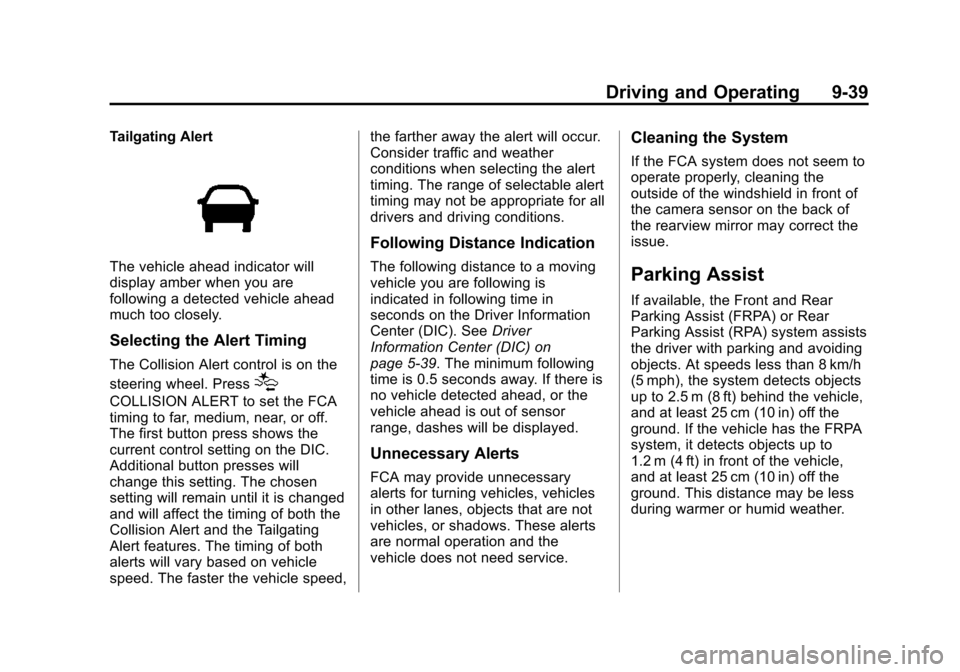
Tailgating Alert
The vehicle ahead indicator will
display amber when you are
following a detected vehicle ahead
much too closely.
Selecting the Alert Timing
The Collision Alert control is on the
steering wheel. Press
[
COLLISION ALERT to set the FCA
timing to far, medium, near, or off.
The first button press shows the
current control setting on the DIC.
Additional button presses will
change this setting. The chosen
setting will remain until it is changed
and will affect the timing of both the
Collision Alert and the Tailgating
Alert features. The timing of both
alerts will vary based on vehicle
speed. The faster the vehicle speed,the farther away the alert will occur.
Consider traffic and weather
conditions when selecting the alert
timing. The range of selectable alert
timing may not be appropriate for all
drivers and driving conditions.
Following Distance Indication
The following distance to a moving
vehicle you are following is
indicated in following time in
seconds on the Driver Information
Center (DIC). See
Driver
Information Center (DIC) on
page 5-39. The minimum following
time is 0.5 seconds away. If there is
no vehicle detected ahead, or the
vehicle ahead is out of sensor
range, dashes will be displayed.
Unnecessary Alerts
FCA may provide unnecessary
alerts for turning vehicles, vehicles
in other lanes, objects that are not
vehicles, or shadows. These alerts
are normal operation and the
vehicle does not need service.
Cleaning the System
If the FCA system does not seem to
operate properly, cleaning the
outside of the windshield in front of
the camera sensor on the back of
the rearview mirror may correct the
issue.
Parking Assist
If available, the Front and Rear
Parking Assist (FRPA) or Rear
Parking Assist (RPA) system assists
the driver with parking and avoiding
objects. At speeds less than 8 km/h
(5 mph), the system detects objects
up to 2.5 m (8 ft) behind the vehicle,
and at least 25 cm (10 in) off the
ground. If the vehicle has the FRPA
system, it detects objects up to
1.2 m (4 ft) in front of the vehicle,
and at least 25 cm (10 in) off the
ground. This distance may be less
during warmer or humid weather.
Page 225 of 387
Black plate (40,1)Chevrolet VOLT Owner Manual (GMNA-Localizing-U.S./Canada-7695131) -
2015 - crc - 4/25/14
9-40 Driving and Operating
{Warning
The parking assist system does
not detect children, pedestrians,
bicyclists, animals, or objects
located below the bumper or that
are too close or too far from the
vehicle. It is not available at
speeds greater than 8 km/h
(5 mph). To prevent injury, death,
or vehicle damage, even with
parking assist, always check the
area around the vehicle and
check all mirrors before moving
forward or backing.
How the System Works
When the vehicle is shifted into
R (Reverse) the park assist sensors
are automatically turned on. After
the vehicle is shifted out of
R (Reverse), the Rear Parking
Assist is turned off and the Front
Parking Assist (if equipped) stays
on until the vehicle is above a
speed of 8 km/h (5 mph). For FrontParking Assist to be active again
without shifting into R (Reverse), the
park assist button in the overhead
console must be pressed. See
“Turning the System On and Off”
later in this section.
When the vehicle is in N (Neutral),
the system may be active. The
Parking Assist system may need to
be turned off during a car wash to
avoid repeating alerts. See
“Turning
the System On and Off” later in this
section to turn the system off.
For vehicles with FRPA, high-toned
beeps from the front speakers are
for objects detected near the front
bumper. Low-toned beeps from the
rear speakers are for objects
detected near the rear bumper. The
interval between the beeps
becomes shorter as the vehicle gets
closer to the obstacle. When the
distance is less than 30 cm (12 in)
the beeping is a continuous tone for
five seconds. Objects Detected by Both the
Front and Rear Sensors (If
Equipped)
In general, if objects are detected at
the same time near both the front
and rear bumpers while backing up,
the beeps only sound to indicate
that objects are close to the rear
bumper.
However, if an object comes within
0.3 m (1 ft) of the front bumper while
the vehicle is backing up and at the
same time there is another object
further than 0.3 m (1 ft) from the rear
bumper, then the beeps only sound
to indicate the object that is closer
to the front bumper.Turning the System On and Off
The system can be turned on and
off by pressing the park assist
button in the overhead console.
Page 226 of 387
Black plate (41,1)Chevrolet VOLT Owner Manual (GMNA-Localizing-U.S./Canada-7695131) -
2015 - crc - 4/25/14
Driving and Operating 9-41
The indicator light next to the park
assist button lights up when the
system is active.
When the system is turned off or
when there is a temporary condition
causing the system to be disabled,
PARK ASSIST OFF displays on the
Driver Information Center (DIC). The
message disappears after a short
period of time.
The system defaults to the on
setting each time the vehicle is
started.
When the System Does Not
Seem to Work Properly
The following messages may be
displayed on the DIC:
SERVICE PARKING ASSIST:If
this message occurs, check the
following conditions:
.The sensors are not clean. Keep
the vehicle's bumpers free of
mud, dirt, snow, ice, and slush.
For cleaning instructions, see
Exterior Care on page 10-79.
.The park assist sensors are
covered by frost or ice. Frost or
ice can form around and behind
the sensors and may not always
be seen; this can occur after
washing the vehicle in cold
weather. The message may not
clear until the frost or ice has
melted.
If the above conditions do not exist,
take the vehicle to your dealer to
repair the system. PARK ASSIST OFF:
If the system
does not activate due to a
temporary condition, the message
displays on the DIC. This can occur
under the following conditions:
.The driver has disabled the
system.
.An object was hanging out of the
hatch during the last drive cycle.
Once the object is removed, the
system will return to normal
operation.
.An object or cover is attached to
the front of the vehicle.
.The bumper is damaged. Take
the vehicle to your dealer to
repair the system.
.Other conditions, such as
vibrations from a jackhammer or
the compression of air brakes on
a very large truck, are affecting
system performance.
Page 227 of 387
Black plate (42,1)Chevrolet VOLT Owner Manual (GMNA-Localizing-U.S./Canada-7695131) -
2015 - crc - 4/25/14
9-42 Driving and Operating
Rear Vision
Camera (RVC)
If equipped, the RVC system can
assist the driver when backing up by
displaying a view of the area behind
the vehicle.
{Warning
The RVC system does not display
children, pedestrians, bicyclists,
crossing traffic, animals, or any
other object located outside the
camera's field of view, below the
bumper, or under the vehicle.
Perceived distances may be
different from actual distances.
Do not back the vehicle using
only the RVC screen. Failure to
use proper care before backing
may result in injury, death,
or vehicle damage. Always check
behind and around the vehicle
before backing.
How the System Works
When the vehicle is shifted into
R (Reverse), the image of the area
behind the vehicle appears in the
infotainment display. The previous
screen displays when the vehicle is
shifted out of R (Reverse) after
approximately 10 seconds.
To see the previous screen sooner,
do one of the following:
.Press a button on the
infotainment system.
.Shift into P (Park).
.Reach a vehicle speed of
8 km/h (5 mph).
Symbols and Guidelines
The vehicle may have a feature that
lets the driver view symbols on the
infotainment screen while using the
RVC. The Front and Rear Parking
Assist (FRPA) or Rear Parking
Assist (RPA) system must not be
disabled to use the caution symbols.
The error message REAR PARKING
ASSIST SYMBOLS UNAVAILABLE may display if parking assist has
been disabled and the symbols
have been turned on. See
Parking
Assist on page 9-39.
The symbols appear and may cover
an object when viewing the
infotainment screen when an object
is detected by the parking assist
system.
The RVC system may also have a
guideline overlay that can help the
driver align the vehicle when
backing into a parking spot.
To turn the symbols or guidelines on
or off:
1. Shift into P (Park).
2. Press the CONFIG button on the center stack.
3. Select Display Settings and then Rear Camera Options.
4. Select Symbols or Guidelines. The feature is on when a check
mark appears next to it.
Page 262 of 387
Black plate (19,1)Chevrolet VOLT Owner Manual (GMNA-Localizing-U.S./Canada-7695131) -
2015 - crc - 4/25/14
Vehicle Care 10-19
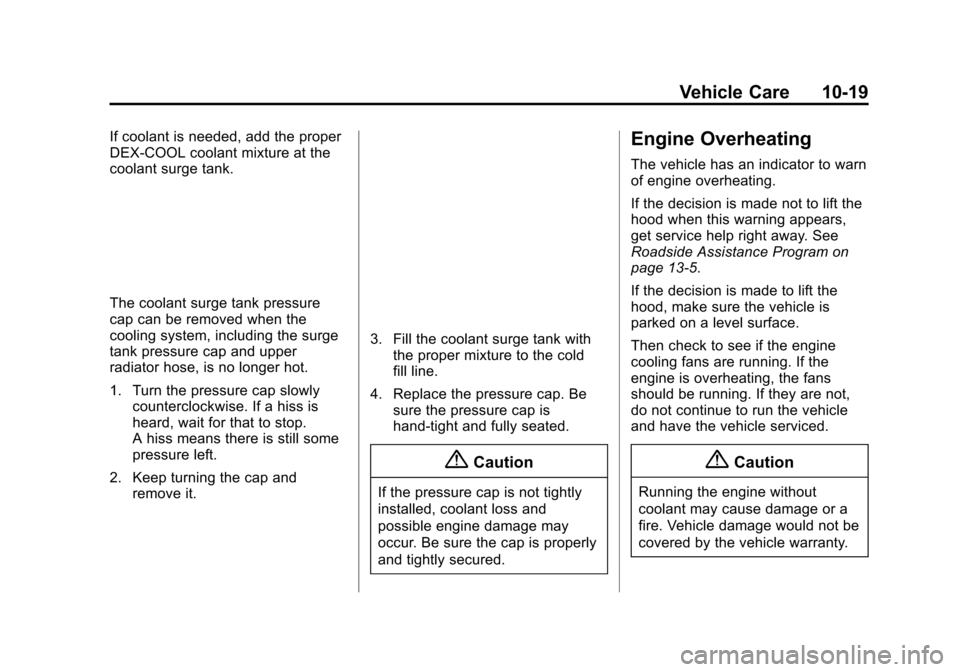
If coolant is needed, add the proper
DEX-COOL coolant mixture at the
coolant surge tank.
The coolant surge tank pressure
cap can be removed when the
cooling system, including the surge
tank pressure cap and upper
radiator hose, is no longer hot.
1. Turn the pressure cap slowlycounterclockwise. If a hiss is
heard, wait for that to stop.
A hiss means there is still some
pressure left.
2. Keep turning the cap and remove it.
3. Fill the coolant surge tank with
the proper mixture to the cold
fill line.
4. Replace the pressure cap. Be sure the pressure cap is
hand-tight and fully seated.
{Caution
If the pressure cap is not tightly
installed, coolant loss and
possible engine damage may
occur. Be sure the cap is properly
and tightly secured.
Engine Overheating
The vehicle has an indicator to warn
of engine overheating.
If the decision is made not to lift the
hood when this warning appears,
get service help right away. See
Roadside Assistance Program on
page 13-5.
If the decision is made to lift the
hood, make sure the vehicle is
parked on a level surface.
Then check to see if the engine
cooling fans are running. If the
engine is overheating, the fans
should be running. If they are not,
do not continue to run the vehicle
and have the vehicle serviced.
{Caution
Running the engine without
coolant may cause damage or a
fire. Vehicle damage would not be
covered by the vehicle warranty.
Page 282 of 387
Black plate (39,1)Chevrolet VOLT Owner Manual (GMNA-Localizing-U.S./Canada-7695131) -
2015 - crc - 4/25/14
Vehicle Care 10-39
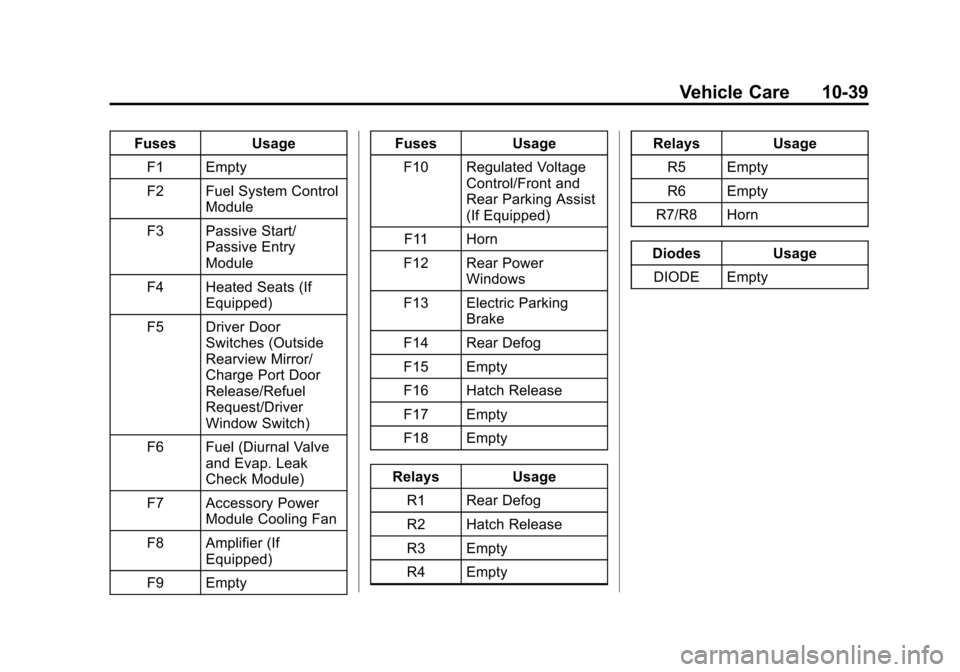
FusesUsage
F1 Empty
F2 Fuel System Control Module
F3 Passive Start/ Passive Entry
Module
F4 Heated Seats (If Equipped)
F5 Driver Door Switches (Outside
Rearview Mirror/
Charge Port Door
Release/Refuel
Request/Driver
Window Switch)
F6 Fuel (Diurnal Valve and Evap. Leak
Check Module)
F7 Accessory Power Module Cooling Fan
F8 Amplifier (If Equipped)
F9 Empty Fuses
Usage
F10 Regulated Voltage Control/Front and
Rear Parking Assist
(If Equipped)
F11 Horn
F12 Rear Power Windows
F13 Electric Parking Brake
F14 Rear Defog
F15 Empty
F16 Hatch Release
F17 Empty
F18 Empty
Relays Usage
R1 Rear Defog
R2 Hatch Release
R3 Empty
R4 Empty Relays
Usage
R5 Empty
R6 Empty
R7/R8 Horn
Diodes Usage DIODE Empty