ECU CHEVROLET VOLT 2016 2.G Owner's Guide
[x] Cancel search | Manufacturer: CHEVROLET, Model Year: 2016, Model line: VOLT, Model: CHEVROLET VOLT 2016 2.GPages: 366, PDF Size: 5.4 MB
Page 116 of 366
Chevrolet VOLT Owner Manual (GMNA-Localizing-U.S/Canada/Mexico-
9159388) - 2016 - crc - 5/20/15
Instruments and Controls 115
Caution (Continued)
by the vehicle warranty. Check
the oil level as soon as possible.
Add oil if required, but if the oil
level is within the operating range
and the oil pressure is still low,
have the vehicle serviced. Always
follow the maintenance schedule
for changing engine oil.
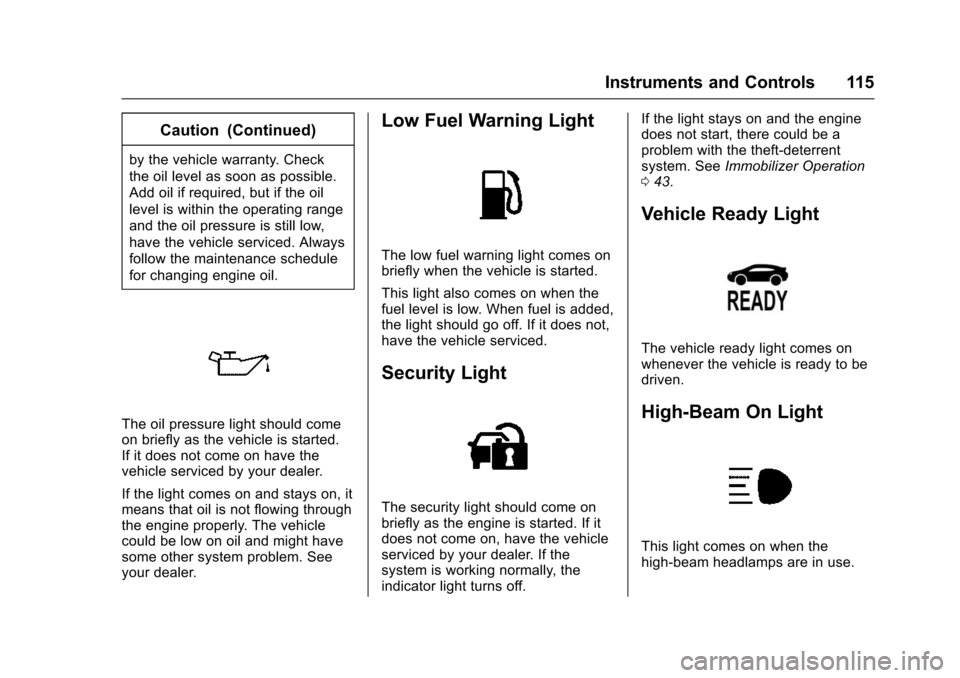
The oil pressure light should come
on briefly as the vehicle is started.
If it does not come on have the
vehicle serviced by your dealer.
If the light comes on and stays on, it
means that oil is not flowing through
the engine properly. The vehicle
could be low on oil and might have
some other system problem. See
your dealer.
Low Fuel Warning Light
The low fuel warning light comes on
briefly when the vehicle is started.
This light also comes on when the
fuel level is low. When fuel is added,
the light should go off. If it does not,
have the vehicle serviced.
Security Light
The security light should come on
briefly as the engine is started. If it
does not come on, have the vehicle
serviced by your dealer. If the
system is working normally, the
indicator light turns off.If the light stays on and the engine
does not start, there could be a
problem with the theft-deterrent
system. See
Immobilizer Operation
0 43.
Vehicle Ready Light
The vehicle ready light comes on
whenever the vehicle is ready to be
driven.
High-Beam On Light
This light comes on when the
high-beam headlamps are in use.
Page 117 of 366
Chevrolet VOLT Owner Manual (GMNA-Localizing-U.S/Canada/Mexico-
9159388) - 2016 - crc - 5/20/15
116 Instruments and Controls
SeeHeadlamp High/Low-Beam
Changer 0147.
IntelliBeam®Light
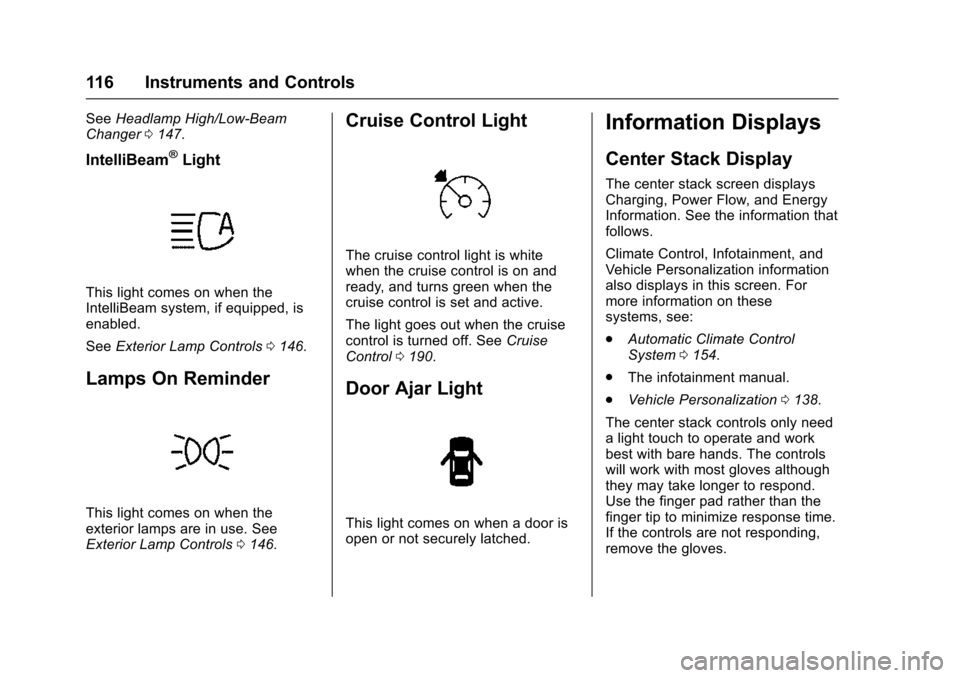
This light comes on when the
IntelliBeam system, if equipped, is
enabled.
See Exterior Lamp Controls 0146.
Lamps On Reminder
This light comes on when the
exterior lamps are in use. See
Exterior Lamp Controls 0146.
Cruise Control Light
The cruise control light is white
when the cruise control is on and
ready, and turns green when the
cruise control is set and active.
The light goes out when the cruise
control is turned off. See Cruise
Control 0190.
Door Ajar Light
This light comes on when a door is
open or not securely latched.
Information Displays
Center Stack Display
The center stack screen displays
Charging, Power Flow, and Energy
Information. See the information that
follows.
Climate Control, Infotainment, and
Vehicle Personalization information
also displays in this screen. For
more information on these
systems, see:
.
Automatic Climate Control
System 0154.
. The infotainment manual.
. Vehicle Personalization 0138.
The center stack controls only need
a light touch to operate and work
best with bare hands. The controls
will work with most gloves although
they may take longer to respond.
Use the finger pad rather than the
finger tip to minimize response time.
If the controls are not responding,
remove the gloves.
Page 124 of 366
Chevrolet VOLT Owner Manual (GMNA-Localizing-U.S/Canada/Mexico-
9159388) - 2016 - crc - 5/20/15
Instruments and Controls 123
Summer/Winter Schedule Start
Date Entering
To toggle between a yearly
schedule or a summer/winter
schedule, touch Rate
Schedule Type.
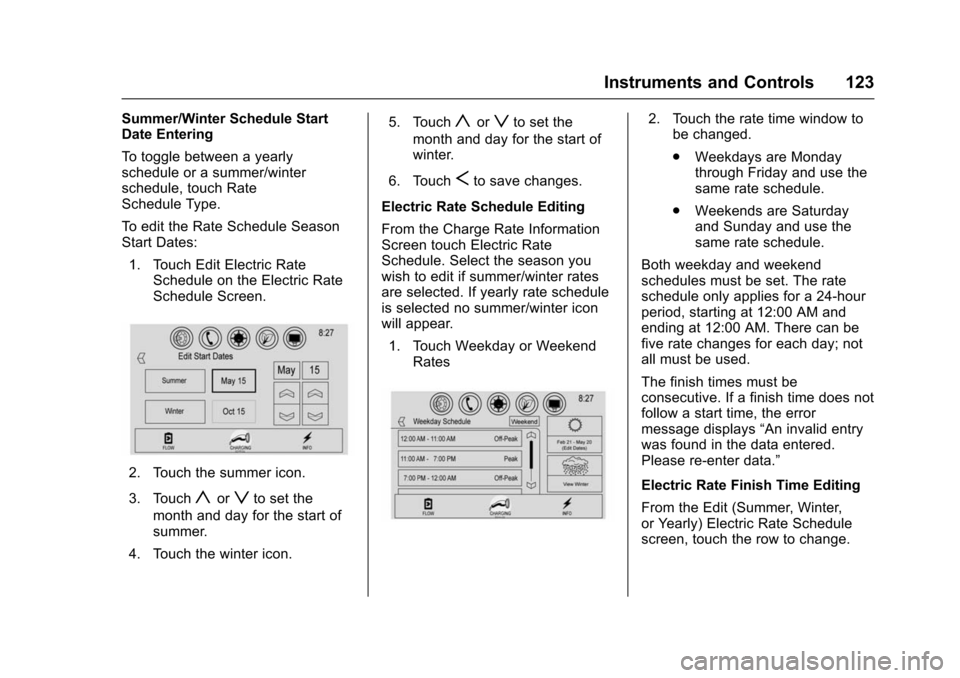
To edit the Rate Schedule Season
Start Dates:1. Touch Edit Electric Rate Schedule on the Electric Rate
Schedule Screen.
2. Touch the summer icon.
3. Touch
yorzto set the
month and day for the start of
summer.
4. Touch the winter icon. 5. Touch
yorzto set the
month and day for the start of
winter.
6. Touch
Sto save changes.
Electric Rate Schedule Editing
From the Charge Rate Information
Screen touch Electric Rate
Schedule. Select the season you
wish to edit if summer/winter rates
are selected. If yearly rate schedule
is selected no summer/winter icon
will appear. 1. Touch Weekday or Weekend Rates
2. Touch the rate time window tobe changed.
.Weekdays are Monday
through Friday and use the
same rate schedule.
. Weekends are Saturday
and Sunday and use the
same rate schedule.
Both weekday and weekend
schedules must be set. The rate
schedule only applies for a 24-hour
period, starting at 12:00 AM and
ending at 12:00 AM. There can be
five rate changes for each day; not
all must be used.
The finish times must be
consecutive. If a finish time does not
follow a start time, the error
message displays “An invalid entry
was found in the data entered.
Please re-enter data.”
Electric Rate Finish Time Editing
From the Edit (Summer, Winter,
or Yearly) Electric Rate Schedule
screen, touch the row to change.
Page 137 of 366
Chevrolet VOLT Owner Manual (GMNA-Localizing-U.S/Canada/Mexico-
9159388) - 2016 - crc - 5/20/15
136 Instruments and Controls
battery. Only if both the
PROPULSION POWER IS
REDUCED message and the
malfunction indicator lamp are on
should the vehicle be taken to the
dealer for service.
While climbing the grade with this
message displayed, the vehicle
speed may be reduced until the
engine can recover the battery state
of charge to a normal level. See
“Mountain Mode”underDriver
Selected Operating Modes 0177.
Ride Control System
Messages
SERVICE STABILITRAK
This message displays when there
is a problem detected with the
StabiliTrak system. The vehicle is
safe to drive, but the StabiliTrak
system is not operational. See
Traction Control/Electronic Stability
Control 0188 for information on
resetting the system.
SERVICE TRACTION
CONTROL
This message displays when there
is a problem detected with the
Traction Control System (TCS). The
vehicle is safe to drive, but the TCS
is not operational. See Traction
Control/Electronic Stability Control
0 188 for information on resetting
the system.
STABILITRAK OFF
This message displays when
StabiliTrak is turned off. Adjust your
driving accordingly.
TRACTION CONTROL OFF
This message displays when the
Traction Control System (TCS) is
turned off. Adjust your driving
accordingly.
TRACTION CONTROL ON
This message displays when the
Traction Control System (TCS) is
turned on.
Airbag System Messages
SERVICE AIRBAG
This message displays if there is a
problem with the airbag system. See
your dealer for service.
Security Messages
SERVICE THEFT ALARM
This message displays if there is a
problem with the alarm. See your
dealer for service.
SERVICE THEFT DETERRENT
SYSTEM
This message displays if there is a
problem with the theft-deterrent
system. See your dealer for service.
Service Vehicle Messages
ENGINE MAINTENANCE XXX%
COMPLETE
This message displays when the
Engine Maintenance Mode is
running. See “Engine Maintenance
Mode (EMM)” underMaintenance
Modes 0180.
Page 172 of 366
Chevrolet VOLT Owner Manual (GMNA-Localizing-U.S/Canada/Mexico-
9159388) - 2016 - crc - 5/20/15
Driving and Operating 171
weight of the driver, passengers,
and cargo should never exceed
the vehicle's capacity weight.
Certification Label
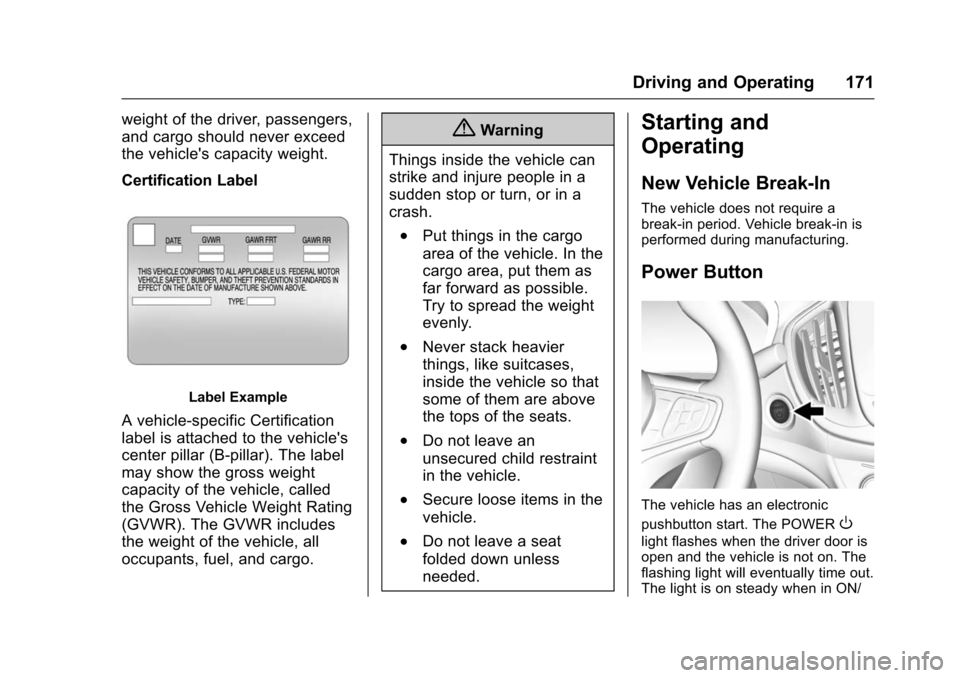
Label Example
A vehicle-specific Certification
label is attached to the vehicle's
center pillar (B-pillar). The label
may show the gross weight
capacity of the vehicle, called
the Gross Vehicle Weight Rating
(GVWR). The GVWR includes
the weight of the vehicle, all
occupants, fuel, and cargo.
{Warning
Things inside the vehicle can
strike and injure people in a
sudden stop or turn, or in a
crash.
.Put things in the cargo
area of the vehicle. In the
cargo area, put them as
far forward as possible.
Try to spread the weight
evenly.
.Never stack heavier
things, like suitcases,
inside the vehicle so that
some of them are above
the tops of the seats.
.Do not leave an
unsecured child restraint
in the vehicle.
.Secure loose items in the
vehicle.
.Do not leave a seat
folded down unless
needed.
Starting and
Operating
New Vehicle Break-In
The vehicle does not require a
break-in period. Vehicle break-in is
performed during manufacturing.
Power Button
The vehicle has an electronic
pushbutton start. The POWER
O
light flashes when the driver door is
open and the vehicle is not on. The
flashing light will eventually time out.
The light is on steady when in ON/
Page 218 of 366
Chevrolet VOLT Owner Manual (GMNA-Localizing-U.S/Canada/Mexico-
9159388) - 2016 - crc - 5/20/15
Driving and Operating 217
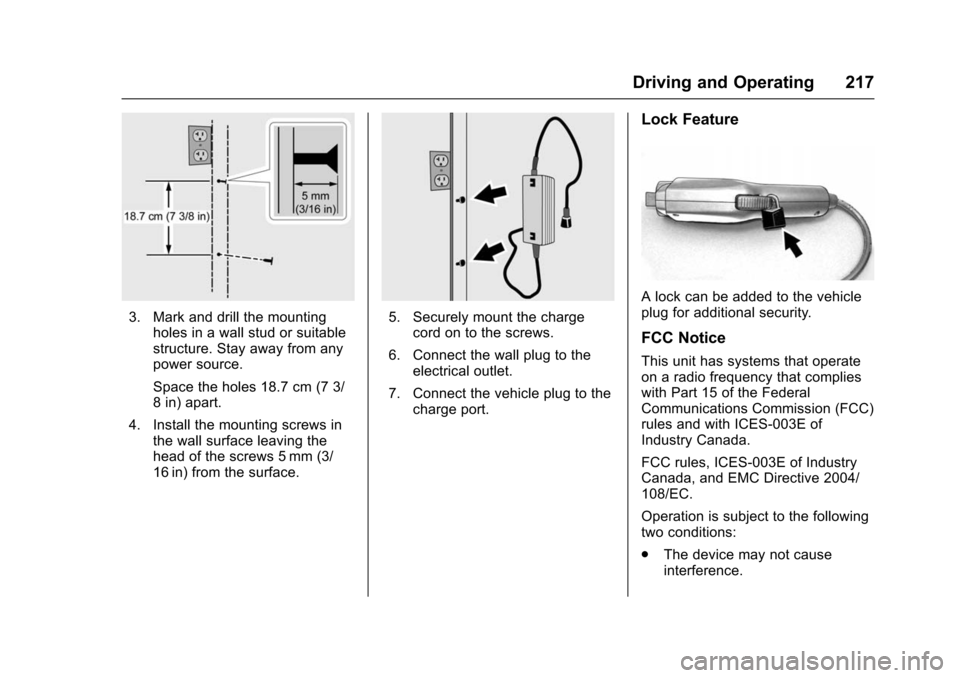
3. Mark and drill the mountingholes in a wall stud or suitable
structure. Stay away from any
power source.
Space the holes 18.7 cm (7 3/
8 in) apart.
4. Install the mounting screws in the wall surface leaving the
head of the screws 5 mm (3/
16 in) from the surface.5. Securely mount the chargecord on to the screws.
6. Connect the wall plug to the electrical outlet.
7. Connect the vehicle plug to the charge port.
Lock Feature
A lock can be added to the vehicle
plug for additional security.
FCC Notice
This unit has systems that operate
on a radio frequency that complies
with Part 15 of the Federal
Communications Commission (FCC)
rules and with ICES-003E of
Industry Canada.
FCC rules, ICES-003E of Industry
Canada, and EMC Directive 2004/
108/EC.
Operation is subject to the following
two conditions:
.The device may not cause
interference.
Page 231 of 366
Chevrolet VOLT Owner Manual (GMNA-Localizing-U.S/Canada/Mexico-
9159388) - 2016 - crc - 5/20/15
230 Vehicle Care
This vehicle has an airbag system.
Before attempting to do your own
service work, seeAirbag System
Check 073.
Keep a record with all parts receipts
and list the mileage and the date of
any service work performed. See
Maintenance Records 0326.
Caution
Even small amounts of
contamination can cause damage
to vehicle systems. Do not allow
contaminants to contact the fluids,
reservoir caps, or dipsticks.
Hood
To open the hood:
1. Turn the vehicle off before opening the hood. If the vehicle
is on, the engine will start when
the hood is opened. See
Electric Mode 0176 and
Extended Range Mode 0176.
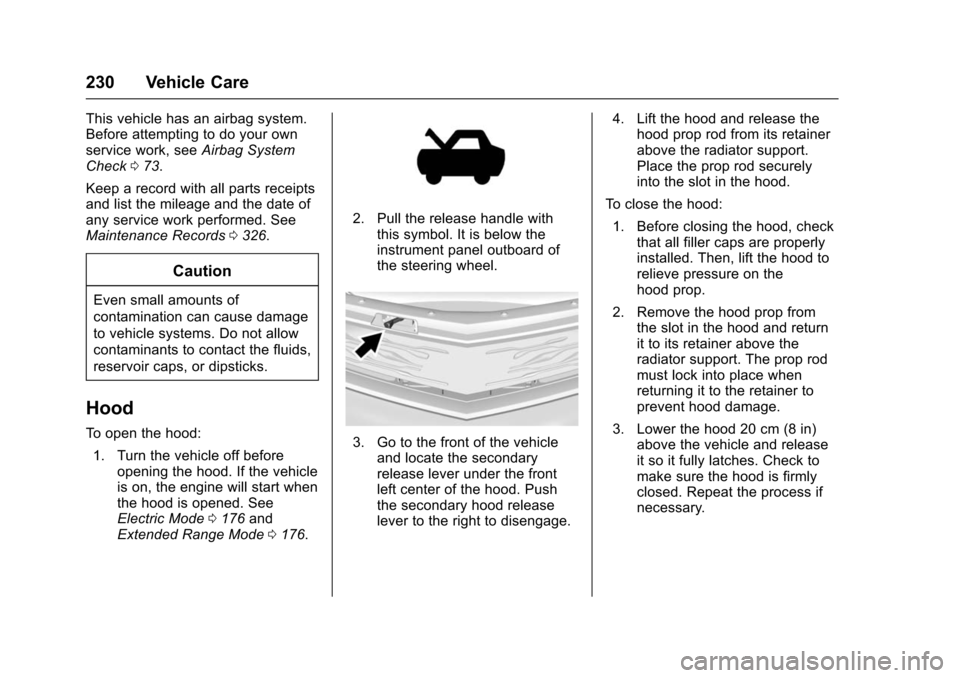
2. Pull the release handle with
this symbol. It is below the
instrument panel outboard of
the steering wheel.
3. Go to the front of the vehicleand locate the secondary
release lever under the front
left center of the hood. Push
the secondary hood release
lever to the right to disengage. 4. Lift the hood and release the
hood prop rod from its retainer
above the radiator support.
Place the prop rod securely
into the slot in the hood.
To close the hood:
1. Before closing the hood, check that all filler caps are properly
installed. Then, lift the hood to
relieve pressure on the
hood prop.
2. Remove the hood prop from the slot in the hood and return
it to its retainer above the
radiator support. The prop rod
must lock into place when
returning it to the retainer to
prevent hood damage.
3. Lower the hood 20 cm (8 in) above the vehicle and release
it so it fully latches. Check to
make sure the hood is firmly
closed. Repeat the process if
necessary.
Page 237 of 366
Chevrolet VOLT Owner Manual (GMNA-Localizing-U.S/Canada/Mexico-
9159388) - 2016 - crc - 5/20/15
236 Vehicle Care
replace if damaged. Do not clean
the engine air cleaner/filter or
components with water or
compressed air.
To inspect or replace the air filter:1. Open the hood. See Hood
0 230.
2. Locate the engine air cleaner/ filter assembly on the
passenger side of the engine
compartment. See Engine
Compartment Overview 0231.
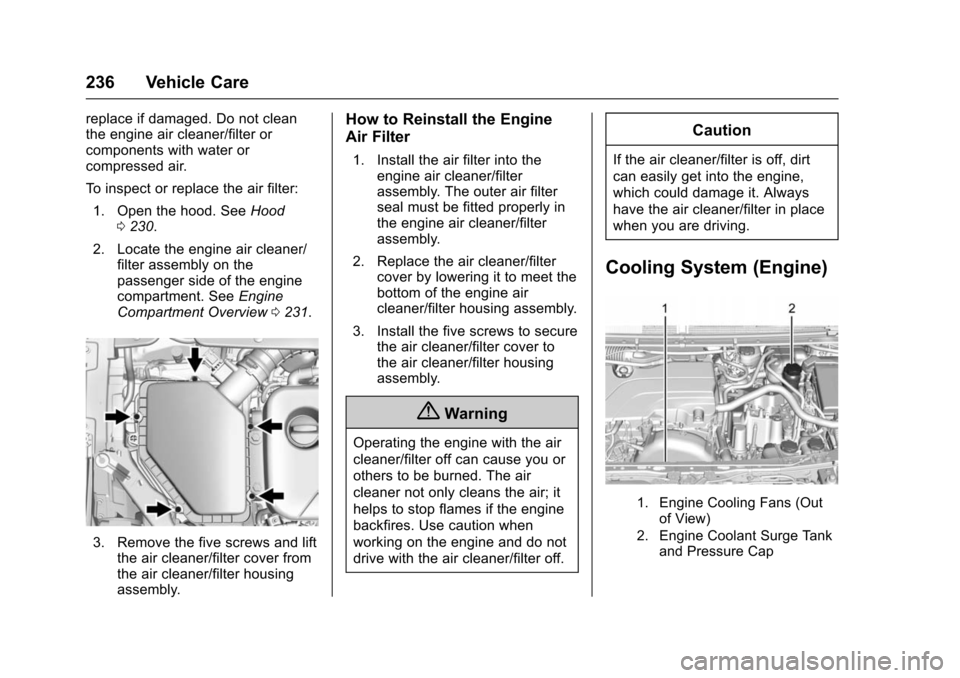
3. Remove the five screws and lift
the air cleaner/filter cover from
the air cleaner/filter housing
assembly.
How to Reinstall the Engine
Air Filter
1. Install the air filter into theengine air cleaner/filter
assembly. The outer air filter
seal must be fitted properly in
the engine air cleaner/filter
assembly.
2. Replace the air cleaner/filter cover by lowering it to meet the
bottom of the engine air
cleaner/filter housing assembly.
3. Install the five screws to secure the air cleaner/filter cover to
the air cleaner/filter housing
assembly.
{Warning
Operating the engine with the air
cleaner/filter off can cause you or
others to be burned. The air
cleaner not only cleans the air; it
helps to stop flames if the engine
backfires. Use caution when
working on the engine and do not
drive with the air cleaner/filter off.
Caution
If the air cleaner/filter is off, dirt
can easily get into the engine,
which could damage it. Always
have the air cleaner/filter in place
when you are driving.
Cooling System (Engine)
1. Engine Cooling Fans (Out
of View)
2. Engine Coolant Surge Tank and Pressure Cap
Page 242 of 366
Chevrolet VOLT Owner Manual (GMNA-Localizing-U.S/Canada/Mexico-
9159388) - 2016 - crc - 5/20/15
Vehicle Care 241
Warning (Continued)
cause injury. Keep hands,
clothing, and tools away from any
underhood electric fan.
{Warning
Steam and scalding liquids from a
hot cooling system can blow out
and burn you badly. They are
under pressure, and if you turn
the surge tank pressure
cap—even a little —they can
come out at high speed. Never
turn the cap when the cooling
system, including the surge tank
pressure cap, is hot. Wait for the
cooling system and surge tank
pressure cap to cool if you ever
have to turn the pressure cap.
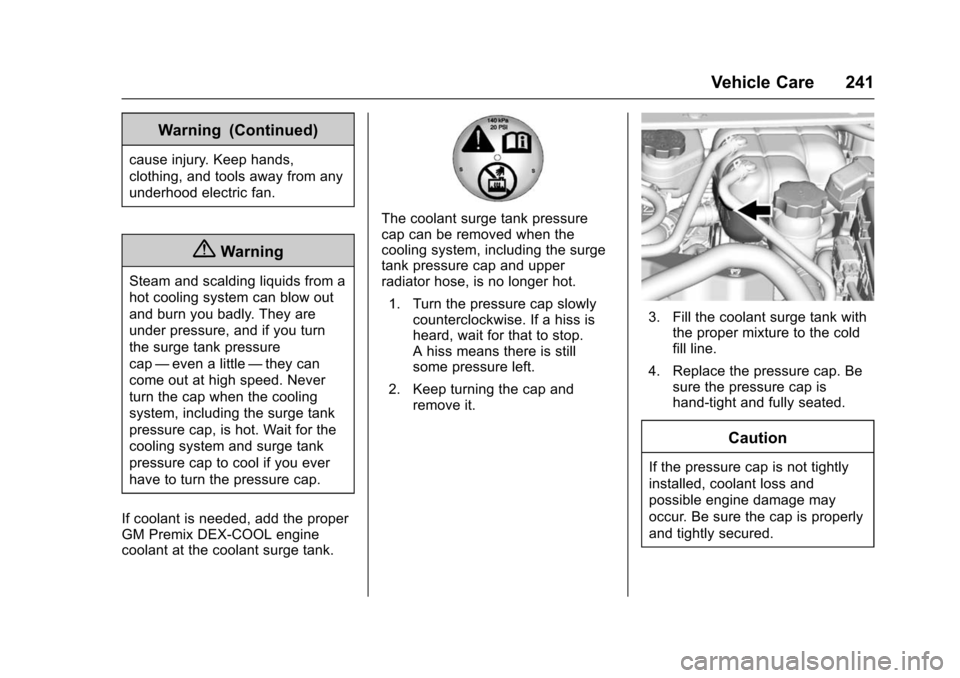
If coolant is needed, add the proper
GM Premix DEX-COOL engine
coolant at the coolant surge tank.
The coolant surge tank pressure
cap can be removed when the
cooling system, including the surge
tank pressure cap and upper
radiator hose, is no longer hot. 1. Turn the pressure cap slowly counterclockwise. If a hiss is
heard, wait for that to stop.
A hiss means there is still
some pressure left.
2. Keep turning the cap and remove it.
3. Fill the coolant surge tank withthe proper mixture to the cold
fill line.
4. Replace the pressure cap. Be sure the pressure cap is
hand-tight and fully seated.
Caution
If the pressure cap is not tightly
installed, coolant loss and
possible engine damage may
occur. Be sure the cap is properly
and tightly secured.
Page 251 of 366
Chevrolet VOLT Owner Manual (GMNA-Localizing-U.S/Canada/Mexico-
9159388) - 2016 - crc - 5/20/15
250 Vehicle Care
5. Install the new bulb in thesocket.
6. Install the bulb socket by turning it clockwise.
7. Install the cover in the back of the headlamp assembly by
turning it clockwise.
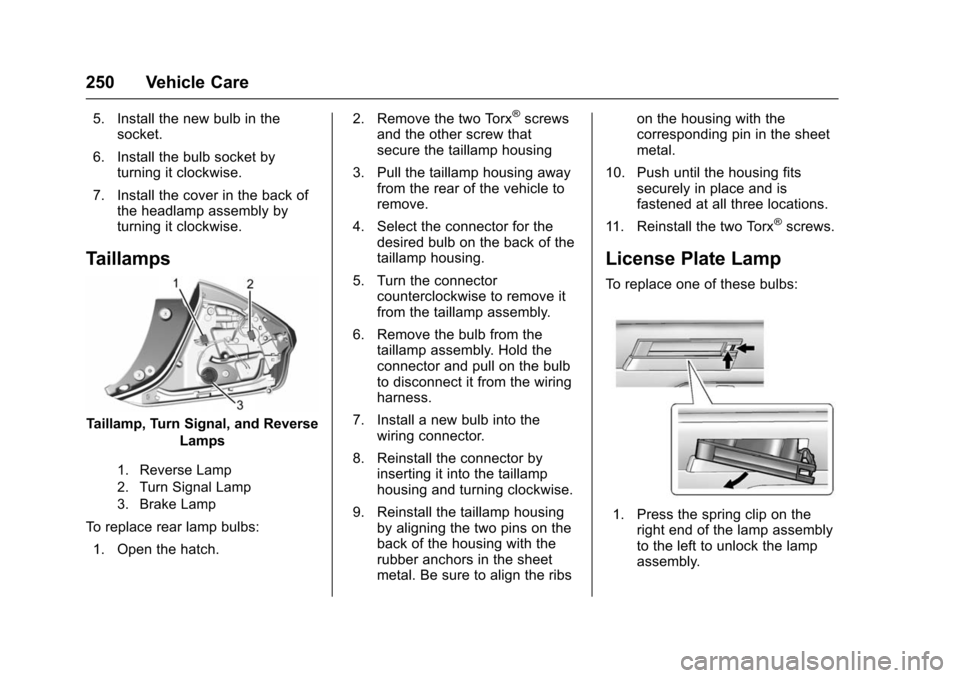
Taillamps
Taillamp, Turn Signal, and Reverse
Lamps
1. Reverse Lamp
2. Turn Signal Lamp
3. Brake Lamp
To replace rear lamp bulbs:
1. Open the hatch. 2. Remove the two Torx
®screws
and the other screw that
secure the taillamp housing
3. Pull the taillamp housing away from the rear of the vehicle to
remove.
4. Select the connector for the desired bulb on the back of the
taillamp housing.
5. Turn the connector counterclockwise to remove it
from the taillamp assembly.
6. Remove the bulb from the taillamp assembly. Hold the
connector and pull on the bulb
to disconnect it from the wiring
harness.
7. Install a new bulb into the wiring connector.
8. Reinstall the connector by inserting it into the taillamp
housing and turning clockwise.
9. Reinstall the taillamp housing by aligning the two pins on the
back of the housing with the
rubber anchors in the sheet
metal. Be sure to align the ribs on the housing with the
corresponding pin in the sheet
metal.
10. Push until the housing fits securely in place and is
fastened at all three locations.
11. Reinstall the two Torx
®screws.
License Plate Lamp
To replace one of these bulbs:
1. Press the spring clip on the right end of the lamp assembly
to the left to unlock the lamp
assembly.