seats CHEVROLET VOLT 2016 2.G Workshop Manual
[x] Cancel search | Manufacturer: CHEVROLET, Model Year: 2016, Model line: VOLT, Model: CHEVROLET VOLT 2016 2.GPages: 366, PDF Size: 5.4 MB
Page 141 of 366
Chevrolet VOLT Owner Manual (GMNA-Localizing-U.S/Canada/Mexico-
9159388) - 2016 - crc - 5/20/15
140 Instruments and Controls
Audio Cue Volume
This feature sets the volume of
audio files played at system startup
and shutdown.
Select On, then select + or−to
increase or decrease the volume.
Vehicle
Select and the following may
display:
. Climate and Air Quality
. Collision/Detection Systems
. Comfort and Convenience
. Energy
. Lighting
. Power Door Locks
. Remote Lock, Unlock, Start
Climate and Air Quality
Select and the following may
display:
. Auto Fan Speed
. Auto Heated Seats
. Auto Defog
. Engine Assist Heat .
Engine Assist Heat Plugged In
Auto Fan Speed
This feature will set the maximum
auto fan speed.
Select Low, Medium, or High.
Auto Heated Seats
When enabled, the AUTO heated
seat buttons on the touch screen
will be highlighted. This feature will
automatically activate heated seats
at the level required by the interior
temperature. The auto heated seats
can be turned off by using the
heated seat buttons on the center
stack.
Select Off or On.
Auto Defog
When set to On, the front defog will
automatically come on when the
vehicle is started.
Select Off or On.
Engine Assist Heat
If equipped, this feature selects the
outside temperature level at which
the engine may run to assist heating in Electric Mode. A change in
selection will not take effect until
after the vehicle is first
powered down.
Select On for temperatures below
approximately 2 °C (35 °F), or select
Deferred for temperatures below
approximately
−10 °C (15 °F).
Engine Assist Heat Plugged In
During remote start, this feature
turns on or off the ability for the
engine to run to help heat the
vehicle when it is plugged in.
A change in setting will not take
effect until after the vehicle is first
powered down.
Select Off or On.
Collision/Detection Systems
Select and the following may
display:
. Auto Collision Preparation
. Rear Cross Traffic Alert
. Lane Change Alert
Page 143 of 366

Chevrolet VOLT Owner Manual (GMNA-Localizing-U.S/Canada/Mexico-
9159388) - 2016 - crc - 5/20/15
142 Instruments and Controls
Lighting
Select and the following may
display:
.Vehicle Locator Lights
. Exit Lighting
Vehicle Locator Lights
This feature will flash the exterior
lamps and allows some of the
exterior lamps and most of the
interior lamps to turn on briefly when
Kon the Remote Keyless Entry
(RKE) transmitter is pressed to
locate the vehicle.
Select Off or On.
Exit Lighting
This allows the selection of how
long the exterior lamps stay on
when leaving the vehicle when it is
dark outside.
Select Off, 30 Seconds, 60
Seconds, or 120 Seconds.
Power Door Locks
Select and the following may
display:
. Unlocked Door Anti-Lockout .
Auto Door Unlock
. Delayed Door Lock
Unlocked Door Anti-Lockout
When on, this feature will keep the
driver door from locking when the
door is open. If Off is selected, the
Delayed Door Lock menu will be
available.
Select Off or On.
Auto Door Unlock
This allows selection of which of the
doors will automatically unlock when
the vehicle is shifted into P (Park).
Select Off, All Doors, or Driver Door.
Delayed Door Lock
When on, this feature will delay the
locking of the doors. To override the
delay, press the power door lock
switch on the door.
Select Off or On.
Remote Lock, Unlock, Start
Select and the following may
display:
. Remote Unlock Light Feedback .
Remote Lock Feedback
. Remote Door Unlock
. Remote Start Auto Heat Seats
. Remote Window Operation
. Passive Door Unlock
. Passive Door Lock
. Remote Left in Vehicle Alert
Remote Unlock Light Feedback
When on, the exterior lamps will
flash when unlocking the vehicle
with the RKE transmitter.
Select Off or Flash Lights.
Remote Lock Feedback
This allows selection of what type of
feedback is given when locking the
vehicle with the RKE transmitter.
Select Off, Lights and Horn, Lights
Only, or Horn Only.
Remote Door Unlock
This allows selection of which doors
will unlock when pressing
Kon the
RKE transmitter.
Select All Doors or Driver Door.
Page 144 of 366
Chevrolet VOLT Owner Manual (GMNA-Localizing-U.S/Canada/Mexico-
9159388) - 2016 - crc - 5/20/15
Instruments and Controls 143
Remote Start Auto Heat Seats
If equipped and turned on, this
feature will turn the heated seats on
when using remote start on
cold days.
Select Off or On.
Remote Window Operation
This allows the window to be
opened when pressing and holding
Kon the RKE transmitter. See
Remote Keyless Entry (RKE)
System Operation 029.
Select Off or On.
Passive Door Unlock
This allows the selection of what
doors will unlock when using the
door handle touch pad button on the
driver door to unlock the vehicle.
Select All Doors or Driver Door.
Passive Door Lock
This allows passive locking to be
turned on or off and selects
feedback. See “Passive Locking” in
Remote Keyless Entry (RKE)
System Operation 029. Select Off, On with Horn
Chirp, or On.
Remote Left in Vehicle Alert
This feature sounds an alert when
the RKE transmitter is left in the
vehicle.
Select Off or On.
Bluetooth
Select and the following may
display:
.
Pair New Device
. Device Management
. Ringtones
. Voice Mail Numbers
. Text Message
Pair New Device
Select to pair a new device. See
“Pairing” in“Infotainment Controls”
under “Bluetooth” in the infotainment
manual.
Device Management
Select to connect to a different
phone source, disconnect a phone,
or delete a phone. Ringtones
Select to change the ring tone for
the specific phone. The phone does
not need to be connected to change
the ring tone.
Voice Mail Numbers
This feature displays the voice mail
number for all connected phones.
To change the voice mail number,
select EDIT and type in a new
number, then select SAVE.
Text Message
This feature allows text messages
to be received. See
“Text
Messaging” under“Phone” in the
infotainment manual.
Select Off or On.
Voice
Select and the following may
display:
. Confidence Threshold
. Prompt Length
. Audio Feedback Speed
Page 156 of 366
Chevrolet VOLT Owner Manual (GMNA-Localizing-U.S/Canada/Mexico-
9159388) - 2016 - crc - 5/20/15
Climate Controls 155
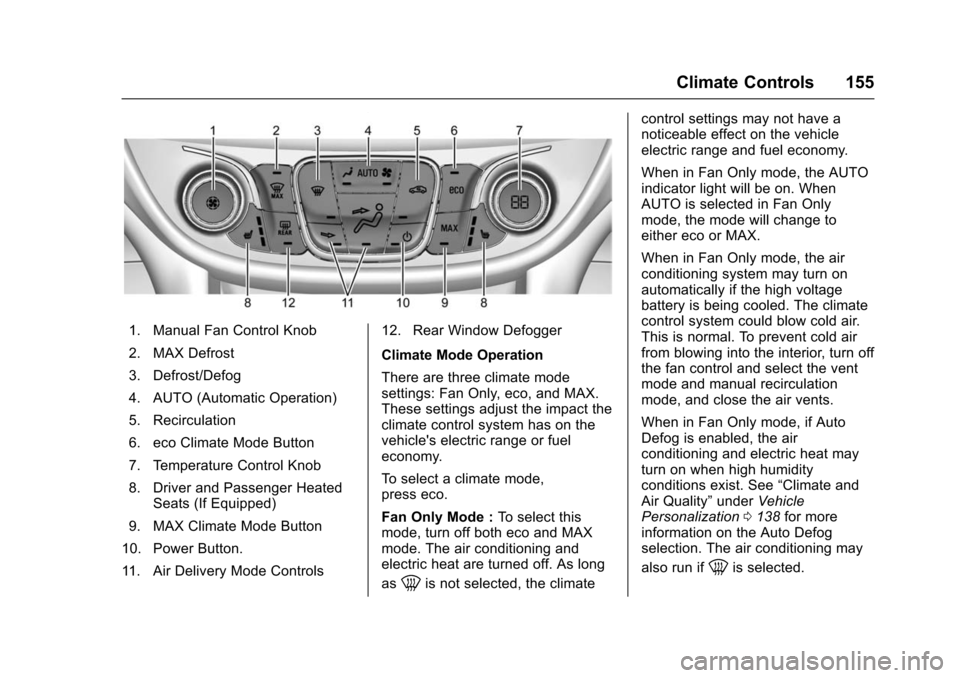
1. Manual Fan Control Knob
2. MAX Defrost
3. Defrost/Defog
4. AUTO (Automatic Operation)
5. Recirculation
6. eco Climate Mode Button
7. Temperature Control Knob
8. Driver and Passenger HeatedSeats (If Equipped)
9. MAX Climate Mode Button
10. Power Button.
11. Air Delivery Mode Controls 12. Rear Window Defogger
Climate Mode Operation
There are three climate mode
settings: Fan Only, eco, and MAX.
These settings adjust the impact the
climate control system has on the
vehicle's electric range or fuel
economy.
To select a climate mode,
press eco.
Fan Only Mode :
To select this
mode, turn off both eco and MAX
mode. The air conditioning and
electric heat are turned off. As long
as
0is not selected, the climate control settings may not have a
noticeable effect on the vehicle
electric range and fuel economy.
When in Fan Only mode, the AUTO
indicator light will be on. When
AUTO is selected in Fan Only
mode, the mode will change to
either eco or MAX.
When in Fan Only mode, the air
conditioning system may turn on
automatically if the high voltage
battery is being cooled. The climate
control system could blow cold air.
This is normal. To prevent cold air
from blowing into the interior, turn off
the fan control and select the vent
mode and manual recirculation
mode, and close the air vents.
When in Fan Only mode, if Auto
Defog is enabled, the air
conditioning and electric heat may
turn on when high humidity
conditions exist. See
“Climate and
Air Quality” underVehicle
Personalization 0138 for more
information on the Auto Defog
selection. The air conditioning may
also run if
0is selected.
Page 158 of 366
Chevrolet VOLT Owner Manual (GMNA-Localizing-U.S/Canada/Mexico-
9159388) - 2016 - crc - 5/20/15
Climate Controls 157
To change the current mode, select
one or more of the following:
0:Clears the windows of fog or
moisture. Air is directed to the
windshield.
d: Air is directed to the instrument
panel outlets.
c: Air is directed to the floor
outlets.
0MAX : Air is directed to the
windshield and the fan runs at a
higher speed. Fog or frost is cleared
from the windshield more quickly.
When the button is pressed again,
the system returns to the previous
mode setting.
For best results, clear all snow and
ice from the windshield before
defrosting.
If
0is selected in eco or MAX
mode, air conditioning or electric
heat may turn on and have a
noticeable effect on vehicle electric
range and fuel economy.
@: Press to turn on recirculation.
An indicator light comes on. Air is
recirculated to quickly cool the inside of the vehicle or to reduce the
entry of outside air and odors. The
recirculation mode is not available in
Defrost or Defog modes.
Pressing this button cancels
automatic recirculation. Press AUTO
to return to automatic operation;
recirculation runs automatically as
needed.
Auto Defog :
The system will
monitor high humidity inside the
vehicle. When high humidity is
detected, the climate control system
may adjust to outside air supply and
turn on the air conditioner or the
heater. The fan speed may slightly
increase to help prevent fogging.
When high humidity is no longer
detected, the system will return to
its prior operation. To turn Auto
Defog off or on, see “Climate and
Air Quality” underVehicle
Personalization 0138.
LorM:If equipped, pressLorMto heat the driver or passenger seat
cushion and seatback. See Heated
Front Seats 053. Auto Heated Seats :
If equipped.
press AUTO to access this feature.
When the vehicle is on, this feature
will automatically activate the
heated seats at the level required by
the vehicle's interior temperature.
The active high, medium, low, or off
heated seat level will be indicated
by the manual heated seat button
lights on the center stack. Press
L
orMon the center stack to turn
auto heated seats off. See Heated
Front Seats 053 and Vehicle
Personalization 0138.
Rear Window Defogger
K:Press to turn the rear window
defogger on or off. An indicator light
on the button comes on to show that
the rear window defogger is on.
The defogger only works when the
vehicle is in ON/RUN. The defogger
will turn off if the vehicle is
turned off.
If equipped with heated outside
rearview mirrors, they turn on when
the rear window defogger button is
Page 160 of 366
Chevrolet VOLT Owner Manual (GMNA-Localizing-U.S/Canada/Mexico-
9159388) - 2016 - crc - 5/20/15
Climate Controls 159
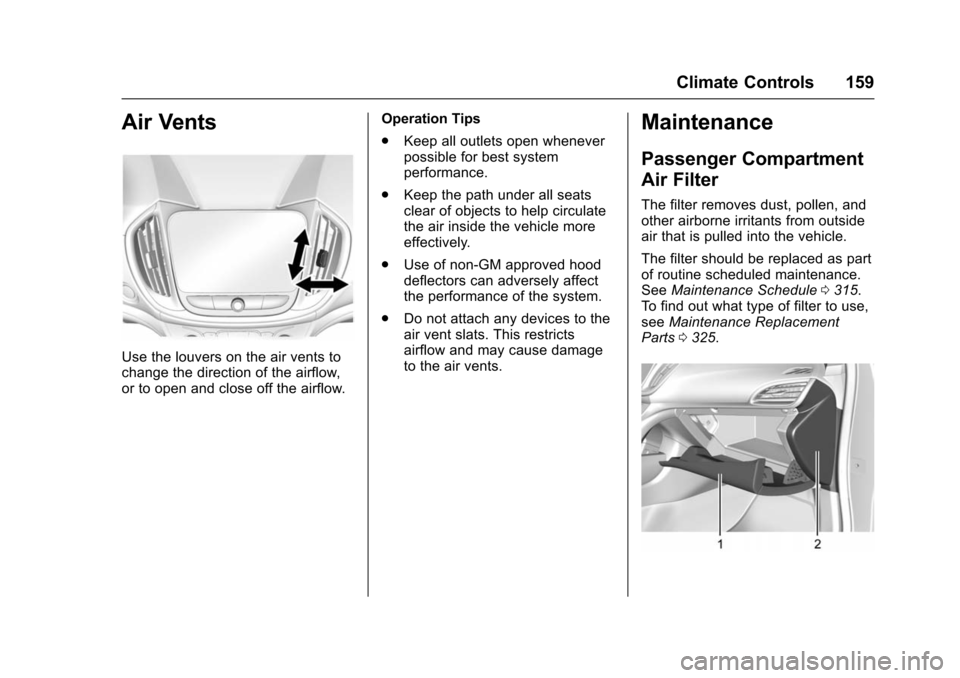
Air Vents
Use the louvers on the air vents to
change the direction of the airflow,
or to open and close off the airflow.Operation Tips
.
Keep all outlets open whenever
possible for best system
performance.
. Keep the path under all seats
clear of objects to help circulate
the air inside the vehicle more
effectively.
. Use of non-GM approved hood
deflectors can adversely affect
the performance of the system.
. Do not attach any devices to the
air vent slats. This restricts
airflow and may cause damage
to the air vents.
Maintenance
Passenger Compartment
Air Filter
The filter removes dust, pollen, and
other airborne irritants from outside
air that is pulled into the vehicle.
The filter should be replaced as part
of routine scheduled maintenance.
See Maintenance Schedule 0315.
To find out what type of filter to use,
see Maintenance Replacement
Parts 0325.
Page 172 of 366
Chevrolet VOLT Owner Manual (GMNA-Localizing-U.S/Canada/Mexico-
9159388) - 2016 - crc - 5/20/15
Driving and Operating 171
weight of the driver, passengers,
and cargo should never exceed
the vehicle's capacity weight.
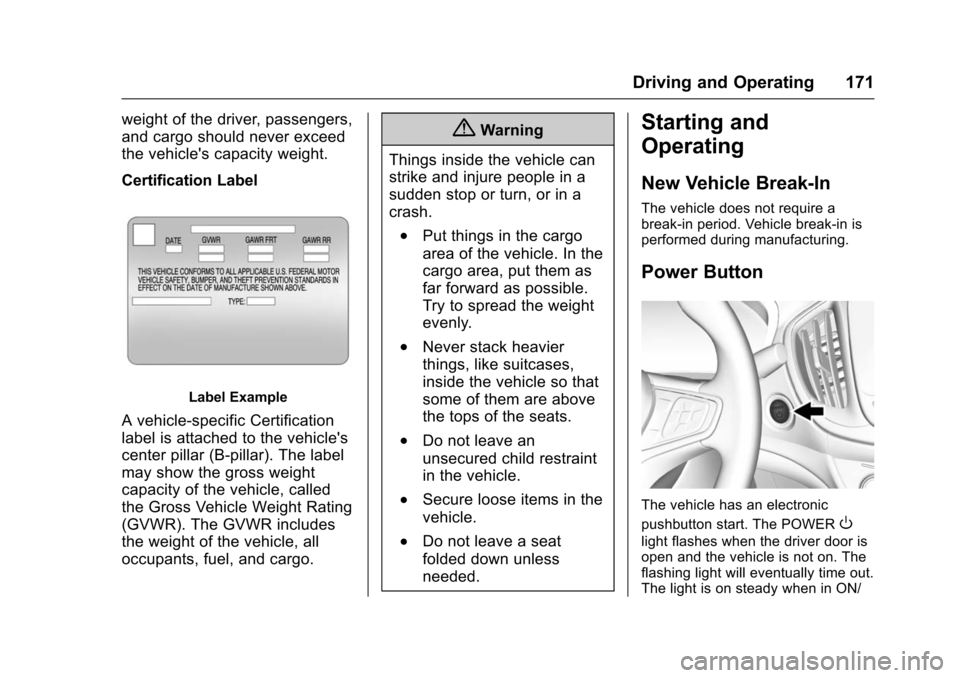
Certification Label
Label Example
A vehicle-specific Certification
label is attached to the vehicle's
center pillar (B-pillar). The label
may show the gross weight
capacity of the vehicle, called
the Gross Vehicle Weight Rating
(GVWR). The GVWR includes
the weight of the vehicle, all
occupants, fuel, and cargo.
{Warning
Things inside the vehicle can
strike and injure people in a
sudden stop or turn, or in a
crash.
.Put things in the cargo
area of the vehicle. In the
cargo area, put them as
far forward as possible.
Try to spread the weight
evenly.
.Never stack heavier
things, like suitcases,
inside the vehicle so that
some of them are above
the tops of the seats.
.Do not leave an
unsecured child restraint
in the vehicle.
.Secure loose items in the
vehicle.
.Do not leave a seat
folded down unless
needed.
Starting and
Operating
New Vehicle Break-In
The vehicle does not require a
break-in period. Vehicle break-in is
performed during manufacturing.
Power Button
The vehicle has an electronic
pushbutton start. The POWER
O
light flashes when the driver door is
open and the vehicle is not on. The
flashing light will eventually time out.
The light is on steady when in ON/
Page 267 of 366
Chevrolet VOLT Owner Manual (GMNA-Localizing-U.S/Canada/Mexico-
9159388) - 2016 - crc - 5/20/15
266 Vehicle Care
Tire Terminology and
Definitions
Air Pressure:The amount of
air inside the tire pressing
outward on each square inch of
the tire. Air pressure is
expressed in kPa (kilopascal)
or psi (pounds per square inch).
Accessory Weight
:The
combined weight of optional
accessories. Some examples of
optional accessories are, electric
drive unit, power windows,
power seats, and air
conditioning.
Aspect Ratio
:The relationship
of a tire's height to its width.
Belt
:A rubber coated layer of
cords that is located between
the plies and the tread. Cords
may be made from steel or other
reinforcing materials. Bead
:The tire bead contains
steel wires wrapped by steel
cords that hold the tire onto
the rim.
Bias Ply Tire
:A pneumatic tire
in which the plies are laid at
alternate angles less than
90 degrees to the centerline of
the tread.
Cold Tire Pressure
:The
amount of air pressure in a tire,
measured in kPa (kilopascal)
or psi (pounds per square inch)
before a tire has built up heat
from driving. See Tire Pressure
0 268.
Curb Weight
:The weight of a
motor vehicle with standard and
optional equipment including the
maximum capacity of fuel, oil,
and coolant, but without
passengers and cargo.
DOT Markings
:A code molded
into the sidewall of a tire
signifying that the tire is in
compliance with the U.S. Department of Transportation
(DOT) Motor Vehicle Safety
Standards. The DOT code
includes the Tire Identification
Number (TIN), an alphanumeric
designator which can also
identify the tire manufacturer,
production plant, brand, and
date of production.
GAWR FRT
:Gross Axle Weight
Rating for the front axle. See
Vehicle Load Limits 0168.
GAWR RR
:Gross Axle Weight
Rating for the rear axle. See
Vehicle Load Limits 0168.
GVWR
:Gross Vehicle Weight
Rating. See Vehicle Load Limits
0 168.
Intended Outboard Sidewall
:
The side of an asymmetrical tire,
that must always face outward
when mounted on a vehicle.
Kilopascal (kPa)
:The metric
unit for air pressure.
Page 359 of 366

Chevrolet VOLT Owner Manual (GMNA-Localizing-U.S/Canada/Mexico-
9159388) - 2016 - crc - 5/20/15
358 Index
Electrical Requirements forBattery Charging . . . . . . . . . . . . . . 218
Electrical System Engine Compartment FuseBlock . . . . . . . . . . . . . . . . . . . . . . . . 252
Instrument Panel Fuse Block . . . . . . . . . . . . . . . . . . . . . . . . 256
Overload . . . . . . . . . . . . . . . . . . . . . 252
Rear Compartment Fuse Block . . . . . . . . . . . . . . . . . . . . . . . . 259
Emergency
OnStar
®. . . . . . . . . . . . . . . . . . . . . . 346
Energy Efficiency Driving . . . . . . . . . . . . . . . . . . . . . . . . . . 25
Energy Information . . . . . . . . . . . . . 127
Engine Air Cleaner/Filter . . . . . . . . . . . . . 235
Check and Service EngineSoon Light . . . . . . . . . . . . . . . . . . 109
Compartment Overview . . . . . . . 231
Coolant . . . . . . . . . . . . . . . . . . . . . . . 239
Coolant Temperature Warning Light . . . . . . . . . . . . . . . .114
Cooling System . . . . . . . . . . 236–238
Cooling System Messages . . . 132
Drive Belt Routing . . . . . . . . . . . . 330
Exhaust . . . . . . . . . . . . . . . . . . . . . . 182
Oil Life System . . . . . . . . . . . . . . . 234 Engine (cont'd)
Oil Messages . . . . . . . . . . . . . . . . . 132
Oil Pressure Light . . . . . . . . . . . . .114
Overheating . . . . . . . . . . . . . . . . . . 242
Running While Parked . . . . . . . . 182
Engine Unavailable Out of Fuel . . . . . . . . . . . . . . . . . . . 179
Entry Lighting . . . . . . . . . . . . . . . . . . . 151
Event Data Recorders . . . . . . . . . . 343
Exit Lighting . . . . . . . . . . . . . . . . . . . . 151
Extended Range Mode . . . . . . . . . 176
Extender, Safety Belt . . . . . . . . . . . . 60
Exterior Lamp Controls . . . . . . . . . 146
F
Filter, Engine Air Cleaner . . . . . . . . . . . 235
Flash-to-Pass . . . . . . . . . . . . . . . . . . . 148
Flashers, Hazard Warning . . . . . . 149
Flat Tire . . . . . . . . . . . . . . . . . . . . . . . . 281 Changing . . . . . . . . . . . . . . . . . . . . . 289
Floor Mats . . . . . . . . . . . . . . . . . . . . . . 312
Fluid Brakes . . . . . . . . . . . . . . . . . . . . . . . . 243
Washer . . . . . . . . . . . . . . . . . . . . . . . 242
Folding Mirrors . . . . . . . . . . . . . . . . . . 45
Forward Collision Alert (FCA) System . . . . . . . . . . . . . . . . . 198 Frequency Statement
Radio . . . . . . . . . . . . . . . . . . . . . . . . . 341
Front Automatic Braking (FAB) System . . . . . . . . . . . . . . . . . 200
Front Seats Adjustment . . . . . . . . . . . . . . . . . . . . . 51
Heated . . . . . . . . . . . . . . . . . . . . . . . . . 53
Fuel . . . . . . . . . . . . . . . . . . . . . . . . . . . . 219 Additives . . . . . . . . . . . . . . . . . . . . . 221
Filling a Portable FuelContainer . . . . . . . . . . . . . . . . . . . 223
Filling the Tank . . . . . . . . . . . . . . . 221
Foreign Countries . . . . . . . . . . . . 221
Gauge . . . . . . . . . . . . . . . . . . . . . . . . 104
Low Fuel Warning Light . . . . . . . .115
Requirements, California . . . . . 220
System Messages . . . . . . . . . . . . 132
Function Check Electric Drive Unit ShiftLock Control . . . . . . . . . . . . . . . . 247
Fuses
Engine Compartment FuseBlock . . . . . . . . . . . . . . . . . . . . . . . . 252
Instrument Panel Fuse Block . . . . . . . . . . . . . . . . . . . . . . . . 256
Rear Compartment Fuse Block . . . . . . . . . . . . . . . . . . . . . . . . 259
Page 360 of 366

Chevrolet VOLT Owner Manual (GMNA-Localizing-U.S/Canada/Mexico-
9159388) - 2016 - crc - 5/20/15
Index 359
G
GaugesBattery . . . . . . . . . . . . . . . . . . . . . . . 104
Driver Efficiency . . . . . . . . . . . . . . 105
Fuel . . . . . . . . . . . . . . . . . . . . . . . . . . 104
Odometer . . . . . . . . . . . . . . . . . . . . . 104
Power Indicator . . . . . . . . . . . . . . . 106
Speedometer . . . . . . . . . . . . . . . . . 104
Trip Odometer . . . . . . . . . . . . . . . . 104
Warning Lights andIndicators . . . . . . . . . . . . . . . . . . . 100
General Information Service and Maintenance . . . . . 314
Towing . . . . . . . . . . . . . . . . . . . . . . . . 223
Vehicle Care . . . . . . . . . . . . . . . . . . 226
Glove Box . . . . . . . . . . . . . . . . . . . . . . . 92
GM Mobility Reimbursement Program . . . . . . . . . . . . . . . . . . . . . . . 334
H
Halogen Bulbs . . . . . . . . . . . . . . . . . . 249
Hatch . . . . . . . . . . . . . . . . . . . . . . . . . . . . 41
Hazard Warning Flashers . . . . . . . 149
Head Restraints . . . . . . . . . . . . . . . . . 50
Headlamps . . . . . . . . . . . . . . . . . . . . . 249Aiming . . . . . . . . . . . . . . . . . . . . . . . . 249
Automatic . . . . . . . . . . . . . . . . . . . . . 148
Bulb Replacement . . . . . . . . . . . . 249 Headlamps (cont'd)
Daytime Running
Lamps (DRL) . . . . . . . . . . . . . . . . 148
Flash-to-Pass . . . . . . . . . . . . . . . . . 148
High-Beam On Light . . . . . . . . . . .115
High/Low Beam Changer . . . . . 147
Lamps On Reminder . . . . . . . . . .116
Heated Rear Seats . . . . . . . . . . . . . . . . . . . . . 56
Steering Wheel . . . . . . . . . . . . . . . . . 95
Heated Front Seats . . . . . . . . . . . . . . 53
Heated Mirrors . . . . . . . . . . . . . . . . . . . 45
Heating and Air Conditioning . . . 154
High Voltage Battery Gauge . . . . 104
High Voltage Devices and Wiring . . . . . . . . . . . . . . . . . . . . . . . . . 251
High-Beam On Light . . . . . . . . . . . . 115
Hill and Mountain Roads . . . . . . . . 166
Hill Start Assist (HSA) . . . . . . . . . . 186
Hold Mode Light . . . . . . . . . . . . . . . . 112
Hood . . . . . . . . . . . . . . . . . . . . . . . . . . . 230
Horn . . . . . . . . . . . . . . . . . . . . . . . . . . . . . 96
How to Wear Safety Belts Properly . . . . . . . . . . . . . . . . . . . . . . . . 57
I
Immobilizer . . . . . . . . . . . . . . . . . . . . . . 43
IndicatorVehicle Ahead . . . . . . . . . . . . . . . . .113
Infants and Young Children,
Restraints . . . . . . . . . . . . . . . . . . . . . . 75
Information Energy . . . . . . . . . . . . . . . . . . . . . . . 127
Infotainment . . . . . . . . . . . . . . . . . . . . 153
Infotainment System . . . . . . . . . . . . 344
Instrument Cluster . . . . . . . . . . . . . . 100
Interior Rearview Mirrors . . . . . . . . . 45
Introduction . . . . . . . . . . . . . . . . . . . . . . . 2
J
Jump Starting - North America . . . . . . . . . . . . . . . . . . . . . . . 295
K
Key and Lock Messages . . . . . . . . 133
Keyless EntryRemote (RKE) System . . . . . . . . . 29
Keys . . . . . . . . . . . . . . . . . . . . . . . . . . . . . 28
L
Labeling, Tire Sidewall . . . . . . . . . . 263
Lamps Daytime Running (DRL) . . . . . . 148
Dome . . . . . . . . . . . . . . . . . . . . . . . . . 150
Exterior Controls . . . . . . . . . . . . . . 146