air condition CHEVROLET VOLT 2017 2.G User Guide
[x] Cancel search | Manufacturer: CHEVROLET, Model Year: 2017, Model line: VOLT, Model: CHEVROLET VOLT 2017 2.GPages: 376, PDF Size: 6.75 MB
Page 91 of 376
Chevrolet VOLT Owner Manual (GMNA-Localizing-U.S./Canada/Mexico-
9807421) - 2017 - CRC - 11/18/15
90 Seats and Restraints
Securing Child Restraints
(With the Safety Belt in
the Front Seat)
This vehicle has airbags. A rear
seat is a safer place to secure a
forward-facing child restraint. See
Where to Put the Restraint081.
In addition, the vehicle has a
passenger sensing system which is
designed to turn off the front
outboard passenger frontal airbag
and passenger knee airbag under
certain conditions. See Passenger
Sensing System 069 and
Passenger Airbag Status Indicator
0 108 for more information,
including important safety
information.
Never put a rear-facing child seat in
the front. This is because the risk to
the rear-facing child is so great,
if the airbag deploys.
{Warning
A child in a rear-facing child
restraint can be seriously injured
or killed if the front outboard
passenger frontal airbag inflates.
This is because the back of the
rear-facing child restraint would
be very close to the inflating
airbag. A child in a forward-facing
child restraint can be seriously
injured or killed if the front
outboard passenger frontal airbag
inflates and the passenger seat is
in a forward position.
Even if the passenger sensing
system has turned off the front
outboard passenger airbag(s), no
system is fail-safe. No one can
guarantee that an airbag will not
inflate under some unusual
circumstance, even though the
airbag(s) are off.
Secure rear-facing child restraints
in a rear seat, even if the
airbag(s) are off. If you secure a
(Continued)
Warning (Continued)
forward-facing child restraint in
the front outboard passenger
seat, always move the seat as far
back as it will go. It is better to
secure the child restraint in a
rear seat.
SeePassenger Sensing System
0 69 for additional information.
If the child restraint uses a top
tether, see Lower Anchors and
Tethers for Children (LATCH
System) 082 for top tether anchor
locations.
Do not secure a child seat in a
position without a top tether anchor
if a national or local law requires
that the top tether be anchored, or if
the instructions that come with the
child restraint say that the top strap
must be anchored.
In Canada, the law requires that
forward-facing child restraints have
a top tether, and that the tether be
attached.
Page 130 of 376
Chevrolet VOLT Owner Manual (GMNA-Localizing-U.S./Canada/Mexico-
9807421) - 2017 - CRC - 11/18/15
Instruments and Controls 129
The electric equivalent to fuel
economy is MPGe. Touch MPG on
the screen to view. When dashes
are displayed, the maximum limits to
some values have been reached.
The circle graph displays
the percentage of distance traveled
using Electric Mode versus
Extended Range Mode. The
Lifetime fuel economy is a total over
the life of the vehicle and can only
be reset by the dealer. The Energy
Usage information will also appear
automatically on power off when
Retained Accessory Power is
active. This pop-up can be disabled.
See“Energy Summary Pop-up”
under Vehicle
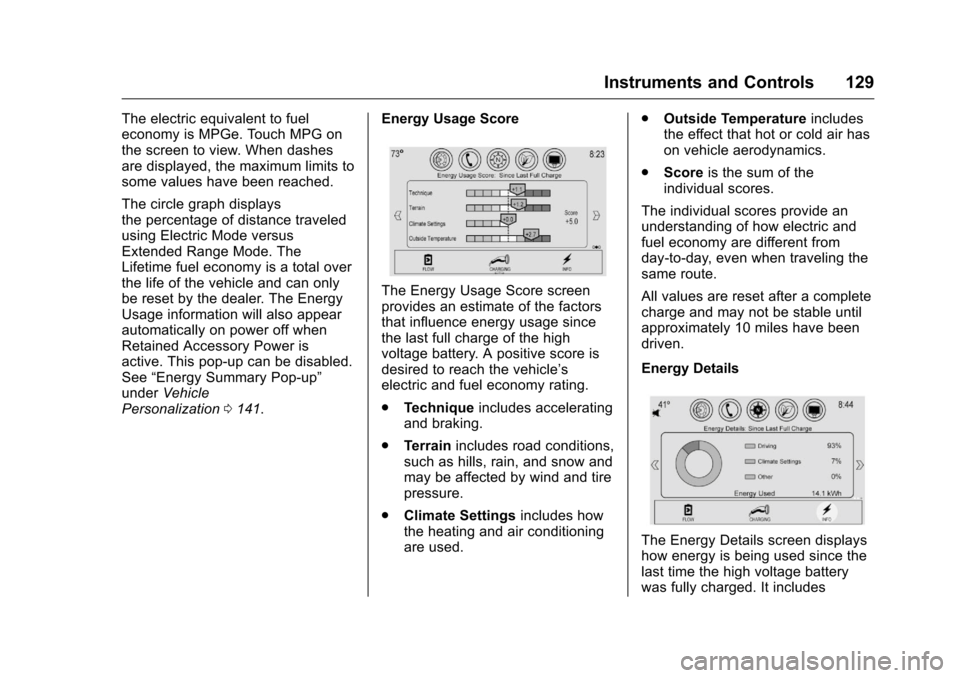
Personalization 0141. Energy Usage Score
The Energy Usage Score screen
provides an estimate of the factors
that influence energy usage since
the last full charge of the high
voltage battery. A positive score is
desired to reach the vehicle’s
electric and fuel economy rating.
.
Technique includes accelerating
and braking.
. Terrain includes road conditions,
such as hills, rain, and snow and
may be affected by wind and tire
pressure.
. Climate Settings includes how
the heating and air conditioning
are used. .
Outside Temperature includes
the effect that hot or cold air has
on vehicle aerodynamics.
. Score is the sum of the
individual scores.
The individual scores provide an
understanding of how electric and
fuel economy are different from
day-to-day, even when traveling the
same route.
All values are reset after a complete
charge and may not be stable until
approximately 10 miles have been
driven.
Energy Details
The Energy Details screen displays
how energy is being used since the
last time the high voltage battery
was fully charged. It includes
Page 138 of 376
Chevrolet VOLT Owner Manual (GMNA-Localizing-U.S./Canada/Mexico-
9807421) - 2017 - CRC - 11/18/15
Instruments and Controls 137
LANE CHANGE ALERT OFF
This message indicates that the
driver has turned the Side Blind
Zone Alert (SBZA) and Lane
Change Alert (LCA) systems off.
LANE KEEPING ASSIST
UNAVAILABLE
This message displays when the
Lane Keep Assist (LKA) and Lane
Departure Warning (LDW) system is
temporarily unavailable. The LKA
system does not need service.
This message could be due to the
camera being blocked. Clean the
outside of the windshield behind the
rearview mirror.
PARK ASSIST OFF
This message displays when the
Parking Assist system has been
turned off or when there is a
temporary condition causing the
system to be disabled.
SERVICE FORWARD
COLLISION SYSTEM
If this message displays, see your
dealer for service . Forward
Collision Alert (FCA) and/or the
Forward Automatic Braking (FAB)
System may not work. Do not use
these systems until the vehicle has
been repaired.
SERVICE FRONT CAMERA
If this message remains on after
continued driving, see your dealer
for service. Do not use the Lane
Keep Assist (LKA), Lane Departure
Warning (LDW), Forward Automatic
Braking (FAB), and Forward
Collision Alert (FCA) features.
SERVICE PARK ASSIST
This message displays if there is a
problem with the Parking Assist
system. Do not use this system to
help you park. See your dealer for
service.
SERVICE SIDE DETECTION
SYSTEM
If this message remains on after
continued driving, the vehicle needs
service. Side Blind Zone Alert
(SBZA), Lane Change Alert (LCA),
and Rear Cross Traffic Alert (RCTA)
features will not work. See your
dealer for service.
SIDE DETECTION SYSTEM
UNAVAILABLE
This message indicates that Side
Blind Zone Alert (SBZA), Lane
Change Alert (LCA), and Rear
Cross Traffic Alert (RCTA) are
disabled either because the sensor
is blocked and cannot detect
vehicles in the blind zone, or the
vehicle is passing through an open
area, such as the desert, where
there is insufficient data for
operation. This message may also
activate during heavy rain or due to
road spray. The vehicle does not
need service. For cleaning, see
"Washing the Vehicle" under
Exterior Care0314.
Page 140 of 376
Chevrolet VOLT Owner Manual (GMNA-Localizing-U.S./Canada/Mexico-
9807421) - 2017 - CRC - 11/18/15
Instruments and Controls 139
TRACTION CONTROL ON
This message displays when the
Traction Control System (TCS) is
turned on.
Airbag System Messages
SERVICE AIRBAG
This message displays if there is a
problem with the airbag system. See
your dealer for service.
Security Messages
SERVICE THEFT ALARM
This message displays if there is a
problem with the alarm. See your
dealer for service.
SERVICE THEFT DETERRENT
SYSTEM
This message displays if there is a
problem with the theft-deterrent
system. See your dealer for service.
Service Vehicle Messages
ENGINE MAINTENANCE XXX%
COMPLETE
This message displays when the
Engine Maintenance Mode is
running. See“Engine Maintenance
Mode (EMM)” underMaintenance
Modes 0183.
ENGINE NOT AVAILABLE
SERVICE SOON
This message displays when the
engine is not available due to a
malfunction that will not allow the
engine to start. The vehicle can
continue to be driven in Electric
Mode until the battery is depleted,
but will have reduced acceleration.
When this message is displayed,
the vehicle should be taken to your
dealer for service as soon as
possible. See Out of Fuel/Engine
Unavailable 0183.
SERVICE AC SYSTEM
This message displays if there is a
problem with the air conditioning
system. See your dealer for service.
SERVICE HEATER SOON
This message displays if there is a
problem with the heater system.
See your dealer for service.
SERVICE POWER STEERING
This message displays and a chime
may sound when there may be a
problem with the power steering
system. If this message displays
and a reduction in steering
performance or loss of power
steering assistance is noticed, see
your dealer for service.
SERVICE VEHICLE SOON
This message displays if there is a
problem with the vehicle. See your
dealer for service. Depending on the
severity of a crash, this message
may come on along with the airbag
readiness light.
Page 141 of 376
Chevrolet VOLT Owner Manual (GMNA-Localizing-U.S./Canada/Mexico-
9807421) - 2017 - CRC - 11/18/15
140 Instruments and Controls
Starting the Vehicle
Messages
PRESS BRAKE TO START
VEHICLE
This message displays when
attempting to start the vehicle
without first pressing the brake
pedal.
PRESS BUTTON AGAIN TO
TURN ENGINE OFF
This message displays as a
reminder to press POWER
Oto turn
the vehicle off when an attempt is
made to turn off the vehicle while it
is in motion.
SERVICE KEYLESS START
SYSTEM
This message is displayed if there is
a problem with the pushbutton start
system. See your dealer for service.
Tire Messages
SERVICE TIRE MONITOR
SYSTEM
This message displays if there is a
problem with the Tire Pressure
Monitor System (TPMS). See Tire
Pressure Monitor Operation 0281.
TIRE LEARNING ACTIVE
This message displays when the
system is learning new tires. See
Tire Pressure Monitor
Operation 0281.
TIRE PRESSURE LOW ADD
AIR TO TIRE
This message displays when the
pressure in one or more of the tires
is low.
This message also displays LEFT
FRONT, RIGHT FRONT, LEFT
REAR, or RIGHT REAR to indicate
the location of the low tire.
The low tire pressure warning light
will also come on. See Tire
Pressure Light 0115. If a tire pressure message appears
on the DIC, stop as soon as
possible. Inflate the tires by adding
air until the tire pressure is equal to
the values shown on the Tire and
Loading Information label. See
Tires
0 271, Vehicle Load Limits 0171,
and Tire Pressure 0278.
More than one tire pressure
message can appear at a time. The
DIC also shows the tire pressure
values. See Driver Information
Center (DIC) 0130.
Vehicle Reminder
Messages
ICE POSSIBLE DRIVE
WITH CARE
This message is displayed when ice
conditions are possible.
Vehicle Speed Messages
SPEED LIMITED TO XXX
This message displays when the
vehicle speed is limited.
Page 158 of 376
Chevrolet VOLT Owner Manual (GMNA-Localizing-U.S./Canada/Mexico-
9807421) - 2017 - CRC - 11/18/15
Climate Controls 157
Climate Controls
Climate Control Systems
Automatic Climate ControlSystem . . . . . . . . . . . . . . . . . . . . . . 157
Air Vents
Air Vents . . . . . . . . . . . . . . . . . . . . . 162
Maintenance
Passenger Compartment AirFilter . . . . . . . . . . . . . . . . . . . . . . . . 162
Climate Control
Systems
Automatic Climate
Control System
The heating, cooling, and ventilation
for the vehicle can be controlled
with this system.
The vehicle may require the use of
an auxiliary heat source under
certain cold conditions. This
provides additional heating and defrost capability obtained by
running the engine, even if the high
voltage battery is adequately
charged. Under these conditions,
the engine will start and use fuel.
Make sure there is fuel in the tank.
Do not allow the vehicle to remain in
extreme temperatures for long
periods without being driven or
plugged in.
Page 159 of 376
Chevrolet VOLT Owner Manual (GMNA-Localizing-U.S./Canada/Mexico-
9807421) - 2017 - CRC - 11/18/15
158 Climate Controls
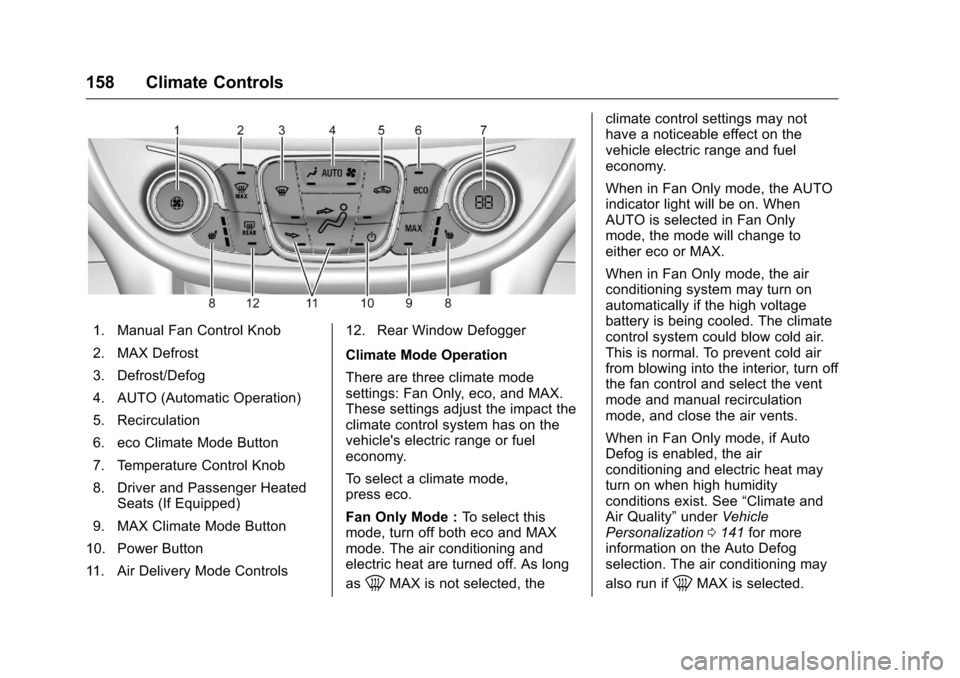
1. Manual Fan Control Knob
2. MAX Defrost
3. Defrost/Defog
4. AUTO (Automatic Operation)
5. Recirculation
6. eco Climate Mode Button
7. Temperature Control Knob
8. Driver and Passenger HeatedSeats (If Equipped)
9. MAX Climate Mode Button
10. Power Button
11. Air Delivery Mode Controls 12. Rear Window Defogger
Climate Mode Operation
There are three climate mode
settings: Fan Only, eco, and MAX.
These settings adjust the impact the
climate control system has on the
vehicle's electric range or fuel
economy.
To select a climate mode,
press eco.
Fan Only Mode :
To select this
mode, turn off both eco and MAX
mode. The air conditioning and
electric heat are turned off. As long
as
0MAX is not selected, the climate control settings may not
have a noticeable effect on the
vehicle electric range and fuel
economy.
When in Fan Only mode, the AUTO
indicator light will be on. When
AUTO is selected in Fan Only
mode, the mode will change to
either eco or MAX.
When in Fan Only mode, the air
conditioning system may turn on
automatically if the high voltage
battery is being cooled. The climate
control system could blow cold air.
This is normal. To prevent cold air
from blowing into the interior, turn off
the fan control and select the vent
mode and manual recirculation
mode, and close the air vents.
When in Fan Only mode, if Auto
Defog is enabled, the air
conditioning and electric heat may
turn on when high humidity
conditions exist. See
“Climate and
Air Quality” underVehicle
Personalization 0141 for more
information on the Auto Defog
selection. The air conditioning may
also run if0MAX is selected.
Page 160 of 376
Chevrolet VOLT Owner Manual (GMNA-Localizing-U.S./Canada/Mexico-
9807421) - 2017 - CRC - 11/18/15
Climate Controls 159
eco Mode :Press eco to select this
mode and the indicator will be lit.
The air conditioning and electric
heat are controlled to balance
comfort with fuel economy. As long
as
0MAX is not selected, the
vehicle electric range or fuel
economy will decrease less than in
MAX mode, but will result in
moderate comfort.
MAX Mode : Press MAX to select
this mode and the indicator will be
lit. The air conditioning and electric
heat are controlled to reach the best
comfort level based on the
temperature setting selected. In this
mode, vehicle electric range or fuel
economy will decrease depending
on the amount of energy required to
reach the best comfort levels.
The air conditioning and electric
heat could be on at the same time
when dehumidification is required in
eco or MAX modes.
The air conditioning may also run if
0MAX is selected, regardless of
the climate mode. Automatic Operation
The system automatically controls
the fan speed, air delivery mode,
and recirculation to heat or cool the
vehicle to the selected temperature.
When the AUTO indicator light is
on, the system is in full automatic
operation. If the air delivery mode or
fan speed setting is adjusted, the
AUTO indicator turns off and the
selected settings display.
For automatic operation:
1. Press AUTO.
2. Set the temperature. An initial setting of 23 °C (74 °F) is
recommended. Allow the
system time to stabilize. Adjust
the temperature as needed.
Manual Operation
O: Press to turn the climate control
system on and off.
A: Turn the knob clockwise or
counterclockwise to increase or
decrease the fan speed. The fan
speed setting appears on the
display screen. Manually adjusting
the fan speed cancels automatic fan control. Press AUTO to return to
automatic operation. Press
Oto turn
off the fan and the climate control
system.
If the power is turned off while in
eco or MAX mode, the display will
automatically change to Fan Only
mode. If the fan speed is increased
or AUTO is pressed, the climate
mode will revert back to eco or
MAX mode.
Temperature Control : Turn the
knob clockwise or counterclockwise
to increase or decrease the
temperature setting.
Air Delivery Mode Control :
Press
dandcor a
combination of the buttons to
change the direction of the airflow.
The indicator light in the button will
turn on. The current mode appears
in the display screen.
Pressing any of the air delivery
buttons cancels automatic air
delivery control and the direction of
the airflow can be controlled
manually. Press AUTO to return to
automatic operation.
Page 161 of 376
Chevrolet VOLT Owner Manual (GMNA-Localizing-U.S./Canada/Mexico-
9807421) - 2017 - CRC - 11/18/15
160 Climate Controls
To change the current mode, select
one or more of the following:
0:Air is directed to the
windshield.
d: Air is directed to the instrument
panel outlets.
c: Air is directed to the floor
outlets.
0MAX : Air is directed to the
windshield and the fan runs at a
higher speed. Fog or frost is cleared
from the windshield more quickly.
When the button is pressed again,
the system returns to the previous
mode setting.
For best results, clear all snow and
ice from the windshield before
defrosting.
If
0MAX is selected in eco or
MAX mode, air conditioning or
electric heat may turn on and have
a noticeable effect on vehicle
electric range and fuel economy.
@: Press to turn on recirculation.
An indicator light comes on. Air is
recirculated to quickly cool the
inside of the vehicle or to reduce the entry of outside air and odors. The
recirculation mode is not available in
Defrost or Defog modes.
Pressing this button cancels
automatic recirculation. Press AUTO
to return to automatic operation;
recirculation runs automatically as
needed.
Auto Defog :
The system will
monitor high humidity inside the
vehicle. When high humidity is
detected, the climate control system
may adjust to outside air supply and
turn on the air conditioner or the
heater. The fan speed may slightly
increase to help prevent fogging.
When high humidity is no longer
detected, the system will return to
its prior operation. To turn Auto
Defog off or on, see “Climate and
Air Quality” underVehicle
Personalization 0141.
LorM:If equipped, pressLorMto heat the driver or passenger seat.
See Heated Front Seats 054.
Auto Heated Seats : If equipped,
the controls can be accessed while
the vehicle is on by pressing
Lor
Mon the center stack. When the vehicle is on, this feature will
automatically activate the heated
seats at the level required by the
vehicle's interior temperature. The
active high, medium, low, or off
heated seat level will be indicated
by the manual heated seat button
lights on the center stack. See
Heated Front Seats
054 and
Vehicle Personalization 0141.
Rear Window Defogger
K:Press to turn the rear window
defogger on or off. An indicator light
on the button comes on to show that
the rear window defogger is on.
The defogger only works when the
vehicle is in ON/RUN. The defogger
will turn off if the vehicle is
turned off.
If equipped with heated outside
rearview mirrors, they turn on when
the rear window defogger button is
on and help to clear fog or frost from
the surface of the mirror. See
Heated Mirrors 046.
Page 162 of 376
Chevrolet VOLT Owner Manual (GMNA-Localizing-U.S./Canada/Mexico-
9807421) - 2017 - CRC - 11/18/15
Climate Controls 161
Caution
Do not try to clear frost or other
material from the inside of the
front windshield and rear window
with a razor blade or anything
else that is sharp. This may
damage the rear window
defogger grid and affect the
radio's ability to pick up stations
clearly. The repairs would not be
covered by the vehicle warranty.
Remote Start : The climate control
system may be started by using the
Remote Keyless Entry (RKE)
transmitter. The climate control
system will default to an appropriate
heating or cooling mode. See
Remote Start 036.
The rear window defogger turns on
if it is cold outside.
Compressor
The vehicle has an electric powered
air conditioning compressor. This
allows for continuous air conditioning and/or high voltage
battery cooling operation, without
running the engine.
The compressor operating speed is
not tied to the engine speed, so
some noise may be heard from the
compressor, especially when air
conditioning use is high and the
engine has turned off. This is
normal.
Sensors
Solar Sensor
The solar sensor is on top of the
instrument panel, near the
windshield, where it monitors solar
intensity.
The climate control system uses the
sensor information to adjust the
temperature, fan speed,
recirculation, and air delivery mode
for best comfort.
Do not cover the sensor; otherwise
the automatic climate control system
may not work properly.
Humidity Sensor
The humidity sensor is near the
base of the inside rearview mirror.
The climate control system uses the
sensor information to adjust the
temperature and recirculation for
best comfort.
Outside Air Temperature Sensor
The outside air temperature sensor
is behind the front grille of the
vehicle. The vehicle uses the sensor
information to display outside air
temperature. The climate control
system uses the information to
adjust the climate system operation.