reset CHEVROLET VOLT 2017 2.G User Guide
[x] Cancel search | Manufacturer: CHEVROLET, Model Year: 2017, Model line: VOLT, Model: CHEVROLET VOLT 2017 2.GPages: 376, PDF Size: 6.75 MB
Page 132 of 376
Chevrolet VOLT Owner Manual (GMNA-Localizing-U.S./Canada/Mexico-
9807421) - 2017 - CRC - 11/18/15
Instruments and Controls 131
The Average Fuel Economy display
shows the approximate average
liters per 100 kilometers (L/100 km)
or miles per gallon (mpg). This
number is calculated based on the
number of L/100 km (mpg) recorded
since the last time this menu item
was reset. This number reflects only
the approximate average fuel
economy that the vehicle has right
now, and will change as driving
conditions change. The Average
Fuel Economy can be reset along
with the trip odometer by pressing
and holding
Vwhile this display is
active.
Compass and Speed : Shows the
direction the vehicle is driving and
the vehicle speed in either
kilometers per hour (km/h) or miles
per hour (mph).
Total Range : Shows the remaining
distance the vehicle can be driven
combining the electric range and
fuel range. Oil Life :
The Oil Life display shows
an estimate of the oil's remaining
useful life. If REMAINING OIL LIFE
99% is displayed, that means 99%
of the current oil life remains.
When the remaining oil life is low,
the CHANGE ENGINE OIL SOON
message will appear on the display.
See Engine Oil Messages 0134.
The oil should be changed as soon
as possible. See Engine Oil0243.
In addition to the engine oil life
system monitoring the oil life,
additional maintenance is
recommended. See Maintenance
Schedule 0326.
Remember, the Oil Life display must
be reset after each oil change. It will
not reset itself. Also, be careful not
to reset the Oil Life display
accidentally at any time other than
when the oil has just been changed.
It cannot be reset accurately until
the next oil change. To reset the
engine oil life system, press and
hold
Vfor several seconds while
the Oil Life display is active. See
Engine Oil Life System 0245. Tire Pressure :
Shows the
approximate pressures of all four
tires. Tire pressure is displayed in
either kilopascal (kPa) or in pounds
per square inch (psi). If the pressure
is low, the value for that tire is
shown in amber. See Tire Pressure
Monitor System 0280 andTire
Pressure Monitor Operation 0281.
Average Speed : Shows the
average speed of the vehicle in
kilometers per hour (km/h) or miles
per hour (mph). This average is
calculated based on the various
vehicle speeds recorded since the
last reset of this value. The average
speed can be reset by pressing and
holding
Vwhile this display is
active.
Timer : This display can be used as
a timer. To start the timer, press
V
while this display is active. The
display will show the amount of
time that has passed since the timer
was last reset. To stop the timer,
press
Vbriefly while this display
is active and the timer is running.
Page 133 of 376
Chevrolet VOLT Owner Manual (GMNA-Localizing-U.S./Canada/Mexico-
9807421) - 2017 - CRC - 11/18/15
132 Instruments and Controls
To reset the timer to zero, press and
hold
Vwhile this display is active.
Speed Limit : Shows the current
speed limit. The information for this
page comes from a roadway
database.
Follow Distance Indicator : The
current follow time to the vehicle
ahead is displayed as a time value
on this page.
Coolant Temperature : Shows the
engine coolant temperature in either
degrees Celsius (°C) or degrees
Fahrenheit (°F).
Blank Page : The Blank Page
display allows for no information to
be displayed in the cluster info
display areas.Vehicle Messages
Messages displayed on the DIC
indicate the status of the vehicle or
some action that may be needed to
correct a condition. Multiple
messages may appear one after
another.
The messages that do not require
immediate action can be
acknowledged and cleared by
pressing
V.
The messages that require
immediate action cannot be cleared
until that action is performed.
All messages should be taken
seriously; clearing the message
does not correct the problem.
The following are the possible
messages and some information
about them.
Battery and Charging
Messages
BATTERY SAVER ACTIVE
This message displays when the
vehicle has detected that the 12-volt
battery voltage has dropped and
vehicle features are being disabled.
The 12-volt battery saver system
starts reducing certain features
trying to save the charge of the
12-volt battery. Turn off unnecessary
features to allow the battery to
recharge.
CHARGE CORD CONNECTED
This message displays when the
charge cord is connected to the
vehicle. The vehicle cannot be
shifted out of P (Park) with the
charge cord connected.
CHARGE DOOR OPEN
This message displays when the
charge door is open and the vehicle
is shifted out of P (Park). The
charge door should be kept fully
closed when the vehicle is not
charging.
Page 135 of 376
Chevrolet VOLT Owner Manual (GMNA-Localizing-U.S./Canada/Mexico-
9807421) - 2017 - CRC - 11/18/15
134 Instruments and Controls
HOOD OPEN
This message will display along with
a hood open symbol when the hood
is open. Close the hood completely.
TRUNK OPEN
This message will display along with
a symbol when the hatch is open.
Close the hatch completely.
Electric Drive Unit
Messages
SHIFT FROM NEUTRAL
This message displays when the
vehicle should be shifted from
N (Neutral). If the vehicle remains in
electric neutral at low vehicle
speeds, the vehicle will not be able
to charge the high voltage battery.
SHIFT TO PARK
This message displays when the
vehicle should be shifted to
P (Park). This may appear when
attempting to turn off the vehicle
when it is not in P (Park).
Engine Cooling System
Messages
ENGINE OVERHEATED—
REDUCE SPEED
This message displays when the
engine coolant temperature or
engine oil is too hot. Reduce speed
and allow the vehicle to cool down.
ENGINE OVERHEATED —
TURN VEHICLE OFF
This message displays and a
continuous chime sounds if the
engine cooling system reaches
unsafe temperatures for operation.
Stop and turn off the vehicle as
soon as it is safe to do so to avoid
severe damage. This message
clears when the engine has cooled
to a safe operating temperature.
ENGINE RUNNING DUE TO
TEMPERATURE
This message displays when the
high voltage battery is charged but
the engine has to come on because
of the outside temperature or high
voltage battery temperature.
Engine Oil Messages
CHANGE ENGINE OIL SOON
This message displays when the
engine oil needs to be changed.
After changing the engine oil, the
Engine Oil Life System must be
reset. See Engine Oil Life System
0 245 andDriver Information Center
(DIC) 0130 for information on how
to reset the system. See Engine Oil
0 243 andMaintenance
Schedule 0326.
OIL PRESSURE LOW —TURN
VEHICLE OFF
This message displays if low oil
pressure levels occur. Stop the
vehicle as soon as safely possible
and do not operate it until the cause
of the low oil pressure has been
corrected. Check the oil as soon as
possible and see your dealer for
service.
Page 139 of 376
Chevrolet VOLT Owner Manual (GMNA-Localizing-U.S./Canada/Mexico-
9807421) - 2017 - CRC - 11/18/15
138 Instruments and Controls
Propulsion Power
Messages
PROPULSION POWER IS
REDUCED
This message displays when the
propulsion power is reduced and
can affect the ability to accelerate.
If this message is on, but there is no
reduction in performance, proceed
to your destination. The
performance may be reduced the
next time the vehicle is driven. The
vehicle may be driven at a reduced
speed while this message is on, but
maximum acceleration and speed
may be reduced. If this message
stays on when the malfunction
indicator lamp is on, the vehicle
should be taken to your dealer for
service as soon as possible.
This message can display when the
vehicle is parked during extreme
cold conditions without plugging-in.
While driving the vehicle with this
message displayed, the vehicle
speed may be reduced until the high
voltage battery is conditioned.This message can display when
driving in mountainous terrain
without using Mountain Mode or by
not entering Mountain Mode soon
enough to build a sufficient battery
charge reserve before climbing
steep grades. This is normal
operation to protect the high voltage
battery. Only if both the
PROPULSION POWER IS
REDUCED message and the
malfunction indicator lamp are on
should the vehicle be taken to the
dealer for service.
While climbing the grade with this
message displayed, the vehicle
speed may be reduced until the
engine can recover the battery state
of charge to a normal level. See
“Mountain Mode”
underDriver
Selected Operating Modes 0181.
Ride Control System
Messages
SERVICE STABILITRAK
This message displays when there
is a problem detected with the
StabiliTrak system. The vehicle is safe to drive, but the StabiliTrak
system is not operational. See
Traction Control/Electronic Stability
Control
0192 for information on
resetting the system.
SERVICE TRACTION
CONTROL
This message displays when there
is a problem detected with the
Traction Control System (TCS). The
vehicle is safe to drive, but the TCS
is not operational. See Traction
Control/Electronic Stability Control
0 192 for information on resetting
the system.
STABILITRAK OFF
This message displays when
StabiliTrak is turned off. Adjust your
driving accordingly.
TRACTION CONTROL OFF
This message displays when the
Traction Control System (TCS) is
turned off. Adjust your driving
accordingly.
Page 226 of 376
Chevrolet VOLT Owner Manual (GMNA-Localizing-U.S./Canada/Mexico-
9807421) - 2017 - CRC - 11/18/15
Driving and Operating 225
OPSymbol Fault/Condition/Event
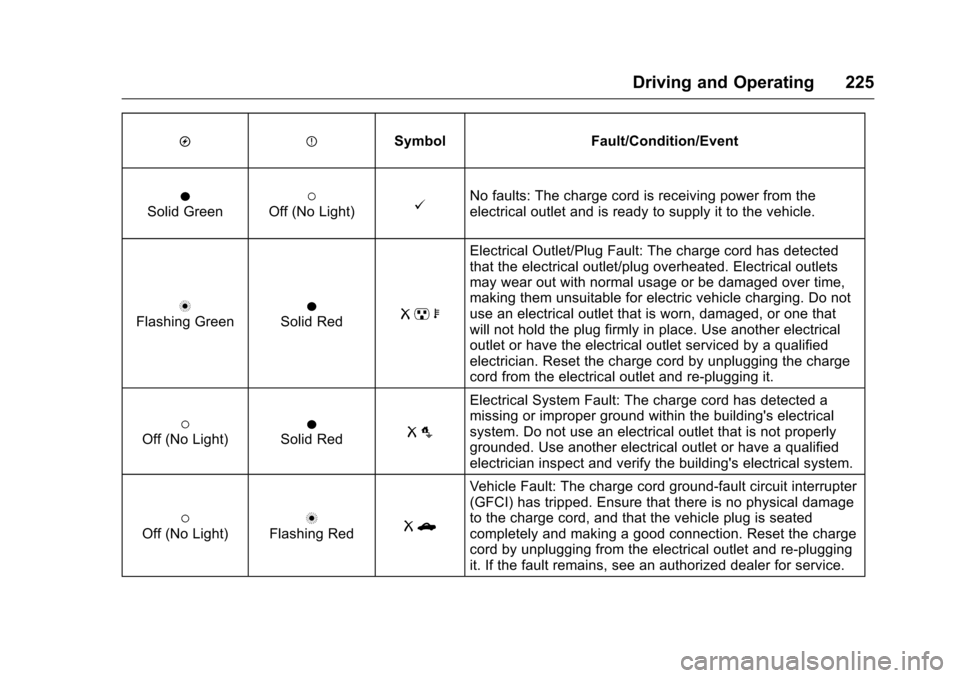
OSolid Green(Off (No Light)@No faults: The charge cord is receiving power from the
electrical outlet and is ready to supply it to the vehicle.
nFlashing GreenOSolid RedR pb
Electrical Outlet/Plug Fault: The charge cord has detected
that the electrical outlet/plug overheated. Electrical outlets
may wear out with normal usage or be damaged over time,
making them unsuitable for electric vehicle charging. Do not
use an electrical outlet that is worn, damaged, or one that
will not hold the plug firmly in place. Use another electrical
outlet or have the electrical outlet serviced by a qualified
electrician. Reset the charge cord by unplugging the charge
cord from the electrical outlet and re-plugging it.
(Off (No Light)OSolid RedR o
Electrical System Fault: The charge cord has detected a
missing or improper ground within the building's electrical
system. Do not use an electrical outlet that is not properly
grounded. Use another electrical outlet or have a qualified
electrician inspect and verify the building's electrical system.
(Off (No Light)nFlashing RedRb
Vehicle Fault: The charge cord ground-fault circuit interrupter
(GFCI) has tripped. Ensure that there is no physical damage
to the charge cord, and that the vehicle plug is seated
completely and making a good connection. Reset the charge
cord by unplugging from the electrical outlet and re-plugging
it. If the fault remains, see an authorized dealer for service.
Page 227 of 376
Chevrolet VOLT Owner Manual (GMNA-Localizing-U.S./Canada/Mexico-
9807421) - 2017 - CRC - 11/18/15
226 Driving and Operating
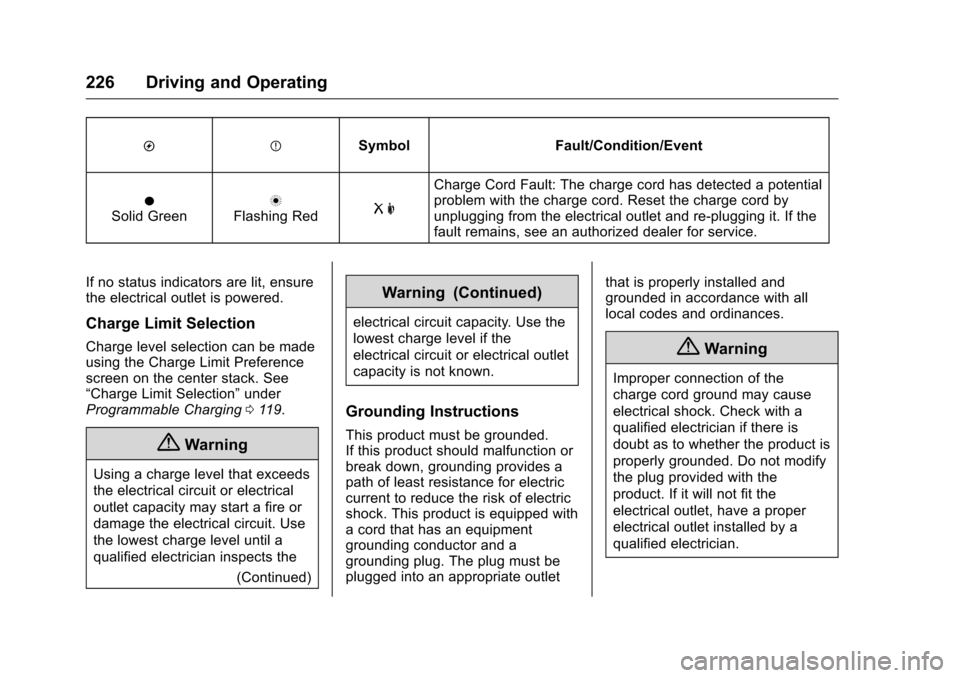
OPSymbol Fault/Condition/Event
OSolid GreennFlashing RedR m
Charge Cord Fault: The charge cord has detected a potential
problem with the charge cord. Reset the charge cord by
unplugging from the electrical outlet and re-plugging it. If the
fault remains, see an authorized dealer for service.
If no status indicators are lit, ensure
the electrical outlet is powered.
Charge Limit Selection
Charge level selection can be made
using the Charge Limit Preference
screen on the center stack. See
“Charge Limit Selection” under
Programmable Charging 0119.
{Warning
Using a charge level that exceeds
the electrical circuit or electrical
outlet capacity may start a fire or
damage the electrical circuit. Use
the lowest charge level until a
qualified electrician inspects the
(Continued)
Warning (Continued)
electrical circuit capacity. Use the
lowest charge level if the
electrical circuit or electrical outlet
capacity is not known.
Grounding Instructions
This product must be grounded.
If this product should malfunction or
break down, grounding provides a
path of least resistance for electric
current to reduce the risk of electric
shock. This product is equipped with
a cord that has an equipment
grounding conductor and a
grounding plug. The plug must be
plugged into an appropriate outlet that is properly installed and
grounded in accordance with all
local codes and ordinances.
{Warning
Improper connection of the
charge cord ground may cause
electrical shock. Check with a
qualified electrician if there is
doubt as to whether the product is
properly grounded. Do not modify
the plug provided with the
product. If it will not fit the
electrical outlet, have a proper
electrical outlet installed by a
qualified electrician.
Page 246 of 376
Chevrolet VOLT Owner Manual (GMNA-Localizing-U.S./Canada/Mexico-
9807421) - 2017 - CRC - 11/18/15
Vehicle Care 245
Selecting the Right Engine Oil
Selecting the right engine oil
depends on both the proper oil
specification and viscosity grade.
SeeRecommended Fluids and
Lubricants 0334.
Specification
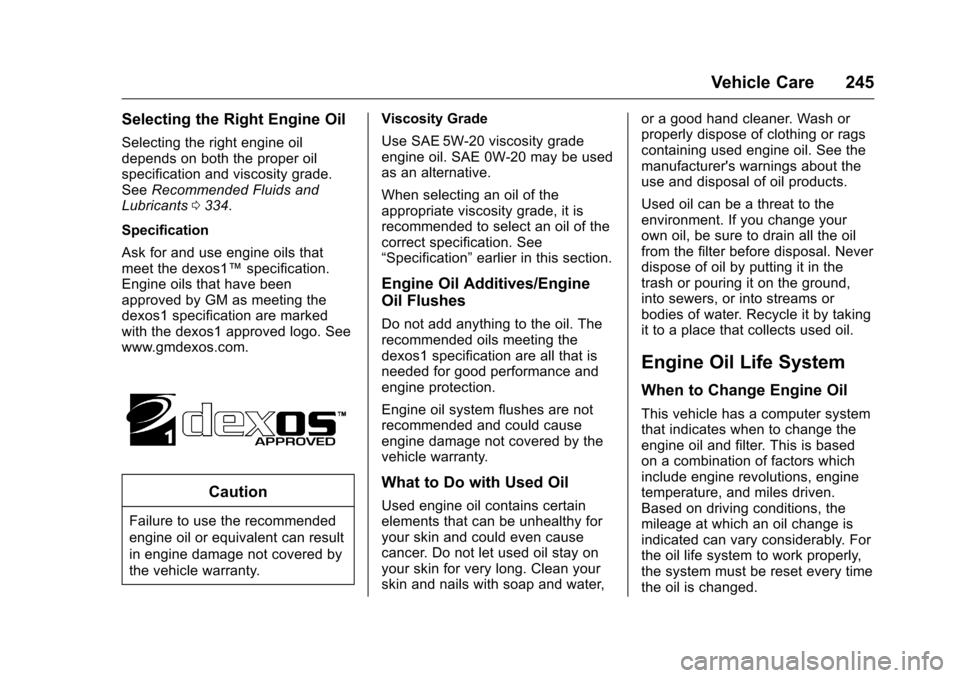
Ask for and use engine oils that
meet the dexos1™ specification.
Engine oils that have been
approved by GM as meeting the
dexos1 specification are marked
with the dexos1 approved logo. See
www.gmdexos.com.
Caution
Failure to use the recommended
engine oil or equivalent can result
in engine damage not covered by
the vehicle warranty. Viscosity Grade
Use SAE 5W-20 viscosity grade
engine oil. SAE 0W-20 may be used
as an alternative.
When selecting an oil of the
appropriate viscosity grade, it is
recommended to select an oil of the
correct specification. See
“Specification”
earlier in this section.
Engine Oil Additives/Engine
Oil Flushes
Do not add anything to the oil. The
recommended oils meeting the
dexos1 specification are all that is
needed for good performance and
engine protection.
Engine oil system flushes are not
recommended and could cause
engine damage not covered by the
vehicle warranty.
What to Do with Used Oil
Used engine oil contains certain
elements that can be unhealthy for
your skin and could even cause
cancer. Do not let used oil stay on
your skin for very long. Clean your
skin and nails with soap and water, or a good hand cleaner. Wash or
properly dispose of clothing or rags
containing used engine oil. See the
manufacturer's warnings about the
use and disposal of oil products.
Used oil can be a threat to the
environment. If you change your
own oil, be sure to drain all the oil
from the filter before disposal. Never
dispose of oil by putting it in the
trash or pouring it on the ground,
into sewers, or into streams or
bodies of water. Recycle it by taking
it to a place that collects used oil.
Engine Oil Life System
When to Change Engine Oil
This vehicle has a computer system
that indicates when to change the
engine oil and filter. This is based
on a combination of factors which
include engine revolutions, engine
temperature, and miles driven.
Based on driving conditions, the
mileage at which an oil change is
indicated can vary considerably. For
the oil life system to work properly,
the system must be reset every time
the oil is changed.
Page 247 of 376
Chevrolet VOLT Owner Manual (GMNA-Localizing-U.S./Canada/Mexico-
9807421) - 2017 - CRC - 11/18/15
246 Vehicle Care
When the system has calculated
that oil life has been diminished, it
indicates that an oil change is
necessary. A CHANGE ENGINE
OIL SOON message comes on.
Change the oil as soon as possible
within the next 1 000 km (600 mi).
It is possible that, if driving under
the best conditions, the oil life
system might indicate that an oil
change is not necessary for up to
two years. The engine oil and filter
must be changed at least once
every two years and, at this time,
the system must be reset. Your
dealer has trained service people
who will perform this work and reset
the system. It is also important to
check the oil regularly over the
course of an oil drain interval and
keep it at the proper level.
If the system is ever reset
accidentally, the oil must be
changed at 5 000 km (3,000 mi)
since the last oil change.
Remember to reset the oil life
system whenever the oil is changed.How to Reset the Engine Oil
Life System
Reset the system whenever the
engine oil is changed so that the
system can calculate the next
engine oil change. To reset the
system:1. Select REMAINING OIL LIFE on the DIC menu.
2. Press and hold
Vfor several
seconds while the Oil Life
display is active to reset the Oil
Life system.
3. 100% OIL LIFE will be displayed when the oil life
system is successfully reset.
The oil life system can also be reset
as follows: 1. Turn the ignition to ON/RUN with the engine off.
2. Fully press and release the accelerator pedal three times
within five seconds. If the CHANGE ENGINE OIL SOON
message comes back on when the
vehicle is started, the engine oil life
system has not reset. Repeat the
procedure.
Engine Air Cleaner/Filter
The engine air cleaner/filter is in the
engine compartment on the
passenger side of the vehicle, see
Engine Compartment
Overview
0242.
When to Inspect the Engine Air
Filter
For intervals on changing and
inspecting the engine air cleaner/
filter, see Maintenance
Schedule 0326.
How to Inspect the Engine Air
Filter
Do not start the engine or have the
engine running with the engine air
cleaner/filter housing open. Before
removing the engine air cleaner/
filter, make sure that the engine air
cleaner/filter housing and nearby
components are free of dirt and
debris. Remove the engine air
Page 260 of 376
Chevrolet VOLT Owner Manual (GMNA-Localizing-U.S./Canada/Mexico-
9807421) - 2017 - CRC - 11/18/15
Vehicle Care 259
Replacement blades come in
different types and are removed in
different ways. For proper type and
length, seeMaintenance
Replacement Parts 0335.
Caution
Allowing the wiper arm to touch
the windshield when no wiper
blade is installed could damage
the windshield. Any damage that
occurs would not be covered by
the vehicle warranty. Do not allow
the wiper arm to touch the
windshield.
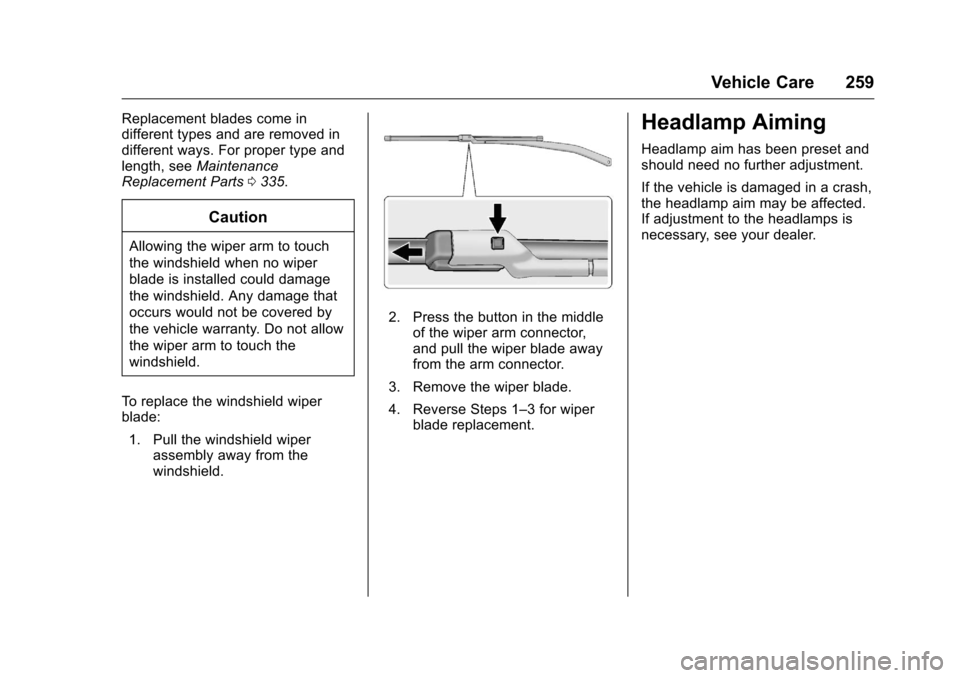
To replace the windshield wiper
blade: 1. Pull the windshield wiper assembly away from the
windshield.
2. Press the button in the middleof the wiper arm connector,
and pull the wiper blade away
from the arm connector.
3. Remove the wiper blade.
4. Reverse Steps 1–3 for wiper blade replacement.
Headlamp Aiming
Headlamp aim has been preset and
should need no further adjustment.
If the vehicle is damaged in a crash,
the headlamp aim may be affected.
If adjustment to the headlamps is
necessary, see your dealer.
Page 284 of 376
Chevrolet VOLT Owner Manual (GMNA-Localizing-U.S./Canada/Mexico-
9807421) - 2017 - CRC - 11/18/15
Vehicle Care 283
TPMS Sensor Matching
Process
Each TPMS sensor has a unique
identification code. The identification
code needs to be matched to a new
tire/wheel position after rotating the
vehicle’s tires or replacing one or
more of the TPMS sensors. The
TPMS sensor matching process
should also be performed after
replacing a spare tire with a road
tire containing the TPMS sensor.
The malfunction light and the DIC
message should go off at the next
ignition cycle. The sensors are
matched to the tire/wheel positions,
using a TPMS relearn tool, in the
following order: driver side front tire,
passenger side front tire, passenger
side rear tire, and driver side rear.
See your dealer for service or to
purchase a relearn tool. A TPMS
relearn tool can also be purchased.
See Tire Pressure Monitor
Sensor Activation Tool at
www.gmtoolsandequipment.com or
call 1-800-GM TOOLS
(1-800-468-6657).There are two minutes to match the
first tire/wheel position, and
five minutes overall to match all four
tire/wheel positions. If it takes
longer, the matching process stops
and must be restarted.
The TPMS sensor matching
process is:
1. Set the parking brake.
2. Place the vehicle in ON/RUN. See Power Button 0175.
3. Make sure the Tire Pressure info page option is turned on.
The info pages on the DIC can
be turned on and off through
the Settings menu. See Driver
Information Center (DIC) 0130.
4. Use the DIC controls on the right side of the steering wheel
to scroll to the Tire Pressure
screen under the DIC
info page.
5. Press and hold the
V(Set/
Reset) button located in the
center of the DIC controls. The horn sounds twice to
signal the receiver is in relearn
mode and the TIRE
LEARNING ACTIVE message
displays on the DIC screen.
6. Start with the driver side front tire.
7. Place the relearn tool against the tire sidewall, near the valve
stem. Then press the button to
activate the TPMS sensor.
A horn chirp confirms that the
sensor identification code has
been matched to this tire and
wheel position.
8. Proceed to the passenger side front tire, and repeat the
procedure in Step 7.
9. Proceed to the passenger side rear tire, and repeat the
procedure in Step 7.
10. Proceed to the driver side rear tire, and repeat the procedure
in Step 7. The horn sounds two
times to indicate the sensor
identification code has been
matched to the driver side rear
tire, and the TPMS sensor