mount CHEVROLET VOLT 2017 2.G Owner's Manual
[x] Cancel search | Manufacturer: CHEVROLET, Model Year: 2017, Model line: VOLT, Model: CHEVROLET VOLT 2017 2.GPages: 376, PDF Size: 6.75 MB
Page 182 of 376
Chevrolet VOLT Owner Manual (GMNA-Localizing-U.S./Canada/Mexico-
9807421) - 2017 - CRC - 11/18/15
Driving and Operating 181
Driver Selected Operating
Modes
While driving in Electric or Extended
Range Mode, additional operating
modes can be selected.
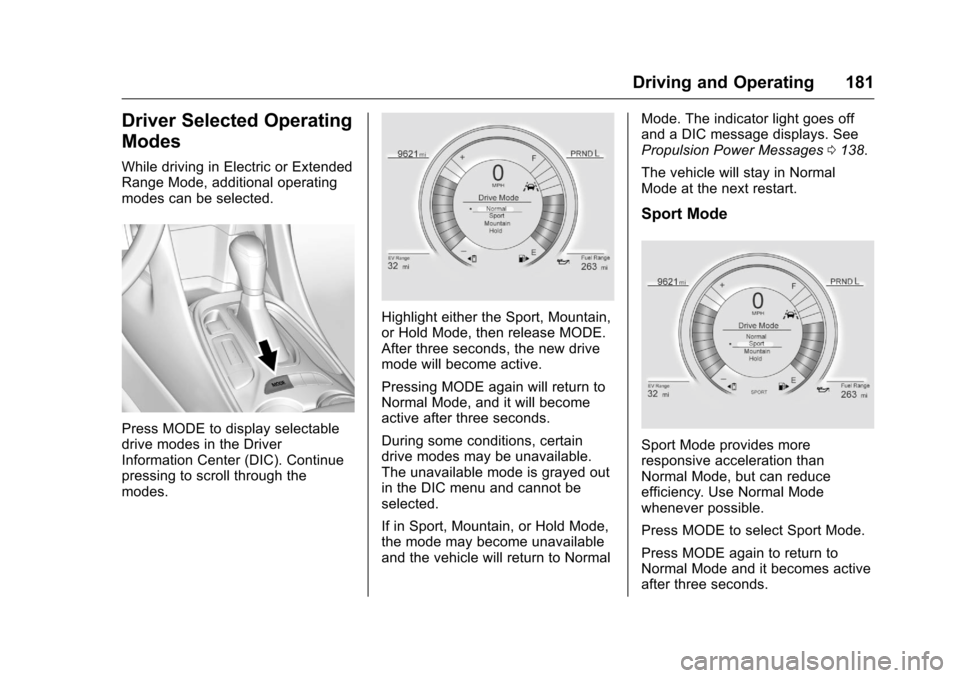
Press MODE to display selectable
drive modes in the Driver
Information Center (DIC). Continue
pressing to scroll through the
modes.
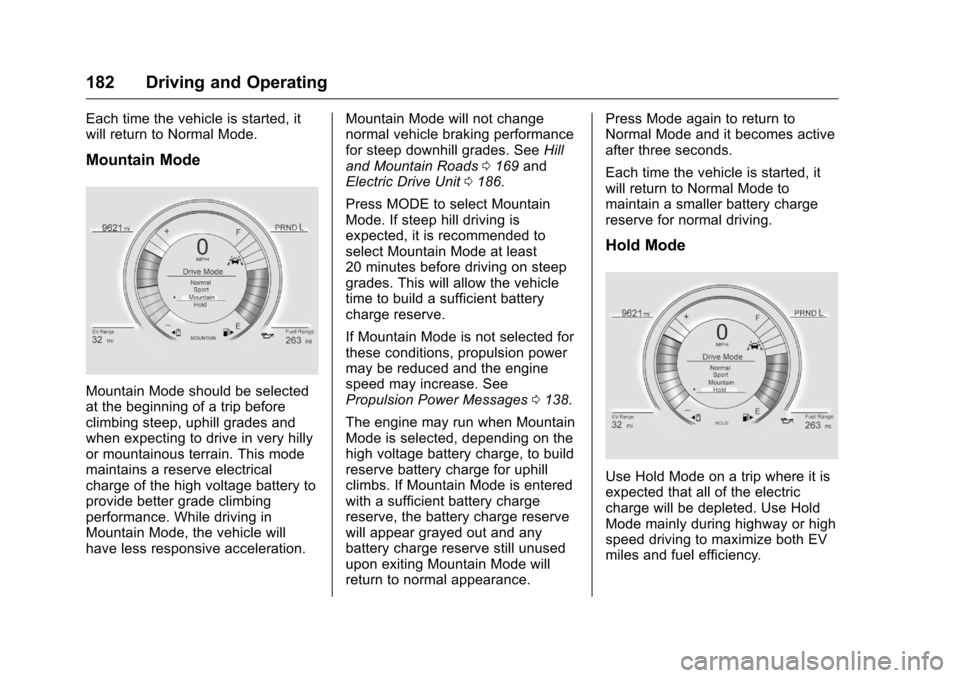
Highlight either the Sport, Mountain,
or Hold Mode, then release MODE.
After three seconds, the new drive
mode will become active.
Pressing MODE again will return to
Normal Mode, and it will become
active after three seconds.
During some conditions, certain
drive modes may be unavailable.
The unavailable mode is grayed out
in the DIC menu and cannot be
selected.
If in Sport, Mountain, or Hold Mode,
the mode may become unavailable
and the vehicle will return to NormalMode. The indicator light goes off
and a DIC message displays. See
Propulsion Power Messages
0138.
The vehicle will stay in Normal
Mode at the next restart.
Sport Mode
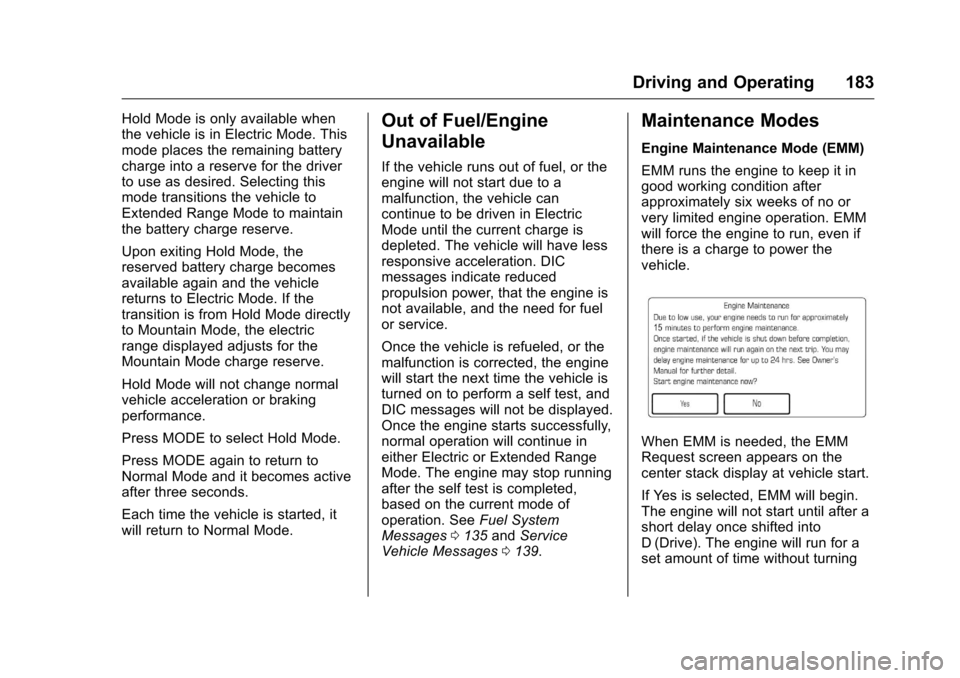
Sport Mode provides more
responsive acceleration than
Normal Mode, but can reduce
efficiency. Use Normal Mode
whenever possible.
Press MODE to select Sport Mode.
Press MODE again to return to
Normal Mode and it becomes active
after three seconds.
Page 183 of 376
Chevrolet VOLT Owner Manual (GMNA-Localizing-U.S./Canada/Mexico-
9807421) - 2017 - CRC - 11/18/15
182 Driving and Operating
Each time the vehicle is started, it
will return to Normal Mode.
Mountain Mode
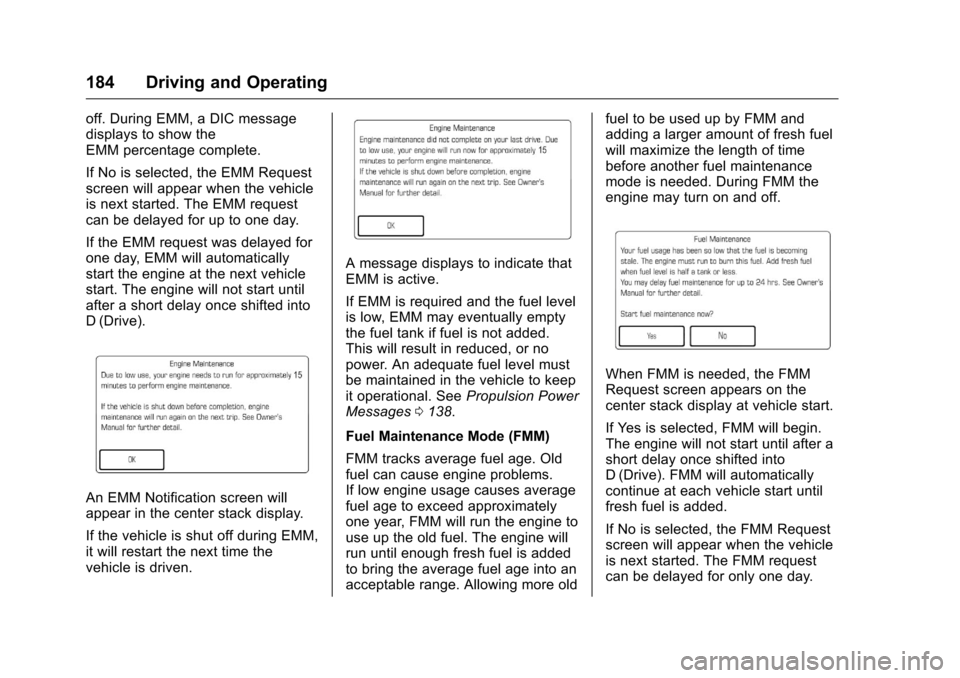
Mountain Mode should be selected
at the beginning of a trip before
climbing steep, uphill grades and
when expecting to drive in very hilly
or mountainous terrain. This mode
maintains a reserve electrical
charge of the high voltage battery to
provide better grade climbing
performance. While driving in
Mountain Mode, the vehicle will
have less responsive acceleration.Mountain Mode will not change
normal vehicle braking performance
for steep downhill grades. See
Hill
and Mountain Roads 0169 and
Electric Drive Unit 0186.
Press MODE to select Mountain
Mode. If steep hill driving is
expected, it is recommended to
select Mountain Mode at least
20 minutes before driving on steep
grades. This will allow the vehicle
time to build a sufficient battery
charge reserve.
If Mountain Mode is not selected for
these conditions, propulsion power
may be reduced and the engine
speed may increase. See
Propulsion Power Messages 0138.
The engine may run when Mountain
Mode is selected, depending on the
high voltage battery charge, to build
reserve battery charge for uphill
climbs. If Mountain Mode is entered
with a sufficient battery charge
reserve, the battery charge reserve
will appear grayed out and any
battery charge reserve still unused
upon exiting Mountain Mode will
return to normal appearance. Press Mode again to return to
Normal Mode and it becomes active
after three seconds.
Each time the vehicle is started, it
will return to Normal Mode to
maintain a smaller battery charge
reserve for normal driving.
Hold Mode
Use Hold Mode on a trip where it is
expected that all of the electric
charge will be depleted. Use Hold
Mode mainly during highway or high
speed driving to maximize both EV
miles and fuel efficiency.
Page 184 of 376
Chevrolet VOLT Owner Manual (GMNA-Localizing-U.S./Canada/Mexico-
9807421) - 2017 - CRC - 11/18/15
Driving and Operating 183
Hold Mode is only available when
the vehicle is in Electric Mode. This
mode places the remaining battery
charge into a reserve for the driver
to use as desired. Selecting this
mode transitions the vehicle to
Extended Range Mode to maintain
the battery charge reserve.
Upon exiting Hold Mode, the
reserved battery charge becomes
available again and the vehicle
returns to Electric Mode. If the
transition is from Hold Mode directly
to Mountain Mode, the electric
range displayed adjusts for the
Mountain Mode charge reserve.
Hold Mode will not change normal
vehicle acceleration or braking
performance.
Press MODE to select Hold Mode.
Press MODE again to return to
Normal Mode and it becomes active
after three seconds.
Each time the vehicle is started, it
will return to Normal Mode.Out of Fuel/Engine
Unavailable
If the vehicle runs out of fuel, or the
engine will not start due to a
malfunction, the vehicle can
continue to be driven in Electric
Mode until the current charge is
depleted. The vehicle will have less
responsive acceleration. DIC
messages indicate reduced
propulsion power, that the engine is
not available, and the need for fuel
or service.
Once the vehicle is refueled, or the
malfunction is corrected, the engine
will start the next time the vehicle is
turned on to perform a self test, and
DIC messages will not be displayed.
Once the engine starts successfully,
normal operation will continue in
either Electric or Extended Range
Mode. The engine may stop running
after the self test is completed,
based on the current mode of
operation. SeeFuel System
Messages 0135 andService
Vehicle Messages 0139.
Maintenance Modes
Engine Maintenance Mode (EMM)
EMM runs the engine to keep it in
good working condition after
approximately six weeks of no or
very limited engine operation. EMM
will force the engine to run, even if
there is a charge to power the
vehicle.
When EMM is needed, the EMM
Request screen appears on the
center stack display at vehicle start.
If Yes is selected, EMM will begin.
The engine will not start until after a
short delay once shifted into
D (Drive). The engine will run for a
set amount of time without turning
Page 185 of 376
Chevrolet VOLT Owner Manual (GMNA-Localizing-U.S./Canada/Mexico-
9807421) - 2017 - CRC - 11/18/15
184 Driving and Operating
off. During EMM, a DIC message
displays to show the
EMM percentage complete.
If No is selected, the EMM Request
screen will appear when the vehicle
is next started. The EMM request
can be delayed for up to one day.
If the EMM request was delayed for
one day, EMM will automatically
start the engine at the next vehicle
start. The engine will not start until
after a short delay once shifted into
D (Drive).
An EMM Notification screen will
appear in the center stack display.
If the vehicle is shut off during EMM,
it will restart the next time the
vehicle is driven.
A message displays to indicate that
EMM is active.
If EMM is required and the fuel level
is low, EMM may eventually empty
the fuel tank if fuel is not added.
This will result in reduced, or no
power. An adequate fuel level must
be maintained in the vehicle to keep
it operational. SeePropulsion Power
Messages 0138.
Fuel Maintenance Mode (FMM)
FMM tracks average fuel age. Old
fuel can cause engine problems.
If low engine usage causes average
fuel age to exceed approximately
one year, FMM will run the engine to
use up the old fuel. The engine will
run until enough fresh fuel is added
to bring the average fuel age into an
acceptable range. Allowing more old fuel to be used up by FMM and
adding a larger amount of fresh fuel
will maximize the length of time
before another fuel maintenance
mode is needed. During FMM the
engine may turn on and off.
When FMM is needed, the FMM
Request screen appears on the
center stack display at vehicle start.
If Yes is selected, FMM will begin.
The engine will not start until after a
short delay once shifted into
D (Drive). FMM will automatically
continue at each vehicle start until
fresh fuel is added.
If No is selected, the FMM Request
screen will appear when the vehicle
is next started. The FMM request
can be delayed for only one day.
Page 194 of 376
Chevrolet VOLT Owner Manual (GMNA-Localizing-U.S./Canada/Mexico-
9807421) - 2017 - CRC - 11/18/15
Driving and Operating 193
Drive the vehicle. Ifdcomes on
and stays on, the vehicle may need
more time to diagnose the problem.
If the condition persists, see your
dealer.
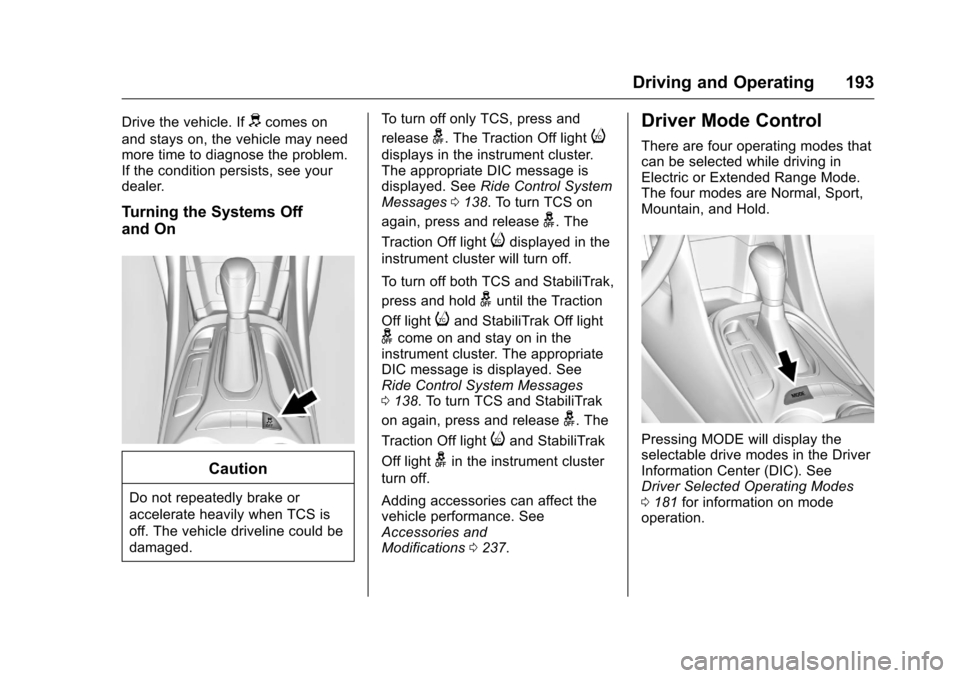
Turning the Systems Off
and On
Caution
Do not repeatedly brake or
accelerate heavily when TCS is
off. The vehicle driveline could be
damaged. To turn off only TCS, press and
release
g. The Traction Off lighti
displays in the instrument cluster.
The appropriate DIC message is
displayed. See
Ride Control System
Messages 0138. To turn TCS on
again, press and release
g. The
Traction Off light
idisplayed in the
instrument cluster will turn off.
To turn off both TCS and StabiliTrak,
press and hold
guntil the Traction
Off light
iand StabiliTrak Off light
gcome on and stay on in the
instrument cluster. The appropriate
DIC message is displayed. See
Ride Control System Messages
0 138. To turn TCS and StabiliTrak
on again, press and release
g. The
Traction Off light
iand StabiliTrak
Off light
gin the instrument cluster
turn off.
Adding accessories can affect the
vehicle performance. See
Accessories and
Modifications 0237.
Driver Mode Control
There are four operating modes that
can be selected while driving in
Electric or Extended Range Mode.
The four modes are Normal, Sport,
Mountain, and Hold.
Pressing MODE will display the
selectable drive modes in the Driver
Information Center (DIC). See
Driver Selected Operating Modes
0181 for information on mode
operation.
Page 223 of 376
Chevrolet VOLT Owner Manual (GMNA-Localizing-U.S./Canada/Mexico-
9807421) - 2017 - CRC - 11/18/15
222 Driving and Operating
Charge Cord
IMPORTANT SAFETY
INSTRUCTIONS
This symbol means Warning: Risk
of electrical shock.
SeeRadio Frequency
Statement 0351.
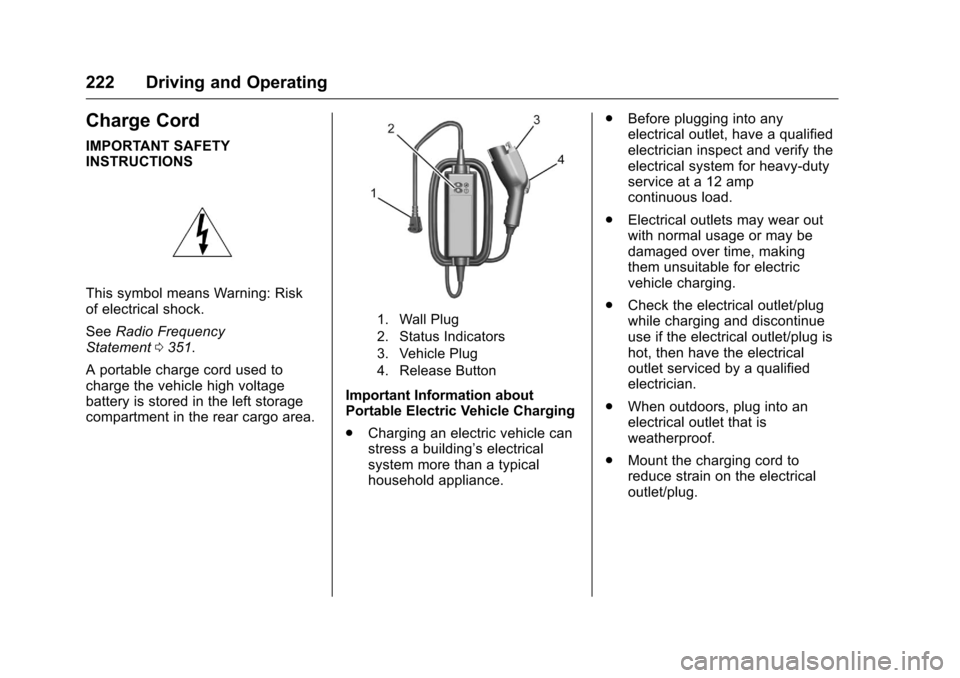
A portable charge cord used to
charge the vehicle high voltage
battery is stored in the left storage
compartment in the rear cargo area.
1. Wall Plug
2. Status Indicators
3. Vehicle Plug
4. Release Button
Important Information about
Portable Electric Vehicle Charging
. Charging an electric vehicle can
stress a building’ s electrical
system more than a typical
household appliance. .
Before plugging into any
electrical outlet, have a qualified
electrician inspect and verify the
electrical system for heavy-duty
service at a 12 amp
continuous load.
. Electrical outlets may wear out
with normal usage or may be
damaged over time, making
them unsuitable for electric
vehicle charging.
. Check the electrical outlet/plug
while charging and discontinue
use if the electrical outlet/plug is
hot, then have the electrical
outlet serviced by a qualified
electrician.
. When outdoors, plug into an
electrical outlet that is
weatherproof.
. Mount the charging cord to
reduce strain on the electrical
outlet/plug.
Page 228 of 376
Chevrolet VOLT Owner Manual (GMNA-Localizing-U.S./Canada/Mexico-
9807421) - 2017 - CRC - 11/18/15
Driving and Operating 227
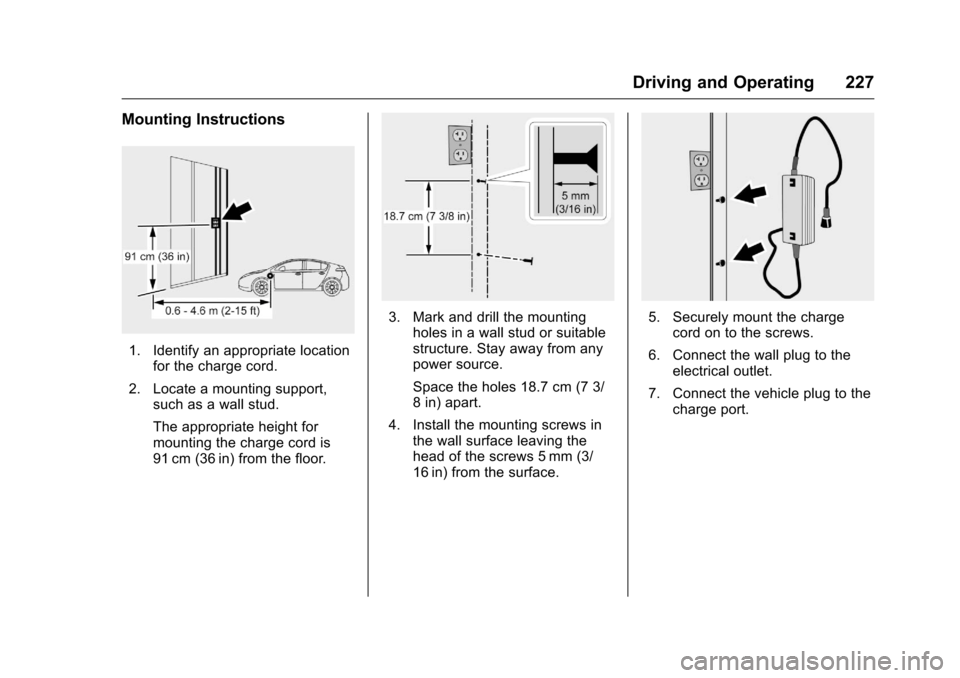
Mounting Instructions
1. Identify an appropriate locationfor the charge cord.
2. Locate a mounting support, such as a wall stud.
The appropriate height for
mounting the charge cord is
91 cm (36 in) from the floor.
3. Mark and drill the mountingholes in a wall stud or suitable
structure. Stay away from any
power source.
Space the holes 18.7 cm (7 3/
8 in) apart.
4. Install the mounting screws in the wall surface leaving the
head of the screws 5 mm (3/
16 in) from the surface.5. Securely mount the chargecord on to the screws.
6. Connect the wall plug to the electrical outlet.
7. Connect the vehicle plug to the charge port.
Page 231 of 376
Chevrolet VOLT Owner Manual (GMNA-Localizing-U.S./Canada/Mexico-
9807421) - 2017 - CRC - 11/18/15
230 Driving and Operating
Fuel
GM recommends the use of TOP
TIER Detergent Gasoline to keep
the engine cleaner and reduce
engine deposits. See
www.toptiergas.com for a list of TOP
TIER Detergent Gasoline marketers
and applicable countries.
Do not use any fuel labeled E85 or
FlexFuel. Do not use gasoline with
ethanol levels greater than 15% by
volume.
Use regular unleaded gasoline
meeting ASTM specification D4814
with a posted octane rating of 87 or
higher. Do not use gasoline with aposted octane rating of less than 87,
as this may cause engine knock and
will lower fuel economy.
Prohibited Fuels
Caution
Do not use fuels with any of the
following conditions; doing so
may damage the vehicle and void
its warranty:
. For vehicles which are not
FlexFuel, fuel labeled
greater than 15% ethanol by
volume, such as mid-level
ethanol blends (16 –50%
ethanol), E85, or FlexFuel.
. Fuel with any amount of
methanol, methylal, and
aniline. These fuels can
corrode metal fuel system
parts or damage plastic and
rubber parts.
. Fuel containing metals such
as methylcyclopentadienyl
manganese tricarbonyl
(Continued)
Caution (Continued)
(MMT), which can damage
the emissions control
system and spark plugs.
. Fuel with a posted octane
rating of less than the
recommended fuel. Using
this fuel will lower fuel
economy and performance,
and may decrease the life of
the emissions catalyst.
California Fuel
Requirements
If the vehicle is certified to meet
California Emissions Standards, it is
designed to operate on fuels that
meet California specifications. See
the underhood emission control
label. If this fuel is not available in
states adopting California Emissions
Standards, the vehicle will operate
satisfactorily on fuels meeting
federal specifications, but emission
control system performance might
be affected. The malfunction
indicator lamp could turn on and the
Page 241 of 376
Chevrolet VOLT Owner Manual (GMNA-Localizing-U.S./Canada/Mexico-
9807421) - 2017 - CRC - 11/18/15
240 Vehicle Care
This vehicle has an airbag system.
Before attempting to do your own
service work, seeAirbag System
Check 075.
Keep a record with all parts receipts
and list the mileage and the date of
any service work performed. See
Maintenance Records 0336.
Caution
Even small amounts of
contamination can cause damage
to vehicle systems. Do not allow
contaminants to contact the fluids,
reservoir caps, or dipsticks.
Hood
To open the hood:
1. Turn the vehicle off before opening the hood. If the vehicle
is on, the engine will start when
the hood is opened. See
Electric Mode 0180 and
Extended Range Mode 0180.
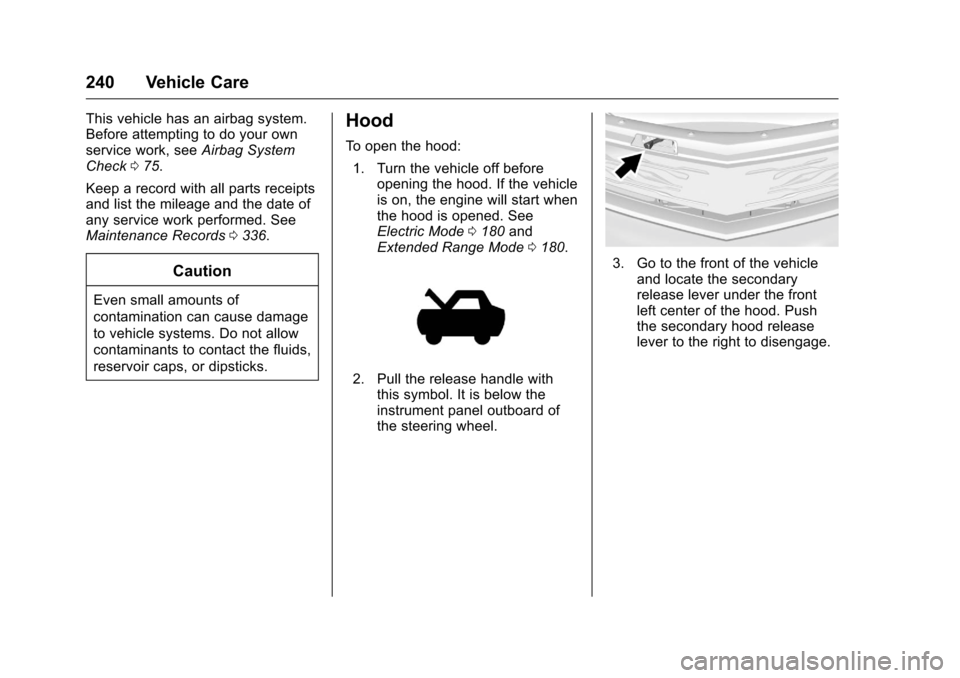
2. Pull the release handle with
this symbol. It is below the
instrument panel outboard of
the steering wheel.
3. Go to the front of the vehicle
and locate the secondary
release lever under the front
left center of the hood. Push
the secondary hood release
lever to the right to disengage.
Page 245 of 376
Chevrolet VOLT Owner Manual (GMNA-Localizing-U.S./Canada/Mexico-
9807421) - 2017 - CRC - 11/18/15
244 Vehicle Care
Checking Engine Oil
It is a good idea to check the engine
oil level at each fuel fill. In order to
get an accurate reading, the vehicle
must be on level ground. The
engine oil dipstick handle is a loop.
SeeEngine Compartment Overview
0 242 for the location of the engine
oil dipstick.
Obtaining an accurate oil level
reading is essential:
1. If the engine has been running recently, turn off the engine and
allow several minutes for the oil
to drain back into the oil pan.
Checking the oil level too soon
after engine shutoff will not
provide an accurate oil level
reading.
{Warning
The engine oil dipstick handle
may be hot; it could burn you.
Use a towel or glove to touch the
dipstick handle. 2. Pull out the dipstick and wipe it
with a clean paper towel or
cloth, then push it back in all
the way. Remove it again,
keeping the tip down, and
check the level.
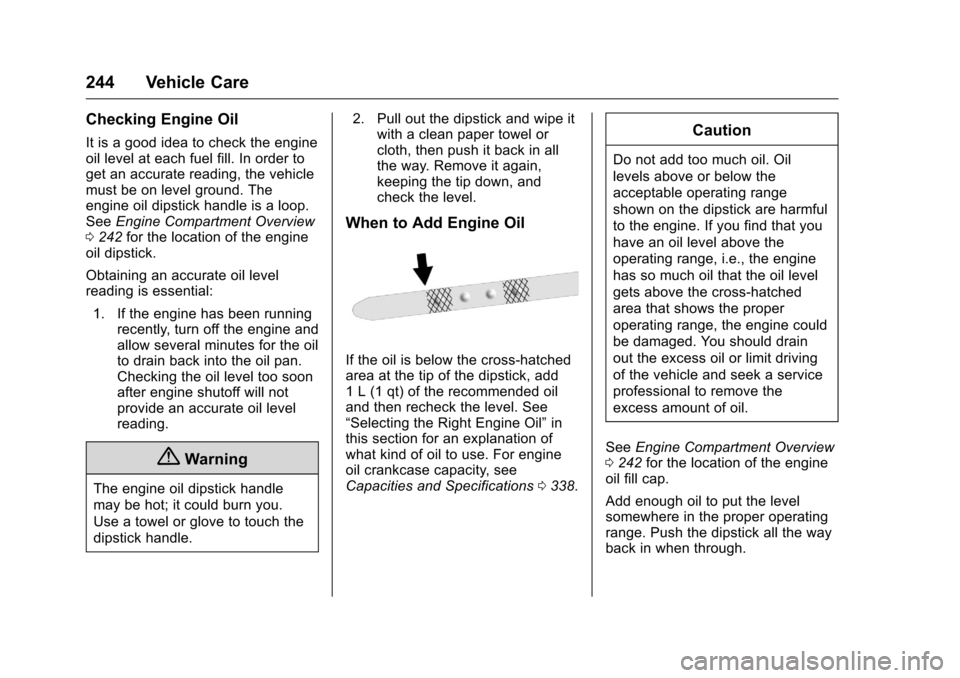
When to Add Engine Oil
If the oil is below the cross-hatched
area at the tip of the dipstick, add
1 L (1 qt) of the recommended oil
and then recheck the level. See
“Selecting the Right Engine Oil” in
this section for an explanation of
what kind of oil to use. For engine
oil crankcase capacity, see
Capacities and Specifications 0338.
Caution
Do not add too much oil. Oil
levels above or below the
acceptable operating range
shown on the dipstick are harmful
to the engine. If you find that you
have an oil level above the
operating range, i.e., the engine
has so much oil that the oil level
gets above the cross-hatched
area that shows the proper
operating range, the engine could
be damaged. You should drain
out the excess oil or limit driving
of the vehicle and seek a service
professional to remove the
excess amount of oil.
See Engine Compartment Overview
0 242 for the location of the engine
oil fill cap.
Add enough oil to put the level
somewhere in the proper operating
range. Push the dipstick all the way
back in when through.