vehicle personalization CHEVROLET VOLT 2017 2.G Owner's Manual
[x] Cancel search | Manufacturer: CHEVROLET, Model Year: 2017, Model line: VOLT, Model: CHEVROLET VOLT 2017 2.GPages: 376, PDF Size: 6.75 MB
Page 191 of 376
Chevrolet VOLT Owner Manual (GMNA-Localizing-U.S./Canada/Mexico-
9807421) - 2017 - CRC - 11/18/15
190 Driving and Operating
Caution
Driving with the parking brake on
can overheat the brake system
and cause premature wear or
damage to brake system parts.
Make sure that the parking brake
is fully released and the brake
warning light is off before driving.
Automatic EPB Release
The EPB will automatically release if
the vehicle is running, placed into
gear, and an attempt is made to
drive away. Avoid rapid acceleration
when the EPB is applied, to
preserve parking brake lining life.
Hill Start Assist (HSA)
The HSA feature will activate when
the vehicle is stopped on a
moderate to steep grade to help
prevent it from rolling in an
unintended direction. After the brake
pedal has been released and before
the accelerator pedal has been
pressed, HSA uses braking
pressure to hold the vehiclestationary. If HSA is holding the
vehicle, a DIC message displays.
HSA will not activate in a forward
drive gear when facing downhill,
or in R (Reverse) when facing uphill.
Extended Hill Start
Assist (EHSA)
Select the duration of the HSA
feature on the center stack
touchscreen by choosing the
submenu for Hill Start Assist or
Extended Hill Start Assist (EHSA).
See
“Extended Hill Start Assist"
under “Comfort and Convenience” in
Vehicle Personalization 0141.
When Standard Hold is selected,
the vehicle is held stationary for up
to two seconds after the brake pedal
is released. When Extended Hold is
selected, the vehicle is held
stationary for up to five minutes
after the brake pedal is released. In
either case, override the hold
feature by pressing the accelerator
pedal and attempting to drive away.
If Hill Start Assist is selected in the
Settings menu, it will hold the
vehicle for two seconds unless the
driver door is opened or the driver safety belt is unbuckled after
releasing the brake pedal.
If Extended Hill Start Assist is
selected, it will hold the vehicle for
five minutes unless the driver door
is opened and the driver safety belt
is unbuckled prior to releasing the
brake pedal. When EHSA is
deactivated after five minutes, or if it
is deactivated when the driver
safety belt is unlatched or the driver
door is opened, the Electric Parking
Brake will engage to prevent vehicle
movement.
Regenerative Braking
Some braking energy from the
moving vehicle is turned back into
electrical energy. This energy is
then stored back into the high
voltage battery system, increasing
energy efficiency.
The hydraulic disc brakes work with
the regenerative braking to ensure
effective braking, such as when a
high braking demand is requested.
Page 201 of 376
Chevrolet VOLT Owner Manual (GMNA-Localizing-U.S./Canada/Mexico-
9807421) - 2017 - CRC - 11/18/15
200 Driving and Operating
selected following gap. The vehicle
speed increases or decreases to
follow the vehicle in front of you, but
will not exceed the set speed. It may
apply limited braking, if necessary.
When braking is active, the brake
lamps will come on. The automatic
braking may feel or sound different
than if the brakes were applied
manually. This is normal.
Stationary or Very Slow-Moving
Objects
{Warning
Adaptive Cruise Control (ACC)
may not detect and react to
stopped or slow-moving vehicles
ahead of you. For example, the
system may not brake for a
vehicle it has never detected
moving. This can occur in
stop-and-go traffic or when a
vehicle suddenly appears due to
a vehicle ahead changing lanes.
Your vehicle may not stop and
could cause a crash. Use caution
when using ACC. Your complete(Continued)
Warning (Continued)
attention is always required while
driving and you should be ready
to take action and apply the
brakes.
ACC Automatically Disengages
ACC may automatically disengage
and the driver will need to manually
apply the brakes to slow the
vehicle when:
. The sensors are blocked.
. The Traction Control System
(TCS) or StabiliTrak system has
activated or been disabled.
. No traffic or other objects are
being detected.
. There is a fault in the system.
The ACC active indicator will not be
displayed when ACC is no longer
active. Notification to Resume ACC
ACC will maintain a following gap
behind a detected vehicle and slow
your vehicle to a stop behind that
vehicle.
If the stopped vehicle ahead has
driven away and ACC has not
resumed, the vehicle ahead
indicator will flash as a reminder to
check traffic before proceeding. In
addition, three beeps will sound.
See
“Go Notifier” in“Collision/
Detection Systems” underVehicle
Personalization 0141.
When the vehicle ahead drives
away, press +RES or the
accelerator pedal to resume ACC.
If stopped for more than
two minutes or if the driver door is
opened and the driver safety belt is
unbuckled, the ACC automatically
applies the Electric Parking Brake
(EPB) to hold the vehicle. The
Electric Parking Brake status light
will turn on. See Electric Parking
Brake 0188. To release the EPB,
press the accelerator pedal.
Page 205 of 376
Chevrolet VOLT Owner Manual (GMNA-Localizing-U.S./Canada/Mexico-
9807421) - 2017 - CRC - 11/18/15
204 Driving and Operating
Audible Alert
Some driver assistance features
alert the driver of obstacles by
beeping. To change the volume of
the warning chime, see“Comfort
and Convenience” underVehicle
Personalization 0141.
Assistance Systems for
Parking or Backing
If equipped, the Rear Vision Camera
(RVC), Rear Parking Assist (RPA),
Front Parking Assist (FPA), Rear
Cross Traffic Alert (RCTA), and
Automatic Parking Assist (APA) may
help the driver park or avoid objects.
Always check around the vehicle
when parking or backing.
Rear Vision Camera (RVC)
When the vehicle is shifted into
R (Reverse), the RVC displays an
image of the area behind the vehicle
in the center stack display. The
previous screen displays when the
vehicle is shifted out of R (Reverse)
after a short delay. To return to the
previous screen sooner, press a button on the infotainment system,
shift into P (Park), or reach a vehicle
speed of 8 km/h (5 mph).
Press MENU to adjust the display
brightness while viewing the rear
camera display.
1. View Displayed by the
Camera
1. View Displayed by the
Camera
2. Corners of the Rear Bumper
Displayed images may be farther or
closer than they appear. The area
displayed is limited and objects that
are close to either corner of the
bumper or under the bumper do not
display.
A warning triangle may display on
the RVC screen to show that RPA
has detected an object. This triangle
changes from amber to red and
increases in size the closer the
object.
Page 207 of 376
Chevrolet VOLT Owner Manual (GMNA-Localizing-U.S./Canada/Mexico-
9807421) - 2017 - CRC - 11/18/15
206 Driving and Operating
Rear Cross Traffic Alert (RCTA)
If equipped, when the vehicle is
shifted into R (Reverse), RCTA
displays a red warning triangle with
a left or right pointing arrow on the
RVC screen to warn of traffic
coming from the left or right. This
system detects objects coming from
up to 20 m (65 ft) from the left or
right side of the vehicle. When an
object is detected, three beeps
sound from the left or right,
depending on the direction of the
detected vehicle.
Turning the Features On or Off
TheXbutton on the center
console is used to turn on or off the
Front and Rear Parking Assist and
the Rear Cross Traffic Alert (RCTA).
The indicator light in the button
comes on when the features are on
and turns off when the features
have been disabled.
RCTA can also be turned off
through vehicle personalization. See
“Collision/Detection Systems” under
Vehicle Personalization 0141. To turn the RPA symbols or
guidance lines on or off, see
“Rear
Camera” underVehicle
Personalization 0141.
Automatic Parking
Assist (APA)
If equipped, APA searches for and
steers the vehicle into parallel and
perpendicular parking spots. When
using APA, you must still shift gears,
and control the brakes and
accelerator. The Driver Information
Center (DIC) and audible beeps
help to guide parking maneuvers.
{Warning
APA does not apply the brakes.
APA may not detect objects in the
parking space, objects that are
soft or narrow, objects high off the
ground such as flatbed trucks,
or objects below ground level
such as large potholes. Always
verify that the parking space is
appropriate for parking a vehicle.
APA does not respond to changes
(Continued)
Warning (Continued)
in the parking space, such as
movement of an adjacent vehicle,
or a person or object entering the
parking space. APA does not
detect or avoid traffic that is
behind or alongside of the
vehicle. Always be prepared to
stop the vehicle during the
parking maneuver.
Press
Oon the center console to
enable the system to search for a
parking space that is large enough
and within 1.5 m (5 ft) of the vehicle.
The vehicle speed must be below
30 km/h (18 mph).
The system cannot:
. Detect whether it is a legal
parking space.
. Park exactly lined up with the
vehicle next to it if the spot is
approached at an angle or if the
parking space is angled.
. Park exactly centered in a spot
that is marked too large.
Page 212 of 376
Chevrolet VOLT Owner Manual (GMNA-Localizing-U.S./Canada/Mexico-
9807421) - 2017 - CRC - 11/18/15
Driving and Operating 211
Warning (Continued)
undesired. It could respond to a
turning vehicle ahead, guardrails,
signs, and other non-moving
objects. To override FAB, firmly
press the accelerator pedal, if it is
safe to do so.
Intelligent Brake Assist (IBA)
IBA may activate when the brake
pedal is applied quickly by providing
a boost to braking based on the
speed of approach and distance to
a vehicle ahead.
Minor brake pedal pulsations or
pedal movement during this time is
normal and the brake pedal should
continue to be applied as needed.
IBA will automatically disengage
only when the brake pedal is
released.
{Warning
IBA may increase vehicle braking
in situations when it may not be
necessary. You could block the
flow of traffic. If this occurs, take
your foot off the brake pedal and
then apply the brakes as needed.
FAB and IBA can be disabled
through vehicle personalization. See
the “Auto Collision Preparation”
information in “Collision/Detection
Systems” underVehicle
Personalization 0141.
Side Blind Zone
Alert (SBZA)
If equipped, the SBZA system is a
lane-changing aid that assists
drivers with avoiding crashes that
occur with moving vehicles in the
side blind zone (or spot) areas.
When the vehicle is in a forward
gear, the left or right side mirror
display will light up if a moving
vehicle is detected in that blind
zone. If the turn signal is activated and a vehicle is also detected on
the same side, the display will flash
as an extra warning not to change
lanes. Since this system is part of
the Lane Change Alert (LCA)
system, read the entire LCA section
before using this feature.
Lane Change Alert (LCA)
If equipped, the LCA system is a
lane-changing aid that assists
drivers with avoiding lane change
crashes that occur with moving
vehicles in the side blind zone (or
spot) areas or with vehicles rapidly
approaching these areas from
behind. The LCA warning display
will light up in the corresponding
outside side mirror and will flash if
the turn signal is on.
{Warning
LCA does not alert the driver to
vehicles outside of the system
detection zones, pedestrians,
bicyclists, or animals. It may not
provide alerts when changing
(Continued)
Page 213 of 376
Chevrolet VOLT Owner Manual (GMNA-Localizing-U.S./Canada/Mexico-
9807421) - 2017 - CRC - 11/18/15
212 Driving and Operating
Warning (Continued)
lanes under all driving conditions.
Failure to use proper care when
changing lanes may result in
injury, death, or vehicle damage.
Before making a lane change,
always check mirrors, glance over
your shoulder, and use the turn
signals.
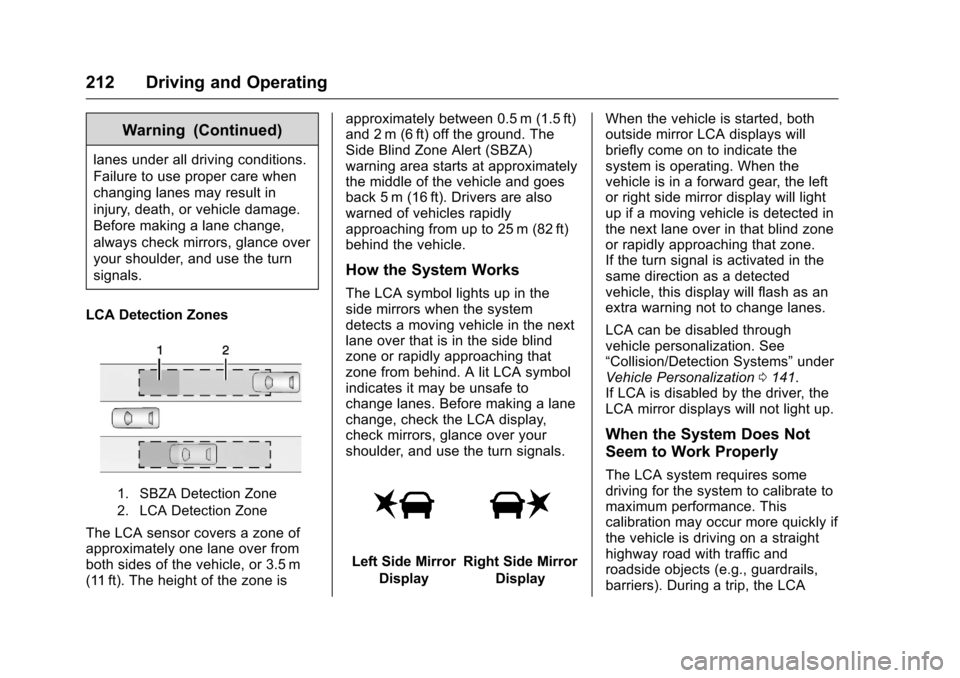
LCA Detection Zones
1. SBZA Detection Zone
2. LCA Detection Zone
The LCA sensor covers a zone of
approximately one lane over from
both sides of the vehicle, or 3.5 m
(11 ft). The height of the zone is approximately between 0.5 m (1.5 ft)
and 2 m (6 ft) off the ground. The
Side Blind Zone Alert (SBZA)
warning area starts at approximately
the middle of the vehicle and goes
back 5 m (16 ft). Drivers are also
warned of vehicles rapidly
approaching from up to 25 m (82 ft)
behind the vehicle.
How the System Works
The LCA symbol lights up in the
side mirrors when the system
detects a moving vehicle in the next
lane over that is in the side blind
zone or rapidly approaching that
zone from behind. A lit LCA symbol
indicates it may be unsafe to
change lanes. Before making a lane
change, check the LCA display,
check mirrors, glance over your
shoulder, and use the turn signals.
Left Side Mirror
DisplayRight Side Mirror Display When the vehicle is started, both
outside mirror LCA displays will
briefly come on to indicate the
system is operating. When the
vehicle is in a forward gear, the left
or right side mirror display will light
up if a moving vehicle is detected in
the next lane over in that blind zone
or rapidly approaching that zone.
If the turn signal is activated in the
same direction as a detected
vehicle, this display will flash as an
extra warning not to change lanes.
LCA can be disabled through
vehicle personalization. See
“Collision/Detection Systems”
under
Vehicle Personalization 0141.
If LCA is disabled by the driver, the
LCA mirror displays will not light up.
When the System Does Not
Seem to Work Properly
The LCA system requires some
driving for the system to calibrate to
maximum performance. This
calibration may occur more quickly if
the vehicle is driving on a straight
highway road with traffic and
roadside objects (e.g., guardrails,
barriers). During a trip, the LCA
Page 214 of 376
Chevrolet VOLT Owner Manual (GMNA-Localizing-U.S./Canada/Mexico-
9807421) - 2017 - CRC - 11/18/15
Driving and Operating 213
system is not operational until the
vehicle first reaches a speed of
24 km/h (15 mph).
LCA displays may not come on
when passing a vehicle quickly or
for a stopped vehicle. LCA may alert
to objects attached to the vehicle,
such as a bicycle or object
extending out to either side of the
vehicle. Attached objects may also
interfere with the detection of
vehicles. This is normal system
operation; the vehicle does not need
service.
LCA may not always alert the driver
to vehicles in the next lane over,
especially in wet conditions or when
driving on sharp curves. The system
does not need to be serviced. The
system may light up due to
guardrails, signs, trees, shrubs, and
other non-moving objects. This is
normal system operation; the
vehicle does not need service.
LCA may not operate when the LCA
sensors in the left or right corners of
the rear bumper are covered with
mud, dirt, snow, ice, or slush, or in
heavy rainstorms. For cleaninginstructions, see "Washing the
Vehicle" under
Exterior Care0314.
If the DIC still displays the system
unavailable message after cleaning
both sides of the vehicle toward the
rear corners of the vehicle, see your
dealer.
If the LCA displays do not light up
when moving vehicles are in the
side blind zone or rapidly
approaching this zone and the
system is clean, the system may
need service. Take the vehicle to
your dealer.
When LCA is disabled for any
reason other than the driver turning
it off, the Lane Change Alert On
option will not be available on the
personalization menu.
Radio Frequency Information
See Radio Frequency
Statement 0351.
Lane Departure
Warning (LDW)
If equipped, LDW may help avoid
crashes due to unintentional lane
departures. It may provide a warning if the vehicle is crossing a
detected lane marking without using
a turn signal in the lane departure
direction. Since this system is part
of the Lane Keep Assist (LKA)
system, read the entire LKA section
before using this feature.
Lane Keep Assist (LKA)
If equipped, LKA may help avoid
crashes due to unintentional lane
departures. It may assist by gently
turning the steering wheel if the
vehicle approaches a detected lane
marking without using a turn signal
in that direction. It may also provide
a Lane Departure Warning (LDW)
system alert as the lane marking is
crossed. The LKA system will not
assist or provide an LDW alert if it
detects that you are actively
steering. Override LKA by turning
the steering wheel. LKA uses a
camera to detect lane markings
between 60 km/h (37 mph) and
180 km/h (112 mph).
Page 217 of 376
Chevrolet VOLT Owner Manual (GMNA-Localizing-U.S./Canada/Mexico-
9807421) - 2017 - CRC - 11/18/15
216 Driving and Operating
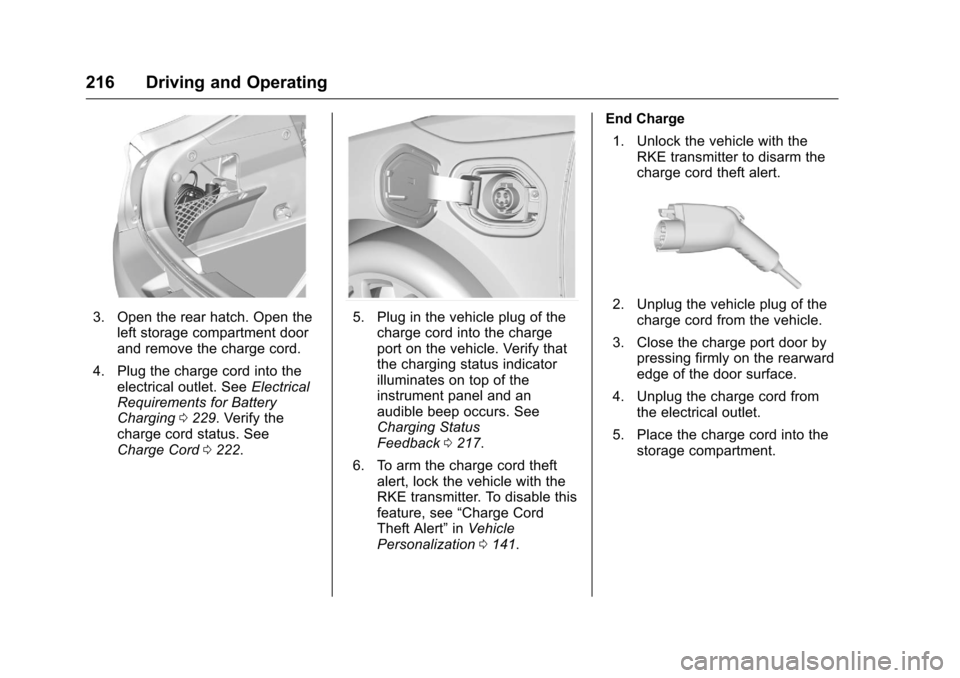
3. Open the rear hatch. Open theleft storage compartment door
and remove the charge cord.
4. Plug the charge cord into the electrical outlet. See Electrical
Requirements for Battery
Charging 0229. Verify the
charge cord status. See
Charge Cord 0222.5. Plug in the vehicle plug of the
charge cord into the charge
port on the vehicle. Verify that
the charging status indicator
illuminates on top of the
instrument panel and an
audible beep occurs. See
Charging Status
Feedback 0217.
6. To arm the charge cord theft alert, lock the vehicle with the
RKE transmitter. To disable this
feature, see “Charge Cord
Theft Alert” inVehicle
Personalization 0141. End Charge
1. Unlock the vehicle with the RKE transmitter to disarm the
charge cord theft alert.2. Unplug the vehicle plug of thecharge cord from the vehicle.
3. Close the charge port door by pressing firmly on the rearward
edge of the door surface.
4. Unplug the charge cord from the electrical outlet.
5. Place the charge cord into the storage compartment.
Page 373 of 376
Chevrolet VOLT Owner Manual (GMNA-Localizing-U.S./Canada/Mexico-
9807421) - 2017 - CRC - 11/18/15
372 Index
Parking or BackingAssistance Systems . . . . . . . . . . 204
Passenger Airbag Status Indicator . . . . . . . . . . . . . . . . . . . . . . 108
Passenger Compartment Air Filter . . . . . . . . . . . . . . . . . . . . . . . . . . 162
Passenger Sensing System . . . . . 69
Perchlorate Materials
Requirements, California . . . . . . 236
Personalization Vehicle . . . . . . . . . . . . . . . . . . . . . . . 141
Plug-In Charging . . . . . . . . . . . . . . . 215
Power Button . . . . . . . . . . . . . . . . . . . . . . . . 175
Door Locks . . . . . . . . . . . . . . . . . . . . . 40
Flows . . . . . . . . . . . . . . . . . . . . . . . . . .117
Indicator Gauge . . . . . . . . . . . . . . 107
Mirrors . . . . . . . . . . . . . . . . . . . . . . . . . . 46
Outlets . . . . . . . . . . . . . . . . . . . . . . . . . 99
Protection, Battery . . . . . . . . . . . . 155
Retained Accessory (RAP) . . . 177
Windows . . . . . . . . . . . . . . . . . . . . . . . 47
Pregnancy, Using Safety Belts . . . 61
Privacy Vehicle Data Recording . . . . . . . 353
Program Courtesy Transportation . . . . . . 347
Programmable Charging . . . . . . . . 119 Proposition
65 Warning,
California . . . . . . . . . . . .236, 256, 305
Propulsion Power Messages . . . 138
R
Radio Frequency Statement . . . . 351
Reading Lamps . . . . . . . . . . . . . . . . . 154
Ready Indicator . . . . . . . . . . . . . . . . . 116
Rear Seats . . . . . . . . . . . . . . . . . . . . . . 55 Heated . . . . . . . . . . . . . . . . . . . . . . . . . 57
Rear Storage . . . . . . . . . . . . . . . . . . . . 93
Rear Vision Camera (RVC) . . . . . 204
Rearview Mirrors . . . . . . . . . . . . . . . . 46
Automatic Dimming . . . . . . . . . . . . . 46
Reclining Seatbacks . . . . . . . . . . . . . 53
Recommended Fluids and Lubricants . . . . . . . . . . . . . . . . . . . . . 334
Records Maintenance . . . . . . . . . . . . . . . . . . 336
Recreational Vehicle Towing . . . . 312
Regenerative Braking . . . . . . . . . . . 190
Reimbursement Program,
GM Mobility . . . . . . . . . . . . . . . . . . . 345
Remote Keyless Entry (RKE) System . . . . . . . . . . . . . . . . . . . . . . . . . 30
Remote Start . . . . . . . . . . . . . . . . . . . . 36
Replacement Bulbs . . . . . . . . . . . . . 262 Replacement Parts
Airbags . . . . . . . . . . . . . . . . . . . . . . . . . 75
Maintenance . . . . . . . . . . . . . . . . . . 335
Replacing Airbag System . . . . . . . . 75
Replacing LATCH System Parts after a Crash . . . . . . . . . . . . . 87
Replacing Safety Belt System
Parts after a Crash . . . . . . . . . . . . . 62
Reporting Safety Defects Canadian Government . . . . . . . . 352
General Motors . . . . . . . . . . . . . . . 352
U.S. Government . . . . . . . . . . . . . 352
Requirements Electrical Battery Charging . . . 229
Restraints Where to Put . . . . . . . . . . . . . . . . . . . 81
Retained Accessory Power (RAP) . . . . . . . . . . . . . . . . . . 177
Ride Control Systems Messages . . . . . . . . . . . . . . . . . . . . 138
Roads
Driving, Wet . . . . . . . . . . . . . . . . . . 168
Roadside Assistance Program . . . . . . . . . . . . . . . . . . . . . . . 345
Rotation, Tires . . . . . . . . . . . . . . . . . . 284
Routing, Engine Drive Belt . . . . . . 340
Running the Vehicle While
Parked . . . . . . . . . . . . . . . . . . . . . . . . 186
Page 376 of 376
Chevrolet VOLT Owner Manual (GMNA-Localizing-U.S./Canada/Mexico-
9807421) - 2017 - CRC - 11/18/15
Index 375
Vehicle (cont'd)Messages . . . . . . . . . . . . . . . . . . . . 132
Personalization . . . . . . . . . . . . . . . 141
Reminder Messages . . . . . . . . . . 140
Security . . . . . . . . . . . . . . . . . . . . . . . . 43
Speed Messages . . . . . . . . . . . . . 140
Starting and Stopping . . . . . . . . . 176
Towing . . . . . . . . . . . . . . . . . . . . . . . . .311
Vehicle Ahead Indicator . . . . . . . . 113
Vehicle Care
Storing the Tire Sealantand Compressor Kit . . . . . . . . . 299
Tire Pressure . . . . . . . . . . . . . . . . . 278
Vehicle Data Recording and
Privacy . . . . . . . . . . . . . . . . . . . . . . . . 353
Vehicle Ready Light . . . . . . . . . . . . 116
Ventilation, Air . . . . . . . . . . . . . . . . . . 162
Visors . . . . . . . . . . . . . . . . . . . . . . . . . . . 49
Voltage Devices and Wiring . . . . 262
W
Warning Brake System Light . . . . . . . . . . . . 111
Caution and Danger . . . . . . . . . . . . . 3
Lane Departure (LDW) . . . . . . . 213
Warning Lights, Gauges, and Indicators . . . . . . . . . . . . . . . . . . . . . 101 Warnings
Hazard Flashers . . . . . . . . . . . . . . 152
Washer Fluid . . . . . . . . . . . . . . . . . . . 253
Wheels Alignment and Tire Balance . . 289
Different Size . . . . . . . . . . . . . . . . . 287
Replacement . . . . . . . . . . . . . . . . . 289
When It Is Time for New Tires . . . . . . . . . . . . . . . . . . . . . . . . . . 285
Where to Put the Restraint . . . . . . 81
Windows . . . . . . . . . . . . . . . . . . . . . . . . 47 Power . . . . . . . . . . . . . . . . . . . . . . . . . . 47
Windshield Wiper/Washer . . . . . . . . . . . . . . . . . . 97
Winter Driving . . . . . . . . . . . . . . . . . . . . . . . . 170
Winter Tires . . . . . . . . . . . . . . . . . . . . 272
Wiper Blade Replacement . . . . . . 258
Wireless Charging . . . . . . . . . . . . . . . 99
Wiring, High Voltage Devices . . . 262