ECO mode CHEVROLET VOLT 2017 2.G Owner's Guide
[x] Cancel search | Manufacturer: CHEVROLET, Model Year: 2017, Model line: VOLT, Model: CHEVROLET VOLT 2017 2.GPages: 376, PDF Size: 6.75 MB
Page 183 of 376
Chevrolet VOLT Owner Manual (GMNA-Localizing-U.S./Canada/Mexico-
9807421) - 2017 - CRC - 11/18/15
182 Driving and Operating
Each time the vehicle is started, it
will return to Normal Mode.
Mountain Mode
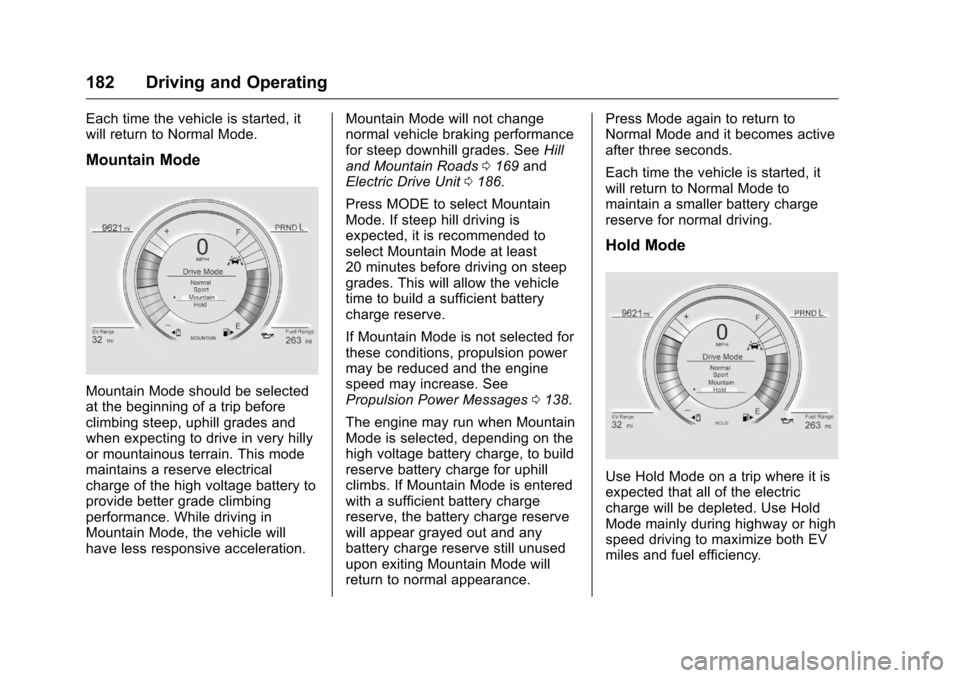
Mountain Mode should be selected
at the beginning of a trip before
climbing steep, uphill grades and
when expecting to drive in very hilly
or mountainous terrain. This mode
maintains a reserve electrical
charge of the high voltage battery to
provide better grade climbing
performance. While driving in
Mountain Mode, the vehicle will
have less responsive acceleration.Mountain Mode will not change
normal vehicle braking performance
for steep downhill grades. See
Hill
and Mountain Roads 0169 and
Electric Drive Unit 0186.
Press MODE to select Mountain
Mode. If steep hill driving is
expected, it is recommended to
select Mountain Mode at least
20 minutes before driving on steep
grades. This will allow the vehicle
time to build a sufficient battery
charge reserve.
If Mountain Mode is not selected for
these conditions, propulsion power
may be reduced and the engine
speed may increase. See
Propulsion Power Messages 0138.
The engine may run when Mountain
Mode is selected, depending on the
high voltage battery charge, to build
reserve battery charge for uphill
climbs. If Mountain Mode is entered
with a sufficient battery charge
reserve, the battery charge reserve
will appear grayed out and any
battery charge reserve still unused
upon exiting Mountain Mode will
return to normal appearance. Press Mode again to return to
Normal Mode and it becomes active
after three seconds.
Each time the vehicle is started, it
will return to Normal Mode to
maintain a smaller battery charge
reserve for normal driving.
Hold Mode
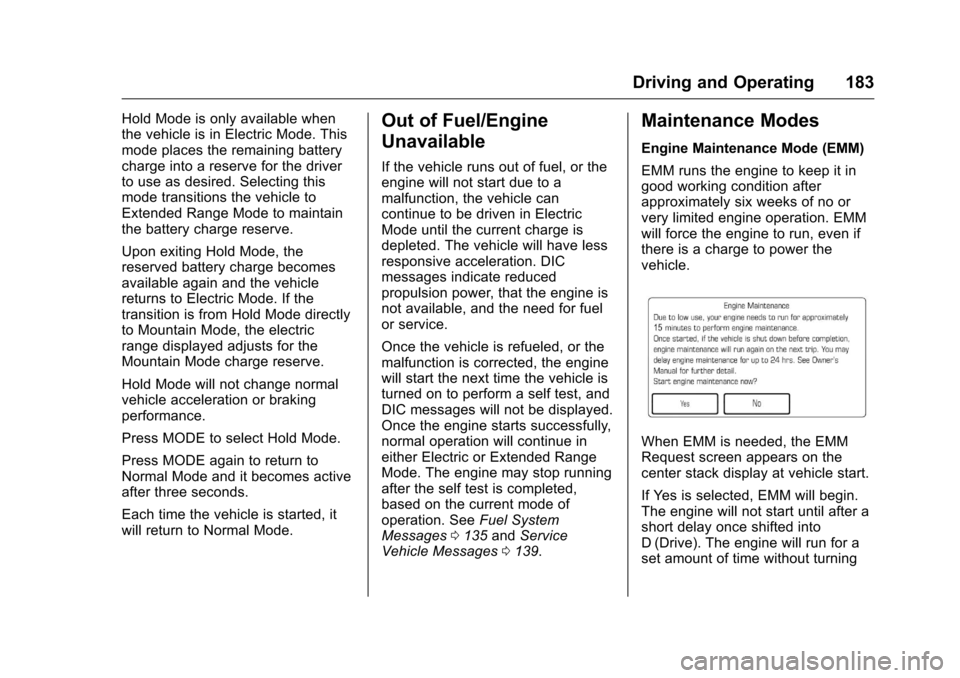
Use Hold Mode on a trip where it is
expected that all of the electric
charge will be depleted. Use Hold
Mode mainly during highway or high
speed driving to maximize both EV
miles and fuel efficiency.
Page 184 of 376
Chevrolet VOLT Owner Manual (GMNA-Localizing-U.S./Canada/Mexico-
9807421) - 2017 - CRC - 11/18/15
Driving and Operating 183
Hold Mode is only available when
the vehicle is in Electric Mode. This
mode places the remaining battery
charge into a reserve for the driver
to use as desired. Selecting this
mode transitions the vehicle to
Extended Range Mode to maintain
the battery charge reserve.
Upon exiting Hold Mode, the
reserved battery charge becomes
available again and the vehicle
returns to Electric Mode. If the
transition is from Hold Mode directly
to Mountain Mode, the electric
range displayed adjusts for the
Mountain Mode charge reserve.
Hold Mode will not change normal
vehicle acceleration or braking
performance.
Press MODE to select Hold Mode.
Press MODE again to return to
Normal Mode and it becomes active
after three seconds.
Each time the vehicle is started, it
will return to Normal Mode.Out of Fuel/Engine
Unavailable
If the vehicle runs out of fuel, or the
engine will not start due to a
malfunction, the vehicle can
continue to be driven in Electric
Mode until the current charge is
depleted. The vehicle will have less
responsive acceleration. DIC
messages indicate reduced
propulsion power, that the engine is
not available, and the need for fuel
or service.
Once the vehicle is refueled, or the
malfunction is corrected, the engine
will start the next time the vehicle is
turned on to perform a self test, and
DIC messages will not be displayed.
Once the engine starts successfully,
normal operation will continue in
either Electric or Extended Range
Mode. The engine may stop running
after the self test is completed,
based on the current mode of
operation. SeeFuel System
Messages 0135 andService
Vehicle Messages 0139.
Maintenance Modes
Engine Maintenance Mode (EMM)
EMM runs the engine to keep it in
good working condition after
approximately six weeks of no or
very limited engine operation. EMM
will force the engine to run, even if
there is a charge to power the
vehicle.
When EMM is needed, the EMM
Request screen appears on the
center stack display at vehicle start.
If Yes is selected, EMM will begin.
The engine will not start until after a
short delay once shifted into
D (Drive). The engine will run for a
set amount of time without turning
Page 186 of 376
Chevrolet VOLT Owner Manual (GMNA-Localizing-U.S./Canada/Mexico-
9807421) - 2017 - CRC - 11/18/15
Driving and Operating 185
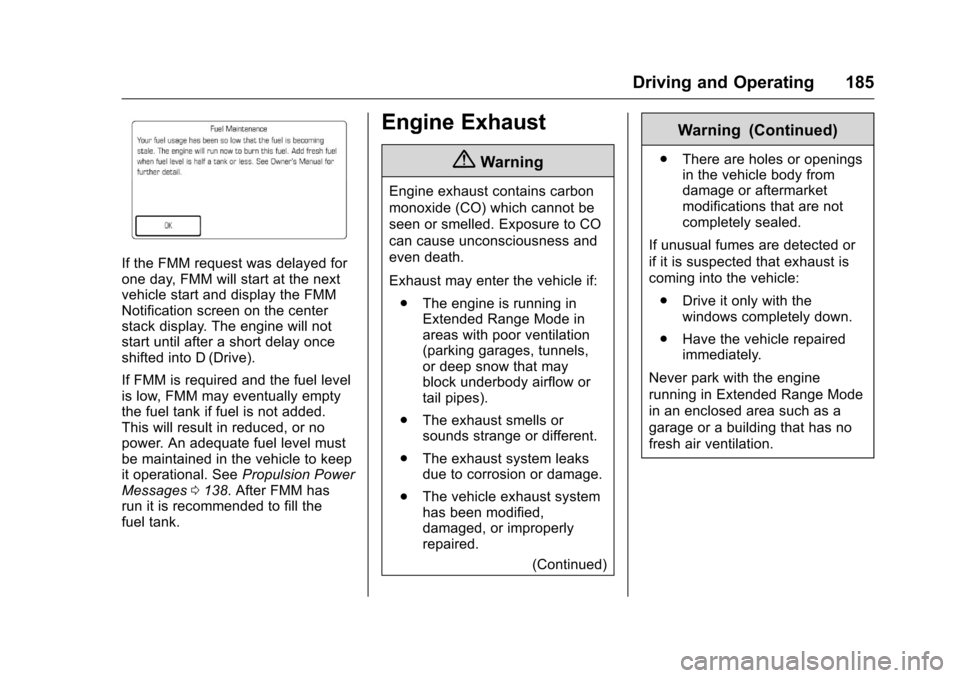
If the FMM request was delayed for
one day, FMM will start at the next
vehicle start and display the FMM
Notification screen on the center
stack display. The engine will not
start until after a short delay once
shifted into D (Drive).
If FMM is required and the fuel level
is low, FMM may eventually empty
the fuel tank if fuel is not added.
This will result in reduced, or no
power. An adequate fuel level must
be maintained in the vehicle to keep
it operational. SeePropulsion Power
Messages 0138. After FMM has
run it is recommended to fill the
fuel tank.
Engine Exhaust
{Warning
Engine exhaust contains carbon
monoxide (CO) which cannot be
seen or smelled. Exposure to CO
can cause unconsciousness and
even death.
Exhaust may enter the vehicle if:
. The engine is running in
Extended Range Mode in
areas with poor ventilation
(parking garages, tunnels,
or deep snow that may
block underbody airflow or
tail pipes).
. The exhaust smells or
sounds strange or different.
. The exhaust system leaks
due to corrosion or damage.
. The vehicle exhaust system
has been modified,
damaged, or improperly
repaired.
(Continued)
Warning (Continued)
.There are holes or openings
in the vehicle body from
damage or aftermarket
modifications that are not
completely sealed.
If unusual fumes are detected or
if it is suspected that exhaust is
coming into the vehicle: . Drive it only with the
windows completely down.
. Have the vehicle repaired
immediately.
Never park with the engine
running in Extended Range Mode
in an enclosed area such as a
garage or a building that has no
fresh air ventilation.
Page 191 of 376
Chevrolet VOLT Owner Manual (GMNA-Localizing-U.S./Canada/Mexico-
9807421) - 2017 - CRC - 11/18/15
190 Driving and Operating
Caution
Driving with the parking brake on
can overheat the brake system
and cause premature wear or
damage to brake system parts.
Make sure that the parking brake
is fully released and the brake
warning light is off before driving.
Automatic EPB Release
The EPB will automatically release if
the vehicle is running, placed into
gear, and an attempt is made to
drive away. Avoid rapid acceleration
when the EPB is applied, to
preserve parking brake lining life.
Hill Start Assist (HSA)
The HSA feature will activate when
the vehicle is stopped on a
moderate to steep grade to help
prevent it from rolling in an
unintended direction. After the brake
pedal has been released and before
the accelerator pedal has been
pressed, HSA uses braking
pressure to hold the vehiclestationary. If HSA is holding the
vehicle, a DIC message displays.
HSA will not activate in a forward
drive gear when facing downhill,
or in R (Reverse) when facing uphill.
Extended Hill Start
Assist (EHSA)
Select the duration of the HSA
feature on the center stack
touchscreen by choosing the
submenu for Hill Start Assist or
Extended Hill Start Assist (EHSA).
See
“Extended Hill Start Assist"
under “Comfort and Convenience” in
Vehicle Personalization 0141.
When Standard Hold is selected,
the vehicle is held stationary for up
to two seconds after the brake pedal
is released. When Extended Hold is
selected, the vehicle is held
stationary for up to five minutes
after the brake pedal is released. In
either case, override the hold
feature by pressing the accelerator
pedal and attempting to drive away.
If Hill Start Assist is selected in the
Settings menu, it will hold the
vehicle for two seconds unless the
driver door is opened or the driver safety belt is unbuckled after
releasing the brake pedal.
If Extended Hill Start Assist is
selected, it will hold the vehicle for
five minutes unless the driver door
is opened and the driver safety belt
is unbuckled prior to releasing the
brake pedal. When EHSA is
deactivated after five minutes, or if it
is deactivated when the driver
safety belt is unlatched or the driver
door is opened, the Electric Parking
Brake will engage to prevent vehicle
movement.
Regenerative Braking
Some braking energy from the
moving vehicle is turned back into
electrical energy. This energy is
then stored back into the high
voltage battery system, increasing
energy efficiency.
The hydraulic disc brakes work with
the regenerative braking to ensure
effective braking, such as when a
high braking demand is requested.
Page 241 of 376
Chevrolet VOLT Owner Manual (GMNA-Localizing-U.S./Canada/Mexico-
9807421) - 2017 - CRC - 11/18/15
240 Vehicle Care
This vehicle has an airbag system.
Before attempting to do your own
service work, seeAirbag System
Check 075.
Keep a record with all parts receipts
and list the mileage and the date of
any service work performed. See
Maintenance Records 0336.
Caution
Even small amounts of
contamination can cause damage
to vehicle systems. Do not allow
contaminants to contact the fluids,
reservoir caps, or dipsticks.
Hood
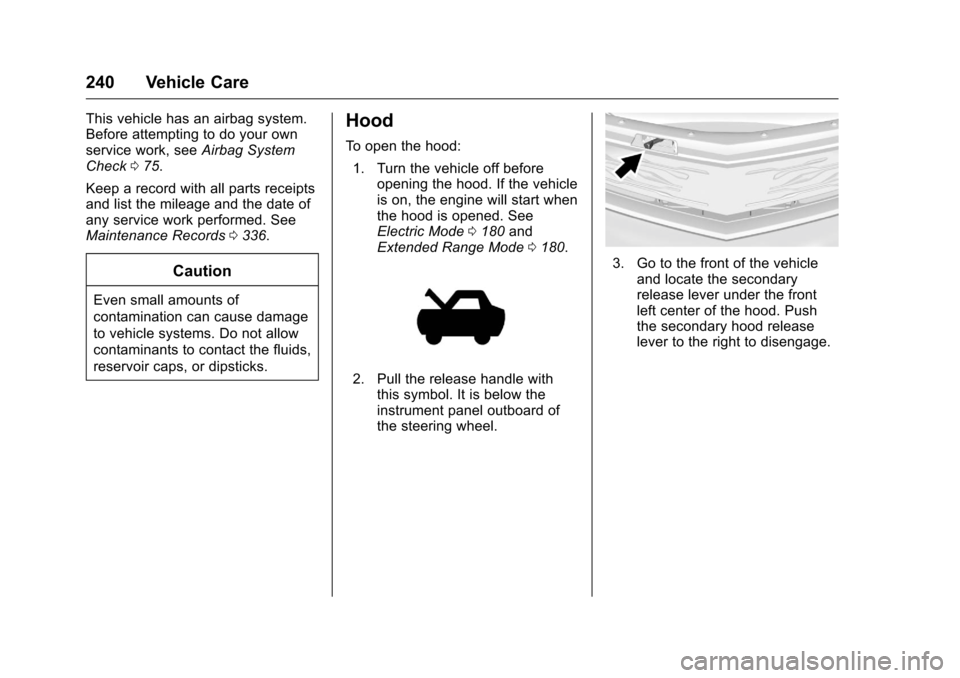
To open the hood:
1. Turn the vehicle off before opening the hood. If the vehicle
is on, the engine will start when
the hood is opened. See
Electric Mode 0180 and
Extended Range Mode 0180.
2. Pull the release handle with
this symbol. It is below the
instrument panel outboard of
the steering wheel.
3. Go to the front of the vehicle
and locate the secondary
release lever under the front
left center of the hood. Push
the secondary hood release
lever to the right to disengage.
Page 258 of 376
Chevrolet VOLT Owner Manual (GMNA-Localizing-U.S./Canada/Mexico-
9807421) - 2017 - CRC - 11/18/15
Vehicle Care 257
Vehicle Storage
{Warning
Batteries have acid that can burn
you and gas that can explode.
You can be badly hurt if you are
not careful. SeeJump Starting -
North America 0305 for tips on
working around a battery without
getting hurt.
Up to four weeks
. Plug in the high voltage battery
charge cord if temperatures will
exceed 35 °C (95 °F) and keep
the 12-volt battery cables
connected.
Four weeks to 12 months
. Discharge the high voltage
battery until two or three bars
remain on the battery range
indicator (Battery symbol) on the
instrument cluster.
. Do not plug in the high voltage
battery charge cord. .
Remove the black negative (−)
cable from the 12-volt battery.
Attach a trickle charger to the
battery terminals or keep the
12-volt battery cables connected
and trickle charge from the
underhood remote positive (+)
and negative (−) terminals. See
Jump Starting - North America
0305 for the location of these
terminals.
Caution
The vehicle is equipped with an
AGM/VRLA 12-volt battery, which
can be damaged by using the
incorrect type of trickle charger.
An AGM/VRLA-compatible
charger must be used, with the
appropriate setting selected.
Follow the trickle charger
manufacturer instructions.
Reconnecting the 12-Volt Black
Negative Cable
With the 12-volt black negative (−)
cable disconnected, the hatch
cannot be opened by pressing the hatch release button. If the hatch is
closed and latched after power has
been disconnected:
1. Use the door key to open the driver door.
2. Manually unlock and open one of the rear doors.
3. Lower one of the rear seatbacks.
4. Pull the load floor cover forward to access and
reconnect the 12-volt battery
black negative (−) cable.
5. After the cable has been connected, open the rear hatch
and then tighten the cable.
After the battery cable is
reconnected, it is possible that the
vehicle may not operate in Electric
Mode. If this happens, the high
voltage battery may need to be
charged.
Page 259 of 376
Chevrolet VOLT Owner Manual (GMNA-Localizing-U.S./Canada/Mexico-
9807421) - 2017 - CRC - 11/18/15
258 Vehicle Care
Electric Drive Unit Shift
Lock Control Function
Check
{Warning
When you are doing this
inspection, the vehicle could
move suddenly. If the vehicle
moves, you or others could be
injured.
1. Before starting this check, be sure there is enough room
around the vehicle. It should be
parked on a level surface.
2. Firmly apply the parking brake. See Electric Parking
Brake 0188.
Be ready to apply the regular
brake immediately if the vehicle
begins to move. 3. With the vehicle off and the
brake not applied, press and
hold POWER
Ofor more than
five seconds to place the
vehicle in Service Only Mode.
See Power Button 0175.
Without applying the regular
brake, try to move the shift
lever out of P (Park) with
normal effort. If the shift lever
moves out of P (Park), contact
your dealer for service.
Park Brake and P (Park)
Mechanism Check
{Warning
When you are doing this check,
the vehicle could begin to move.
You or others could be injured
and property could be damaged.
Make sure there is room in front
of the vehicle in case it begins to
roll. Be ready to apply the regular
brake at once should the vehicle
begin to move. Park on a fairly steep hill, with the
vehicle facing downhill. Keeping
your foot on the regular brake, set
the Electric Parking Brake (EPB).
.
To check the EPB's holding
ability: With the propulsion
system active and the electric
drive unit in N (Neutral), slowly
remove foot pressure from the
regular brake pedal. Do this until
the vehicle is held by the
EPB only.
. To check the P (Park)
mechanism's holding ability:
With the propulsion system
active, shift to P (Park). Then
release the EPB followed by the
regular brake.
Contact your dealer if service is
required.
Wiper Blade Replacement
Windshield wiper blades should be
inspected for wear and cracking.
See the Maintenance
Schedule 0326.
Page 346 of 376
Chevrolet VOLT Owner Manual (GMNA-Localizing-U.S./Canada/Mexico-
9807421) - 2017 - CRC - 11/18/15
Customer Information 345
.Download owner manuals.
. Find the
Chevrolet-recommended
maintenance services.
GM Mobility
Reimbursement Program
This program is available to
qualified applicants for cost
reimbursement of eligible
aftermarket adaptive equipment
required for the vehicle, such as
hand controls or a wheelchair/
scooter lift for the vehicle.
For more information on the limited
offer, visit www.gmmobility.com or
call the GM Mobility Assistance
Center at 1-800-323-9935. Text
Telephone (TTY) users, call
1-800-833-9935. General Motors of Canada also has
a Mobility Program. Visit www.gm.ca
or call 1-800-GM-DRIVE (463-7483)
for details. TTY users call
1-800-263-3830.
Roadside Assistance
Program
From the U.S., call 1-888-811-1926;
(Text Telephone (TTY):
1-888-889-2438).
From Canada, call 1-800-268-6800.
Service is available 24 hours a day,
365 days a year.
Calling for Assistance
When calling Roadside Assistance,
have the following information
ready:
.
Your name, home address, and
home telephone number.
. Telephone number of your
location.
. Location of the vehicle.
. Model, year, color, and license
plate number of the vehicle. .
Odometer reading, Vehicle
Identification Number (VIN), and
delivery date of the vehicle.
. Description of the problem.
Coverage
Services are provided for the
duration of the vehicle’s powertrain
warranty.
In the U.S., anyone driving the
vehicle is covered. In Canada, a
person driving the vehicle without
permission from the owner is not
covered.
Roadside Assistance is not a part of
the New Vehicle Limited Warranty.
General Motors North America and
Chevrolet reserve the right to make
any changes or discontinue the
Roadside Assistance program at
any time without notification.
General Motors North America and
Chevrolet reserve the right to limit
services or payment to an owner or
driver if they decide the claims are
made too often, or the same type of
claim is made many times.
Page 351 of 376
Chevrolet VOLT Owner Manual (GMNA-Localizing-U.S./Canada/Mexico-
9807421) - 2017 - CRC - 11/18/15
350 Customer Information
.Vehicle license plate number.
. Vehicle make, model, and
model year.
. Vehicle Identification
Number (VIN).
. Insurance company and policy
number.
. General description of the
damage to the other vehicle.
Choose a reputable repair facility
that uses quality replacement parts.
See “Collision Parts” earlier in this
section.
In a crash, the sensing system may
shut down the high voltage system.
See Battery - North America 0256
for important safety information.
If an airbag has inflated, see What
Will You See after an Airbag
Inflates? 068.
If the vehicle is damaged from a
crash, flood, fire, or other event it
may be necessary to have the
vehicle inspected. SeeBattery -
North America 0256 andHigh
Voltage Safety Information 019 for
important safety information.Managing the Vehicle Damage
Repair Process
In the event that the vehicle requires
damage repairs, GM recommends
that you take an active role in its
repair. If you have a pre-determined
repair facility of choice, take the
vehicle there, or have it towed there.
Specify to the facility that any
required replacement collision parts
be original equipment parts, either
new Genuine GM parts or recycled
original GM parts. Remember,
recycled parts will not be covered by
the GM vehicle warranty.
Insurance pays the bill for the repair,
but you must live with the repair.
Depending on your policy limits,
your insurance company may
initially value the repair using
aftermarket parts. Discuss this with
the repair professional, and insist on
Genuine GM parts. Remember,
if the vehicle is leased, you may be
obligated to have the vehicle
repaired with Genuine GM parts,
even if your insurance coverage
does not pay the full cost. If another party's insurance
company is paying for the repairs,
you are not obligated to accept a
repair valuation based on that
insurance company's collision policy
repair limits, as you have no
contractual limits with that company.
In such cases, you can have control
of the repair and parts choices as
long as the cost stays within
reasonable limits.
Service Publications
Ordering Information
Service Manuals
Service Manuals have the diagnosis
and repair information on the
engine, electric drive unit, axle,
suspension, brakes, electrical,
steering, body, etc.
Service Bulletins
Service Bulletins give additional
technical service information
needed to knowledgeably service
General Motors cars and trucks.
Each bulletin contains instructions
to assist in the diagnosis and
service of the vehicle.
Page 368 of 376
Chevrolet VOLT Owner Manual (GMNA-Localizing-U.S./Canada/Mexico-
9807421) - 2017 - CRC - 11/18/15
Index 367
Compass . . . . . . . . . . . . . . . . . . . . . . . . 98Messages . . . . . . . . . . . . . . . . . . . . 133
Compressor Kit, Tire Sealant . . . 293
Connections OnStar
®. . . . . . . . . . . . . . . . . . . . . . 357
Control Traction and Electronic
Stability . . . . . . . . . . . . . . . . . . . . . 192
Control of a Vehicle . . . . . . . . . . . . . 166
Convex Mirrors . . . . . . . . . . . . . . . . . . 45
Coolant Engine . . . . . . . . . . . . . . . . . . . . . . . . 250
Engine TemperatureWarning Light . . . . . . . . . . . . . . . .114
Cooling System . . . . . . . . . . . . 248, 249 Engine Messages . . . . . . . . . . . . 134
Courtesy Transportation Program . . . . . . . . . . . . . . . . . . . . . . . 347
Cover Cargo . . . . . . . . . . . . . . . . . . . . . . . . . . . 94
Cruise Control . . . . . . . . . . . . . . . . . . 194
Light . . . . . . . . . . . . . . . . . . . . . . . . . . .117
Messages . . . . . . . . . . . . . . . . . . . . 133
Cruise Control, Adaptive . . . . . . . . 196
Customer Assistance . . . . . . . . . . . 344 Offices . . . . . . . . . . . . . . . . . . . . . . . . 343
Text Telephone (TTY)Users . . . . . . . . . . . . . . . . . . . . . . . 344 Customer Information
Service Publications
Ordering Information . . . . . . . . 350
Customer Satisfaction Procedure . . . . . . . . . . . . . . . . . . . . . 341
D
Damage Repair, Collision . . . . . . . 348
Danger, Warning, and Caution . . . . 3
Data CollectionInfotainment System . . . . . . . . . . 354
OnStar . . . . . . . . . . . . . . . . . . . . . . . 354
Data Recorders, Event . . . . . . . . . 353
Daytime Running Lamps (DRL) . . . . . . . . . . . . . . . . . . 151
Defensive Driving . . . . . . . . . . . . . . . 166
Delayed Charging Override . . . . . 217
Delayed Locking . . . . . . . . . . . . . . . . . 40
Diagnostics OnStar
®. . . . . . . . . . . . . . . . . . . . . . 359
Distracted Driving . . . . . . . . . . . . . . . 165
Dome Lamps . . . . . . . . . . . . . . . . . . . 154
Door
Ajar Light . . . . . . . . . . . . . . . . . . . . . .117
Ajar Messages . . . . . . . . . . . . . . . 133
Delayed Locking . . . . . . . . . . . . . . . . 40
Locks . . . . . . . . . . . . . . . . . . . . . . . . . . . 39
Power Locks . . . . . . . . . . . . . . . . . . . . 40
Drive Belt Routing, Engine . . . . . . 340 Drive Unit
Electric . . . . . . . . . . . . . . . . . . . . . . . 186
Driver Assistance Systems . . . . . 203
Driver Efficiency Gauge . . . . . . . . 106
Driver Information Center (DIC) . . . . . . . . . . . . . . . . . . 130
Driver Mode Control . . . . . . . . . . . . 193
Driver Selected Operating
Modes . . . . . . . . . . . . . . . . . . . . . . . . 181
Driving Assistance Systems . . . . . . . . . . 208
Defensive . . . . . . . . . . . . . . . . . . . . . 166
Drunk . . . . . . . . . . . . . . . . . . . . . . . . . 166
Hill and Mountain Roads . . . . . . 169
If the Vehicle is Stuck . . . . . . . . . 171
Loss of Control . . . . . . . . . . . . . . . 168
Off-Road Recovery . . . . . . . . . . . 167
Vehicle Load Limits . . . . . . . . . . . 171
Wet Roads . . . . . . . . . . . . . . . . . . . 168
Winter . . . . . . . . . . . . . . . . . . . . . . . . 170
Driving for Better Energy
Efficiency . . . . . . . . . . . . . . . . . . . . . . 26
E
Electric Drive Unit . . . . . . . . . . . . . . 186
Electric Drive Unit Messages . . . 134
Electric Drive Unit Shift LockControl Function Check . . . . . . . 258
Electric Mode . . . . . . . . . . . . . . . . . . . 180