brake CHEVROLET VOLT 2017 2.G Workshop Manual
[x] Cancel search | Manufacturer: CHEVROLET, Model Year: 2017, Model line: VOLT, Model: CHEVROLET VOLT 2017 2.GPages: 376, PDF Size: 6.75 MB
Page 211 of 376
Chevrolet VOLT Owner Manual (GMNA-Localizing-U.S./Canada/Mexico-
9807421) - 2017 - CRC - 11/18/15
210 Driving and Operating
Cleaning the System
If the FCA system does not seem to
operate properly, cleaning the
outside of the windshield in front of
the rearview mirror, and cleaning the
front of the vehicle where radar
sensors are located, may correct
the issue.
Forward Automatic
Braking (FAB)
If the vehicle has Forward Collision
Alert (FCA), it also has FAB, which
includes Intelligent Brake
Assist (IBA). When the system
detects a vehicle ahead in your path
that is traveling in the same
direction that you may be about to
crash into, it can provide a boost to
braking or automatically brake the
vehicle. This can help avoid or
lessen the severity of crashes when
driving in a forward gear. Depending
on the situation, the vehicle may
automatically brake moderately or
hard. This front automatic braking
can only occur if a vehicle is
detected. This is shown by the FCAvehicle ahead indicator being lit.
See
Forward Collision Alert (FCA)
System 0208.
The system works when driving in a
forward gear between 8 km/h
(5 mph) and 60 km/h (37 mph).
It can detect vehicles up to
approximately 60 m (197 ft).
{Warning
FAB is an emergency crash
preparation feature and is not
designed to avoid crashes. Do
not rely on FAB to brake the
vehicle. FAB will not brake
outside of its operating speed
range and only responds to
detected vehicles.
FAB may not: . Detect a vehicle ahead on
winding or hilly roads.
. Detect all vehicles,
especially vehicles with a
trailer, tractors, muddy
vehicles, etc.
(Continued)
Warning (Continued)
.Detect a vehicle when
weather limits visibility, such
as in fog, rain, or snow.
. Detect a vehicle ahead if it
is partially blocked by
pedestrians or other objects.
Complete attention is always
required while driving, and you
should be ready to take action
and apply the brakes and/or steer
the vehicle to avoid crashes.
FAB may slow the vehicle to a
complete stop to try to avoid a
potential crash. If this happens, FAB
may engage the Electric Parking
Brake (EPB) to hold the vehicle at a
stop. Release the EPB or firmly
press the accelerator pedal.
{Warning
FAB may automatically brake the
vehicle suddenly in situations
where it is unexpected and (Continued)
Page 212 of 376
Chevrolet VOLT Owner Manual (GMNA-Localizing-U.S./Canada/Mexico-
9807421) - 2017 - CRC - 11/18/15
Driving and Operating 211
Warning (Continued)
undesired. It could respond to a
turning vehicle ahead, guardrails,
signs, and other non-moving
objects. To override FAB, firmly
press the accelerator pedal, if it is
safe to do so.
Intelligent Brake Assist (IBA)
IBA may activate when the brake
pedal is applied quickly by providing
a boost to braking based on the
speed of approach and distance to
a vehicle ahead.
Minor brake pedal pulsations or
pedal movement during this time is
normal and the brake pedal should
continue to be applied as needed.
IBA will automatically disengage
only when the brake pedal is
released.
{Warning
IBA may increase vehicle braking
in situations when it may not be
necessary. You could block the
flow of traffic. If this occurs, take
your foot off the brake pedal and
then apply the brakes as needed.
FAB and IBA can be disabled
through vehicle personalization. See
the “Auto Collision Preparation”
information in “Collision/Detection
Systems” underVehicle
Personalization 0141.
Side Blind Zone
Alert (SBZA)
If equipped, the SBZA system is a
lane-changing aid that assists
drivers with avoiding crashes that
occur with moving vehicles in the
side blind zone (or spot) areas.
When the vehicle is in a forward
gear, the left or right side mirror
display will light up if a moving
vehicle is detected in that blind
zone. If the turn signal is activated and a vehicle is also detected on
the same side, the display will flash
as an extra warning not to change
lanes. Since this system is part of
the Lane Change Alert (LCA)
system, read the entire LCA section
before using this feature.
Lane Change Alert (LCA)
If equipped, the LCA system is a
lane-changing aid that assists
drivers with avoiding lane change
crashes that occur with moving
vehicles in the side blind zone (or
spot) areas or with vehicles rapidly
approaching these areas from
behind. The LCA warning display
will light up in the corresponding
outside side mirror and will flash if
the turn signal is on.
{Warning
LCA does not alert the driver to
vehicles outside of the system
detection zones, pedestrians,
bicyclists, or animals. It may not
provide alerts when changing
(Continued)
Page 236 of 376
Chevrolet VOLT Owner Manual (GMNA-Localizing-U.S./Canada/Mexico-
9807421) - 2017 - CRC - 11/18/15
Vehicle Care 235
Vehicle Care
General Information
General Information . . . . . . . . . . 236
California Proposition65 Warning . . . . . . . . . . . . . . . . . 236
California Perchlorate Materials Requirements . . . . . 236
Accessories and Modifications . . . . . . . . . . . . . . . . 237
Lifting the Vehicle . . . . . . . . . . . . 237
Vehicle Checks
Doing Your Own Service Work . . . . . . . . . . . . . . . 239
Hood . . . . . . . . . . . . . . . . . . . . . . . . . 240
Engine Compartment Overview . . . . . . . . . . . . . . . . . . . . 242
Engine Oil . . . . . . . . . . . . . . . . . . . . 243
Engine Oil Life System . . . . . . . 245
Engine Air Cleaner/Filter . . . . . . 246
Cooling System (Engine) . . . . . 248
Cooling System (High Voltage Battery) . . . . . . . . . . . . . . . . . . . . . 248
Cooling System (Power Electronics and Charger
Modules) . . . . . . . . . . . . . . . . . . . . 249
Engine Coolant . . . . . . . . . . . . . . . 250
Engine Overheating . . . . . . . . . . 253
Washer Fluid . . . . . . . . . . . . . . . . . 253 Brakes . . . . . . . . . . . . . . . . . . . . . . . 254
Brake Fluid . . . . . . . . . . . . . . . . . . . 254
Battery - North America . . . . . . 256
Electric Drive Unit Shift Lock
Control Function Check . . . . . 258
Park Brake and P (Park) Mechanism Check . . . . . . . . . . 258
Wiper Blade Replacement . . . . 258
Headlamp Aiming
Headlamp Aiming . . . . . . . . . . . . 259
Bulb Replacement
Bulb Replacement . . . . . . . . . . . . 260
Halogen Bulbs . . . . . . . . . . . . . . . . 260
LED Lighting . . . . . . . . . . . . . . . . . 260
Headlamps . . . . . . . . . . . . . . . . . . . 260
Taillamps . . . . . . . . . . . . . . . . . . . . . 261
License Plate Lamp . . . . . . . . . . 261
Replacement Bulbs . . . . . . . . . . . 262
Electrical System
High Voltage Devices and Wiring . . . . . . . . . . . . . . . . . . . . . . . 262
Electrical System Overload . . . 262
Engine Compartment Fuse Block . . . . . . . . . . . . . . . . . . . . . . . . 263
Instrument Panel Fuse Block . . . . . . . . . . . . . . . . . . . . . . . . 266
Rear Compartment Fuse Block . . . . . . . . . . . . . . . . . . . . . . . . 269
Wheels and Tires
Tires . . . . . . . . . . . . . . . . . . . . . . . . . . 271
All-Season Tires . . . . . . . . . . . . . . 272
Winter Tires . . . . . . . . . . . . . . . . . . 272
Low-Profile Tires . . . . . . . . . . . . . 273
Tire Sidewall Labeling . . . . . . . . 273
Tire Designations . . . . . . . . . . . . . 275
Tire Terminology andDefinitions . . . . . . . . . . . . . . . . . . 276
Tire Pressure . . . . . . . . . . . . . . . . . 278
Tire Pressure Monitor System . . . . . . . . . . . . . . . . . . . . . . 280
Tire Pressure Monitor Operation . . . . . . . . . . . . . . . . . . . 281
Tire Inspection . . . . . . . . . . . . . . . . 284
Tire Rotation . . . . . . . . . . . . . . . . . 284
When It Is Time for New Tires . . . . . . . . . . . . . . . . . . . . . . . . 285
Buying New Tires . . . . . . . . . . . . . 286
Different Size Tires and Wheels . . . . . . . . . . . . . . . . . . . . . . 287
Uniform Tire Quality Grading . . . . . . . . . . . . . . . . . . . . . 288
Wheel Alignment and Tire Balance . . . . . . . . . . . . . . . . . . . . . 289
Wheel Replacement . . . . . . . . . . 289
Tire Chains . . . . . . . . . . . . . . . . . . . 291
If a Tire Goes Flat . . . . . . . . . . . . 291
Tire Sealant and Compressor Kit . . . . . . . . . . . . . 293
Page 238 of 376
Chevrolet VOLT Owner Manual (GMNA-Localizing-U.S./Canada/Mexico-
9807421) - 2017 - CRC - 11/18/15
Vehicle Care 237
Accessories and
Modifications
Adding non-dealer accessories or
making modifications to the vehicle
can affect vehicle performance and
safety, including such things as
airbags, braking, stability, ride and
handling, emissions systems,
aerodynamics, durability, and
electronic systems like antilock
brakes, traction control, and stability
control. These accessories or
modifications could even cause
malfunction or damage not covered
by the vehicle warranty.
Damage to suspension components
caused by modifying vehicle height
outside of factory settings will not be
covered by the warranty.
Damage to vehicle components
resulting from modifications or the
installation or use of non-GM
certified parts, including control
module or software modifications, is
not covered under the terms of the
vehicle warranty and may affect
remaining warranty coverage for
affected parts.GM Accessories are designed to
complement and function with other
systems on the vehicle. See your
dealer to accessorize the vehicle
using genuine GM Accessories
installed by a dealer technician.
Also, see
Adding Equipment to the
Airbag-Equipped Vehicle 074.
Lifting the Vehicle
Use only a hoist or a service jack to
lift the vehicle. Do not use any other
type of jack.
Lifting the Vehicle with a Hoist
To hoist lift, look for the four cutout
areas on the body flange.
Caution
Lifting the vehicle improperly can
damage the vehicle and result in
costly repairs not covered by the
warranty.
1. Front Lifting Points
2. Rear Lifting Points
Access the front lifting points (1) just
behind the front tires.
Access the rear lifting points (2) just
in front of the rear tires
The hoist arm pad and jack stands
must be placed on this recessed
area of the flange.
Page 239 of 376
Chevrolet VOLT Owner Manual (GMNA-Localizing-U.S./Canada/Mexico-
9807421) - 2017 - CRC - 11/18/15
238 Vehicle Care
Lifting the Vehicle with a
Service Jack
{Warning
Lifting a vehicle can cause an
injury. The vehicle can slip off the
jack and roll over you or other
people. You and they could be
badly injured. Find a level place
to lift your vehicle. To help
prevent the vehicle from moving:1. Set the parking brake firmly.
2. Put the shift lever inP (Park).
3. Turn off the vehicle.
To be even more certain the
vehicle will not move, put blocks
in front of and behind the wheels.
{Warning
Getting under a vehicle when it is
lifted on a jack is dangerous.
If the vehicle slips off the jack,
you could be badly injured or
killed. Never get under a vehicle
when it is supported only by
a jack.
{Warning
Raising the vehicle with the jack
improperly positioned can
damage the vehicle or the vehicle
may fall and cause injury to you
or others.
When using a jack to lift the vehicle,
follow the instructions that came
with the jack and be sure to use the
correct lifting points to avoid
damaging the vehicle.
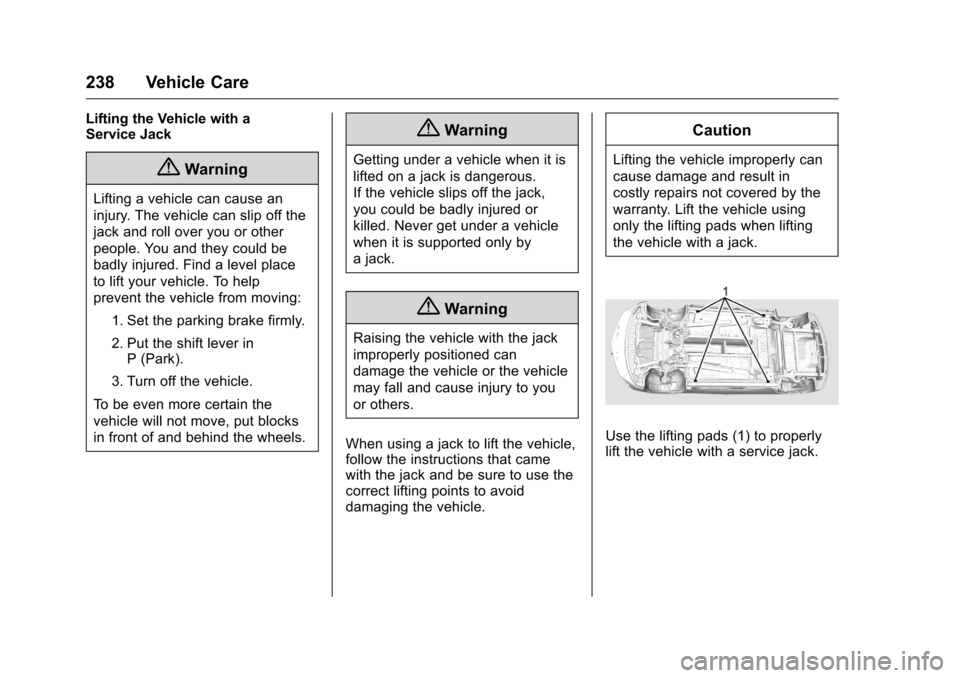
Caution
Lifting the vehicle improperly can
cause damage and result in
costly repairs not covered by the
warranty. Lift the vehicle using
only the lifting pads when lifting
the vehicle with a jack.
Use the lifting pads (1) to properly
lift the vehicle with a service jack.
Page 244 of 376
Chevrolet VOLT Owner Manual (GMNA-Localizing-U.S./Canada/Mexico-
9807421) - 2017 - CRC - 11/18/15
Vehicle Care 243
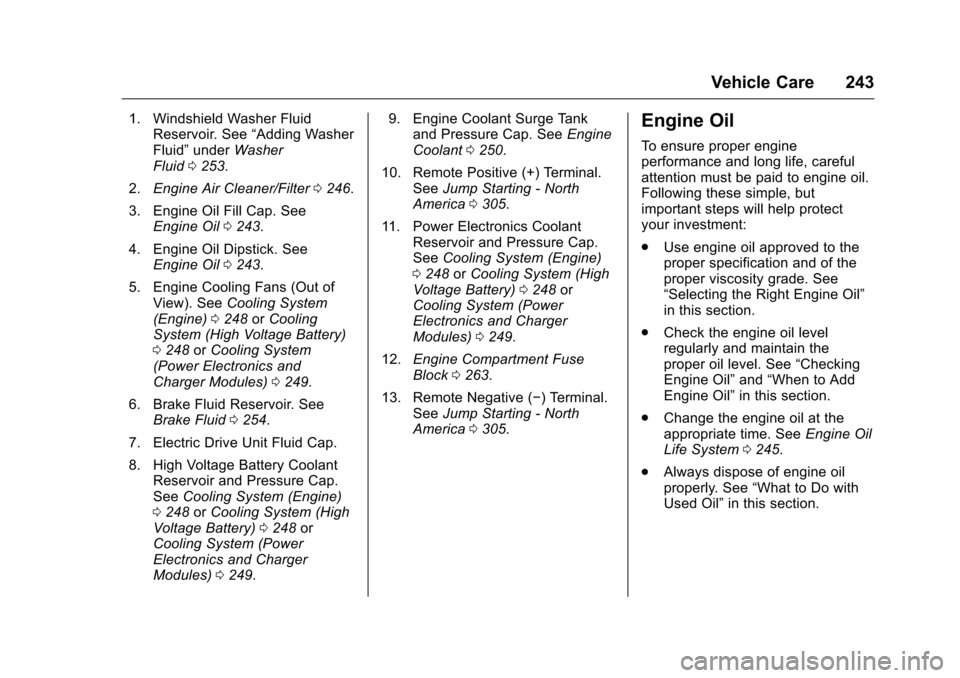
1. Windshield Washer FluidReservoir. See “Adding Washer
Fluid” under Washer
Fluid 0253.
2. Engine Air Cleaner/Filter 0246.
3. Engine Oil Fill Cap. See Engine Oil 0243.
4. Engine Oil Dipstick. See Engine Oil 0243.
5. Engine Cooling Fans (Out of View). See Cooling System
(Engine) 0248 orCooling
System (High Voltage Battery)
0 248 orCooling System
(Power Electronics and
Charger Modules) 0249.
6. Brake Fluid Reservoir. See Brake Fluid 0254.
7. Electric Drive Unit Fluid Cap.
8. High Voltage Battery Coolant Reservoir and Pressure Cap.
See Cooling System (Engine)
0 248 orCooling System (High
Voltage Battery) 0248 or
Cooling System (Power
Electronics and Charger
Modules) 0249. 9. Engine Coolant Surge Tank
and Pressure Cap. See Engine
Coolant 0250.
10. Remote Positive (+) Terminal. SeeJump Starting - North
America 0305.
11. Power Electronics Coolant Reservoir and Pressure Cap.
SeeCooling System (Engine)
0 248 orCooling System (High
Voltage Battery) 0248 or
Cooling System (Power
Electronics and Charger
Modules) 0249.
12. Engine Compartment Fuse
Block 0263.
13. Remote Negative (−) Terminal. SeeJump Starting - North
America 0305.Engine Oil
To ensure proper engine
performance and long life, careful
attention must be paid to engine oil.
Following these simple, but
important steps will help protect
your investment:
.
Use engine oil approved to the
proper specification and of the
proper viscosity grade. See
“Selecting the Right Engine Oil”
in this section.
. Check the engine oil level
regularly and maintain the
proper oil level. See “Checking
Engine Oil” and“When to Add
Engine Oil” in this section.
. Change the engine oil at the
appropriate time. See Engine Oil
Life System 0245.
. Always dispose of engine oil
properly. See “What to Do with
Used Oil” in this section.
Page 255 of 376
Chevrolet VOLT Owner Manual (GMNA-Localizing-U.S./Canada/Mexico-
9807421) - 2017 - CRC - 11/18/15
254 Vehicle Care
Caution (Continued)
.When using concentrated
washer fluid, follow the
manufacturer instructions for
adding water.
. Fill the washer fluid tank
only three-quarters full when
it is very cold. This allows
for fluid expansion if
freezing occurs, which could
damage the tank if it is
completely full.
Brakes
Disc brake pads have built-in wear
indicators that make a high-pitched
warning sound when the brake pads
are worn and new pads are needed.
The sound can come and go or can
be heard all the time when the
vehicle is moving, except when
applying the brake pedal firmly.
{Warning
The brake wear warning sound
means that soon the brakes will
not work well. That could lead to
a crash. When the brake wear
warning sound is heard, have the
vehicle serviced.
Caution
Continuing to drive with worn-out
brake pads could result in costly
brake repair.
Some driving conditions or climates
can cause a brake squeal when the
brakes are first applied or lightly
applied. This does not mean
something is wrong with the brakes.
Properly torqued wheel nuts are
necessary to help prevent brake
pulsation. When tires are rotated,
inspect brake pads for wear and
evenly tighten wheel nuts in the
proper sequence to torque
specifications. See Capacities and
Specifications 0338. Brake pads should be replaced as
complete sets.
Brake Pedal Travel
See your dealer if the brake pedal
does not return to normal height,
or if there is a rapid increase in
pedal travel. This could be a sign
that brake service may be required.
Replacing Brake System Parts
Always replace brake system parts
with new, approved replacement
parts. If this is not done, the brakes
may not work properly. The braking
performance expected can change
in many other ways if the wrong
replacement brake parts are
installed or if parts are improperly
installed.
Brake Fluid
Page 256 of 376
Chevrolet VOLT Owner Manual (GMNA-Localizing-U.S./Canada/Mexico-
9807421) - 2017 - CRC - 11/18/15
Vehicle Care 255
The brake master cylinder reservoir
is filled with GM approved DOT 3
brake fluid as indicated on the
reservoir cap. SeeEngine
Compartment Overview 0242 for
the location of the reservoir.
Checking Brake Fluid
With the vehicle in P (Park) on a
level surface, the brake fluid level
should be between the minimum
and maximum marks on the brake
fluid reservoir.
There are only two reasons why the
brake fluid level in the reservoir may
go down:
. Normal brake lining wear. When
new linings are installed, the
fluid level goes back up.
. A fluid leak in the brake
hydraulic system. Have the
brake hydraulic system fixed.
With a leak, the brakes will not
work well.
Always clean the brake fluid
reservoir cap and the area around
the cap before removing it. Do not top off the brake fluid.
Adding fluid does not correct a leak.
If fluid is added when the linings are
worn, there will be too much fluid
when new brake linings are
installed. Add or remove fluid, as
necessary, only when work is done
on the brake hydraulic system.
{Warning
If too much brake fluid is added, it
can spill on the engine and burn,
if the engine is hot enough. You
or others could be burned, and
the vehicle could be damaged.
Add brake fluid only when work is
done on the brake hydraulic
system.
When the brake fluid falls to a low
level, the brake warning light comes
on. See Brake System Warning
Light 0111.
Brake fluid absorbs water over time
which degrades the effectiveness of
the brake fluid. Replace brake fluid at the specified intervals to prevent
increased stopping distance. See
Maintenance Schedule
0326.
What to Add
Use only GM approved DOT 3
brake fluid from a clean, sealed
container. See Recommended
Fluids and Lubricants 0334.{Warning
The wrong or contaminated brake
fluid could result in damage to the
brake system. This could result in
the loss of braking leading to a
possible injury. Always use the
proper GM approved brake fluid.
Caution
If brake fluid is spilled on the
vehicle's painted surfaces, the
paint finish can be damaged.
Immediately wash off any painted
surface.
Page 259 of 376
Chevrolet VOLT Owner Manual (GMNA-Localizing-U.S./Canada/Mexico-
9807421) - 2017 - CRC - 11/18/15
258 Vehicle Care
Electric Drive Unit Shift
Lock Control Function
Check
{Warning
When you are doing this
inspection, the vehicle could
move suddenly. If the vehicle
moves, you or others could be
injured.
1. Before starting this check, be sure there is enough room
around the vehicle. It should be
parked on a level surface.
2. Firmly apply the parking brake. See Electric Parking
Brake 0188.
Be ready to apply the regular
brake immediately if the vehicle
begins to move. 3. With the vehicle off and the
brake not applied, press and
hold POWER
Ofor more than
five seconds to place the
vehicle in Service Only Mode.
See Power Button 0175.
Without applying the regular
brake, try to move the shift
lever out of P (Park) with
normal effort. If the shift lever
moves out of P (Park), contact
your dealer for service.
Park Brake and P (Park)
Mechanism Check
{Warning
When you are doing this check,
the vehicle could begin to move.
You or others could be injured
and property could be damaged.
Make sure there is room in front
of the vehicle in case it begins to
roll. Be ready to apply the regular
brake at once should the vehicle
begin to move. Park on a fairly steep hill, with the
vehicle facing downhill. Keeping
your foot on the regular brake, set
the Electric Parking Brake (EPB).
.
To check the EPB's holding
ability: With the propulsion
system active and the electric
drive unit in N (Neutral), slowly
remove foot pressure from the
regular brake pedal. Do this until
the vehicle is held by the
EPB only.
. To check the P (Park)
mechanism's holding ability:
With the propulsion system
active, shift to P (Park). Then
release the EPB followed by the
regular brake.
Contact your dealer if service is
required.
Wiper Blade Replacement
Windshield wiper blades should be
inspected for wear and cracking.
See the Maintenance
Schedule 0326.
Page 262 of 376
Chevrolet VOLT Owner Manual (GMNA-Localizing-U.S./Canada/Mexico-
9807421) - 2017 - CRC - 11/18/15
Vehicle Care 261
Taillamps
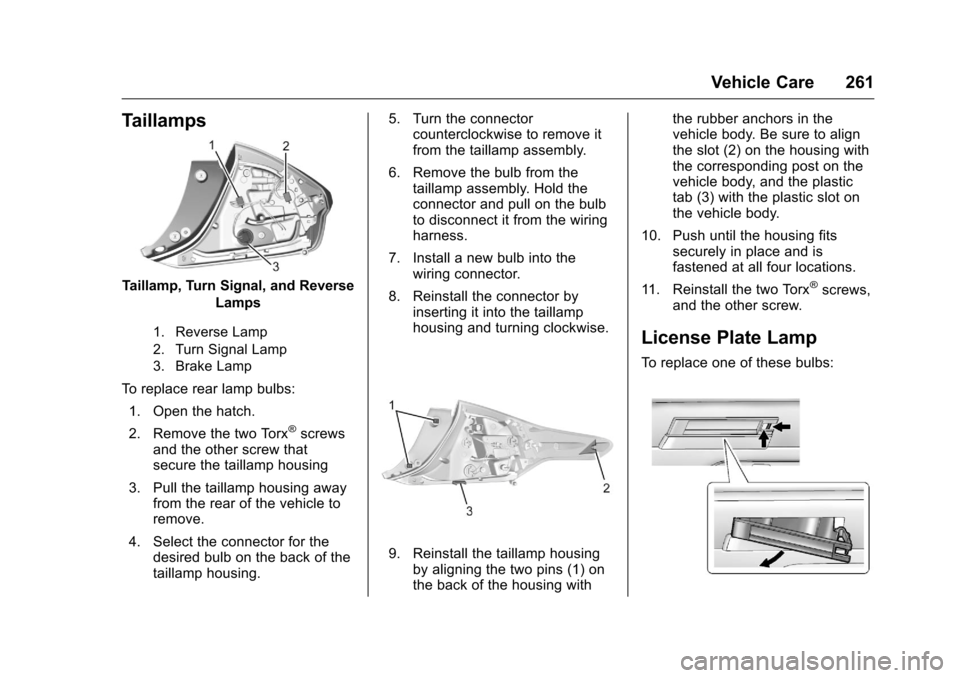
Taillamp, Turn Signal, and ReverseLamps
1. Reverse Lamp
2. Turn Signal Lamp
3. Brake Lamp
To replace rear lamp bulbs:
1. Open the hatch.
2. Remove the two Torx
®screws
and the other screw that
secure the taillamp housing
3. Pull the taillamp housing away from the rear of the vehicle to
remove.
4. Select the connector for the desired bulb on the back of the
taillamp housing. 5. Turn the connector
counterclockwise to remove it
from the taillamp assembly.
6. Remove the bulb from the taillamp assembly. Hold the
connector and pull on the bulb
to disconnect it from the wiring
harness.
7. Install a new bulb into the wiring connector.
8. Reinstall the connector by inserting it into the taillamp
housing and turning clockwise.
9. Reinstall the taillamp housingby aligning the two pins (1) on
the back of the housing with the rubber anchors in the
vehicle body. Be sure to align
the slot (2) on the housing with
the corresponding post on the
vehicle body, and the plastic
tab (3) with the plastic slot on
the vehicle body.
10. Push until the housing fits securely in place and is
fastened at all four locations.
11. Reinstall the two Torx
®screws,
and the other screw.
License Plate Lamp
To replace one of these bulbs: