lock CHEVROLET VOLT 2017 2.G Workshop Manual
[x] Cancel search | Manufacturer: CHEVROLET, Model Year: 2017, Model line: VOLT, Model: CHEVROLET VOLT 2017 2.GPages: 376, PDF Size: 6.75 MB
Page 138 of 376
Chevrolet VOLT Owner Manual (GMNA-Localizing-U.S./Canada/Mexico-
9807421) - 2017 - CRC - 11/18/15
Instruments and Controls 137
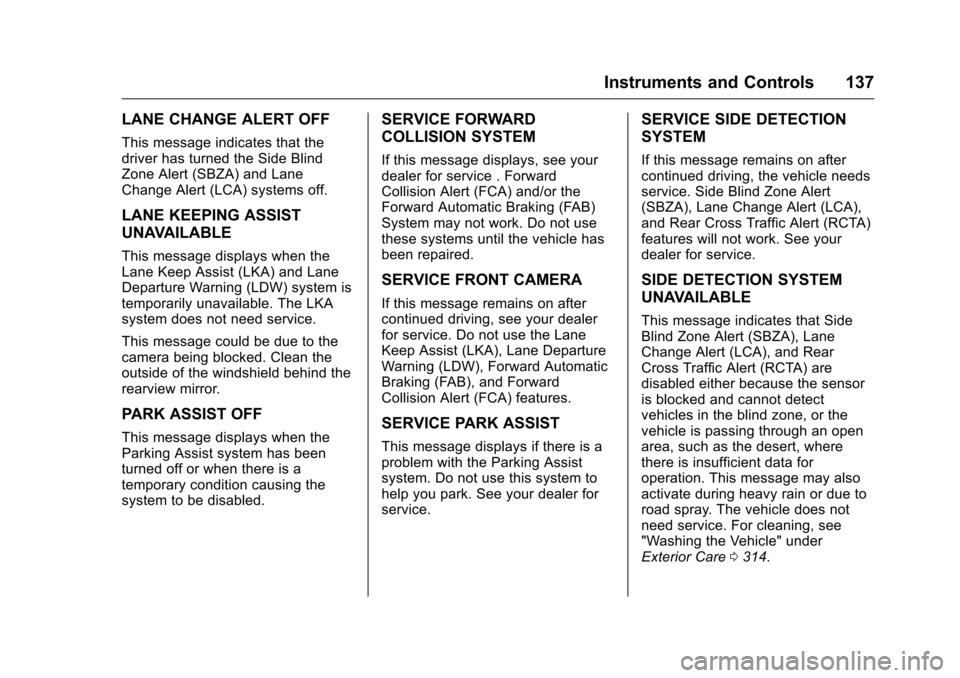
LANE CHANGE ALERT OFF
This message indicates that the
driver has turned the Side Blind
Zone Alert (SBZA) and Lane
Change Alert (LCA) systems off.
LANE KEEPING ASSIST
UNAVAILABLE
This message displays when the
Lane Keep Assist (LKA) and Lane
Departure Warning (LDW) system is
temporarily unavailable. The LKA
system does not need service.
This message could be due to the
camera being blocked. Clean the
outside of the windshield behind the
rearview mirror.
PARK ASSIST OFF
This message displays when the
Parking Assist system has been
turned off or when there is a
temporary condition causing the
system to be disabled.
SERVICE FORWARD
COLLISION SYSTEM
If this message displays, see your
dealer for service . Forward
Collision Alert (FCA) and/or the
Forward Automatic Braking (FAB)
System may not work. Do not use
these systems until the vehicle has
been repaired.
SERVICE FRONT CAMERA
If this message remains on after
continued driving, see your dealer
for service. Do not use the Lane
Keep Assist (LKA), Lane Departure
Warning (LDW), Forward Automatic
Braking (FAB), and Forward
Collision Alert (FCA) features.
SERVICE PARK ASSIST
This message displays if there is a
problem with the Parking Assist
system. Do not use this system to
help you park. See your dealer for
service.
SERVICE SIDE DETECTION
SYSTEM
If this message remains on after
continued driving, the vehicle needs
service. Side Blind Zone Alert
(SBZA), Lane Change Alert (LCA),
and Rear Cross Traffic Alert (RCTA)
features will not work. See your
dealer for service.
SIDE DETECTION SYSTEM
UNAVAILABLE
This message indicates that Side
Blind Zone Alert (SBZA), Lane
Change Alert (LCA), and Rear
Cross Traffic Alert (RCTA) are
disabled either because the sensor
is blocked and cannot detect
vehicles in the blind zone, or the
vehicle is passing through an open
area, such as the desert, where
there is insufficient data for
operation. This message may also
activate during heavy rain or due to
road spray. The vehicle does not
need service. For cleaning, see
"Washing the Vehicle" under
Exterior Care0314.
Page 142 of 376
Chevrolet VOLT Owner Manual (GMNA-Localizing-U.S./Canada/Mexico-
9807421) - 2017 - CRC - 11/18/15
Instruments and Controls 141
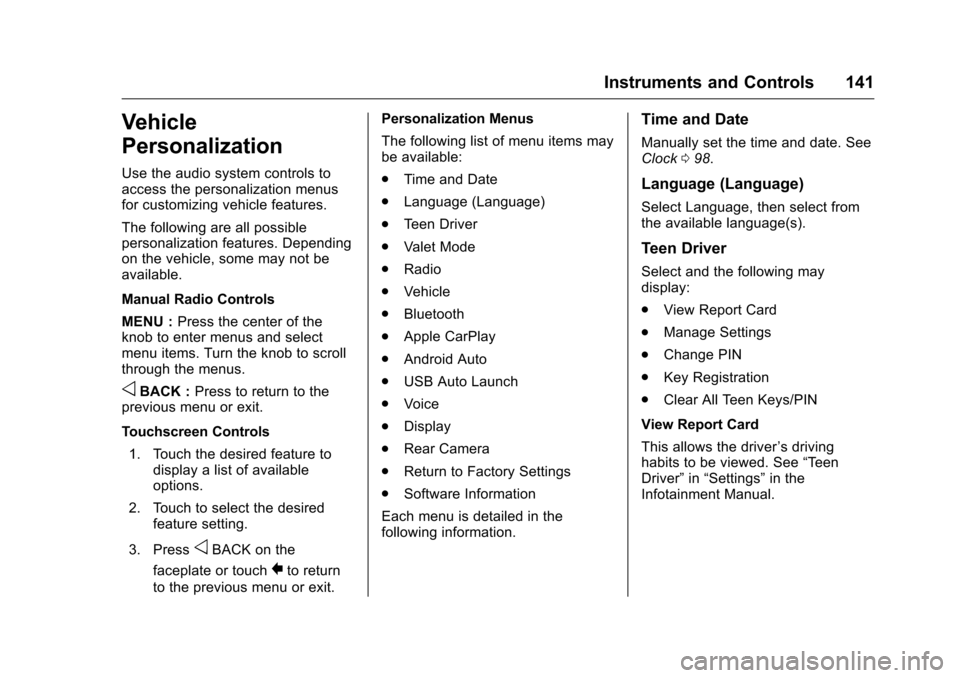
Vehicle
Personalization
Use the audio system controls to
access the personalization menus
for customizing vehicle features.
The following are all possible
personalization features. Depending
on the vehicle, some may not be
available.
Manual Radio Controls
MENU :Press the center of the
knob to enter menus and select
menu items. Turn the knob to scroll
through the menus.
oBACK : Press to return to the
previous menu or exit.
Touchscreen Controls
1. Touch the desired feature to display a list of available
options.
2. Touch to select the desired feature setting.
3. Press
oBACK on the
faceplate or touch
0to return
to the previous menu or exit. Personalization Menus
The following list of menu items may
be available:
.
Time and Date
. Language (Language)
. Teen Driver
. Valet Mode
. Radio
. Vehicle
. Bluetooth
. Apple CarPlay
. Android Auto
. USB Auto Launch
. Voice
. Display
. Rear Camera
. Return to Factory Settings
. Software Information
Each menu is detailed in the
following information.
Time and Date
Manually set the time and date. See
Clock 098.
Language (Language)
Select Language, then select from
the available language(s).
Teen Driver
Select and the following may
display:
.
View Report Card
. Manage Settings
. Change PIN
. Key Registration
. Clear All Teen Keys/PIN
View Report Card
This allows the driver ’s driving
habits to be viewed. See “Teen
Driver” in“Settings” in the
Infotainment Manual.
Page 143 of 376
Chevrolet VOLT Owner Manual (GMNA-Localizing-U.S./Canada/Mexico-
9807421) - 2017 - CRC - 11/18/15
142 Instruments and Controls
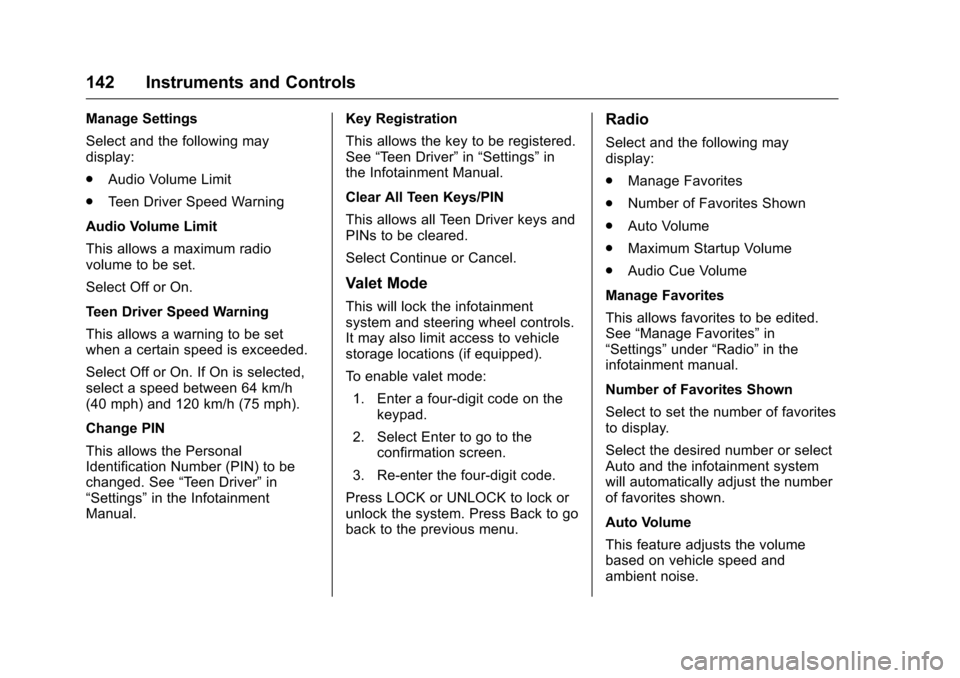
Manage Settings
Select and the following may
display:
.Audio Volume Limit
. Teen Driver Speed Warning
Audio Volume Limit
This allows a maximum radio
volume to be set.
Select Off or On.
Teen Driver Speed Warning
This allows a warning to be set
when a certain speed is exceeded.
Select Off or On. If On is selected,
select a speed between 64 km/h
(40 mph) and 120 km/h (75 mph).
Change PIN
This allows the Personal
Identification Number (PIN) to be
changed. See “Teen Driver”in
“Settings” in the Infotainment
Manual. Key Registration
This allows the key to be registered.
See
“Teen Driver” in“Settings” in
the Infotainment Manual.
Clear All Teen Keys/PIN
This allows all Teen Driver keys and
PINs to be cleared.
Select Continue or Cancel.
Valet Mode
This will lock the infotainment
system and steering wheel controls.
It may also limit access to vehicle
storage locations (if equipped).
To enable valet mode:
1. Enter a four-digit code on the keypad.
2. Select Enter to go to the confirmation screen.
3. Re-enter the four-digit code.
Press LOCK or UNLOCK to lock or
unlock the system. Press Back to go
back to the previous menu.
Radio
Select and the following may
display:
. Manage Favorites
. Number of Favorites Shown
. Auto Volume
. Maximum Startup Volume
. Audio Cue Volume
Manage Favorites
This allows favorites to be edited.
See “Manage Favorites” in
“Settings” under“Radio” in the
infotainment manual.
Number of Favorites Shown
Select to set the number of favorites
to display.
Select the desired number or select
Auto and the infotainment system
will automatically adjust the number
of favorites shown.
Auto Volume
This feature adjusts the volume
based on vehicle speed and
ambient noise.
Page 144 of 376
Chevrolet VOLT Owner Manual (GMNA-Localizing-U.S./Canada/Mexico-
9807421) - 2017 - CRC - 11/18/15
Instruments and Controls 143
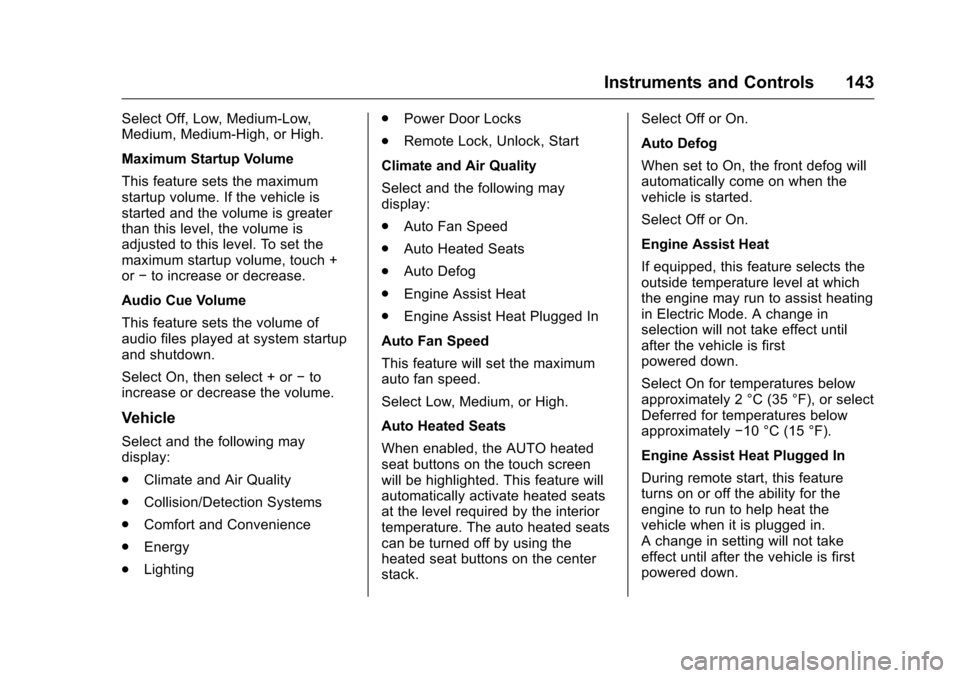
Select Off, Low, Medium-Low,
Medium, Medium-High, or High.
Maximum Startup Volume
This feature sets the maximum
startup volume. If the vehicle is
started and the volume is greater
than this level, the volume is
adjusted to this level. To set the
maximum startup volume, touch +
or−to increase or decrease.
Audio Cue Volume
This feature sets the volume of
audio files played at system startup
and shutdown.
Select On, then select + or −to
increase or decrease the volume.
Vehicle
Select and the following may
display:
. Climate and Air Quality
. Collision/Detection Systems
. Comfort and Convenience
. Energy
. Lighting .
Power Door Locks
. Remote Lock, Unlock, Start
Climate and Air Quality
Select and the following may
display:
. Auto Fan Speed
. Auto Heated Seats
. Auto Defog
. Engine Assist Heat
. Engine Assist Heat Plugged In
Auto Fan Speed
This feature will set the maximum
auto fan speed.
Select Low, Medium, or High.
Auto Heated Seats
When enabled, the AUTO heated
seat buttons on the touch screen
will be highlighted. This feature will
automatically activate heated seats
at the level required by the interior
temperature. The auto heated seats
can be turned off by using the
heated seat buttons on the center
stack. Select Off or On.
Auto Defog
When set to On, the front defog will
automatically come on when the
vehicle is started.
Select Off or On.
Engine Assist Heat
If equipped, this feature selects the
outside temperature level at which
the engine may run to assist heating
in Electric Mode. A change in
selection will not take effect until
after the vehicle is first
powered down.
Select On for temperatures below
approximately 2 °C (35 °F), or select
Deferred for temperatures below
approximately
−10 °C (15 °F).
Engine Assist Heat Plugged In
During remote start, this feature
turns on or off the ability for the
engine to run to help heat the
vehicle when it is plugged in.
A change in setting will not take
effect until after the vehicle is first
powered down.
Page 146 of 376
Chevrolet VOLT Owner Manual (GMNA-Localizing-U.S./Canada/Mexico-
9807421) - 2017 - CRC - 11/18/15
Instruments and Controls 145
Charge Cord Theft Alert
This allows the feature to be turned
on or off.
Select Off or On.
Charge Power Loss Alert
This allows the feature to be turned
on or off.
Select Off or On.
Lighting
Select and the following may
display:
.Vehicle Locator Lights
. Exit Lighting
Vehicle Locator Lights
This feature will flash the exterior
lamps and allows some of the
exterior lamps and most of the
interior lamps to turn on briefly
when
Kon the Remote Keyless
Entry (RKE) transmitter is pressed
to locate the vehicle.
Select Off or On. Exit Lighting
This allows the selection of how
long the exterior lamps stay on
when leaving the vehicle when it is
dark outside.
Select Off, 30 Seconds, 60
Seconds, or 120 Seconds.
Power Door Locks
Select and the following may
display:
.
Unlocked Door Anti-Lockout
. Auto Door Unlock
. Delayed Door Lock
Unlocked Door Anti-Lockout
When on, this feature will keep the
driver door from locking when the
door is open. If Off is selected, the
Delayed Door Lock menu will be
available.
Select Off or On.
Auto Door Unlock
This allows selection of which of the
doors will automatically unlock when
the vehicle is shifted into P (Park).
Select Off, All Doors, or Driver Door. Delayed Door Lock
When on, this feature will delay the
locking of the doors. To override the
delay, press the power door lock
switch on the door.
Select Off or On.
Remote Lock, Unlock, Start
Select and the following may
display:
.
Remote Unlock Light Feedback
. Remote Lock Feedback
. Remote Door Unlock
. Remote Start Auto Heat Seats
. Remote Window Operation
. Passive Door Unlock
. Passive Door Lock
. Remote Left in Vehicle Alert
Remote Unlock Light Feedback
When on, the exterior lamps will
flash when unlocking the vehicle
with the RKE transmitter.
Select Off or Flash Lights.
Page 147 of 376
Chevrolet VOLT Owner Manual (GMNA-Localizing-U.S./Canada/Mexico-
9807421) - 2017 - CRC - 11/18/15
146 Instruments and Controls
Remote Lock Feedback
This allows selection of what type of
feedback is given when locking the
vehicle with the RKE transmitter.
Select Off, Lights and Horn, Lights
Only, or Horn Only.
Remote Door Unlock
This allows selection of which doors
will unlock when pressing
Kon the
RKE transmitter.
Select All Doors or Driver Door.
Remote Start Auto Heat Seats
If equipped and turned on, this
feature will turn the heated seats on
when using remote start on
cold days.
Select Off or On.
Remote Window Operation
This allows the window to be
opened when pressing and
holding
Kon the RKE transmitter.
See Remote Keyless Entry (RKE)
System Operation 030.
Select Off or On. Passive Door Unlock
This allows the selection of what
doors will unlock when using the
door handle touch pad button on the
driver door to unlock the vehicle.
Select All Doors or Driver Door.
Passive Door Lock
This allows passive locking to be
turned on or off and selects
feedback. See
“Passive Locking” in
Remote Keyless Entry (RKE)
System Operation 030.
Select Off, On with Horn
Chirp, or On.
Remote Left in Vehicle Alert
This feature sounds an alert when
the RKE transmitter is left in the
vehicle.
Select Off or On.
Bluetooth
Select and the following may
display:
. Pair New Device
. Device Management
. Ringtones .
Voice Mail Numbers
. Text Message
Pair New Device
Select to pair a new device. See
“Pairing” in“Infotainment Controls”
under “Bluetooth” in the infotainment
manual.
Device Management
Select to connect to a different
phone source, disconnect a phone,
or delete a phone.
Ringtones
Select to change the ring tone for
the specific phone. The phone does
not need to be connected to change
the ring tone.
Voice Mail Numbers
This feature displays the voice mail
number for all connected phones.
To change the voice mail number,
select EDIT and type in a new
number, then select SAVE.
Page 151 of 376
Chevrolet VOLT Owner Manual (GMNA-Localizing-U.S./Canada/Mexico-
9807421) - 2017 - CRC - 11/18/15
150 Lighting
Turning On and Enabling
IntelliBeam
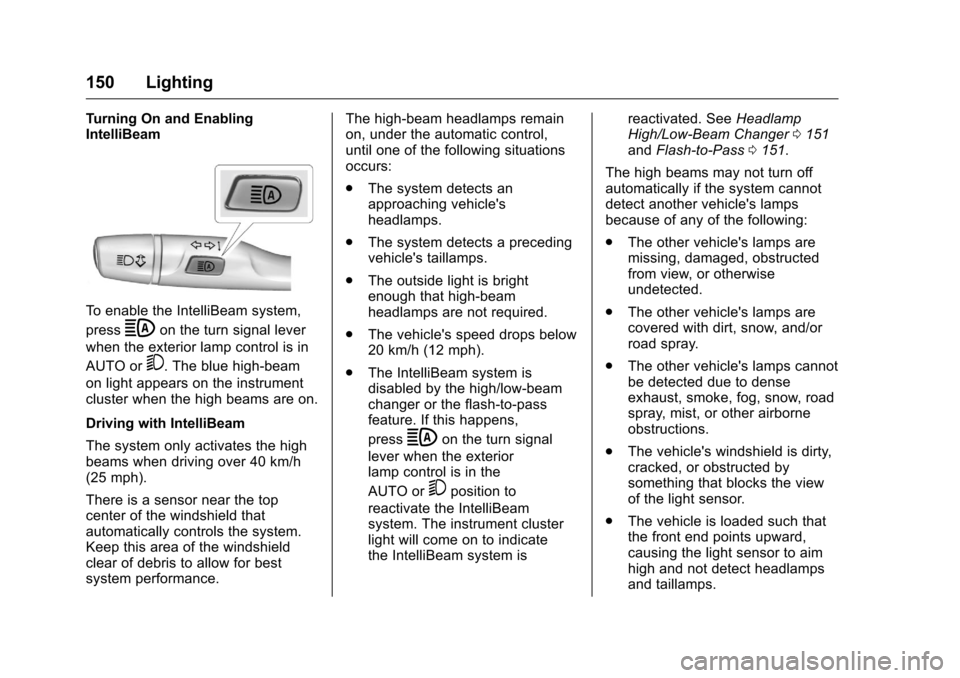
To enable the IntelliBeam system,
press
bon the turn signal lever
when the exterior lamp control is in
AUTO or
5. The blue high-beam
on light appears on the instrument
cluster when the high beams are on.
Driving with IntelliBeam
The system only activates the high
beams when driving over 40 km/h
(25 mph).
There is a sensor near the top
center of the windshield that
automatically controls the system.
Keep this area of the windshield
clear of debris to allow for best
system performance. The high-beam headlamps remain
on, under the automatic control,
until one of the following situations
occurs:
.
The system detects an
approaching vehicle's
headlamps.
. The system detects a preceding
vehicle's taillamps.
. The outside light is bright
enough that high-beam
headlamps are not required.
. The vehicle's speed drops below
20 km/h (12 mph).
. The IntelliBeam system is
disabled by the high/low-beam
changer or the flash-to-pass
feature. If this happens,
press
bon the turn signal
lever when the exterior
lamp control is in the
AUTO or
5position to
reactivate the IntelliBeam
system. The instrument cluster
light will come on to indicate
the IntelliBeam system is reactivated. See
Headlamp
High/Low-Beam Changer 0151
and Flash-to-Pass 0151.
The high beams may not turn off
automatically if the system cannot
detect another vehicle's lamps
because of any of the following:
. The other vehicle's lamps are
missing, damaged, obstructed
from view, or otherwise
undetected.
. The other vehicle's lamps are
covered with dirt, snow, and/or
road spray.
. The other vehicle's lamps cannot
be detected due to dense
exhaust, smoke, fog, snow, road
spray, mist, or other airborne
obstructions.
. The vehicle's windshield is dirty,
cracked, or obstructed by
something that blocks the view
of the light sensor.
. The vehicle is loaded such that
the front end points upward,
causing the light sensor to aim
high and not detect headlamps
and taillamps.
Page 154 of 376
Chevrolet VOLT Owner Manual (GMNA-Localizing-U.S./Canada/Mexico-
9807421) - 2017 - CRC - 11/18/15
Lighting 153
Turn and Lane-Change
Signals
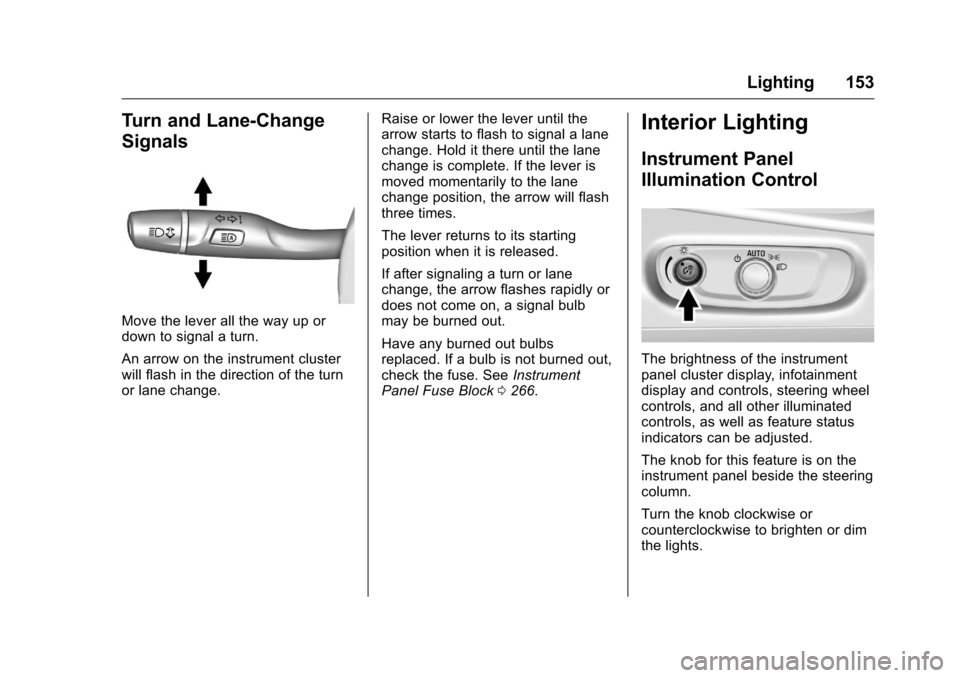
Move the lever all the way up or
down to signal a turn.
An arrow on the instrument cluster
will flash in the direction of the turn
or lane change.Raise or lower the lever until the
arrow starts to flash to signal a lane
change. Hold it there until the lane
change is complete. If the lever is
moved momentarily to the lane
change position, the arrow will flash
three times.
The lever returns to its starting
position when it is released.
If after signaling a turn or lane
change, the arrow flashes rapidly or
does not come on, a signal bulb
may be burned out.
Have any burned out bulbs
replaced. If a bulb is not burned out,
check the fuse. See
Instrument
Panel Fuse Block 0266.
Interior Lighting
Instrument Panel
Illumination Control
The brightness of the instrument
panel cluster display, infotainment
display and controls, steering wheel
controls, and all other illuminated
controls, as well as feature status
indicators can be adjusted.
The knob for this feature is on the
instrument panel beside the steering
column.
Turn the knob clockwise or
counterclockwise to brighten or dim
the lights.
Page 160 of 376
Chevrolet VOLT Owner Manual (GMNA-Localizing-U.S./Canada/Mexico-
9807421) - 2017 - CRC - 11/18/15
Climate Controls 159
eco Mode :Press eco to select this
mode and the indicator will be lit.
The air conditioning and electric
heat are controlled to balance
comfort with fuel economy. As long
as
0MAX is not selected, the
vehicle electric range or fuel
economy will decrease less than in
MAX mode, but will result in
moderate comfort.
MAX Mode : Press MAX to select
this mode and the indicator will be
lit. The air conditioning and electric
heat are controlled to reach the best
comfort level based on the
temperature setting selected. In this
mode, vehicle electric range or fuel
economy will decrease depending
on the amount of energy required to
reach the best comfort levels.
The air conditioning and electric
heat could be on at the same time
when dehumidification is required in
eco or MAX modes.
The air conditioning may also run if
0MAX is selected, regardless of
the climate mode. Automatic Operation
The system automatically controls
the fan speed, air delivery mode,
and recirculation to heat or cool the
vehicle to the selected temperature.
When the AUTO indicator light is
on, the system is in full automatic
operation. If the air delivery mode or
fan speed setting is adjusted, the
AUTO indicator turns off and the
selected settings display.
For automatic operation:
1. Press AUTO.
2. Set the temperature. An initial setting of 23 °C (74 °F) is
recommended. Allow the
system time to stabilize. Adjust
the temperature as needed.
Manual Operation
O: Press to turn the climate control
system on and off.
A: Turn the knob clockwise or
counterclockwise to increase or
decrease the fan speed. The fan
speed setting appears on the
display screen. Manually adjusting
the fan speed cancels automatic fan control. Press AUTO to return to
automatic operation. Press
Oto turn
off the fan and the climate control
system.
If the power is turned off while in
eco or MAX mode, the display will
automatically change to Fan Only
mode. If the fan speed is increased
or AUTO is pressed, the climate
mode will revert back to eco or
MAX mode.
Temperature Control : Turn the
knob clockwise or counterclockwise
to increase or decrease the
temperature setting.
Air Delivery Mode Control :
Press
dandcor a
combination of the buttons to
change the direction of the airflow.
The indicator light in the button will
turn on. The current mode appears
in the display screen.
Pressing any of the air delivery
buttons cancels automatic air
delivery control and the direction of
the airflow can be controlled
manually. Press AUTO to return to
automatic operation.
Page 165 of 376
Chevrolet VOLT Owner Manual (GMNA-Localizing-U.S./Canada/Mexico-
9807421) - 2017 - CRC - 11/18/15
164 Driving and Operating
Driving and
Operating
Driving Information
Distracted Driving . . . . . . . . . . . . 165
Defensive Driving . . . . . . . . . . . . . 166
Drunk Driving . . . . . . . . . . . . . . . . . 166
Control of a Vehicle . . . . . . . . . . . 166
Braking . . . . . . . . . . . . . . . . . . . . . . . 166
Steering . . . . . . . . . . . . . . . . . . . . . . 167
Off-Road Recovery . . . . . . . . . . . 167
Loss of Control . . . . . . . . . . . . . . . 168
Driving on Wet Roads . . . . . . . . 168
Hill and Mountain Roads . . . . . 169
Winter Driving . . . . . . . . . . . . . . . . 170
If the Vehicle Is Stuck . . . . . . . . 171
Vehicle Load Limits . . . . . . . . . . . 171
Starting and Operating
New Vehicle Break-In . . . . . . . . . 175
Power Button . . . . . . . . . . . . . . . . . 175
Starting and Stopping theVehicle . . . . . . . . . . . . . . . . . . . . . . 176
Retained Accessory Power (RAP) . . . . . . . . . . . . . . . . 177
Shifting Into Park . . . . . . . . . . . . . 177
Shifting out of Park . . . . . . . . . . . 178
Parking over Things That Burn . . . . . . . . . . . . . . . . . . . 179
Electric Vehicle Operating
Modes
System Operation . . . . . . . . . . . . 179
Electric Mode . . . . . . . . . . . . . . . . . 180
Extended Range Mode . . . . . . . 180
Driver Selected OperatingModes . . . . . . . . . . . . . . . . . . . . . . 181
Out of Fuel/Engine Unavailable . . . . . . . . . . . . . . . . . 183
Maintenance Modes . . . . . . . . . . 183
Engine Exhaust
Engine Exhaust . . . . . . . . . . . . . . 185
Running the Vehicle While Parked . . . . . . . . . . . . . . . . . . . . . . 186
Electric Drive Unit
Electric Drive Unit . . . . . . . . . . . . 186
Brakes
Antilock BrakeSystem (ABS) . . . . . . . . . . . . . . . 188
Electric Parking Brake . . . . . . . . 188
Hill Start Assist (HSA) . . . . . . . . 190
Regenerative Braking . . . . . . . . 190
Ride Control Systems
Traction Control/Electronic Stability Control . . . . . . . . . . . . . 192
Driver Mode Control . . . . . . . . . . 193
Cruise Control
Cruise Control . . . . . . . . . . . . . . . . 194
Adaptive Cruise Control . . . . . . 196
Driver Assistance Systems
Driver Assistance Systems . . . 203
Assistance Systems for Parking or Backing . . . . . . . . . . 204
Assistance Systems for Driving . . . . . . . . . . . . . . . . . . . . . . 208
Forward Collision Alert (FCA) System . . . . . . . . . . . . . . . . . . . . . . 208
Forward Automatic Braking (FAB) . . . . . . . . . . . . . . . 210
Side Blind Zone Alert (SBZA) . . . . . . . . . . . . . . . . 211
Lane Change Alert (LCA) . . . . . 211
Lane Departure Warning (LDW) . . . . . . . . . . . . . 213
Lane Keep Assist (LKA) . . . . . . 213
Charging
Plug-In Charging . . . . . . . . . . . . . 215
Delayed Charging Override . . . 217
Charging Status Feedback . . . 217
Charge Cord . . . . . . . . . . . . . . . . . 222
Utility Interruption of Charging . . . . . . . . . . . . . . . . . . . . 228
Electrical Requirements for Battery Charging . . . . . . . . . . . . 229