air condition CHEVROLET VOLT 2018 User Guide
[x] Cancel search | Manufacturer: CHEVROLET, Model Year: 2018, Model line: VOLT, Model: CHEVROLET VOLT 2018Pages: 379, PDF Size: 5.65 MB
Page 137 of 379
Chevrolet VOLT Owner Manual (GMNA-Localizing-U.S./Canada/Mexico-
11349113) - 2018 - crc - 10/12/17
136 Instruments and Controls
Vehicle Messages
Messages displayed on the DIC
indicate the status of the vehicle or
some action that may be needed to
correct a condition. Multiple
messages may appear one after
another.
The messages that do not require
immediate action can be
acknowledged and cleared by
pressing
V. The messages that
require immediate action cannot be
cleared until that action is
performed.
All messages should be taken
seriously; clearing the message
does not correct the problem.
If a SERVICE message appears,
see your dealer.
Follow the instructions given in the
messages. The system displays
messages regarding the following
topics:
. Service Messages
. Fluid Levels
. Vehicle Security .
Brakes
. Ride Control Systems
. Driver Assistance Systems
. Cruise Control
. Lighting and Bulb Replacement
. Wiper/Washer Systems
. Doors and Windows
. Seat Belts
. Airbag Systems
. Engine and Transmission
. Tire Pressure
. Battery
Propulsion Power
Messages
PROPULSION POWER IS
REDUCED
This message displays when the
propulsion power is reduced and
can affect the ability to accelerate.
If this message is on, but there is no
reduction in performance, proceed
to your destination. The
performance may be reduced the next time the vehicle is driven. The
vehicle may be driven while this
message is on, but maximum
acceleration and speed may be
reduced. If this message stays on
when the malfunction indicator lamp
is on, the vehicle should be taken to
your dealer for service as soon as
possible.
This message can display when the
vehicle is parked during extreme
cold conditions without plugging in.
While driving the vehicle with this
message displayed, the vehicle
speed may be reduced until the high
voltage battery is conditioned.
This message can display when
driving in mountainous terrain
without using Mountain Mode or by
not entering Mountain Mode soon
enough to build a sufficient battery
charge reserve before climbing
steep grades. This is normal
operation to protect the high voltage
battery. Only if both the
PROPULSION POWER IS
REDUCED message and the
Page 154 of 379
Chevrolet VOLT Owner Manual (GMNA-Localizing-U.S./Canada/Mexico-
11349113) - 2018 - crc - 10/12/17
Climate Controls 153
Climate Controls
Climate Control Systems
Automatic Climate ControlSystem . . . . . . . . . . . . . . . . . . . . . . 153
Air Vents
Air Vents . . . . . . . . . . . . . . . . . . . . . 158
Maintenance
Passenger Compartment AirFilter . . . . . . . . . . . . . . . . . . . . . . . . 159
Climate Control
Systems
Automatic Climate
Control System
The heating, cooling, and ventilation
for the vehicle can be controlled
with this system.
The vehicle may require the use of
an auxiliary heat source under
certain cold conditions. This
provides additional heating and
defrost capability obtained by
running the engine, even if the high
voltage battery is adequately
charged. Under these conditions,
the engine will start and use fuel.
Make sure there is fuel in the tank. Do not allow the vehicle to remain in
extreme temperatures for long
periods without being driven or
plugged in.
Page 155 of 379
Chevrolet VOLT Owner Manual (GMNA-Localizing-U.S./Canada/Mexico-
11349113) - 2018 - crc - 10/12/17
154 Climate Controls
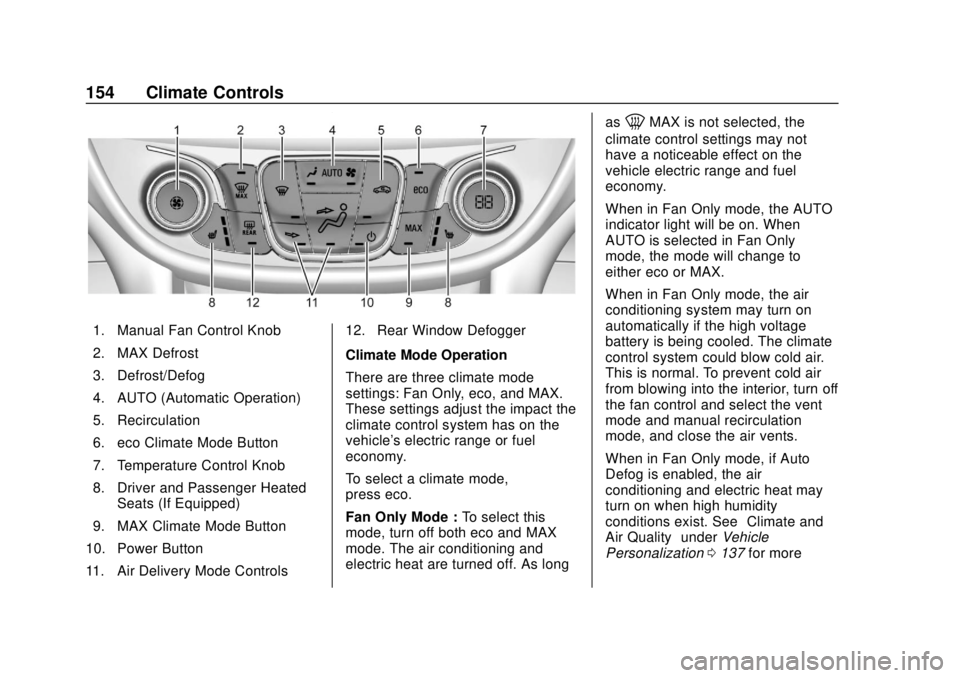
1. Manual Fan Control Knob
2. MAX Defrost
3. Defrost/Defog
4. AUTO (Automatic Operation)
5. Recirculation
6. eco Climate Mode Button
7. Temperature Control Knob
8. Driver and Passenger HeatedSeats (If Equipped)
9. MAX Climate Mode Button
10. Power Button
11. Air Delivery Mode Controls 12. Rear Window Defogger
Climate Mode Operation
There are three climate mode
settings: Fan Only, eco, and MAX.
These settings adjust the impact the
climate control system has on the
vehicle's electric range or fuel
economy.
To select a climate mode,
press eco.
Fan Only Mode :
To select this
mode, turn off both eco and MAX
mode. The air conditioning and
electric heat are turned off. As long as
0MAX is not selected, the
climate control settings may not
have a noticeable effect on the
vehicle electric range and fuel
economy.
When in Fan Only mode, the AUTO
indicator light will be on. When
AUTO is selected in Fan Only
mode, the mode will change to
either eco or MAX.
When in Fan Only mode, the air
conditioning system may turn on
automatically if the high voltage
battery is being cooled. The climate
control system could blow cold air.
This is normal. To prevent cold air
from blowing into the interior, turn off
the fan control and select the vent
mode and manual recirculation
mode, and close the air vents.
When in Fan Only mode, if Auto
Defog is enabled, the air
conditioning and electric heat may
turn on when high humidity
conditions exist. See “Climate and
Air Quality” underVehicle
Personalization 0137 for more
Page 156 of 379
Chevrolet VOLT Owner Manual (GMNA-Localizing-U.S./Canada/Mexico-
11349113) - 2018 - crc - 10/12/17
Climate Controls 155
information on the Auto Defog
selection. The air conditioning may
also run if
0MAX is selected.
eco Mode : Press eco to select this
mode and the indicator will be lit.
The air conditioning and electric
heat are controlled to balance
comfort with fuel economy. As long
as
0MAX is not selected, the
vehicle electric range or fuel
economy will decrease less than in
MAX mode, but will result in
moderate comfort.
MAX Mode : Press MAX to select
this mode and the indicator will be
lit. The air conditioning and electric
heat are controlled to reach the best
comfort level based on the
temperature setting selected. In this
mode, vehicle electric range or fuel
economy will decrease depending
on the amount of energy required to
reach the best comfort levels.
The air conditioning and electric
heat could be on at the same time
when dehumidification is required in
eco or MAX modes. The air conditioning may also run if
0MAX is selected, regardless of
the climate mode.
Automatic Operation
The system automatically controls
the fan speed, air delivery mode, air
conditioning, and recirculation to
heat or cool the vehicle to the
selected temperature.
When AUTO is lit, all four functions
operate automatically. Each function
can also be manually set and the
setting is displayed. Functions not
manually set will continue to be
automatically controlled, even if the
AUTO indicator is not lit.
For automatic operation:
1. Press AUTO.
2. Set the temperature. An initial setting of 23 °C (74 °F) is
recommended. Allow the
system time to stabilize. Adjust
the temperature as needed.
Manual Operation
O: Press to turn the climate control
system on and off.
A: Turn the knob clockwise or
counterclockwise to increase or
decrease the fan speed. The fan
speed setting appears on the
display screen. Manually adjusting
the fan speed cancels automatic fan
control. Press AUTO to return to
automatic operation. Press
Oto turn
off the fan and the climate control
system.
If the power is turned off while in
eco or MAX mode, the display will
automatically change to Fan Only
mode. If the fan speed is increased
or AUTO is pressed, the climate
mode will revert back to eco or
MAX mode.
Temperature Control : Turn the
knob clockwise or counterclockwise
to increase or decrease the
temperature setting.
Air Delivery Mode Control : Press
0,dorcor a combination of
the buttons to change the direction
of the airflow. The indicator light in
the button will turn on. The current
mode appears in the display screen.
Page 157 of 379
Chevrolet VOLT Owner Manual (GMNA-Localizing-U.S./Canada/Mexico-
11349113) - 2018 - crc - 10/12/17
156 Climate Controls
Pressing any of the air delivery
buttons cancels automatic air
delivery control and the direction of
the airflow can be controlled
manually. Press AUTO to return to
automatic operation.
To change the current mode, select
one or more of the following:
0:Air is directed to the
windshield.
d: Air is directed to the instrument
panel outlets.
c: Air is directed to the floor
outlets.
0MAX : Air is directed to the
windshield and the fan runs at a
higher speed. Fog or frost is cleared
from the windshield more quickly.
When the button is pressed again,
the system returns to the previous
mode setting.
For best results, clear all snow and
ice from the windshield before
defrosting. If
0MAX is selected in eco or
MAX mode, air conditioning or
electric heat may turn on and have
a noticeable effect on vehicle
electric range and fuel economy.
@: Press to turn on recirculation.
An indicator light comes on. Air is
recirculated to quickly cool the
inside of the vehicle or to reduce the
entry of outside air and odors. The
recirculation mode is not available in
Defrost or Defog modes.
Pressing this button cancels
automatic recirculation. Press AUTO
to return to automatic operation;
recirculation runs automatically as
needed.
Auto Defog : The system will
monitor high humidity inside the
vehicle. When high humidity is
detected, the climate control system
may adjust to outside air supply and
turn on the air conditioner or the
heater. The fan speed may slightly
increase to help prevent fogging.
When high humidity is no longer
detected, the system will return to
its prior operation. To turn Auto Defog off or on, see
“Climate and
Air Quality” underVehicle
Personalization 0137.
LorM:If equipped, pressLorMto heat the driver or passenger seat.
See Heated Front Seats 056.
Auto Heated Seats : If equipped,
the controls can be accessed while
the vehicle is on by pressing
Lor
Mon the center stack. When the
vehicle is on, this feature will
automatically activate the heated
seats at the level required by the
vehicle's interior temperature. The
active high, medium, low, or off
heated seat level will be indicated
by the manual heated seat button
lights on the center stack.
See Heated Front Seats 056 and
Vehicle Personalization 0137.
Rear Window Defogger
K:Press to turn the rear window
defogger on or off. An indicator light
on the button comes on to show that
the rear window defogger is on.
Page 158 of 379
Chevrolet VOLT Owner Manual (GMNA-Localizing-U.S./Canada/Mexico-
11349113) - 2018 - crc - 10/12/17
Climate Controls 157
The defogger only works when the
vehicle is on. The defogger will turn
off if the vehicle is turned off.
If equipped with heated outside
rearview mirrors, they turn on when
the rear window defogger button is
on and help to clear fog or frost from
the surface of the mirror. See
Heated Mirrors048.
Caution
Do not try to clear frost or other
material from the inside of the
front windshield and rear window
with a razor blade or anything
else that is sharp. This may
damage the rear window
defogger grid and affect the
radio's ability to pick up stations
clearly. The repairs would not be
covered by the vehicle warranty.
Remote Start : The climate control
system may be started by using the
Remote Keyless Entry (RKE)
transmitter. The climate control system will default to an appropriate
heating or cooling mode. See
Remote Start
038.
If equipped, the heated seats will
turn on if it is cold outside. The
heated seat indicator light may not
come on during a remote start.
If equipped, the heated steering
wheel will come on if it is cold
outside. The heated steering wheel
indicator light may not come on
during a remote start.
The rear window defogger turns on
if it is cold outside.
Compressor
The vehicle has an electric powered
air conditioning compressor. This
allows for continuous air
conditioning and/or high voltage
battery cooling operation, without
running the engine.
The compressor operating speed is
not tied to the engine speed, so
some noise may be heard from the
compressor, especially when air
conditioning use is high and the
engine has turned off. This is
normal.
Sensors
Solar Sensor
The solar sensor is on top of the
instrument panel, near the
windshield, where it monitors solar
intensity.
The climate control system uses the
sensor information to adjust the
temperature, fan speed,
recirculation, and air delivery mode
for best comfort.
Do not cover the sensor; otherwise
the automatic climate control system
may not work properly.
Humidity Sensor
The humidity sensor is near the
base of the inside rearview mirror.
The climate control system uses the
sensor information to adjust the
temperature and recirculation for
best comfort.
Page 202 of 379
Chevrolet VOLT Owner Manual (GMNA-Localizing-U.S./Canada/Mexico-
11349113) - 2018 - crc - 10/12/17
Driving and Operating 201
Warning (Continued)
Under many conditions, these
systems will not:. Detect children,
pedestrians, bicyclists,
or animals.
. Detect vehicles or objects
outside the area monitored
by the system.
. Work at all driving speeds.
. Warn you or provide you
with enough time to avoid a
crash.
. Work under poor visibility or
bad weather conditions.
. Work if the detection sensor
is not cleaned or is covered
by ice, snow, mud, or dirt.
(Continued)
Warning (Continued)
.Work if the detection sensor
is covered up, such as with
a sticker, magnet, or metal
plate.
. Work if the area surrounding
the detection sensor is
damaged or not properly
repaired.
Complete attention is always
required while driving, and you
should be ready to take action
and apply the brakes and/or steer
the vehicle to avoid crashes.
Audible Alert
Some driver assistance features
alert the driver of obstacles by
beeping. To change the volume of
the warning chime, see “Comfort
and Convenience” underVehicle
Personalization 0137.
Assistance Systems for
Parking or Backing
If equipped, the Rear Vision Camera
(RVC), Rear Parking Assist (RPA),
Front Parking Assist (FPA), Rear
Cross Traffic Alert (RCTA), and
Automatic Parking Assist (APA) may
help the driver park or avoid objects.
Always check around the vehicle
when parking or backing.
Rear Vision Camera (RVC)
When the vehicle is shifted into
R (Reverse), the RVC displays an
image of the area behind the vehicle
in the infotainment display. The
previous screen displays when the
vehicle is shifted out of R (Reverse)
after a short delay. To return to the
previous screen sooner, press any
button on the infotainment system,
shift into P (Park), or reach a vehicle
speed of approximately 12 km/h
(8 mph).
Page 207 of 379
Chevrolet VOLT Owner Manual (GMNA-Localizing-U.S./Canada/Mexico-
11349113) - 2018 - crc - 10/12/17
206 Driving and Operating
it can detect vehicles to distances of
approximately 110 m (360 ft) and
operates at all speeds. See
Adaptive Cruise Control0193.
{Warning
FCA is a warning system and
does not apply the brakes. When
approaching a slower-moving or
stopped vehicle ahead too rapidly,
or when following a vehicle too
closely, FCA may not provide a
warning with enough time to help
avoid a crash. It also may not
provide any warning at all. FCA
does not warn of pedestrians,
animals, signs, guardrails,
bridges, construction barrels,
or other objects. Be ready to take
action and apply the brakes. See
Defensive Driving 0162.
FCA can be disabled with either the
FCA steering wheel control or,
if equipped, through vehicle
personalization. See “Collision/
Detection Systems” underVehicle
Personalization 0137.
Detecting the Vehicle Ahead
FCA warnings will not occur unless
the FCA system detects a vehicle
ahead. When a vehicle is detected,
the vehicle ahead indicator will
display green. Vehicles may not be
detected on curves, highway exit
ramps, or hills, due to poor visibility;
or if a vehicle ahead is partially
blocked by pedestrians or other
objects. FCA will not detect another
vehicle ahead until it is completely
in the driving lane.
{Warning
FCA does not provide a warning
to help avoid a crash, unless it
detects a vehicle. FCA may not
detect a vehicle ahead if the FCA
sensor is blocked by dirt, snow,
(Continued)
Warning (Continued)
or ice, or if the windshield is
damaged. It may also not detect a
vehicle on winding or hilly roads,
or in conditions that can limit
visibility such as fog, rain,
or snow, or if the headlamps or
windshield are not cleaned or in
proper condition. Keep the
windshield, headlamps, and FCA
sensors clean and in good repair.
Collision Alert
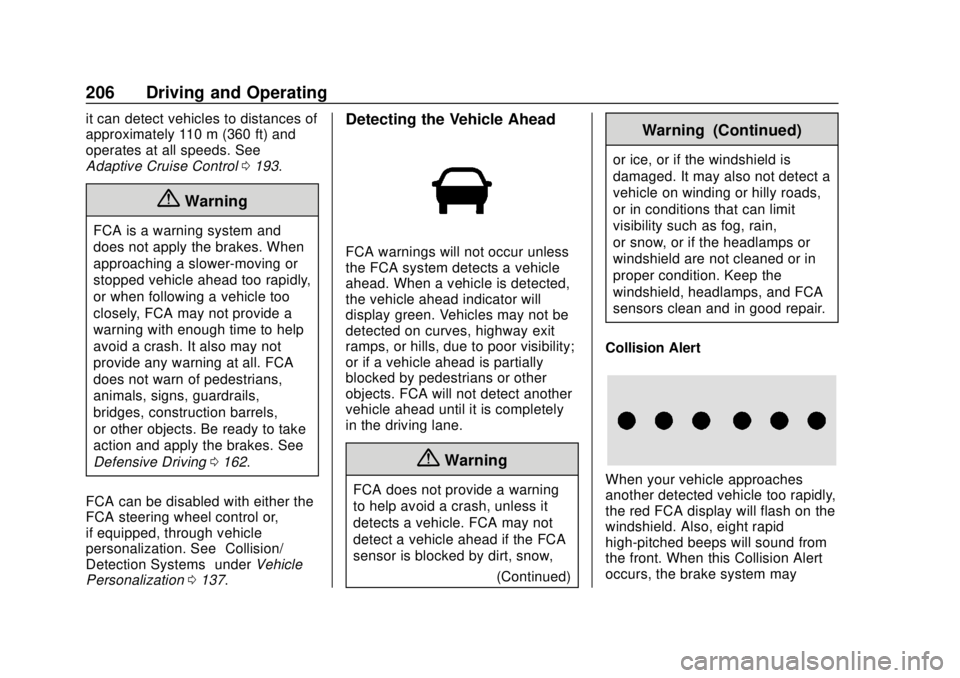
When your vehicle approaches
another detected vehicle too rapidly,
the red FCA display will flash on the
windshield. Also, eight rapid
high-pitched beeps will sound from
the front. When this Collision Alert
occurs, the brake system may
Page 213 of 379
Chevrolet VOLT Owner Manual (GMNA-Localizing-U.S./Canada/Mexico-
11349113) - 2018 - crc - 10/12/17
212 Driving and Operating
Warning (Continued)
.Detect road edges.
. Detect lanes on winding or
hilly roads.
If LKA only detects lane markings
on one side of the road, it will
only assist or provide an LDW
alert when approaching the lane
on the side where it has detected
a lane marking. Even with LKA
and LDW, you must steer the
vehicle. Always keep your
attention on the road and
maintain proper vehicle position
within the lane, or vehicle
damage, injury, or death could
occur. Always keep the
windshield, headlamps, and
camera sensors clean and in
good repair. Do not use LKA in
bad weather conditions.
{Warning
Using LKA on slippery roads
could cause loss of control of the
vehicle and a crash. Turn the
system off.
How the System Works
The LKA camera sensor is on the
windshield ahead of the rearview
mirror.
To turn LKA on and off, press
A
on the steering wheel.
When on,
Ais green if LKA is
available to assist and provide LDW
alerts. It may assist by gently
turning the steering wheel and
display
Aas amber if the vehicle
approaches a detected lane marking
without using a turn signal in that
direction. It may also provide an
LDW alert by flashing
Aamber
as the lane marking is crossed.
Additionally, there may be three
beeps on the right or left, depending
on the lane departure direction. Take Steering
The LKA system does not
continuously steer the vehicle.
If LKA does not detect active driver
steering, an alert, chime, or DIC
message may be provided. Move
the steering wheel to dismiss.
When the System Does Not
Seem to Work Properly
The system performance may be
affected by:
.
Close vehicles ahead.
. Sudden lighting changes, such
as when driving through tunnels.
. Banked roads.
. Roads with poor lane markings,
such as two-lane roads.
If the LKA system is not functioning
properly when lane markings are
clearly visible, cleaning the
windshield may help.
A system unavailable message may
display if the camera is blocked.
The LKA system does not need
service.
Page 230 of 379
Chevrolet VOLT Owner Manual (GMNA-Localizing-U.S./Canada/Mexico-
11349113) - 2018 - crc - 10/12/17
Driving and Operating 229
Caution (Continued)
.Fuel containing metals such
as methylcyclopentadienyl
manganese tricarbonyl
(MMT), which can damage
the emissions control
system and spark plugs.
. Fuel with a posted octane
rating of less than the
recommended fuel. Using
this fuel will lower fuel
economy and performance,
and may decrease the life of
the emissions catalyst.
California Fuel
Requirements
If the vehicle is certified to meet
California Emissions Standards, it is
designed to operate on fuels that
meet California specifications. See
the underhood emission control
label. If this fuel is not available in
states adopting California Emissions
Standards, the vehicle will operate
satisfactorily on fuels meeting federal specifications, but emission
control system performance may be
affected. The malfunction indicator
lamp could turn on and the vehicle
may not pass a smog-check test.
See
Malfunction Indicator Lamp
(Check Engine Light) 0114. If this
occurs, return to your authorized
dealer for diagnosis. If it is
determined that the condition is
caused by the type of fuel used,
repairs may not be covered by the
vehicle warranty.
Fuels in Foreign
Countries
The U.S., Canada, and Mexico post
fuel octane ratings in anti-knock
index (AKI). For fuel not to use in a
foreign country, see “Prohibited
Fuels” inFuel 0228.
Fuel Additives
To keep fuel systems clean, TOP
TIER detergent gasoline is
recommended. See Fuel0228. If TOP TIER detergent gasoline is
not available, one bottle of GM Fuel
System Treatment Cleaner added to
the fuel tank at every engine oil
change, can help. GM Fuel System
Treatment Cleaner is the only
gasoline additive recommended by
General Motors. It is available at
your dealer.
Filling the Tank
{Warning
Fuel vapors and fuel fires burn
violently and can cause injury or
death.
. To help avoid injuries to you
and others, read and follow
all the instructions on the
fuel pump island.
. Turn off the engine when
refueling.
. Keep sparks, flames, and
smoking materials away
from fuel.
(Continued)