maintenance CHEVROLET VOLT 2018 User Guide
[x] Cancel search | Manufacturer: CHEVROLET, Model Year: 2018, Model line: VOLT, Model: CHEVROLET VOLT 2018Pages: 379, PDF Size: 5.65 MB
Page 136 of 379
Chevrolet VOLT Owner Manual (GMNA-Localizing-U.S./Canada/Mexico-
11349113) - 2018 - crc - 10/12/17
Instruments and Controls 135
system monitoring the oil life,
additional maintenance is
recommended. SeeMaintenance
Schedule 0327.
Remember, the Oil Life display must
be reset after each oil change. It will
not reset itself. Also, be careful not
to reset the Oil Life display
accidentally at any time other than
when the oil has just been changed.
It cannot be reset accurately until
the next oil change. To reset the
engine oil life system, press and
hold
Vfor several seconds while
the Oil Life display is active. See
Engine Oil Life System 0242.
Tire Pressure : Shows the
approximate pressures of all four
tires. Tire pressure is displayed in
either kilopascal (kPa) or in pounds
per square inch (psi). If the pressure
is low, the value for that tire is
shown in amber.
See Tire Pressure Monitor System
0 280 andTire Pressure Monitor
Operation 0281. Average Speed :
Shows the
average speed of the vehicle in
kilometers per hour (km/h) or miles
per hour (mph). This average is
calculated based on the various
vehicle speeds recorded since the
last reset of this value. The average
speed can be reset by pressing and
holding
Vwhile this display is
active.
Timer : This display can be used as
a timer. To start the timer, press
V
while this display is active. The
display will show the amount of time
that has passed since the timer was
last reset. To stop the timer, press
V
briefly while this display is active
and the timer is running. To reset
the timer to zero, press and hold
V
while this display is active.
Speed Limit : Shows the current
speed limit. The information for this
page comes from a roadway
database.
Follow Distance Indicator : The
current follow time to the vehicle
ahead is displayed as a time value
on this page. Coolant Temperature :
Shows the
engine coolant temperature in either
degrees Celsius (°C) or degrees
Fahrenheit (°F).
Blank Page : The Blank Page
display allows for no information to
be displayed in the cluster info
display areas.
Page 154 of 379
Chevrolet VOLT Owner Manual (GMNA-Localizing-U.S./Canada/Mexico-
11349113) - 2018 - crc - 10/12/17
Climate Controls 153
Climate Controls
Climate Control Systems
Automatic Climate ControlSystem . . . . . . . . . . . . . . . . . . . . . . 153
Air Vents
Air Vents . . . . . . . . . . . . . . . . . . . . . 158
Maintenance
Passenger Compartment AirFilter . . . . . . . . . . . . . . . . . . . . . . . . 159
Climate Control
Systems
Automatic Climate
Control System
The heating, cooling, and ventilation
for the vehicle can be controlled
with this system.
The vehicle may require the use of
an auxiliary heat source under
certain cold conditions. This
provides additional heating and
defrost capability obtained by
running the engine, even if the high
voltage battery is adequately
charged. Under these conditions,
the engine will start and use fuel.
Make sure there is fuel in the tank. Do not allow the vehicle to remain in
extreme temperatures for long
periods without being driven or
plugged in.
Page 160 of 379
Chevrolet VOLT Owner Manual (GMNA-Localizing-U.S./Canada/Mexico-
11349113) - 2018 - crc - 10/12/17
Climate Controls 159
Maintenance
Passenger Compartment
Air Filter
The filter removes dust, pollen, and
other airborne irritants from outside
air that is pulled into the vehicle.
The filter should be replaced as part
of routine scheduled maintenance.
SeeMaintenance Schedule 0327.
To find out what type of filter to use,
see Maintenance Replacement
Parts 0336.
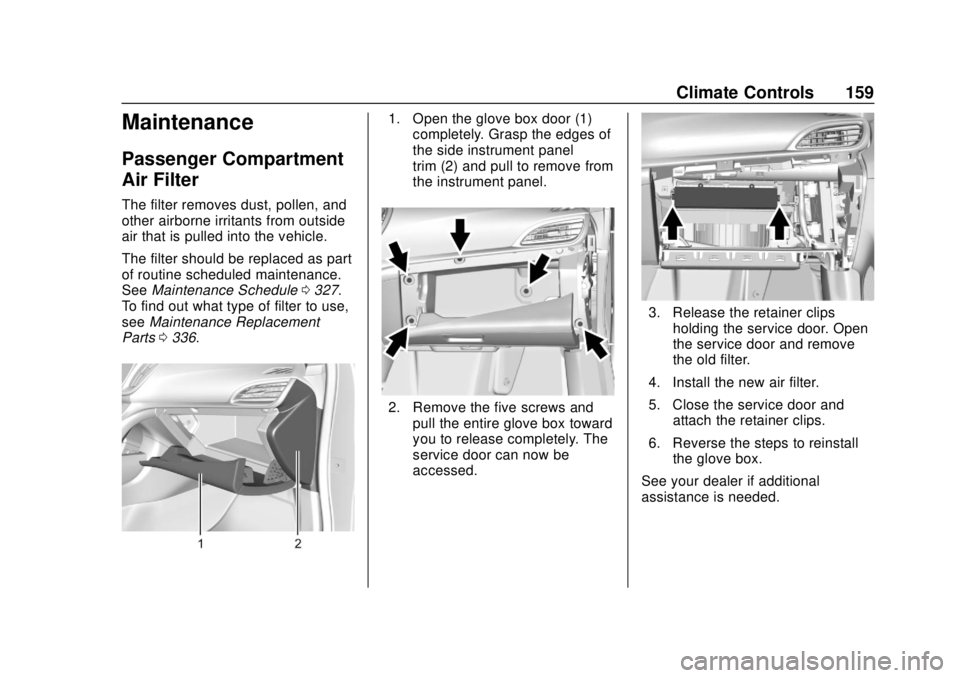
1. Open the glove box door (1)
completely. Grasp the edges of
the side instrument panel
trim (2) and pull to remove from
the instrument panel.
2. Remove the five screws and
pull the entire glove box toward
you to release completely. The
service door can now be
accessed.
3. Release the retainer clipsholding the service door. Open
the service door and remove
the old filter.
4. Install the new air filter.
5. Close the service door and attach the retainer clips.
6. Reverse the steps to reinstall the glove box.
See your dealer if additional
assistance is needed.
Page 161 of 379
Chevrolet VOLT Owner Manual (GMNA-Localizing-U.S./Canada/Mexico-
11349113) - 2018 - crc - 10/12/17
160 Driving and Operating
Driving and
Operating
Driving Information
Distracted Driving . . . . . . . . . . . . 161
Defensive Driving . . . . . . . . . . . . . 162
Drunk Driving . . . . . . . . . . . . . . . . . 162
Control of a Vehicle . . . . . . . . . . . 162
Braking . . . . . . . . . . . . . . . . . . . . . . . 162
Steering . . . . . . . . . . . . . . . . . . . . . . 163
Off-Road Recovery . . . . . . . . . . . 163
Loss of Control . . . . . . . . . . . . . . . 164
Driving on Wet Roads . . . . . . . . 164
Hill and Mountain Roads . . . . . 165
Winter Driving . . . . . . . . . . . . . . . . 166
If the Vehicle Is Stuck . . . . . . . . 167
Vehicle Load Limits . . . . . . . . . . . 167
Starting and Operating
New Vehicle Break-In . . . . . . . . . 171
Power Button . . . . . . . . . . . . . . . . . 171
Starting and Stopping theVehicle . . . . . . . . . . . . . . . . . . . . . . 172
Retained Accessory Power (RAP) . . . . . . . . . . . . . . . . 174
Shifting Into Park . . . . . . . . . . . . . 174
Shifting out of Park . . . . . . . . . . . 175 Parking over Things
That Burn . . . . . . . . . . . . . . . . . . . 175
Extended Parking . . . . . . . . . . . . 176
Electric Vehicle Operating
Modes
System Operation . . . . . . . . . . . . 176
Electric Mode . . . . . . . . . . . . . . . . . 176
Extended Range Mode . . . . . . . 177
Driver Selected Operating Modes . . . . . . . . . . . . . . . . . . . . . . 177
Out of Fuel/Engine Unavailable . . . . . . . . . . . . . . . . . 180
Maintenance Modes . . . . . . . . . . 180
Engine Exhaust
Engine Exhaust . . . . . . . . . . . . . . 182
Running the Vehicle While Parked . . . . . . . . . . . . . . . . . . . . . . 183
Electric Drive Unit
Electric Drive Unit . . . . . . . . . . . . 183
Brakes
Antilock BrakeSystem (ABS) . . . . . . . . . . . . . . . 185
Electric Parking Brake . . . . . . . . 185
Hill Start Assist (HSA) . . . . . . . . 187
Regenerative Braking . . . . . . . . 187
Ride Control Systems
Traction Control/Electronic Stability Control . . . . . . . . . . . . . 189
Driver Mode Control . . . . . . . . . . 190
Cruise Control
Cruise Control . . . . . . . . . . . . . . . . 191
Adaptive Cruise Control . . . . . . 193
Driver Assistance Systems
Driver Assistance Systems . . . 200
Assistance Systems for Parking or Backing . . . . . . . . . . 201
Assistance Systems for Driving . . . . . . . . . . . . . . . . . . . . . . 205
Forward Collision Alert (FCA) System . . . . . . . . . . . . . . . . . . . . . . 205
Forward Automatic Braking (FAB) . . . . . . . . . . . . . . . 207
Side Blind Zone Alert (SBZA) . . . . . . . . . . . . . . . . 209
Lane Change Alert (LCA) . . . . . 209
Lane Departure Warning (LDW) . . . . . . . . . . . . . . 211
Lane Keep Assist (LKA) . . . . . . 211
Charging
Plug-In Charging . . . . . . . . . . . . . 213
Delayed Charging Override . . . 215
Charging Status Feedback . . . 215
Charge Cord . . . . . . . . . . . . . . . . . 220
Page 164 of 379
Chevrolet VOLT Owner Manual (GMNA-Localizing-U.S./Canada/Mexico-
11349113) - 2018 - crc - 10/12/17
Driving and Operating 163
Steering
Electric Power Steering
The vehicle has electric power
steering. It does not have power
steering fluid. Regular maintenance
is not required.
If power steering assist is lost due
to a system malfunction, the vehicle
can be steered, but may require
increased effort.
If the steering assist is used for an
extended period of time while the
vehicle is not moving, power assist
may be reduced.
If the steering wheel is turned until it
reaches the end of its travel and is
held against that position for an
extended period of time, power
steering assist may be reduced.
Normal use of the power steering
assist should return when the
system cools down.
See your dealer if there is a
problem.
Curve Tips
.Take curves at a reasonable
speed.
. Reduce speed before entering a
curve.
. Maintain a reasonable steady
speed through the curve.
. Wait until the vehicle is out of
the curve before accelerating
gently into the straightaway.
Steering in Emergencies
.There are some situations when
steering around a problem may
be more effective than braking.
. Holding both sides of the
steering wheel allows you to turn
180 degrees without removing
a hand.
. The Antilock Brake System
(ABS) allows steering while
braking.
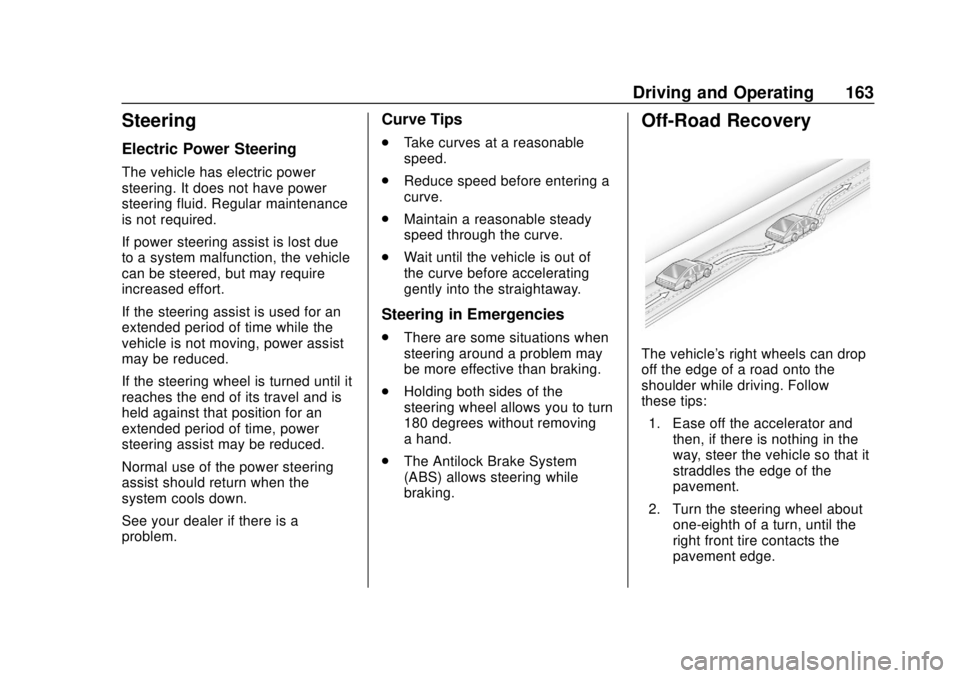
Off-Road Recovery
The vehicle's right wheels can drop
off the edge of a road onto the
shoulder while driving. Follow
these tips:
1. Ease off the accelerator and then, if there is nothing in the
way, steer the vehicle so that it
straddles the edge of the
pavement.
2. Turn the steering wheel about one-eighth of a turn, until the
right front tire contacts the
pavement edge.
Page 174 of 379
Chevrolet VOLT Owner Manual (GMNA-Localizing-U.S./Canada/Mexico-
11349113) - 2018 - crc - 10/12/17
Driving and Operating 173
Caution
Do not try to shift to P (Park) if the
vehicle is moving or the electric
drive unit could be damaged.
Shift to P (Park) only when the
vehicle is stopped.
Caution
If you add electrical parts or
accessories, you could change
the way the vehicle operates. Any
resulting damage would not be
covered by the vehicle warranty.
SeeAdd-On Electrical Equipment
0 232.
The Remote Keyless Entry (RKE)
transmitter must be in the vehicle.
Press the brake pedal and press
and release POWER
O. If the RKE transmitter is not in the
vehicle or something is interfering
with the transmitter, a message
displays in the Driver Information
Center (DIC).
If the vehicle will not start due to a
low RKE transmitter battery, the
vehicle can still be driven. See
“Starting the Vehicle with a Low
Transmitter Battery”
inRemote
Keyless Entry (RKE) System
Operation 032.
A Welcome, Ready, and Good-bye
audio message will be heard in the
vehicle and animated on the
instrument cluster when opening the
driver door upon entry, when the
vehicle is ready to be driven, and
when the vehicle is turned off.
The instrument cluster displays an
active fuel and/or battery gauge,
along with an audio startup cue,
when the vehicle is ready to be
driven. This could take up to
15 seconds at extremely cold
temperatures. The engine will only
start if needed. If the vehicle did not
start, the instrument cluster will display a screen with inactive fuel
and battery gauges. See
Starting
and Stopping the Vehicle 0172.
Restarting Procedure
If the vehicle must be restarted
while it is still moving, move the shift
lever to N (Neutral) and press
POWER
Otwice without pressing
the brake pedal. The propulsion
system will not restart in any other
position.
Forced Engine On
Some vehicle conditions that force
the engine to run:
. There are cold ambient
temperatures.
. The hood is open or not
completely latched while the
vehicle is not in N (Neutral).
. The high voltage battery has a
low charge.
. The engine needs to run for
maintenance.
See Maintenance Modes 0180.
Page 177 of 379
Chevrolet VOLT Owner Manual (GMNA-Localizing-U.S./Canada/Mexico-
11349113) - 2018 - crc - 10/12/17
176 Driving and Operating
Extended Parking
It is best not to park with the vehicle
running. If the vehicle is left running,
be sure it will not move and there is
adequate ventilation.
SeeShifting Into Park 0174 and
Engine Exhaust 0182.
If the vehicle is left parked and
running with the RKE transmitter
outside the vehicle, it will turn off
after one hour.
If the vehicle is left parked and
running with the RKE transmitter
inside the vehicle, it will turn off after
two hours.
The vehicle could turn off sooner if it
is parked on a hill, due to lack of
available fuel.
The timer will reset if the vehicle is
shifted out of P (Park) while it is
running.
Electric Vehicle
Operating Modes
System Operation
This vehicle is an Extended Range
Electric Vehicle (EREV). It uses an
electric propulsion system to drive
the vehicle at all times. Electricity is
the vehicle's primary source of
energy, while gasoline is the
secondary source.
The vehicle has two modes of
operation: Electric and Extended
Range. In Electric Mode, the vehicle
is propelled by its electric drive unit
only. It converts electrical energy
into mechanical energy to drive the
wheels. In Extended Range Mode,
both the battery and the engine
power the vehicle. The vehicle's
performance remains nearly the
same in either mode. See Driving
for Better Energy Efficiency 027.
Electric Mode
In Electric Mode, the vehicle does
not use fuel or produce tailpipe
emissions. During this primary
mode, the vehicle is powered by
electrical energy stored in the high
voltage battery. The vehicle can
operate in this mode until the
battery has reached a low charge.
There are some conditions when the
battery charge is high enough to
provide Electric Mode operation, but
the engine still runs. They are:
.
Cold ambient temperatures.
. Hot or cold high voltage battery
temperatures.
. The hood being open or not
completely closed and latched.
. Certain high voltage battery fault
conditions.
. Engine Maintenance Mode or
Fuel Maintenance Mode
being run.
Page 181 of 379
Chevrolet VOLT Owner Manual (GMNA-Localizing-U.S./Canada/Mexico-
11349113) - 2018 - crc - 10/12/17
180 Driving and Operating
Each time the vehicle is started, it
will return to Normal Mode.
Out of Fuel/Engine
Unavailable
If the vehicle runs out of fuel, or the
engine will not start due to a
malfunction, the vehicle can
continue to be driven in Electric
Mode until the current charge is
depleted. The vehicle will have less
responsive acceleration. DIC
messages indicate reduced
propulsion power, that the engine is
not available, and the need for fuel
or service.
Once the vehicle is refueled, or the
malfunction is corrected, the engine
will start the next time the vehicle is
turned on to perform a self test, and
DIC messages will not be displayed.
Once the engine starts successfully,
normal operation will continue in
either Electric or Extended Range
Mode. The engine may stop running
after the self test is completed,
based on the current mode of
operation.
Maintenance Modes
Engine Maintenance Mode (EMM)
EMM runs the engine to keep it in
good working condition after
approximately six weeks of no or
very limited engine operation. EMM
will force the engine to run, even if
there is a charge to power the
vehicle.
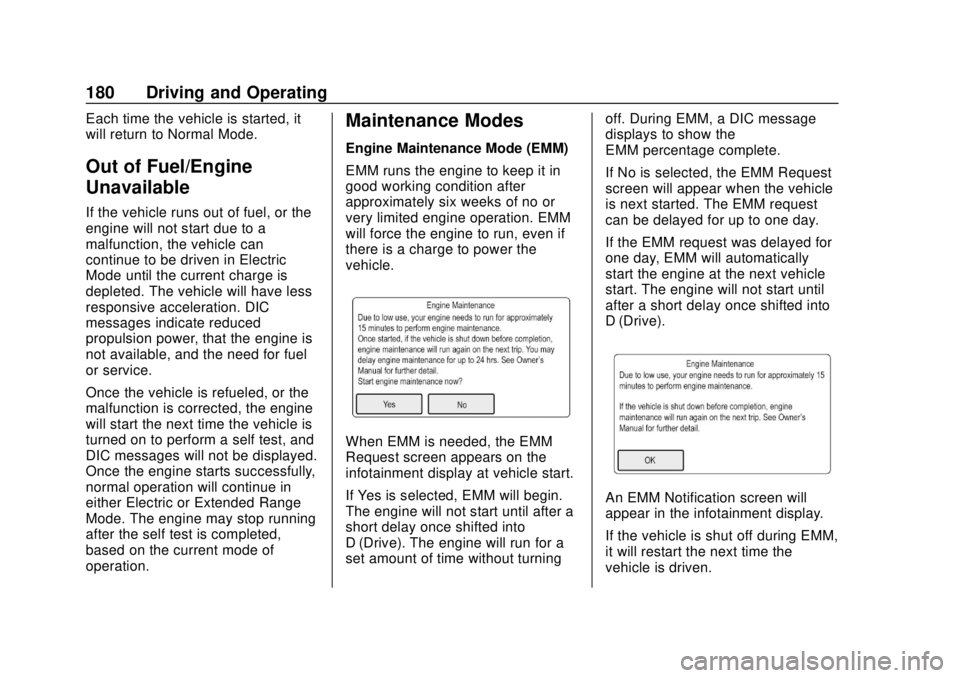
When EMM is needed, the EMM
Request screen appears on the
infotainment display at vehicle start.
If Yes is selected, EMM will begin.
The engine will not start until after a
short delay once shifted into
D (Drive). The engine will run for a
set amount of time without turningoff. During EMM, a DIC message
displays to show the
EMM percentage complete.
If No is selected, the EMM Request
screen will appear when the vehicle
is next started. The EMM request
can be delayed for up to one day.
If the EMM request was delayed for
one day, EMM will automatically
start the engine at the next vehicle
start. The engine will not start until
after a short delay once shifted into
D (Drive).
An EMM Notification screen will
appear in the infotainment display.
If the vehicle is shut off during EMM,
it will restart the next time the
vehicle is driven.
Page 182 of 379
Chevrolet VOLT Owner Manual (GMNA-Localizing-U.S./Canada/Mexico-
11349113) - 2018 - crc - 10/12/17
Driving and Operating 181
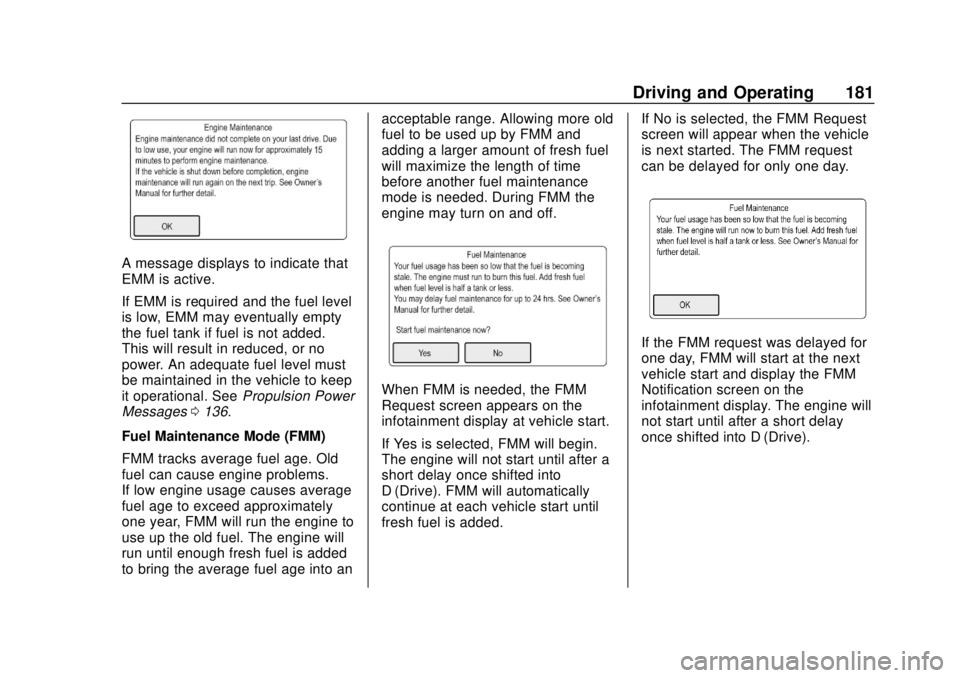
A message displays to indicate that
EMM is active.
If EMM is required and the fuel level
is low, EMM may eventually empty
the fuel tank if fuel is not added.
This will result in reduced, or no
power. An adequate fuel level must
be maintained in the vehicle to keep
it operational. SeePropulsion Power
Messages 0136.
Fuel Maintenance Mode (FMM)
FMM tracks average fuel age. Old
fuel can cause engine problems.
If low engine usage causes average
fuel age to exceed approximately
one year, FMM will run the engine to
use up the old fuel. The engine will
run until enough fresh fuel is added
to bring the average fuel age into an acceptable range. Allowing more old
fuel to be used up by FMM and
adding a larger amount of fresh fuel
will maximize the length of time
before another fuel maintenance
mode is needed. During FMM the
engine may turn on and off.
When FMM is needed, the FMM
Request screen appears on the
infotainment display at vehicle start.
If Yes is selected, FMM will begin.
The engine will not start until after a
short delay once shifted into
D (Drive). FMM will automatically
continue at each vehicle start until
fresh fuel is added.
If No is selected, the FMM Request
screen will appear when the vehicle
is next started. The FMM request
can be delayed for only one day.
If the FMM request was delayed for
one day, FMM will start at the next
vehicle start and display the FMM
Notification screen on the
infotainment display. The engine will
not start until after a short delay
once shifted into D (Drive).
Page 233 of 379
Chevrolet VOLT Owner Manual (GMNA-Localizing-U.S./Canada/Mexico-
11349113) - 2018 - crc - 10/12/17
232 Driving and Operating
Warning (Continued)
.Fill the container no more
than 95% full to allow for
expansion.
. Do not smoke, light
matches, or use lighters
while pumping fuel.
. Avoid using cell phones or
other electronic devices.
Trailer Towing
General Towing
Information
The vehicle is neither designed nor
intended to tow a trailer or another
vehicle.
For information on towing a disabled
vehicle, see Towing the Vehicle
0 311. For information on towing the
vehicle behind another vehicle such
as a motor home, see Recreational
Vehicle Towing 0313.
Conversions and
Add-Ons
Add-On Electrical
Equipment
{Warning
The Data Link Connector (DLC) is
used for vehicle service and
Emission Inspection/Maintenance
testing. See Malfunction
Indicator Lamp (Check Engine
Light) 0114. A device connected
to the DLC —such as an
aftermarket fleet or
driver-behavior tracking device —
may interfere with vehicle
systems. This could affect vehicle
operation and cause a crash.
Such devices may also access
information stored in the vehicle’s
systems.