open hood CHEVROLET VOLT 2018 User Guide
[x] Cancel search | Manufacturer: CHEVROLET, Model Year: 2018, Model line: VOLT, Model: CHEVROLET VOLT 2018Pages: 379, PDF Size: 5.65 MB
Page 259 of 379
Chevrolet VOLT Owner Manual (GMNA-Localizing-U.S./Canada/Mexico-
11349113) - 2018 - crc - 10/12/17
258 Vehicle Care
Headlamp Aiming
Headlamp aim has been preset and
should need no further adjustment.
If the vehicle is damaged in a crash,
the headlamp aim may be affected.
If adjustment to the headlamps is
necessary, see your dealer.
Bulb Replacement
For the proper type of replacement
bulbs, or any bulb changing
procedure not listed in this section,
contact your dealer.
Halogen Bulbs
{Warning
Halogen bulbs have pressurized
gas inside and can burst if you
drop or scratch the bulb. You or
others could be injured. Be sure
to read and follow the instructions
on the bulb package.
LED Lighting
This vehicle has several LED lamps.
For replacement of any LED lighting
assembly, contact your dealer.
Headlamps
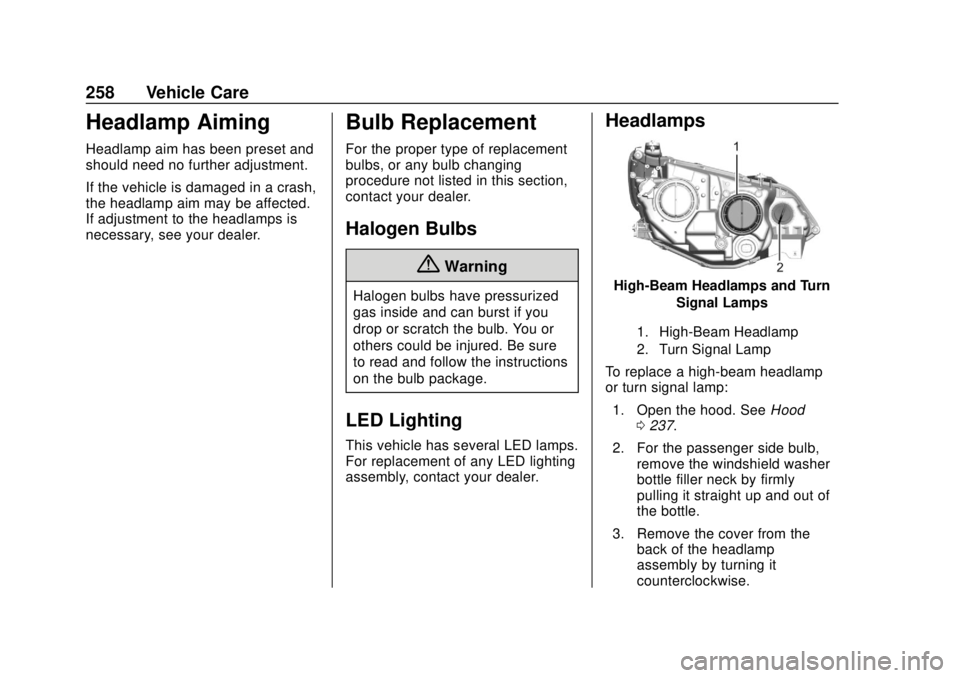
High-Beam Headlamps and TurnSignal Lamps
1. High-Beam Headlamp
2. Turn Signal Lamp
To replace a high-beam headlamp
or turn signal lamp:
1. Open the hood. See Hood
0 237.
2. For the passenger side bulb, remove the windshield washer
bottle filler neck by firmly
pulling it straight up and out of
the bottle.
3. Remove the cover from the back of the headlamp
assembly by turning it
counterclockwise.
Page 309 of 379
Chevrolet VOLT Owner Manual (GMNA-Localizing-U.S./Canada/Mexico-
11349113) - 2018 - crc - 10/12/17
308 Vehicle Care
4. Locate the positive (+) andnegative (−) terminals on the
other vehicle.
5. Open the hood to locate the positive (+) and negative (−)
terminals on your Volt. Open
the access cover for the
remote positive (+) terminal (1).
The remote negative (−)
terminal (2) for the Volt is a
stud GND (−) on the driver side
of the engine compartment.
6. Check that the jumper cables do not have loose or missing
insulation or a shock could
result and the vehicles could
be damaged.
Before connecting the jumper
cables, here are some basic
things to know. Positive (+)
jumper cable goes to
positive (+) battery terminal or
a remote positive (+) terminal if
available. Negative (−) jumper
cable goes to negative (−)
battery terminal or a remote
negative (−) terminal if
available. Do not connect
positive (+) to negative (−) or there will be a short that may
damage the battery and other
parts of the vehicle.
Caution
If the jumper cables are
connected or removed in the
wrong order, electrical shorting
may occur and damage the
vehicle. The repairs would not be
covered by the vehicle warranty.
Always connect and remove the
jumper cables in the correct order,
making sure that the cables do
not touch each other or other
metal.
Connecting the Jumper Cables 1. Connect the red positive (+) jumper cable to the remote
positive (+) terminal (1) of your
Volt. Do not let the other end of
the cable touch metal.
2. Connect the other end of the red positive (+) jumper cable to
the positive (+) terminal of the
other vehicle. 3. Connect the black negative (−)
jumper cable to the
negative (−) battery terminal of
the other vehicle battery. Do
not let the other end touch
anything until the next step.
4. Connect the other end of the black negative (−) jumper cable
to the remote negative (−)
terminal (2) of your Volt.
5. Press POWER
Oto start. This
will wake up the electronics on
the Volt. After the instrument
cluster initializes, the Volt will
use power from the high
voltage battery to charge the
12-volt battery. The jumper
cables can then be
disconnected. If the Volt does
not start, call your dealer or
Roadside Assistance. See
Roadside Assistance Program
0 345.