power button CHEVROLET VOLT 2018 User Guide
[x] Cancel search | Manufacturer: CHEVROLET, Model Year: 2018, Model line: VOLT, Model: CHEVROLET VOLT 2018Pages: 379, PDF Size: 5.65 MB
Page 158 of 379
Chevrolet VOLT Owner Manual (GMNA-Localizing-U.S./Canada/Mexico-
11349113) - 2018 - crc - 10/12/17
Climate Controls 157
The defogger only works when the
vehicle is on. The defogger will turn
off if the vehicle is turned off.
If equipped with heated outside
rearview mirrors, they turn on when
the rear window defogger button is
on and help to clear fog or frost from
the surface of the mirror. See
Heated Mirrors048.
Caution
Do not try to clear frost or other
material from the inside of the
front windshield and rear window
with a razor blade or anything
else that is sharp. This may
damage the rear window
defogger grid and affect the
radio's ability to pick up stations
clearly. The repairs would not be
covered by the vehicle warranty.
Remote Start : The climate control
system may be started by using the
Remote Keyless Entry (RKE)
transmitter. The climate control system will default to an appropriate
heating or cooling mode. See
Remote Start
038.
If equipped, the heated seats will
turn on if it is cold outside. The
heated seat indicator light may not
come on during a remote start.
If equipped, the heated steering
wheel will come on if it is cold
outside. The heated steering wheel
indicator light may not come on
during a remote start.
The rear window defogger turns on
if it is cold outside.
Compressor
The vehicle has an electric powered
air conditioning compressor. This
allows for continuous air
conditioning and/or high voltage
battery cooling operation, without
running the engine.
The compressor operating speed is
not tied to the engine speed, so
some noise may be heard from the
compressor, especially when air
conditioning use is high and the
engine has turned off. This is
normal.
Sensors
Solar Sensor
The solar sensor is on top of the
instrument panel, near the
windshield, where it monitors solar
intensity.
The climate control system uses the
sensor information to adjust the
temperature, fan speed,
recirculation, and air delivery mode
for best comfort.
Do not cover the sensor; otherwise
the automatic climate control system
may not work properly.
Humidity Sensor
The humidity sensor is near the
base of the inside rearview mirror.
The climate control system uses the
sensor information to adjust the
temperature and recirculation for
best comfort.
Page 161 of 379
Chevrolet VOLT Owner Manual (GMNA-Localizing-U.S./Canada/Mexico-
11349113) - 2018 - crc - 10/12/17
160 Driving and Operating
Driving and
Operating
Driving Information
Distracted Driving . . . . . . . . . . . . 161
Defensive Driving . . . . . . . . . . . . . 162
Drunk Driving . . . . . . . . . . . . . . . . . 162
Control of a Vehicle . . . . . . . . . . . 162
Braking . . . . . . . . . . . . . . . . . . . . . . . 162
Steering . . . . . . . . . . . . . . . . . . . . . . 163
Off-Road Recovery . . . . . . . . . . . 163
Loss of Control . . . . . . . . . . . . . . . 164
Driving on Wet Roads . . . . . . . . 164
Hill and Mountain Roads . . . . . 165
Winter Driving . . . . . . . . . . . . . . . . 166
If the Vehicle Is Stuck . . . . . . . . 167
Vehicle Load Limits . . . . . . . . . . . 167
Starting and Operating
New Vehicle Break-In . . . . . . . . . 171
Power Button . . . . . . . . . . . . . . . . . 171
Starting and Stopping theVehicle . . . . . . . . . . . . . . . . . . . . . . 172
Retained Accessory Power (RAP) . . . . . . . . . . . . . . . . 174
Shifting Into Park . . . . . . . . . . . . . 174
Shifting out of Park . . . . . . . . . . . 175 Parking over Things
That Burn . . . . . . . . . . . . . . . . . . . 175
Extended Parking . . . . . . . . . . . . 176
Electric Vehicle Operating
Modes
System Operation . . . . . . . . . . . . 176
Electric Mode . . . . . . . . . . . . . . . . . 176
Extended Range Mode . . . . . . . 177
Driver Selected Operating Modes . . . . . . . . . . . . . . . . . . . . . . 177
Out of Fuel/Engine Unavailable . . . . . . . . . . . . . . . . . 180
Maintenance Modes . . . . . . . . . . 180
Engine Exhaust
Engine Exhaust . . . . . . . . . . . . . . 182
Running the Vehicle While Parked . . . . . . . . . . . . . . . . . . . . . . 183
Electric Drive Unit
Electric Drive Unit . . . . . . . . . . . . 183
Brakes
Antilock BrakeSystem (ABS) . . . . . . . . . . . . . . . 185
Electric Parking Brake . . . . . . . . 185
Hill Start Assist (HSA) . . . . . . . . 187
Regenerative Braking . . . . . . . . 187
Ride Control Systems
Traction Control/Electronic Stability Control . . . . . . . . . . . . . 189
Driver Mode Control . . . . . . . . . . 190
Cruise Control
Cruise Control . . . . . . . . . . . . . . . . 191
Adaptive Cruise Control . . . . . . 193
Driver Assistance Systems
Driver Assistance Systems . . . 200
Assistance Systems for Parking or Backing . . . . . . . . . . 201
Assistance Systems for Driving . . . . . . . . . . . . . . . . . . . . . . 205
Forward Collision Alert (FCA) System . . . . . . . . . . . . . . . . . . . . . . 205
Forward Automatic Braking (FAB) . . . . . . . . . . . . . . . 207
Side Blind Zone Alert (SBZA) . . . . . . . . . . . . . . . . 209
Lane Change Alert (LCA) . . . . . 209
Lane Departure Warning (LDW) . . . . . . . . . . . . . . 211
Lane Keep Assist (LKA) . . . . . . 211
Charging
Plug-In Charging . . . . . . . . . . . . . 213
Delayed Charging Override . . . 215
Charging Status Feedback . . . 215
Charge Cord . . . . . . . . . . . . . . . . . 220
Page 172 of 379
Chevrolet VOLT Owner Manual (GMNA-Localizing-U.S./Canada/Mexico-
11349113) - 2018 - crc - 10/12/17
Driving and Operating 171
Warning (Continued)
. Secure loose items in the
vehicle.
.Do not leave a seat
folded down unless
needed.
Starting and
Operating
New Vehicle Break-In
The vehicle does not require a
break-in period. Vehicle break-in is
performed during manufacturing.
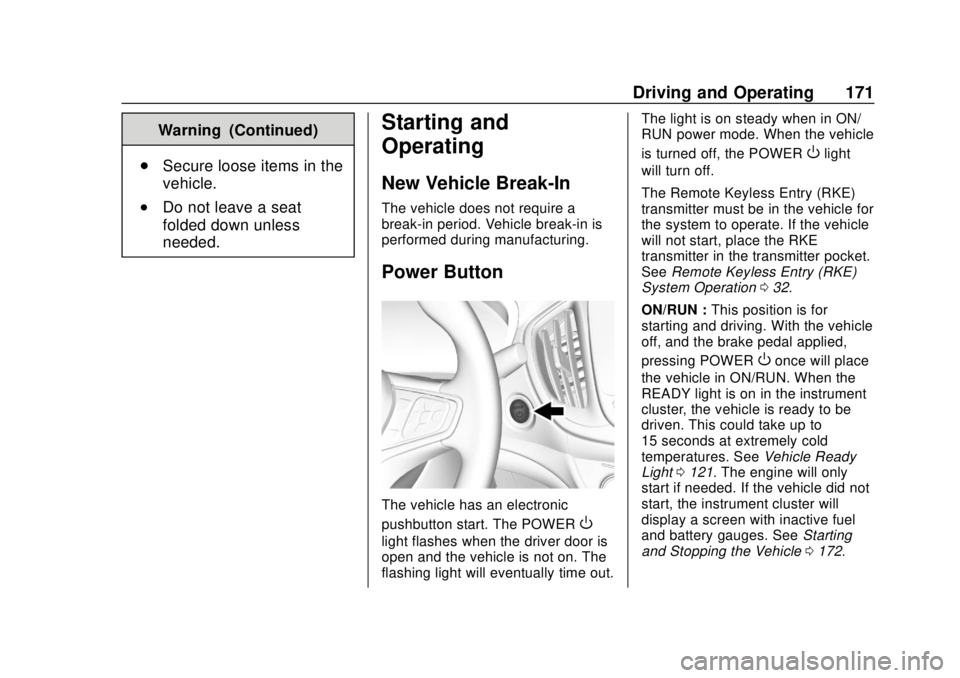
Power Button
The vehicle has an electronic
pushbutton start. The POWER
O
light flashes when the driver door is
open and the vehicle is not on. The
flashing light will eventually time out. The light is on steady when in ON/
RUN power mode. When the vehicle
is turned off, the POWER
Olight
will turn off.
The Remote Keyless Entry (RKE)
transmitter must be in the vehicle for
the system to operate. If the vehicle
will not start, place the RKE
transmitter in the transmitter pocket.
See Remote Keyless Entry (RKE)
System Operation 032.
ON/RUN : This position is for
starting and driving. With the vehicle
off, and the brake pedal applied,
pressing POWER
Oonce will place
the vehicle in ON/RUN. When the
READY light is on in the instrument
cluster, the vehicle is ready to be
driven. This could take up to
15 seconds at extremely cold
temperatures. See Vehicle Ready
Light 0121. The engine will only
start if needed. If the vehicle did not
start, the instrument cluster will
display a screen with inactive fuel
and battery gauges. See Starting
and Stopping the Vehicle 0172.
Page 173 of 379
Chevrolet VOLT Owner Manual (GMNA-Localizing-U.S./Canada/Mexico-
11349113) - 2018 - crc - 10/12/17
172 Driving and Operating
STOPPING THE VEHICLE/OFF :
To turn the vehicle off, press
POWER
Owith the vehicle in
P (Park). Retained Accessory Power
(RAP) will remain active until the
driver door is opened. See Retained
Accessory Power (RAP) 0174.
When turning off the vehicle, if the
vehicle is not in P (Park), the vehicle
will go to ACC/ACCESSORY and
display the message SHIFT TO
PARK in the Driver Information
Center (DIC).
If the vehicle must be shut off in an
emergency:
1. Brake using a firm and steady pressure. Do not pump the
brakes.
2. Shift the vehicle to N (Neutral). This can be done while the
vehicle is moving. After shifting
to N (Neutral), firmly apply the
brakes and steer the vehicle to
a safe location.
3. Come to a complete stop, shift to P (Park), and turn the vehicle
off by pressing POWER
O. 4. Set the parking brake. See
Electric Parking Brake 0185.
{Warning
Turning off the vehicle while
moving may disable the airbags.
While driving, only shut the
propulsion system off in an
emergency.
If the vehicle cannot be pulled over,
and must be shut off while driving,
press and hold POWER
Ofor
longer than two seconds, or press
twice in five seconds.
Service Mode
Caution
Placing the vehicle in Service
Mode will use the 12-volt battery.
Do not use Service Mode for an
extended period, or the vehicle
may not start. This power mode is available for
service and diagnostics, and to
verify the proper operation of the
malfunction indicator lamp as may
be required for emission inspection
purposes. With the vehicle off, and
the brake pedal not applied,
pressing and holding POWER
Ofor
more than five seconds will place
the vehicle in Service Mode. The
instruments and audio systems will
operate as they do in ON/RUN, but
the vehicle will not be able to be
driven. The propulsion system will
not start in Service Mode. Press the
button again to turn the vehicle off.
Starting and Stopping the
Vehicle
Computers determine when the
engine needs to run. The engine
may start, if required, when the
propulsion system is on.
Starting Procedure
Move the shift lever to P (Park) or
N (Neutral). The propulsion system
will not start in any other position.
Page 175 of 379
Chevrolet VOLT Owner Manual (GMNA-Localizing-U.S./Canada/Mexico-
11349113) - 2018 - crc - 10/12/17
174 Driving and Operating
A chime will sound if the driver door
is opened while the vehicle is on.
Always press POWER
Oto turn the
vehicle off before exiting.
Stopping Procedure
For information on how to turn the
vehicle off, see Power Button0171.
Retained Accessory
Power (RAP)
Some vehicle accessories may be
used after the ignition is turned off.
The power windows and sunroof,
if equipped, will continue to work for
up to 10 minutes or until any door is
opened.
The infotainment system will
continue to work for 10 minutes,
until the driver door is opened,
or until the ignition is turned on or
placed in ACC/ACCESSORY.
Shifting Into Park
1. Hold the brake pedal down and
set the parking brake. See
Electric Parking Brake 0185. 2. Move the shift lever into
P (Park) by pushing the lever
all the way toward the front of
the vehicle.
3. Turn the vehicle off.
Leaving the Vehicle with the
Propulsion System On
{Warning
It can be dangerous to leave the
vehicle with the propulsion
system running. It could overheat
and catch fire.
It is dangerous to get out of the
vehicle if the shift lever is not fully
in P (Park) with the parking brake
firmly set. The vehicle can roll.
Do not leave the vehicle when the
propulsion system is running.
If you have left the propulsion
system running, the vehicle can
move suddenly. You or others
could be injured. To be sure the
vehicle will not move, even when (Continued)
Warning (Continued)
you are on fairly level ground,
always set the parking brake and
move the shift lever to P (Park).
SeeShifting Into Park 0174.
If you have to leave the vehicle with
the propulsion system on, be sure
the vehicle is in P (Park) and the
parking brake is firmly set before
you leave it. After you have moved
the shift lever into P (Park), hold
down the regular brake pedal. See if
you can move the shift lever away
from P (Park) without first pulling it
toward you. If you can, it means that
the shift lever was not fully locked
into P (Park).
Torque Lock
Torque lock is when the weight of
the vehicle puts too much force on
the parking pawl in the electric drive
unit. This happens when parking on
a hill and shifting the electric drive
unit into P (Park) is not done
properly and then it is difficult to
Page 176 of 379
Chevrolet VOLT Owner Manual (GMNA-Localizing-U.S./Canada/Mexico-
11349113) - 2018 - crc - 10/12/17
Driving and Operating 175
shift out of P (Park). To prevent
torque lock, set the parking brake
and then shift into P (Park).
If torque lock does occur, your
vehicle may need to be pushed
uphill by another vehicle to relieve
the parking pawl pressure, so you
can shift out of P (Park).
Shifting out of Park
To shift out of P (Park), the vehicle
must be on, the brake pedal must
be applied, and the charge cord
must be unplugged.
The vehicle has an electronic shift
lock release system. The shift lock
release is designed to:
.Prevent the vehicle from turning
off unless the shift lever is in
P (Park).
. Prevent moving the shift lever
out of P (Park), unless the
vehicle is on, the brake pedal is
applied, and the charge cord is
unplugged. Parking the vehicle in extreme cold
for several days without the charge
cord connected may cause the
electric drive unit to be locked in
P (Park) until the propulsion system
has warmed sufficiently.
The shift lock is always functional
except in the case of an uncharged
or low charged 12-volt battery (less
than 9 volts).
If the vehicle has an uncharged
12-volt battery or a 12-volt battery
with low voltage, try charging or
jump starting the 12-volt battery.
See
Battery - North America 0253
or Jump Starting - North America
0 306.
If the shift lever cannot be moved
out of P (Park): 1. Apply and maintain the regular brakes.
2. Turn the vehicle on using POWER
O. See Power Button
0 171. 3. Let up on the shift lever and
make sure the shift lever is
pushed all the way into
P (Park).
4. Press the shift lever button.
5. Move the shift lever into the desired gear.
If you still cannot move the shift
lever from P (Park), see your dealer
or a professional towing service.
Parking over Things
That Burn
{Warning
Things that can burn could touch
hot exhaust parts under the
vehicle and ignite. Do not park
over papers, leaves, dry grass,
or other things that can burn.
Page 185 of 379
Chevrolet VOLT Owner Manual (GMNA-Localizing-U.S./Canada/Mexico-
11349113) - 2018 - crc - 10/12/17
184 Driving and Operating
shift lever, then push the shift lever
all the way into P (Park) as you
maintain brake application. Then
press the shift lever button and
move the shift lever into another
gear. SeeShifting out of Park 0175.
R : Use this gear to back up.
Caution
Shifting to R (Reverse) while the
vehicle is moving forward could
damage the electric drive unit.
The repairs would not be covered
by the vehicle warranty. Shift to
R (Reverse) only after the vehicle
is stopped.
To rock the vehicle back and forth to
get out of snow, ice, or sand without
damaging the electric drive unit, see
If the Vehicle Is Stuck 0167.
N : In this position, the propulsion
system does not transfer torque to
the wheels. To restart the propulsion
system when the vehicle is already
moving, use N (Neutral) only. D :
This position is for normal
driving. If more power is needed for
passing, press the accelerator
pedal down.
Caution
If the vehicle seems to accelerate
slowly or not respond when you
go faster, and you continue to
drive the vehicle that way, you
could damage the electric drive
unit. Have the vehicle serviced
right away.
L : This position reduces vehicle
speed without using the brakes. Use
L (Low) on very steep hills, in deep
snow, in mud, or in stop-and-go
traffic.
Caution
Spinning the tires or holding the
vehicle in one place on a hill
using only the accelerator pedal
may damage the electric drive
(Continued)
Caution (Continued)
unit. The repair will not be
covered by the vehicle warranty.
If you are stuck, do not spin the
tires. When stopping on a hill, use
the brakes to hold the vehicle in
place.
Page 256 of 379
Chevrolet VOLT Owner Manual (GMNA-Localizing-U.S./Canada/Mexico-
11349113) - 2018 - crc - 10/12/17
Vehicle Care 255
Caution
The vehicle is equipped with an
AGM/VRLA 12-volt battery, which
can be damaged by using the
incorrect type of trickle charger.
An AGM/VRLA-compatible
charger must be used, with the
appropriate setting selected.
Follow the trickle charger
manufacturer instructions.
Reconnecting the 12-Volt Black
Negative Cable
With the 12-volt black negative (−)
cable disconnected, the hatch
cannot be opened by pressing the
hatch release button. If the hatch is
closed and latched after power has
been disconnected: 1. Use the door key to open the driver door.
2. Manually unlock and open one of the rear doors.
3. Lower one of the rear seatbacks. 4. Pull the load floor cover
forward to access and
reconnect the 12-volt battery
black negative (−) cable.
5. After the cable has been connected, open the rear hatch
and then tighten the cable.
After the battery cable is
reconnected, it is possible that the
vehicle may not operate in Electric
Mode. If this happens, the high
voltage battery may need to be
charged.
Electric Drive Unit Shift
Lock Control Function
Check
{Warning
When you are doing this
inspection, the vehicle could
move suddenly. If the vehicle
moves, you or others could be
injured. 1. Before starting this check, be
sure there is enough room
around the vehicle. It should be
parked on a level surface.
2. Firmly apply the parking brake. See Electric Parking Brake
0 185.
Be ready to apply the regular
brake immediately if the vehicle
begins to move.
3. With the vehicle off and the brake not applied, press and
hold POWER
Ofor more than
five seconds to place the
vehicle in Service Mode. See
Power Button 0171. Without
applying the regular brake, try
to move the shift lever out of
P (Park) with normal effort.
If the shift lever moves out of
P (Park), contact your dealer
for service.
Page 284 of 379
Chevrolet VOLT Owner Manual (GMNA-Localizing-U.S./Canada/Mexico-
11349113) - 2018 - crc - 10/12/17
Vehicle Care 283
your dealer for service if the TPMS
malfunction light and DIC message
comes on and stays on.
TPMS Sensor Matching
Process
Each TPMS sensor has a unique
identification code. The identification
code needs to be matched to a new
tire/wheel position after rotating the
vehicle’s tires or replacing one or
more of the TPMS sensors. The
TPMS sensor matching process
should also be performed after
replacing a spare tire with a road
tire containing the TPMS sensor.
The malfunction light and the DIC
message should go off at the next
ignition cycle. The sensors are
matched to the tire/wheel positions,
using a TPMS relearn tool, in the
following order: driver side front tire,
passenger side front tire, passenger
side rear tire, and driver side rear.
See your dealer for service or to
purchase a relearn tool. A TPMS
relearn tool can also be purchased.
See Tire Pressure Monitor Sensor
Activation Tool atwww.gmtoolsandequipment.com or
call 1-800-GM TOOLS
(1-800-468-6657).
There are two minutes to match the
first tire/wheel position, and
five minutes overall to match all four
tire/wheel positions. If it takes
longer, the matching process stops
and must be restarted.
The TPMS sensor matching
process is:
1. Set the parking brake.
2. Place the vehicle in Service Mode. See Power Button
0 171.
3. Make sure the Tire Pressure info page option is turned on.
The info pages on the DIC can
be turned on and off through
the Settings menu. See Driver
Information Center (DIC) 0133.
4. Use the DIC controls on the right side of the steering wheel
to scroll to the Tire Pressure
screen under the DIC
info page. 5. Press and hold
Vin the center
of the DIC controls.
The horn sounds twice to
signal the receiver is in relearn
mode and the TIRE
LEARNING ACTIVE message
displays on the DIC screen.
6. Start with the driver side front tire.
7. Place the relearn tool against the tire sidewall, near the valve
stem. Then press the button to
activate the TPMS sensor.
A horn chirp confirms that the
sensor identification code has
been matched to this tire and
wheel position.
8. Proceed to the passenger side front tire, and repeat the
procedure in Step 7.
9. Proceed to the passenger side rear tire, and repeat the
procedure in Step 7.
10. Proceed to the driver side rear tire, and repeat the procedure
in Step 7. The horn sounds two
times to indicate the sensor
Page 296 of 379
Chevrolet VOLT Owner Manual (GMNA-Localizing-U.S./Canada/Mexico-
11349113) - 2018 - crc - 10/12/17
Vehicle Care 295
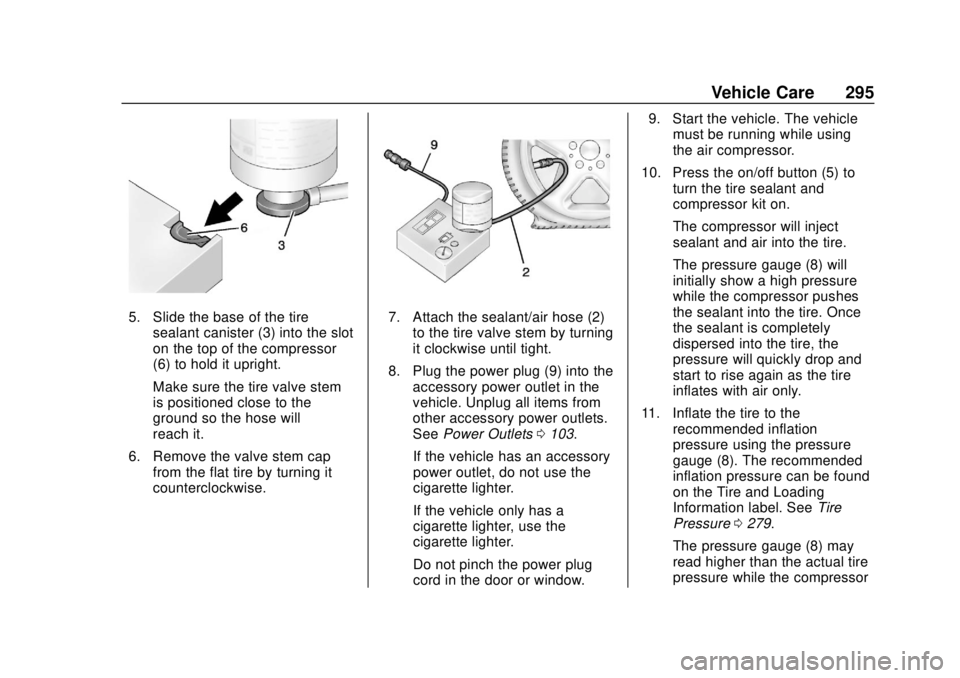
5. Slide the base of the tiresealant canister (3) into the slot
on the top of the compressor
(6) to hold it upright.
Make sure the tire valve stem
is positioned close to the
ground so the hose will
reach it.
6. Remove the valve stem cap from the flat tire by turning it
counterclockwise.7. Attach the sealant/air hose (2)
to the tire valve stem by turning
it clockwise until tight.
8. Plug the power plug (9) into the accessory power outlet in the
vehicle. Unplug all items from
other accessory power outlets.
See Power Outlets 0103.
If the vehicle has an accessory
power outlet, do not use the
cigarette lighter.
If the vehicle only has a
cigarette lighter, use the
cigarette lighter.
Do not pinch the power plug
cord in the door or window. 9. Start the vehicle. The vehicle
must be running while using
the air compressor.
10. Press the on/off button (5) to turn the tire sealant and
compressor kit on.
The compressor will inject
sealant and air into the tire.
The pressure gauge (8) will
initially show a high pressure
while the compressor pushes
the sealant into the tire. Once
the sealant is completely
dispersed into the tire, the
pressure will quickly drop and
start to rise again as the tire
inflates with air only.
11. Inflate the tire to the recommended inflation
pressure using the pressure
gauge (8). The recommended
inflation pressure can be found
on the Tire and Loading
Information label. See Tire
Pressure 0279.
The pressure gauge (8) may
read higher than the actual tire
pressure while the compressor