infotainment CHEVROLET VOLT 2018 Owner's Guide
[x] Cancel search | Manufacturer: CHEVROLET, Model Year: 2018, Model line: VOLT, Model: CHEVROLET VOLT 2018Pages: 379, PDF Size: 5.65 MB
Page 163 of 379
Chevrolet VOLT Owner Manual (GMNA-Localizing-U.S./Canada/Mexico-
11349113) - 2018 - crc - 10/12/17
162 Driving and Operating
{Warning
Taking your eyes off the road too
long or too often could cause a
crash resulting in injury or death.
Focus your attention on driving.
Refer to the infotainment manual for
more information on using that
system and the navigation system,
if equipped, including pairing and
using a cell phone.
Defensive Driving
Defensive driving means “always
expect the unexpected.” The first
step in driving defensively is to wear
the seat belt. See Seat Belts059.
. Assume that other road users
(pedestrians, bicyclists, and
other drivers) are going to be
careless and make mistakes.
Anticipate what they might do
and be ready.
. Allow enough following distance
between you and the driver in
front of you. .
Focus on the task of driving.
Drunk Driving
Death and injury associated with
drinking and driving is a global
tragedy.
{Warning
Drinking and then driving is very
dangerous. Your reflexes,
perceptions, attentiveness, and
judgment can be affected by even
a small amount of alcohol. You
can have a serious —or even
fatal —collision if you drive after
drinking.
Do not drink and drive or ride with
a driver who has been drinking.
Ride home in a cab; or if you are
with a group, designate a driver
who will not drink.
Control of a Vehicle
Braking, steering, and accelerating
are important factors in helping to
control a vehicle while driving.
Braking
Braking action involves perception
time and reaction time. Deciding to
push the brake pedal is perception
time. Actually doing it is
reaction time.
Average driver reaction time is
about three-quarters of a second. In
that time, a vehicle moving at
100 km/h (60 mph) travels 20 m
(66 ft), which could be a lot of
distance in an emergency.
Helpful braking tips to keep in mind
include:
. Keep enough distance between
you and the vehicle in front
of you.
. Avoid needless heavy braking.
. Keep pace with traffic.
Power brake assist is available
unless the 12-volt battery drains or
there is a fault in the brake
computer.
Page 175 of 379
Chevrolet VOLT Owner Manual (GMNA-Localizing-U.S./Canada/Mexico-
11349113) - 2018 - crc - 10/12/17
174 Driving and Operating
A chime will sound if the driver door
is opened while the vehicle is on.
Always press POWER
Oto turn the
vehicle off before exiting.
Stopping Procedure
For information on how to turn the
vehicle off, see Power Button0171.
Retained Accessory
Power (RAP)
Some vehicle accessories may be
used after the ignition is turned off.
The power windows and sunroof,
if equipped, will continue to work for
up to 10 minutes or until any door is
opened.
The infotainment system will
continue to work for 10 minutes,
until the driver door is opened,
or until the ignition is turned on or
placed in ACC/ACCESSORY.
Shifting Into Park
1. Hold the brake pedal down and
set the parking brake. See
Electric Parking Brake 0185. 2. Move the shift lever into
P (Park) by pushing the lever
all the way toward the front of
the vehicle.
3. Turn the vehicle off.
Leaving the Vehicle with the
Propulsion System On
{Warning
It can be dangerous to leave the
vehicle with the propulsion
system running. It could overheat
and catch fire.
It is dangerous to get out of the
vehicle if the shift lever is not fully
in P (Park) with the parking brake
firmly set. The vehicle can roll.
Do not leave the vehicle when the
propulsion system is running.
If you have left the propulsion
system running, the vehicle can
move suddenly. You or others
could be injured. To be sure the
vehicle will not move, even when (Continued)
Warning (Continued)
you are on fairly level ground,
always set the parking brake and
move the shift lever to P (Park).
SeeShifting Into Park 0174.
If you have to leave the vehicle with
the propulsion system on, be sure
the vehicle is in P (Park) and the
parking brake is firmly set before
you leave it. After you have moved
the shift lever into P (Park), hold
down the regular brake pedal. See if
you can move the shift lever away
from P (Park) without first pulling it
toward you. If you can, it means that
the shift lever was not fully locked
into P (Park).
Torque Lock
Torque lock is when the weight of
the vehicle puts too much force on
the parking pawl in the electric drive
unit. This happens when parking on
a hill and shifting the electric drive
unit into P (Park) is not done
properly and then it is difficult to
Page 181 of 379
Chevrolet VOLT Owner Manual (GMNA-Localizing-U.S./Canada/Mexico-
11349113) - 2018 - crc - 10/12/17
180 Driving and Operating
Each time the vehicle is started, it
will return to Normal Mode.
Out of Fuel/Engine
Unavailable
If the vehicle runs out of fuel, or the
engine will not start due to a
malfunction, the vehicle can
continue to be driven in Electric
Mode until the current charge is
depleted. The vehicle will have less
responsive acceleration. DIC
messages indicate reduced
propulsion power, that the engine is
not available, and the need for fuel
or service.
Once the vehicle is refueled, or the
malfunction is corrected, the engine
will start the next time the vehicle is
turned on to perform a self test, and
DIC messages will not be displayed.
Once the engine starts successfully,
normal operation will continue in
either Electric or Extended Range
Mode. The engine may stop running
after the self test is completed,
based on the current mode of
operation.
Maintenance Modes
Engine Maintenance Mode (EMM)
EMM runs the engine to keep it in
good working condition after
approximately six weeks of no or
very limited engine operation. EMM
will force the engine to run, even if
there is a charge to power the
vehicle.
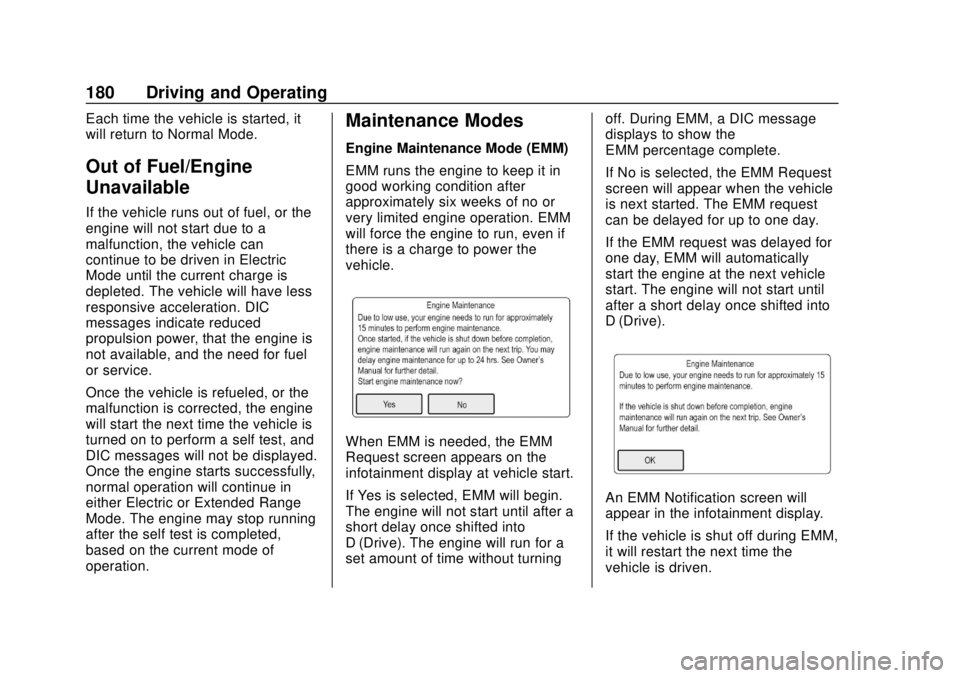
When EMM is needed, the EMM
Request screen appears on the
infotainment display at vehicle start.
If Yes is selected, EMM will begin.
The engine will not start until after a
short delay once shifted into
D (Drive). The engine will run for a
set amount of time without turningoff. During EMM, a DIC message
displays to show the
EMM percentage complete.
If No is selected, the EMM Request
screen will appear when the vehicle
is next started. The EMM request
can be delayed for up to one day.
If the EMM request was delayed for
one day, EMM will automatically
start the engine at the next vehicle
start. The engine will not start until
after a short delay once shifted into
D (Drive).
An EMM Notification screen will
appear in the infotainment display.
If the vehicle is shut off during EMM,
it will restart the next time the
vehicle is driven.
Page 182 of 379
Chevrolet VOLT Owner Manual (GMNA-Localizing-U.S./Canada/Mexico-
11349113) - 2018 - crc - 10/12/17
Driving and Operating 181
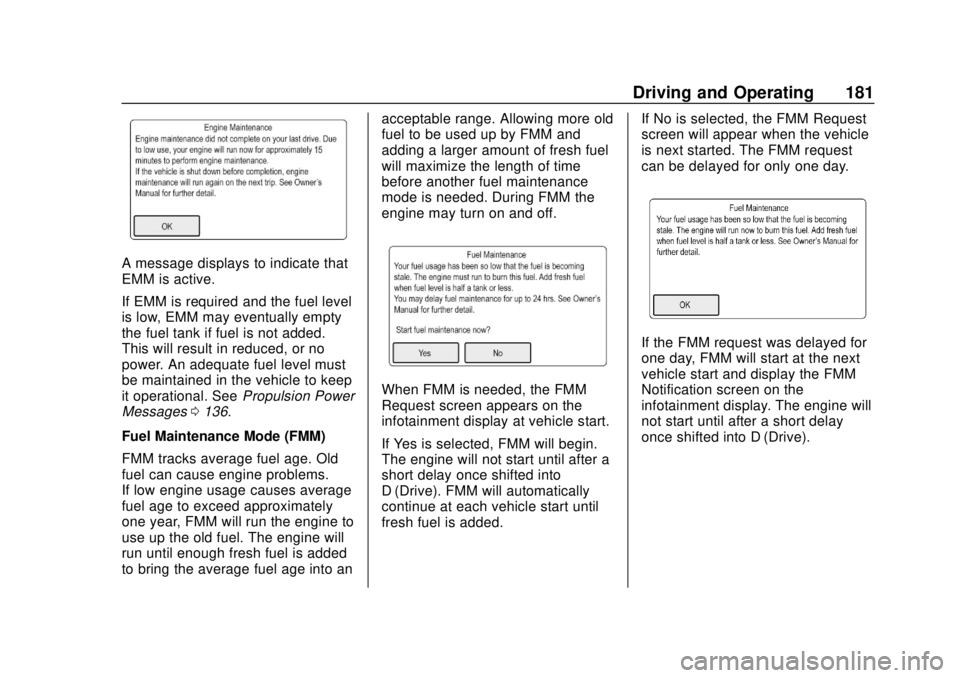
A message displays to indicate that
EMM is active.
If EMM is required and the fuel level
is low, EMM may eventually empty
the fuel tank if fuel is not added.
This will result in reduced, or no
power. An adequate fuel level must
be maintained in the vehicle to keep
it operational. SeePropulsion Power
Messages 0136.
Fuel Maintenance Mode (FMM)
FMM tracks average fuel age. Old
fuel can cause engine problems.
If low engine usage causes average
fuel age to exceed approximately
one year, FMM will run the engine to
use up the old fuel. The engine will
run until enough fresh fuel is added
to bring the average fuel age into an acceptable range. Allowing more old
fuel to be used up by FMM and
adding a larger amount of fresh fuel
will maximize the length of time
before another fuel maintenance
mode is needed. During FMM the
engine may turn on and off.
When FMM is needed, the FMM
Request screen appears on the
infotainment display at vehicle start.
If Yes is selected, FMM will begin.
The engine will not start until after a
short delay once shifted into
D (Drive). FMM will automatically
continue at each vehicle start until
fresh fuel is added.
If No is selected, the FMM Request
screen will appear when the vehicle
is next started. The FMM request
can be delayed for only one day.
If the FMM request was delayed for
one day, FMM will start at the next
vehicle start and display the FMM
Notification screen on the
infotainment display. The engine will
not start until after a short delay
once shifted into D (Drive).
Page 202 of 379
Chevrolet VOLT Owner Manual (GMNA-Localizing-U.S./Canada/Mexico-
11349113) - 2018 - crc - 10/12/17
Driving and Operating 201
Warning (Continued)
Under many conditions, these
systems will not:. Detect children,
pedestrians, bicyclists,
or animals.
. Detect vehicles or objects
outside the area monitored
by the system.
. Work at all driving speeds.
. Warn you or provide you
with enough time to avoid a
crash.
. Work under poor visibility or
bad weather conditions.
. Work if the detection sensor
is not cleaned or is covered
by ice, snow, mud, or dirt.
(Continued)
Warning (Continued)
.Work if the detection sensor
is covered up, such as with
a sticker, magnet, or metal
plate.
. Work if the area surrounding
the detection sensor is
damaged or not properly
repaired.
Complete attention is always
required while driving, and you
should be ready to take action
and apply the brakes and/or steer
the vehicle to avoid crashes.
Audible Alert
Some driver assistance features
alert the driver of obstacles by
beeping. To change the volume of
the warning chime, see “Comfort
and Convenience” underVehicle
Personalization 0137.
Assistance Systems for
Parking or Backing
If equipped, the Rear Vision Camera
(RVC), Rear Parking Assist (RPA),
Front Parking Assist (FPA), Rear
Cross Traffic Alert (RCTA), and
Automatic Parking Assist (APA) may
help the driver park or avoid objects.
Always check around the vehicle
when parking or backing.
Rear Vision Camera (RVC)
When the vehicle is shifted into
R (Reverse), the RVC displays an
image of the area behind the vehicle
in the infotainment display. The
previous screen displays when the
vehicle is shifted out of R (Reverse)
after a short delay. To return to the
previous screen sooner, press any
button on the infotainment system,
shift into P (Park), or reach a vehicle
speed of approximately 12 km/h
(8 mph).
Page 203 of 379
Chevrolet VOLT Owner Manual (GMNA-Localizing-U.S./Canada/Mexico-
11349113) - 2018 - crc - 10/12/17
202 Driving and Operating
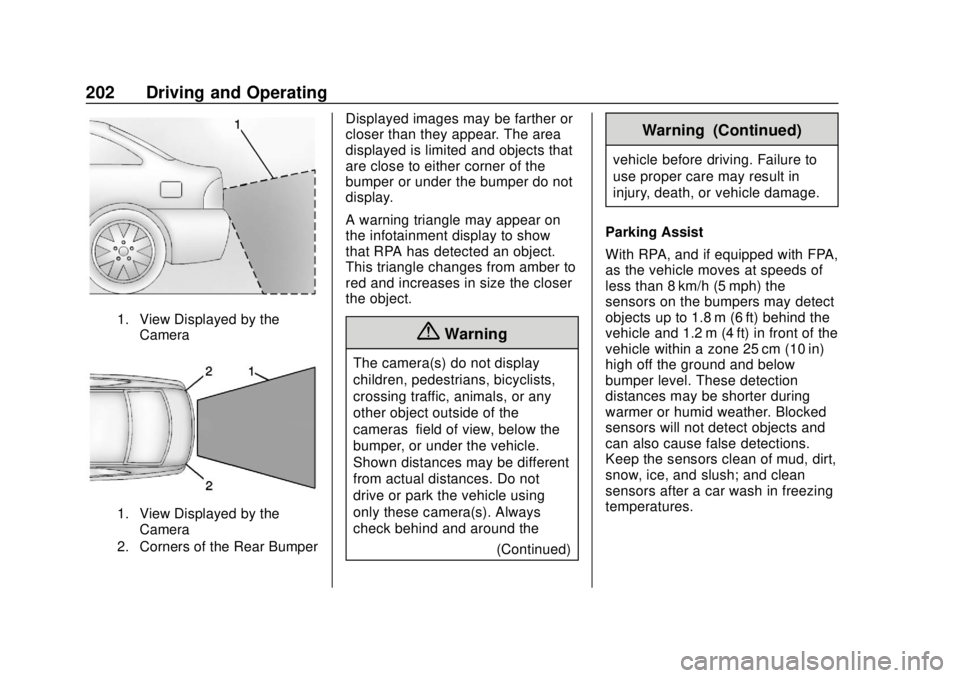
1. View Displayed by theCamera
1. View Displayed by theCamera
2. Corners of the Rear Bumper
Displayed images may be farther or
closer than they appear. The area
displayed is limited and objects that
are close to either corner of the
bumper or under the bumper do not
display.
A warning triangle may appear on
the infotainment display to show
that RPA has detected an object.
This triangle changes from amber to
red and increases in size the closer
the object.
{Warning
The camera(s) do not display
children, pedestrians, bicyclists,
crossing traffic, animals, or any
other object outside of the
cameras’ field of view, below the
bumper, or under the vehicle.
Shown distances may be different
from actual distances. Do not
drive or park the vehicle using
only these camera(s). Always
check behind and around the
(Continued)
Warning (Continued)
vehicle before driving. Failure to
use proper care may result in
injury, death, or vehicle damage.
Parking Assist
With RPA, and if equipped with FPA,
as the vehicle moves at speeds of
less than 8 km/h (5 mph) the
sensors on the bumpers may detect
objects up to 1.8 m (6 ft) behind the
vehicle and 1.2 m (4 ft) in front of the
vehicle within a zone 25 cm (10 in)
high off the ground and below
bumper level. These detection
distances may be shorter during
warmer or humid weather. Blocked
sensors will not detect objects and
can also cause false detections.
Keep the sensors clean of mud, dirt,
snow, ice, and slush; and clean
sensors after a car wash in freezing
temperatures.
Page 204 of 379
Chevrolet VOLT Owner Manual (GMNA-Localizing-U.S./Canada/Mexico-
11349113) - 2018 - crc - 10/12/17
Driving and Operating 203
{Warning
The Parking Assist system does
not detect children, pedestrians,
bicyclists, animals, or objects
located below the bumper or that
are too close or too far from the
vehicle. It is not available at
speeds greater than 8 km/h
(5 mph). To prevent injury, death,
or vehicle damage, even with
Parking Assist, always check the
area around the vehicle and
check all mirrors before moving
forward or backing.
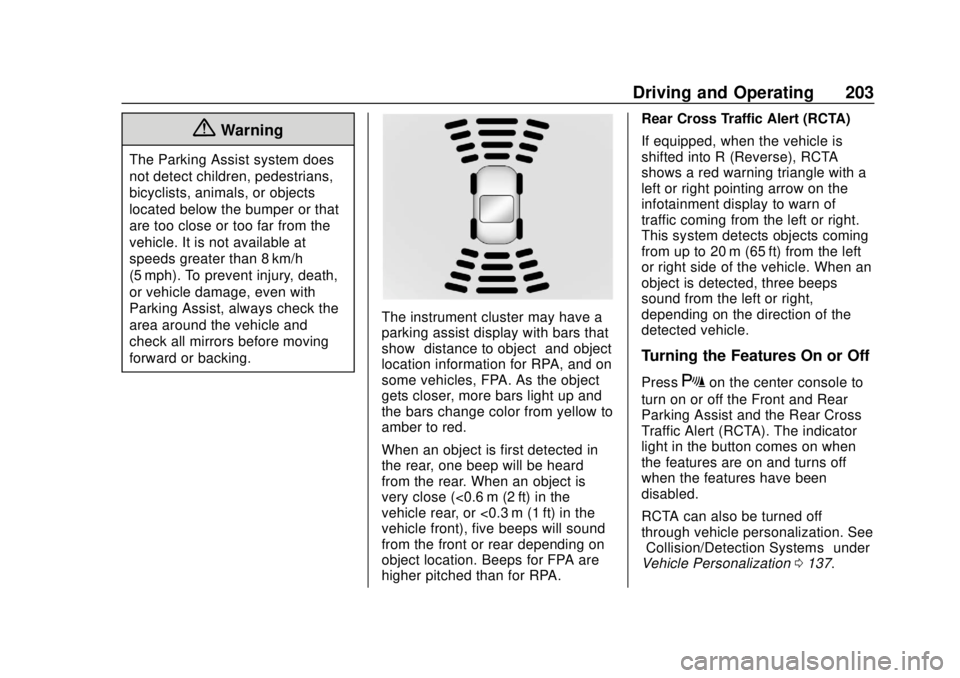
The instrument cluster may have a
parking assist display with bars that
show“distance to object” and object
location information for RPA, and on
some vehicles, FPA. As the object
gets closer, more bars light up and
the bars change color from yellow to
amber to red.
When an object is first detected in
the rear, one beep will be heard
from the rear. When an object is
very close (<0.6 m (2 ft) in the
vehicle rear, or <0.3 m (1 ft) in the
vehicle front), five beeps will sound
from the front or rear depending on
object location. Beeps for FPA are
higher pitched than for RPA. Rear Cross Traffic Alert (RCTA)
If equipped, when the vehicle is
shifted into R (Reverse), RCTA
shows a red warning triangle with a
left or right pointing arrow on the
infotainment display to warn of
traffic coming from the left or right.
This system detects objects coming
from up to 20 m (65 ft) from the left
or right side of the vehicle. When an
object is detected, three beeps
sound from the left or right,
depending on the direction of the
detected vehicle.
Turning the Features On or Off
PressXon the center console to
turn on or off the Front and Rear
Parking Assist and the Rear Cross
Traffic Alert (RCTA). The indicator
light in the button comes on when
the features are on and turns off
when the features have been
disabled.
RCTA can also be turned off
through vehicle personalization. See
“Collision/Detection Systems” under
Vehicle Personalization 0137.
Page 205 of 379
Chevrolet VOLT Owner Manual (GMNA-Localizing-U.S./Canada/Mexico-
11349113) - 2018 - crc - 10/12/17
204 Driving and Operating
To turn the RPA symbols or
guidance lines on or off, see“Rear
Camera” underVehicle
Personalization 0137.
Automatic Parking
Assist (APA)
If equipped, APA searches for and
steers the vehicle into parallel and
perpendicular parking spots. When
using APA, you must still shift gears,
and control the brakes and
accelerator. The infotainment
display or Driver information Center
(DIC) and audible beeps help to
guide parking maneuvers.
{Warning
APA does not apply the brakes.
APA may not detect objects in the
parking space, objects that are
soft or narrow, objects high off the
ground such as flatbed trucks,
or objects below ground level
such as large potholes. Always
verify that the parking space is
appropriate for parking a vehicle.
(Continued)
Warning (Continued)
APA does not respond to changes
in the parking space, such as
movement of an adjacent vehicle,
or a person or object entering the
parking space. APA does not
detect or avoid traffic that is
behind or alongside of the
vehicle. Always be prepared to
stop the vehicle during the
parking maneuver.
The system is available when the
vehicle speed is below
30 km/h (18 mph). Press the APA
button,
O, to enable the system to
begin searching for a space that is
large enough to park in. The system
cannot detect whether it is a legal
parking space. The vehicle may not
align properly to angled parking
spots and the system may have
difficulty sensing short curbs.
When enabled, APA searches for
parallel parking spaces to the right
of the vehicle. To search for a
parking space to the left, turn on the left turn signal or, if available,
change the side selection in the
infotainment display. To switch the
parking mode between parallel and
perpendicular, press and hold
O
during the search process or,
if available, change the parking
mode in the infotainment display.
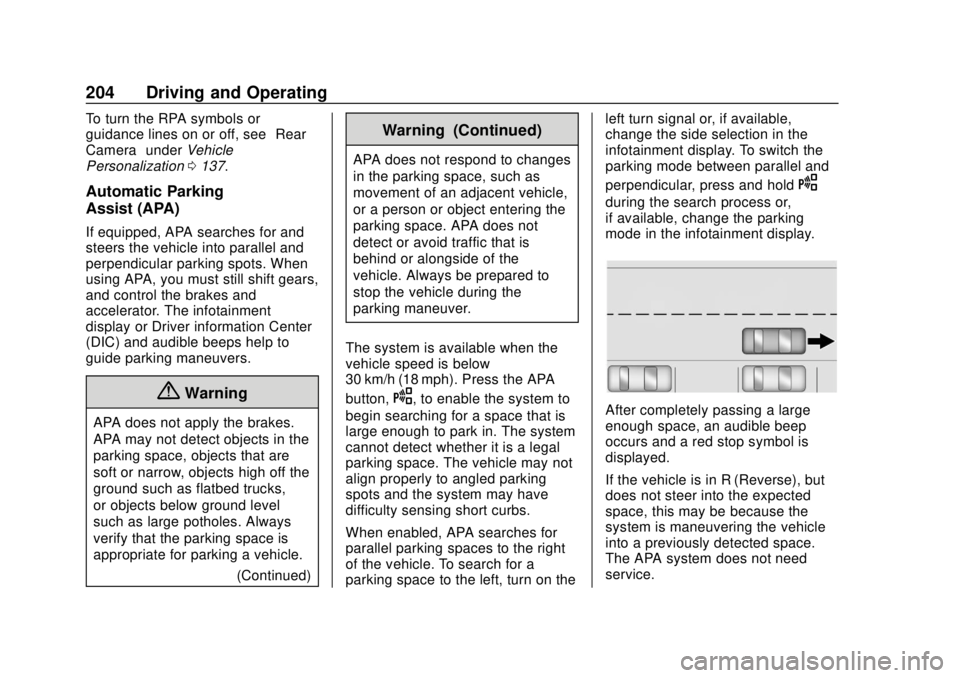
After completely passing a large
enough space, an audible beep
occurs and a red stop symbol is
displayed.
If the vehicle is in R (Reverse), but
does not steer into the expected
space, this may be because the
system is maneuvering the vehicle
into a previously detected space.
The APA system does not need
service.
Page 228 of 379
Chevrolet VOLT Owner Manual (GMNA-Localizing-U.S./Canada/Mexico-
11349113) - 2018 - crc - 10/12/17
Driving and Operating 227
Changing the charge mode to
Immediate or performing a delayed
charging override will not disable a
utility interruption.
A pop-up will appear in the
infotainment display during the key
cycle following any utility
interruption. See“Charging
Interrupted or Overridden Pop-Up”
under Programmable Charging
0 123.
A message will display on the
instrument cluster indicating that a
utility interruption has occurred. See
Instrument Cluster 0106.
Charging Station
Troubleshooting
If the vehicle does not charge after
being plugged in to a residential
240-volt charging station:
1. Verify that the charge mode is set to Immediate.
2. Verify that the charging station’s circuit breaker has not
been tripped. 3. Plug the portable charge cord
into the wall outlet, verify that
the indicator light on the charge
cord is solid green, and
connect it to the vehicle. See
“Charge Cord Status
Indicators” inCharge Cord
0 220.
4. If the vehicle charges with the portable charge cord, there
may be a problem with the
charging station. Try to charge
the vehicle with a different
240-volt charging station, such
as a public station. If both
attempts charge the vehicle,
contact the charging station
manufacturer.Electrical Requirements
for Battery Charging
This vehicle is capable of being
charged with most standard vehicle
charging equipment complying with
one or more of the following:
.SAE J1772
. SAE J2847-2 .
IEC 61851-1
. IEC 61851-22
. IEC 61851-23
. IEC 61851-24
. IEC 62196-1
. IEC 62196-2
. IEC 62196-3
. ISO 15118
. GB/T 18487.1
. GB/T 20234.1
. GB/T 20234.2
The following are the minimum
requirements for circuits used to
charge this vehicle:
. 120 volts/15 amps
. 240 volts/20 amps
Charging equipment with a rating of
at least 240 volts/20 amps will
provide the fastest charging time
and best charging efficiency to
recharge the high voltage battery.
240 volt/40 amp circuits provide
flexibility for future vehicle charging
needs. Always follow the charging
Page 269 of 379
Chevrolet VOLT Owner Manual (GMNA-Localizing-U.S./Canada/Mexico-
11349113) - 2018 - crc - 10/12/17
268 Vehicle Care
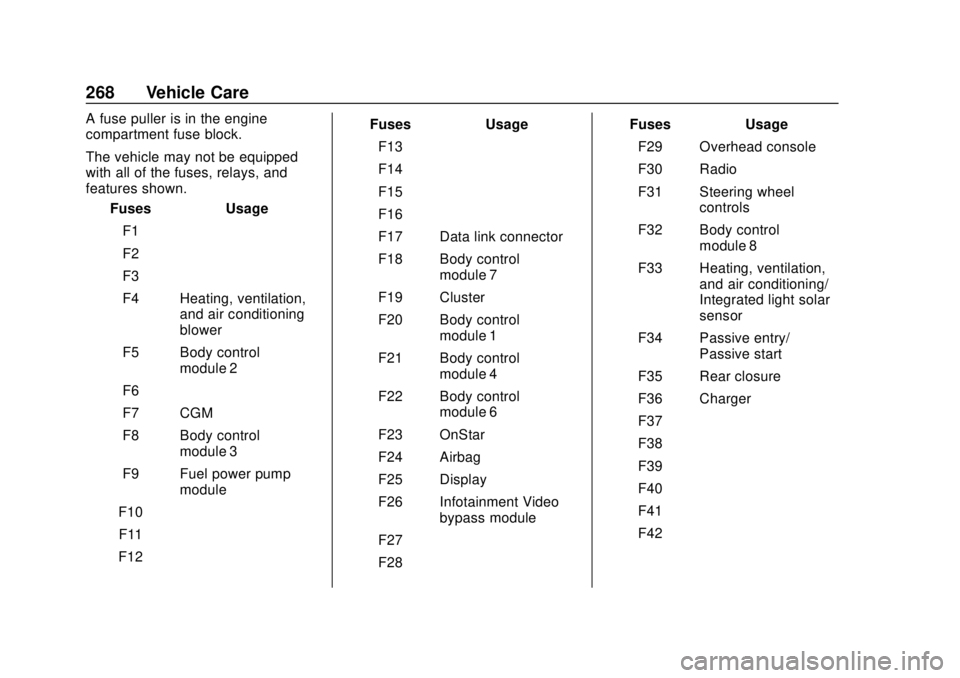
A fuse puller is in the engine
compartment fuse block.
The vehicle may not be equipped
with all of the fuses, relays, and
features shown.Fuses Usage
F1 –
F2 –
F3 –
F4 Heating, ventilation, and air conditioning
blower
F5 Body control module 2
F6 –
F7 CGM
F8 Body control module 3
F9 Fuel power pump module
F10 –
F11 –
F12 – Fuses Usage
F13 –
F14 –
F15 –
F16 –
F17 Data link connector
F18 Body control module 7
F19 Cluster
F20 Body control module 1
F21 Body control module 4
F22 Body control module 6
F23 OnStar
F24 Airbag
F25 Display
F26 Infotainment Video bypass module
F27 –
F28 – Fuses Usage
F29 Overhead console
F30 Radio
F31 Steering wheel controls
F32 Body control module 8
F33 Heating, ventilation, and air conditioning/
Integrated light solar
sensor
F34 Passive entry/ Passive start
F35 Rear closure
F36 Charger
F37 –
F38 –
F39 –
F40 –
F41 –
F42 –