center console CHEVROLET VOLT 2018 Owner's Manual
[x] Cancel search | Manufacturer: CHEVROLET, Model Year: 2018, Model line: VOLT, Model: CHEVROLET VOLT 2018Pages: 379, PDF Size: 5.65 MB
Page 26 of 379
Chevrolet VOLT Owner Manual (GMNA-Localizing-U.S./Canada/Mexico-
11349113) - 2018 - crc - 10/12/17
In Brief 25
4. After refueling, reinstall the fuelcap by turning it clockwise until
it clicks. Close the fuel door.
See Filling the Tank 0229.
Regenerative Braking
Regenerative braking takes some of
the energy from the moving vehicle
and turns it back into electrical
energy. This energy is then stored in
the high voltage battery system,
contributing to increased energy
efficiency.
Regen on Demand
This feature will slow the vehicle by
recapturing energy using the
steering wheel paddle.
See Regenerative Braking 0187.
Service
{Warning
Never try to do your own service
on high voltage components. You
can be injured and the vehicle
can be damaged if you try to do
your own service work. Service
and repair of these high voltage
components should only be
performed by a trained service
technician with the proper
knowledge and tools. See Doing
Your Own Service Work 0236.
Performance and
Maintenance
Traction Control/
Electronic Stability
Control
The Traction Control System (TCS)
limits wheel slip. The system turns
on automatically every time the
vehicle is powered up.
The Electronic Stability Control
system called StabiliTrak assists
with directional control of the vehicle
in difficult driving conditions. The
system turns on automatically every
time the vehicle is on.
.
To turn off TCS, press and
release
g, on the center console
behind the shift lever.
i
illuminates and a Driver
Information Center (DIC)
message may display.
Page 36 of 379
Chevrolet VOLT Owner Manual (GMNA-Localizing-U.S./Canada/Mexico-
11349113) - 2018 - crc - 10/12/17
Keys, Doors, and Windows 35
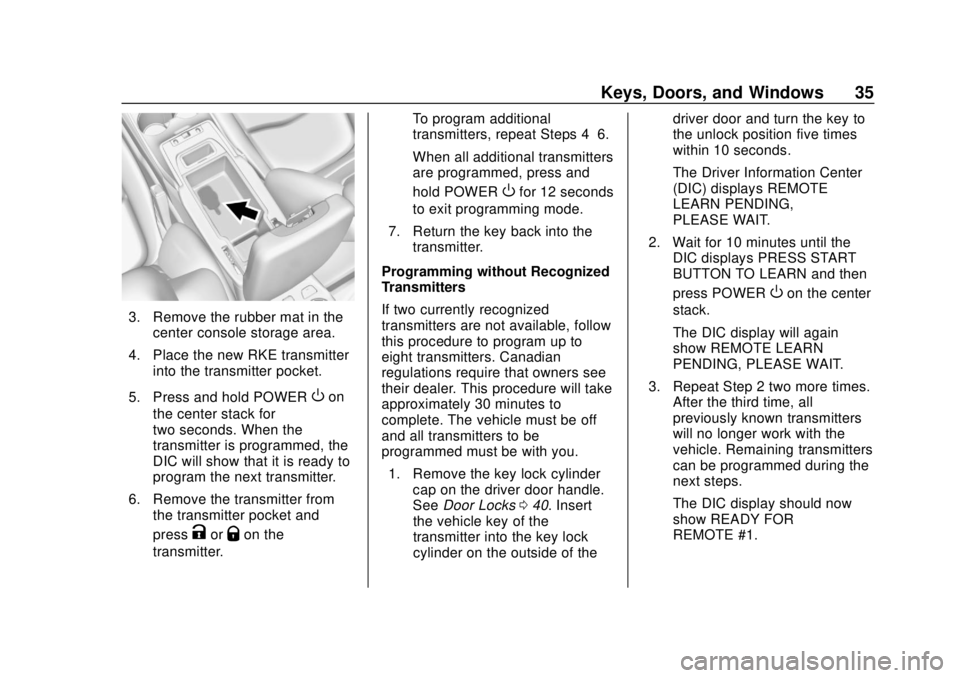
3. Remove the rubber mat in thecenter console storage area.
4. Place the new RKE transmitter into the transmitter pocket.
5. Press and hold POWER
Oon
the center stack for
two seconds. When the
transmitter is programmed, the
DIC will show that it is ready to
program the next transmitter.
6. Remove the transmitter from the transmitter pocket and
press
KorQon the
transmitter. To program additional
transmitters, repeat Steps 4–6.
When all additional transmitters
are programmed, press and
hold POWER
Ofor 12 seconds
to exit programming mode.
7. Return the key back into the transmitter.
Programming without Recognized
Transmitters
If two currently recognized
transmitters are not available, follow
this procedure to program up to
eight transmitters. Canadian
regulations require that owners see
their dealer. This procedure will take
approximately 30 minutes to
complete. The vehicle must be off
and all transmitters to be
programmed must be with you. 1. Remove the key lock cylinder cap on the driver door handle.
See Door Locks 040. Insert
the vehicle key of the
transmitter into the key lock
cylinder on the outside of the driver door and turn the key to
the unlock position five times
within 10 seconds.
The Driver Information Center
(DIC) displays REMOTE
LEARN PENDING,
PLEASE WAIT.
2. Wait for 10 minutes until the DIC displays PRESS START
BUTTON TO LEARN and then
press POWER
Oon the center
stack.
The DIC display will again
show REMOTE LEARN
PENDING, PLEASE WAIT.
3. Repeat Step 2 two more times. After the third time, all
previously known transmitters
will no longer work with the
vehicle. Remaining transmitters
can be programmed during the
next steps.
The DIC display should now
show READY FOR
REMOTE #1.
Page 37 of 379
Chevrolet VOLT Owner Manual (GMNA-Localizing-U.S./Canada/Mexico-
11349113) - 2018 - crc - 10/12/17
36 Keys, Doors, and Windows
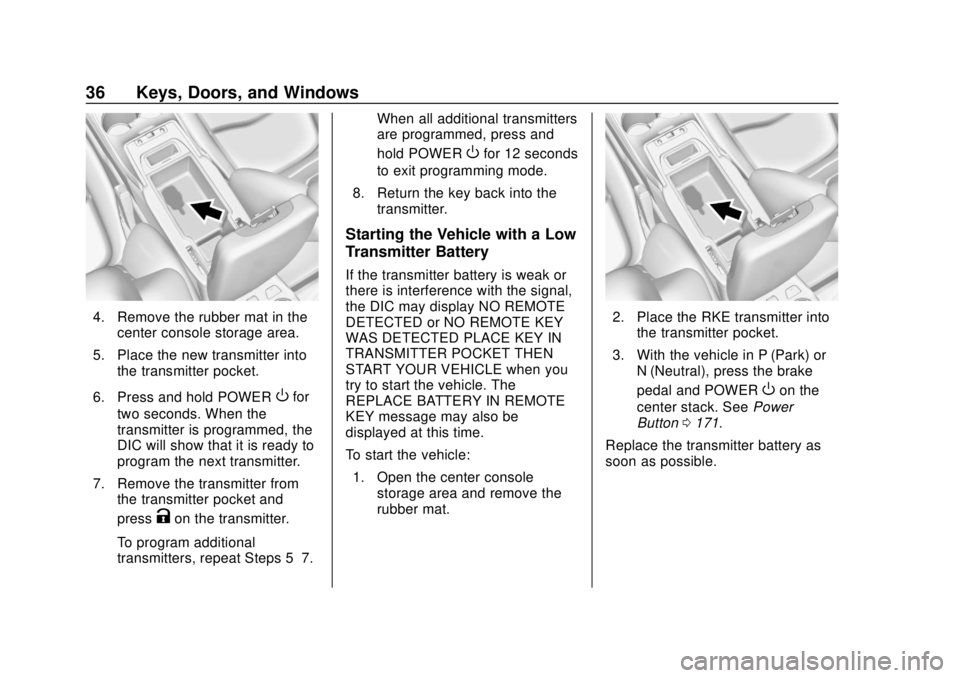
4. Remove the rubber mat in thecenter console storage area.
5. Place the new transmitter into the transmitter pocket.
6. Press and hold POWER
Ofor
two seconds. When the
transmitter is programmed, the
DIC will show that it is ready to
program the next transmitter.
7. Remove the transmitter from the transmitter pocket and
press
Kon the transmitter.
To program additional
transmitters, repeat Steps 5–7. When all additional transmitters
are programmed, press and
hold POWER
Ofor 12 seconds
to exit programming mode.
8. Return the key back into the transmitter.
Starting the Vehicle with a Low
Transmitter Battery
If the transmitter battery is weak or
there is interference with the signal,
the DIC may display NO REMOTE
DETECTED or NO REMOTE KEY
WAS DETECTED PLACE KEY IN
TRANSMITTER POCKET THEN
START YOUR VEHICLE when you
try to start the vehicle. The
REPLACE BATTERY IN REMOTE
KEY message may also be
displayed at this time.
To start the vehicle:
1. Open the center console storage area and remove the
rubber mat.
2. Place the RKE transmitter intothe transmitter pocket.
3. With the vehicle in P (Park) or N (Neutral), press the brake
pedal and POWER
Oon the
center stack. See Power
Button 0171.
Replace the transmitter battery as
soon as possible.
Page 60 of 379
Chevrolet VOLT Owner Manual (GMNA-Localizing-U.S./Canada/Mexico-
11349113) - 2018 - crc - 10/12/17
Seats and Restraints 59
If equipped, the rear heated seat
buttons are on the rear of the center
console.
Press
MorLto heat the left
outboard or right outboard seat
cushion.
Seat Belts
This section describes how to use
seat belts properly, and some things
not to do.
{Warning
Do not let anyone ride where a
seat belt cannot be worn properly.
In a crash, if you or your
passenger(s) are not wearing
seat belts, injuries can be much
worse than if you are wearing
seat belts. You can be seriously
injured or killed by hitting things
inside the vehicle harder or by
being ejected from the vehicle. In
addition, anyone who is not
buckled up can strike other
passengers in the vehicle.
It is extremely dangerous to ride
in a cargo area, inside or outside
of a vehicle. In a collision,
passengers riding in these areas
are more likely to be seriously
injured or killed. Do not allow
(Continued)
Warning (Continued)
passengers to ride in any area of
the vehicle that is not equipped
with seats and seat belts.
Always wear a seat belt, and
check that all passenger(s) are
restrained properly too.
This vehicle has indicators as a
reminder to buckle the seat belts.
See Seat Belt Reminders 0112.
Why Seat Belts Work
Page 97 of 379
Chevrolet VOLT Owner Manual (GMNA-Localizing-U.S./Canada/Mexico-
11349113) - 2018 - crc - 10/12/17
96 Storage
Storage
Storage Compartments
Storage Compartments . . . . . . . . 96
Glove Box . . . . . . . . . . . . . . . . . . . . . 96
Rear Storage . . . . . . . . . . . . . . . . . . 96
Center Console Storage . . . . . . . 97
Additional Storage Features
Cargo Cover . . . . . . . . . . . . . . . . . . . 97
Cargo Tie-Downs . . . . . . . . . . . . . . 98
Storage
Compartments
{Warning
Do not store heavy or sharp
objects in storage compartments.
In a crash, these objects may
cause the cover to open and
could result in injury.
Glove Box
Open the glove box by lifting up on
the lever.
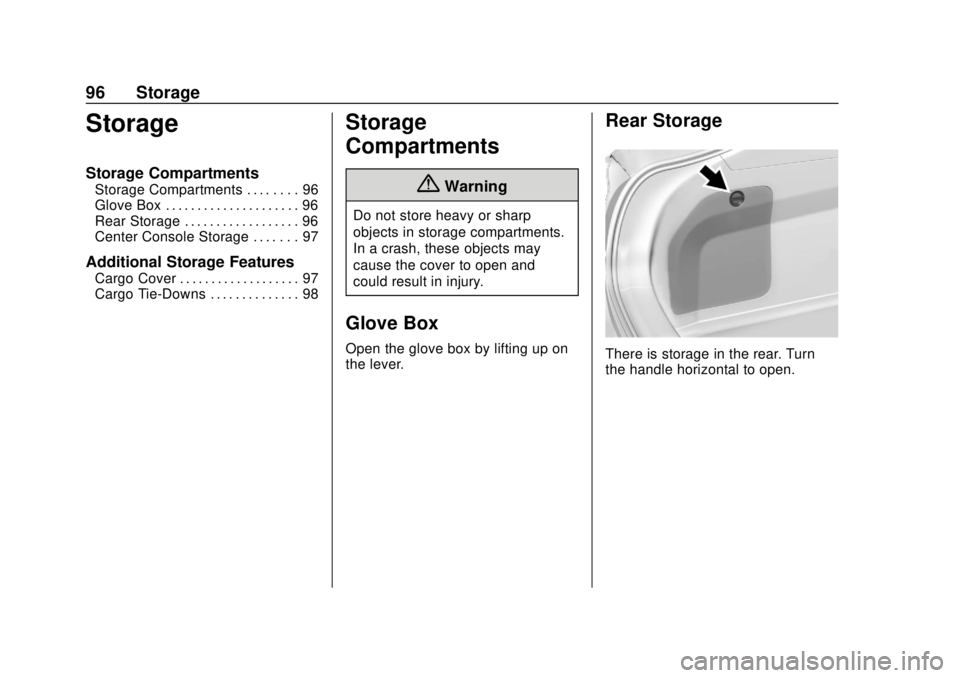
Rear Storage
There is storage in the rear. Turn
the handle horizontal to open.
Page 98 of 379
Chevrolet VOLT Owner Manual (GMNA-Localizing-U.S./Canada/Mexico-
11349113) - 2018 - crc - 10/12/17
Storage 97
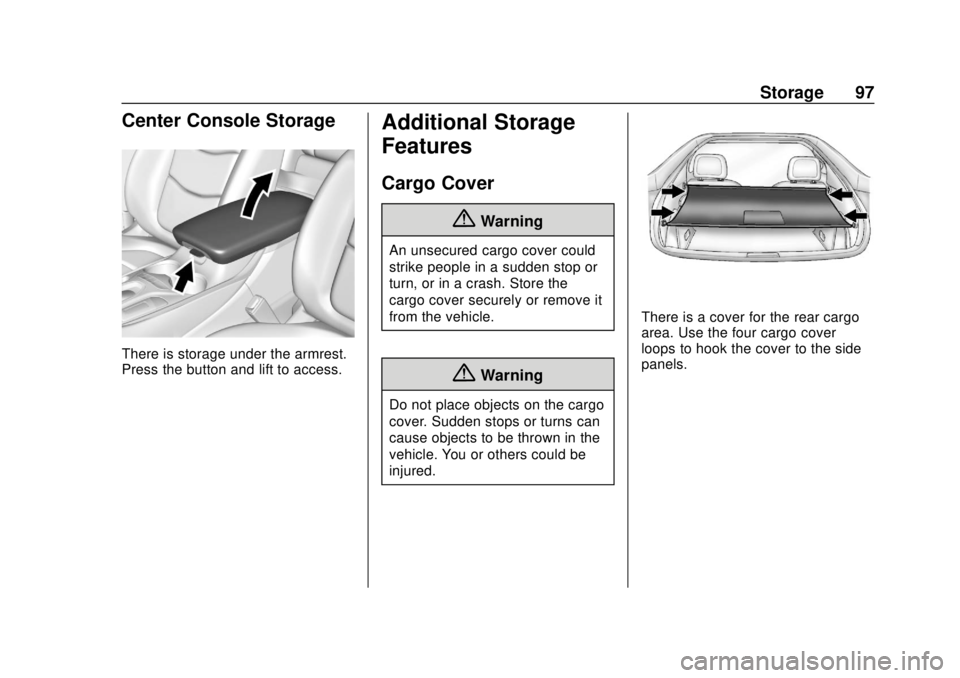
Center Console Storage
There is storage under the armrest.
Press the button and lift to access.
Additional Storage
Features
Cargo Cover
{Warning
An unsecured cargo cover could
strike people in a sudden stop or
turn, or in a crash. Store the
cargo cover securely or remove it
from the vehicle.
{Warning
Do not place objects on the cargo
cover. Sudden stops or turns can
cause objects to be thrown in the
vehicle. You or others could be
injured.
There is a cover for the rear cargo
area. Use the four cargo cover
loops to hook the cover to the side
panels.
Page 104 of 379
Chevrolet VOLT Owner Manual (GMNA-Localizing-U.S./Canada/Mexico-
11349113) - 2018 - crc - 10/12/17
Instruments and Controls 103
Power Outlets
The accessory power outlets can be
used to plug in electrical equipment,
such as a cell phone or MP3 player.
There are two accessory power
outlets:
.In the storage area below the
climate control system.
. On the rear of the front console
armrest.
The power outlets supply power
while the vehicle is on, or if the
vehicle is in Retained Accessory
Power (RAP). See Retained
Accessory Power (RAP) 0174.
Lift the cover to access and replace
when not in use.
Certain accessory plugs may not be
compatible with the accessory
power outlet and could overload
vehicle or adapter fuses. If a
problem is experienced, see your
dealer. When adding electrical equipment,
be sure to follow the installation
instructions included with the
equipment. See
Add-On Electrical
Equipment 0232.
Caution
Hanging heavy equipment from
the power outlet can cause
damage not covered by the
vehicle warranty. The power
outlets are designed for
accessory power plugs only, such
as cell phone charge cords.
Wireless Charging
The vehicle may have a wireless
charging pocket inside the armrest
of the center console. The system
operates at 145 kHz and wirelessly
charges one Qi compatible mobile
device. The power output of the
system is capable of charging at a
rate up to 1 amp (5W), as requested
by the compatible mobile device.
See Radio Frequency Statement
0 351. To check for phone or other device
compatibility:
.
In the U.S., see
my.chevrolet.com/learn.
. In Canada, see
gmtotalconnect.ca.
. Or, see your dealer for details.
{Warning
Wireless charging can affect the
operation of an implanted
pacemaker or other medical
devices. If you have one, it is
recommended to consult with
your doctor before using the
wireless charging system.
The vehicle must be on or in ACC/
ACCESSORY, or Retained
Accessory Power (RAP) must be
active. The wireless charging
feature may not correctly indicate
charging when the vehicle is in RAP.
See Retained Accessory Power
(RAP) 0174.
Page 114 of 379
Chevrolet VOLT Owner Manual (GMNA-Localizing-U.S./Canada/Mexico-
11349113) - 2018 - crc - 10/12/17
Instruments and Controls 113
such as a briefcase, handbag,
grocery bag, laptop, or other
electronic device. To turn off the
reminder light and/or chime, remove
the object from the seat or buckle
the seat belt.
Airbag Readiness Light
This light shows if there is an
electrical problem with the airbag
system. The system check includes
the airbag sensor(s), the passenger
sensing system, the pretensioners,
the airbag modules, the wiring, and
the crash sensing and diagnostic
module. For more information on the
airbag system, seeAirbag System
0 65.
The airbag readiness light comes on
for several seconds when the
vehicle is started. If the light does
not come on then, have it fixed
immediately.
{Warning
If the airbag readiness light stays
on after the vehicle is started or
comes on while driving, it means
the airbag system might not be
working properly. The airbags in
the vehicle might not inflate in a
crash, or they could even inflate
without a crash. To help avoid
injury, have the vehicle serviced
right away.
If there is a problem with the airbag
system, a Driver Information Center
(DIC) message may also come on.
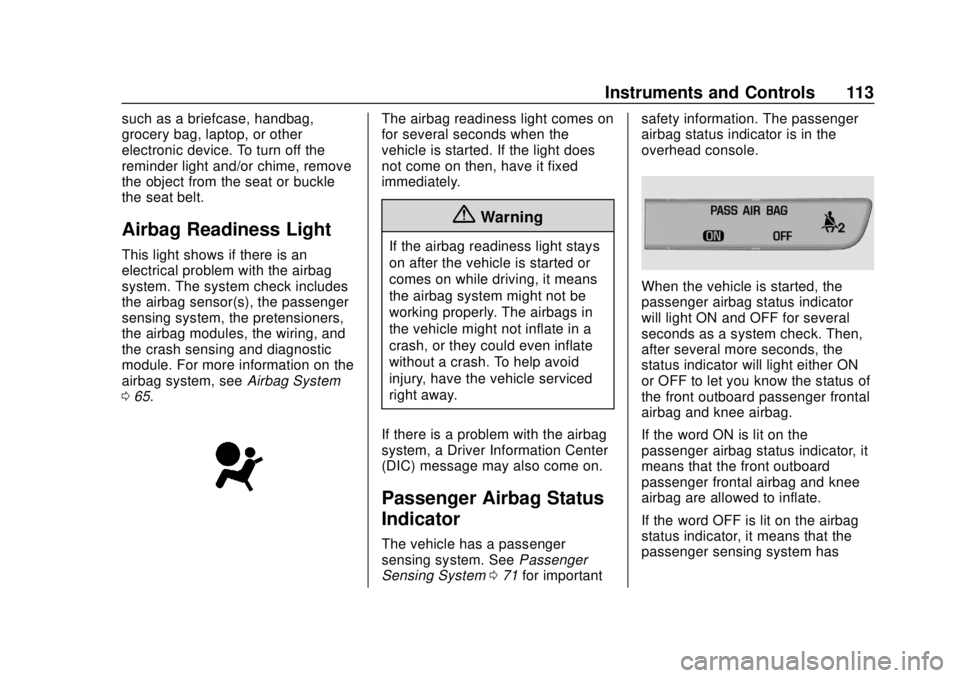
Passenger Airbag Status
Indicator
The vehicle has a passenger
sensing system. See Passenger
Sensing System 071 for important safety information. The passenger
airbag status indicator is in the
overhead console.
When the vehicle is started, the
passenger airbag status indicator
will light ON and OFF for several
seconds as a system check. Then,
after several more seconds, the
status indicator will light either ON
or OFF to let you know the status of
the front outboard passenger frontal
airbag and knee airbag.
If the word ON is lit on the
passenger airbag status indicator, it
means that the front outboard
passenger frontal airbag and knee
airbag are allowed to inflate.
If the word OFF is lit on the airbag
status indicator, it means that the
passenger sensing system has
Page 204 of 379
Chevrolet VOLT Owner Manual (GMNA-Localizing-U.S./Canada/Mexico-
11349113) - 2018 - crc - 10/12/17
Driving and Operating 203
{Warning
The Parking Assist system does
not detect children, pedestrians,
bicyclists, animals, or objects
located below the bumper or that
are too close or too far from the
vehicle. It is not available at
speeds greater than 8 km/h
(5 mph). To prevent injury, death,
or vehicle damage, even with
Parking Assist, always check the
area around the vehicle and
check all mirrors before moving
forward or backing.
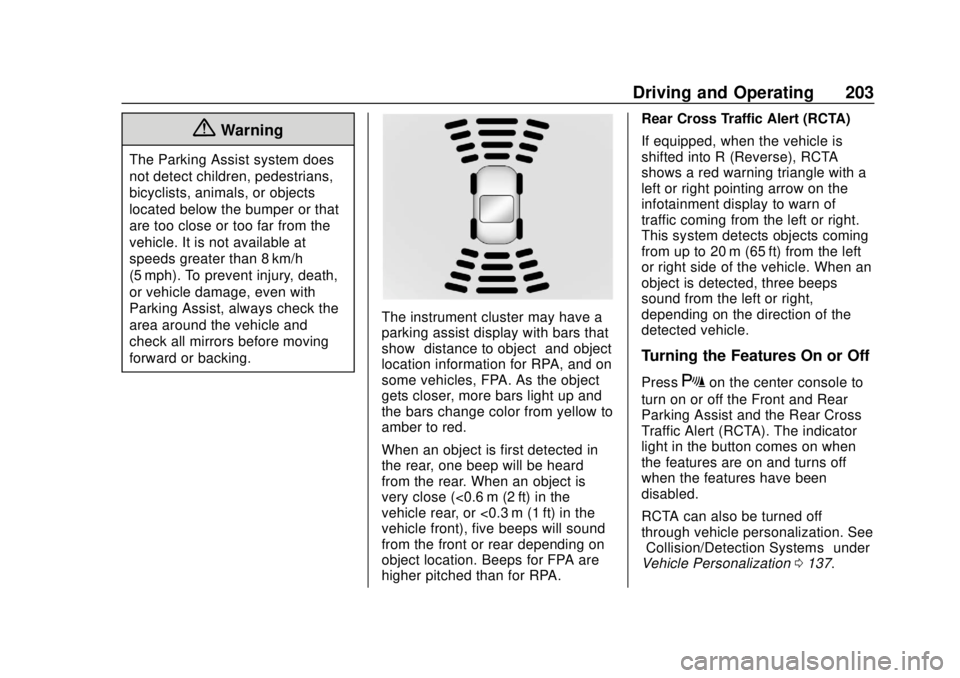
The instrument cluster may have a
parking assist display with bars that
show“distance to object” and object
location information for RPA, and on
some vehicles, FPA. As the object
gets closer, more bars light up and
the bars change color from yellow to
amber to red.
When an object is first detected in
the rear, one beep will be heard
from the rear. When an object is
very close (<0.6 m (2 ft) in the
vehicle rear, or <0.3 m (1 ft) in the
vehicle front), five beeps will sound
from the front or rear depending on
object location. Beeps for FPA are
higher pitched than for RPA. Rear Cross Traffic Alert (RCTA)
If equipped, when the vehicle is
shifted into R (Reverse), RCTA
shows a red warning triangle with a
left or right pointing arrow on the
infotainment display to warn of
traffic coming from the left or right.
This system detects objects coming
from up to 20 m (65 ft) from the left
or right side of the vehicle. When an
object is detected, three beeps
sound from the left or right,
depending on the direction of the
detected vehicle.
Turning the Features On or Off
PressXon the center console to
turn on or off the Front and Rear
Parking Assist and the Rear Cross
Traffic Alert (RCTA). The indicator
light in the button comes on when
the features are on and turns off
when the features have been
disabled.
RCTA can also be turned off
through vehicle personalization. See
“Collision/Detection Systems” under
Vehicle Personalization 0137.
Page 369 of 379

Chevrolet VOLT Owner Manual (GMNA-Localizing-U.S./Canada/Mexico-
11349113) - 2018 - crc - 10/12/17
368 Index
Automatic (cont'd)Forward Braking . . . . . . . . . . . . . . 207
Headlamp System . . . . . . . . . . . . 147
B
Battery . . . . . . . . . . . . . . . . . . . . . . . . . 110
Power Protection . . . . . . . . . . . . . 151
Battery - North America . . . . 253, 306
Battery Gauge High Voltage . . . . . . . . . . . . . . . . . . .110
Blade Replacement, Wiper . . . . . 256
Brake Parking, Electric . . . . . . . . . . . . . . 185
System Warning Light . . . . . . . . .116
Brakes . . . . . . . . . . . . . . . . . . . . . . . . . . 251 Antilock . . . . . . . . . . . . . . . . . . . . . . . 185
Fluid . . . . . . . . . . . . . . . . . . . . . . . . . . 252
Regenerative Braking . . . . . . . . . 187
Braking . . . . . . . . . . . . . . . . . . . . . . . . . 162
Automatic Forward . . . . . . . . . . . 207
Break-In, New Vehicle . . . . . . . . . . 171
Bulb Replacement Halogen Bulbs . . . . . . . . . . . . . . . . 258
Headlamp Aiming . . . . . . . . . . . . . 258
Headlamps . . . . . . . . . . . . . . . . . . . 258
License Plate Lamps . . . . . . . . . 260
Taillamps . . . . . . . . . . . . . . . . . . . . . 259
Buying New Tires . . . . . . . . . . . . . . . 286
C
Calibration . . . . . . . . . . . . . . . . . . . . . . 102
California
Fuel Requirements . . . . . . . . . . . 229
Perchlorate MaterialsRequirements . . . . . . . . . . . . . . . 236
California Proposition
65 Warning . . . . . . . . . .235, 253, 306, Back Cover
Canadian Vehicle Owners . . . . . . . . 2
Capacities and Specifications . . . . . . . . . . . . . . . . . 339
Carbon Monoxide
Engine Exhaust . . . . . . . . . . . . . . . 182
Hatch . . . . . . . . . . . . . . . . . . . . . . . . . . . 44
Winter Driving . . . . . . . . . . . . . . . . 166
Cargo Cover . . . . . . . . . . . . . . . . . . . . . . . . . . . 97
Tie-Downs . . . . . . . . . . . . . . . . . . . . . . 98
Caution, Danger, and Warning . . . . 2
Center Console Storage . . . . . . . . . 97
Chains, Tire . . . . . . . . . . . . . . . . . . . . 291
Charge Cord . . . . . . . . . . . . . . . . . . . . 220
Charging Delay Override . . . . . . . . . . . . . . . 215
Electrical Requirements . . . . . . 227
Plug-In . . . . . . . . . . . . . . . . . . . . . . . 213 Charging (cont'd)
Programmable . . . . . . . . . . . . . . . . 123
Utility Interruption . . . . . . . . . . . . . 226
Wireless . . . . . . . . . . . . . . . . . . . . . . 103
Charging Status Screens . . . . . . . 215
Charging System Light . . . . . . . . . 114
Check Engine Light (MalfunctionIndicator) . . . . . . . . . . . . . . . . . . . . .114
Child Restraints Infants and Young Children . . . . . 79
Lower Anchors and Tethersfor Children . . . . . . . . . . . . . . . . . . . 84
Older Children . . . . . . . . . . . . . . . . . . 77
Securing . . . . . . . . . . . . . . . . . . . . 90, 92
Systems . . . . . . . . . . . . . . . . . . . . . . . . 81
Circuit Breakers . . . . . . . . . . . . . . . . 262
Cleaning Exterior Care . . . . . . . . . . . . . . . . . 315
Interior Care . . . . . . . . . . . . . . . . . . 320
Climate Control Systems Automatic . . . . . . . . . . . . . . . . . . . . . 153
Clock . . . . . . . . . . . . . . . . . . . . . . . . . . . 102
Cluster, Instrument . . . . . . . . . . . . . 106
Collision Damage Repair . . . . . . . 348
Compact Spare Tire . . . . . . . . . . . . 305
Compartments Storage . . . . . . . . . . . . . . . . . . . . . . . . . 96