hood release CHEVROLET VOLT 2018 Owner's Manual
[x] Cancel search | Manufacturer: CHEVROLET, Model Year: 2018, Model line: VOLT, Model: CHEVROLET VOLT 2018Pages: 379, PDF Size: 5.65 MB
Page 8 of 379

Chevrolet VOLT Owner Manual (GMNA-Localizing-U.S./Canada/Mexico-
11349113) - 2018 - crc - 10/12/17
In Brief 7
1.Air Vents 0158.
2. Turn Signal Lever. See Turn
and Lane-Change Signals
0 149.
IntelliBeam
®System Button (If
Equipped). See Exterior Lamp
Controls 0145.
3. Instrument Cluster 0106.
Driver Information Center (DIC)
Display. See Driver Information
Center (DIC) 0133.
4. Windshield Wiper/Washer
0101.
5. Charging Status Indicator. See Charging Status Feedback
0215.
Light Sensor. See Automatic
Headlamp System 0147.
6. Infotainment. See the infotainment manual.
Navigation System (If
Equipped). See the
infotainment manual.
7. Automatic Climate Control
System 0153. Heated Front Seats
056 (If
Equipped).
8. Power Outlets 0103.
USB Port. See the infotainment
manual.
Auxiliary Jack. See the
infotainment manual.
9. Shift Lever. See Electric Drive
Unit 0183.
10. Drive MODE Button. See Driver Selected Operating
Modes 0177.
Assistance Systems for
Parking or Backing 0201 (If
Equipped).
Traction Control/Electronic
Stability Control 0189.
11. Hazard Warning Flashers
0148.
12. Electric Parking Brake 0185.
13. Power Button 0171.
14. Steering Wheel Controls. See the infotainment manual. 15. Volume Switches (Out of View)
(If Equipped). See “Steering
Wheel Controls” in the
infotainment manual.
16. Horn 0100.
17. Steering Wheel Adjustment
0100 (Out of View).
18. Regen on Demand Paddle (Out of View). See Regenerative
Braking 0187.
19. Cruise Control 0191.
Adaptive Cruise Control 0193
(If Equipped).
Heated Steering Wheel 0100
(If Equipped).
Forward Collision Alert (FCA)
System 0205 (If Equipped).
Lane Keep Assist (LKA) 0211
(If Equipped).
20. Hood Release. See Hood
0 237.
21. Data Link Connector (DLC) (Out of View). See Malfunction
Indicator Lamp (Check Engine
Light) 0114.
Page 40 of 379
Chevrolet VOLT Owner Manual (GMNA-Localizing-U.S./Canada/Mexico-
11349113) - 2018 - crc - 10/12/17
Keys, Doors, and Windows 39
Starting the Vehicle
To heat or cool the passenger
compartment using remote start:1. Press and release
Qon the
RKE transmitter; the doors
will lock.
2. Immediately press and hold
/
until the turn signal lamps
flash, or for at least
four seconds. Pressing
/
again during a remote start will
turn the feature off.
Remote start will automatically shut
off after 10 minutes unless a time
extension is done.
While the remote start is active, the
parking lamps will turn on and
remain on.
After entering the vehicle during a
remote start, press POWER
Oon
the center stack with the brake
pedal applied to operate as normal. The remote start can be initiated
two separate times between driving.
For each remote start, the
passenger compartment will be
heated or cooled for 10 minutes.
Extending Vehicle Run Time
The vehicle run time can also be
extended by another 10 minutes,
if during the first 10 minutes
Steps 1 and 2 are repeated while
the vehicle is still running. An
extension can be requested
30 seconds after starting. This
provides a total of 20 minutes.
The remote start can only be
extended once.
When the remote start is extended,
the second 10-minute period is
added on to the first 10 minutes for
a total of 20 minutes.
A maximum of two remote starts,
or a remote start with an extension,
are allowed between vehicle
operation.
The ignition must be turned on and
then off before the remote start
procedure can be used again.
Canceling Remote Start
To cancel a remote start, do any of
the following:
.
Aim the RKE transmitter at the
vehicle and press and hold
/
until the parking lamps turn off.
. Turn on the hazard warning
flashers.
. Press POWER
Oon the center
stack, with the brake pedal
applied, then press POWER
O
again to turn the vehicle off.
Conditions in Which Remote
Start May Not Work
Conditions in which a remote start
will not occur include:
. An open hood.
. The RKE transmitter is in the
vehicle.
. The vehicle is not in P (Park).
. Vehicle propulsion system fault
conditions, including an
emission control system
malfunction.
Page 174 of 379
Chevrolet VOLT Owner Manual (GMNA-Localizing-U.S./Canada/Mexico-
11349113) - 2018 - crc - 10/12/17
Driving and Operating 173
Caution
Do not try to shift to P (Park) if the
vehicle is moving or the electric
drive unit could be damaged.
Shift to P (Park) only when the
vehicle is stopped.
Caution
If you add electrical parts or
accessories, you could change
the way the vehicle operates. Any
resulting damage would not be
covered by the vehicle warranty.
SeeAdd-On Electrical Equipment
0 232.
The Remote Keyless Entry (RKE)
transmitter must be in the vehicle.
Press the brake pedal and press
and release POWER
O. If the RKE transmitter is not in the
vehicle or something is interfering
with the transmitter, a message
displays in the Driver Information
Center (DIC).
If the vehicle will not start due to a
low RKE transmitter battery, the
vehicle can still be driven. See
“Starting the Vehicle with a Low
Transmitter Battery”
inRemote
Keyless Entry (RKE) System
Operation 032.
A Welcome, Ready, and Good-bye
audio message will be heard in the
vehicle and animated on the
instrument cluster when opening the
driver door upon entry, when the
vehicle is ready to be driven, and
when the vehicle is turned off.
The instrument cluster displays an
active fuel and/or battery gauge,
along with an audio startup cue,
when the vehicle is ready to be
driven. This could take up to
15 seconds at extremely cold
temperatures. The engine will only
start if needed. If the vehicle did not
start, the instrument cluster will display a screen with inactive fuel
and battery gauges. See
Starting
and Stopping the Vehicle 0172.
Restarting Procedure
If the vehicle must be restarted
while it is still moving, move the shift
lever to N (Neutral) and press
POWER
Otwice without pressing
the brake pedal. The propulsion
system will not restart in any other
position.
Forced Engine On
Some vehicle conditions that force
the engine to run:
. There are cold ambient
temperatures.
. The hood is open or not
completely latched while the
vehicle is not in N (Neutral).
. The high voltage battery has a
low charge.
. The engine needs to run for
maintenance.
See Maintenance Modes 0180.
Page 238 of 379
Chevrolet VOLT Owner Manual (GMNA-Localizing-U.S./Canada/Mexico-
11349113) - 2018 - crc - 10/12/17
Vehicle Care 237
Warning (Continued)
High voltage components are
identified by labels. Do not
remove, open, take apart,
or modify these components.
High voltage cable or wiring has
orange covering. Do not probe,
tamper with, cut, or modify high
voltage cable or wiring.
{Warning
It can be dangerous to work on
your vehicle if you do not have
the proper knowledge, service
manual, tools, or parts. Always
follow owner’s manual procedures
and consult the service manual
for your vehicle before doing any
service work.
If doing some of your own service
work, use the proper service
manual. It tells you much more
about how to service the vehicle
than this manual can. To order the proper service manual, see
Service
Publications Ordering Information
0 351.
This vehicle has an airbag system.
Before attempting to do your own
service work, see Airbag System
Check 077.
Keep a record with all parts receipts
and list the mileage and the date of
any service work performed. See
Maintenance Records 0337.
Caution
Even small amounts of
contamination can cause damage
to vehicle systems. Do not allow
contaminants to contact the fluids,
reservoir caps, or dipsticks.
Hood
To open the hood:
1. Turn the vehicle off before opening the hood. If the vehicle
is on, the engine will start when the hood is opened.
See
Electric Mode 0176 and
Extended Range Mode 0177.
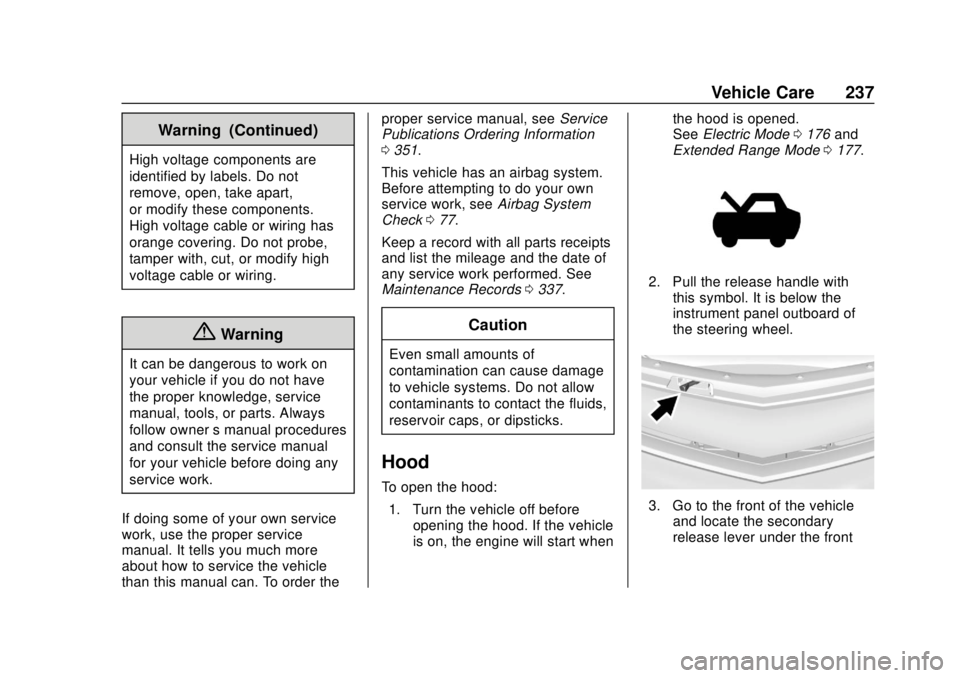
2. Pull the release handle with
this symbol. It is below the
instrument panel outboard of
the steering wheel.
3. Go to the front of the vehicleand locate the secondary
release lever under the front
Page 239 of 379
Chevrolet VOLT Owner Manual (GMNA-Localizing-U.S./Canada/Mexico-
11349113) - 2018 - crc - 10/12/17
238 Vehicle Care
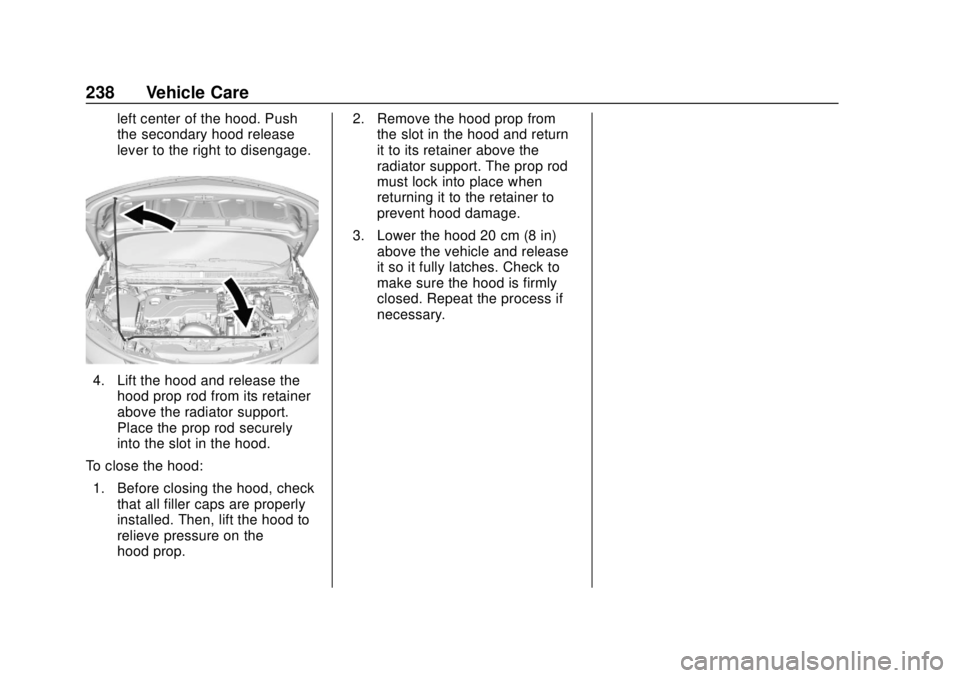
left center of the hood. Push
the secondary hood release
lever to the right to disengage.
4. Lift the hood and release thehood prop rod from its retainer
above the radiator support.
Place the prop rod securely
into the slot in the hood.
To close the hood: 1. Before closing the hood, check that all filler caps are properly
installed. Then, lift the hood to
relieve pressure on the
hood prop. 2. Remove the hood prop from
the slot in the hood and return
it to its retainer above the
radiator support. The prop rod
must lock into place when
returning it to the retainer to
prevent hood damage.
3. Lower the hood 20 cm (8 in) above the vehicle and release
it so it fully latches. Check to
make sure the hood is firmly
closed. Repeat the process if
necessary.
Page 245 of 379
Chevrolet VOLT Owner Manual (GMNA-Localizing-U.S./Canada/Mexico-
11349113) - 2018 - crc - 10/12/17
244 Vehicle Care
filter, make sure that the engine air
cleaner/filter housing and nearby
components are free of dirt and
debris. Remove the engine air
cleaner/filter. Lightly tap and shake
the engine air cleaner/filter (away
from the vehicle), to release loose
dust and dirt. Inspect the engine air
cleaner/filter for damage, and
replace if damaged. Do not clean
the engine air cleaner/filter or
components with water or
compressed air.
To inspect or replace the air filter:1. Open the hood. See Hood
0 237.
2. Locate the engine air cleaner/ filter assembly on the
passenger side of the engine
compartment. See Engine
Compartment Overview 0239.
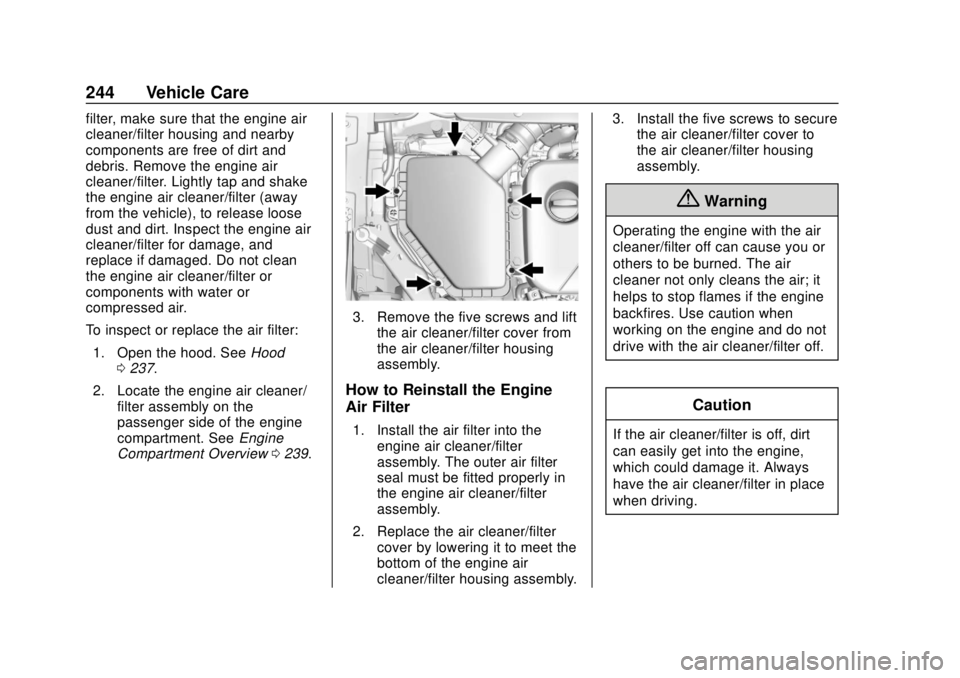
3. Remove the five screws and lift
the air cleaner/filter cover from
the air cleaner/filter housing
assembly.
How to Reinstall the Engine
Air Filter
1. Install the air filter into theengine air cleaner/filter
assembly. The outer air filter
seal must be fitted properly in
the engine air cleaner/filter
assembly.
2. Replace the air cleaner/filter cover by lowering it to meet the
bottom of the engine air
cleaner/filter housing assembly. 3. Install the five screws to secure
the air cleaner/filter cover to
the air cleaner/filter housing
assembly.
{Warning
Operating the engine with the air
cleaner/filter off can cause you or
others to be burned. The air
cleaner not only cleans the air; it
helps to stop flames if the engine
backfires. Use caution when
working on the engine and do not
drive with the air cleaner/filter off.
Caution
If the air cleaner/filter is off, dirt
can easily get into the engine,
which could damage it. Always
have the air cleaner/filter in place
when driving.