Traction CHEVROLET VOLT 2019 User Guide
[x] Cancel search | Manufacturer: CHEVROLET, Model Year: 2019, Model line: VOLT, Model: CHEVROLET VOLT 2019Pages: 373, PDF Size: 5.66 MB
Page 164 of 373
Chevrolet VOLT Owner Manual (GMNA-Localizing-U.S./Canada/Mexico-
12163007) - 2019 - CRC - 11/5/18
Driving and Operating 163
.Pay attention to special road
signs (e.g., falling rocks area,
winding roads, long grades,
passing or no-passing zones)
and take appropriate action.
Winter Driving
Driving on Snow or Ice
Snow or ice between the tires and
the road creates less traction or
grip, so drive carefully. Wet ice can
occur at about 0 °C (32 °F) when
freezing rain begins to fall. Avoid
driving on wet ice or in freezing rain
until roads can be treated.
For slippery road driving:
.Accelerate gently. Accelerating
too quickly causes the wheels to
spin and makes the surface
under the tires slick.
. Turn on Traction Control. See
Traction Control/Electronic
Stability Control 0186.
. The Antilock Brake System
(ABS) improves vehicle stability
during hard stops, but the
brakes should be applied sooner than when on dry pavement.
See
Antilock Brake System
(ABS) 0182.
. Allow greater following distance
and watch for slippery spots. Icy
patches can occur on otherwise
clear roads in shaded areas.
The surface of a curve or an
overpass can remain icy when
the surrounding roads are clear.
Avoid sudden steering
maneuvers and braking while
on ice.
. Turn off cruise control.
. Select All-Wheel Drive (AWD)
Mode for vehicles equipped with
AWD. Select Snow/Ice Mode for
FWD only vehicles. See Driver
Mode Control 0188.
Blizzard Conditions
Stop the vehicle in a safe place and
signal for help. Stay with the vehicle
unless there is help nearby.
If possible, use Roadside
Assistance. See Roadside
Assistance Program 0339. To get
help and keep everyone in the
vehicle safe: .
Turn on the hazard warning
flashers.
. Tie a red cloth to an outside
mirror.
{Warning
Snow can trap engine exhaust
under the vehicle. This may
cause exhaust gases to get
inside. Engine exhaust contains
carbon monoxide (CO), which
cannot be seen or smelled. It can
cause unconsciousness and even
death.
If the vehicle is stuck in snow:
. Clear snow from the base of
the vehicle, especially any
blocking the exhaust pipe.
. Open a window about 5 cm
(2 in) on the vehicle side
that is away from the wind,
to bring in fresh air.
. Fully open the air outlets on
or under the instrument
panel.
(Continued)
Page 165 of 373
Chevrolet VOLT Owner Manual (GMNA-Localizing-U.S./Canada/Mexico-
12163007) - 2019 - CRC - 11/5/18
164 Driving and Operating
Warning (Continued)
.Adjust the climate control
system to circulate the air
inside the vehicle and set
the fan speed to the highest
setting. See “Climate
Control Systems.”
For more information about CO,
see Engine Exhaust 0180.
To save fuel, start the vehicle for
short periods to warm the vehicle
and then shut the engine off and
partially close the window. Moving
about to keep warm also helps.
If the Vehicle Is Stuck
Slowly and cautiously spin the
wheels to free the vehicle when
stuck in sand, mud, ice, or snow.
The Traction Control System (TCS)
must be turned off by pressing the
TCS/ESC button. Traction control is
not completely off, but will only
engage if the maneuver can cause
damage to the electric drive unit.
{Warning
If the vehicle's tires spin at high
speed, they can explode, and you
or others could be injured. The
vehicle can overheat, causing an
engine compartment fire or other
damage. Spin the wheels as little
as possible and avoid going
above 56 km/h (35 mph).
Rocking the Vehicle to Get
it Out
Turn the steering wheel left and
right to clear the area around the
front wheels. Shift back and forth
between R (Reverse) and a forward
gear, spinning the wheels as little as
possible. The Traction Control
System prevents the tires from
spinning at high speeds. To prevent
electric drive unit wear, wait until the
wheels stop spinning before shifting
gears. Release the accelerator
pedal while shifting, and press
lightly on the accelerator pedal
when the electric drive unit is in
gear. Slowly spinning the wheels in the forward and reverse directions
causes a rocking motion that could
free the vehicle. If that does not get
the vehicle out after a few tries, it
might need to be towed out. If the
vehicle does need to be towed out,
see
Towing the Vehicle 0305.
Vehicle Load Limits
It is very important to know how
much weight the vehicle can
carry. This weight is called the
vehicle capacity weight and
includes the weight of all
occupants, cargo, and all
nonfactory-installed options.
Two labels on the vehicle may
show how much weight it may
properly carry: the Tire and
Loading Information label and
the Certification label.
Page 187 of 373
Chevrolet VOLT Owner Manual (GMNA-Localizing-U.S./Canada/Mexico-
12163007) - 2019 - CRC - 11/5/18
186 Driving and Operating
Regen on Demand
{Warning
To help avoid personal injury and
vehicle damage, use caution
when driving in L (Low) or using
Regen on Demand in slippery
conditions. Wheel slip may occur
with increased regenerative
braking.
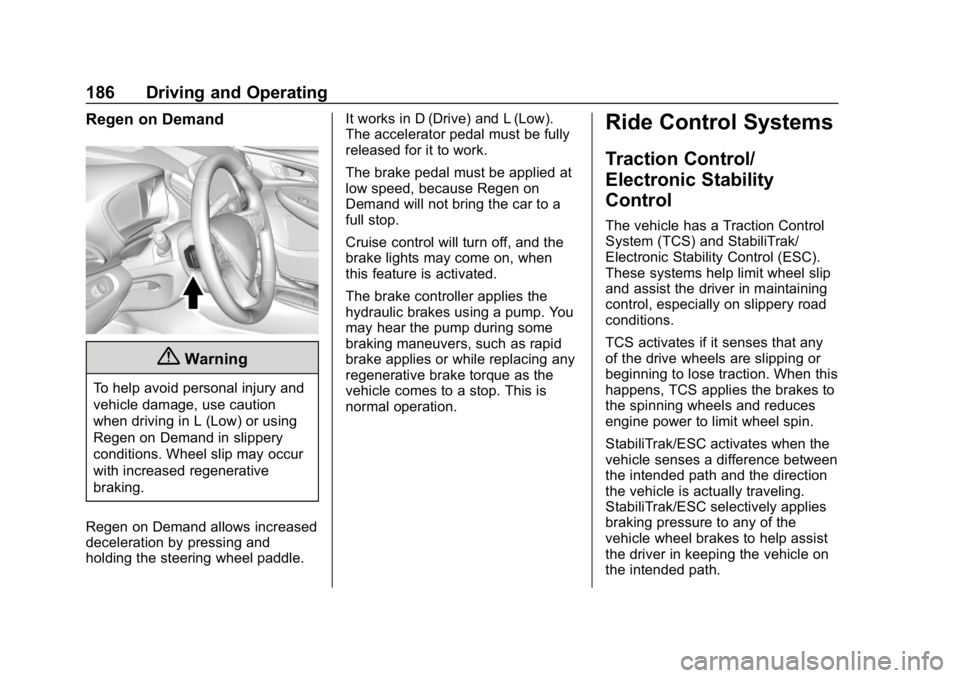
Regen on Demand allows increased
deceleration by pressing and
holding the steering wheel paddle. It works in D (Drive) and L (Low).
The accelerator pedal must be fully
released for it to work.
The brake pedal must be applied at
low speed, because Regen on
Demand will not bring the car to a
full stop.
Cruise control will turn off, and the
brake lights may come on, when
this feature is activated.
The brake controller applies the
hydraulic brakes using a pump. You
may hear the pump during some
braking maneuvers, such as rapid
brake applies or while replacing any
regenerative brake torque as the
vehicle comes to a stop. This is
normal operation.
Ride Control Systems
Traction Control/
Electronic Stability
Control
The vehicle has a Traction Control
System (TCS) and StabiliTrak/
Electronic Stability Control (ESC).
These systems help limit wheel slip
and assist the driver in maintaining
control, especially on slippery road
conditions.
TCS activates if it senses that any
of the drive wheels are slipping or
beginning to lose traction. When this
happens, TCS applies the brakes to
the spinning wheels and reduces
engine power to limit wheel spin.
StabiliTrak/ESC activates when the
vehicle senses a difference between
the intended path and the direction
the vehicle is actually traveling.
StabiliTrak/ESC selectively applies
braking pressure to any of the
vehicle wheel brakes to help assist
the driver in keeping the vehicle on
the intended path.
Page 189 of 373
Chevrolet VOLT Owner Manual (GMNA-Localizing-U.S./Canada/Mexico-
12163007) - 2019 - CRC - 11/5/18
188 Driving and Operating
To turn off only TCS, press and
release
g. The Traction Off lighti
displays in the instrument cluster. To
turn TCS on again, press and
release
g. The Traction Off lighti
displayed in the instrument cluster
will turn off.
To turn off both TCS and StabiliTrak/
ESC, press and hold
guntil the
Traction Off light
iand StabiliTrak/
ESC Off light
gcome on and stay
on in the instrument cluster. To turn
TCS and StabiliTrak/ESC on again,
press and release
g. The Traction
Off light
iand StabiliTrak/ESC Off
light
gin the instrument cluster
turn off.
Adding accessories can affect the
vehicle performance. See
Accessories and Modifications
0 237.
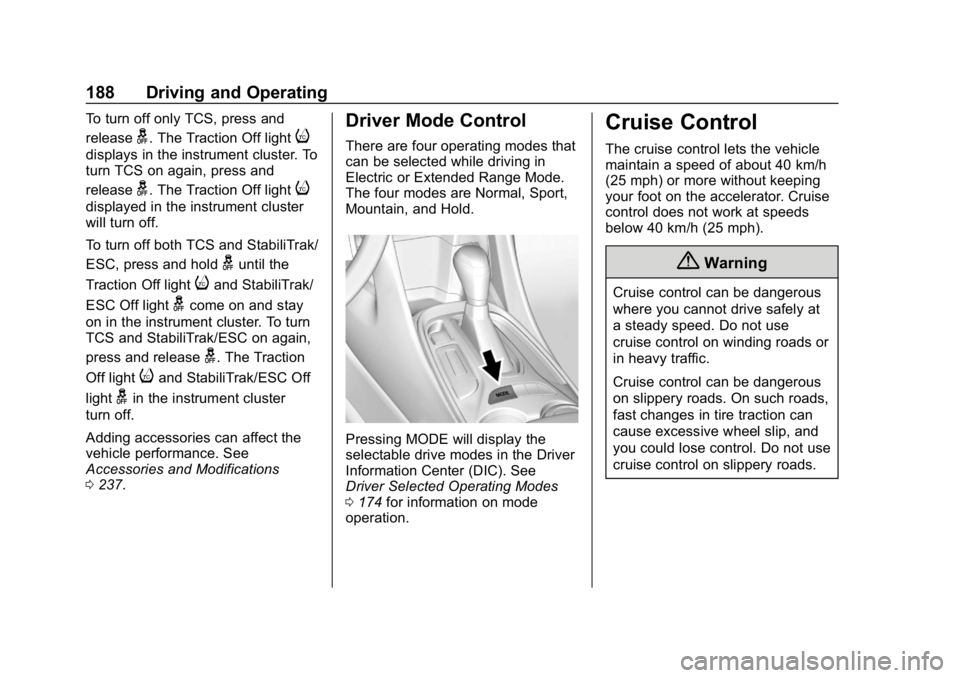
Driver Mode Control
There are four operating modes that
can be selected while driving in
Electric or Extended Range Mode.
The four modes are Normal, Sport,
Mountain, and Hold.
Pressing MODE will display the
selectable drive modes in the Driver
Information Center (DIC). See
Driver Selected Operating Modes
0174 for information on mode
operation.
Cruise Control
The cruise control lets the vehicle
maintain a speed of about 40 km/h
(25 mph) or more without keeping
your foot on the accelerator. Cruise
control does not work at speeds
below 40 km/h (25 mph).
{Warning
Cruise control can be dangerous
where you cannot drive safely at
a steady speed. Do not use
cruise control on winding roads or
in heavy traffic.
Cruise control can be dangerous
on slippery roads. On such roads,
fast changes in tire traction can
cause excessive wheel slip, and
you could lose control. Do not use
cruise control on slippery roads.
Page 190 of 373
Chevrolet VOLT Owner Manual (GMNA-Localizing-U.S./Canada/Mexico-
12163007) - 2019 - CRC - 11/5/18
Driving and Operating 189
With the Traction Control System
(TCS) or StabiliTrak/Electronic
Stability Control (ESC), the system
may begin to limit wheel spin while
you are using cruise control. If this
happens, the cruise control will
automatically disengage. See
Traction Control/Electronic Stability
Control0186. If a collision alert
occurs when cruise control is
activated, cruise control is
disengaged. See Forward Collision
Alert (FCA) System 0206. When
road conditions allow you to safely
use it again, cruise control can be
turned back on.
If the brakes or the Regen on
Demand paddle are applied, cruise
control disengages.
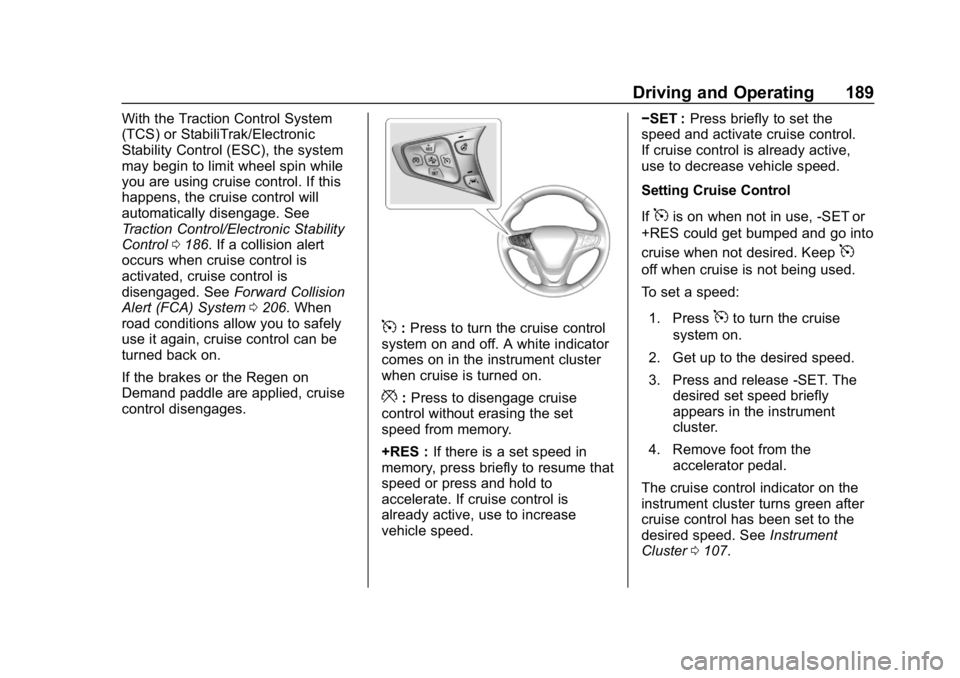
5: Press to turn the cruise control
system on and off. A white indicator
comes on in the instrument cluster
when cruise is turned on.
*: Press to disengage cruise
control without erasing the set
speed from memory.
+RES : If there is a set speed in
memory, press briefly to resume that
speed or press and hold to
accelerate. If cruise control is
already active, use to increase
vehicle speed. −SET :
Press briefly to set the
speed and activate cruise control.
If cruise control is already active,
use to decrease vehicle speed.
Setting Cruise Control
If
5is on when not in use, -SET or
+RES could get bumped and go into
cruise when not desired. Keep
5
off when cruise is not being used.
To set a speed:
1. Press
5to turn the cruise
system on.
2. Get up to the desired speed.
3. Press and release -SET. The desired set speed briefly
appears in the instrument
cluster.
4. Remove foot from the accelerator pedal.
The cruise control indicator on the
instrument cluster turns green after
cruise control has been set to the
desired speed. See Instrument
Cluster 0107.
Page 192 of 373
Chevrolet VOLT Owner Manual (GMNA-Localizing-U.S./Canada/Mexico-
12163007) - 2019 - CRC - 11/5/18
Driving and Operating 191
Ending Cruise Control
There are five ways to end cruise
control:
.Step lightly on the brake pedal.
. Press
*.
. Shift the electric drive unit to
N (Neutral).
. Press
5to turn the cruise
control system off completely.
. Press the Regen on Demand
paddle.
Erasing Speed Memory
The cruise control set speed is
erased from memory if
5is pressed
or if the vehicle is turned off.
Adaptive Cruise Control
If equipped, Adaptive Cruise Control
(ACC) allows the cruise control set
speed and following gap to be
selected. Read this entire section
before using this system. The
following gap is the following time
between your vehicle and a vehicle
detected directly ahead in your path, moving in the same direction. If no
vehicle is detected in your path,
ACC works like regular cruise
control. ACC uses camera and
radar sensors. See
Radio
Frequency Statement 0345.
If a vehicle is detected in your path,
ACC can apply acceleration or
limited, moderate braking to
maintain the selected following gap.
To disengage ACC, apply the brake.
If ACC is controlling your vehicle
speed when the traction control
system (TCS) or StabiliTrak/
Electronic Stability Control (ESC)
system activates, ACC may
automatically disengage. See
Traction Control/Electronic Stability
Control 0186. When road
conditions allow ACC to be safely
used, the ACC can be turned back
on. Disabling the TCS or StabiliTrak/
ESC system will disengage and
prevent engagement of ACC.
ACC will not engage if the TCS or
StabiliTrak/ESC system is disabled. ACC can reduce the need for you to
frequently brake and accelerate,
especially when used on
expressways, freeways, and
interstate highways. When used on
other roads, you may need to take
over the control of braking or
acceleration more often.
{Warning
ACC has limited braking ability
and may not have time to slow
the vehicle down enough to avoid
a collision with another vehicle
you are following. This can occur
when vehicles suddenly slow or
stop ahead, or enter your lane.
Also see
“Alerting the Driver” in
this section. Complete attention is
always required while driving and
you should be ready to take
action and apply the brakes. See
Defensive Driving 0159.
Page 193 of 373
Chevrolet VOLT Owner Manual (GMNA-Localizing-U.S./Canada/Mexico-
12163007) - 2019 - CRC - 11/5/18
192 Driving and Operating
{Warning
ACC will not detect or brake for
children, pedestrians, animals,
or other objects.
Do not use ACC when:. On winding and hilly roads
or when the sensors are
blocked by snow, ice, or dirt.
The system may not detect
a vehicle ahead. Keep the
entire front of the vehicle
clean.
. Visibility is low, such as in
fog, rain, or snow
conditions. ACC
performance is limited under
these conditions.
. On slippery roads where
fast changes in tire traction
can cause excessive
wheel slip.
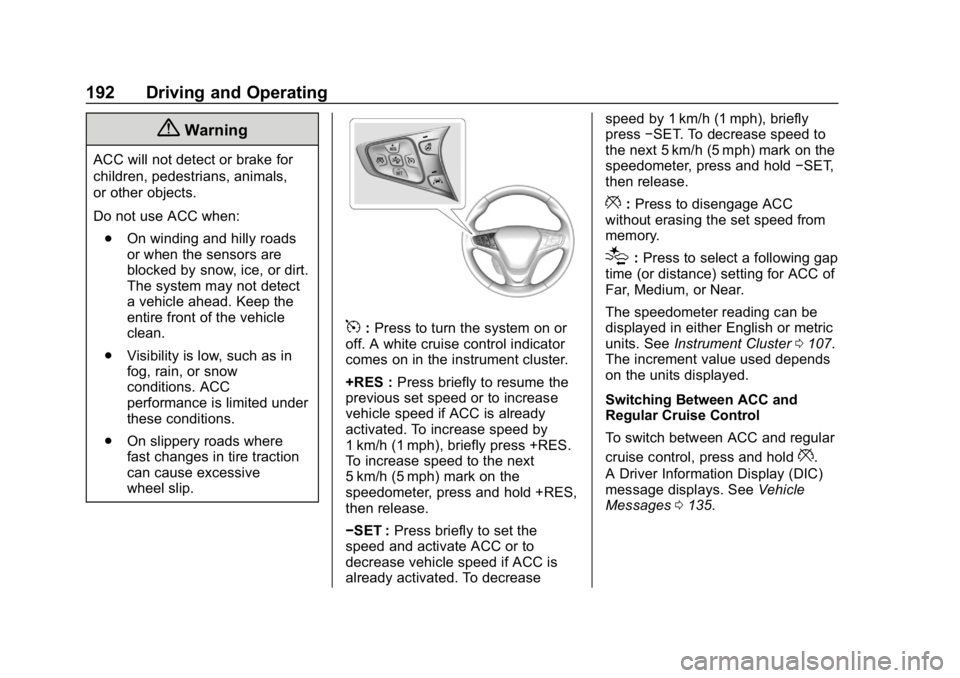
5:Press to turn the system on or
off. A white cruise control indicator
comes on in the instrument cluster.
+RES : Press briefly to resume the
previous set speed or to increase
vehicle speed if ACC is already
activated. To increase speed by
1 km/h (1 mph), briefly press +RES.
To increase speed to the next
5 km/h (5 mph) mark on the
speedometer, press and hold +RES,
then release.
−SET : Press briefly to set the
speed and activate ACC or to
decrease vehicle speed if ACC is
already activated. To decrease speed by 1 km/h (1 mph), briefly
press
−SET. To decrease speed to
the next 5 km/h (5 mph) mark on the
speedometer, press and hold −SET,
then release.
*: Press to disengage ACC
without erasing the set speed from
memory.
[: Press to select a following gap
time (or distance) setting for ACC of
Far, Medium, or Near.
The speedometer reading can be
displayed in either English or metric
units. See Instrument Cluster 0107.
The increment value used depends
on the units displayed.
Switching Between ACC and
Regular Cruise Control
To switch between ACC and regular
cruise control, press and hold
*.
A Driver Information Display (DIC)
message displays. See Vehicle
Messages 0135.
Page 198 of 373
Chevrolet VOLT Owner Manual (GMNA-Localizing-U.S./Canada/Mexico-
12163007) - 2019 - CRC - 11/5/18
Driving and Operating 197
.The sensors are blocked.
. The Traction Control System
(TCS) or StabiliTrak/ESC system
has activated or been disabled.
. There is a fault in the system.
. The radar falsely reports a
blockage when driving in a
desert or remote area with no
other vehicles or roadside
objects. A DIC message may
display to indicate that ACC is
temporarily unavailable.
The ACC indicator will turn white
when ACC is no longer active.
Notification to Resume ACC
ACC will maintain a following gap
behind a detected vehicle and slow
your vehicle to a stop behind that
vehicle.
If the stopped vehicle ahead has
driven away and ACC has not
resumed, the vehicle ahead
indicator will flash as a reminder to
check traffic ahead before
proceeding. See “Adaptive Cruise Go Notifier”
in“Collision/Detection
Systems” underVehicle
Personalization 0137.
When the vehicle ahead drives
away, press +RES or the
accelerator pedal to resume ACC.
If stopped for more than
two minutes or if the driver door is
opened and the driver seat belt is
unbuckled, the ACC automatically
applies the Electric Parking Brake
(EPB) to hold the vehicle. The EPB
status light will turn on. See Electric
Parking Brake 0183.
A DIC warning message may
display indicating to shift to P (Park)
before exiting the vehicle. See
Vehicle Messages 0135.
{Warning
If ACC has stopped the vehicle,
and if ACC is disengaged, turned
off, or canceled, the vehicle will
no longer be held at a stop. The
vehicle can move. When ACC is
(Continued)
Warning (Continued)
holding the vehicle at a stop,
always be prepared to manually
apply the brakes.
{Warning
Leaving the vehicle without
placing it in P (Park) can be
dangerous. Do not leave the
vehicle while it is being held at a
stop by ACC. Always place the
vehicle in P (Park) and turn off
the ignition before leaving the
vehicle.
ACC Override
If using the accelerator pedal while
ACC is active, the ACC indicator
turns blue on the instrument cluster
indicating ACC braking will not
occur. ACC will resume operation
when the accelerator pedal is not
being pressed.
Page 238 of 373
Chevrolet VOLT Owner Manual (GMNA-Localizing-U.S./Canada/Mexico-
12163007) - 2019 - CRC - 11/5/18
Vehicle Care 237
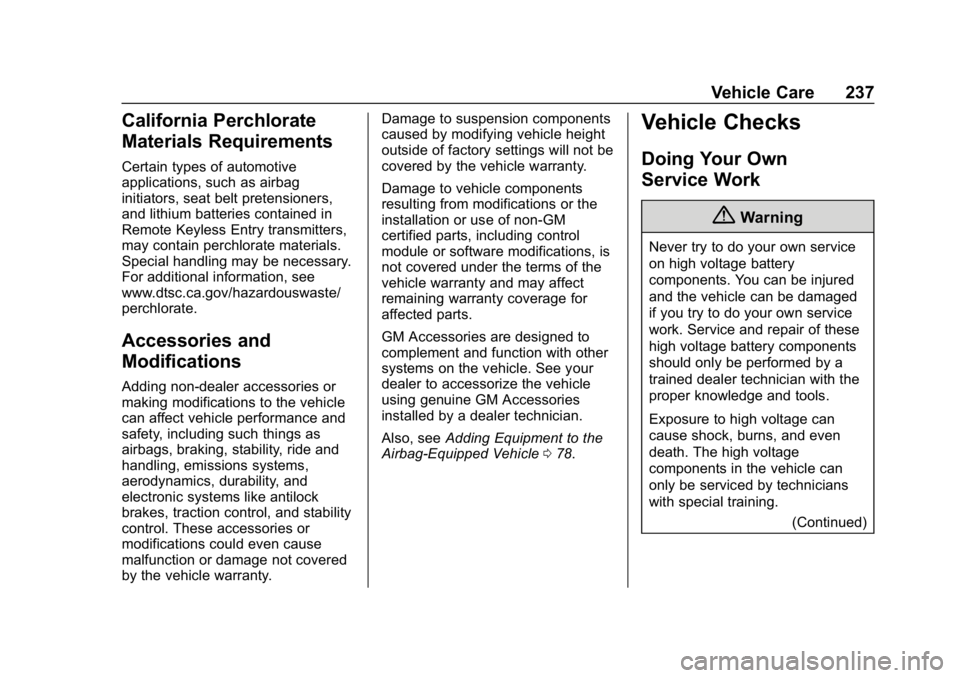
California Perchlorate
Materials Requirements
Certain types of automotive
applications, such as airbag
initiators, seat belt pretensioners,
and lithium batteries contained in
Remote Keyless Entry transmitters,
may contain perchlorate materials.
Special handling may be necessary.
For additional information, see
www.dtsc.ca.gov/hazardouswaste/
perchlorate.
Accessories and
Modifications
Adding non-dealer accessories or
making modifications to the vehicle
can affect vehicle performance and
safety, including such things as
airbags, braking, stability, ride and
handling, emissions systems,
aerodynamics, durability, and
electronic systems like antilock
brakes, traction control, and stability
control. These accessories or
modifications could even cause
malfunction or damage not covered
by the vehicle warranty.Damage to suspension components
caused by modifying vehicle height
outside of factory settings will not be
covered by the vehicle warranty.
Damage to vehicle components
resulting from modifications or the
installation or use of non-GM
certified parts, including control
module or software modifications, is
not covered under the terms of the
vehicle warranty and may affect
remaining warranty coverage for
affected parts.
GM Accessories are designed to
complement and function with other
systems on the vehicle. See your
dealer to accessorize the vehicle
using genuine GM Accessories
installed by a dealer technician.
Also, see
Adding Equipment to the
Airbag-Equipped Vehicle 078.
Vehicle Checks
Doing Your Own
Service Work
{Warning
Never try to do your own service
on high voltage battery
components. You can be injured
and the vehicle can be damaged
if you try to do your own service
work. Service and repair of these
high voltage battery components
should only be performed by a
trained dealer technician with the
proper knowledge and tools.
Exposure to high voltage can
cause shock, burns, and even
death. The high voltage
components in the vehicle can
only be serviced by technicians
with special training.
(Continued)
Page 267 of 373
Chevrolet VOLT Owner Manual (GMNA-Localizing-U.S./Canada/Mexico-
12163007) - 2019 - CRC - 11/5/18
266 Vehicle Care
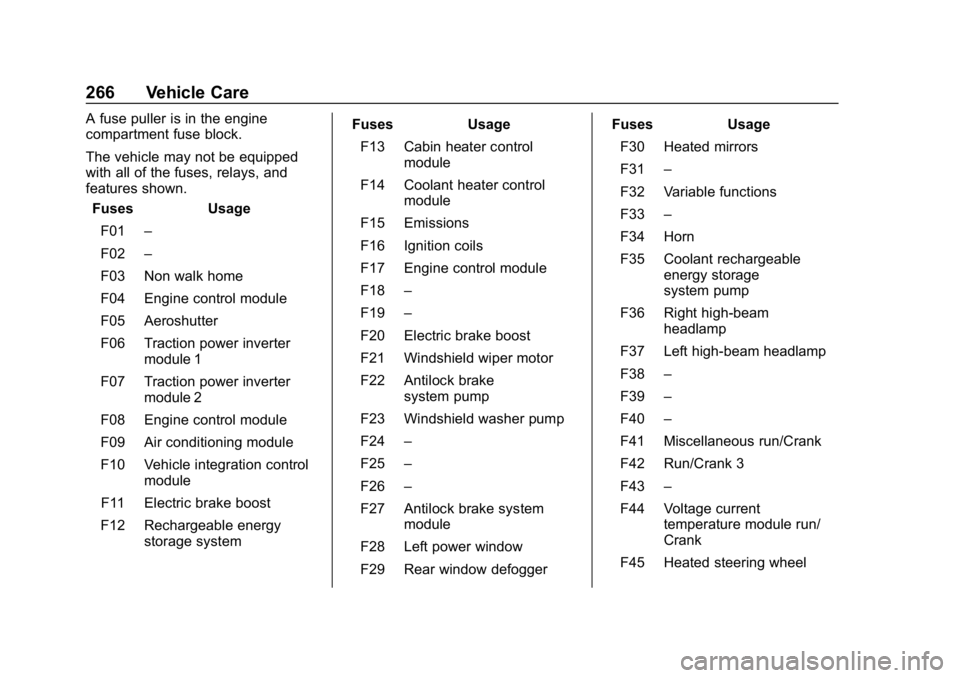
A fuse puller is in the engine
compartment fuse block.
The vehicle may not be equipped
with all of the fuses, relays, and
features shown.Fuses Usage
F01 –
F02 –
F03 Non walk home
F04 Engine control module
F05 Aeroshutter
F06 Traction power inverter module 1
F07 Traction power inverter module 2
F08 Engine control module
F09 Air conditioning module
F10 Vehicle integration control module
F11 Electric brake boost
F12 Rechargeable energy storage system Fuses Usage
F13 Cabin heater control module
F14 Coolant heater control module
F15 Emissions
F16 Ignition coils
F17 Engine control module
F18 –
F19 –
F20 Electric brake boost
F21 Windshield wiper motor
F22 Antilock brake system pump
F23 Windshield washer pump
F24 –
F25 –
F26 –
F27 Antilock brake system module
F28 Left power window
F29 Rear window defogger Fuses Usage
F30 Heated mirrors
F31 –
F32 Variable functions
F33 –
F34 Horn
F35 Coolant rechargeable energy storage
system pump
F36 Right high-beam headlamp
F37 Left high-beam headlamp
F38 –
F39 –
F40 –
F41 Miscellaneous run/Crank
F42 Run/Crank 3
F43 –
F44 Voltage current temperature module run/
Crank
F45 Heated steering wheel