air condition CHEVROLET VOLT 2019 User Guide
[x] Cancel search | Manufacturer: CHEVROLET, Model Year: 2019, Model line: VOLT, Model: CHEVROLET VOLT 2019Pages: 373, PDF Size: 5.66 MB
Page 135 of 373
Chevrolet VOLT Owner Manual (GMNA-Localizing-U.S./Canada/Mexico-
12163007) - 2019 - CRC - 11/5/18
134 Instruments and Controls
reset. The trip odometer can be
reset by pressing and holding
V
while this display is active.
The Average Fuel Economy display
shows the approximate average
liters per 100 kilometers (L/100 km)
or miles per gallon (mpg). This
number is calculated based on the
number of L/100 km (mpg) recorded
since the last time this menu item
was reset. This number reflects only
the approximate average fuel
economy that the vehicle has right
now, and will change as driving
conditions change. The Average
Fuel Economy can be reset along
with the trip odometer by pressing
and holding
Vwhile this display is
active.
Total Range : Shows the remaining
distance the vehicle can be driven
combining the electric range and
fuel range.
Oil Life : The Oil Life display shows
an estimate of the oil's remaining
useful life. If REMAINING OIL LIFE
99% is displayed, that means 99%
of the current oil life remains. When the remaining oil life is low,
the CHANGE ENGINE OIL SOON
message will appear on the display.
The oil should be changed as soon
as possible. See
Engine Oil0241.
In addition to the engine oil life
system monitoring the oil life,
additional maintenance is
recommended. See Maintenance
Schedule 0321.
Remember, the Oil Life display must
be reset after each oil change. It will
not reset itself. Also, be careful not
to reset the Oil Life display
accidentally at any time other than
when the oil has just been changed.
It cannot be reset accurately until
the next oil change. To reset the
engine oil life system, press and
hold
Vfor several seconds while
the Oil Life display is active. See
Engine Oil Life System 0243.
Engine Air Filter Life : Shows an
estimate of the engine air filter
remaining useful life and the state of
the system. Engine Air Filter Life
95% means 95% of the current air filter life remains. Messages will
display based on engine air filter life
and the state of the system. When
the REPLACE AT NEXT OIL
CHANGE message displays, the
engine air filter should be replaced
at the time of the next engine oil
change. When the REPLACE
ENGINE AIR FILTER NOW
message displays, the engine air
filter should be replaced as soon as
possible. The Engine Air Filter Life
display must be reset after the
engine air filter replacement. To
reset the engine air filter life system,
see
Engine Air Filter Life System
0 244.
Tire Pressure : Shows the
approximate pressures of all four
tires. Tire pressure is displayed in
either kilopascal (kPa) or in pounds
per square inch (psi). If the pressure
is low, the value for that tire is
shown in amber. See Tire Pressure
Monitor System 0280 andTire
Pressure Monitor Operation 0281.
Page 137 of 373
Chevrolet VOLT Owner Manual (GMNA-Localizing-U.S./Canada/Mexico-
12163007) - 2019 - CRC - 11/5/18
136 Instruments and Controls
.Brakes
. Steering
. Ride Control Systems
. Driver Assistance Systems
. Cruise Control
. Lighting and Bulb Replacement
. Wiper/Washer Systems
. Doors and Windows
. Seat Belts
. Airbag Systems
. Propulsion and Drive Unit
. Tire Pressure
. Battery
Propulsion Power
Messages
PROPULSION POWER IS
REDUCED
This message displays when the
propulsion power is reduced and
can affect the ability to accelerate.
If this message is on, but there is no
reduction in performance, proceed to your destination. The
performance may be reduced the
next time the vehicle is driven. The
vehicle may be driven while this
message is on, but maximum
acceleration and speed may be
reduced. If this message stays on
when the malfunction indicator lamp
is on, the vehicle should be taken to
your dealer for service as soon as
possible.
This message can display when the
vehicle is parked during extreme
cold conditions without being
plugged in. While driving the vehicle
with this message displayed, the
vehicle speed may be reduced until
the high voltage battery is
conditioned.
This message can display when
driving in mountainous terrain
without using Mountain Mode or by
not entering Mountain Mode soon
enough to build a sufficient battery
charge reserve before climbing
steep grades. This is normal
operation to protect the high voltage
battery. Only if both the
PROPULSION POWER ISREDUCED message and the
malfunction indicator lamp are on
should the vehicle be taken to the
dealer for service.
While climbing the grade with this
message displayed, the vehicle
speed may be reduced until the
engine can recover the battery state
of charge to a normal level. See
“Mountain Mode”
underDriver
Selected Operating Modes 0174.
Vehicle Speed Messages
SPEED LIMITED TO
XXX KM/H (MPH)
This message shows that the
vehicle speed has been limited to
the speed displayed. The limited
speed is a protection for various
propulsion and vehicle systems,
such as lubrication, thermal,
suspension, Teen Driver if
equipped, or tires.
Page 138 of 373
Chevrolet VOLT Owner Manual (GMNA-Localizing-U.S./Canada/Mexico-
12163007) - 2019 - CRC - 11/5/18
Instruments and Controls 137
Vehicle
Personalization
The following are all possible
vehicle personalization features.
Depending on the vehicle, some
may not be available.
For System, Apps, and Personal
features and functions, see
“Settings”in the infotainment
manual.
To access the vehicle
personalization menu:
1. Touch the Settings icon on the Home Page of the infotainment
display.
2. Touch Vehicle to display a list of available options.
3. Touch to select the desired feature setting.
4. Touch
9orRto turn a feature
off or on.
5. Touch
zto go to the top level
of the Settings menu. The menu may contain the
following:
Rear Seat Reminder
This allows for a chime and a
message when the rear door has
been opened before or during
operation of the vehicle.
Touch Off or On.
Climate and Air Quality
Touch and the following may
display:
.
Auto Fan Speed
. Auto Heated Seats
. Auto Defog
. Engine Assisted Heating
. Engine Assisted Heating
Plugged In
Auto Fan Speed
This feature will set the auto fan
speed.
Touch Low, Medium, or High. Auto Heated Seats
When the vehicle is on, this feature
will automatically activate the
heated seats at the level required by
the vehicle's interior temperature.
The auto heated seats can be
turned off by using
LorMon the
center stack.
If equipped with Auto Heated
Steering Wheel, this feature will turn
on when the Auto Heated Seats
turn on.
Touch Off or On.
Auto Defog
When turned on and high humidity
is detected, the climate control
system may adjust to outside air
supply and turn on the air
conditioner or the heater. The fan
speed may slightly increase to help
prevent fogging. When high
humidity is no longer detected, the
system will return to its prior
operation.
Touch Off or On.
Page 151 of 373
Chevrolet VOLT Owner Manual (GMNA-Localizing-U.S./Canada/Mexico-
12163007) - 2019 - CRC - 11/5/18
150 Climate Controls
Climate Controls
Climate Control Systems
Automatic Climate ControlSystem . . . . . . . . . . . . . . . . . . . . . . 150
Air Vents
Air Vents . . . . . . . . . . . . . . . . . . . . . 155
Maintenance
Passenger Compartment AirFilter . . . . . . . . . . . . . . . . . . . . . . . . 155
Service . . . . . . . . . . . . . . . . . . . . . . . 156
Climate Control
Systems
Automatic Climate
Control System
The heating, cooling, and ventilation
for the vehicle can be controlled
with this system.
The vehicle may require the use of
an auxiliary heat source under
certain cold conditions. This
provides additional heating and
defrost capability obtained by
running the engine, even if the high voltage battery is adequately
charged. Under these conditions,
the engine will start and use fuel.
Make sure there is fuel in the tank.
Do not allow the vehicle to remain in
extreme temperatures for long
periods without being driven or
plugged in.
Page 152 of 373
Chevrolet VOLT Owner Manual (GMNA-Localizing-U.S./Canada/Mexico-
12163007) - 2019 - CRC - 11/5/18
Climate Controls 151
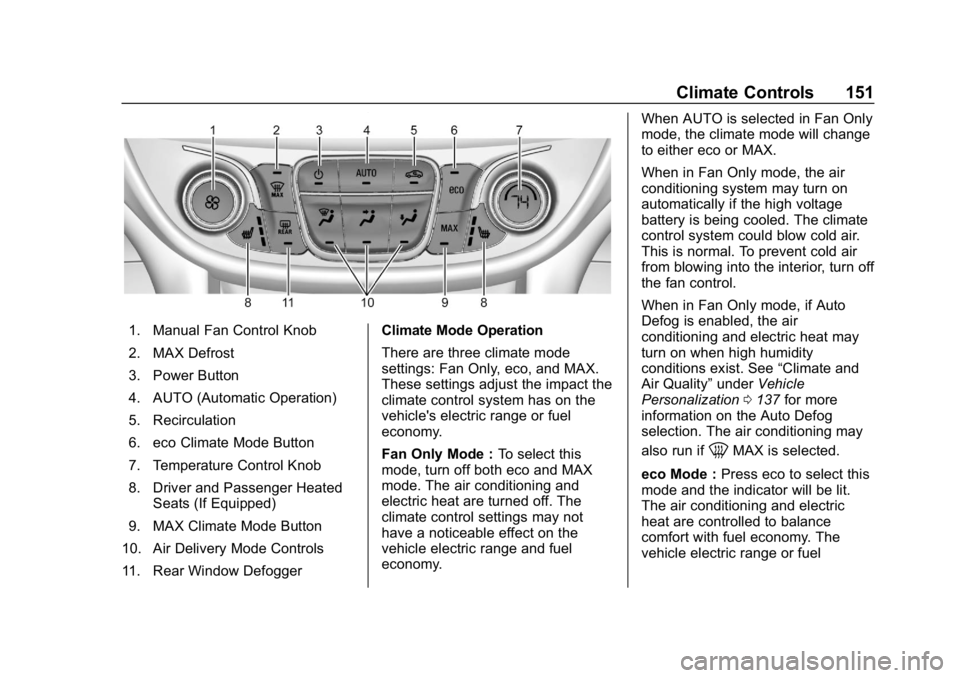
1. Manual Fan Control Knob
2. MAX Defrost
3. Power Button
4. AUTO (Automatic Operation)
5. Recirculation
6. eco Climate Mode Button
7. Temperature Control Knob
8. Driver and Passenger HeatedSeats (If Equipped)
9. MAX Climate Mode Button
10. Air Delivery Mode Controls
11. Rear Window Defogger Climate Mode Operation
There are three climate mode
settings: Fan Only, eco, and MAX.
These settings adjust the impact the
climate control system has on the
vehicle's electric range or fuel
economy.
Fan Only Mode :
To select this
mode, turn off both eco and MAX
mode. The air conditioning and
electric heat are turned off. The
climate control settings may not
have a noticeable effect on the
vehicle electric range and fuel
economy. When AUTO is selected in Fan Only
mode, the climate mode will change
to either eco or MAX.
When in Fan Only mode, the air
conditioning system may turn on
automatically if the high voltage
battery is being cooled. The climate
control system could blow cold air.
This is normal. To prevent cold air
from blowing into the interior, turn off
the fan control.
When in Fan Only mode, if Auto
Defog is enabled, the air
conditioning and electric heat may
turn on when high humidity
conditions exist. See
“Climate and
Air Quality” underVehicle
Personalization 0137 for more
information on the Auto Defog
selection. The air conditioning may
also run if
0MAX is selected.
eco Mode : Press eco to select this
mode and the indicator will be lit.
The air conditioning and electric
heat are controlled to balance
comfort with fuel economy. The
vehicle electric range or fuel
Page 153 of 373
Chevrolet VOLT Owner Manual (GMNA-Localizing-U.S./Canada/Mexico-
12163007) - 2019 - CRC - 11/5/18
152 Climate Controls
economy will decrease less than in
MAX mode, but will result in
reduced comfort.
MAX Mode :Press MAX to select
this mode and the indicator will be
lit. The air conditioning and electric
heat are controlled to reach the best
comfort level based on the
temperature setting selected. In this
mode, vehicle electric range or fuel
economy will decrease depending
on the amount of energy required to
reach the best comfort levels.
The air conditioning and electric
heat could be on at the same time
when dehumidification is required in
eco or MAX modes.
The air conditioning may also run if
0MAX is selected, regardless of
the climate mode.
Automatic Operation
The system automatically controls
fan speed, air delivery mode, air
conditioning, and recirculation to
heat or cool the vehicle to the
selected temperature. When AUTO is lit, all four functions
operate automatically. Each function
can also be manually set and the
setting is displayed. Functions not
manually set will continue to be
automatically controlled, even if the
AUTO indicator is not lit.
For automatic operation:
1. Press AUTO.
2. Set the temperature. An initial setting of 23 °C (74 °F) is
recommended. Allow the
system time to stabilize. Adjust
the temperature as needed.
Manual Operation
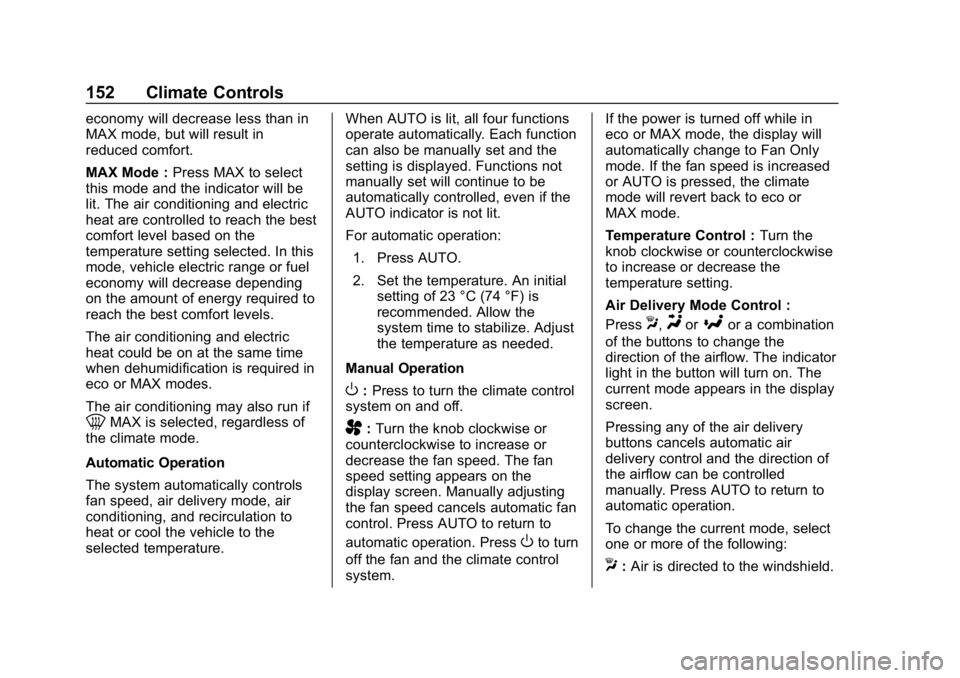
O: Press to turn the climate control
system on and off.
A: Turn the knob clockwise or
counterclockwise to increase or
decrease the fan speed. The fan
speed setting appears on the
display screen. Manually adjusting
the fan speed cancels automatic fan
control. Press AUTO to return to
automatic operation. Press
Oto turn
off the fan and the climate control
system. If the power is turned off while in
eco or MAX mode, the display will
automatically change to Fan Only
mode. If the fan speed is increased
or AUTO is pressed, the climate
mode will revert back to eco or
MAX mode.
Temperature Control :
Turn the
knob clockwise or counterclockwise
to increase or decrease the
temperature setting.
Air Delivery Mode Control :
Press
X,Yor[or a combination
of the buttons to change the
direction of the airflow. The indicator
light in the button will turn on. The
current mode appears in the display
screen.
Pressing any of the air delivery
buttons cancels automatic air
delivery control and the direction of
the airflow can be controlled
manually. Press AUTO to return to
automatic operation.
To change the current mode, select
one or more of the following:
X: Air is directed to the windshield.
Page 154 of 373
Chevrolet VOLT Owner Manual (GMNA-Localizing-U.S./Canada/Mexico-
12163007) - 2019 - CRC - 11/5/18
Climate Controls 153
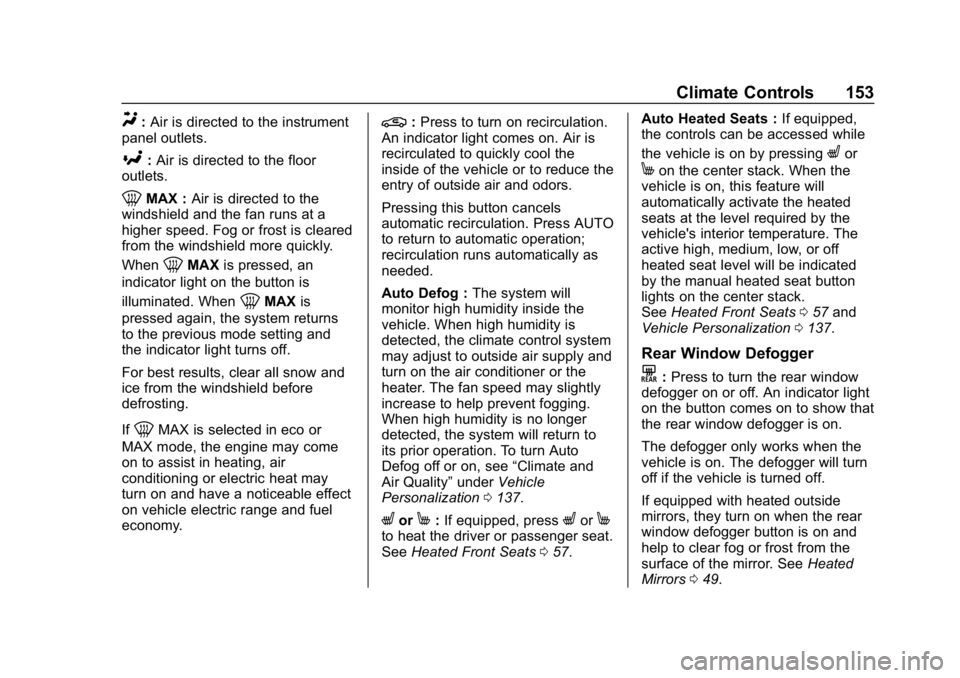
Y:Air is directed to the instrument
panel outlets.
[: Air is directed to the floor
outlets.
0MAX : Air is directed to the
windshield and the fan runs at a
higher speed. Fog or frost is cleared
from the windshield more quickly.
When
0MAX is pressed, an
indicator light on the button is
illuminated. When
0MAX is
pressed again, the system returns
to the previous mode setting and
the indicator light turns off.
For best results, clear all snow and
ice from the windshield before
defrosting.
If
0MAX is selected in eco or
MAX mode, the engine may come
on to assist in heating, air
conditioning or electric heat may
turn on and have a noticeable effect
on vehicle electric range and fuel
economy.
@: Press to turn on recirculation.
An indicator light comes on. Air is
recirculated to quickly cool the
inside of the vehicle or to reduce the
entry of outside air and odors.
Pressing this button cancels
automatic recirculation. Press AUTO
to return to automatic operation;
recirculation runs automatically as
needed.
Auto Defog : The system will
monitor high humidity inside the
vehicle. When high humidity is
detected, the climate control system
may adjust to outside air supply and
turn on the air conditioner or the
heater. The fan speed may slightly
increase to help prevent fogging.
When high humidity is no longer
detected, the system will return to
its prior operation. To turn Auto
Defog off or on, see “Climate and
Air Quality” underVehicle
Personalization 0137.
LorM:If equipped, pressLorMto heat the driver or passenger seat.
See Heated Front Seats 057. Auto Heated Seats :
If equipped,
the controls can be accessed while
the vehicle is on by pressing
Lor
Mon the center stack. When the
vehicle is on, this feature will
automatically activate the heated
seats at the level required by the
vehicle's interior temperature. The
active high, medium, low, or off
heated seat level will be indicated
by the manual heated seat button
lights on the center stack.
See Heated Front Seats 057 and
Vehicle Personalization 0137.
Rear Window Defogger
K:Press to turn the rear window
defogger on or off. An indicator light
on the button comes on to show that
the rear window defogger is on.
The defogger only works when the
vehicle is on. The defogger will turn
off if the vehicle is turned off.
If equipped with heated outside
mirrors, they turn on when the rear
window defogger button is on and
help to clear fog or frost from the
surface of the mirror. See Heated
Mirrors 049.
Page 155 of 373
Chevrolet VOLT Owner Manual (GMNA-Localizing-U.S./Canada/Mexico-
12163007) - 2019 - CRC - 11/5/18
154 Climate Controls
Caution
Do not try to clear frost or other
material from the inside of the
front windshield and rear window
with a razor blade or anything
else that is sharp. This may
damage the rear window
defogger grid and affect the
radio's ability to pick up stations
clearly. The repairs would not be
covered by the vehicle warranty.
Remote Start : The climate control
system may be started by using the
Remote Keyless Entry (RKE)
transmitter. The climate control
system will default to an appropriate
heating or cooling mode. See
Remote Start 038.
If equipped, the heated seats will
turn on if it is cold outside. The
heated seat indicator light will not
come on during a remote start.
If equipped, the heated steering
wheel will come on if it is cold outside. The heated steering wheel
indicator light will not come on
during a remote start.
The rear window defogger turns on
if it is cold outside.
Compressor
The vehicle has an electric powered
air conditioning compressor. This
allows for continuous air
conditioning and/or high voltage
battery cooling operation, without
running the engine.
The compressor operating speed is
not tied to the engine speed, so
some noise may be heard from the
compressor, especially when air
conditioning use is high and the
engine has turned off. This is
normal.
Sensors
Solar Sensor
The solar sensor is on top of the
instrument panel, near the
windshield, where it monitors solar
intensity.The climate control system uses the
sensor information to adjust the
temperature, fan speed,
recirculation, and air delivery mode
for best comfort.
Do not cover the sensor; otherwise
the automatic climate control system
may not work properly.
Humidity Sensor
The humidity sensor is near the
base of the inside rearview mirror.
The climate control system uses the
sensor information to adjust the
temperature and recirculation for
best comfort.
Outside Air Temperature Sensor
The outside air temperature sensor
is behind the front grille of the
vehicle. The vehicle uses the sensor
information to display outside air
temperature. The climate control
system uses the information to
adjust the climate system operation.
Page 157 of 373
Chevrolet VOLT Owner Manual (GMNA-Localizing-U.S./Canada/Mexico-
12163007) - 2019 - CRC - 11/5/18
156 Climate Controls
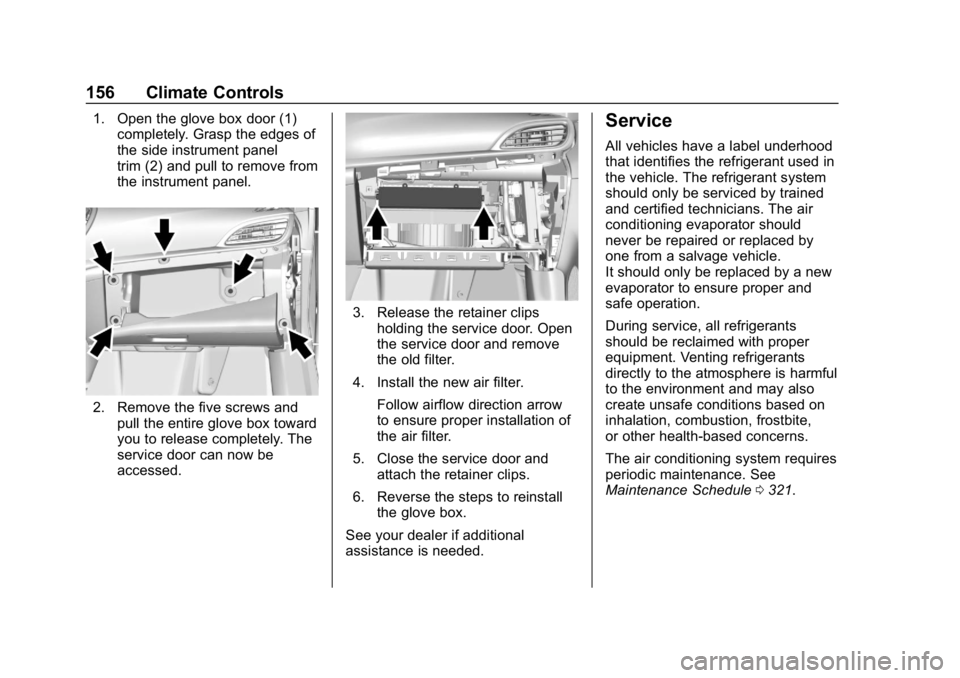
1. Open the glove box door (1)completely. Grasp the edges of
the side instrument panel
trim (2) and pull to remove from
the instrument panel.
2. Remove the five screws and
pull the entire glove box toward
you to release completely. The
service door can now be
accessed.
3. Release the retainer clipsholding the service door. Open
the service door and remove
the old filter.
4. Install the new air filter. Follow airflow direction arrow
to ensure proper installation of
the air filter.
5. Close the service door and attach the retainer clips.
6. Reverse the steps to reinstall the glove box.
See your dealer if additional
assistance is needed.
Service
All vehicles have a label underhood
that identifies the refrigerant used in
the vehicle. The refrigerant system
should only be serviced by trained
and certified technicians. The air
conditioning evaporator should
never be repaired or replaced by
one from a salvage vehicle.
It should only be replaced by a new
evaporator to ensure proper and
safe operation.
During service, all refrigerants
should be reclaimed with proper
equipment. Venting refrigerants
directly to the atmosphere is harmful
to the environment and may also
create unsafe conditions based on
inhalation, combustion, frostbite,
or other health-based concerns.
The air conditioning system requires
periodic maintenance. See
Maintenance Schedule 0321.
Page 164 of 373
Chevrolet VOLT Owner Manual (GMNA-Localizing-U.S./Canada/Mexico-
12163007) - 2019 - CRC - 11/5/18
Driving and Operating 163
.Pay attention to special road
signs (e.g., falling rocks area,
winding roads, long grades,
passing or no-passing zones)
and take appropriate action.
Winter Driving
Driving on Snow or Ice
Snow or ice between the tires and
the road creates less traction or
grip, so drive carefully. Wet ice can
occur at about 0 °C (32 °F) when
freezing rain begins to fall. Avoid
driving on wet ice or in freezing rain
until roads can be treated.
For slippery road driving:
.Accelerate gently. Accelerating
too quickly causes the wheels to
spin and makes the surface
under the tires slick.
. Turn on Traction Control. See
Traction Control/Electronic
Stability Control 0186.
. The Antilock Brake System
(ABS) improves vehicle stability
during hard stops, but the
brakes should be applied sooner than when on dry pavement.
See
Antilock Brake System
(ABS) 0182.
. Allow greater following distance
and watch for slippery spots. Icy
patches can occur on otherwise
clear roads in shaded areas.
The surface of a curve or an
overpass can remain icy when
the surrounding roads are clear.
Avoid sudden steering
maneuvers and braking while
on ice.
. Turn off cruise control.
. Select All-Wheel Drive (AWD)
Mode for vehicles equipped with
AWD. Select Snow/Ice Mode for
FWD only vehicles. See Driver
Mode Control 0188.
Blizzard Conditions
Stop the vehicle in a safe place and
signal for help. Stay with the vehicle
unless there is help nearby.
If possible, use Roadside
Assistance. See Roadside
Assistance Program 0339. To get
help and keep everyone in the
vehicle safe: .
Turn on the hazard warning
flashers.
. Tie a red cloth to an outside
mirror.
{Warning
Snow can trap engine exhaust
under the vehicle. This may
cause exhaust gases to get
inside. Engine exhaust contains
carbon monoxide (CO), which
cannot be seen or smelled. It can
cause unconsciousness and even
death.
If the vehicle is stuck in snow:
. Clear snow from the base of
the vehicle, especially any
blocking the exhaust pipe.
. Open a window about 5 cm
(2 in) on the vehicle side
that is away from the wind,
to bring in fresh air.
. Fully open the air outlets on
or under the instrument
panel.
(Continued)