check engine CHEVROLET VOLT 2019 User Guide
[x] Cancel search | Manufacturer: CHEVROLET, Model Year: 2019, Model line: VOLT, Model: CHEVROLET VOLT 2019Pages: 373, PDF Size: 5.66 MB
Page 188 of 373
Chevrolet VOLT Owner Manual (GMNA-Localizing-U.S./Canada/Mexico-
12163007) - 2019 - CRC - 11/5/18
Driving and Operating 187
If cruise control is being used and
TCS or StabiliTrak/ESC begins to
limit wheel spin, cruise control will
disengage. Cruise control may be
turned back on when road
conditions allow.
Both systems come on
automatically when the vehicle is
started and begins to move. The
systems may be heard or felt while
they are operating or while
performing diagnostic checks. This
is normal and does not mean there
is a problem with the vehicle.
It is recommended to leave both
systems on for normal driving
conditions, but it may be necessary
to turn TCS off if the vehicle gets
stuck in sand, mud, ice, or snow.
SeeIf the Vehicle Is Stuck 0164
and “Turning the Systems Off and
On” later in this section.The indicator light for both systems
is in the instrument cluster. This
light will:
.
Flash when TCS is limiting
wheel spin.
. Flash when StabiliTrak/ESC is
activated.
. Turn on and stay on when either
system is not working.
If either system fails to turn on or to
activate, and
dcomes on and stays
on to indicate that the system is
inactive and is not assisting the
driver in maintaining control. The
vehicle is safe to drive, but driving
should be adjusted accordingly.
If
dcomes on and stays on:
1. Stop the vehicle.
2. Turn the engine off and wait 15 seconds.
3. Start the engine. Drive the vehicle. If
dcomes on
and stays on, the vehicle may need
more time to diagnose the problem.
If the condition persists, see your
dealer.
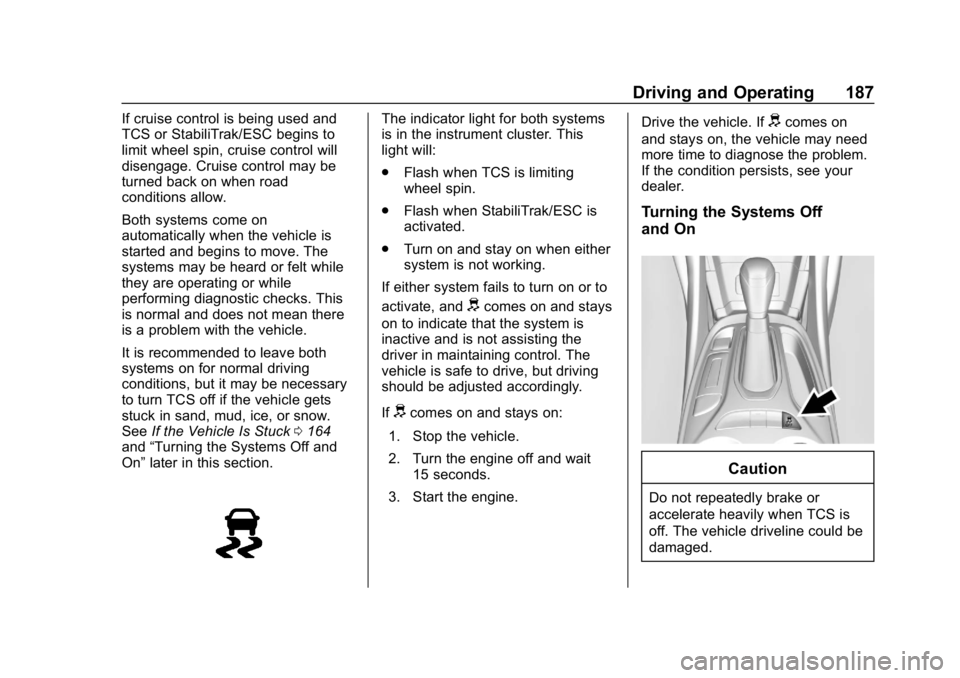
Turning the Systems Off
and On
Caution
Do not repeatedly brake or
accelerate heavily when TCS is
off. The vehicle driveline could be
damaged.
Page 219 of 373
Chevrolet VOLT Owner Manual (GMNA-Localizing-U.S./Canada/Mexico-
12163007) - 2019 - CRC - 11/5/18
218 Driving and Operating
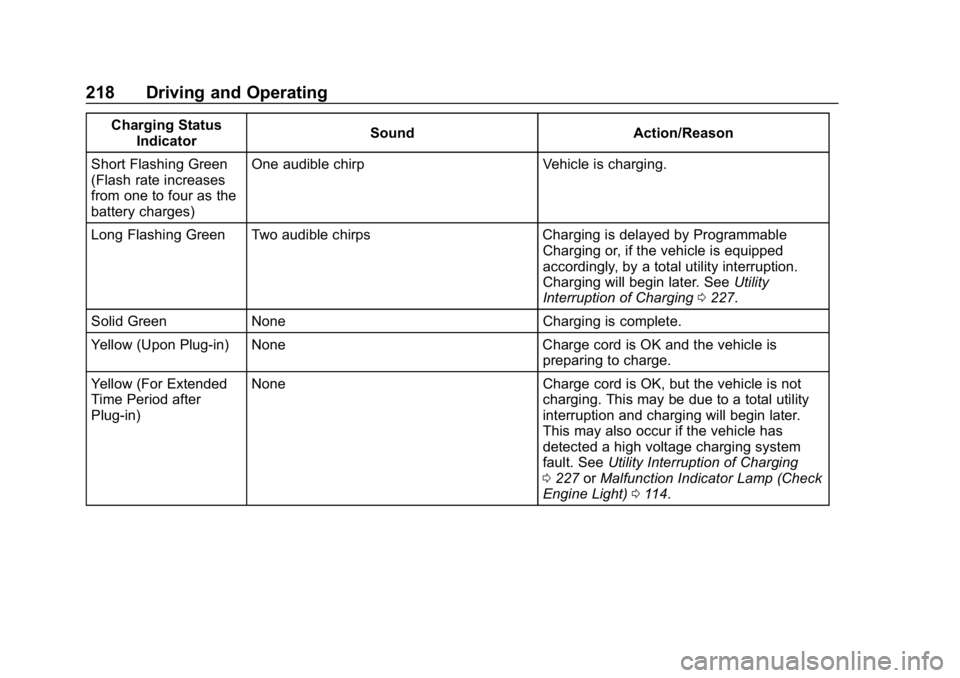
Charging StatusIndicator Sound Action/Reason
Short Flashing Green
(Flash rate increases
from one to four as the
battery charges) One audible chirp Vehicle is charging.
Long Flashing Green Two audible chirps Charging is delayed by Programmable Charging or, if the vehicle is equipped
accordingly, by a total utility interruption.
Charging will begin later. SeeUtility
Interruption of Charging 0227.
Solid Green None Charging is complete.
Yellow (Upon Plug-in) None Charge cord is OK and the vehicle is preparing to charge.
Yellow (For Extended
Time Period after
Plug-in) None Charge cord is OK, but the vehicle is not
charging. This may be due to a total utility
interruption and charging will begin later.
This may also occur if the vehicle has
detected a high voltage charging system
fault. SeeUtility Interruption of Charging
0 227 orMalfunction Indicator Lamp (Check
Engine Light) 0114.
Page 220 of 373
Chevrolet VOLT Owner Manual (GMNA-Localizing-U.S./Canada/Mexico-
12163007) - 2019 - CRC - 11/5/18
Driving and Operating 219
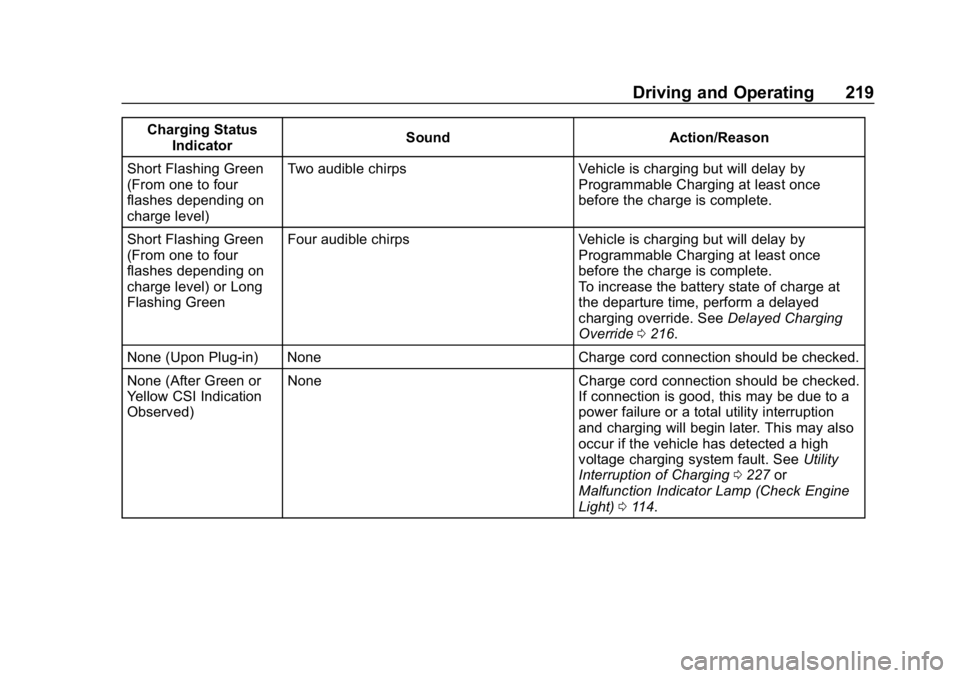
Charging StatusIndicator Sound Action/Reason
Short Flashing Green
(From one to four
flashes depending on
charge level) Two audible chirps Vehicle is charging but will delay by
Programmable Charging at least once
before the charge is complete.
Short Flashing Green
(From one to four
flashes depending on
charge level) or Long
Flashing Green Four audible chirps Vehicle is charging but will delay by
Programmable Charging at least once
before the charge is complete.
To increase the battery state of charge at
the departure time, perform a delayed
charging override. SeeDelayed Charging
Override 0216.
None (Upon Plug-in) None Charge cord connection should be checked.
None (After Green or
Yellow CSI Indication
Observed) None Charge cord connection should be checked.
If connection is good, this may be due to a
power failure or a total utility interruption
and charging will begin later. This may also
occur if the vehicle has detected a high
voltage charging system fault. SeeUtility
Interruption of Charging 0227 or
Malfunction Indicator Lamp (Check Engine
Light) 0114.
Page 233 of 373
Chevrolet VOLT Owner Manual (GMNA-Localizing-U.S./Canada/Mexico-
12163007) - 2019 - CRC - 11/5/18
232 Driving and Operating
4. After refueling, reinstall the fuelcap by turning it clockwise until
it clicks. Close the fuel door.
{Warning
Overfilling the fuel tank by more
than three clicks of a standard fill
nozzle may cause:
. Vehicle performance issues,
including engine stalling and
damage to the fuel system.
. Fuel spills.
. Potential fuel fires.
Be careful not to spill fuel. Wait
five seconds after you have finished
pumping before removing the
nozzle. Clean fuel from painted
surfaces as soon as possible. See
Exterior Care 0309.
{Warning
If a fire starts while you are
refueling, do not remove the
nozzle. Shut off the flow of fuel by
shutting off the pump or by
notifying the station attendant.
Leave the area immediately.
Caution
If a new fuel cap is needed, be
sure to get the right type of cap
from your dealer. The wrong type
of fuel cap may not fit properly,
may cause the malfunction
indicator lamp to light, and could
damage the fuel tank and
emissions system. See
Malfunction Indicator Lamp
(Check Engine Light) 0114.
Filling a Portable Fuel
Container
{Warning
Never fill a portable fuel container
while it is in the vehicle. Static
electricity discharge from the
container can ignite the fuel
vapor. You can be badly burned
and the vehicle damaged if this
occurs. To help avoid injury to you
and others:
. Dispense fuel only into
approved containers.
. Do not fill a container while
it is inside a vehicle, in a
vehicle's trunk, pickup bed,
or on any surface other than
the ground.
(Continued)
Page 234 of 373
Chevrolet VOLT Owner Manual (GMNA-Localizing-U.S./Canada/Mexico-
12163007) - 2019 - CRC - 11/5/18
Driving and Operating 233
Warning (Continued)
.Bring the fill nozzle in
contact with the inside of
the fill opening before
operating the nozzle.
Contact should be
maintained until the filling is
complete.
. Do not smoke while
pumping fuel.
. Avoid using electronic
devices.
Trailer Towing
General Towing
Information
{Warning
Never tow a trailer with your
vehicle. It was not designed or
intended to tow a trailer.
Conversions and
Add-Ons
Add-On Electrical
Equipment
{Warning
The Data Link Connector (DLC) is
used for vehicle service and
Emission Inspection/Maintenance
testing. See Malfunction Indicator
Lamp (Check Engine Light) 0114.
A device connected to the DLC —
such as an aftermarket fleet or
driver-behavior tracking device —
may interfere with vehicle
systems. This could affect vehicle
operation and cause a crash.
Such devices may also access
information stored in the vehicle’s
systems.
Page 236 of 373
Chevrolet VOLT Owner Manual (GMNA-Localizing-U.S./Canada/Mexico-
12163007) - 2019 - CRC - 11/5/18
Vehicle Care 235
Vehicle Care
General Information
General Information . . . . . . . . . . 236
California Proposition65 Warning . . . . . . . . . . . . . . . . . 236
California Perchlorate Materials Requirements . . . . . 237
Accessories and Modifications . . . . . . . . . . . . . . . . 237
Vehicle Checks
Doing Your OwnService Work . . . . . . . . . . . . . . . 237
Hood . . . . . . . . . . . . . . . . . . . . . . . . . 238
Engine Compartment Overview . . . . . . . . . . . . . . . . . . . . 240
Engine Oil . . . . . . . . . . . . . . . . . . . . 241
Engine Oil Life System . . . . . . . 243
Engine Air Filter Life System . . . . . . . . . . . . . . . . . . . . . . 244
Engine Air Cleaner/Filter . . . . . . 245
Cooling System (Engine) . . . . . 246
Cooling System (High Voltage Battery) . . . . . . . . . . . . . . . . . . . . . 250
Cooling System (Power Electronics and Charger
Modules) . . . . . . . . . . . . . . . . . . . . 251
Engine Overheating . . . . . . . . . . 252 Washer Fluid . . . . . . . . . . . . . . . . . 252
Brakes . . . . . . . . . . . . . . . . . . . . . . . 253
Brake Fluid . . . . . . . . . . . . . . . . . . . 254
Battery - North America . . . . . . 255
Electric Drive Unit Shift Lock
Control Function Check . . . . . 257
Park Brake and P (Park) Mechanism Check . . . . . . . . . . 257
Wiper Blade Replacement . . . . 258
Windshield Replacement . . . . . 258
Gas Strut(s) . . . . . . . . . . . . . . . . . . 258
Headlamp Aiming
Headlamp Aiming . . . . . . . . . . . . 260
Bulb Replacement
Bulb Replacement . . . . . . . . . . . . 260
Halogen Bulbs . . . . . . . . . . . . . . . . 260
LED Lighting . . . . . . . . . . . . . . . . . 260
Headlamps . . . . . . . . . . . . . . . . . . . 260
Taillamps . . . . . . . . . . . . . . . . . . . . . 261
License Plate Lamp . . . . . . . . . . 262
Electrical System
High Voltage Devices and Wiring . . . . . . . . . . . . . . . . . . . . . . . 263
Electrical System Overload . . . 263
Fuses and Circuit Breakers . . . 264
Engine Compartment Fuse Block . . . . . . . . . . . . . . . . . . . . . . . . 264 Instrument Panel Fuse
Block . . . . . . . . . . . . . . . . . . . . . . . . 267
Rear Compartment Fuse Block . . . . . . . . . . . . . . . . . . . . . . . . 270
Wheels and Tires
Tires . . . . . . . . . . . . . . . . . . . . . . . . . . 272
All-Season Tires . . . . . . . . . . . . . . 273
Winter Tires . . . . . . . . . . . . . . . . . . 273
Low-Profile Tires . . . . . . . . . . . . . 274
Tire Sidewall Labeling . . . . . . . . 274
Tire Designations . . . . . . . . . . . . . 275
Tire Terminology andDefinitions . . . . . . . . . . . . . . . . . . 276
Tire Pressure . . . . . . . . . . . . . . . . . 279
Tire Pressure Monitor System . . . . . . . . . . . . . . . . . . . . . . 280
Tire Pressure Monitor Operation . . . . . . . . . . . . . . . . . . . 281
Tire Inspection . . . . . . . . . . . . . . . . 284
Tire Rotation . . . . . . . . . . . . . . . . . 284
When It Is Time for New Tires . . . . . . . . . . . . . . . . . . . . . . . . 285
Buying New Tires . . . . . . . . . . . . . 286
Different Size Tires and Wheels . . . . . . . . . . . . . . . . . . . . . . 287
Uniform Tire Quality Grading . . . . . . . . . . . . . . . . . . . . . 288
Wheel Alignment and Tire Balance . . . . . . . . . . . . . . . . . . . . . 289
Wheel Replacement . . . . . . . . . . 290
Page 239 of 373
Chevrolet VOLT Owner Manual (GMNA-Localizing-U.S./Canada/Mexico-
12163007) - 2019 - CRC - 11/5/18
238 Vehicle Care
Warning (Continued)
High voltage components are
identified by labels. Do not
remove, open, take apart,
or modify these components.
High voltage cable or wiring has
orange covering. Do not probe,
tamper with, cut, or modify high
voltage cable or wiring.
{Warning
It can be dangerous to work on
your vehicle if you do not have
the proper knowledge, service
manual, tools, or parts. Always
follow owner’s manual procedures
and consult the service manual
for your vehicle before doing any
service work. If doing some of your own service
work, use the proper service
manual. It tells you much more
about how to service the vehicle
than this manual can. To order the
proper service manual, see
Publication Ordering Information
0
345.
This vehicle has an airbag system.
Before attempting to do your own
service work, see Airbag System
Check 079.
The vehicle is equipped with remote
start. Open the hood before
performing any service work to
prevent remote starting the vehicle
accidentally. See Remote Start
0 38.
Keep a record with all parts receipts
and list the mileage and the date of
any service work performed. See
Maintenance Records 0331.
Caution
Even small amounts of
contamination can cause damage
to vehicle systems. Do not allow
contaminants to contact the fluids,
reservoir caps, or dipsticks.
Hood
To open the hood:
1. Turn the vehicle off before opening the hood. If the vehicle
is on, the engine will start when
the hood is opened.
See Electric Mode 0174 and
Extended Range Mode 0174.
Page 242 of 373
Chevrolet VOLT Owner Manual (GMNA-Localizing-U.S./Canada/Mexico-
12163007) - 2019 - CRC - 11/5/18
Vehicle Care 241
1. Windshield Washer FluidReservoir. See “Adding Washer
Fluid” under Washer Fluid
0 252.
2. Engine Air Cleaner/Filter 0245.
3. Engine Oil Fill Cap. See Engine Oil 0241.
4. Engine Oil Dipstick. See Engine Oil 0241.
5. Engine Cooling Fans (Out of View). See Cooling System
(Engine) 0246 orCooling
System (High Voltage Battery)
0 250 orCooling System
(Power Electronics and
Charger Modules) 0251.
6. Brake Fluid Reservoir. See Brake Fluid 0254.
7. Electric Drive Unit Fluid Cap.
8. High Voltage Battery Coolant Reservoir and Pressure Cap.
See Cooling System (Engine)
0 246 orCooling System (High
Voltage Battery) 0250 or
Cooling System (Power
Electronics and Charger
Modules) 0251. 9. Engine Coolant Surge Tank
and Pressure Cap. See
Cooling System (Engine) 0246
or Cooling System (High
Voltage Battery) 0250 or
Cooling System (Power
Electronics and Charger
Modules) 0251.
10. Remote Positive (+) Terminal. SeeJump Starting - North
America 0299.
11. Power Electronics Coolant Reservoir and Pressure Cap.
SeeCooling System (Engine)
0 246 orCooling System (High
Voltage Battery) 0250 or
Cooling System (Power
Electronics and Charger
Modules) 0251.
12. Engine Compartment Fuse
Block 0264.
13. Remote Negative (−) Terminal. SeeJump Starting - North
America 0299.Engine Oil
To ensure proper engine
performance and long life, careful
attention must be paid to engine oil.
Following these simple, but
important steps will help protect
your investment:
.
Use engine oil approved to the
proper specification and of the
proper viscosity grade. See
“Selecting the Right Engine Oil”
in this section.
. Check the engine oil level
regularly and maintain the
proper oil level. See “Checking
Engine Oil” and“When to Add
Engine Oil” in this section.
. Change the engine oil at the
appropriate time. See Engine Oil
Life System 0243.
. Always dispose of engine oil
properly. See “What to Do with
Used Oil” in this section.
Page 243 of 373
Chevrolet VOLT Owner Manual (GMNA-Localizing-U.S./Canada/Mexico-
12163007) - 2019 - CRC - 11/5/18
242 Vehicle Care
Checking Engine Oil
Check the engine oil level regularly,
every 650 km (400 mi), especially
prior to a long trip. The engine oil
dipstick handle is a loop. See
Engine Compartment Overview
0240 for the location.
{Warning
The engine oil dipstick handle
may be hot; it could burn you.
Use a towel or glove to touch the
dipstick handle.
If a low oil Driver Information Center
(DIC) message displays, check the
oil level.
Follow these guidelines:
. To get an accurate reading, park
the vehicle on level ground.
Check the engine oil level after
the engine has been off for at
least two hours. Checking the
engine oil level on steep grades
or too soon after engine shutoff
can result in incorrect readings.
Accuracy improves when checking a cold engine prior to
starting. Remove the dipstick
and check the level.
. If unable to wait two hours, the
engine must be off for at least
15 minutes if the engine is
warm, or at least 30 minutes if
the engine is not warm. Pull out
the dipstick, wipe it with a clean
paper towel or cloth, then push it
back in all the way. Remove it
again, keeping the tip down, and
check the level.
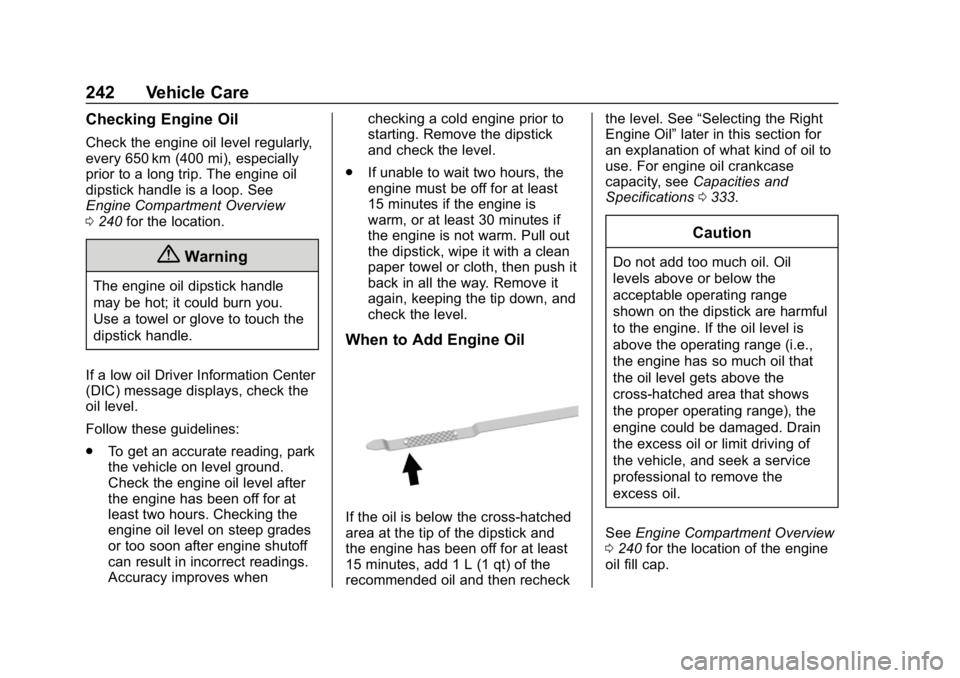
When to Add Engine Oil
If the oil is below the cross-hatched
area at the tip of the dipstick and
the engine has been off for at least
15 minutes, add 1 L (1 qt) of the
recommended oil and then recheck the level. See
“Selecting the Right
Engine Oil” later in this section for
an explanation of what kind of oil to
use. For engine oil crankcase
capacity, see Capacities and
Specifications 0333.
Caution
Do not add too much oil. Oil
levels above or below the
acceptable operating range
shown on the dipstick are harmful
to the engine. If the oil level is
above the operating range (i.e.,
the engine has so much oil that
the oil level gets above the
cross-hatched area that shows
the proper operating range), the
engine could be damaged. Drain
the excess oil or limit driving of
the vehicle, and seek a service
professional to remove the
excess oil.
See Engine Compartment Overview
0 240 for the location of the engine
oil fill cap.
Page 245 of 373
Chevrolet VOLT Owner Manual (GMNA-Localizing-U.S./Canada/Mexico-
12163007) - 2019 - CRC - 11/5/18
244 Vehicle Care
include engine revolutions, engine
temperature, and miles driven.
Based on driving conditions, the
mileage at which an oil change is
indicated can vary considerably. For
the oil life system to work properly,
the system must be reset every time
the oil is changed.
When the system has calculated
that oil life has been diminished, it
indicates that an oil change is
necessary. A CHANGE ENGINE
OIL SOON message comes on.
Change the oil as soon as possible
within the next 1 000 km (600 mi).
It is possible that, if driving under
the best conditions, the oil life
system might indicate that an oil
change is not necessary for up to
two years. The engine oil and filter
must be changed at least once
every two years and, at this time,
the system must be reset. Your
dealer has trained service people
who will perform this work and reset
the system. It is also important to
check the oil regularly over the
course of an oil drain interval and
keep it at the proper level.If the system is ever reset
accidentally, the oil must be
changed at 5 000 km (3,000 mi)
since the last oil change.
Remember to reset the oil life
system whenever the oil is changed.
How to Reset the Engine Oil
Life System
Reset the system whenever the
engine oil is changed so that the
system can calculate the next
engine oil change. To reset the
system:
1. Select REMAINING OIL LIFE on the DIC menu.
2. Press and hold
Vfor several
seconds while the Oil Life
display is active to reset the Oil
Life system.
3. 100% OIL LIFE will be displayed when the oil life
system is successfully reset.
The oil life system can also be reset
as follows: 1. Select REMAINING OIL LIFE on the DIC menu. 2. Fully press and release the
accelerator pedal three times
within five seconds.
If the CHANGE ENGINE OIL SOON
message comes back on when the
vehicle is started, the engine oil life
system has not reset. Repeat the
procedure.
Engine Air Filter Life
System
The engine air filter life system
provides an estimate of the engine
air filter remaining useful life, its
condition and the optimal timing for
a change. A computer-based
algorithm calculates engine air filter
remaining useful life, based on
pressure drop across the air filter
and the age of the air filter.
When to Change Engine Air
Filter
If equipped, this feature provides an
indication of when to change the
engine air filter. It is based on
driving conditions, which can cause