climate control CHEVROLET VOLT 2019 User Guide
[x] Cancel search | Manufacturer: CHEVROLET, Model Year: 2019, Model line: VOLT, Model: CHEVROLET VOLT 2019Pages: 373, PDF Size: 5.66 MB
Page 58 of 373

Chevrolet VOLT Owner Manual (GMNA-Localizing-U.S./Canada/Mexico-
12163007) - 2019 - CRC - 11/5/18
Seats and Restraints 57
Heated Front Seats
{Warning
If temperature change or pain to
the skin cannot be felt, the seat
heater may cause burns. To
reduce the risk of burns, use care
when using the seat heater,
especially for long periods of
time. Do not place anything on
the seat that insulates against
heat, such as a blanket, cushion,
cover, or similar item. This may
cause the seat heater to
overheat. An overheated seat
heater may cause a burn or may
damage the seat.
If equipped, the controls are on the
center stack. To operate, the vehicle
must be on.
Press
LorMto heat the driver or
passenger seat.
Press the button once for the
highest setting. With each press of
the button, the heated seat will
change to the next lower setting,
and then the off setting. Three lights
indicate the highest setting and one
light the lowest.
Auto Heated Seats
If equipped, the controls can be
accessed while the vehicle is on by
pressing
LorMon the center
stack.
When the vehicle is on and the auto
climate control system is enabled,
this feature will automatically
activate the heated seats at the
level required by the vehicle's
interior temperature. The active
high, medium, low, or off heated
seat level will be indicated by the
heated seat button lights on the
center stack. Use
LorMon the
center stack to turn auto heated
seats off.
If the passenger seat is unoccupied,
the auto heated seats feature will
not activate that seat.
The auto heated seats feature can
be programmed to always be
enabled when the vehicle is on. See
Vehicle Personalization 0137.
Page 105 of 373
Chevrolet VOLT Owner Manual (GMNA-Localizing-U.S./Canada/Mexico-
12163007) - 2019 - CRC - 11/5/18
104 Instruments and Controls
activated. SeeWasher Fluid0252
for information on filling the
windshield washer fluid reservoir.
{Warning
In freezing weather, do not use
the washer until the windshield is
warmed. Otherwise the washer
fluid can form ice on the
windshield, blocking your vision.
Compass
The vehicle may have a compass
display on the Driver Information
Center (DIC). The compass receives
its heading and other information
from the Global Positioning
System (GPS) antenna, StabiliTrak/
Electronic Stability Control (ESC),
and vehicle speed information.
The compass system is designed to
operate for a certain number of
miles or degrees of turn before
needing a signal from the GPS
satellites. When the compass
display shows CAL, drive the
vehicle for a short distance in an open area where it can receive a
GPS signal. The compass system
will automatically determine when a
GPS signal is restored and provide
a heading again.
Clock
The time and date for the clock can
be set using the infotainment
system. See
“Time/Date”in
“System” under“Settings” in the
infotainment manual.
Power Outlets
The accessory power outlets can be
used to plug in electrical equipment,
such as a cell phone or MP3 player.
There are two accessory power
outlets:
. In the storage area below the
climate control system.
. On the rear of the front console
armrest. The power outlets supply power
while the vehicle is on, or if the
vehicle is in Retained Accessory
Power (RAP). See
Retained
Accessory Power (RAP) 0171.
Lift the cover to access and replace
when not in use.
Certain accessory plugs may not be
compatible with the accessory
power outlet and could overload
vehicle or adapter fuses. If a
problem is experienced, see your
dealer.
When adding electrical equipment,
be sure to follow the installation
instructions included with the
equipment. See Add-On Electrical
Equipment 0233.
Caution
Hanging heavy equipment from
the power outlet can cause
damage not covered by the
vehicle warranty. The power
outlets are designed for
accessory power plugs only, such
as cell phone charge cords.
Page 106 of 373
Chevrolet VOLT Owner Manual (GMNA-Localizing-U.S./Canada/Mexico-
12163007) - 2019 - CRC - 11/5/18
Instruments and Controls 105
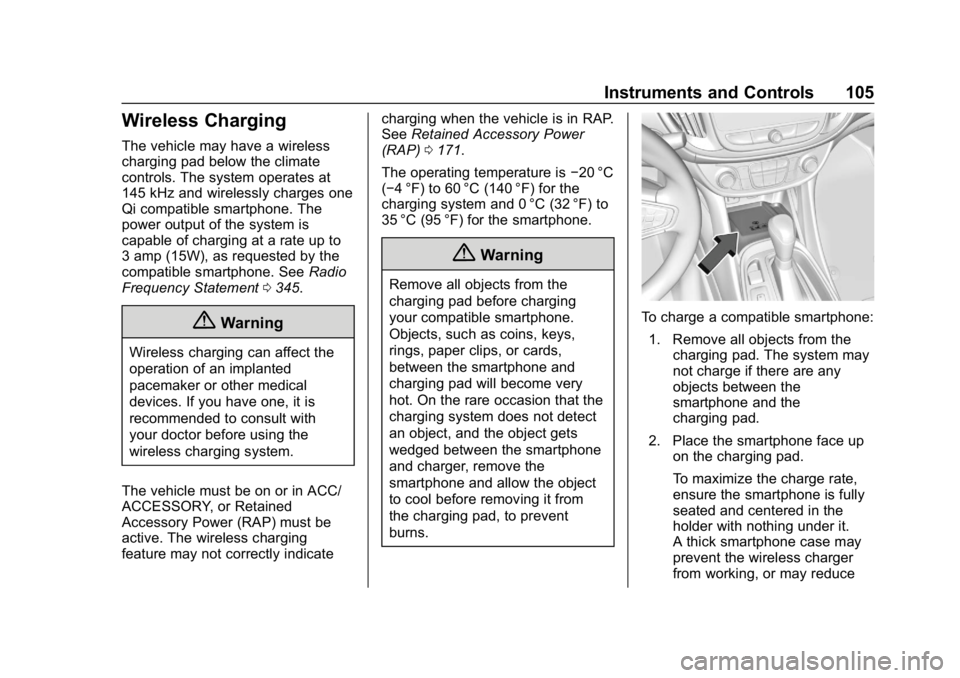
Wireless Charging
The vehicle may have a wireless
charging pad below the climate
controls. The system operates at
145 kHz and wirelessly charges one
Qi compatible smartphone. The
power output of the system is
capable of charging at a rate up to
3 amp (15W), as requested by the
compatible smartphone. SeeRadio
Frequency Statement 0345.
{Warning
Wireless charging can affect the
operation of an implanted
pacemaker or other medical
devices. If you have one, it is
recommended to consult with
your doctor before using the
wireless charging system.
The vehicle must be on or in ACC/
ACCESSORY, or Retained
Accessory Power (RAP) must be
active. The wireless charging
feature may not correctly indicate charging when the vehicle is in RAP.
See
Retained Accessory Power
(RAP) 0171.
The operating temperature is −20 °C
(−4 °F) to 60 °C (140 °F) for the
charging system and 0 °C (32 °F) to
35 °C (95 °F) for the smartphone.
{Warning
Remove all objects from the
charging pad before charging
your compatible smartphone.
Objects, such as coins, keys,
rings, paper clips, or cards,
between the smartphone and
charging pad will become very
hot. On the rare occasion that the
charging system does not detect
an object, and the object gets
wedged between the smartphone
and charger, remove the
smartphone and allow the object
to cool before removing it from
the charging pad, to prevent
burns.
To charge a compatible smartphone:
1. Remove all objects from the charging pad. The system may
not charge if there are any
objects between the
smartphone and the
charging pad.
2. Place the smartphone face up on the charging pad.
To maximize the charge rate,
ensure the smartphone is fully
seated and centered in the
holder with nothing under it.
A thick smartphone case may
prevent the wireless charger
from working, or may reduce
Page 131 of 373
Chevrolet VOLT Owner Manual (GMNA-Localizing-U.S./Canada/Mexico-
12163007) - 2019 - CRC - 11/5/18
130 Instruments and Controls
2. Touch Add A Rate Period orSubtract A Rate Period.
.Weekdays are Monday
through Friday and use the
same rate schedule.
. Weekends are Saturday
and Sunday and use the
same rate schedule.
Both weekday and weekend
schedules must be set. The rate
schedule only applies for a 24-hour
period, starting at 12:00 am and
ending at 12:00 am. There can be
five rate changes for each day; not
all must be used.
The finish times must be
consecutive. If a finish time does not
follow a start time, this error
message displays: “An invalid entry
was found in the data entered.
Please re-enter data.”
Energy Summary Pop-Up
When this function is turned on, the
Energy Summary Pop-Up will
provide a summary of energy usage
when the vehicle is turned off.
Select On or Off.
Charge Status Feedback
When this function is turned on, the
vehicle will provide audible
feedback of the charge status.
1 beep : Immediate charging
2 beeps : Delayed charging
3 beeps : Charge port door is open
4 beeps : Desired time cannot
be met
Select On or Off.
Charge Cord Theft Alert
When this function is turned on and
the vehicle is off and locked, the
horn will sound if the charge cord is
removed.
Select On or Off.
Charge Power Loss Alert
When this function is turned on and
the vehicle is charging, the horn will
sound if power is lost.
Select On or Off.
Engine Assisted Heating
In Default setting, the engine will run
at cold ambient temperatures to
assist in warming the cabin. When
Deferred is selected the engine will
not run to assist in cabin heating,
until extremely cold ambient
temperatures, or Max Defrost is
selected. See Automatic Climate
Control System 0150.
Engine Assisted Heating
Plugged In
If the vehicle is started remotely, the
engine will turn on to assist in
warming up the cabin.
Select On or Off.
Charging Interrupted or
Overridden Pop-Up
The Charging Interrupted or
Overridden message will appear if
there was an unintended loss of AC
power during the plug in charge
event. For example, there was a
power outage or the charge cord
was unplugged from the wall.
Page 133 of 373
Chevrolet VOLT Owner Manual (GMNA-Localizing-U.S./Canada/Mexico-
12163007) - 2019 - CRC - 11/5/18
132 Instruments and Controls
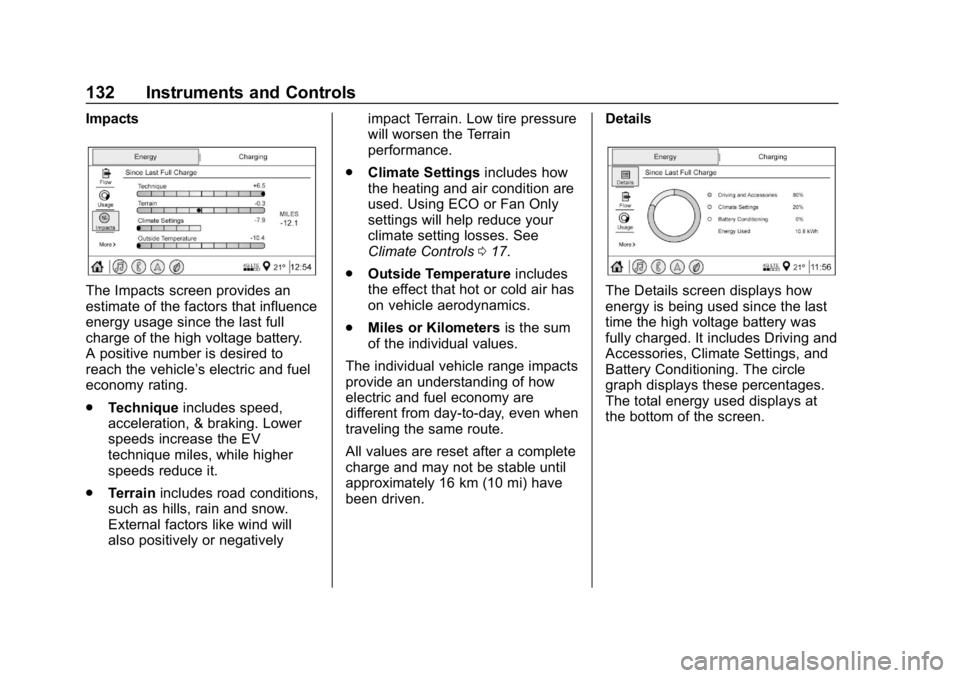
Impacts
The Impacts screen provides an
estimate of the factors that influence
energy usage since the last full
charge of the high voltage battery.
A positive number is desired to
reach the vehicle’s electric and fuel
economy rating.
.Technique includes speed,
acceleration, & braking. Lower
speeds increase the EV
technique miles, while higher
speeds reduce it.
. Terrain includes road conditions,
such as hills, rain and snow.
External factors like wind will
also positively or negatively impact Terrain. Low tire pressure
will worsen the Terrain
performance.
. Climate Settings includes how
the heating and air condition are
used. Using ECO or Fan Only
settings will help reduce your
climate setting losses. See
Climate Controls 017.
. Outside Temperature includes
the effect that hot or cold air has
on vehicle aerodynamics.
. Miles or Kilometers is the sum
of the individual values.
The individual vehicle range impacts
provide an understanding of how
electric and fuel economy are
different from day-to-day, even when
traveling the same route.
All values are reset after a complete
charge and may not be stable until
approximately 16 km (10 mi) have
been driven. DetailsThe Details screen displays how
energy is being used since the last
time the high voltage battery was
fully charged. It includes Driving and
Accessories, Climate Settings, and
Battery Conditioning. The circle
graph displays these percentages.
The total energy used displays at
the bottom of the screen.
Page 138 of 373
Chevrolet VOLT Owner Manual (GMNA-Localizing-U.S./Canada/Mexico-
12163007) - 2019 - CRC - 11/5/18
Instruments and Controls 137
Vehicle
Personalization
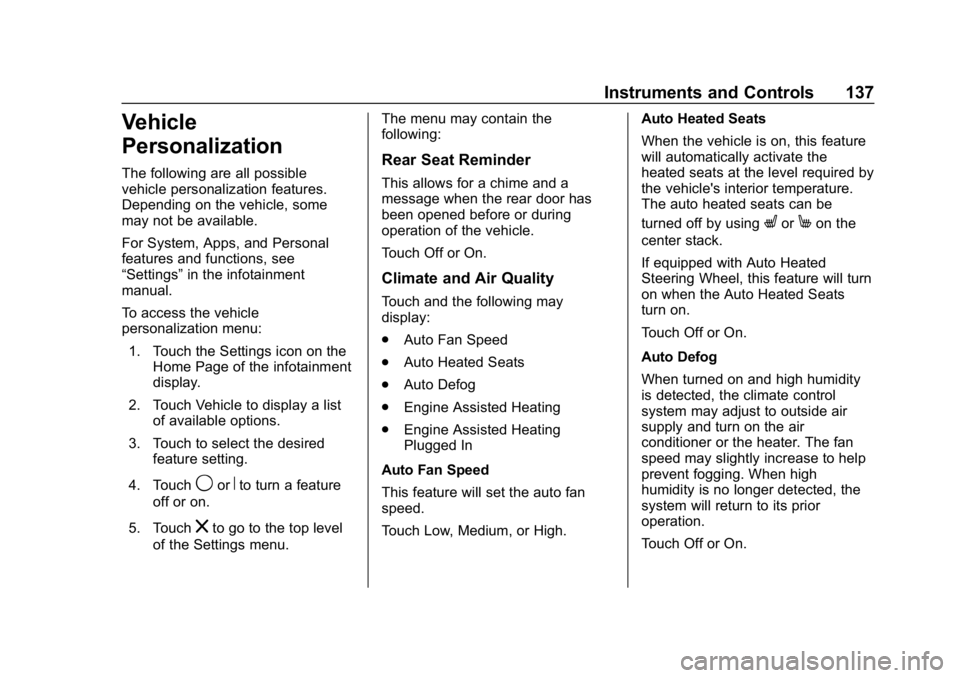
The following are all possible
vehicle personalization features.
Depending on the vehicle, some
may not be available.
For System, Apps, and Personal
features and functions, see
“Settings”in the infotainment
manual.
To access the vehicle
personalization menu:
1. Touch the Settings icon on the Home Page of the infotainment
display.
2. Touch Vehicle to display a list of available options.
3. Touch to select the desired feature setting.
4. Touch
9orRto turn a feature
off or on.
5. Touch
zto go to the top level
of the Settings menu. The menu may contain the
following:
Rear Seat Reminder
This allows for a chime and a
message when the rear door has
been opened before or during
operation of the vehicle.
Touch Off or On.
Climate and Air Quality
Touch and the following may
display:
.
Auto Fan Speed
. Auto Heated Seats
. Auto Defog
. Engine Assisted Heating
. Engine Assisted Heating
Plugged In
Auto Fan Speed
This feature will set the auto fan
speed.
Touch Low, Medium, or High. Auto Heated Seats
When the vehicle is on, this feature
will automatically activate the
heated seats at the level required by
the vehicle's interior temperature.
The auto heated seats can be
turned off by using
LorMon the
center stack.
If equipped with Auto Heated
Steering Wheel, this feature will turn
on when the Auto Heated Seats
turn on.
Touch Off or On.
Auto Defog
When turned on and high humidity
is detected, the climate control
system may adjust to outside air
supply and turn on the air
conditioner or the heater. The fan
speed may slightly increase to help
prevent fogging. When high
humidity is no longer detected, the
system will return to its prior
operation.
Touch Off or On.
Page 139 of 373
Chevrolet VOLT Owner Manual (GMNA-Localizing-U.S./Canada/Mexico-
12163007) - 2019 - CRC - 11/5/18
138 Instruments and Controls
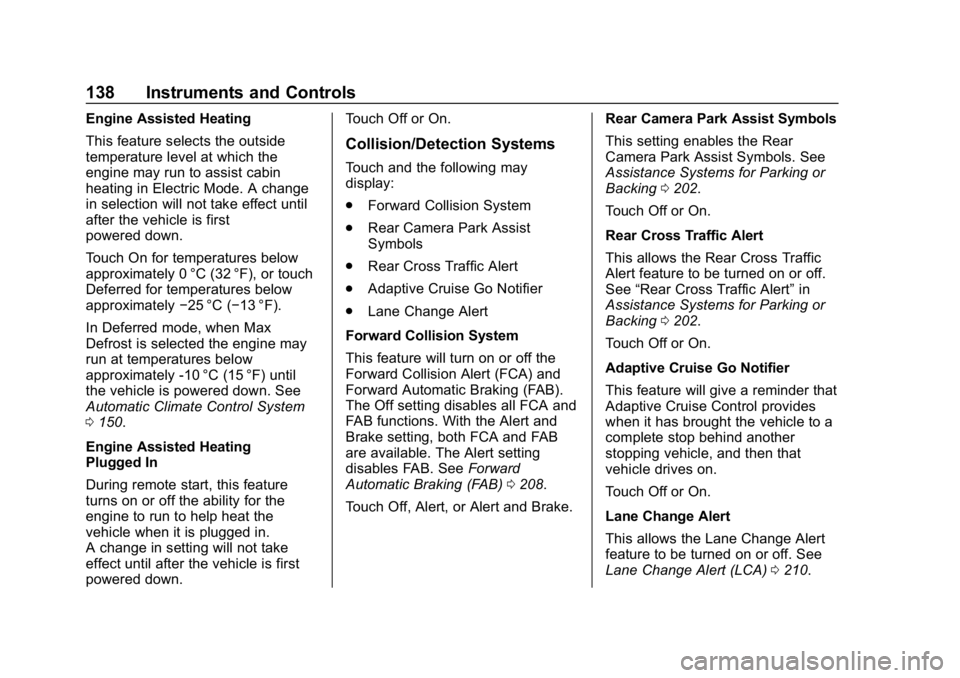
Engine Assisted Heating
This feature selects the outside
temperature level at which the
engine may run to assist cabin
heating in Electric Mode. A change
in selection will not take effect until
after the vehicle is first
powered down.
Touch On for temperatures below
approximately 0 °C (32 °F), or touch
Deferred for temperatures below
approximately−25 °C (−13 °F).
In Deferred mode, when Max
Defrost is selected the engine may
run at temperatures below
approximately -10 °C (15 °F) until
the vehicle is powered down. See
Automatic Climate Control System
0 150.
Engine Assisted Heating
Plugged In
During remote start, this feature
turns on or off the ability for the
engine to run to help heat the
vehicle when it is plugged in.
A change in setting will not take
effect until after the vehicle is first
powered down. Touch Off or On.
Collision/Detection Systems
Touch and the following may
display:
.
Forward Collision System
. Rear Camera Park Assist
Symbols
. Rear Cross Traffic Alert
. Adaptive Cruise Go Notifier
. Lane Change Alert
Forward Collision System
This feature will turn on or off the
Forward Collision Alert (FCA) and
Forward Automatic Braking (FAB).
The Off setting disables all FCA and
FAB functions. With the Alert and
Brake setting, both FCA and FAB
are available. The Alert setting
disables FAB. See Forward
Automatic Braking (FAB) 0208.
Touch Off, Alert, or Alert and Brake. Rear Camera Park Assist Symbols
This setting enables the Rear
Camera Park Assist Symbols. See
Assistance Systems for Parking or
Backing
0202.
Touch Off or On.
Rear Cross Traffic Alert
This allows the Rear Cross Traffic
Alert feature to be turned on or off.
See “Rear Cross Traffic Alert” in
Assistance Systems for Parking or
Backing 0202.
Touch Off or On.
Adaptive Cruise Go Notifier
This feature will give a reminder that
Adaptive Cruise Control provides
when it has brought the vehicle to a
complete stop behind another
stopping vehicle, and then that
vehicle drives on.
Touch Off or On.
Lane Change Alert
This allows the Lane Change Alert
feature to be turned on or off. See
Lane Change Alert (LCA) 0210.
Page 151 of 373
Chevrolet VOLT Owner Manual (GMNA-Localizing-U.S./Canada/Mexico-
12163007) - 2019 - CRC - 11/5/18
150 Climate Controls
Climate Controls
Climate Control Systems
Automatic Climate ControlSystem . . . . . . . . . . . . . . . . . . . . . . 150
Air Vents
Air Vents . . . . . . . . . . . . . . . . . . . . . 155
Maintenance
Passenger Compartment AirFilter . . . . . . . . . . . . . . . . . . . . . . . . 155
Service . . . . . . . . . . . . . . . . . . . . . . . 156
Climate Control
Systems
Automatic Climate
Control System
The heating, cooling, and ventilation
for the vehicle can be controlled
with this system.
The vehicle may require the use of
an auxiliary heat source under
certain cold conditions. This
provides additional heating and
defrost capability obtained by
running the engine, even if the high voltage battery is adequately
charged. Under these conditions,
the engine will start and use fuel.
Make sure there is fuel in the tank.
Do not allow the vehicle to remain in
extreme temperatures for long
periods without being driven or
plugged in.
Page 152 of 373
Chevrolet VOLT Owner Manual (GMNA-Localizing-U.S./Canada/Mexico-
12163007) - 2019 - CRC - 11/5/18
Climate Controls 151
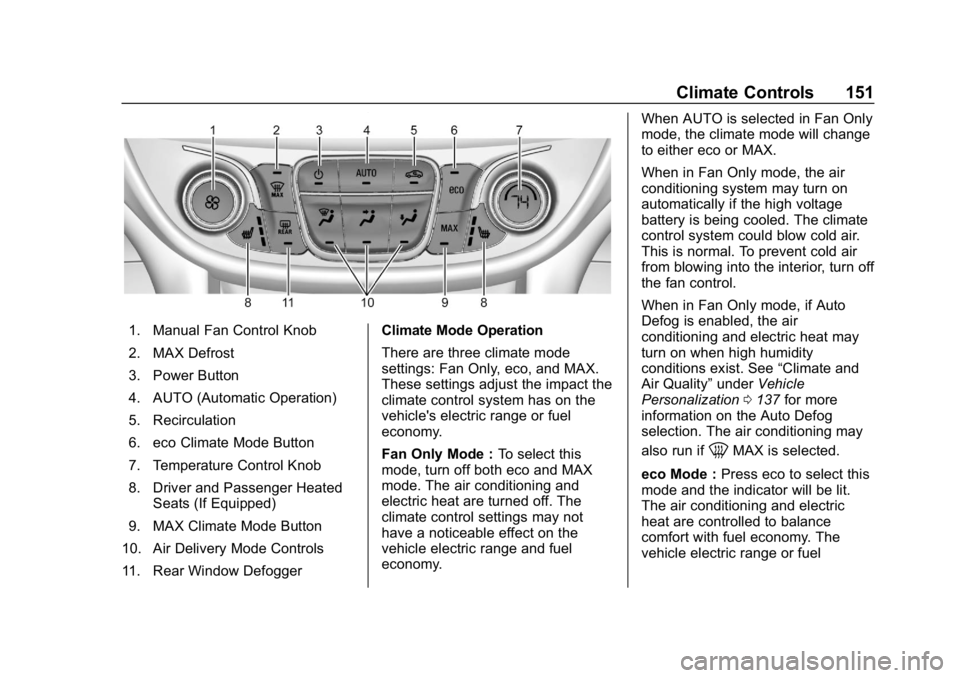
1. Manual Fan Control Knob
2. MAX Defrost
3. Power Button
4. AUTO (Automatic Operation)
5. Recirculation
6. eco Climate Mode Button
7. Temperature Control Knob
8. Driver and Passenger HeatedSeats (If Equipped)
9. MAX Climate Mode Button
10. Air Delivery Mode Controls
11. Rear Window Defogger Climate Mode Operation
There are three climate mode
settings: Fan Only, eco, and MAX.
These settings adjust the impact the
climate control system has on the
vehicle's electric range or fuel
economy.
Fan Only Mode :
To select this
mode, turn off both eco and MAX
mode. The air conditioning and
electric heat are turned off. The
climate control settings may not
have a noticeable effect on the
vehicle electric range and fuel
economy. When AUTO is selected in Fan Only
mode, the climate mode will change
to either eco or MAX.
When in Fan Only mode, the air
conditioning system may turn on
automatically if the high voltage
battery is being cooled. The climate
control system could blow cold air.
This is normal. To prevent cold air
from blowing into the interior, turn off
the fan control.
When in Fan Only mode, if Auto
Defog is enabled, the air
conditioning and electric heat may
turn on when high humidity
conditions exist. See
“Climate and
Air Quality” underVehicle
Personalization 0137 for more
information on the Auto Defog
selection. The air conditioning may
also run if
0MAX is selected.
eco Mode : Press eco to select this
mode and the indicator will be lit.
The air conditioning and electric
heat are controlled to balance
comfort with fuel economy. The
vehicle electric range or fuel
Page 153 of 373
Chevrolet VOLT Owner Manual (GMNA-Localizing-U.S./Canada/Mexico-
12163007) - 2019 - CRC - 11/5/18
152 Climate Controls
economy will decrease less than in
MAX mode, but will result in
reduced comfort.
MAX Mode :Press MAX to select
this mode and the indicator will be
lit. The air conditioning and electric
heat are controlled to reach the best
comfort level based on the
temperature setting selected. In this
mode, vehicle electric range or fuel
economy will decrease depending
on the amount of energy required to
reach the best comfort levels.
The air conditioning and electric
heat could be on at the same time
when dehumidification is required in
eco or MAX modes.
The air conditioning may also run if
0MAX is selected, regardless of
the climate mode.
Automatic Operation
The system automatically controls
fan speed, air delivery mode, air
conditioning, and recirculation to
heat or cool the vehicle to the
selected temperature. When AUTO is lit, all four functions
operate automatically. Each function
can also be manually set and the
setting is displayed. Functions not
manually set will continue to be
automatically controlled, even if the
AUTO indicator is not lit.
For automatic operation:
1. Press AUTO.
2. Set the temperature. An initial setting of 23 °C (74 °F) is
recommended. Allow the
system time to stabilize. Adjust
the temperature as needed.
Manual Operation
O: Press to turn the climate control
system on and off.
A: Turn the knob clockwise or
counterclockwise to increase or
decrease the fan speed. The fan
speed setting appears on the
display screen. Manually adjusting
the fan speed cancels automatic fan
control. Press AUTO to return to
automatic operation. Press
Oto turn
off the fan and the climate control
system. If the power is turned off while in
eco or MAX mode, the display will
automatically change to Fan Only
mode. If the fan speed is increased
or AUTO is pressed, the climate
mode will revert back to eco or
MAX mode.
Temperature Control :
Turn the
knob clockwise or counterclockwise
to increase or decrease the
temperature setting.
Air Delivery Mode Control :
Press
X,Yor[or a combination
of the buttons to change the
direction of the airflow. The indicator
light in the button will turn on. The
current mode appears in the display
screen.
Pressing any of the air delivery
buttons cancels automatic air
delivery control and the direction of
the airflow can be controlled
manually. Press AUTO to return to
automatic operation.
To change the current mode, select
one or more of the following:
X: Air is directed to the windshield.