mirror CHEVROLET VOLT 2019 User Guide
[x] Cancel search | Manufacturer: CHEVROLET, Model Year: 2019, Model line: VOLT, Model: CHEVROLET VOLT 2019Pages: 373, PDF Size: 5.66 MB
Page 201 of 373
Chevrolet VOLT Owner Manual (GMNA-Localizing-U.S./Canada/Mexico-
12163007) - 2019 - CRC - 11/5/18
200 Driving and Operating
Lighting Conditions Affecting ACC
The ACC front camera can be
affected by poor lighting conditions,
and ACC may have limited
performance when:
.There are changes in brightness,
such as entering and exiting
tunnels, bridges, and
overpasses
. Low sun angles cause the
camera to not detect objects,
or it is more difficult to detect
objects in the same traffic lane
. Lighting is poor in the evening or
early morning
. There are multiple changes in
brightness or shadows along the
vehicle roadway
. In a tunnel without the head
lamps on, or in a tunnel when
there is a vehicle in front that
does not have its tail lamps on .
Subjected to strong light from
opposing lane traffic in the front
of the vehicle, such as
high-beam head lamps from
oncoming traffic
Accessory Installations and
Vehicle Modifications
Do not install or place any object on
the front of the vehicle that would
obstruct the front radar view.
Do not install or place any object
around the front camera windshield
area that would obstruct the front
camera view.
Do not install objects on top of the
vehicle that overhang and obstruct
the front camera, such as a canoe,
kayak, or other items that can be
transported on a roof rack system.
Do not modify the hood, head
lamps, or fog lamps, as this may
limit the camera's ability to detect an
object. Cleaning the Sensing System
The camera sensor on the
windshield ahead of the rearview
mirror and the radar sensors on the
front of the vehicle can become
blocked by snow, ice, dirt, or mud.
These areas need to be cleaned for
ACC to operate properly.
If ACC will not operate, regular
cruise control may be available. See
"Switching Between ACC and
Regular Cruise Control" in this
section. Always consider driving
conditions before using either cruise
control system.
For cleaning instructions, see
“Washing the Vehicle”
under
Exterior Care 0309.
Page 203 of 373
Chevrolet VOLT Owner Manual (GMNA-Localizing-U.S./Canada/Mexico-
12163007) - 2019 - CRC - 11/5/18
202 Driving and Operating
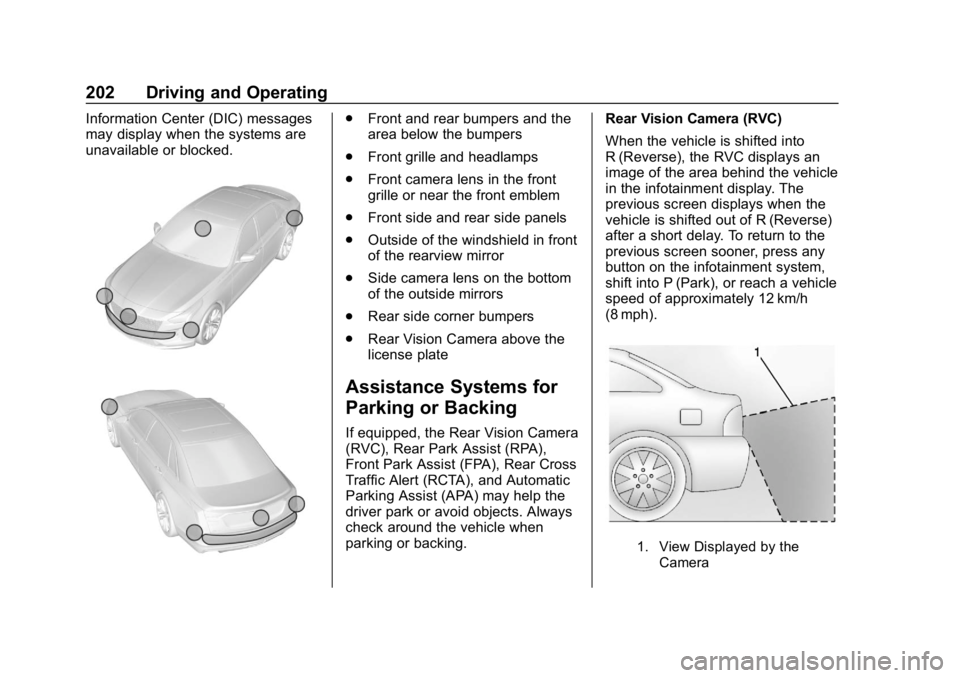
Information Center (DIC) messages
may display when the systems are
unavailable or blocked..Front and rear bumpers and the
area below the bumpers
. Front grille and headlamps
. Front camera lens in the front
grille or near the front emblem
. Front side and rear side panels
. Outside of the windshield in front
of the rearview mirror
. Side camera lens on the bottom
of the outside mirrors
. Rear side corner bumpers
. Rear Vision Camera above the
license plate
Assistance Systems for
Parking or Backing
If equipped, the Rear Vision Camera
(RVC), Rear Park Assist (RPA),
Front Park Assist (FPA), Rear Cross
Traffic Alert (RCTA), and Automatic
Parking Assist (APA) may help the
driver park or avoid objects. Always
check around the vehicle when
parking or backing. Rear Vision Camera (RVC)
When the vehicle is shifted into
R (Reverse), the RVC displays an
image of the area behind the vehicle
in the infotainment display. The
previous screen displays when the
vehicle is shifted out of R (Reverse)
after a short delay. To return to the
previous screen sooner, press any
button on the infotainment system,
shift into P (Park), or reach a vehicle
speed of approximately 12 km/h
(8 mph).
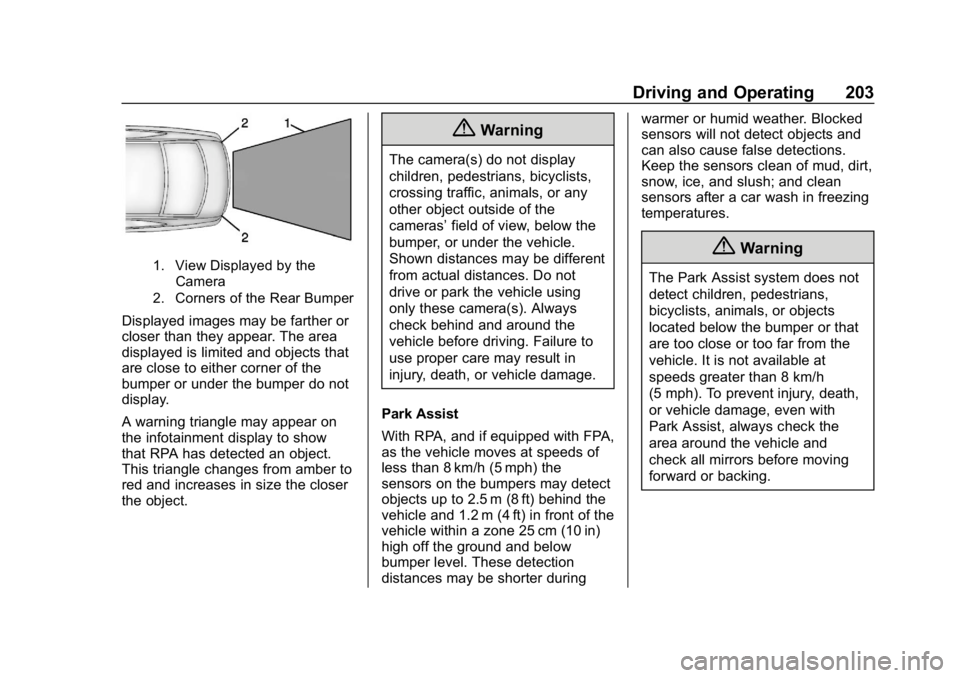
1. View Displayed by the
Camera
Page 204 of 373
Chevrolet VOLT Owner Manual (GMNA-Localizing-U.S./Canada/Mexico-
12163007) - 2019 - CRC - 11/5/18
Driving and Operating 203
1. View Displayed by theCamera
2. Corners of the Rear Bumper
Displayed images may be farther or
closer than they appear. The area
displayed is limited and objects that
are close to either corner of the
bumper or under the bumper do not
display.
A warning triangle may appear on
the infotainment display to show
that RPA has detected an object.
This triangle changes from amber to
red and increases in size the closer
the object.
{Warning
The camera(s) do not display
children, pedestrians, bicyclists,
crossing traffic, animals, or any
other object outside of the
cameras’ field of view, below the
bumper, or under the vehicle.
Shown distances may be different
from actual distances. Do not
drive or park the vehicle using
only these camera(s). Always
check behind and around the
vehicle before driving. Failure to
use proper care may result in
injury, death, or vehicle damage.
Park Assist
With RPA, and if equipped with FPA,
as the vehicle moves at speeds of
less than 8 km/h (5 mph) the
sensors on the bumpers may detect
objects up to 2.5 m (8 ft) behind the
vehicle and 1.2 m (4 ft) in front of the
vehicle within a zone 25 cm (10 in)
high off the ground and below
bumper level. These detection
distances may be shorter during warmer or humid weather. Blocked
sensors will not detect objects and
can also cause false detections.
Keep the sensors clean of mud, dirt,
snow, ice, and slush; and clean
sensors after a car wash in freezing
temperatures.
{Warning
The Park Assist system does not
detect children, pedestrians,
bicyclists, animals, or objects
located below the bumper or that
are too close or too far from the
vehicle. It is not available at
speeds greater than 8 km/h
(5 mph). To prevent injury, death,
or vehicle damage, even with
Park Assist, always check the
area around the vehicle and
check all mirrors before moving
forward or backing.
Page 209 of 373
Chevrolet VOLT Owner Manual (GMNA-Localizing-U.S./Canada/Mexico-
12163007) - 2019 - CRC - 11/5/18
208 Driving and Operating
affect the timing of both the Collision
Alert and the Tailgating Alert
features. The timing of both alerts
will vary based on vehicle speed.
The faster the vehicle speed, the
farther away the alert will occur.
Consider traffic and weather
conditions when selecting the alert
timing. The range of selectable alert
timings may not be appropriate for
all drivers and driving conditions.
Following Distance Indication
The distance to a moving vehicle
that you are following is shown in
seconds on the Driver Information
Center (DIC). SeeDriver
Information Center (DIC) 0133. The
minimum following time is
0.5 seconds away. If there is no
vehicle detected ahead, or the
vehicle ahead is out of sensor
range, dashes will be displayed.
Unnecessary Alerts
FCA may provide unnecessary
alerts to turning vehicles, vehicles in
other lanes, objects that are not vehicles, or shadows. These alerts
are normal operation and the
vehicle does not need service.
Cleaning the System
If the FCA system does not seem to
operate properly, this may correct
the issue:
.
Clean the outside of the
windshield in front of the
rearview mirror.
. Clean the entire front of the
vehicle.
. Clean the headlamps.
Forward Automatic
Braking (FAB)
If the vehicle has Forward Collision
Alert (FCA), it also has FAB, which
includes Intelligent Brake
Assist (IBA). When the system
detects a vehicle ahead in your path
that is traveling in the same
direction that you may be about to
crash into, it can provide a boost to
braking or automatically brake the
vehicle. This can help avoid or
lessen the severity of crashes when driving in a forward gear. Depending
on the situation, the vehicle may
automatically brake moderately or
hard. This forward automatic
braking can only occur if a vehicle is
detected. This is shown by the FCA
vehicle ahead indicator being lit.
See
Forward Collision Alert (FCA)
System 0206.
The system works when driving in a
forward gear between 8 km/h
(5 mph) and 60 km/h (37 mph),
or on vehicles with ACC, above
4 km/h (2 mph). It can detect
vehicles up to approximately 60 m
(197 ft).
{Warning
FAB is an emergency crash
preparation feature and is not
designed to avoid crashes. Do
not rely on FAB to brake the
vehicle. FAB will not brake
outside of its operating speed
range and only responds to
detected vehicles. (Continued)
Page 211 of 373
Chevrolet VOLT Owner Manual (GMNA-Localizing-U.S./Canada/Mexico-
12163007) - 2019 - CRC - 11/5/18
210 Driving and Operating
Side Blind Zone
Alert (SBZA)
If equipped, the SBZA system is a
lane-changing aid that assists
drivers with avoiding crashes that
occur with moving vehicles in the
side blind zone (or spot) areas.
When the vehicle is in a forward
gear, the left or right side mirror
display will light up if a moving
vehicle is detected in that blind
zone. If the turn signal is activated
and a vehicle is also detected on
the same side, the display will flash
as an extra warning not to change
lanes. Since this system is part of
the Lane Change Alert (LCA)
system, read the entire LCA section
before using this feature.
Lane Change Alert (LCA)
If equipped, the LCA system is a
lane-changing aid that assists
drivers with avoiding lane change
crashes that occur with moving
vehicles in the side blind zone (or
spot) areas or with vehicles rapidly
approaching these areas frombehind. The LCA warning display
will light up in the corresponding
outside side mirror and will flash if
the turn signal is on.
{Warning
LCA does not alert the driver to
vehicles outside of the system
detection zones, pedestrians,
bicyclists, or animals. It may not
provide alerts when changing
lanes under all driving conditions.
Failure to use proper care when
changing lanes may result in
injury, death, or vehicle damage.
Before making a lane change,
always check mirrors, glance over
your shoulder, and use the turn
signals.
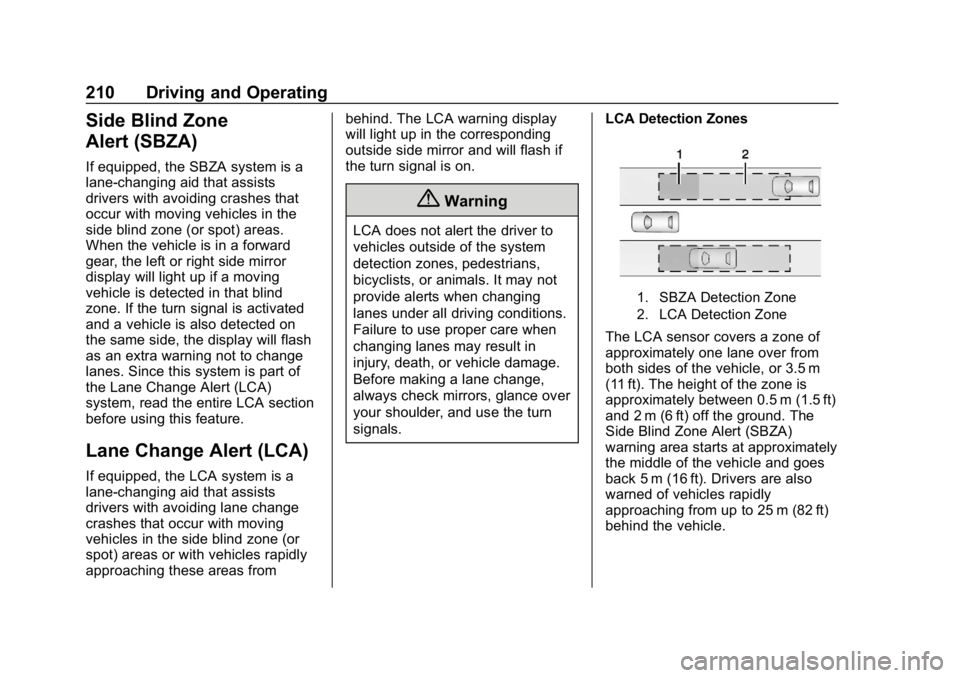
LCA Detection Zones
1. SBZA Detection Zone
2. LCA Detection Zone
The LCA sensor covers a zone of
approximately one lane over from
both sides of the vehicle, or 3.5 m
(11 ft). The height of the zone is
approximately between 0.5 m (1.5 ft)
and 2 m (6 ft) off the ground. The
Side Blind Zone Alert (SBZA)
warning area starts at approximately
the middle of the vehicle and goes
back 5 m (16 ft). Drivers are also
warned of vehicles rapidly
approaching from up to 25 m (82 ft)
behind the vehicle.
Page 212 of 373
Chevrolet VOLT Owner Manual (GMNA-Localizing-U.S./Canada/Mexico-
12163007) - 2019 - CRC - 11/5/18
Driving and Operating 211
How the System Works
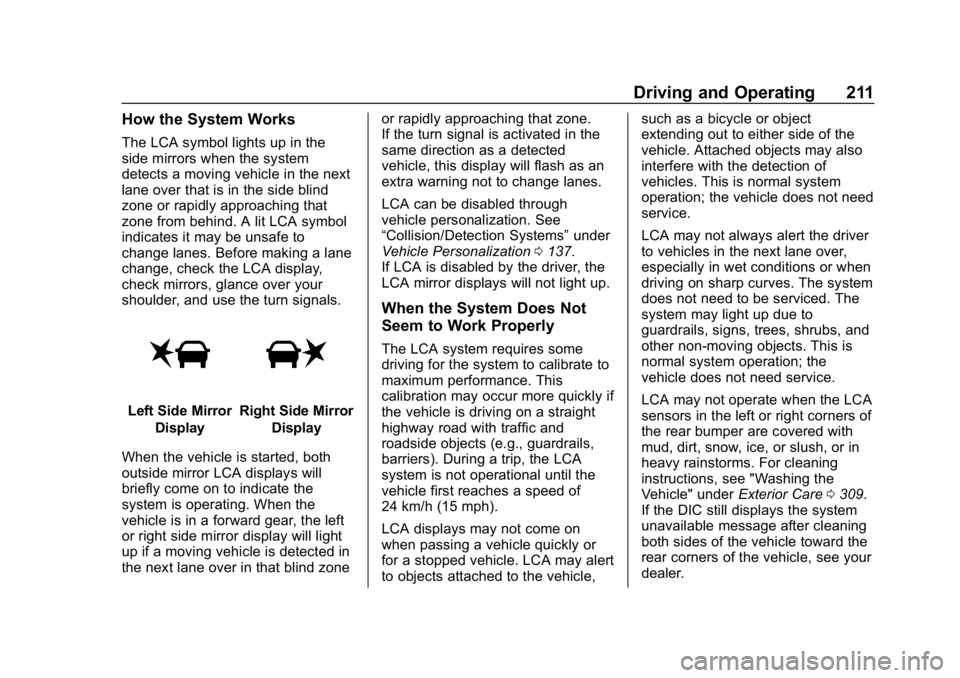
The LCA symbol lights up in the
side mirrors when the system
detects a moving vehicle in the next
lane over that is in the side blind
zone or rapidly approaching that
zone from behind. A lit LCA symbol
indicates it may be unsafe to
change lanes. Before making a lane
change, check the LCA display,
check mirrors, glance over your
shoulder, and use the turn signals.
Left Side MirrorDisplayRight Side Mirror Display
When the vehicle is started, both
outside mirror LCA displays will
briefly come on to indicate the
system is operating. When the
vehicle is in a forward gear, the left
or right side mirror display will light
up if a moving vehicle is detected in
the next lane over in that blind zone or rapidly approaching that zone.
If the turn signal is activated in the
same direction as a detected
vehicle, this display will flash as an
extra warning not to change lanes.
LCA can be disabled through
vehicle personalization. See
“Collision/Detection Systems”
under
Vehicle Personalization 0137.
If LCA is disabled by the driver, the
LCA mirror displays will not light up.
When the System Does Not
Seem to Work Properly
The LCA system requires some
driving for the system to calibrate to
maximum performance. This
calibration may occur more quickly if
the vehicle is driving on a straight
highway road with traffic and
roadside objects (e.g., guardrails,
barriers). During a trip, the LCA
system is not operational until the
vehicle first reaches a speed of
24 km/h (15 mph).
LCA displays may not come on
when passing a vehicle quickly or
for a stopped vehicle. LCA may alert
to objects attached to the vehicle, such as a bicycle or object
extending out to either side of the
vehicle. Attached objects may also
interfere with the detection of
vehicles. This is normal system
operation; the vehicle does not need
service.
LCA may not always alert the driver
to vehicles in the next lane over,
especially in wet conditions or when
driving on sharp curves. The system
does not need to be serviced. The
system may light up due to
guardrails, signs, trees, shrubs, and
other non-moving objects. This is
normal system operation; the
vehicle does not need service.
LCA may not operate when the LCA
sensors in the left or right corners of
the rear bumper are covered with
mud, dirt, snow, ice, or slush, or in
heavy rainstorms. For cleaning
instructions, see "Washing the
Vehicle" under
Exterior Care0309.
If the DIC still displays the system
unavailable message after cleaning
both sides of the vehicle toward the
rear corners of the vehicle, see your
dealer.
Page 214 of 373
Chevrolet VOLT Owner Manual (GMNA-Localizing-U.S./Canada/Mexico-
12163007) - 2019 - CRC - 11/5/18
Driving and Operating 213
Warning (Continued)
and LDW, you must steer the
vehicle. Always keep your
attention on the road and
maintain proper vehicle position
within the lane, or vehicle
damage, injury, or death could
occur. Always keep the
windshield, headlamps, and
camera sensors clean and in
good repair. Do not use LKA in
bad weather conditions.
{Warning
Using LKA on slippery roads
could cause loss of control of the
vehicle and a crash. Turn the
system off.
How the System Works
The LKA camera sensor is on the
windshield ahead of the rearview
mirror.
To turn LKA on and off, press
A
on the steering wheel.
When on,
Ais green if LKA is
available to assist and provide LDW
alerts. It may assist by gently
turning the steering wheel and
display
Aas amber if the vehicle
approaches a detected lane marking
without using a turn signal in that
direction. It may also provide an
LDW alert by flashing
Aamber
as the lane marking is crossed.
Additionally, there may be three
beeps on the right or left, depending
on the lane departure direction. Take Steering
The LKA system does not
continuously steer the vehicle.
If LKA does not detect active driver
steering, an alert, chime, or DIC
message may be provided. Move
the steering wheel to dismiss.
When the System Does Not
Seem to Work Properly
The system performance may be
affected by:
.
Close vehicles ahead.
. Sudden lighting changes, such
as when driving through tunnels.
. Banked roads.
. Roads with poor lane markings,
such as two-lane roads.
Page 267 of 373
Chevrolet VOLT Owner Manual (GMNA-Localizing-U.S./Canada/Mexico-
12163007) - 2019 - CRC - 11/5/18
266 Vehicle Care
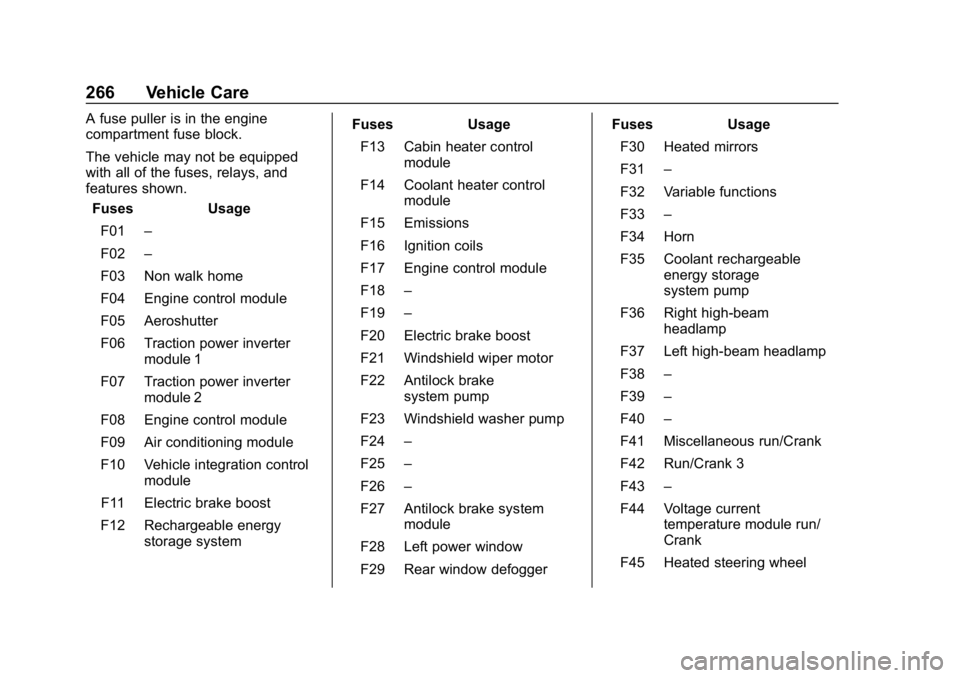
A fuse puller is in the engine
compartment fuse block.
The vehicle may not be equipped
with all of the fuses, relays, and
features shown.Fuses Usage
F01 –
F02 –
F03 Non walk home
F04 Engine control module
F05 Aeroshutter
F06 Traction power inverter module 1
F07 Traction power inverter module 2
F08 Engine control module
F09 Air conditioning module
F10 Vehicle integration control module
F11 Electric brake boost
F12 Rechargeable energy storage system Fuses Usage
F13 Cabin heater control module
F14 Coolant heater control module
F15 Emissions
F16 Ignition coils
F17 Engine control module
F18 –
F19 –
F20 Electric brake boost
F21 Windshield wiper motor
F22 Antilock brake system pump
F23 Windshield washer pump
F24 –
F25 –
F26 –
F27 Antilock brake system module
F28 Left power window
F29 Rear window defogger Fuses Usage
F30 Heated mirrors
F31 –
F32 Variable functions
F33 –
F34 Horn
F35 Coolant rechargeable energy storage
system pump
F36 Right high-beam headlamp
F37 Left high-beam headlamp
F38 –
F39 –
F40 –
F41 Miscellaneous run/Crank
F42 Run/Crank 3
F43 –
F44 Voltage current temperature module run/
Crank
F45 Heated steering wheel
Page 273 of 373
Chevrolet VOLT Owner Manual (GMNA-Localizing-U.S./Canada/Mexico-
12163007) - 2019 - CRC - 11/5/18
272 Vehicle Care
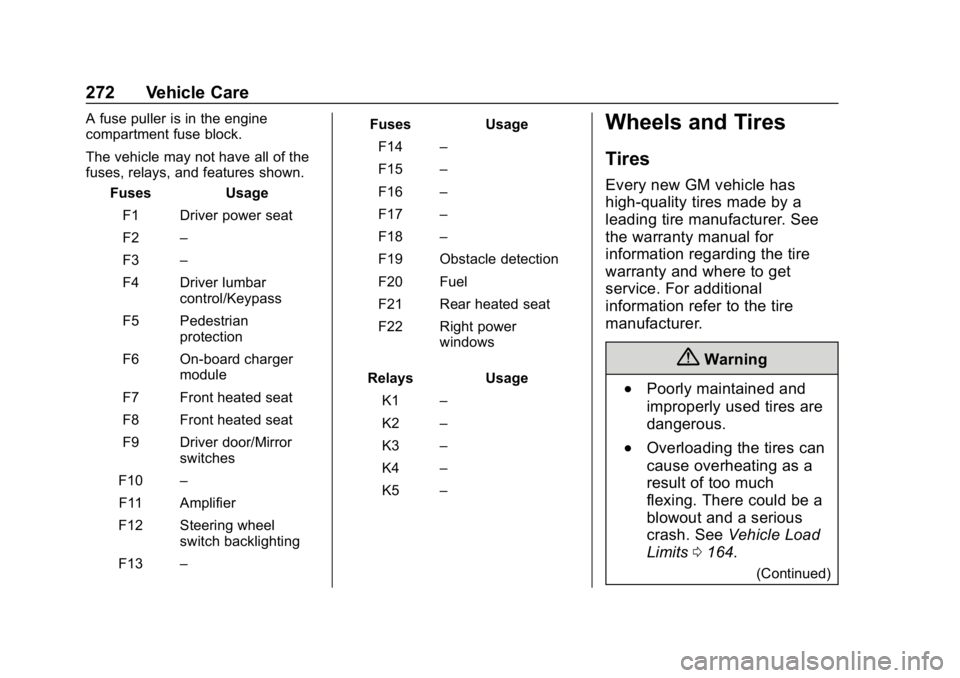
A fuse puller is in the engine
compartment fuse block.
The vehicle may not have all of the
fuses, relays, and features shown.Fuses Usage
F1 Driver power seat
F2 –
F3 –
F4 Driver lumbar control/Keypass
F5 Pedestrian protection
F6 On-board charger module
F7 Front heated seat
F8 Front heated seat
F9 Driver door/Mirror switches
F10 –
F11 Amplifier
F12 Steering wheel switch backlighting
F13 – Fuses Usage
F14 –
F15 –
F16 –
F17 –
F18 –
F19 Obstacle detection
F20 Fuel
F21 Rear heated seat
F22 Right power windows
Relays Usage K1 –
K2 –
K3 –
K4 –
K5 –Wheels and Tires
Tires
Every new GM vehicle has
high-quality tires made by a
leading tire manufacturer. See
the warranty manual for
information regarding the tire
warranty and where to get
service. For additional
information refer to the tire
manufacturer.
{Warning
.Poorly maintained and
improperly used tires are
dangerous.
.Overloading the tires can
cause overheating as a
result of too much
flexing. There could be a
blowout and a serious
crash. See Vehicle Load
Limits 0164.
(Continued)
Page 364 of 373

Chevrolet VOLT Owner Manual (GMNA-Localizing-U.S./Canada/Mexico-
12163007) - 2019 - CRC - 11/5/18
Index 363
Clock . . . . . . . . . . . . . . . . . . . . . . . . . . . 104
Cluster, Instrument . . . . . . . . . . . . . 107
Collision Damage Repair . . . . . . . 342
CompartmentsStorage . . . . . . . . . . . . . . . . . . . . . . . . . 98
Compass . . . . . . . . . . . . . . . . . . . . . . . 104
Compressor Kit, Tire Sealant . . . 292
Connected Services Connections . . . . . . . . . . . . . . . . . . 358
Diagnostics . . . . . . . . . . . . . . . . . . . 360
Navigation . . . . . . . . . . . . . . . . . . . . 357
Connections Connected Services . . . . . . . . . . 358
Control Traction and ElectronicStability . . . . . . . . . . . . . . . . . . . . . 186
Control of a Vehicle . . . . . . . . . . . . . 159
Convex Mirrors . . . . . . . . . . . . . . . . . . 48
Coolant Engine TemperatureWarning Light . . . . . . . . . . . . . . . 120
Cooling . . . . . . . . . . . . . . . . . . . . . . . . . 150
Cooling System . . . . . . .246, 250, 251
Courtesy Transportation Program . . . . . . . . . . . . . . . . . . . . . . . 341
Cover Cargo . . . . . . . . . . . . . . . . . . . . . . . . . . . 99
Cruise Control . . . . . . . . . . . . . . . . . . 188 Cruise Control (cont'd)
Light . . . . . . . . . . . . . . . . . . . . . . . . . . 122
Cruise Control, Adaptive . . . . . . . . 191
Customer Assistance . . . . . . . . . . . 338 Offices . . . . . . . . . . . . . . . . . . . . . . . . 337
Text Telephone (TTY)Users . . . . . . . . . . . . . . . . . . . . . . . 338
Customer Information Publications Ordering
Information . . . . . . . . . . . . . . . . . . 345
Customer Satisfaction Procedure . . . . . . . . . . . . . . . . . . . . . 335
D
Damage Repair, Collision . . . . . . . 342
Danger, Warning, and Caution . . . . 2
Data CollectionInfotainment System . . . . . . . . . . 348
OnStar . . . . . . . . . . . . . . . . . . . . . . . 348
Data Recorders, Event . . . . . . . . . 347
Daytime Running Lamps (DRL) . . . . . . . . . . . . . . . . . . 144
Defensive Driving . . . . . . . . . . . . . . . 159
Delayed Charging Override . . . . . 216
Delayed Locking . . . . . . . . . . . . . . . . . 43
Diagnostics Connected Services . . . . . . . . . . 360
Distracted Driving . . . . . . . . . . . . . . . 158 Dome Lamps . . . . . . . . . . . . . . . . . . . 147
Door
Ajar Light . . . . . . . . . . . . . . . . . . . . . 123
Delayed Locking . . . . . . . . . . . . . . . . 43
Locks . . . . . . . . . . . . . . . . . . . . . . . . . . . 40
Power Locks . . . . . . . . . . . . . . . . . . . . 43
Drive Belt Routing, Engine . . . . . . 334
Drive Unit
Electric . . . . . . . . . . . . . . . . . . . . . . . 181
Driver Assistance Systems . . . . . 201
Driver Efficiency Gauge . . . . . . . . 111
Driver Information Center (DIC) . . . . . . . . . . . . . . . . . . 133
Driver Mode Control . . . . . . . . . . . . 188
Driver Selected Operating Modes . . . . . . . . . . . . . . . . . . . . . . . . 174
Driving Assistance Systems . . . . . . . . . . 206
Defensive . . . . . . . . . . . . . . . . . . . . . 159
Drunk . . . . . . . . . . . . . . . . . . . . . . . . . 159
Hill and Mountain Roads . . . . . . 162
If the Vehicle is Stuck . . . . . . . . . 164
Loss of Control . . . . . . . . . . . . . . . 161
Off-Road Recovery . . . . . . . . . . . 160
Vehicle Load Limits . . . . . . . . . . . 164
Wet Roads . . . . . . . . . . . . . . . . . . . 161
Winter . . . . . . . . . . . . . . . . . . . . . . . . 163