roof CHEVROLET VOLT 2019 User Guide
[x] Cancel search | Manufacturer: CHEVROLET, Model Year: 2019, Model line: VOLT, Model: CHEVROLET VOLT 2019Pages: 373, PDF Size: 5.66 MB
Page 125 of 373
Chevrolet VOLT Owner Manual (GMNA-Localizing-U.S./Canada/Mexico-
12163007) - 2019 - CRC - 11/5/18
124 Instruments and Controls
.When outdoors, plug into an
electrical outlet that is
weatherproof while in use.
. Mount the charging cord to
reduce strain on the electrical
outlet/plug.
{Danger
Improper use of portable electric
vehicle charge cords may cause
a fire, electrical shock, or burns,
and may result in damage to
property, serious injury, or death.
. Do not use extension cords,
multi-outlet power strips,
splitters, grounding
adaptors, surge protectors,
or similar devices.
. Do not use an electrical
outlet that is worn or
damaged, or will not hold
the plug firmly in place.
. Do not use an electrical
outlet that is not properly
grounded.
(Continued)
Danger (Continued)
.Do not use an electrical
outlet that is on a circuit with
other electrical loads.
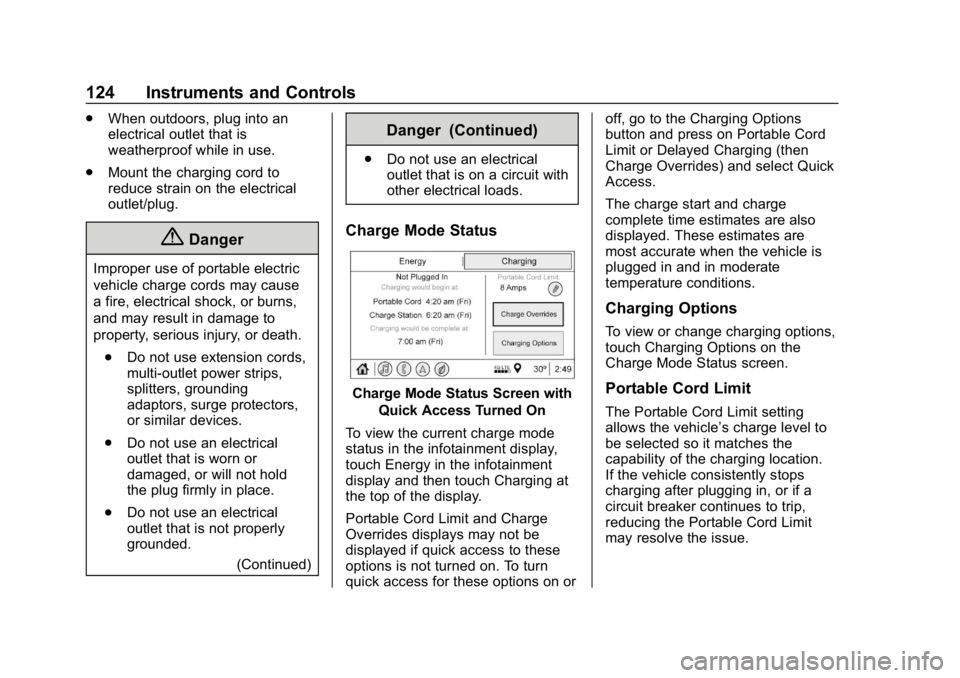
Charge Mode Status
Charge Mode Status Screen with
Quick Access Turned On
To view the current charge mode
status in the infotainment display,
touch Energy in the infotainment
display and then touch Charging at
the top of the display.
Portable Cord Limit and Charge
Overrides displays may not be
displayed if quick access to these
options is not turned on. To turn
quick access for these options on or off, go to the Charging Options
button and press on Portable Cord
Limit or Delayed Charging (then
Charge Overrides) and select Quick
Access.
The charge start and charge
complete time estimates are also
displayed. These estimates are
most accurate when the vehicle is
plugged in and in moderate
temperature conditions.
Charging Options
To view or change charging options,
touch Charging Options on the
Charge Mode Status screen.
Portable Cord Limit
The Portable Cord Limit setting
allows the vehicle’s charge level to
be selected so it matches the
capability of the charging location.
If the vehicle consistently stops
charging after plugging in, or if a
circuit breaker continues to trip,
reducing the Portable Cord Limit
may resolve the issue.
Page 172 of 373
Chevrolet VOLT Owner Manual (GMNA-Localizing-U.S./Canada/Mexico-
12163007) - 2019 - CRC - 11/5/18
Driving and Operating 171
display a screen with inactive fuel
and battery gauges. SeeStarting
and Stopping the Vehicle 0170.
Restarting Procedure
If the vehicle must be restarted
while it is still moving, move the shift
lever to N (Neutral) and press
POWER
Otwice without pressing
the brake pedal. The propulsion
system will not restart in any other
position.
Forced Engine On
Some vehicle conditions that force
the engine to run:
. There are cold ambient
temperatures.
. The hood is open or not
completely latched while the
vehicle is not in N (Neutral).
. The high voltage battery has a
low charge.
. The engine needs to run for
maintenance.
See Maintenance Modes 0177. A chime will sound if the driver door
is opened while the vehicle is on.
Always press POWER
Oto turn the
vehicle off before exiting.
Stopping Procedure
For information on how to turn the
vehicle off, see Power Button0168.
Retained Accessory
Power (RAP)
Some vehicle accessories may be
used after the ignition is turned off.
The power windows and sunroof,
if equipped, will continue to work for
up to 10 minutes or until any door is
opened.
The infotainment system will
continue to work for 10 minutes,
until the driver door is opened,
or until the ignition is turned on or
placed in ACC/ACCESSORY.
Shifting Into Park
1. Hold the brake pedal down and
set the parking brake. See
Electric Parking Brake 0183. 2. Press shift lever button.
3. Move the shift lever into
P (Park) by pushing the lever
all the way toward the front of
the vehicle.
4. Turn the vehicle off.
Leaving the Vehicle with the
Propulsion System On
{Warning
It can be dangerous to leave the
vehicle with the propulsion
system running. It could overheat
and catch fire.
It is dangerous to get out of the
vehicle if the shift lever is not fully
in P (Park) with the parking brake
firmly set. The vehicle can roll.
Do not leave the vehicle when the
propulsion system is running.
If you have left the propulsion
system running, the vehicle can
move suddenly. You or others
could be injured. To be sure the (Continued)
Page 201 of 373
Chevrolet VOLT Owner Manual (GMNA-Localizing-U.S./Canada/Mexico-
12163007) - 2019 - CRC - 11/5/18
200 Driving and Operating
Lighting Conditions Affecting ACC
The ACC front camera can be
affected by poor lighting conditions,
and ACC may have limited
performance when:
.There are changes in brightness,
such as entering and exiting
tunnels, bridges, and
overpasses
. Low sun angles cause the
camera to not detect objects,
or it is more difficult to detect
objects in the same traffic lane
. Lighting is poor in the evening or
early morning
. There are multiple changes in
brightness or shadows along the
vehicle roadway
. In a tunnel without the head
lamps on, or in a tunnel when
there is a vehicle in front that
does not have its tail lamps on .
Subjected to strong light from
opposing lane traffic in the front
of the vehicle, such as
high-beam head lamps from
oncoming traffic
Accessory Installations and
Vehicle Modifications
Do not install or place any object on
the front of the vehicle that would
obstruct the front radar view.
Do not install or place any object
around the front camera windshield
area that would obstruct the front
camera view.
Do not install objects on top of the
vehicle that overhang and obstruct
the front camera, such as a canoe,
kayak, or other items that can be
transported on a roof rack system.
Do not modify the hood, head
lamps, or fog lamps, as this may
limit the camera's ability to detect an
object. Cleaning the Sensing System
The camera sensor on the
windshield ahead of the rearview
mirror and the radar sensors on the
front of the vehicle can become
blocked by snow, ice, dirt, or mud.
These areas need to be cleaned for
ACC to operate properly.
If ACC will not operate, regular
cruise control may be available. See
"Switching Between ACC and
Regular Cruise Control" in this
section. Always consider driving
conditions before using either cruise
control system.
For cleaning instructions, see
“Washing the Vehicle”
under
Exterior Care 0309.
Page 222 of 373

Chevrolet VOLT Owner Manual (GMNA-Localizing-U.S./Canada/Mexico-
12163007) - 2019 - CRC - 11/5/18
Driving and Operating 221
Charge Cord
IMPORTANT SAFETY
INSTRUCTIONS
This symbol means Warning: Risk
of electrical shock.
SeeRadio Frequency Statement
0 345.
A portable charge cord used to
charge the vehicle high voltage
battery is stored in the left storage
compartment in the rear cargo area.
1. Wall Plug
2. Status Indicators
3. Vehicle Plug
4. Release Button
Important Information about
Portable Electric Vehicle Charging
. Charging an electric vehicle can
stress a building’ s electrical
system more than a typical
household appliance. .
Before plugging into any
electrical outlet, have a qualified
electrician inspect and verify the
electrical system for heavy-duty
service at a 12 amp
continuous load.
. Electrical outlets may wear out
with normal usage or may be
damaged over time, making
them unsuitable for electric
vehicle charging.
. Check the electrical outlet/plug
while charging and discontinue
use if the electrical outlet/plug is
hot, then have the electrical
outlet serviced by a qualified
electrician.
. When outdoors, plug into a
weatherproof electrical outlet.
. Mount the charging cord to
reduce strain on the electrical
outlet/plug.