ECO mode CHEVROLET VOLT 2019 Owner's Manual
[x] Cancel search | Manufacturer: CHEVROLET, Model Year: 2019, Model line: VOLT, Model: CHEVROLET VOLT 2019Pages: 373, PDF Size: 5.66 MB
Page 3 of 373
Chevrolet VOLT Owner Manual (GMNA-Localizing-U.S./Canada/Mexico-
12163007) - 2019 - CRC - 11/5/18
2 Introduction
Introduction
The names, logos, emblems,
slogans, vehicle model names, and
vehicle body designs appearing in
this manual including, but not limited
to, GM, the GM logo, CHEVROLET,
the CHEVROLET Emblem, VOLT,
and the VOLT logo are trademarks
and/or service marks of General
Motors LLC, its subsidiaries,
affiliates, or licensors.For vehicles first sold in Canada,
substitute the name
“General
Motors of Canada Company” for
Chevrolet Motor Division wherever it
appears in this manual.
This manual describes features that
may or may not be on the vehicle
because of optional equipment that
was not purchased on the vehicle,
model variants, country
specifications, features/applications
that may not be available in your
region, or changes subsequent to
the printing of this owner ’s manual.
Refer to the purchase
documentation relating to your
specific vehicle to confirm the
features.
Keep this manual in the vehicle for
quick reference.
Canadian Vehicle Owners
A French language manual can be
obtained from your dealer, at
www.helminc.com, or from:
Propriétaires Canadiens
On peut obtenir un exemplaire de
ce guide en français auprès du
concessionnaire ou à l'adresse
suivante:
Helm, Incorporated
Attention: Customer Service
47911 Halyard Drive
Plymouth, MI 48170
USA
Using this Manual
To quickly locate information about
the vehicle, use the Index in the
back of the manual. It is an
alphabetical list of what is in the
manual and the page number where
it can be found.
Litho in U.S.A.
Part No. 84044803 B Second Printing©2018 General Motors LLC. All Rights Reserved.
Page 18 of 373
Chevrolet VOLT Owner Manual (GMNA-Localizing-U.S./Canada/Mexico-
12163007) - 2019 - CRC - 11/5/18
In Brief 17
INT :Move the lever up to INT for
intermittent wipes, then turn the
band up for more frequent wipes or
down for less frequent wipes.
OFF : Use to turn the wipers off.
1X : For a single wipe, briefly move
the lever down. For several wipes,
hold the lever down.
f: Pull the lever toward you to
spray windshield washer fluid and
activate the wipers.
See Windshield Wiper/Washer
0 103.
Climate Controls
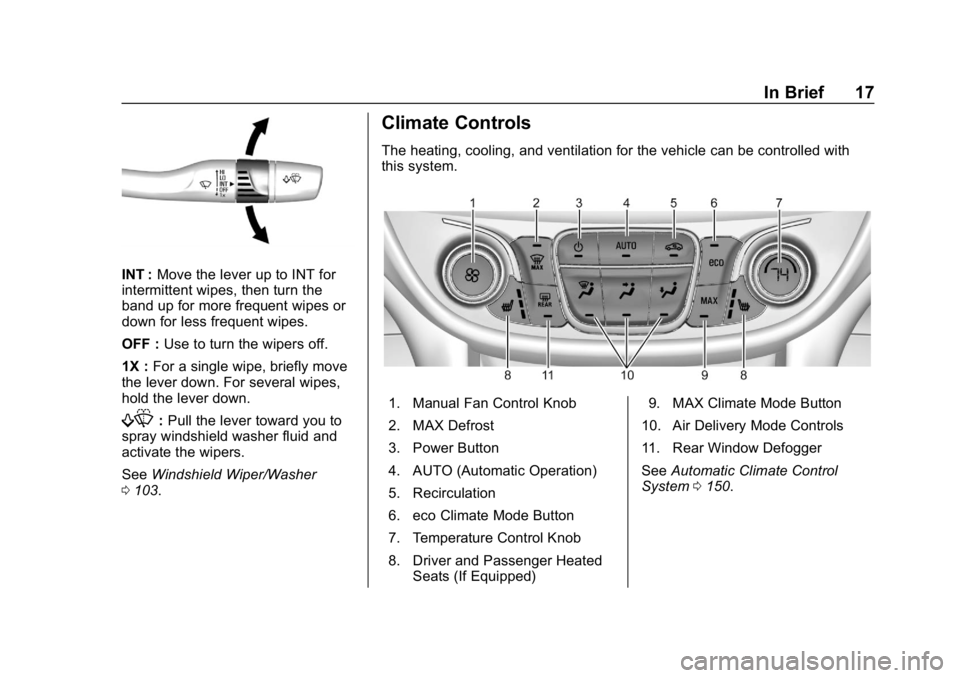
The heating, cooling, and ventilation for the vehicle can be controlled with
this system.
1. Manual Fan Control Knob
2. MAX Defrost
3. Power Button
4. AUTO (Automatic Operation)
5. Recirculation
6. eco Climate Mode Button
7. Temperature Control Knob
8. Driver and Passenger Heated
Seats (If Equipped) 9. MAX Climate Mode Button
10. Air Delivery Mode Controls
11. Rear Window Defogger
See Automatic Climate Control
System 0150.
Page 29 of 373
Chevrolet VOLT Owner Manual (GMNA-Localizing-U.S./Canada/Mexico-
12163007) - 2019 - CRC - 11/5/18
28 In Brief
Inefficient acceleration is indicated
when the ball turns yellow and
travels above the center of the
gauge.
Aggressive braking is indicated
when the ball turns yellow and
travels below the center of the
gauge.
Acceleration/Braking/Coasting
Avoid unnecessary rapid
accelerations and decelerations.
Electric range is maximized at
80 km/h (50 mph) and below. Higher
speeds use more energy and can
significantly reduce electric range.
Use cruise control when
appropriate.
Plan ahead for decelerations and
coast whenever possible. For
example, do not rush to traffic
signals.
Do not shift to N (Neutral) to coast.
The vehicle recovers energy while
coasting and braking in D (Drive)
or L (Low).Drive Mode and PRNDL Selection
Use Normal Mode when possible.
Sport Mode provides more
responsive acceleration than
Normal Mode but can reduce
efficiency.
Use Mountain Mode prior to
climbing long, steep grades in
mountainous areas. Be sure to
engage Mountain Mode before
starting to climb. Mountain Mode
reduces electric range and power
but may be needed to maintain
speed on steep grades.
Use Hold Mode on a trip where it is
expected that all of the electric
charge will be depleted. Use Hold
Mode mainly during highway or high
speed driving to maximize both EV
miles and fuel efficiency.
Use L (Low) when higher levels of
regenerative braking are desired.
L (Low) provides increased
regenerative braking when the
accelerator pedal is released,
reducing brake pedal application
and while increasing regenerating
electrical energy.Climate Setting
Using the heat and air conditioning
systems decreases the energy
available for electric driving.
Optimal energy efficiency is
achieved with the heat, air
conditioning, and fan turned off.
Less energy is used at low fan
speeds. When using the fan:
.
Fan Only is the most energy
efficient climate setting as long
as
0is not selected.
. Use eco for moderate air
conditioning and heater
operation. This is the next most
energy efficient setting as long
as Max Defrost is not selected.
. MAX provides the most comfort
but is the least energy efficient.
If equipped, use the heated seat
feature and the heated steering
wheel instead of climate settings.
Heating the seat and steering wheel
uses less energy than heating the
vehicle interior.
Page 36 of 373
Chevrolet VOLT Owner Manual (GMNA-Localizing-U.S./Canada/Mexico-
12163007) - 2019 - CRC - 11/5/18
Keys, Doors, and Windows 35
Programming with Recognized
Transmitters
A new transmitter can be
programmed to the vehicle when
there are two recognized
transmitters. To program, the vehicle
must be off and all of the
transmitters, both currently
recognized and new, must be in the
vehicle.1. Place the two recognized transmitters in the cupholder.
2. Remove the key lock cylinder cap on the driver door handle.
See Door Locks 040. Insert
the vehicle key of the new
transmitter into the key lock
cylinder on the outside of the
driver door and turn the key
counterclockwise to the unlock
position five times within
10 seconds.
The DIC displays READY FOR
REMOTE #2, 3, 4 OR 5 etc.
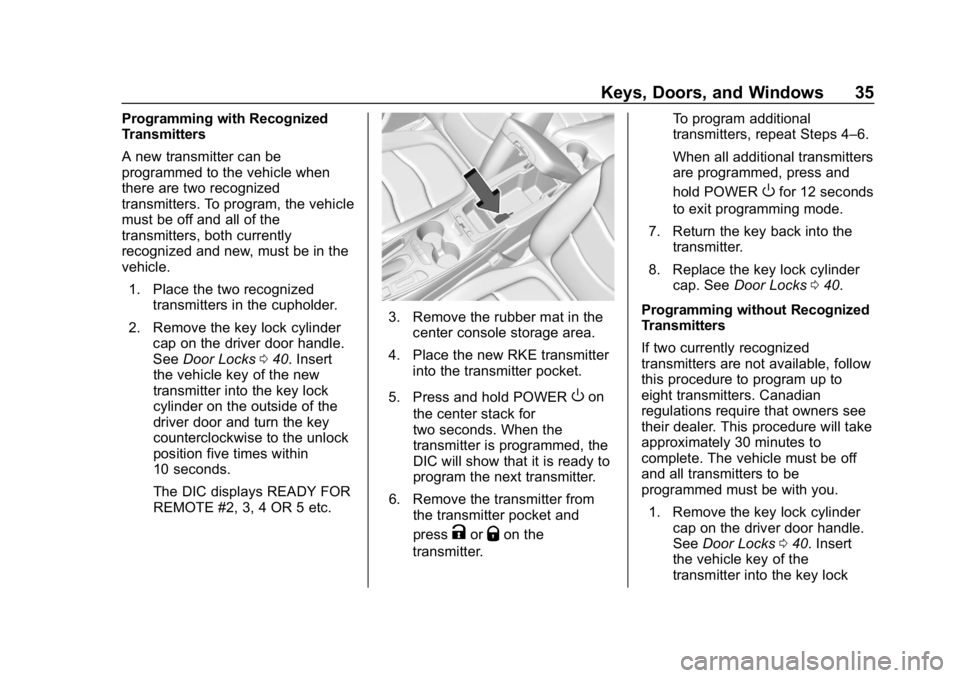
3. Remove the rubber mat in the
center console storage area.
4. Place the new RKE transmitter into the transmitter pocket.
5. Press and hold POWER
Oon
the center stack for
two seconds. When the
transmitter is programmed, the
DIC will show that it is ready to
program the next transmitter.
6. Remove the transmitter from the transmitter pocket and
press
KorQon the
transmitter. To program additional
transmitters, repeat Steps 4–6.
When all additional transmitters
are programmed, press and
hold POWER
Ofor 12 seconds
to exit programming mode.
7. Return the key back into the transmitter.
8. Replace the key lock cylinder cap. See Door Locks 040.
Programming without Recognized
Transmitters
If two currently recognized
transmitters are not available, follow
this procedure to program up to
eight transmitters. Canadian
regulations require that owners see
their dealer. This procedure will take
approximately 30 minutes to
complete. The vehicle must be off
and all transmitters to be
programmed must be with you. 1. Remove the key lock cylinder cap on the driver door handle.
See Door Locks 040. Insert
the vehicle key of the
transmitter into the key lock
Page 37 of 373
Chevrolet VOLT Owner Manual (GMNA-Localizing-U.S./Canada/Mexico-
12163007) - 2019 - CRC - 11/5/18
36 Keys, Doors, and Windows
cylinder on the outside of the
driver door and turn the key to
the unlock position five times
within 10 seconds.
The DIC displays REMOTE
LEARN PENDING,
PLEASE WAIT.
2. Wait for 10 minutes until the DIC displays PRESS START
BUTTON TO LEARN and then
press POWER
Oon the center
stack.
The DIC will again display
REMOTE LEARN PENDING,
PLEASE WAIT.
3. Repeat Step 2 two more times. After the third time, all
previously known transmitters
will no longer work with the
vehicle. Remaining transmitters
can be programmed during the
next steps.
The DIC display should now
show READY FOR
REMOTE #1.
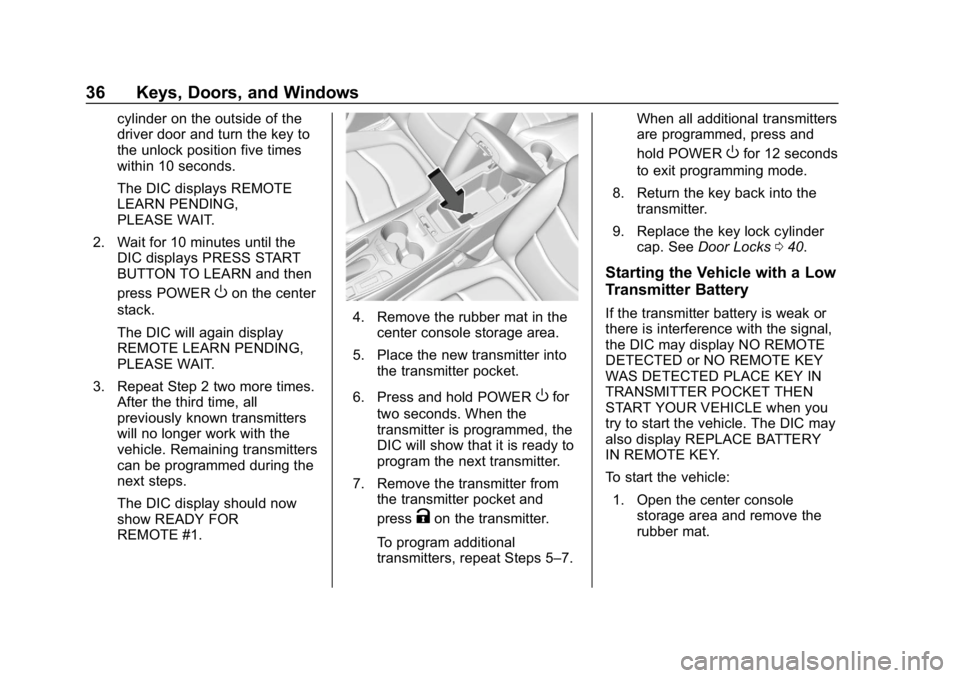
4. Remove the rubber mat in thecenter console storage area.
5. Place the new transmitter into the transmitter pocket.
6. Press and hold POWER
Ofor
two seconds. When the
transmitter is programmed, the
DIC will show that it is ready to
program the next transmitter.
7. Remove the transmitter from the transmitter pocket and
press
Kon the transmitter.
To program additional
transmitters, repeat Steps 5–7. When all additional transmitters
are programmed, press and
hold POWER
Ofor 12 seconds
to exit programming mode.
8. Return the key back into the transmitter.
9. Replace the key lock cylinder cap. See Door Locks 040.
Starting the Vehicle with a Low
Transmitter Battery
If the transmitter battery is weak or
there is interference with the signal,
the DIC may display NO REMOTE
DETECTED or NO REMOTE KEY
WAS DETECTED PLACE KEY IN
TRANSMITTER POCKET THEN
START YOUR VEHICLE when you
try to start the vehicle. The DIC may
also display REPLACE BATTERY
IN REMOTE KEY.
To start the vehicle:
1. Open the center console storage area and remove the
rubber mat.
Page 39 of 373
Chevrolet VOLT Owner Manual (GMNA-Localizing-U.S./Canada/Mexico-
12163007) - 2019 - CRC - 11/5/18
38 Keys, Doors, and Windows
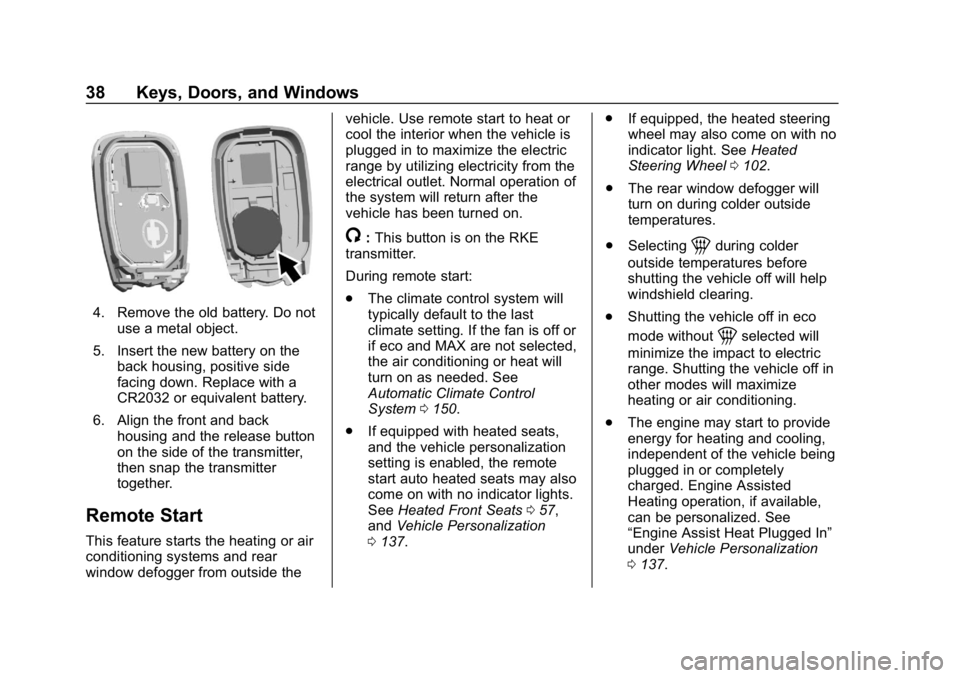
4. Remove the old battery. Do notuse a metal object.
5. Insert the new battery on the back housing, positive side
facing down. Replace with a
CR2032 or equivalent battery.
6. Align the front and back housing and the release button
on the side of the transmitter,
then snap the transmitter
together.
Remote Start
This feature starts the heating or air
conditioning systems and rear
window defogger from outside the vehicle. Use remote start to heat or
cool the interior when the vehicle is
plugged in to maximize the electric
range by utilizing electricity from the
electrical outlet. Normal operation of
the system will return after the
vehicle has been turned on.
/:
This button is on the RKE
transmitter.
During remote start:
. The climate control system will
typically default to the last
climate setting. If the fan is off or
if eco and MAX are not selected,
the air conditioning or heat will
turn on as needed. See
Automatic Climate Control
System 0150.
. If equipped with heated seats,
and the vehicle personalization
setting is enabled, the remote
start auto heated seats may also
come on with no indicator lights.
See Heated Front Seats 057,
and Vehicle Personalization
0 137. .
If equipped, the heated steering
wheel may also come on with no
indicator light. See Heated
Steering Wheel 0102.
. The rear window defogger will
turn on during colder outside
temperatures.
. Selecting1during colder
outside temperatures before
shutting the vehicle off will help
windshield clearing.
. Shutting the vehicle off in eco
mode without
1selected will
minimize the impact to electric
range. Shutting the vehicle off in
other modes will maximize
heating or air conditioning.
. The engine may start to provide
energy for heating and cooling,
independent of the vehicle being
plugged in or completely
charged. Engine Assisted
Heating operation, if available,
can be personalized. See
“Engine Assist Heat Plugged In”
under Vehicle Personalization
0 137.
Page 73 of 373
Chevrolet VOLT Owner Manual (GMNA-Localizing-U.S./Canada/Mexico-
12163007) - 2019 - CRC - 11/5/18
72 Seats and Restraints
A seat-mounted side impact airbag
is designed to inflate on the side of
the vehicle that is struck.
Roof-rail airbags are designed to
inflate in moderate to severe side
crashes depending on the location
of the impact. In addition, these
roof-rail airbags are designed to
inflate during a rollover or in a
severe frontal impact. Roof-rail
airbags are not designed to inflate in
rear impacts. Both roof-rail airbags
will inflate when either side of the
vehicle is struck or if the sensing
system predicts that the vehicle is
about to roll over on its side, or in a
severe frontal impact.
In any particular crash, no one can
say whether an airbag should have
inflated simply because of the
vehicle damage or repair costs.
What Makes an Airbag
Inflate?
In a deployment event, the sensing
system sends an electrical signal
triggering a release of gas from the
inflator. Gas from the inflator fills theairbag causing the bag to break out
of the cover. The inflator, the airbag,
and related hardware are all part of
the airbag module.
For airbag locations, see
Where Are
the Airbags? 069.
How Does an Airbag
Restrain?
In moderate to severe frontal or
near frontal collisions, even belted
occupants can contact the steering
wheel or the instrument panel. In
moderate to severe side collisions,
even belted occupants can contact
the inside of the vehicle.
Airbags supplement the protection
provided by seat belts by
distributing the force of the impact
more evenly over the
occupant's body.
Rollover capable roof-rail airbags
are designed to help contain the
head and chest of occupants in the
outboard seating positions in the
first and second rows. The rollover
capable roof-rail airbags are
designed to help reduce the risk of full or partial ejection in rollover
events, although no system can
prevent all such ejections.
But airbags would not help in many
types of collisions, primarily
because the occupant's motion is
not toward those airbags. See
When
Should an Airbag Inflate? 071.
Airbags should never be regarded
as anything more than a supplement
to seat belts.
What Will You See after
an Airbag Inflates?
After frontal, knee, and
seat-mounted side impact airbags
inflate, they quickly deflate, so
quickly that some people may not
even realize the airbags inflated.
Roof-rail airbags may still be at least
partially inflated for some time after
they inflate. Some components of
the airbag module may be hot for
several minutes. For location of the
airbags, see Where Are the
Airbags? 069.
Page 115 of 373
Chevrolet VOLT Owner Manual (GMNA-Localizing-U.S./Canada/Mexico-
12163007) - 2019 - CRC - 11/5/18
114 Instruments and Controls
turned off the front outboard
passenger frontal airbag and knee
airbag.
If, after several seconds, both status
indicator lights remain on, or if there
are no lights at all, there may be a
problem with the lights or the
passenger sensing system. See
your dealer for service.
{Warning
If the airbag readiness light ever
comes on and stays on, it means
that something may be wrong
with the airbag system. To help
avoid injury to yourself or others,
have the vehicle serviced right
away. SeeAirbag Readiness
Light 0113 for more information,
including important safety
information.
Charging System Light
(12-Volt Battery)
The charging system light comes on
briefly when the vehicle is started,
as a check to show the light is
working.
If the light stays on, or comes on
while driving, there could be a
problem with the electrical charging
system. Have it checked by your
dealer. Driving while this light is on
could drain the 12-volt battery.
If a short distance must be driven
with the light on, be sure to turn off
all accessories, such as the radio.
Malfunction Indicator
Lamp (Check Engine
Light)
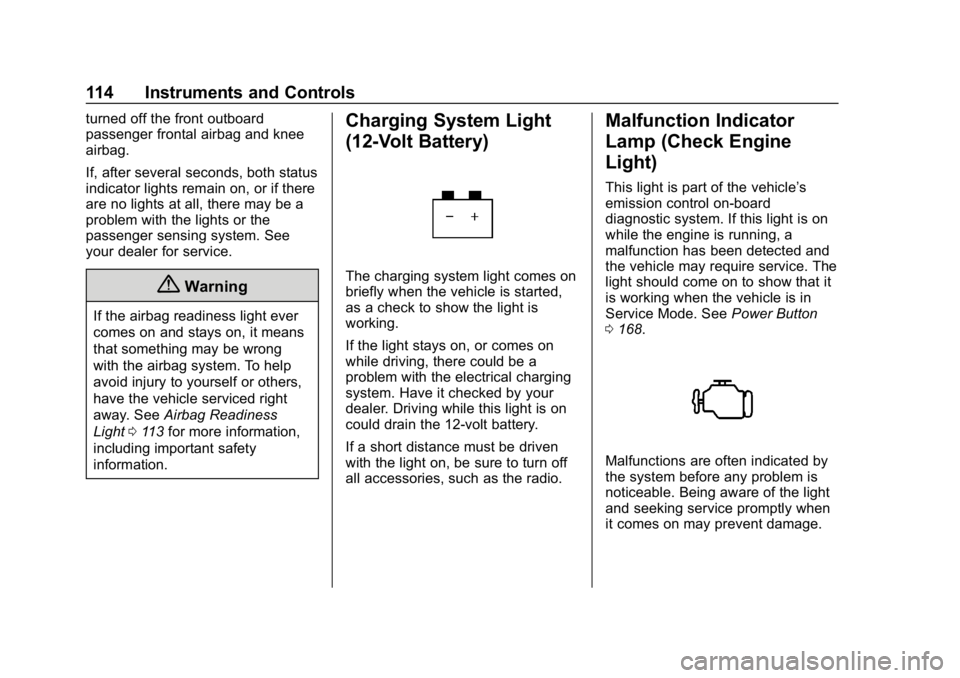
This light is part of the vehicle’s
emission control on-board
diagnostic system. If this light is on
while the engine is running, a
malfunction has been detected and
the vehicle may require service. The
light should come on to show that it
is working when the vehicle is in
Service Mode. See Power Button
0 168.
Malfunctions are often indicated by
the system before any problem is
noticeable. Being aware of the light
and seeking service promptly when
it comes on may prevent damage.
Page 132 of 373
Chevrolet VOLT Owner Manual (GMNA-Localizing-U.S./Canada/Mexico-
12163007) - 2019 - CRC - 11/5/18
Instruments and Controls 131
SeeInstrument Cluster 0107 and
Utility Interruption of Charging
0 227.
Programmable Charging
Disabled
When the Programmable Charging
system is disabled, the main
charging screen will display “- -:- -”
for the Charge Complete Time. The
Programmable Charging system will
be disabled if the Charge Complete
Time cannot be confidently
estimated. If the Programmable
Charging system is consistently
disabled, see your dealer.
A message displays if the vehicle is
not able to charge.
Energy Information
To view Usage, Impacts, Details,
and History, touch Energy on the
infotainment display, Select Energy
on the upper left of the display, then
touch the desired information or
touch More
kif the desired icon is not shown. To reset the values, the
high voltage battery needs to be
fully recharged.
Usage
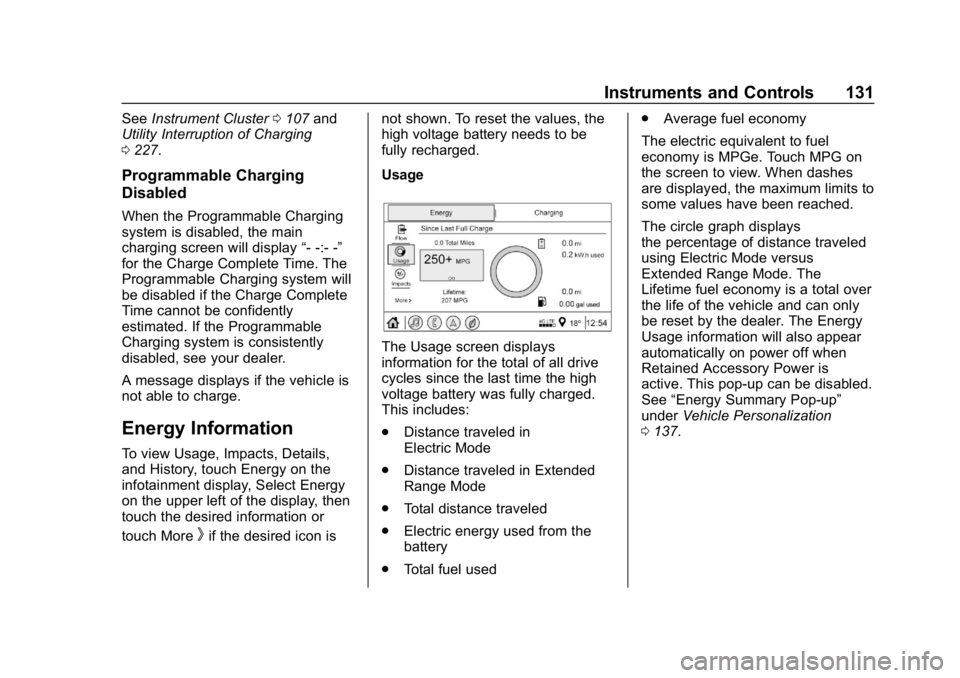
The Usage screen displays
information for the total of all drive
cycles since the last time the high
voltage battery was fully charged.
This includes:
.
Distance traveled in
Electric Mode
. Distance traveled in Extended
Range Mode
. Total distance traveled
. Electric energy used from the
battery
. Total fuel used .
Average fuel economy
The electric equivalent to fuel
economy is MPGe. Touch MPG on
the screen to view. When dashes
are displayed, the maximum limits to
some values have been reached.
The circle graph displays
the percentage of distance traveled
using Electric Mode versus
Extended Range Mode. The
Lifetime fuel economy is a total over
the life of the vehicle and can only
be reset by the dealer. The Energy
Usage information will also appear
automatically on power off when
Retained Accessory Power is
active. This pop-up can be disabled.
See “Energy Summary Pop-up”
under Vehicle Personalization
0 137.
Page 137 of 373
Chevrolet VOLT Owner Manual (GMNA-Localizing-U.S./Canada/Mexico-
12163007) - 2019 - CRC - 11/5/18
136 Instruments and Controls
.Brakes
. Steering
. Ride Control Systems
. Driver Assistance Systems
. Cruise Control
. Lighting and Bulb Replacement
. Wiper/Washer Systems
. Doors and Windows
. Seat Belts
. Airbag Systems
. Propulsion and Drive Unit
. Tire Pressure
. Battery
Propulsion Power
Messages
PROPULSION POWER IS
REDUCED
This message displays when the
propulsion power is reduced and
can affect the ability to accelerate.
If this message is on, but there is no
reduction in performance, proceed to your destination. The
performance may be reduced the
next time the vehicle is driven. The
vehicle may be driven while this
message is on, but maximum
acceleration and speed may be
reduced. If this message stays on
when the malfunction indicator lamp
is on, the vehicle should be taken to
your dealer for service as soon as
possible.
This message can display when the
vehicle is parked during extreme
cold conditions without being
plugged in. While driving the vehicle
with this message displayed, the
vehicle speed may be reduced until
the high voltage battery is
conditioned.
This message can display when
driving in mountainous terrain
without using Mountain Mode or by
not entering Mountain Mode soon
enough to build a sufficient battery
charge reserve before climbing
steep grades. This is normal
operation to protect the high voltage
battery. Only if both the
PROPULSION POWER ISREDUCED message and the
malfunction indicator lamp are on
should the vehicle be taken to the
dealer for service.
While climbing the grade with this
message displayed, the vehicle
speed may be reduced until the
engine can recover the battery state
of charge to a normal level. See
“Mountain Mode”
underDriver
Selected Operating Modes 0174.
Vehicle Speed Messages
SPEED LIMITED TO
XXX KM/H (MPH)
This message shows that the
vehicle speed has been limited to
the speed displayed. The limited
speed is a protection for various
propulsion and vehicle systems,
such as lubrication, thermal,
suspension, Teen Driver if
equipped, or tires.