REAR CAMERA CHEVROLET VOLT 2019 Owner's Manual
[x] Cancel search | Manufacturer: CHEVROLET, Model Year: 2019, Model line: VOLT, Model: CHEVROLET VOLT 2019Pages: 373, PDF Size: 5.66 MB
Page 6 of 373
Chevrolet VOLT Owner Manual (GMNA-Localizing-U.S./Canada/Mexico-
12163007) - 2019 - CRC - 11/5/18
In Brief 5
In Brief
Instrument Panel
Instrument Panel . . . . . . . . . . . . . . . . 6
Initial Drive Information
Initial Drive Information . . . . . . . . . . 8
Remote Keyless Entry (RKE)System . . . . . . . . . . . . . . . . . . . . . . . . 8
Remote Start . . . . . . . . . . . . . . . . . . . . 9
Door Locks . . . . . . . . . . . . . . . . . . . . . 9
Windows . . . . . . . . . . . . . . . . . . . . . . . 11
Seat Adjustment . . . . . . . . . . . . . . . 11
Heated Seats . . . . . . . . . . . . . . . . . . 13
Head Restraint Adjustment . . . . 13
Seat Belts . . . . . . . . . . . . . . . . . . . . . 13
Passenger Sensing System . . . 14
Mirror Adjustment . . . . . . . . . . . . . . 14
Steering Wheel Adjustment . . . . 15
Interior Lighting . . . . . . . . . . . . . . . . 15
Exterior Lighting . . . . . . . . . . . . . . . 16
Windshield Wiper/Washer . . . . . . 16
Climate Controls . . . . . . . . . . . . . . . 17
Vehicle Features
Infotainment System . . . . . . . . . . . 18
Steering Wheel Controls . . . . . . . 18
Cruise Control . . . . . . . . . . . . . . . . . 18 Driver Information
Center (DIC) . . . . . . . . . . . . . . . . . 18
Forward Collision Alert (FCA) System . . . . . . . . . . . . . . . . . . . . . . . 19
Forward Automatic
Braking (FAB) . . . . . . . . . . . . . . . . 19
Lane Keep Assist (LKA) . . . . . . . 19
Lane Change Alert (LCA) . . . . . . 19
Rear Vision Camera (RVC) . . . . 20
Rear Cross Traffic Alert (RCTA) System . . . . . . . . . . . . . . . . . . . . . . . 20
Park Assist . . . . . . . . . . . . . . . . . . . . 20
Automatic Parking Assist (APA) . . . . . . . . . . . . . . . . . . 20
Power Outlets . . . . . . . . . . . . . . . . . 20
Battery and Efficiency
High Voltage Safety Information . . . . . . . . . . . . . . . . . . . 21
Charging . . . . . . . . . . . . . . . . . . . . . . . 22
Fueling . . . . . . . . . . . . . . . . . . . . . . . . 24
Regenerative Braking . . . . . . . . . . 25
Service . . . . . . . . . . . . . . . . . . . . . . . . 25
Performance and Maintenance
Traction Control/Electronic Stability Control . . . . . . . . . . . . . . 26
Tire Pressure Monitor . . . . . . . . . . 26
Fuel . . . . . . . . . . . . . . . . . . . . . . . . . . . 27
E85 or FlexFuel . . . . . . . . . . . . . . . . 27
Engine Oil Life System . . . . . . . . 27 Driving for Better Energy
Efficiency . . . . . . . . . . . . . . . . . . . . . 27
Roadside Assistance Program . . . . . . . . . . . . . . . . . . . . . . 29
Page 21 of 373
Chevrolet VOLT Owner Manual (GMNA-Localizing-U.S./Canada/Mexico-
12163007) - 2019 - CRC - 11/5/18
20 In Brief
SeeSide Blind Zone Alert (SBZA)
0 210 andLane Change Alert (LCA)
0 210.
Rear Vision
Camera (RVC)
If equipped, RVC shows a view of
the area behind the vehicle on the
infotainment display when the
vehicle is shifted into R (Reverse) to
aid with parking and low-speed
backing maneuvers.
See Assistance Systems for Parking
or Backing 0202.
Rear Cross Traffic Alert
(RCTA) System
If equipped, the RCTA system uses
a triangle with an arrow on the
infotainment display to warn of
traffic behind your vehicle that may
cross your vehicle's path while in
R (Reverse). In addition, beeps will
sound.
See Assistance Systems for Parking
or Backing 0202.
Park Assist
If equipped, Rear Park Assist (RPA)
uses sensors on the rear bumper to
assist with parking and avoiding
objects while in R (Reverse).
It operates at speeds less than
8 km/h (5 mph). RPA may show a
warning triangle on the infotainment
display and a graphic on the
instrument cluster to provide the
object distance. In addition, multiple
beeps may occur if very close to an
object.
The vehicle may also have the Front
Park Assist (FPA) system.
See Assistance Systems for Parking
or Backing 0202.
Automatic Parking
Assist (APA)
If equipped, the APA system helps
to search for and maneuver the
vehicle into parallel or perpendicular
parking spots using automatic
steering, displays, and beeps. When the vehicle speed is below 30 km/h
(18 mph), press
Oto enable the
system.
See “Automatic Parking Assist
(APA)” underAssistance Systems
for Parking or Backing 0202.
Power Outlets
The accessory power outlets can be
used to plug in electrical equipment,
such as a cell phone or MP3 player.
There are two accessory power
outlets:
.
In the storage area below the
climate control system.
. On the rear of the front console
armrest.
The power outlets supply power
while the vehicle is on, or if the
vehicle is in Retained Accessory
Power (RAP). See Retained
Accessory Power (RAP) 0171.
Lift the cover to access and replace
when not in use.
See Power Outlets 0104.
Page 139 of 373
Chevrolet VOLT Owner Manual (GMNA-Localizing-U.S./Canada/Mexico-
12163007) - 2019 - CRC - 11/5/18
138 Instruments and Controls
Engine Assisted Heating
This feature selects the outside
temperature level at which the
engine may run to assist cabin
heating in Electric Mode. A change
in selection will not take effect until
after the vehicle is first
powered down.
Touch On for temperatures below
approximately 0 °C (32 °F), or touch
Deferred for temperatures below
approximately−25 °C (−13 °F).
In Deferred mode, when Max
Defrost is selected the engine may
run at temperatures below
approximately -10 °C (15 °F) until
the vehicle is powered down. See
Automatic Climate Control System
0 150.
Engine Assisted Heating
Plugged In
During remote start, this feature
turns on or off the ability for the
engine to run to help heat the
vehicle when it is plugged in.
A change in setting will not take
effect until after the vehicle is first
powered down. Touch Off or On.
Collision/Detection Systems
Touch and the following may
display:
.
Forward Collision System
. Rear Camera Park Assist
Symbols
. Rear Cross Traffic Alert
. Adaptive Cruise Go Notifier
. Lane Change Alert
Forward Collision System
This feature will turn on or off the
Forward Collision Alert (FCA) and
Forward Automatic Braking (FAB).
The Off setting disables all FCA and
FAB functions. With the Alert and
Brake setting, both FCA and FAB
are available. The Alert setting
disables FAB. See Forward
Automatic Braking (FAB) 0208.
Touch Off, Alert, or Alert and Brake. Rear Camera Park Assist Symbols
This setting enables the Rear
Camera Park Assist Symbols. See
Assistance Systems for Parking or
Backing
0202.
Touch Off or On.
Rear Cross Traffic Alert
This allows the Rear Cross Traffic
Alert feature to be turned on or off.
See “Rear Cross Traffic Alert” in
Assistance Systems for Parking or
Backing 0202.
Touch Off or On.
Adaptive Cruise Go Notifier
This feature will give a reminder that
Adaptive Cruise Control provides
when it has brought the vehicle to a
complete stop behind another
stopping vehicle, and then that
vehicle drives on.
Touch Off or On.
Lane Change Alert
This allows the Lane Change Alert
feature to be turned on or off. See
Lane Change Alert (LCA) 0210.
Page 201 of 373
Chevrolet VOLT Owner Manual (GMNA-Localizing-U.S./Canada/Mexico-
12163007) - 2019 - CRC - 11/5/18
200 Driving and Operating
Lighting Conditions Affecting ACC
The ACC front camera can be
affected by poor lighting conditions,
and ACC may have limited
performance when:
.There are changes in brightness,
such as entering and exiting
tunnels, bridges, and
overpasses
. Low sun angles cause the
camera to not detect objects,
or it is more difficult to detect
objects in the same traffic lane
. Lighting is poor in the evening or
early morning
. There are multiple changes in
brightness or shadows along the
vehicle roadway
. In a tunnel without the head
lamps on, or in a tunnel when
there is a vehicle in front that
does not have its tail lamps on .
Subjected to strong light from
opposing lane traffic in the front
of the vehicle, such as
high-beam head lamps from
oncoming traffic
Accessory Installations and
Vehicle Modifications
Do not install or place any object on
the front of the vehicle that would
obstruct the front radar view.
Do not install or place any object
around the front camera windshield
area that would obstruct the front
camera view.
Do not install objects on top of the
vehicle that overhang and obstruct
the front camera, such as a canoe,
kayak, or other items that can be
transported on a roof rack system.
Do not modify the hood, head
lamps, or fog lamps, as this may
limit the camera's ability to detect an
object. Cleaning the Sensing System
The camera sensor on the
windshield ahead of the rearview
mirror and the radar sensors on the
front of the vehicle can become
blocked by snow, ice, dirt, or mud.
These areas need to be cleaned for
ACC to operate properly.
If ACC will not operate, regular
cruise control may be available. See
"Switching Between ACC and
Regular Cruise Control" in this
section. Always consider driving
conditions before using either cruise
control system.
For cleaning instructions, see
“Washing the Vehicle”
under
Exterior Care 0309.
Page 203 of 373
Chevrolet VOLT Owner Manual (GMNA-Localizing-U.S./Canada/Mexico-
12163007) - 2019 - CRC - 11/5/18
202 Driving and Operating
Information Center (DIC) messages
may display when the systems are
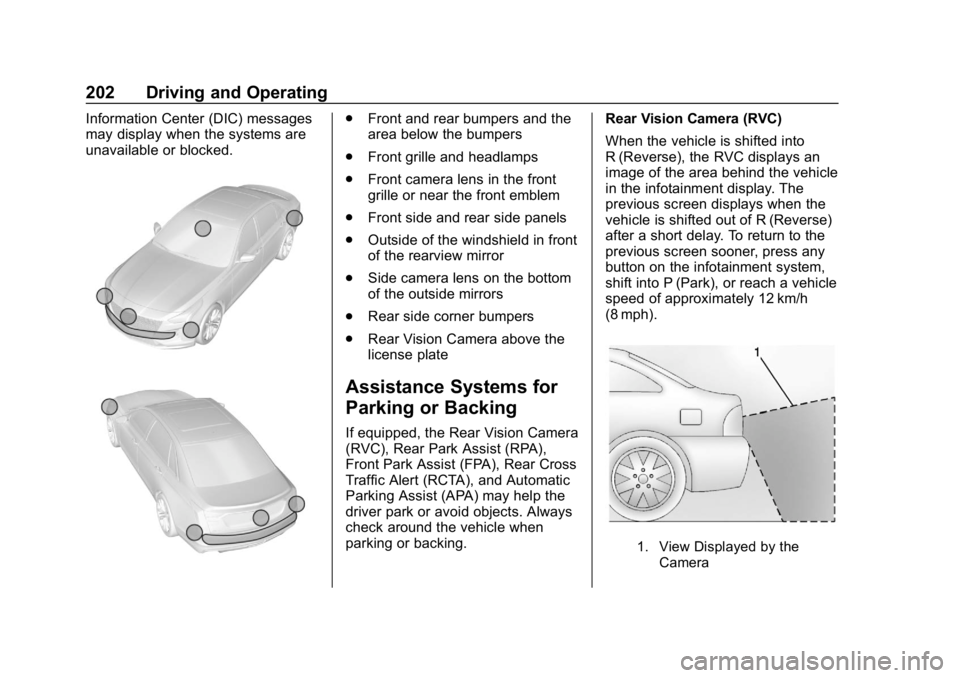
unavailable or blocked..Front and rear bumpers and the
area below the bumpers
. Front grille and headlamps
. Front camera lens in the front
grille or near the front emblem
. Front side and rear side panels
. Outside of the windshield in front
of the rearview mirror
. Side camera lens on the bottom
of the outside mirrors
. Rear side corner bumpers
. Rear Vision Camera above the
license plate
Assistance Systems for
Parking or Backing
If equipped, the Rear Vision Camera
(RVC), Rear Park Assist (RPA),
Front Park Assist (FPA), Rear Cross
Traffic Alert (RCTA), and Automatic
Parking Assist (APA) may help the
driver park or avoid objects. Always
check around the vehicle when
parking or backing. Rear Vision Camera (RVC)
When the vehicle is shifted into
R (Reverse), the RVC displays an
image of the area behind the vehicle
in the infotainment display. The
previous screen displays when the
vehicle is shifted out of R (Reverse)
after a short delay. To return to the
previous screen sooner, press any
button on the infotainment system,
shift into P (Park), or reach a vehicle
speed of approximately 12 km/h
(8 mph).
1. View Displayed by the
Camera
Page 204 of 373
Chevrolet VOLT Owner Manual (GMNA-Localizing-U.S./Canada/Mexico-
12163007) - 2019 - CRC - 11/5/18
Driving and Operating 203
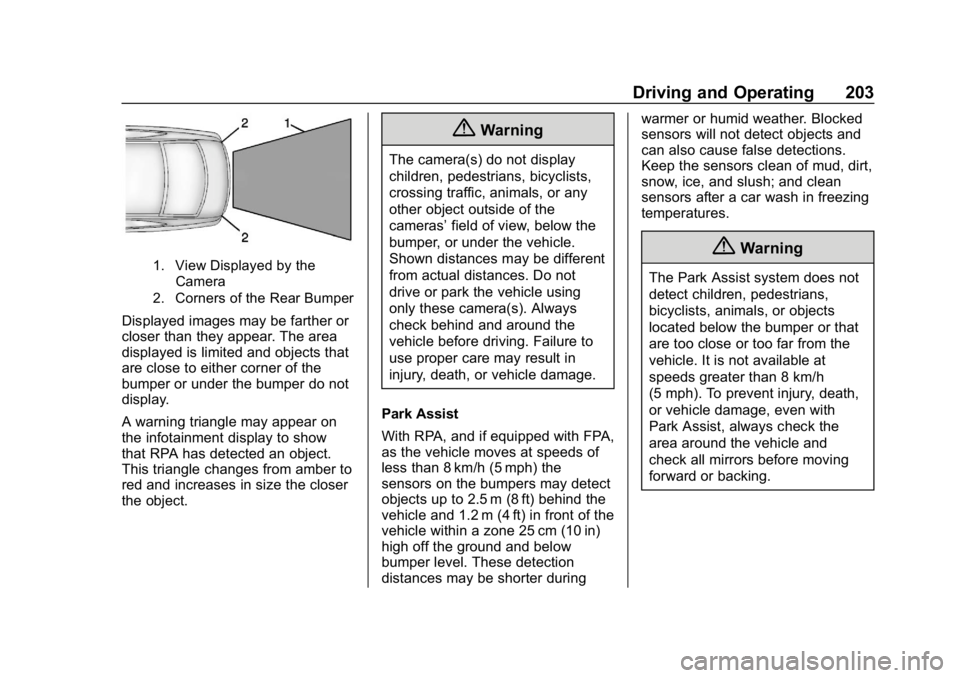
1. View Displayed by theCamera
2. Corners of the Rear Bumper
Displayed images may be farther or
closer than they appear. The area
displayed is limited and objects that
are close to either corner of the
bumper or under the bumper do not
display.
A warning triangle may appear on
the infotainment display to show
that RPA has detected an object.
This triangle changes from amber to
red and increases in size the closer
the object.
{Warning
The camera(s) do not display
children, pedestrians, bicyclists,
crossing traffic, animals, or any
other object outside of the
cameras’ field of view, below the
bumper, or under the vehicle.
Shown distances may be different
from actual distances. Do not
drive or park the vehicle using
only these camera(s). Always
check behind and around the
vehicle before driving. Failure to
use proper care may result in
injury, death, or vehicle damage.
Park Assist
With RPA, and if equipped with FPA,
as the vehicle moves at speeds of
less than 8 km/h (5 mph) the
sensors on the bumpers may detect
objects up to 2.5 m (8 ft) behind the
vehicle and 1.2 m (4 ft) in front of the
vehicle within a zone 25 cm (10 in)
high off the ground and below
bumper level. These detection
distances may be shorter during warmer or humid weather. Blocked
sensors will not detect objects and
can also cause false detections.
Keep the sensors clean of mud, dirt,
snow, ice, and slush; and clean
sensors after a car wash in freezing
temperatures.
{Warning
The Park Assist system does not
detect children, pedestrians,
bicyclists, animals, or objects
located below the bumper or that
are too close or too far from the
vehicle. It is not available at
speeds greater than 8 km/h
(5 mph). To prevent injury, death,
or vehicle damage, even with
Park Assist, always check the
area around the vehicle and
check all mirrors before moving
forward or backing.
Page 205 of 373
Chevrolet VOLT Owner Manual (GMNA-Localizing-U.S./Canada/Mexico-
12163007) - 2019 - CRC - 11/5/18
204 Driving and Operating
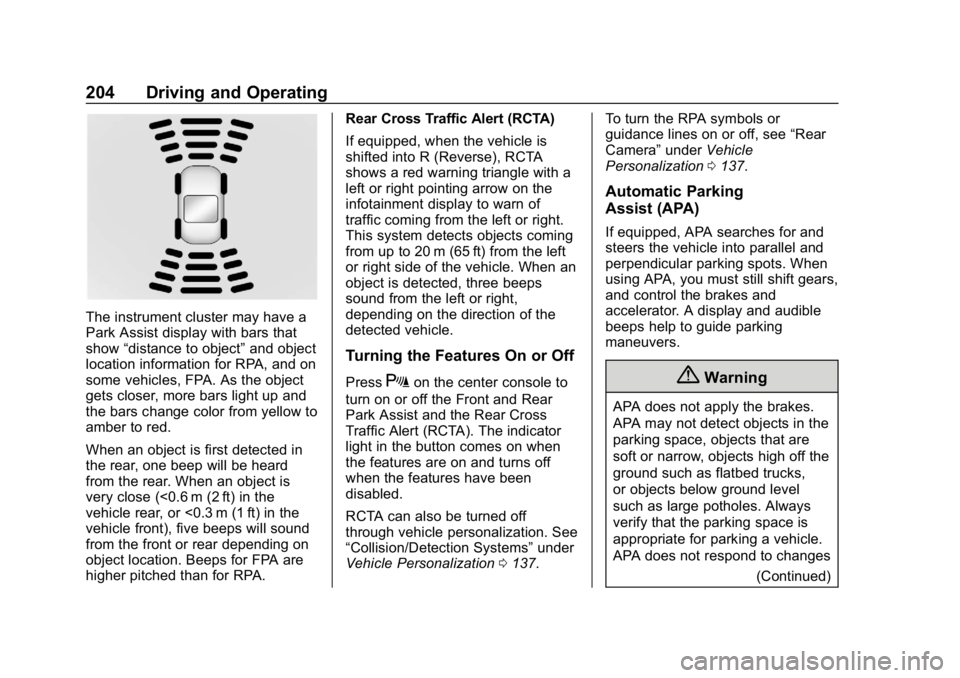
The instrument cluster may have a
Park Assist display with bars that
show“distance to object” and object
location information for RPA, and on
some vehicles, FPA. As the object
gets closer, more bars light up and
the bars change color from yellow to
amber to red.
When an object is first detected in
the rear, one beep will be heard
from the rear. When an object is
very close (<0.6 m (2 ft) in the
vehicle rear, or <0.3 m (1 ft) in the
vehicle front), five beeps will sound
from the front or rear depending on
object location. Beeps for FPA are
higher pitched than for RPA. Rear Cross Traffic Alert (RCTA)
If equipped, when the vehicle is
shifted into R (Reverse), RCTA
shows a red warning triangle with a
left or right pointing arrow on the
infotainment display to warn of
traffic coming from the left or right.
This system detects objects coming
from up to 20 m (65 ft) from the left
or right side of the vehicle. When an
object is detected, three beeps
sound from the left or right,
depending on the direction of the
detected vehicle.
Turning the Features On or Off
PressXon the center console to
turn on or off the Front and Rear
Park Assist and the Rear Cross
Traffic Alert (RCTA). The indicator
light in the button comes on when
the features are on and turns off
when the features have been
disabled.
RCTA can also be turned off
through vehicle personalization. See
“Collision/Detection Systems” under
Vehicle Personalization 0137. To turn the RPA symbols or
guidance lines on or off, see
“Rear
Camera” underVehicle
Personalization 0137.
Automatic Parking
Assist (APA)
If equipped, APA searches for and
steers the vehicle into parallel and
perpendicular parking spots. When
using APA, you must still shift gears,
and control the brakes and
accelerator. A display and audible
beeps help to guide parking
maneuvers.
{Warning
APA does not apply the brakes.
APA may not detect objects in the
parking space, objects that are
soft or narrow, objects high off the
ground such as flatbed trucks,
or objects below ground level
such as large potholes. Always
verify that the parking space is
appropriate for parking a vehicle.
APA does not respond to changes
(Continued)
Page 214 of 373
Chevrolet VOLT Owner Manual (GMNA-Localizing-U.S./Canada/Mexico-
12163007) - 2019 - CRC - 11/5/18
Driving and Operating 213
Warning (Continued)
and LDW, you must steer the
vehicle. Always keep your
attention on the road and
maintain proper vehicle position
within the lane, or vehicle
damage, injury, or death could
occur. Always keep the
windshield, headlamps, and
camera sensors clean and in
good repair. Do not use LKA in
bad weather conditions.
{Warning
Using LKA on slippery roads
could cause loss of control of the
vehicle and a crash. Turn the
system off.
How the System Works
The LKA camera sensor is on the
windshield ahead of the rearview
mirror.
To turn LKA on and off, press
A
on the steering wheel.
When on,
Ais green if LKA is
available to assist and provide LDW
alerts. It may assist by gently
turning the steering wheel and
display
Aas amber if the vehicle
approaches a detected lane marking
without using a turn signal in that
direction. It may also provide an
LDW alert by flashing
Aamber
as the lane marking is crossed.
Additionally, there may be three
beeps on the right or left, depending
on the lane departure direction. Take Steering
The LKA system does not
continuously steer the vehicle.
If LKA does not detect active driver
steering, an alert, chime, or DIC
message may be provided. Move
the steering wheel to dismiss.
When the System Does Not
Seem to Work Properly
The system performance may be
affected by:
.
Close vehicles ahead.
. Sudden lighting changes, such
as when driving through tunnels.
. Banked roads.
. Roads with poor lane markings,
such as two-lane roads.
Page 369 of 373

Chevrolet VOLT Owner Manual (GMNA-Localizing-U.S./Canada/Mexico-
12163007) - 2019 - CRC - 11/5/18
368 Index
Passenger Sensing System . . . . . 74
Pedestrian Safety Signal . . . . . . . 102
Perchlorate MaterialsRequirements, California . . . . . . 237
Personalization Vehicle . . . . . . . . . . . . . . . . . . . . . . . 137
Plug-In Charging . . . . . . . . . . . . . . . 214
Power
Button . . . . . . . . . . . . . . . . . . . . . . . . 168
Door Locks . . . . . . . . . . . . . . . . . . . . . 43
Flows . . . . . . . . . . . . . . . . . . . . . . . . . 123
Indicator Gauge . . . . . . . . . . . . . . .112
Mirrors . . . . . . . . . . . . . . . . . . . . . . . . . . 48
Outlets . . . . . . . . . . . . . . . . . . . . . . . 104
Protection, Battery . . . . . . . . . . . . 148
Retained Accessory (RAP) . . . 171
Seat Adjustment . . . . . . . . . . . . . . . . 55
Windows . . . . . . . . . . . . . . . . . . . . . . . 50
Pregnancy, Using Seat Belts . . . . 65
Privacy Vehicle Data Recording . . . . . . . 347
Program Courtesy Transportation . . . . . . 341
Programmable Charging . . . . . . . . 123
Prohibited Fuels . . . . . . . . . . . . . . . . 229 Proposition
65 Warning,
California . . . . . . . . . . . .236, 255, 299,
Back Cover
Propulsion Power Messages . . . 136
Publication Ordering Information . . . . . . . . . . . . . . . . . . . . 345
R
Radio Frequency Statement . . . . 345
Reading Lamps . . . . . . . . . . . . . . . . . 147
Ready Indicator . . . . . . . . . . . . . . . . . 122
Rear Seats . . . . . . . . . . . . . . . . . . . . . . 58
Heated . . . . . . . . . . . . . . . . . . . . . . . . . 60
Rear Storage . . . . . . . . . . . . . . . . . . . . 98
Rear Vision Camera (RVC) . . . . . 202
Rearview Mirrors . . . . . . . . . . . . . . . . 49 Automatic Dimming . . . . . . . . . . . . . 49
Reclining Seatbacks . . . . . . . . . . . . . 55
Recommended Fuel . . . . . . . . . . . . . . . . . . . . . . . . . . 229
Recommended Fluids and Lubricants . . . . . . . . . . . . . . . . . . . . . 329
Records Maintenance . . . . . . . . . . . . . . . . . . 331
Recreational Vehicle Towing . . . . 307
Regenerative Braking . . . . . . . . . . . 185 Reimbursement Program,
GM Mobility . . . . . . . . . . . . . . . . . . . 339
Remote Keyless Entry (RKE) System . . . . . . . . . . . . . . . . . . . . . . . . . 31
Remote Start . . . . . . . . . . . . . . . . . . . . 38
Replacement Parts Airbags . . . . . . . . . . . . . . . . . . . . . . . . . 80
Maintenance . . . . . . . . . . . . . . . . . . 330
Replacing Airbag System . . . . . . . . 80
Replacing LATCH System Parts after a Crash . . . . . . . . . . . . . 92
Replacing Seat Belt System Parts after a Crash . . . . . . . . . . . . . 67
Reporting Safety Defects Canadian Government . . . . . . . . 346
General Motors . . . . . . . . . . . . . . . 347
U.S. Government . . . . . . . . . . . . . 346
Requirements Electrical Battery Charging . . . 228
Restraints Where to Put . . . . . . . . . . . . . . . . . . . 85
Retained Accessory Power (RAP) . . . . . . . . . . . . . . . . . . 171
Roads Driving, Wet . . . . . . . . . . . . . . . . . . 161
Roadside Assistance Program . . . . . . . . . . . . . . . . . . . . . . . 339
Rotation, Tires . . . . . . . . . . . . . . . . . . 284