park assist CHEVROLET VOLT 2020 User Guide
[x] Cancel search | Manufacturer: CHEVROLET, Model Year: 2020, Model line: VOLT, Model: CHEVROLET VOLT 2020Pages: 347, PDF Size: 5.71 MB
Page 200 of 347
Chevrolet BOLT EV Owner Manual (GMNA-Localizing-U.S./Canada/Mexico-
13556250) - 2020 - CRC - 2/11/20
Driving and Operating 199
Driver Assistance
Systems
This vehicle may have features that
work together to help avoid crashes
or reduce crash damage while
driving, backing, and parking. Read
this entire section before using
these systems.
{Warning
Do not rely on the Driver
Assistance Systems. These
systems do not replace the need
for paying attention and driving
safely. You may not hear or see
alerts or warnings provided by
these systems. Failure to use
proper care when driving may
result in injury, death, or vehicle
damage. SeeDefensive Driving
0 173.
Under many conditions, these
systems will not: (Continued)
Warning (Continued)
.Detect children,
pedestrians, bicyclists,
or animals.
. Detect vehicles or objects
outside the area monitored
by the system.
. Work at all driving speeds.
. Warn you or provide you
with enough time to avoid a
crash.
. Work under poor visibility or
bad weather conditions.
. Work if the detection sensor
is not cleaned or is covered
by ice, snow, mud, or dirt.
. Work if the detection sensor
is covered up, such as with
a sticker, magnet, or metal
plate.
. Work if the area surrounding
the detection sensor is
damaged or not properly
repaired.
(Continued)
Warning (Continued)
Complete attention is always
required while driving, and you
should be ready to take action
and apply the brakes and/or steer
the vehicle to avoid crashes.
Audible Alert
Some driver assistance features
alert the driver of obstacles by
beeping. To change the volume of
the warning chime, see “Comfort
and Convenience” underVehicle
Personalization 0121.
Cleaning
Depending on vehicle options, keep
these areas of the vehicle clean to
ensure the best driver assistance
feature performance. Driver
Information Center (DIC) messages
may display when the systems are
unavailable or blocked.
Page 201 of 347

Chevrolet BOLT EV Owner Manual (GMNA-Localizing-U.S./Canada/Mexico-
13556250) - 2020 - CRC - 2/11/20
200 Driving and Operating
.Front and rear bumpers and the
area below the bumpers
. Front grille and headlamps .
Front camera lens in the front
grille or near the front emblem
. Front side and rear side panels
. Outside of the windshield in front
of the rearview mirror
. Side camera lens on the bottom
of the outside mirrors
. Rear side corner bumpers
. Rear Vision Camera above the
license plate
Radio Frequency
This vehicle may be equipped with
driver assistance systems that
operate using radio frequency. See
Radio Frequency Statement 0322.
Assistance Systems for
Parking or Backing
If equipped, the Rear Vision Camera
(RVC), Rear Park Assist (RPA),
Surround Vision, and Rear Cross
Traffic Alert (RCTA) may help the
driver park or avoid objects. Always
check around the vehicle when
parking or backing.
Rear Vision Camera (RVC)
When the vehicle is shifted into
R (Reverse), the RVC displays an
image of the area behind the vehicle
in the infotainment display. The
previous screen displays when the
vehicle is shifted out of R (Reverse)
after a short delay. To return to the
previous screen sooner, press
{on
the center stack, shift into P (Park),
or reach a vehicle speed of
approximately 12 km/h (8 mph).
Turn
Dto adjust the display
brightness while viewing the
infotainment display.
Page 203 of 347
Chevrolet BOLT EV Owner Manual (GMNA-Localizing-U.S./Canada/Mexico-
13556250) - 2020 - CRC - 2/11/20
202 Driving and Operating
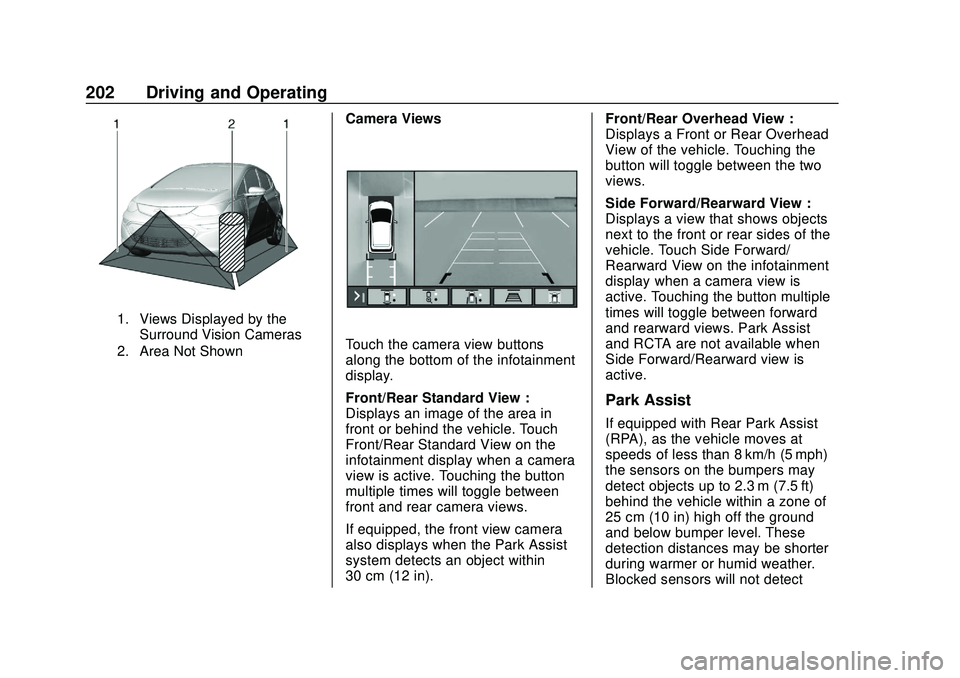
1. Views Displayed by theSurround Vision Cameras
2. Area Not Shown
Camera Views
Touch the camera view buttons
along the bottom of the infotainment
display.
Front/Rear Standard View :
Displays an image of the area in
front or behind the vehicle. Touch
Front/Rear Standard View on the
infotainment display when a camera
view is active. Touching the button
multiple times will toggle between
front and rear camera views.
If equipped, the front view camera
also displays when the Park Assist
system detects an object within
30 cm (12 in). Front/Rear Overhead View :
Displays a Front or Rear Overhead
View of the vehicle. Touching the
button will toggle between the two
views.
Side Forward/Rearward View :
Displays a view that shows objects
next to the front or rear sides of the
vehicle. Touch Side Forward/
Rearward View on the infotainment
display when a camera view is
active. Touching the button multiple
times will toggle between forward
and rearward views. Park Assist
and RCTA are not available when
Side Forward/Rearward view is
active.
Park Assist
If equipped with Rear Park Assist
(RPA), as the vehicle moves at
speeds of less than 8 km/h (5 mph)
the sensors on the bumpers may
detect objects up to 2.3 m (7.5 ft)
behind the vehicle within a zone of
25 cm (10 in) high off the ground
and below bumper level. These
detection distances may be shorter
during warmer or humid weather.
Blocked sensors will not detect
Page 204 of 347
Chevrolet BOLT EV Owner Manual (GMNA-Localizing-U.S./Canada/Mexico-
13556250) - 2020 - CRC - 2/11/20
Driving and Operating 203
objects and can also cause false
detections. Keep the sensors clean
of mud, dirt, snow, ice, and slush;
and clean sensors after a car wash
in freezing temperatures.
{Warning
The Park Assist system does not
detect children, pedestrians,
bicyclists, animals, or objects
located below the bumper or that
are too close or too far from the
vehicle. It is not available at
speeds greater than 8 km/h
(5 mph). To prevent injury, death,
or vehicle damage, even with
Park Assist, always check the
area around the vehicle and
check all mirrors before moving
forward or backing.
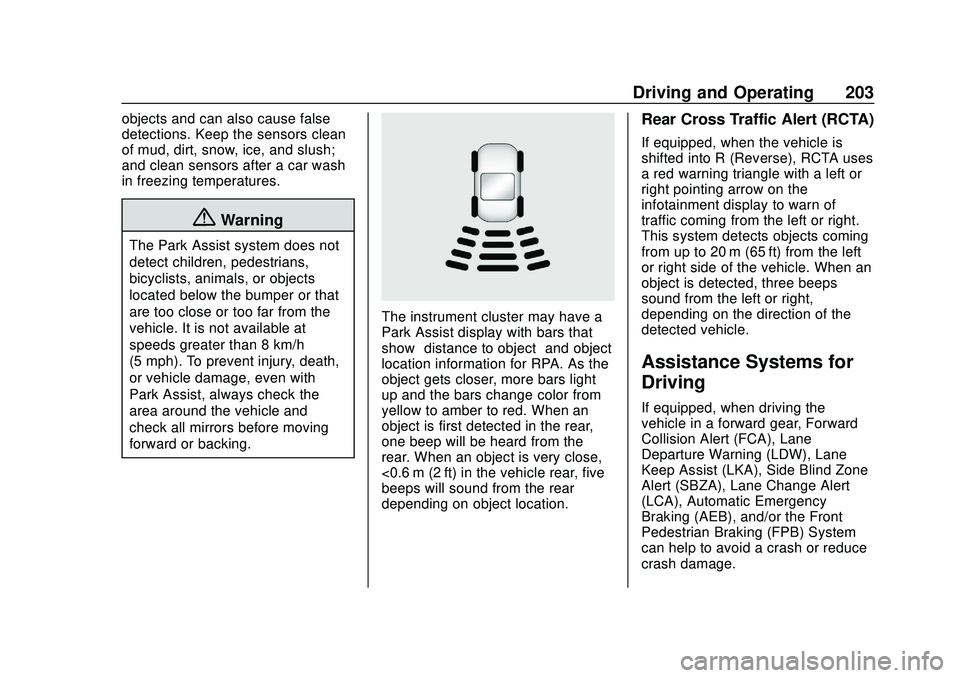
The instrument cluster may have a
Park Assist display with bars that
show“distance to object” and object
location information for RPA. As the
object gets closer, more bars light
up and the bars change color from
yellow to amber to red. When an
object is first detected in the rear,
one beep will be heard from the
rear. When an object is very close,
<0.6 m (2 ft) in the vehicle rear, five
beeps will sound from the rear
depending on object location.
Rear Cross Traffic Alert (RCTA)
If equipped, when the vehicle is
shifted into R (Reverse), RCTA uses
a red warning triangle with a left or
right pointing arrow on the
infotainment display to warn of
traffic coming from the left or right.
This system detects objects coming
from up to 20 m (65 ft) from the left
or right side of the vehicle. When an
object is detected, three beeps
sound from the left or right,
depending on the direction of the
detected vehicle.
Assistance Systems for
Driving
If equipped, when driving the
vehicle in a forward gear, Forward
Collision Alert (FCA), Lane
Departure Warning (LDW), Lane
Keep Assist (LKA), Side Blind Zone
Alert (SBZA), Lane Change Alert
(LCA), Automatic Emergency
Braking (AEB), and/or the Front
Pedestrian Braking (FPB) System
can help to avoid a crash or reduce
crash damage.
Page 207 of 347
Chevrolet BOLT EV Owner Manual (GMNA-Localizing-U.S./Canada/Mexico-
13556250) - 2020 - CRC - 2/11/20
206 Driving and Operating
driving in a forward gear. Depending
on the situation, the vehicle may
automatically brake moderately or
hard. This automatic emergency
braking can only occur if a vehicle is
detected. This is shown by the FCA
vehicle ahead indicator being lit.
SeeForward Collision Alert (FCA)
System 0204.
The system works when driving in a
forward gear between 8 km/h
(5 mph) and 80 km/h (50 mph).
It can detect vehicles up to
approximately 60 m (197 ft).
{Warning
AEB is an emergency crash
preparation feature and is not
designed to avoid crashes. Do
not rely on AEB to brake the
vehicle. AEB will not brake
outside of its operating speed
range and only responds to
detected vehicles. (Continued)
Warning (Continued)
AEB may not:
. Detect a vehicle ahead on
winding or hilly roads.
. Detect all vehicles,
especially vehicles with a
trailer, tractors, muddy
vehicles, etc.
. Detect a vehicle when
weather limits visibility, such
as in fog, rain, or snow.
. Detect a vehicle ahead if it
is partially blocked by
pedestrians or other objects.
Complete attention is always
required while driving, and you
should be ready to take action
and apply the brakes and/or steer
the vehicle to avoid crashes.
AEB may slow the vehicle to a
complete stop to try to avoid a
potential crash. If this happens, AEB
may engage the Electric Parking Brake (EPB) to hold the vehicle at a
stop. Release the EPB or firmly
press the accelerator pedal.
{Warning
AEB may automatically brake the
vehicle suddenly in situations
where it is unexpected and
undesired. It could respond to a
turning vehicle ahead, guardrails,
signs, and other non-moving
objects. To override AEB, firmly
press the accelerator pedal, if it is
safe to do so.
Intelligent Brake Assist (IBA)
IBA may activate when the brake
pedal is applied quickly by providing
a boost to braking based on the
speed of approach and distance to
a vehicle ahead.
Minor brake pedal pulsations or
pedal movement during this time is
normal and the brake pedal should
continue to be applied as needed.
Page 218 of 347
Chevrolet BOLT EV Owner Manual (GMNA-Localizing-U.S./Canada/Mexico-
13556250) - 2020 - CRC - 2/11/20
Driving and Operating 217
5. Follow the steps listed on thecharging station to start
charging.
6. Once charging, the DC vehicle plug will be locked to the DC
charge port and cannot be
disconnected while charging is
active.
7. Verify that the Charging Status Indicator illuminates on top of
the instrument panel and an
audible chirp occurs. See
Charging Status Feedback
0218.
Caution
Do not attempt to disconnect the
DC vehicle plug while charging is
active. This action may damage
the vehicle or charging station
hardware.
Stop Charge
Controls on the charging station can
be used to stop the charge process
at any time. To stop the charge when inside the
vehicle, use the Stop button on the
Charging screen, or press the
button on top of the AC vehicle cord
handle.
Stop Charge
—Automatic
When the vehicle no longer needs
to use power from the charging
station, it will stop charging and the
DC vehicle plug will be unlocked
from the DC charge port.
Energy can still be consumed from
the charging station when the
vehicle’s displays and indicators
show that the battery is fully
charged. This is to ensure the
battery is in optimal temperature
operating range to maximize vehicle
range. See Programmable Charging
0 107.
End Charge 1. Wait until the charging process has been fully stopped, the
vehicle plug is unlocked, and
the Charging Status Indicator is
solid green or off. If the vehicle plug does not
unlock from the vehicle charge
port after a charge, contact
Roadside Assistance for
assistance. See
Roadside
Assistance Program 0316.
2. Unplug the DC vehicle plug from the DC charge port on the
vehicle and close the dust
cover.
3. Close the charge port door by pressing firmly in the center
until it latches.
4. The Electric Parking Brake should be manually
disengaged before driving the
vehicle.
5. To start another DC charge, remove the DC vehicle plug
and reconnect.
Delayed Charging
Override
To temporarily override a delayed
charge event, unplug the charge
cord from the charge port and then
Page 256 of 347
Chevrolet BOLT EV Owner Manual (GMNA-Localizing-U.S./Canada/Mexico-
13556250) - 2020 - CRC - 2/11/20
Vehicle Care 255
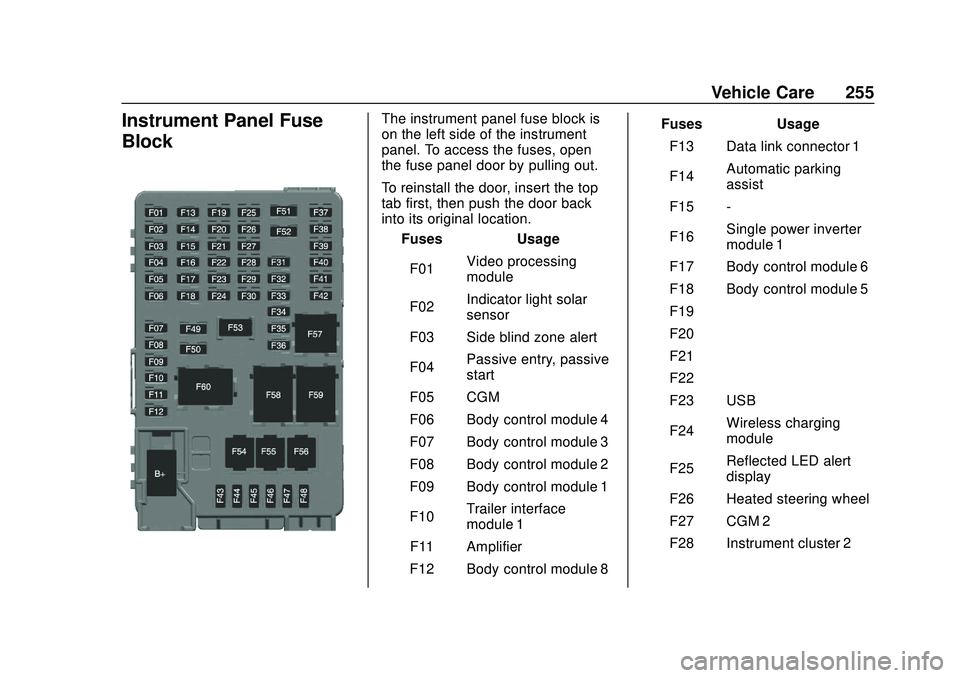
Instrument Panel Fuse
BlockThe instrument panel fuse block is
on the left side of the instrument
panel. To access the fuses, open
the fuse panel door by pulling out.
To reinstall the door, insert the top
tab first, then push the door back
into its original location.Fuses Usage
F01 Video processing
module
F02 Indicator light solar
sensor
F03 Side blind zone alert
F04 Passive entry, passive
start
F05 CGM
F06 Body control module 4
F07 Body control module 3
F08 Body control module 2
F09 Body control module 1
F10 Trailer interface
module 1
F11 Amplifier
F12 Body control module 8 Fuses Usage
F13 Data link connector 1
F14 Automatic parking
assist
F15 -
F16 Single power inverter
module 1
F17 Body control module 6
F18 Body control module 5
F19 –
F20 –
F21 –
F22 –
F23 USB
F24 Wireless charging
module
F25 Reflected LED alert
display
F26 Heated steering wheel
F27 CGM 2
F28 Instrument cluster 2
Page 331 of 347
Chevrolet BOLT EV Owner Manual (GMNA-Localizing-U.S./Canada/Mexico-
13556250) - 2020 - CRC - 2/11/20
330 OnStar
Languages
The vehicle can be programmed to
respond in multiple languages.
Press
Qand ask for an Advisor.
Advisors are available in English,
Spanish, and French. Available
languages may vary by country.
Potential Issues
OnStar cannot perform Remote
Door Unlock or Stolen Vehicle
Assistance after the vehicle has
been off continuously for 10 days
without an ignition cycle. If the
vehicle has not been started for
10 days, OnStar can contact
Roadside Assistance or a locksmith
to help gain access to the vehicle.
Global Positioning
System (GPS)
. Obstruction of the GPS can
occur in a large city with tall
buildings; in parking garages;
around airports; in tunnels and
underpasses; or in an area with
very dense trees. If GPS signals
are not available, the OnStar
system should still operate to call OnStar. However, OnStar
could have difficulty identifying
the exact location.
. In emergency situations, OnStar
can use the last stored GPS
location to send to emergency
responders.
A temporary loss of GPS can cause
loss of the ability to send a
Turn-by-Turn Navigation route. The
Advisor may give a verbal route or
may ask for a call back after the
vehicle is driven into an open area.
Cellular and GPS Antennas
Cellular reception is required for
OnStar to send remote signals to
the vehicle. Do not place items over
or near the antenna to prevent
blocking cellular and GPS signal
reception.
Unable to Connect to OnStar
Message
If there is limited cellular coverage
or the cellular network has reached
maximum capacity, this message may come on. Press
Qto try the
call again or try again after driving a
few miles into another cellular area.
Vehicle and Power Issues
OnStar services require a vehicle
electrical system, wireless service,
and GPS satellite technologies to be
available and operating for features
to function properly. These systems
may not operate if the battery is
discharged or disconnected.
Add-on Electrical Equipment
The OnStar system is integrated
into the electrical architecture of the
vehicle. Do not add any electrical
equipment. See Add-On Electrical
Equipment 0230. Added electrical
equipment may interfere with the
operation of the OnStar system and
cause it to not operate.
Vehicle Software Updates
OnStar or GM may remotely deliver
software updates or changes to the
vehicle without further notice or
consent. These updates or changes
may enhance or maintain safety,
security, or the operation of the
Page 335 of 347
Chevrolet BOLT EV Owner Manual (GMNA-Localizing-U.S./Canada/Mexico-
13556250) - 2020 - CRC - 2/11/20
334 Connected Services
devices. Manage data usage by
turning Wi-Fi on or off on your
mobile device, using the
myChevrolet mobile app, or by
contacting an OnStar Advisor. On
some vehicles, Wi-Fi can also be
managed from the Wi-Fi
Hotspot menu.
myChevrolet Mobile App (If
Available)
Download the myChevrolet mobile
app to compatible Apple and
Android smartphones. Chevrolet
users can access the following
services from a smartphone:
.Remotely start/stop the vehicle,
if factory-equipped.
. Lock/unlock doors, if equipped
with automatic locks.
. Activate the horn and lamps.
. Check the vehicle’s energy level,
range or tire pressure,
if factory-equipped with the Tire
Pressure Monitor System.
. Send destinations to the vehicle.
. Locate the vehicle on a map
(U.S. market only). .
Turn the vehicle's Wi-Fi hotspot
on/off, manage settings, and
monitor data consumption,
if equipped.
. Locate a dealer and schedule
service.
. Request roadside assistance.
. Set a parking reminder with pin
drop, take a photo, make a note,
and set a timer.
. Connect with Chevrolet on social
media.
Features are subject to change. For
myChevrolet mobile app information
and compatibility, see
my.chevrolet.com.
An active OnStar or connected
service plan may be required.
A compatible device,
factory-installed remote start, and
power locks are required. Data rates
apply. See www.onstar.com for
details and system limitations.
Remote Services
Contact an OnStar Advisor to
unlock the doors or sound the horn
and flash the lamps.
Marketplace
OnStar Advisors can provide offers
from restaurants and retailers on
your route, help locate hotels,
or book a room. These services
vary by market.
Diagnostics
By monitoring and reporting on the
vehicle's key systems, OnStar
Advanced Diagnostics, if equipped,
provides a way to keep up on
maintenance. Capabilities vary by
model. See www.onstar.com for
details and system limitations.
Features are subject to change. For
updates on feature capabilities, see
my.chevrolet.com. Message and
data rates may apply.
Page 337 of 347

Chevrolet BOLT EV Owner Manual (GMNA-Localizing-U.S./Canada/Mexico-
13556250) - 2020 - CRC - 2/11/20
336 Index
ArmrestRear Seat . . . . . . . . . . . . . . . . . . . . . . 38
Assistance Program, Roadside . . . . . . . . . . . . . . . . . . . . . . 316
Assistance Systems for Driving . . . . . . . . . . . . . . . . . . . . . . . . 203
Assistance Systems for
Parking and Backing . . . . . . . . . . 200
Audio Bluetooth . . . . . . . . . . . . . . . . . . . . . 150
Theft-Deterrent Feature . . . . . . . 136
Automatic Climate Control System . . . . . . . 163
Door Locks . . . . . . . . . . . . . . . . . . . . . 19
Emergency Braking (AEB) . . . . 205
Headlamp System . . . . . . . . . . . . 131
Auxiliary Devices . . . . . . . . . . . . . . . . . . . . . . . 149
B
Battery . . . . . . . . . . . . . . . . . . . . . . . . . . 98Exterior Lighting BatterySaver . . . . . . . . . . . . . . . . . . . . . . . 134
Power Protection . . . . . . . . . . . . . 134
Battery - North America . . . . 242, 284
Battery Gauge High Voltage . . . . . . . . . . . . . . . . . . . . 98
Blade Replacement, Wiper . . . . . 244 Bluetooth
Overview . . . . . . . . . . . . . . . . . . . . . 153
Bluetooth Audio . . . . . . . . . . . . . . . . 150
Brake Parking, Electric . . . . . . . . . . . . . . 192
System Warning Light . . . . . . . . 102
Brakes . . . . . . . . . . . . . . . . . . . . . . . . . . 240
Antilock . . . . . . . . . . . . . . . . . . . . . . . 191
Assist . . . . . . . . . . . . . . . . . . . . . . . . . 193
Fluid . . . . . . . . . . . . . . . . . . . . . . . . . . 241
Regenerative Braking . . . . . . . . . 194
Braking . . . . . . . . . . . . . . . . . . . . . . . . . 173 AutomaticEmergency (AEB) . . . . . . . . . . . 205
Braking System Front Pedestrian (FPB) . . . . . . . 207
Break-In, New Vehicle . . . . . . . . . . 182
Bulb Replacement Halogen Bulbs . . . . . . . . . . . . . . . . 247
Headlamp Aiming . . . . . . . . . . . . . 247
Headlamps . . . . . . . . . . . . . . . . . . . 247
High Intensity Discharge(HID) Lighting . . . . . . . . . . . . . . . 248
License Plate Lamps . . . . . . . . . 249
Taillamps, Turn Signal, Stoplamps, and Back-up
Lamps . . . . . . . . . . . . . . . . . . . . . . 248
Buying New Tires . . . . . . . . . . . . . . . 271
C
Calibration . . . . . . . . . . . . . . . . . . . . . . . 89
California Perchlorate MaterialsRequirements . . . . . . . . . . . . . . . 234
California Proposition
65 Warning . . . . . . . . . .233, 242, 284, Back Cover
Canadian Vehicle Owners . . . . . . . . 2
Capacities and
Specifications . . . . . . . . . . . . . . . . . 311
Carbon Monoxide Liftgate . . . . . . . . . . . . . . . . . . . . . . . . . 21
Winter Driving . . . . . . . . . . . . . . . . 177
Cargo Cover . . . . . . . . . . . . . . . . . . . . . . . . . . . 82
Management System . . . . . . . . . . . 83
Caution, Danger, and Warning . . . . 2
Center Console Storage . . . . . . . . . 82
Chains, Tire . . . . . . . . . . . . . . . . . . . . 276
Charge Cord . . . . . . . . . . . . . . . . . . . . 222
Charging Delay Override . . . . . . . . . . . . . . . 217
Electrical Requirements . . . . . . 229
Plug-In . . . . . . . . . . . . . . . . . . . . . . . 214
Programmable . . . . . . . . . . . . . . . . 107
Utility Interruption . . . . . . . . . . . . . 228