instrument panel CHRYSLER 200 2013 1.G Owners Manual
[x] Cancel search | Manufacturer: CHRYSLER, Model Year: 2013, Model line: 200, Model: CHRYSLER 200 2013 1.GPages: 517, PDF Size: 3.4 MB
Page 289 of 517
•Extended use of recirculation may cause the windows to
fog. If the interior of the windows begins to fog, press
the Recirculation button to return to outside air. Some
temp/humidity conditions will cause captured interior
air to condense on windows and hamper visibility. For
this reason, the system will not allow Recirculation to be
selected while in defrost. Attempting to use the recircu-
lation while in Defrost will cause the LED in the control
button to blink and then turn off.
• Most of the time, when in Automatic Operation, you
can temporarily put the system into Recirculation
Mode by pressing the Recirculation button. However,
under certain conditions, while in Automatic Mode,
the system is blowing air out the defrost vents. When
these conditions are present, and the Recirculation
button is pressed, the indicator will flash and then turn
off. This tells you that you are unable to go into
Recirculation Mode at this time. If you would like the
system to go into Recirculation Mode, you must first move the Mode knob to Panel, Mix and then press the
Recirculation button. This feature reduces the possibil-
ity of window fogging.
Operating Tips
NOTE:
Refer to the chart at the end of this section for
suggested control settings for various weather conditions.
Summer Operation
The engine cooling system in air-conditioned vehicles
must be protected with a high-quality antifreeze coolant
to provide proper corrosion protection and to protect
against engine overheating. A solution of 50% OAT
(Organic Additive Technology) coolant that meets the
requirements of Chrysler Material Standard MS-12106
and 50% water is recommended. Refer to “Maintenance
Procedures” in “Maintaining Your Vehicle” for proper
coolant selection.
4
UNDERSTANDING YOUR INSTRUMENT PANEL 287
Page 290 of 517
Winter Operation
Use of the air Recirculation Mode during winter months
is not recommended because it may cause window
fogging.
Vacation Storage
Anytime you store your vehicle, or keep it out of service
(i.e., vacation) for two weeks or more, run the air
conditioning system at idle for about five minutes in the
fresh air and high blower settings. This will ensure
adequate system lubrication to minimize the possibility
of compressor damage when the system is started again.
Window Fogging
Interior fogging on the windshield can be quickly re-
moved by turning the mode selector to Defrost. The Mix
mode can be used to maintain a clear windshield and
provide sufficient heating. If side window fogging be-
comes a problem, increase blower speed. Vehicle win-
dows tend to fog on the inside in mild but rainy or humid
weather.
NOTE:Recirculate without A/C should not be used for
long periods as fogging may occur.
288 UNDERSTANDING YOUR INSTRUMENT PANEL
Page 291 of 517
Side Window Demisters
A side window demister outlet is located at each end of
the instrument panel. These non-adjustable outlets direct
air toward the side windows when the system is in the
FLOOR, MIX, or DEFROST mode. The air is directed at
the area of the windows through which you view the
outside mirrors.
Outside Air Intake
Make sure the air intake, located directly in front of the
windshield, is free of obstructions such as leaves. Leaves
collected in the air intake may reduce airflow, and if they
enter the plenum, they could plug the water drains. In
winter months, make sure the air intake is clear of ice,
slush, and snow.
A/C Air Filter — If Equipped
The A/C Filter prevents most dust and pollen from enter-
ing the cabin. The filter acts on air coming from outside the
vehicle and recirculated air within the passenger compart-
ment. Refer to “Maintenance Procedures” in “Maintaining
Your Vehicle” for A/C Air Filter service information or see
your authorized dealer for service. Refer to “Maintenance
Schedules” for filter service intervals.
4
UNDERSTANDING YOUR INSTRUMENT PANEL 289
Page 292 of 517
Control Setting Suggestions for Various Weather Conditions
290 UNDERSTANDING YOUR INSTRUMENT PANEL
Page 398 of 517
HAZARD WARNING FLASHERS
The Hazard Warning flasher switch is located on the
instrument panel, below the radio.Press the switch to turn on the Hazard Warning
flasher. When the switch is activated, all direc-
tional turn signals will flash on and off to warn oncoming
traffic of an emergency. Press the switch a second time to
turn off the Hazard Warning flashers.
This is an emergency warning system and it should not
be used when the vehicle is in motion. Use it when your
vehicle is disabled and it is creating a safety hazard for
other motorists.
When you must leave the vehicle to seek assistance, the
Hazard Warning flashers will continue to operate even
though the ignition is placed in the OFF position.
NOTE: With extended use the Hazard Warning flashers
may wear down your battery.
IF YOUR ENGINE OVERHEATS
In any of the following situations, you can reduce the
potential for overheating by taking the appropriate action.
• On the highways — Slow down.
• In city traffic — While stopped, put transaxle in
NEUTRAL, but do not increase engine idle speed.
CAUTION!
Driving with a hot cooling system could damage
your vehicle. If temperature gauge reads “H”, pull
over and stop the vehicle with the engine at idle,
when safe. Turn the air conditioner off and wait until
the pointer drops back into the normal range. After
appropriate action has been taken, if the pointer
remains on the “H”, turn the engine off immediately,
and call for service.
396 WHAT TO DO IN EMERGENCIES
Page 439 of 517
3.Disconnect the glove box door dampener from the slot
on the side of the box. This is done by grasping the
dampener connector (on the outside of the box) and the
end of the connector pin (on the inside of the box) with
your thumb and forefinger and pulling outward while
lightly lifting upward on the door with your other hand.
Once disconnected, the dampener will retract under-
neath the instrument panel if you release it.
4. Pivot the glove box downward.
5. Disengage the two retaining tabs that secure the filtercover to the HVAC housing and remove the cover.
6. Remove the A/C Air Filter by pulling it straight out ofthe housing.
A/C Air Filter Replacement
7
MAINTAINING YOUR VEHICLE 437
Page 459 of 517
To minimize the possibility of scratching the lenses and
reducing light output, avoid wiping with a dry cloth. To
remove road dirt, wash with a mild soap solution fol-
lowed by rinsing.
Do not use abrasive cleaning components, solvents, steel
wool or other aggressive material to clean the lenses.
Stain Repel Fabric Cleaning Procedure – If Equipped
Stain Repel seats may be cleaned in the following manner:
•Remove as much of the stain as possible by blotting
with a clean, dry towel.
• Blot any remaining stain with a clean, damp towel.
• For tough stains, apply MOPAR® Total Clean, or a
mild soap solution to a clean, damp cloth and remove
stain. Use a fresh, damp towel to remove soap residue. •
For grease stains, apply MOPAR® Multi-Purpose
Cleaner to a clean, damp cloth and remove stain. Use
a fresh, damp towel to remove soap residue.
• Do not use any harsh solvents or any other form of
protectants on Stain Repel products.
Interior Care
Instrument Panel Cover
The instrument panel cover has a low glare surface,
which minimizes reflections in the windshield. Do not
use protectants or other products, which may cause
undesirable reflections. Use soap and warm water to
restore the low glare surface.
7
MAINTAINING YOUR VEHICLE 457
Page 463 of 517
Cav-ity Car-
tridge Fuse Mini
Fuse Description
1 40 Amp Green — Power Top Module –
If Equipped
2 — 20 Amp YellowBrake Vacuum Pump
3 — 10 Amp RedCenter High Mounted
Stop Light (CHMSL)/
Brake Switch
4 — 10 Amp RedIgnition Switch
5 — 20 Amp YellowTrailer Tow – If
Equipped
6 — 10 Amp RedPower Mirror Switch/
Climate Controls
7 — 30 Amp GreenIgnition Off Draw
(IOD) Sense 1Cav-
ity Car-
tridge Fuse Mini
Fuse Description
8 — 30 Amp GreenIgnition Off Draw
(IOD) Sense 2
9 40 Amp Green Battery Feed – Power
Seats – If Equipped
10 — 20 Amp YellowInstrument Panel/
Power Locks/
Interior Lights
11 — 15 Amp Lt BlueSelectable Power
Outlet (Inside Center
Arm Rest)
12 — 20 Amp Yellow—
13 — 20 Amp YellowIgnition/Cigar Lighter
7
MAINTAINING YOUR VEHICLE 461
Page 464 of 517
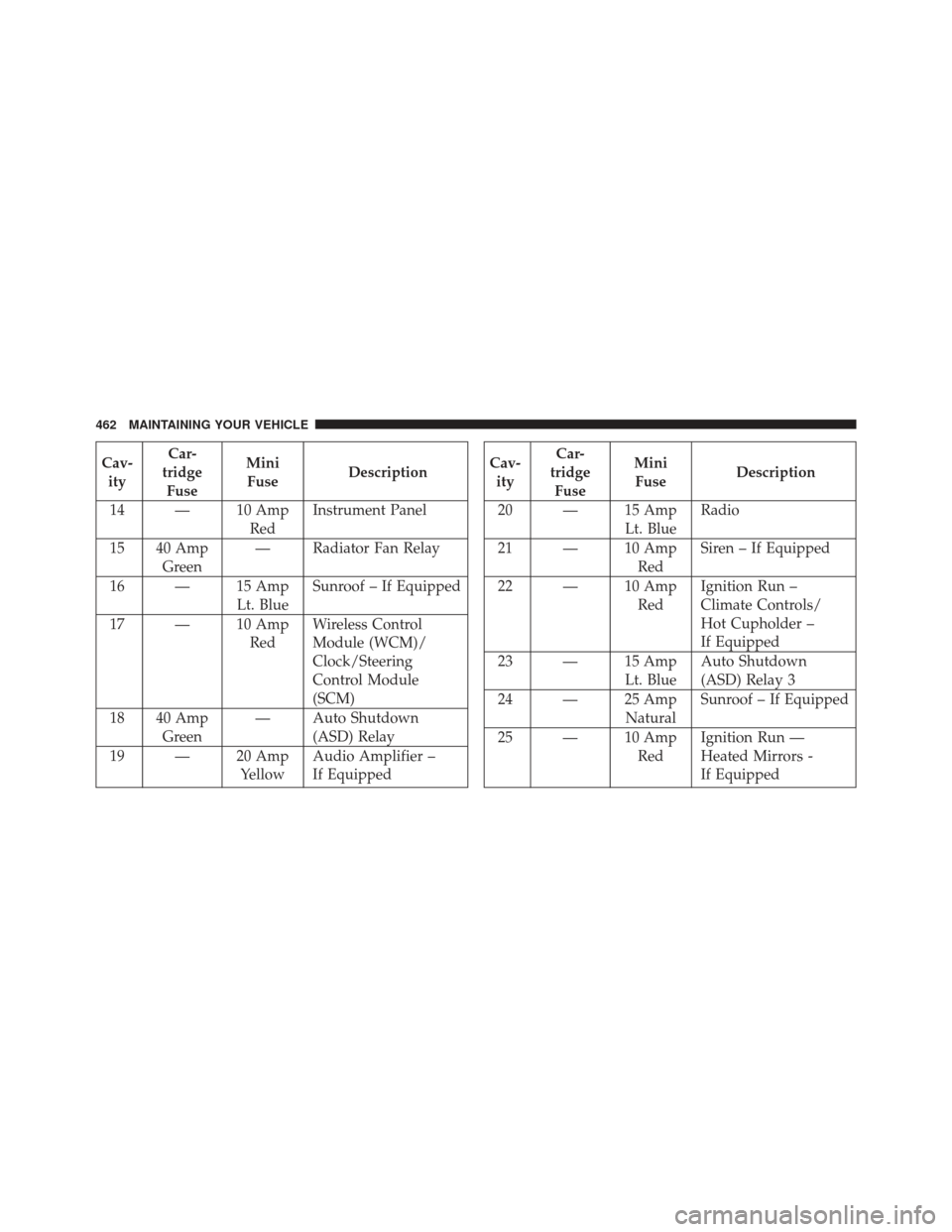
Cav-ity Car-
tridge Fuse Mini
Fuse Description
14 — 10 Amp RedInstrument Panel
15 40 Amp Green — Radiator Fan Relay
16 — 15 Amp Lt. BlueSunroof – If Equipped
17 — 10 Amp RedWireless Control
Module (WCM)/
Clock/Steering
Control Module
(SCM)
18 40 Amp Green — Auto Shutdown
(ASD) Relay
19 — 20 Amp YellowAudio Amplifier –
If EquippedCav-
ity Car-
tridge Fuse Mini
Fuse Description
20 — 15 Amp Lt. BlueRadio
21 — 10 Amp RedSiren – If Equipped
22 — 10 Amp RedIgnition Run –
Climate Controls/
Hot Cupholder –
If Equipped
23 — 15 Amp Lt. BlueAuto Shutdown
(ASD) Relay 3
24 — 25 Amp NaturalSunroof – If Equipped
25 — 10 Amp RedIgnition Run —
Heated Mirrors -
If Equipped
462 MAINTAINING YOUR VEHICLE
Page 478 of 517
MAINTENANCE SCHEDULE
Your vehicle is equipped with an automatic oil change
indicator system. The oil change indicator system will
remind you that it is time to take your vehicle in for
scheduled maintenance.
Based on engine operation conditions, the oil change
indicator message will illuminate. This means that ser-
vice is required for your vehicle. Operating conditions
such as frequent short-trips, trailer tow, extremely hot or
cold ambient temperatures, and E85 fuel usage will
influence when the “Oil Change Required” message is
displayed. Severe Operating Conditions can cause the
change oil message to illuminate as early as 3,500 miles
(5,600 km) since last reset. Have your vehicle serviced as
soon as possible, within the next 500 miles (805 km).Your authorized dealer will reset the oil change indicator
message after completing the scheduled oil change. If a
scheduled oil change is performed by someone other
than your authorized dealer, the message can be reset by
referring to the steps described under “Electronic Vehicle
Information Center (EVIC)/Oil Change Required” in
“Understanding Your Instrument Panel” for further in-
formation
NOTE:
Under no circumstances should oil change inter-
vals exceed 10,000 miles (16,000 km) or twelve months,
whichever comes first.
8
M A I
N T
E
N
A
N
C E
S
C
H E
D
U L
E
S476 MAINTENANCE SCHEDULES