clock CHRYSLER 200 2013 1.G User Guide
[x] Cancel search | Manufacturer: CHRYSLER, Model Year: 2013, Model line: 200, Model: CHRYSLER 200 2013 1.GPages: 517, PDF Size: 3.4 MB
Page 273 of 517
•During all List modes, the iPod® displays all lists in
“wrap-around” mode. So if the track is at the bottom
of the list, just turn the wheel backward (counter-
clockwise) to get to the track faster.
• In List mode, the radio PRESETbuttons are used as
shortcuts to the following lists on the iPod® or
external USB device.
• Preset 1 – Playlists
• Preset 2 – Artists
• Preset 3 – Albums
• Preset 4 – Genres
• Preset 5 – Audiobooks
• Preset 6 – Podcasts •
Pressing a PRESET button will display the current
list on the top line and the first item in that list on the
second line.
•
To exit List mode without selecting a track, press the
same PRESET button again to go back to Play mode.
•LIST button: The LISTbutton will display the top
level menu of the iPod® or external USB device. Turn
the TUNE control knob to list the top-menu item to be
selected and press the TUNEcontrol knob. This will
display the next sub-menu list item on the audio
device, then follow the same steps to go to the desired
track in that list. Not all iPod® or external USB device
sub-menu levels are available on this system.
• MUSIC TYPE button: TheMUSIC TYPE button is
another shortcut button to the genre listing on your
audio device.
4
UNDERSTANDING YOUR INSTRUMENT PANEL 271
Page 276 of 517
STEERING WHEEL AUDIO CONTROLS — IF
EQUIPPEDThe remote sound system controls are located on the rear
surface of the steering wheel, at the three and nine
o’clock positions.
The right-hand rocker switch has a pushbutton in the
center, and controls the volume and mode of the sound
system. Pressing the top of the rocker switch will increase
the volume. Pressing the bottom of the rocker switch will
decrease the volume. Pressing the center button changes
the operation of the radio from AM to FM, or to CD
mode, depending on which radio is in the vehicle.
The left-hand rocker switch has a pushbutton in the
center. The function of the left-hand switch is different,
depending on which mode you are in.
The following describes the left-hand rocker switch op-
eration in each mode.
Remote Sound System Controls(Back View Of Steering Wheel)
274 UNDERSTANDING YOUR INSTRUMENT PANEL
Page 410 of 517
3. Align the valve notch in the wheel cover with thevalve stem on the wheel. Install the cover by hand,
snapping the cover over the two lug nuts. Do not use
a hammer or excessive force to install the cover.
4. Install the remaining lug nuts with the cone shaped end of the nut toward the wheel. Lightly tighten the
lug nuts.
WARNING!
To avoid the risk of forcing the vehicle off the jack,
do not tighten the wheel nuts fully until the vehicle
has been lowered. Failure to follow this warning may
result in personal injury.
5. Lower the vehicle to the ground by turning the jack handle counterclockwise.
Tire And Wheel Cover Or Center Cap
1 — Valve Stem 4 — Wheel Cover
2 — Valve Notch 5 — Mounting Stud
3 — Wheel Lug Nut 408 WHAT TO DO IN EMERGENCIES
Page 411 of 517
6. Finish tightening the lug nuts. Push down on thewrench while at the end of the handle for increased
leverage. Tighten the lug nuts in a star pattern until
each nut has been tightened twice. The correct tight-
ness of each lug nut is 100 ft/lbs (135 N·m). If in doubt
about the correct tightness, have them checked with a
torque wrench by your authorized dealer or service
station.
7. After 25 miles (40 km) check the lug nut torque with a torque wrench to ensure that all lug nuts are properly
seated against the wheel.
Vehicles Without Wheel Covers
1. Mount the road tire on the axle.
2. Install the remaining lug nuts with the cone shapedend of the nut toward the wheel. Lightly tighten the
lug nuts.
WARNING!
To avoid the risk of forcing the vehicle off the jack,
do not tighten the wheel nuts fully until the vehicle
has been lowered. Failure to follow this warning may
result in personal injury.
3. Lower the vehicle to the ground by turning the jack handle counterclockwise.
4. Finish tightening the lug nuts. Push down on the wrench while at the end of the handle for increased
leverage. Tighten the lug nuts in a star pattern until
each nut has been tightened twice. The correct tight-
ness of each lug nut is 100 ft/lbs (135 N·m). If in doubt
about the correct tightness, have them checked with a
torque wrench by your authorized dealer or service
station.
6
WHAT TO DO IN EMERGENCIES 409
Page 464 of 517
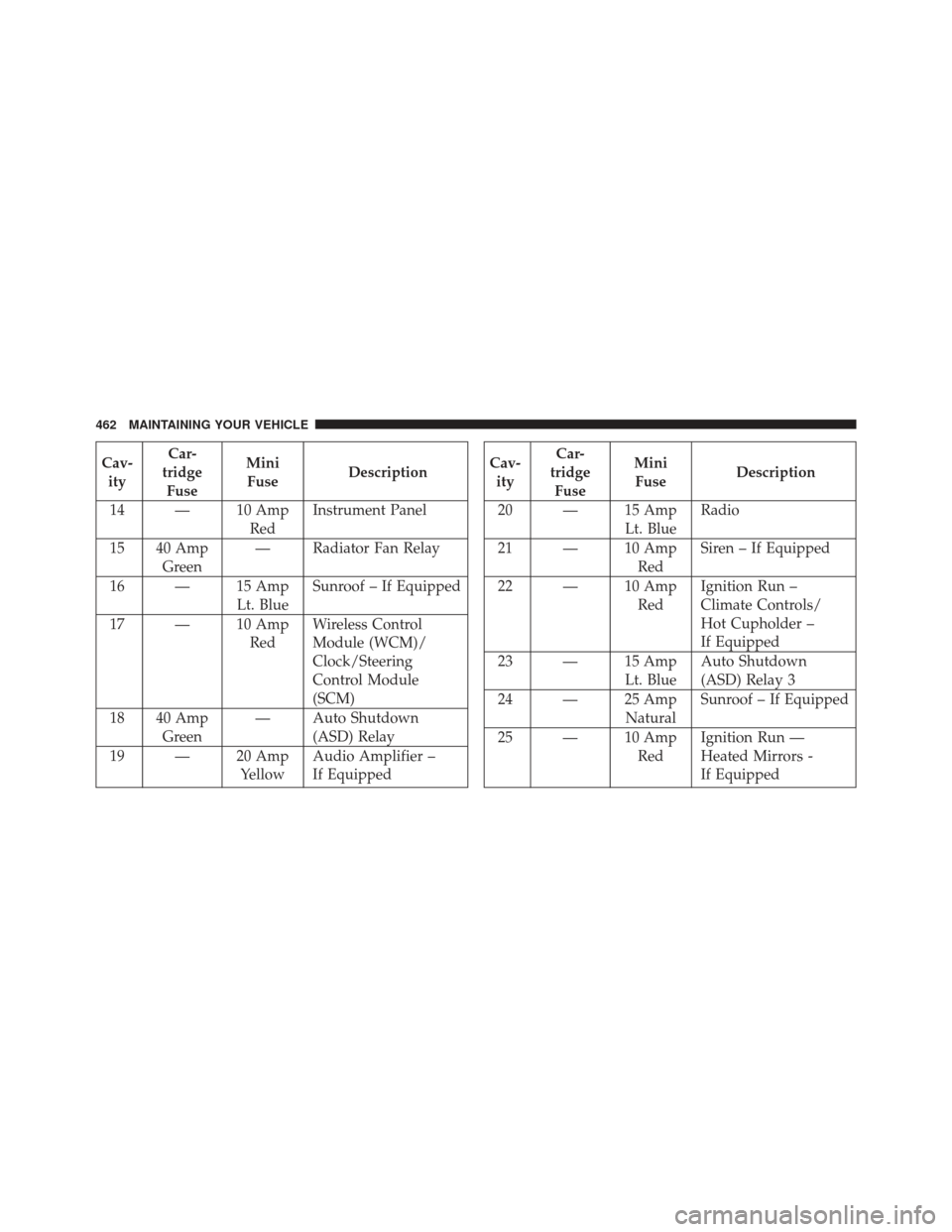
Cav-ity Car-
tridge Fuse Mini
Fuse Description
14 — 10 Amp RedInstrument Panel
15 40 Amp Green — Radiator Fan Relay
16 — 15 Amp Lt. BlueSunroof – If Equipped
17 — 10 Amp RedWireless Control
Module (WCM)/
Clock/Steering
Control Module
(SCM)
18 40 Amp Green — Auto Shutdown
(ASD) Relay
19 — 20 Amp YellowAudio Amplifier –
If EquippedCav-
ity Car-
tridge Fuse Mini
Fuse Description
20 — 15 Amp Lt. BlueRadio
21 — 10 Amp RedSiren – If Equipped
22 — 10 Amp RedIgnition Run –
Climate Controls/
Hot Cupholder –
If Equipped
23 — 15 Amp Lt. BlueAuto Shutdown
(ASD) Relay 3
24 — 25 Amp NaturalSunroof – If Equipped
25 — 10 Amp RedIgnition Run —
Heated Mirrors -
If Equipped
462 MAINTAINING YOUR VEHICLE
Page 470 of 517
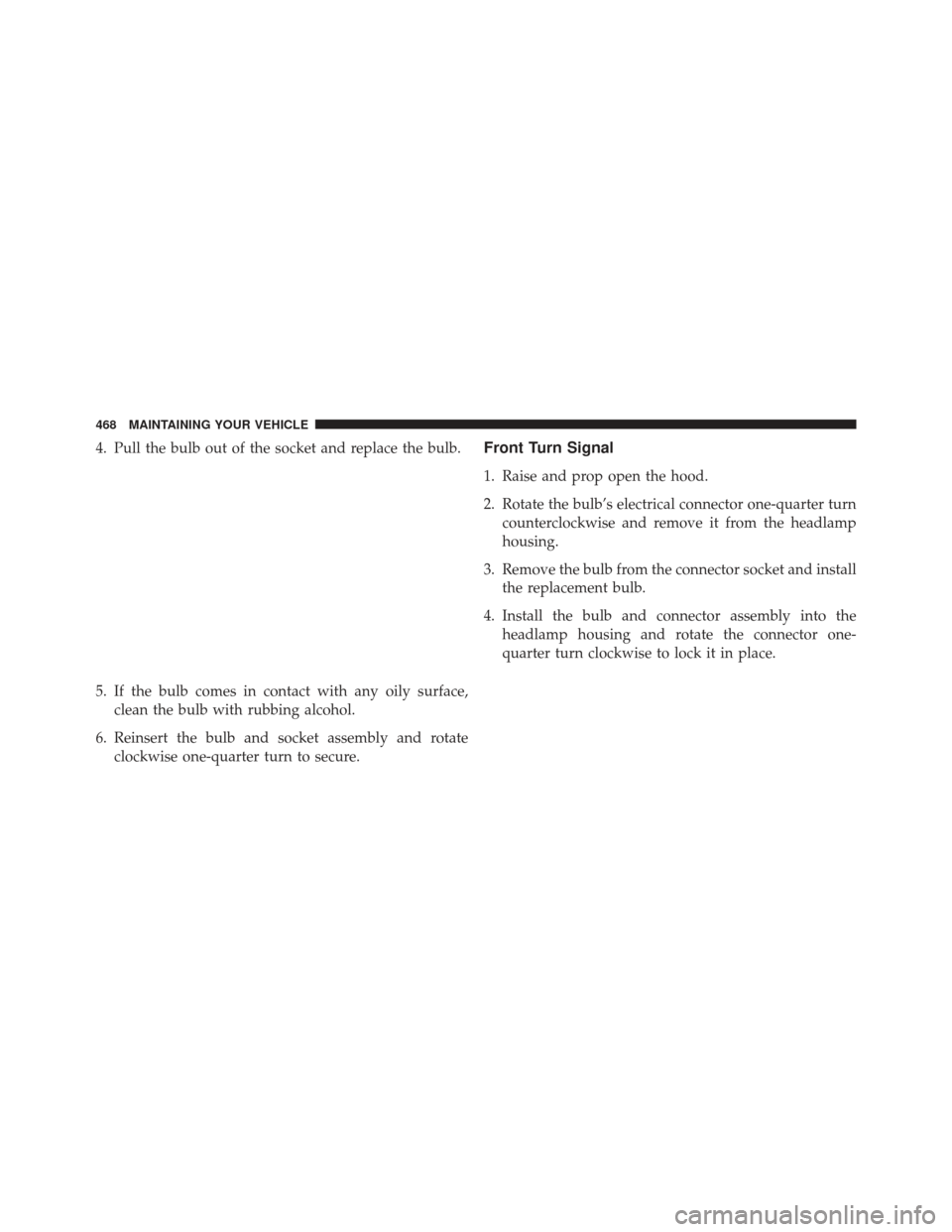
4. Pull the bulb out of the socket and replace the bulb.
5. If the bulb comes in contact with any oily surface,clean the bulb with rubbing alcohol.
6. Reinsert the bulb and socket assembly and rotate clockwise one-quarter turn to secure.Front Turn Signal
1. Raise and prop open the hood.
2. Rotate the bulb’s electrical connector one-quarter turncounterclockwise and remove it from the headlamp
housing.
3. Remove the bulb from the connector socket and install the replacement bulb.
4. Install the bulb and connector assembly into the headlamp housing and rotate the connector one-
quarter turn clockwise to lock it in place.
468 MAINTAINING YOUR VEHICLE
Page 471 of 517
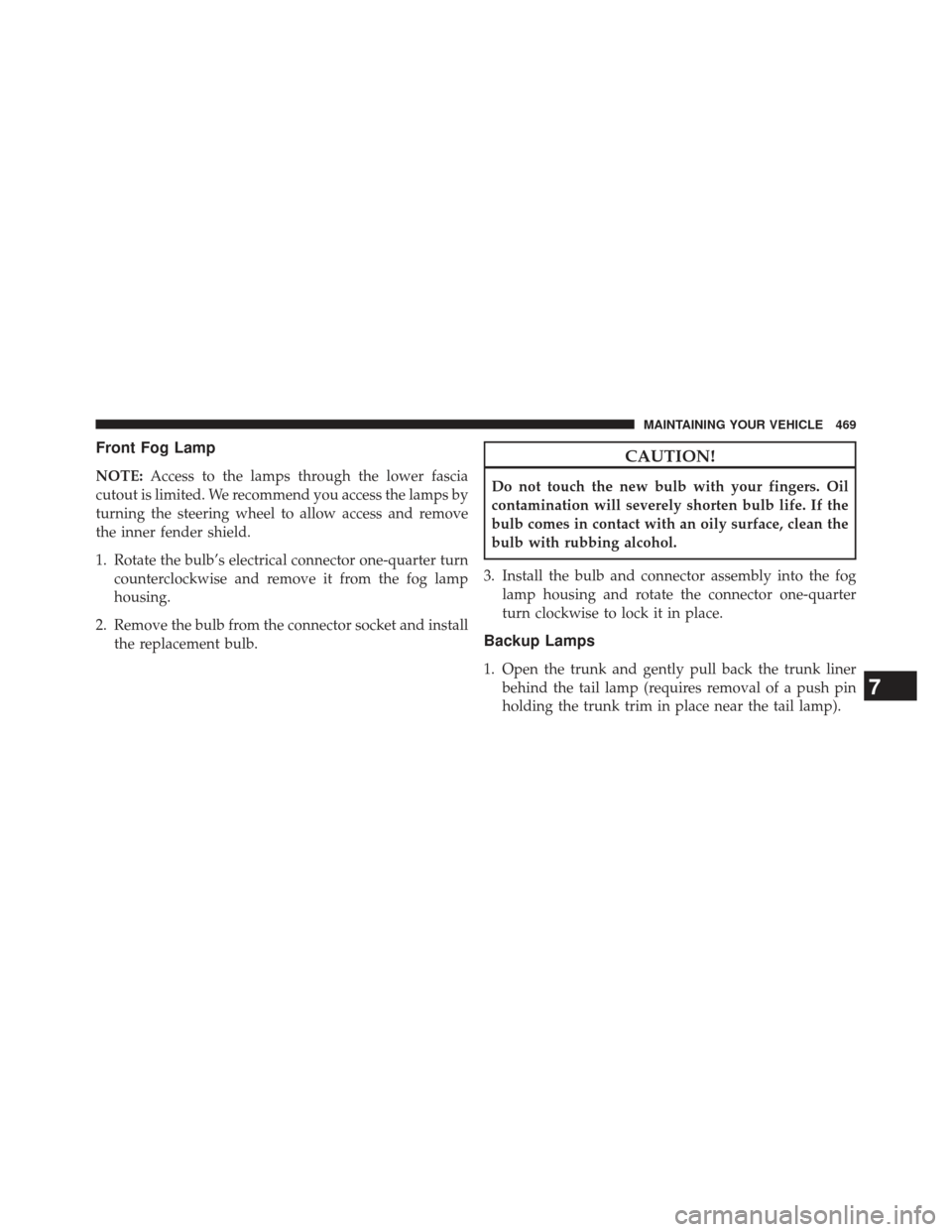
Front Fog Lamp
NOTE:Access to the lamps through the lower fascia
cutout is limited. We recommend you access the lamps by
turning the steering wheel to allow access and remove
the inner fender shield.
1. Rotate the bulb’s electrical connector one-quarter turn counterclockwise and remove it from the fog lamp
housing.
2. Remove the bulb from the connector socket and install the replacement bulb.
CAUTION!
Do not touch the new bulb with your fingers. Oil
contamination will severely shorten bulb life. If the
bulb comes in contact with an oily surface, clean the
bulb with rubbing alcohol.
3. Install the bulb and connector assembly into the fog lamp housing and rotate the connector one-quarter
turn clockwise to lock it in place.
Backup Lamps
1. Open the trunk and gently pull back the trunk linerbehind the tail lamp (requires removal of a push pin
holding the trunk trim in place near the tail lamp).
7
MAINTAINING YOUR VEHICLE 469
Page 500 of 517
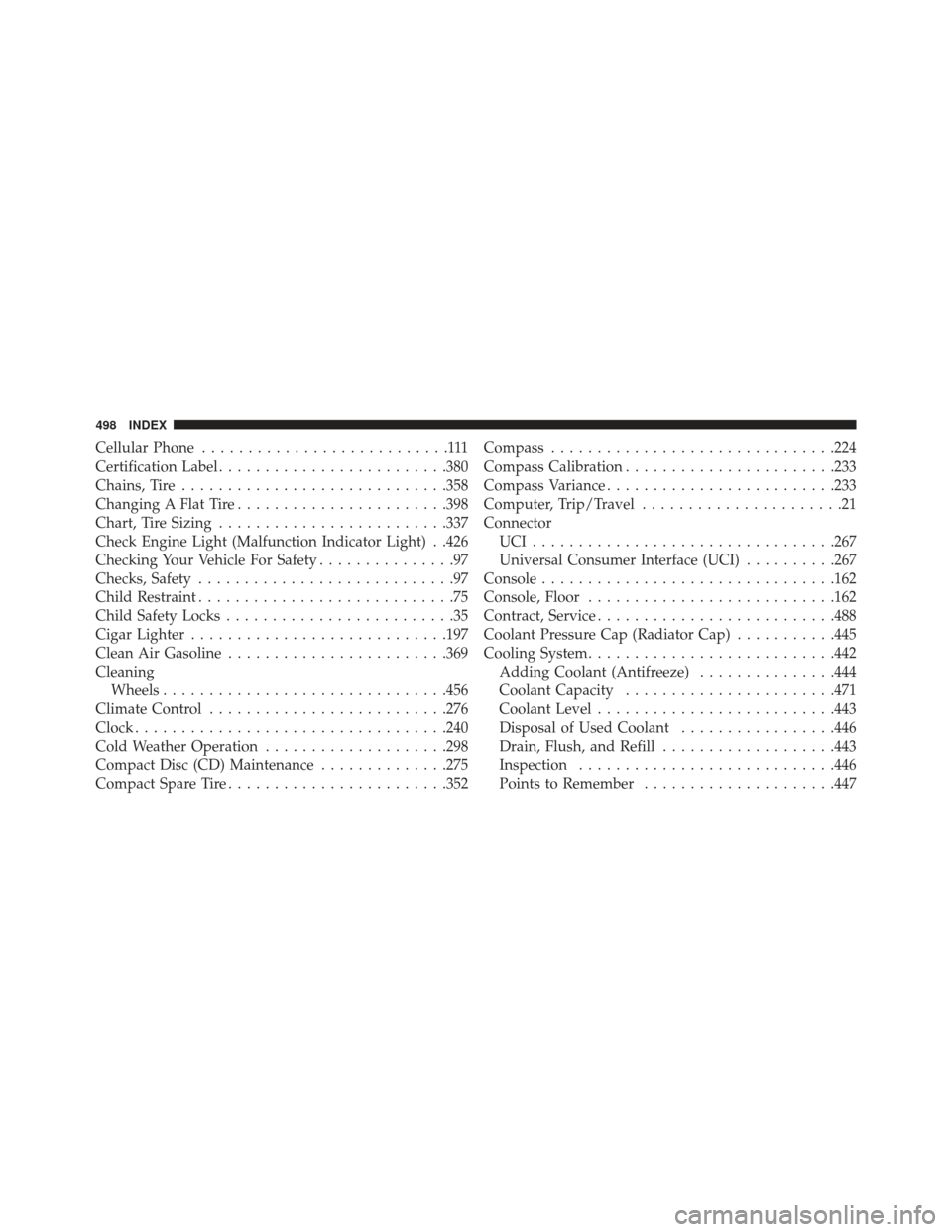
Cellular Phone...........................111
Certification Label ........................ .380
Chains, Tire ............................ .358
Changing A Flat Tire ...................... .398
Chart, Tire Sizing ........................ .337
Check Engine Light (Malfunction Indicator Light) . .426
Checking Your Vehicle For Safety ...............97
Checks, Safety ............................97
Child Restraint ............................75
Child Safety Locks .........................35
Cigar Lighter ........................... .197
Clean Air Gasoline ....................... .369
Cleaning Wheels .............................. .456
Climate Control ......................... .276
Clock ................................. .240
Cold Weather Operation ....................298
Compact Disc (CD) Maintenance ..............275
Compact Spare Tire ....................... .352Compass
.............................. .224
Compass Calibration ...................... .233
Compass Variance ........................ .233
Computer, Trip/Travel ......................21
Connector UCI................................ .267
Universal Consumer Interface (UCI) ..........267
Console ............................... .162
Console, Floor .......................... .162
Contract, Service ......................... .488
Coolant Pressure Cap (Radiator Cap) ...........445
Cooling System .......................... .442
Adding Coolant (Antifreeze) ...............444
Coolant Capacity ...................... .471
Coolant Level ......................... .443
Disposal of Used Coolant .................446
Drain, Flush, and Refill ...................443
Inspection ........................... .446
Points to Remember .....................447
498 INDEX
Page 512 of 517
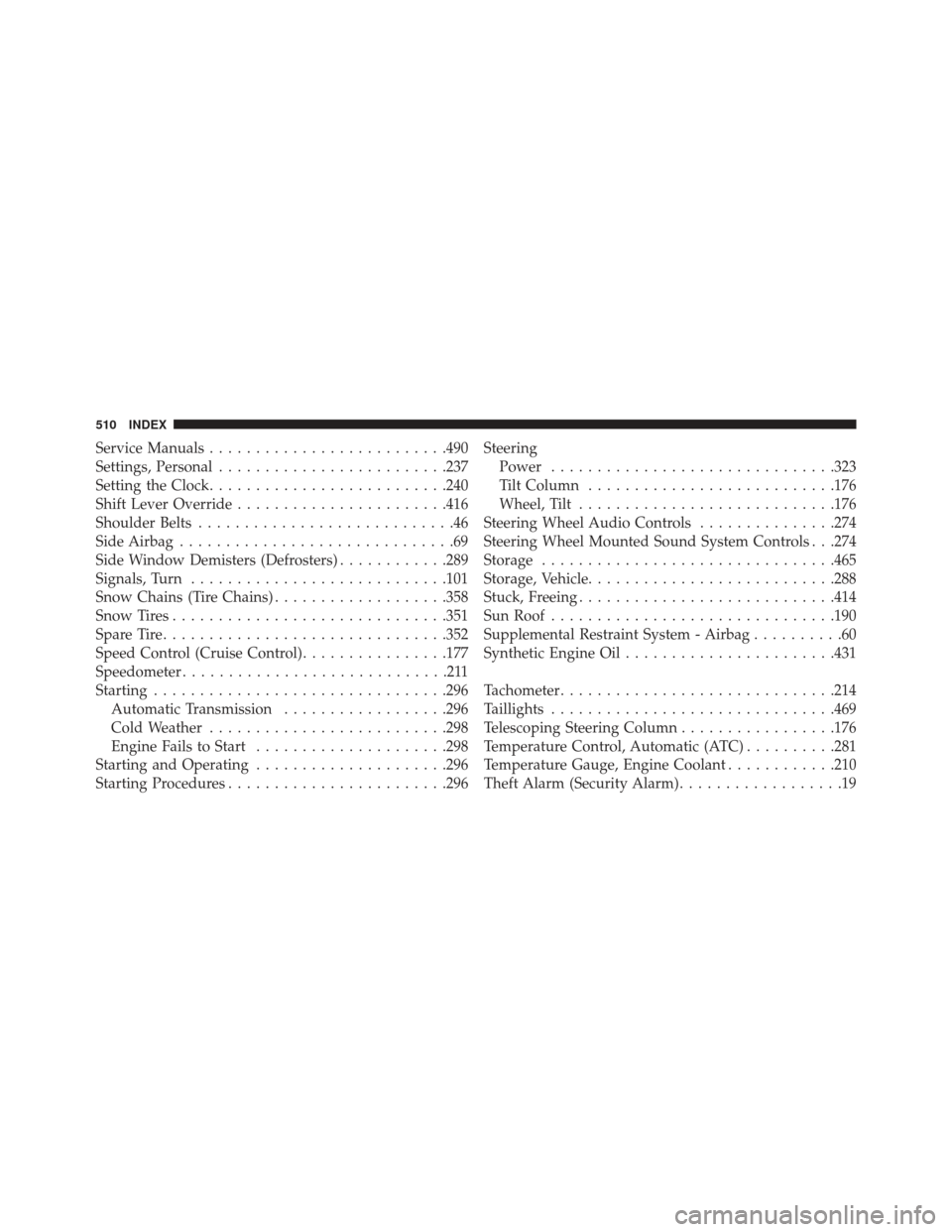
Service Manuals......................... .490
Settings, Personal ........................ .237
Setting the Clock ......................... .240
Shift Lever Override ...................... .416
Shoulder Belts ............................46
Side Airbag ..............................69
Side Window Demisters (Defrosters) ............289
Signals, Turn ........................... .101
Snow Chains (Tire Chains) ...................358
Snow Tires ............................. .351
Spare Tire .............................. .352
Speed Control (Cruise Control) ................177
Speedometer .............................211
Starting ............................... .296
Automatic Transmission ..................296
Cold Weather ......................... .298
Engine Fails to Start .....................298
Starting and Operating .....................296
Starting Procedures ....................... .296Steering
Power .............................. .323
Tilt Column .......................... .176
Wheel, Tilt ........................... .176
Steering Wheel Audio Controls ...............274
Steering Wheel Mounted Sound System Controls . . .274
Storage ............................... .465
Storage, Vehicle .......................... .288
Stuck, Freeing ........................... .414
Sun Roof .............................. .190
Supplemental Restraint System - Airbag ..........60
Synthetic Engine Oil ...................... .431
Tachometer ............................. .214
Taillights .............................. .469
Telescoping Steering Column .................176
Temperature Control, Automatic (ATC) ..........281
Temperature Gauge, Engine Coolant ............210
Theft Alarm (Security Alarm) ..................19
510 INDEX