lights CHRYSLER 200 2015 2.G Owner's Guide
[x] Cancel search | Manufacturer: CHRYSLER, Model Year: 2015, Model line: 200, Model: CHRYSLER 200 2015 2.GPages: 698, PDF Size: 5.12 MB
Page 281 of 698
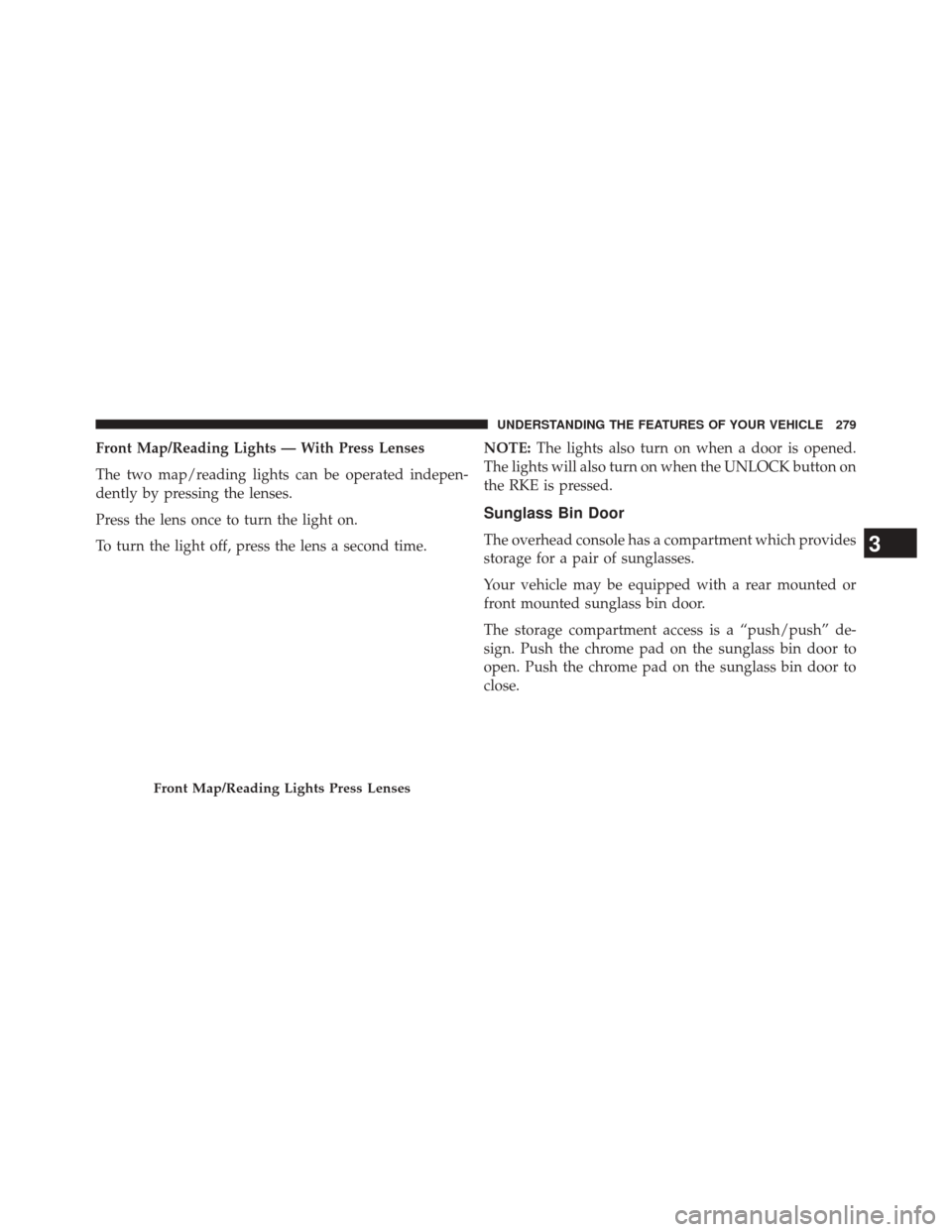
Front Map/Reading Lights — With Press Lenses
The two map/reading lights can be operated indepen-
dently by pressing the lenses.
Press the lens once to turn the light on.
To turn the light off, press the lens a second time.NOTE:
The lights also turn on when a door is opened.
The lights will also turn on when the UNLOCK button on
the RKE is pressed.
Sunglass Bin Door
The overhead console has a compartment which provides
storage for a pair of sunglasses.
Your vehicle may be equipped with a rear mounted or
front mounted sunglass bin door.
The storage compartment access is a “push/push” de-
sign. Push the chrome pad on the sunglass bin door to
open. Push the chrome pad on the sunglass bin door to
close.
Front Map/Reading Lights Press Lenses
3
UNDERSTANDING THE FEATURES OF YOUR VEHICLE 279
Page 303 of 698
WARNING!(Continued)
•Do not touch with wet hands.
• Close the lid when not in use and while driving the
vehicle.
• If this outlet is mishandled, it may cause an electric
shock and failure.
CAUTION!
• Many accessories that can be plugged in draw
power from the vehicle’s battery, even when not in
use (i.e., cellular phones, etc.). Eventually, if
plugged in long enough, the vehicle’s battery will
discharge sufficiently to degrade battery life and/or
prevent the engine from starting.
(Continued)
CAUTION! (Continued)
•Accessories that draw higher power (i.e., coolers,
vacuum cleaners, lights, etc.), will degrade the
battery even more quickly. Only use these intermit-
tently and with greater caution.
• After the use of high power draw accessories, or
long periods of the vehicle not being started (with
accessories still plugged in), the vehicle must be
driven a sufficient length of time to allow the
alternator to recharge the vehicle’s battery.
• Power outlets are designed for accessory plugs
only. Do not hang any type of accessory or acces-
sory bracket from the plug. Improper use of the
power outlet can cause damage.
3
UNDERSTANDING THE FEATURES OF YOUR VEHICLE 301
Page 331 of 698
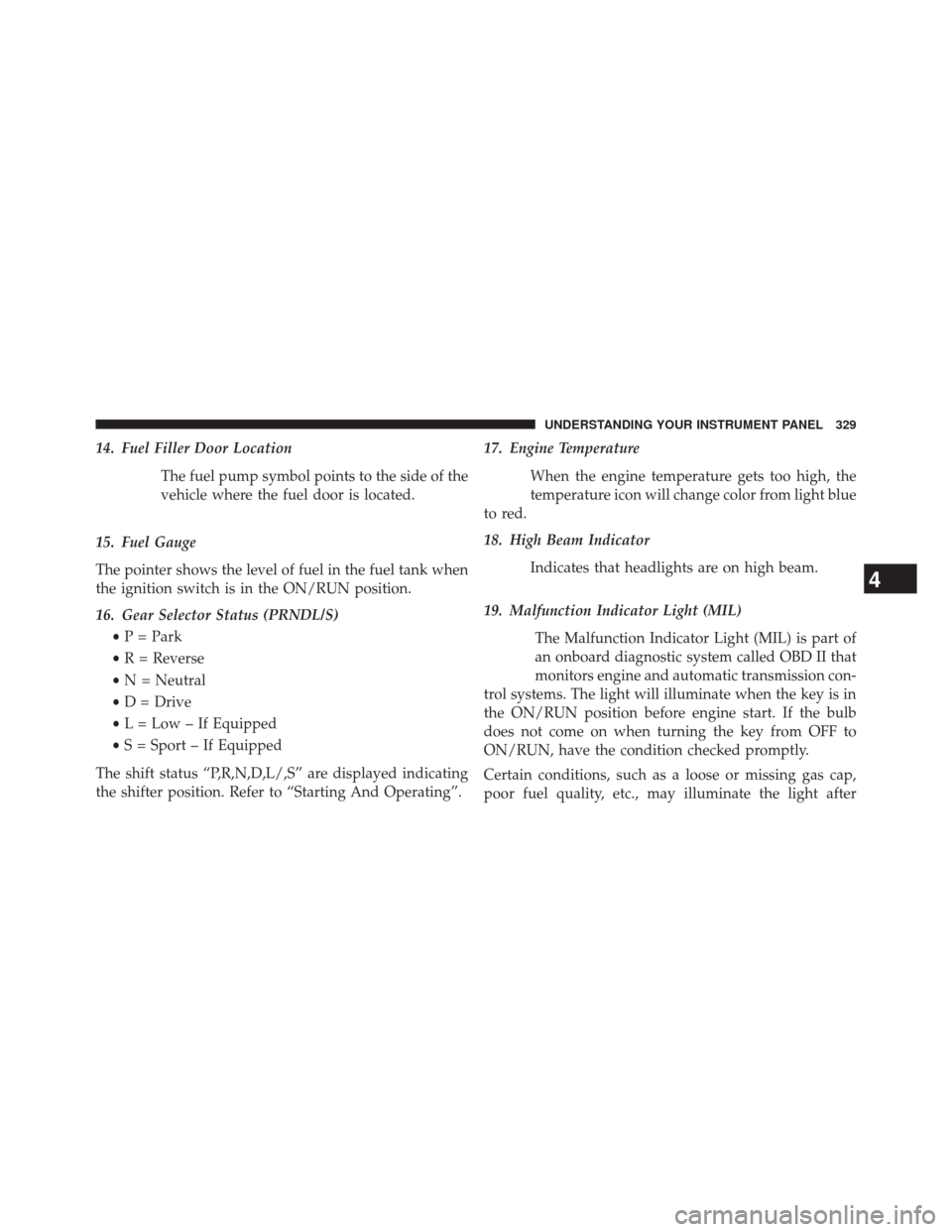
14. Fuel Filler Door LocationThe fuel pump symbol points to the side of the
vehicle where the fuel door is located.
15. Fuel Gauge
The pointer shows the level of fuel in the fuel tank when
the ignition switch is in the ON/RUN position.
16. Gear Selector Status (PRNDL/S) •P = Park
• R = Reverse
• N = Neutral
• D = Drive
• L = Low – If Equipped
• S = Sport – If Equipped
The shift status “P,R,N,D,L/,S” are displayed indicating
the shifter position. Refer to “Starting And Operating”. 17. Engine Temperature
When the engine temperature gets too high, the
temperature icon will change color from light blue
to red.
18. High Beam Indicator
Indicates that headlights are on high beam.
19. Malfunction Indicator Light (MIL) The Malfunction Indicator Light (MIL) is part of
an onboard diagnostic system called OBD II that
monitors engine and automatic transmission con-
trol systems. The light will illuminate when the key is in
the ON/RUN position before engine start. If the bulb
does not come on when turning the key from OFF to
ON/RUN, have the condition checked promptly.
Certain conditions, such as a loose or missing gas cap,
poor fuel quality, etc., may illuminate the light after
4
UNDERSTANDING YOUR INSTRUMENT PANEL 329
Page 332 of 698
engine start. The vehicle should be serviced if the light
stays on through several of your typical driving cycles. In
most situations, the vehicle will drive normally and will
not require towing.
CAUTION!
Prolonged driving with the Malfunction Indicator
Light (MIL) on could cause damage to the engine
control system. It also could affect fuel economy and
driveability. If the MIL is flashing, severe catalytic
converter damage and power loss will soon occur.
Immediate service is required.
WARNING!
A malfunctioning catalytic converter, as referenced
above, can reach higher temperatures than in normal
(Continued)
WARNING!(Continued)
operating conditions. This can cause a fire if you
drive slowly or park over flammable substances such
as dry plants, wood, cardboard, etc. This could result
in death or serious injury to the driver, occupants or
others.
20. Front Fog Light Indicator — If Equipped This indicator will illuminate when the front fog
lights are on.
21. Stop/Start Autostop Active
Press and release the UP or DOWN arrow
button until the Stop/Start icon is highlighted
in the EVIC/DID. Press and release the
SELECT/RIGHT arrow button to display the
Stop/Start status. This telltale will illuminate when the
Stop/Start function can go into “Autostop” mode.
330 UNDERSTANDING YOUR INSTRUMENT PANEL
Page 333 of 698
22. Vehicle Security AlarmThis light will flash rapidly for approximately
15 seconds when the vehicle theft alarm is
arming. The light will flash at a slower speed
continuously after the alarm is set. The security
light will also come on for about three seconds when the
ignition is first turned on.
23. Tachometer
Indicates the engine speed in revolutions per minute
(RPM x 1000).
24. Park/Headlight ON Indicator — If Equipped
This indicator will illuminate when the park
lights or headlights are turned on.
25. EVIC White Telltales — If Equipped 26. Temperature Gauge
The temperature gauge shows engine coolant tempera-
ture. Any reading within the normal range indicates that
the engine cooling system is operating satisfactorily.
The gauge pointer will likely indicate a higher tempera-
ture when driving in hot weather, up mountain grades,
or when towing a trailer. It should not be allowed to
exceed the upper limits of the normal operating range.
CAUTION!
Driving with a hot engine cooling system could
damage your vehicle. If the temperature gauge reads
“H” pull over and stop the vehicle. Idle the vehicle
with the air conditioner turned off until the pointer
drops back into the normal range. If the pointer
remains on the “H” and you hear continuous chimes,
turn the engine off immediately and call an autho-
rized dealer for service.
4
UNDERSTANDING YOUR INSTRUMENT PANEL 331
Page 340 of 698
4. Main Display Area
The main display area will normally display the main
menu or the screens of a selected feature of the main
menu. The main display area also displays “pop up”
messages that consist of approximately 60 possible warn-
ing or information messages. These pop up messages fall
into several categories:•Five Second Stored Messages
When the appropriate conditions occur, this type of
message takes control of the main display area for
five seconds and then returns to the previous screen.
Most of the messages of this type are then stored (as
long as the condition that activated it remains active)
and can be reviewed from the “Messages” main
menu item. As long as there is a stored message, an
“i” will be displayed in the EVIC’s compass/outside
temp line. Examples of this message type are “Right
Front Turn Signal Lamp Out” and “Low Tire Pres-
sure”. •
Unstored Messages
This message type is displayed indefinitely or until
the condition that activated the message is cleared.
Examples of this message type are “Turn Signal On”
(if a turn signal is left on) and “Lights On” (if driver
leaves the vehicle).
• Unstored Messages Until RUN
These messages deal primarily with the Remote Start
feature. This message type is displayed until the
ignition is in the RUN state. Examples of this message
type are “Remote Start Aborted - Door Ajar” and
“Press Brake Pedal and Push Button to Start”.
• Five Second Unstored Messages
When the appropriate conditions occur, this type of
message takes control of the main display area for
five seconds and then returns to the previous screen.
An example of this message type is “Automatic High
Beams On”.
338 UNDERSTANDING YOUR INSTRUMENT PANEL
Page 349 of 698
•Service Power Steering
• Cruise Off
• Cruise Ready
• Cruise Set To XXX MPH
• Cruise Set To XXX KM/H
• Tire Pressure Screen With Low Tire(s) “Inflate Tire to
XX”
• Service Tire Pressure System
• Parking Brake Engaged
• Brake Fluid Low
• Service Electronic Braking System
• Engine Temperature Hot
• Battery Voltage Low •
Service Electronic Throttle Control
• Lights On
• Right Turn Signal Light Out
• Left Turn Signal Light Out
• Turn Signal On
• Vehicle Not in Park
• Key in Ignition
• Key in Ignition Lights On
• Remote Start Active Key to Run
• Remote Start Active Push Start Button
• Remote Start Aborted Fuel Low
• Remote Start Aborted Too Cold
• Remote Start Aborted Door Open
4
UNDERSTANDING YOUR INSTRUMENT PANEL 347
Page 354 of 698
Vehicle Settings (EVIC)
SettingsTranslation Message Submenu
1 Language Select LanguageEnglish, Spanish, French
2 Units Select UnitsU.S., Metric
3 FCW Sensitivity FCW Sensitivity Off, Near, Far
4 ParkSense ParkSenseOff, Sound Only, Sound & Display
5 Blind Spot Alert Blind Spot AlertOff, Lights Only, Lights & Chime
6 Hill Start Assist Hill Start Asst On, Off
7 Auto Lock Doors Auto Lock Doors On, Off
8 Auto Unlock Doors Auto Unlock DoorsOn, Off
9 Passive Entry Passive Entry On, Off
10 Remote Unlock Sequence Remote UnlockDriver Door, All Doors
11 Key Fob Linked to Memory Key in Memory On, Off
12 Remote Start Comfort System Rmt Start Comfort
On, Off
352 UNDERSTANDING YOUR INSTRUMENT PANEL
Page 355 of 698
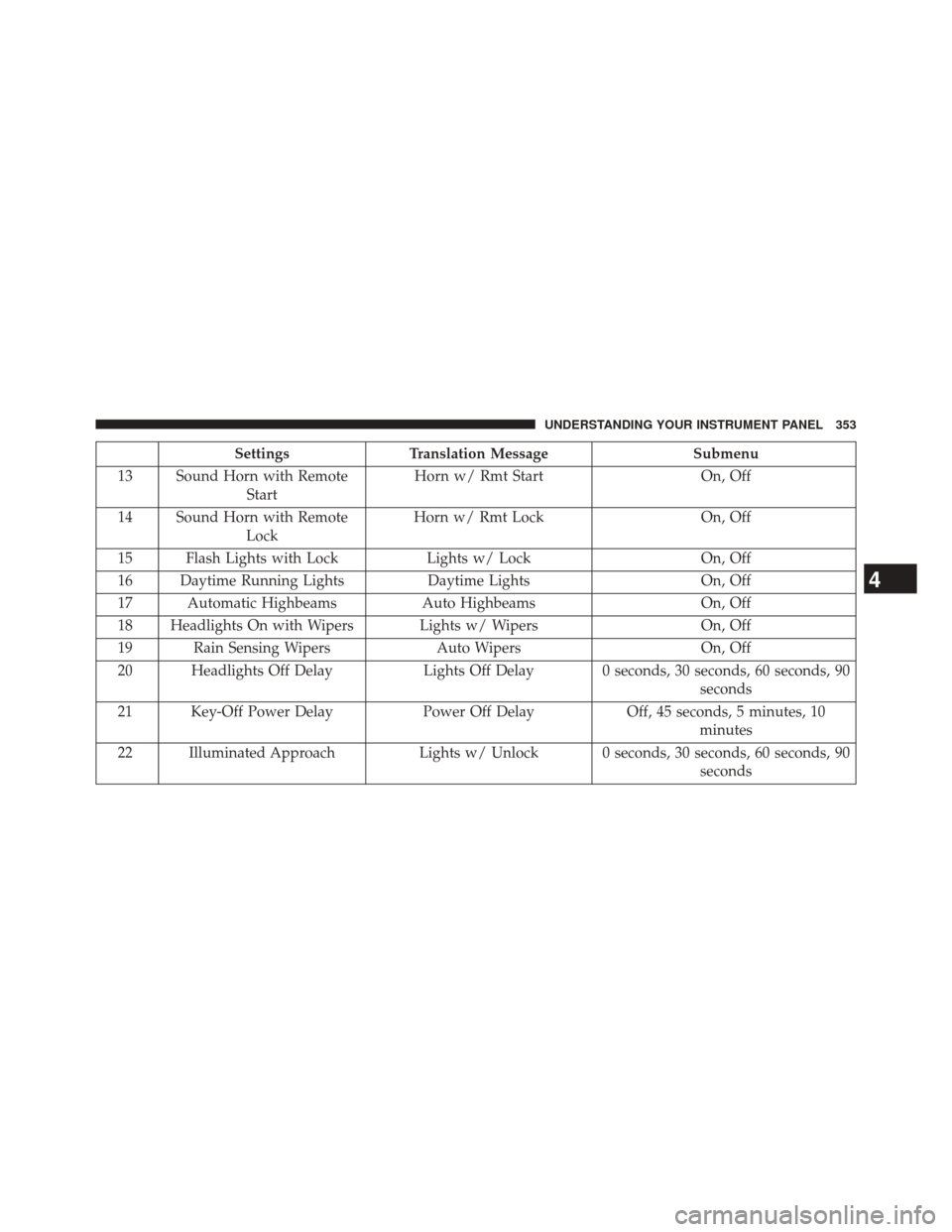
SettingsTranslation Message Submenu
13 Sound Horn with Remote Start Horn w/ Rmt Start
On, Off
14 Sound Horn with Remote Lock Horn w/ Rmt Lock
On, Off
15 Flash Lights with Lock Lights w/ LockOn, Off
16 Daytime Running Lights Daytime LightsOn, Off
17 Automatic Highbeams Auto HighbeamsOn, Off
18 Headlights On with Wipers Lights w/ Wipers On, Off
19 Rain Sensing Wipers Auto WipersOn, Off
20 Headlights Off Delay Lights Off Delay 0 seconds, 30 seconds, 60 seconds, 90
seconds
21 Key-Off Power Delay Power Off DelayOff, 45 seconds, 5 minutes, 10
minutes
22 Illuminated Approach Lights w/ Unlock 0 seconds, 30 seconds, 60 seconds, 90
seconds
4
UNDERSTANDING YOUR INSTRUMENT PANEL 353
Page 367 of 698
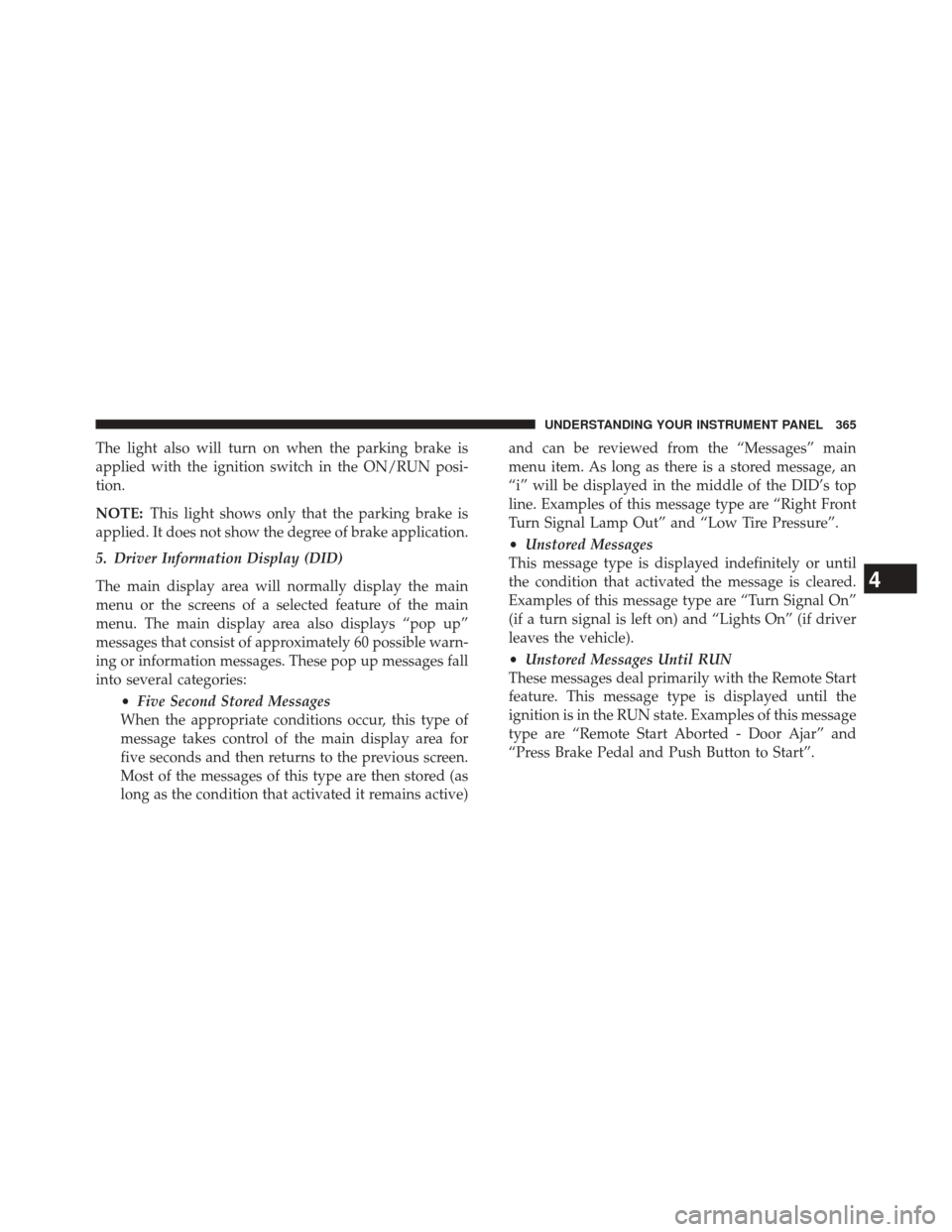
The light also will turn on when the parking brake is
applied with the ignition switch in the ON/RUN posi-
tion.
NOTE:This light shows only that the parking brake is
applied. It does not show the degree of brake application.
5. Driver Information Display (DID)
The main display area will normally display the main
menu or the screens of a selected feature of the main
menu. The main display area also displays “pop up”
messages that consist of approximately 60 possible warn-
ing or information messages. These pop up messages fall
into several categories:
•Five Second Stored Messages
When the appropriate conditions occur, this type of
message takes control of the main display area for
five seconds and then returns to the previous screen.
Most of the messages of this type are then stored (as
long as the condition that activated it remains active) and can be reviewed from the “Messages” main
menu item. As long as there is a stored message, an
“i” will be displayed in the middle of the DID’s top
line. Examples of this message type are “Right Front
Turn Signal Lamp Out” and “Low Tire Pressure”.
•
Unstored Messages
This message type is displayed indefinitely or until
the condition that activated the message is cleared.
Examples of this message type are “Turn Signal On”
(if a turn signal is left on) and “Lights On” (if driver
leaves the vehicle).
• Unstored Messages Until RUN
These messages deal primarily with the Remote Start
feature. This message type is displayed until the
ignition is in the RUN state. Examples of this message
type are “Remote Start Aborted - Door Ajar” and
“Press Brake Pedal and Push Button to Start”.
4
UNDERSTANDING YOUR INSTRUMENT PANEL 365