instrument cluster CHRYSLER 200 2016 2.G Owner's Manual
[x] Cancel search | Manufacturer: CHRYSLER, Model Year: 2016, Model line: 200, Model: CHRYSLER 200 2016 2.GPages: 702, PDF Size: 5.13 MB
Page 320 of 702

INSTRUMENT CLUSTER — PREMIUM
Premium Driver Information Display (DID) Instrument Cluster
318 UNDERSTANDING YOUR INSTRUMENT PANEL
Page 328 of 702
Engine Temperature Warning Light
Red TelltaleLight What It Means
Engine Temperature Warning Light
This light warns of an overheated engine condition. If the engine coolant temperature is too
high, this indicator will illuminate and a single chime will sound.
If the light turns on while driving, safely pull over and stop the vehicle. If the A/C system is on,
turn it off. Also, shift the transmission into NEUTRAL and idle the vehicle. If the temperature
reading does not return to normal, turn the engine off immediately and call for service. Refer to
“If Your Engine Overheats” in “What To Do In Emergencies” for further information.
For vehicles equipped with a premium cluster, this indicator will display in the DID. Refer to
”Driver Information Display (DID) — If Equipped” for further information.
326 UNDERSTANDING YOUR INSTRUMENT PANEL
Page 337 of 702
Electronic Stability Control (ESC) Indicator Light — If Equipped
Yellow TelltaleLight What It Means
Electronic Stability Control (ESC) Indicator Light
The “ESC Indicator Light” in the instrument cluster will come on when the ignition switch
is turned to the ON/RUN position. It should go out with the engine running. If the “ESC
Indicator Light” comes on continuously with the engine running, a malfunction has been
detected in the ESC system. If this light remains on after several ignition cycles, and the ve-
hicle has been driven several miles (kilometers) at speeds greater than 30 mph (48 km/h),
see your authorized dealer as soon as possible to have the problem diagnosed and corrected.
•
The “ESC Off Indicator Light” and the “ESC Indicator Light” come on momentarily each
time the ignition switch is turned to ON/RUN.
• Each time the ignition is turned to ON/RUN, the ESC system will be ON, even if it was
turned off previously.
• The ESC system will make buzzing or clicking sounds when it is active. This is normal;
the sounds will stop when ESC becomes inactive following the maneuver that caused
the ESC activation. 4
UNDERSTANDING YOUR INSTRUMENT PANEL 335
Page 349 of 702
Turn Signal Indicator Lights
Green Tell-tale Light What It Means
Turn Signal Indicator Lights
The instrument cluster arrow will flash independently for the LEFT or RIGHT turn signal as se-
lected, as well as the exterior turn signal lamp(s) (front and rear) as selected when the multi-
function lever is moved down (LEFT) or up (RIGHT).
NOTE:
•A continuous chime will sound if the vehicle is driven more than 1 mile (1.6 km) with either
turn signal on.
•Check for an inoperative outside light bulb if either indicator flashes at a rapid rate.
4
UNDERSTANDING YOUR INSTRUMENT PANEL 347
Page 354 of 702
ELECTRONIC VEHICLE INFORMATION CENTER
(EVIC)
The 3.5” Electronic Vehicle Information Center (EVIC)
display is located in the instrument cluster.The EVIC Main Menu items consists of the following:
•
Speedometer
• Vehicle Info
• Fuel Economy Info
• Trip (Trip A/Trip B)
• Audio Info
• Messages
• Screen Setup
• Settings
Electronic Vehicle Information Center (EVIC) Display
352 UNDERSTANDING YOUR INSTRUMENT PANEL
Page 357 of 702
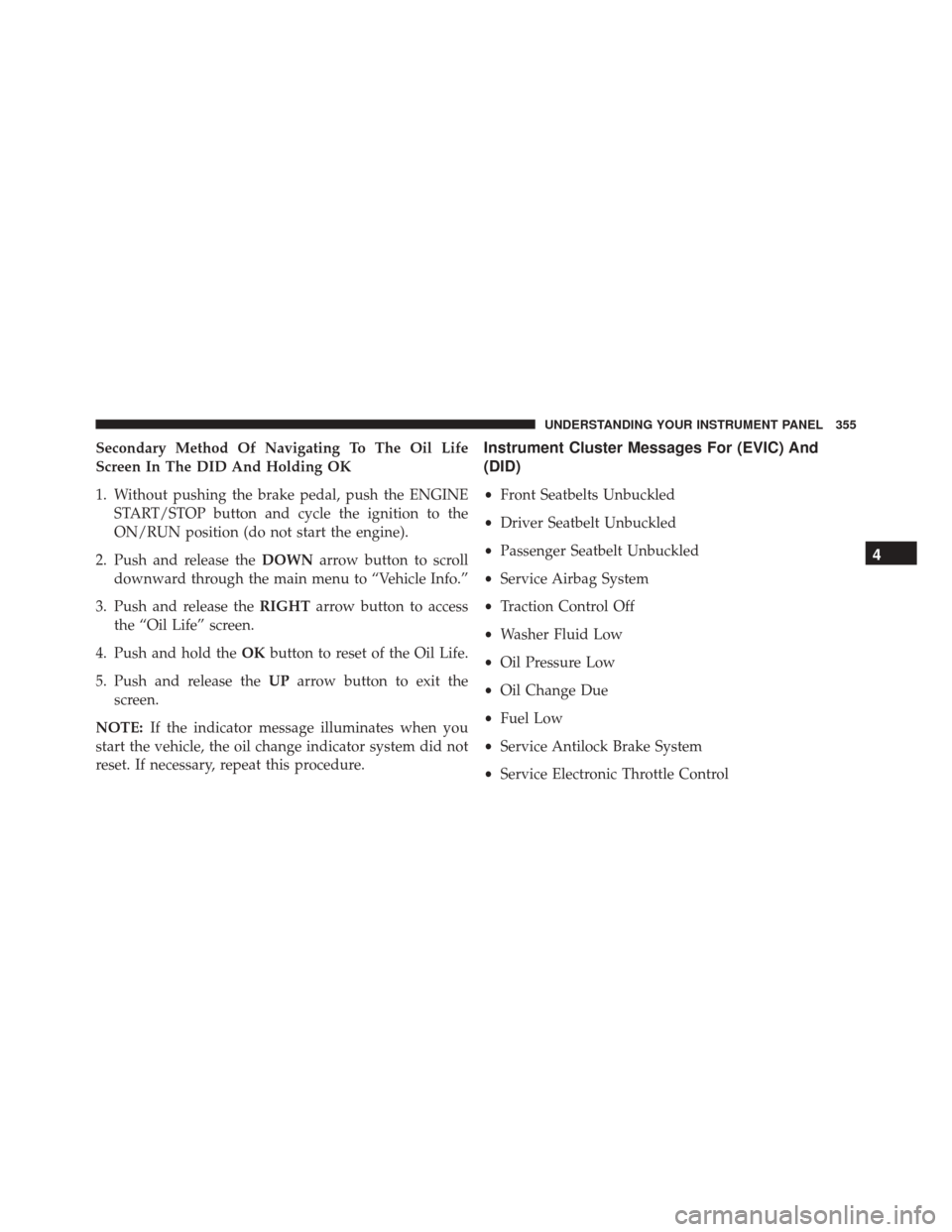
Secondary Method Of Navigating To The Oil Life
Screen In The DID And Holding OK
1. Without pushing the brake pedal, push the ENGINESTART/STOP button and cycle the ignition to the
ON/RUN position (do not start the engine).
2. Push and release the DOWNarrow button to scroll
downward through the main menu to “Vehicle Info.”
3. Push and release the RIGHTarrow button to access
the “Oil Life” screen.
4. Push and hold the OKbutton to reset of the Oil Life.
5. Push and release the UParrow button to exit the
screen.
NOTE: If the indicator message illuminates when you
start the vehicle, the oil change indicator system did not
reset. If necessary, repeat this procedure.Instrument Cluster Messages For (EVIC) And
(DID)
• Front Seatbelts Unbuckled
• Driver Seatbelt Unbuckled
• Passenger Seatbelt Unbuckled
• Service Airbag System
• Traction Control Off
• Washer Fluid Low
• Oil Pressure Low
• Oil Change Due
• Fuel Low
• Service Antilock Brake System
• Service Electronic Throttle Control
4
UNDERSTANDING YOUR INSTRUMENT PANEL 355
Page 362 of 702
Stored Messages
Push and release theUPorDOWN arrow button until
the Messages Menu displays in the EVIC/DID. This
feature shows the number of stored warning messages.
Pushing the RIGHTarrow button will allow you to see
what the stored messages are.
Screen Setup
Push and release the UPorDOWN arrow button until
the Screen Setup Menu displays in the EVIC/DID. Push
and release the OKbutton to enter the sub-menus. The
Screen Setup feature allows you to change what informa-
tion is displayed in the instrument cluster as well as the
location that information is displayed.
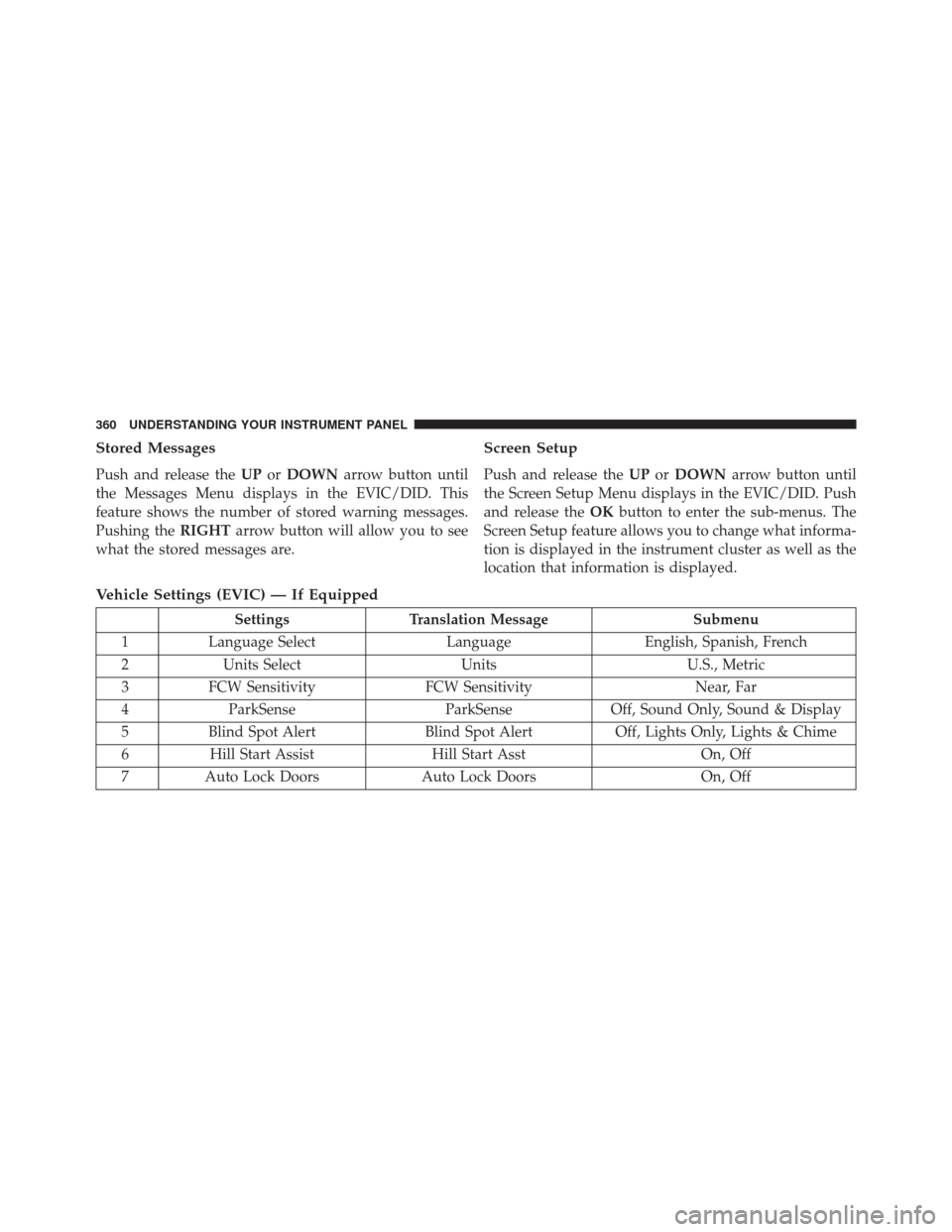
Vehicle Settings (EVIC) — If Equipped
Settings Translation Message Submenu
1 Language Select LanguageEnglish, Spanish, French
2 Units Select UnitsU.S., Metric
3 FCW Sensitivity FCW Sensitivity Near, Far
4 ParkSense ParkSenseOff, Sound Only, Sound & Display
5 Blind Spot Alert Blind Spot AlertOff, Lights Only, Lights & Chime
6 Hill Start Assist Hill Start Asst On, Off
7 Auto Lock Doors Auto Lock Doors On, Off
360 UNDERSTANDING YOUR INSTRUMENT PANEL
Page 366 of 702
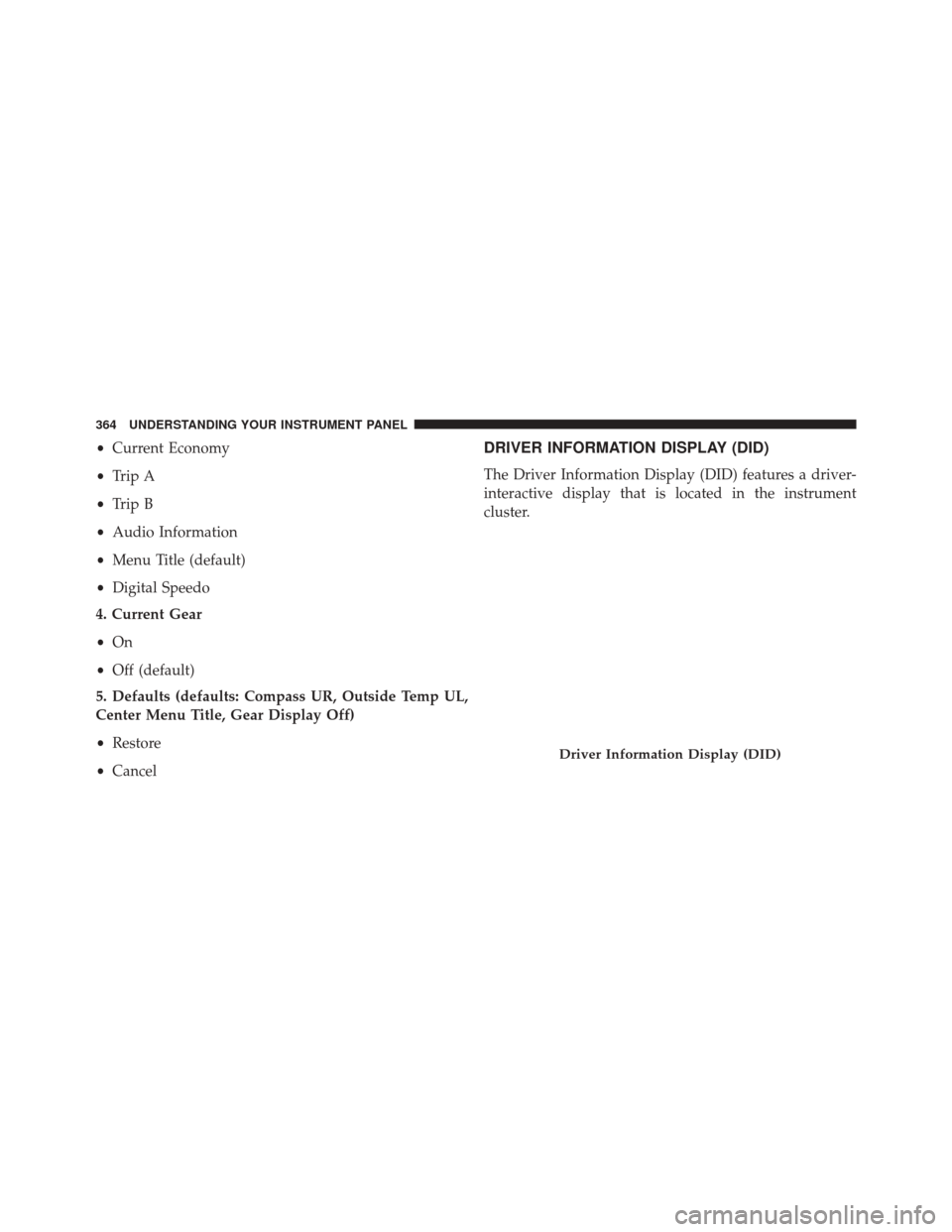
•Current Economy
• Trip A
• Trip B
• Audio Information
• Menu Title (default)
• Digital Speedo
4. Current Gear
• On
• Off (default)
5. Defaults (defaults: Compass UR, Outside Temp UL,
Center Menu Title, Gear Display Off)
• Restore
• CancelDRIVER INFORMATION DISPLAY (DID)
The Driver Information Display (DID) features a driver-
interactive display that is located in the instrument
cluster.
Driver Information Display (DID)
364 UNDERSTANDING YOUR INSTRUMENT PANEL
Page 369 of 702
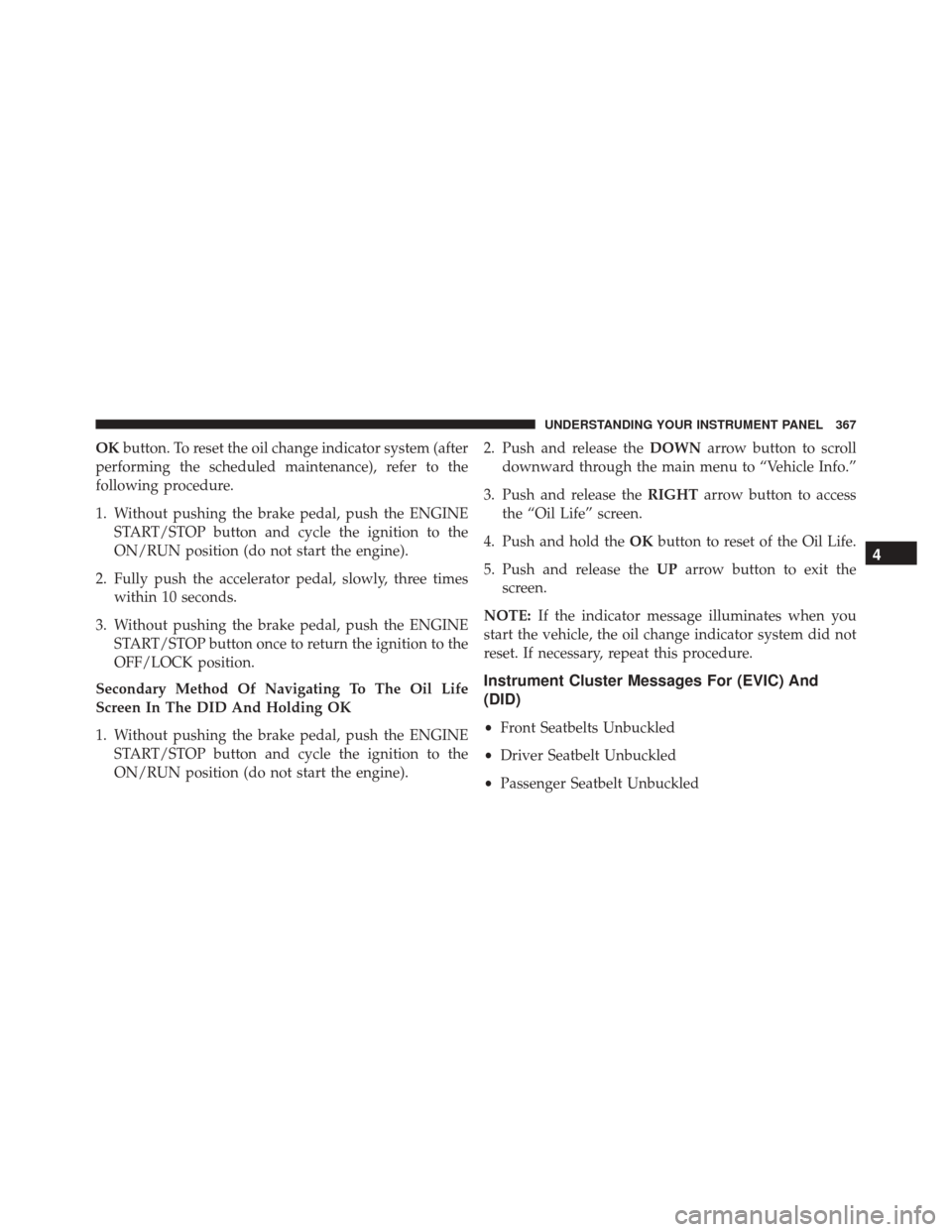
OKbutton. To reset the oil change indicator system (after
performing the scheduled maintenance), refer to the
following procedure.
1. Without pushing the brake pedal, push the ENGINE START/STOP button and cycle the ignition to the
ON/RUN position (do not start the engine).
2. Fully push the accelerator pedal, slowly, three times within 10 seconds.
3. Without pushing the brake pedal, push the ENGINE START/STOP button once to return the ignition to the
OFF/LOCK position.
Secondary Method Of Navigating To The Oil Life
Screen In The DID And Holding OK
1. Without pushing the brake pedal, push the ENGINE START/STOP button and cycle the ignition to the
ON/RUN position (do not start the engine). 2. Push and release the
DOWNarrow button to scroll
downward through the main menu to “Vehicle Info.”
3. Push and release the RIGHTarrow button to access
the “Oil Life” screen.
4. Push and hold the OKbutton to reset of the Oil Life.
5. Push and release the UParrow button to exit the
screen.
NOTE: If the indicator message illuminates when you
start the vehicle, the oil change indicator system did not
reset. If necessary, repeat this procedure.
Instrument Cluster Messages For (EVIC) And
(DID)
• Front Seatbelts Unbuckled
• Driver Seatbelt Unbuckled
• Passenger Seatbelt Unbuckled
4
UNDERSTANDING YOUR INSTRUMENT PANEL 367
Page 374 of 702
Push the SET + or the SET- button (located on the steering
wheel) and the following will display in the DID:
ACC SET
When ACC is set, the set speed will display in the
instrument cluster.
The ACC screen may display once again if any ACC
activity occurs, which may include any of the following:
•Distance Setting Change
• System Cancel
• Driver Override
• System Off
• ACC Proximity Warning
• ACC Unavailable Warning
• The DID will return to the last display selected after
five seconds of no ACC display activity. For further information, refer to “Adaptive Cruise Con-
trol (ACC) — If Equipped” in “Understanding The
Features Of Your Vehicle.”
LaneSense Menu — If Equipped
The DID displays the current LaneSense system settings.
The information displayed depends on LaneSense sys-
tem status and the conditions that need to be met. For
further information, refer to “LaneSense — If Equipped”
in “Understanding The Features Of Your Vehicle.”
Fuel Economy
Push and release the
UPorDOWN arrow button until
the Fuel Economy Menu item is highlighted in the DID.
• Two sub menu pages one with Current value dis-
played and one without the Current Value displayed:
– Current Fuel Economy (MPG, L/100 km, or km/l)
– Range To Empty (miles or km)
– Average Fuel Economy (MPG, L/100 km, or km/l)
372 UNDERSTANDING YOUR INSTRUMENT PANEL