ad blue CHRYSLER 200 2017 2.G User Guide
[x] Cancel search | Manufacturer: CHRYSLER, Model Year: 2017, Model line: 200, Model: CHRYSLER 200 2017 2.GPages: 539, PDF Size: 5.18 MB
Page 335 of 539
To link your internet radio accounts:
1. Download the Uconnect Access App to your mobiledevice.
2. Press the Via Mobile icon on the navigation bar at the bottom of the app. 3. Press the app you’d like to connect to your vehicle.
4. Enter your login information for the selected app and
press Link.
5. Next time you’re in your vehicle, enable Bluetooth, pair your phone and select the Via Mobile app you want to
play from the Uconnect touchscreen to stream your
personalized music.
NOTE:
• You can also complete this process on the web. Simply
visit moparownerconnect.com log in and click Set Up
Via Mobile Profile (under Quick Links).
• Once you download the app to your compatible mobile
device, you will also be able to start your vehicle and
lock/unlock its doors from virtually anywhere.
Mobile App
4
UNDERSTANDING YOUR INSTRUMENT PANEL 333
Page 336 of 539
Voice Texting (8.4/8.4 NAV)
1. To send a message, push the Phone button. After the
beep, say the following command: “Send messageto
John Smith.”
2. Listen to the prompt. After the beep, dictate the message you would like to send. Wait for Uconnect to process
your message.
3. The Uconnect system will repeat your message and provide a variety of options to add to, delete, send or
hear the message again. After the beep, tell Uconnect
what you’d like to do. For instance, if you’re happy with
your message, after the beep, say: “Send.”
You must be registered with Uconnect Access and have a
compatible MAP – enabled smartphone to use your voice
to send a personalized text message. For details about
MAP, visit UconnectPhone.com.
Apple iPhone iOS6 or later supports reading incomingtext
messages only. To enable this feature on your Apple
iPhone, follow these 4 simple steps: TIP:
•
Voice Texting is not compatible with iPhone, but if your
vehicle is equipped with Siri Eyes Free, you can use your
voice to send a text message.
• Messages are limited to 140 characters.
iPhone Notification Settings
1 — Select “Settings”
2 — Select “Bluetooth”
3 — Select the (i) for the paired vehicle
4 — Turn on “Show Notifications”
334 UNDERSTANDING YOUR INSTRUMENT PANEL
Page 341 of 539
Do Not Disturb
With Do Not Disturb, you can disable notifications from
incoming calls and texts, allowing you to keep your eyes
on the road and hands on the wheel. For your convenience,
there is a counter display to keep track of your missed calls
and text messages while you were using Do Not Disturb.Do Not Disturb can automatically reply with a text mes-
sage, a call or both, when declining an incoming call and
send it to voicemail.
Automatic reply messages can be:
•
“I am driving right now, I will get back to you shortly.”
• Create a custom auto reply message up to 160 characters.
NOTE: Only the first 25 characters can been seen on the
touchscreen while typing a custom message.
While in Do Not Disturb, Conference Call can be selected
so you can still place a second call without being inter-
rupted by incoming calls.
NOTE:
• Reply with text message is not compatible with iPhones.
• Auto reply with text message is only available on
phones that supporting Bluetooth MAP.
Siri Eyes Free
4
UNDERSTANDING YOUR INSTRUMENT PANEL 339
Page 481 of 539
CavityCartridge Fuse Blade Fuse Description
F18 – –Not Used
F19 40 Amp Green –Starter Solenoid
F20 –10 Amp Red A/C Compressor Clutch
F21 – –Not Used
F22 –5 Amp Tan Radiator Fan Enable
F23 –70 Amp Tan Body Controller Module (BCM) –
Feed 2
F23 –50 Amp RedVoltage Stability Module (VSM)
#2 – If Equipped With Engine Stop/Start Option
F24 – –Not Used
F25B –20 Amp Yellow Front Washer Pump – If
Equipped with Engine Stop/Start Option
F26 – –Not Used
F27 – –Not Used
F28 –15 Amp Blue Transmission Control Module
(TCM)
7
MAINTAINING YOUR VEHICLE 479
Page 484 of 539
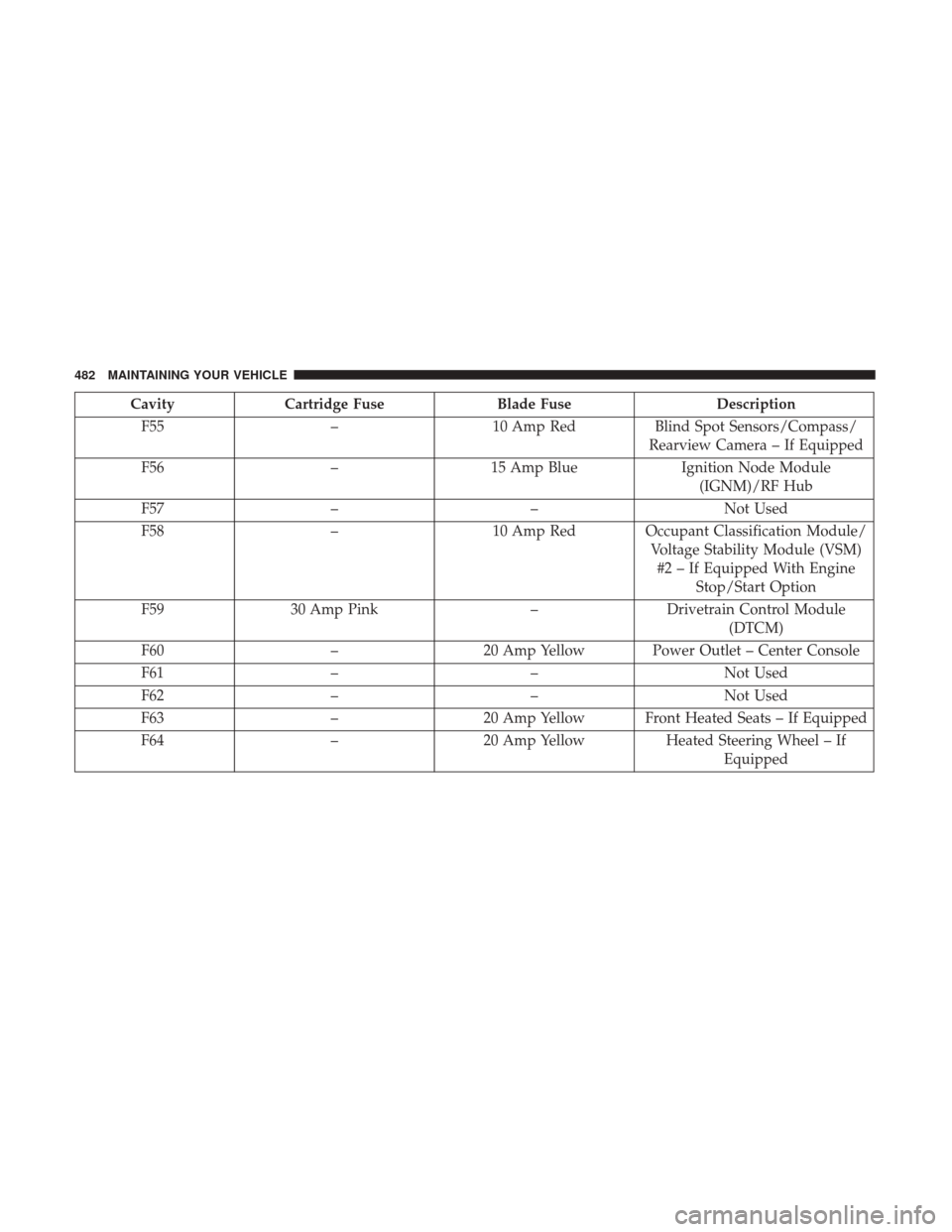
CavityCartridge Fuse Blade Fuse Description
F55 –10 Amp Red Blind Spot Sensors/Compass/
Rearview Camera – If Equipped
F56 –15 Amp Blue Ignition Node Module
(IGNM)/RF Hub
F57 – –Not Used
F58 –10 Amp Red Occupant Classification Module/
Voltage Stability Module (VSM)#2 – If Equipped With Engine Stop/Start Option
F59 30 Amp Pink –Drivetrain Control Module
(DTCM)
F60 –20 Amp Yellow Power Outlet – Center Console
F61 – –Not Used
F62 – –Not Used
F63 –20 Amp Yellow Front Heated Seats – If Equipped
F64 –20 Amp Yellow Heated Steering Wheel – If
Equipped
482 MAINTAINING YOUR VEHICLE
Page 485 of 539
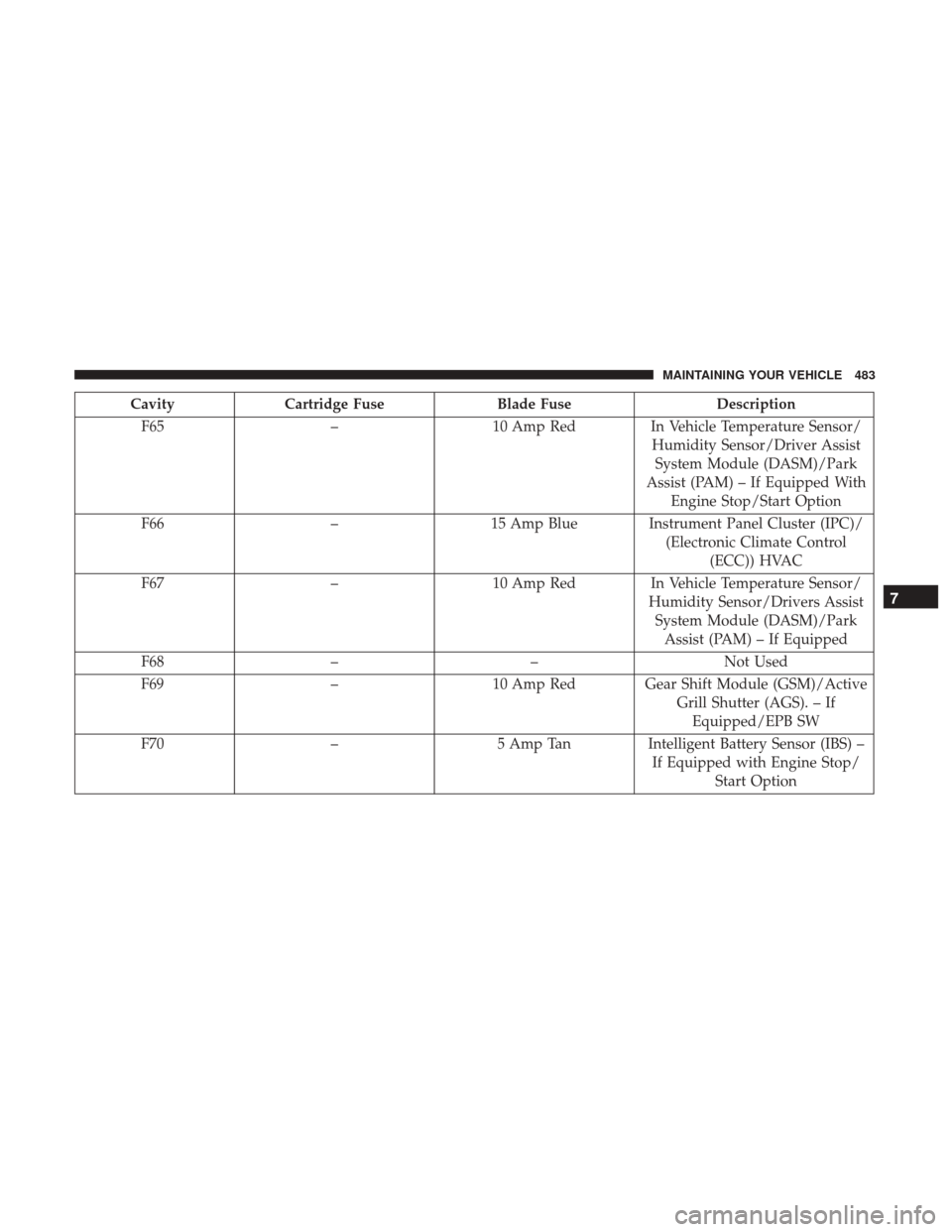
CavityCartridge Fuse Blade Fuse Description
F65 –10 Amp RedIn Vehicle Temperature Sensor/
Humidity Sensor/Driver Assist System Module (DASM)/Park
Assist (PAM) – If Equipped With Engine Stop/Start Option
F66 –15 Amp Blue Instrument Panel Cluster (IPC)/
(Electronic Climate Control(ECC)) HVAC
F67 –10 Amp RedIn Vehicle Temperature Sensor/
Humidity Sensor/Drivers Assist System Module (DASM)/Park Assist (PAM) – If Equipped
F68 – –Not Used
F69 –10 Amp Red Gear Shift Module (GSM)/Active
Grill Shutter (AGS). – IfEquipped/EPB SW
F70 –5 Amp TanIntelligent Battery Sensor (IBS) –
If Equipped with Engine Stop/ Start Option
7
MAINTAINING YOUR VEHICLE 483
Page 486 of 539
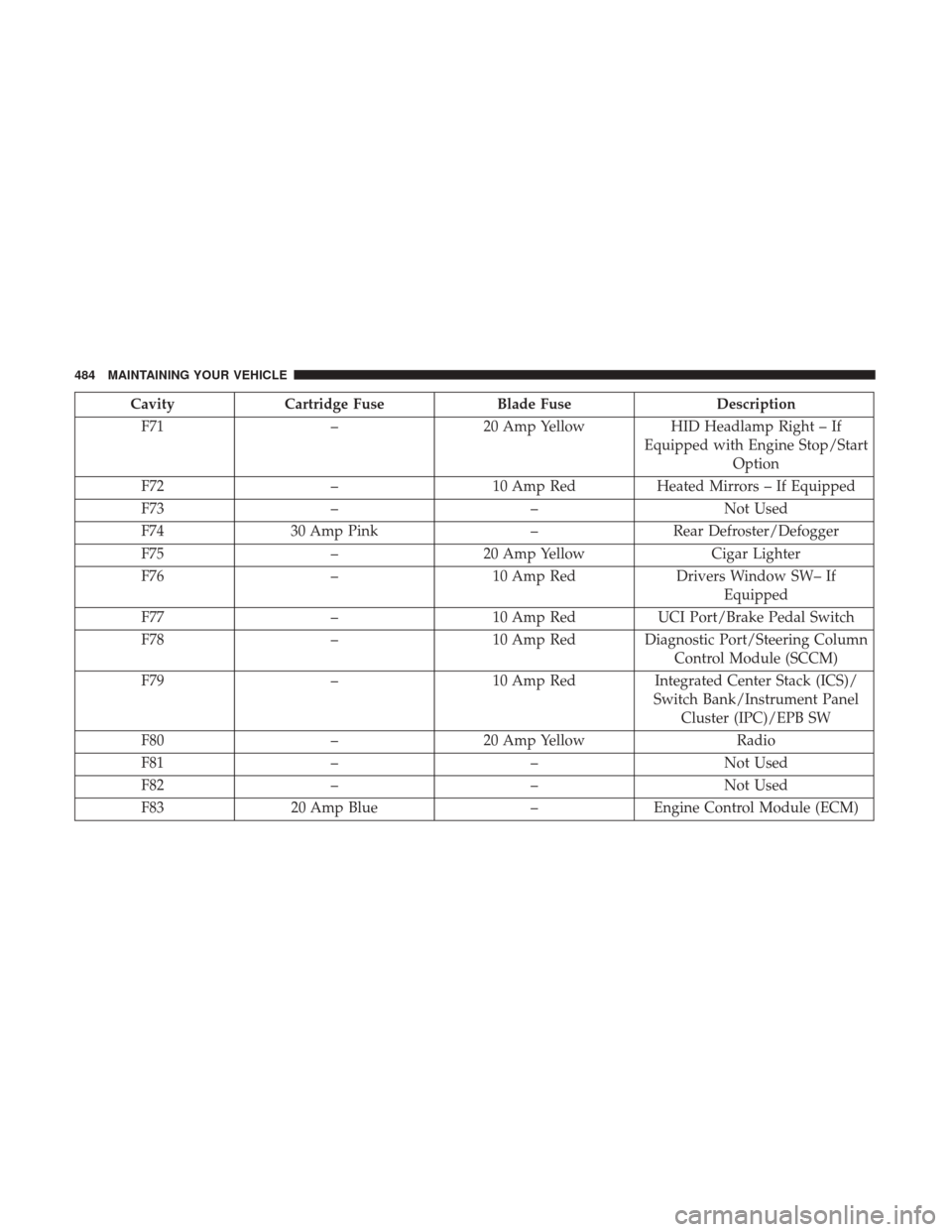
CavityCartridge Fuse Blade Fuse Description
F71 –20 Amp Yellow HID Headlamp Right – If
Equipped with Engine Stop/Start Option
F72 –10 Amp Red Heated Mirrors – If Equipped
F73 – –Not Used
F74 30 Amp Pink –Rear Defroster/Defogger
F75 –20 Amp Yellow Cigar Lighter
F76 –10 Amp Red Drivers Window SW– If
Equipped
F77 –10 Amp Red UCI Port/Brake Pedal Switch
F78 –10 Amp Red Diagnostic Port/Steering Column
Control Module (SCCM)
F79 –10 Amp Red Integrated Center Stack (ICS)/
Switch Bank/Instrument Panel Cluster (IPC)/EPB SW
F80 –20 Amp Yellow Radio
F81 – –Not Used
F82 – –Not Used
F83 20 Amp Blue –Engine Control Module (ECM)
484 MAINTAINING YOUR VEHICLE
Page 489 of 539
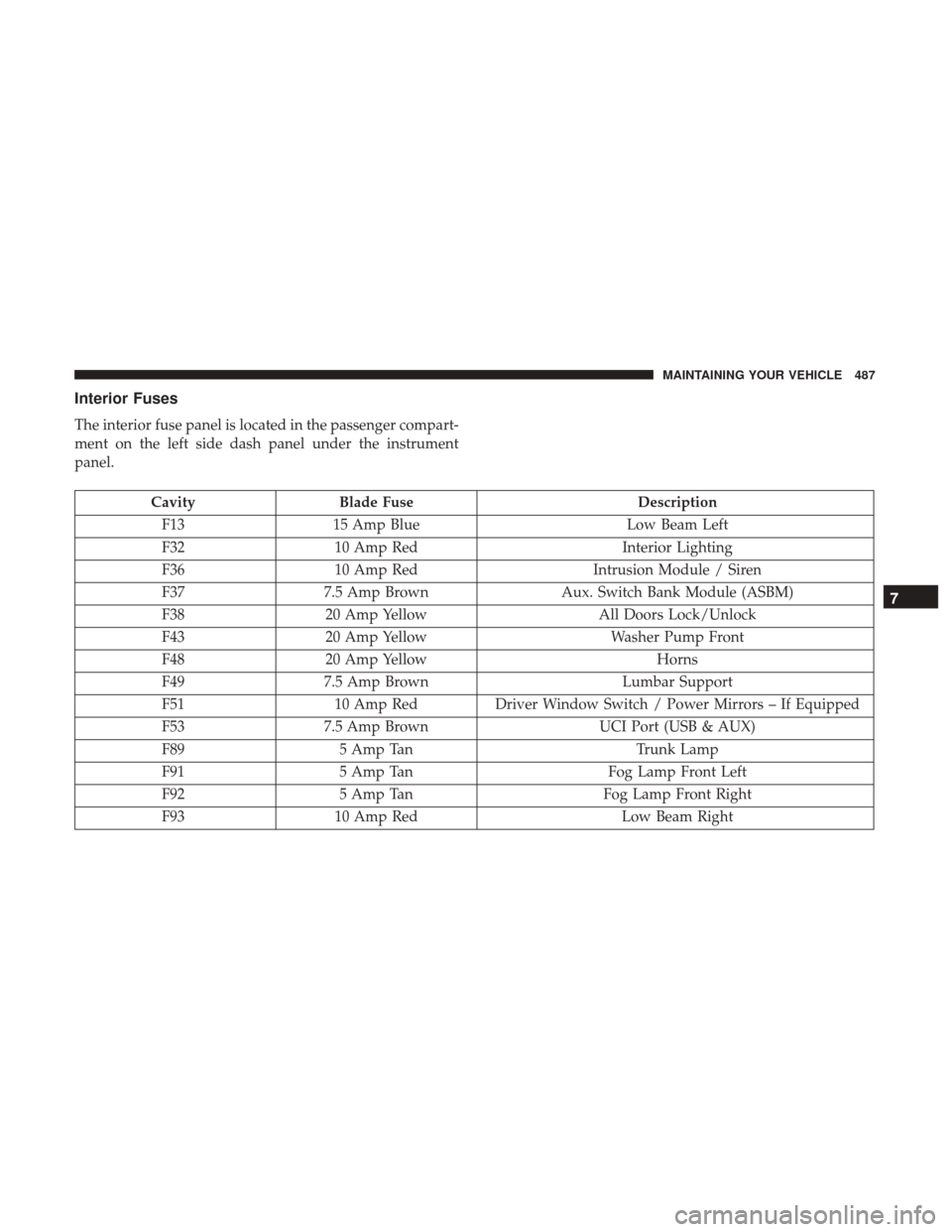
Interior Fuses
The interior fuse panel is located in the passenger compart-
ment on the left side dash panel under the instrument
panel.
CavityBlade Fuse Description
F13 15 Amp Blue Low Beam Left
F32 10 Amp Red Interior Lighting
F36 10 Amp Red Intrusion Module / Siren
F37 7.5 Amp Brown Aux. Switch Bank Module (ASBM)
F38 20 Amp Yellow All Doors Lock/Unlock
F43 20 Amp Yellow Washer Pump Front
F48 20 Amp Yellow Horns
F49 7.5 Amp Brown Lumbar Support
F51 10 Amp RedDriver Window Switch / Power Mirrors – If Equipped
F53 7.5 Amp Brown UCI Port (USB & AUX)
F89 5 Amp Tan Trunk Lamp
F91 5 Amp Tan Fog Lamp Front Left
F92 5 Amp Tan Fog Lamp Front Right
F93 10 Amp Red Low Beam Right
7
MAINTAINING YOUR VEHICLE 487
Page 492 of 539
BULB REPLACEMENT
NOTE:Lens fogging can occur under certain atmospheric
conditions. This will usually clear as atmospheric condi-
tions change to allow the condensation to change back into
a vapor. Turning the lamps on will usually accelerate the
clearing process.
Low Beam And High Beam Headlamps
Bi-Xenon High Intensity Discharge (HID)
Headlamps — If Equipped
The headlamps contain a type of high voltage discharge
light source. High voltage can remain in the circuit even
with the headlamp switch off. Because of this, you should
not attempt to service a HID headlamp light source your-
self. If an HID headlamp light source fails, take your
vehicle to an authorized dealer for service.
NOTE: On vehicles equipped with HID headlamps, when
the headlamps are turned on, there is a blue hue to the
lights. This diminishes and becomes more white after
approximately 10 seconds, as the system charges.
WARNING!
A transient high voltage occurs at the bulb sockets of
HID headlamps when the headlamp switch is turned
ON. It may cause serious electrical shock or electrocu-
tion if not serviced properly. See your authorized
dealer for service.
Bi-Halogen Headlamps
1. Remove the top pushpin on the headlamp access door in the wheel liner to access the headlamp assembly.
Access Door
490 MAINTAINING YOUR VEHICLE