buttons CHRYSLER 200 2017 2.G User Guide
[x] Cancel search | Manufacturer: CHRYSLER, Model Year: 2017, Model line: 200, Model: CHRYSLER 200 2017 2.GPages: 539, PDF Size: 5.18 MB
Page 129 of 539
NOTE:
•If either light remains on and does not flash, or there is
a very fast flash rate, check for a defective outside light
bulb. If an indicator fails to light when the lever is
moved, it would suggest that the indicator bulb is
defective.
• A “Turn Signal On” message will appear in the Instru-
ment Cluster Display and a continuous chime will
sound if the vehicle is driven more than 1 mile (1.6 km)
with either turn signal on.
• When the Daytime Running Lights are on and a turn
signal is activated, the Daytime Running Lamp will turn
off on the side of the vehicle in which the turn signal is
flashing. The Daytime Running Lamp will turn back on
when the turn signal is turned off.
Lane Change Assist
Tap the lever up or down once, without moving beyond
the detent, and the turn signal (right or left) will flash three
times then automatically turn off.
High/Low Beam Switch
Push the multifunction lever away from you to switch the
headlights to high beam. Pull the multifunction lever
toward you to switch the headlights back to low beam.
Flash-To-Pass
You can signal another vehicle with your headlights by
lightly pulling the multifunction lever toward you. This
will turn on the high beams headlights until the lever is
released.
Front Map/Reading Lights
The front map/reading lights are mounted in the overhead
console.
Front Map/Reading Lights — With Center Buttons
There are two map/reading light buttons located in the
center of the overhead console that allow the lights to
operate independently.
Push the button once to turn the light on.
To turn the light off, push the button a second time.
3
UNDERSTANDING THE FEATURES OF YOUR VEHICLE 127
Page 130 of 539
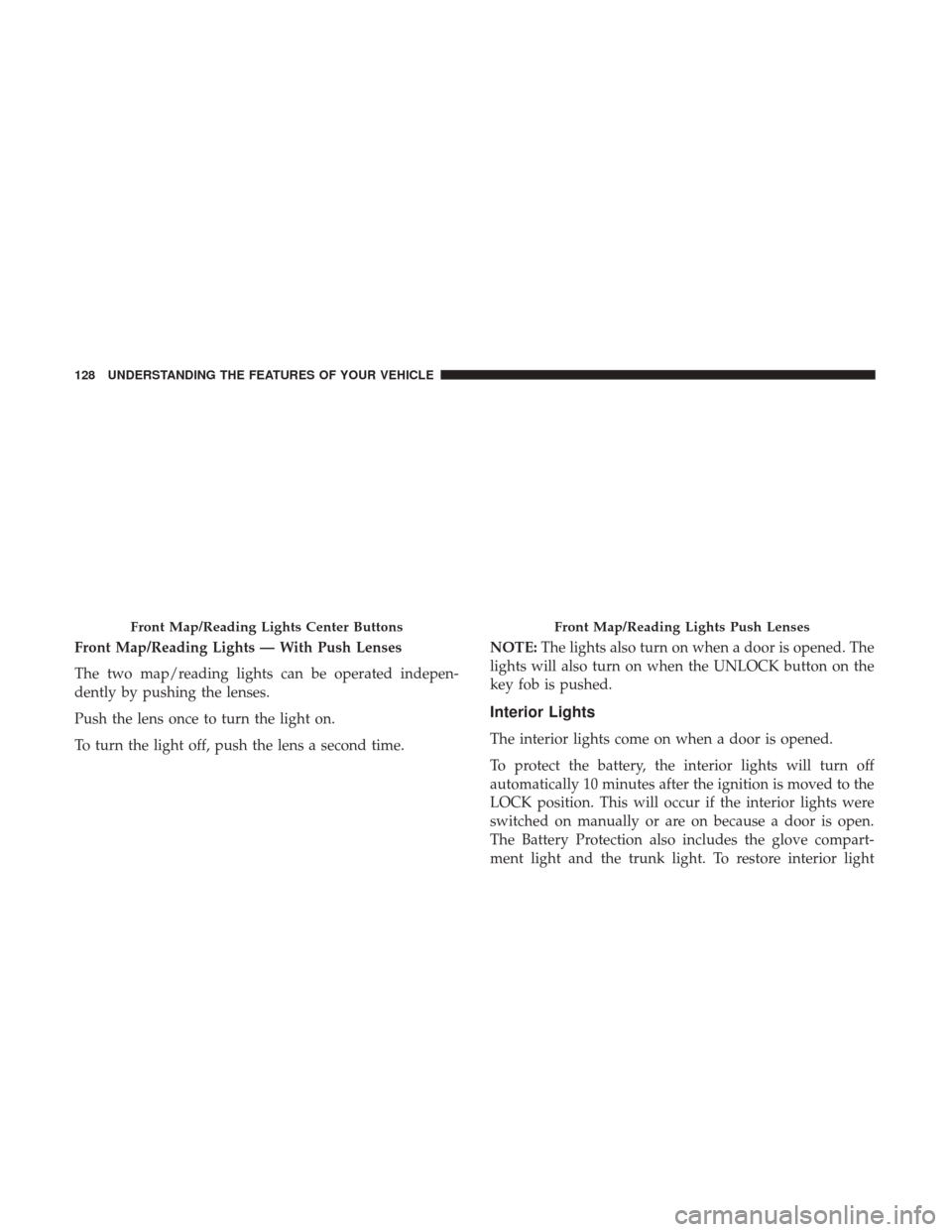
Front Map/Reading Lights — With Push Lenses
The two map/reading lights can be operated indepen-
dently by pushing the lenses.
Push the lens once to turn the light on.
To turn the light off, push the lens a second time.NOTE:
The lights also turn on when a door is opened. The
lights will also turn on when the UNLOCK button on the
key fob is pushed.
Interior Lights
The interior lights come on when a door is opened.
To protect the battery, the interior lights will turn off
automatically 10 minutes after the ignition is moved to the
LOCK position. This will occur if the interior lights were
switched on manually or are on because a door is open.
The Battery Protection also includes the glove compart-
ment light and the trunk light. To restore interior light
Front Map/Reading Lights Center ButtonsFront Map/Reading Lights Push Lenses
128 UNDERSTANDING THE FEATURES OF YOUR VEHICLE
Page 138 of 539
WARNING!(Continued)
•Do not place anything on the steering wheel that
insulates against heat, such as a blanket or steering
wheel covers of any type and material. This may
cause the steering wheel heater to overheat.
ELECTRONIC SPEED CONTROL — IF EQUIPPED
When engaged, the Electronic Speed Control takes over
accelerator operations at speeds greater than 25 mph
(40 km/h).
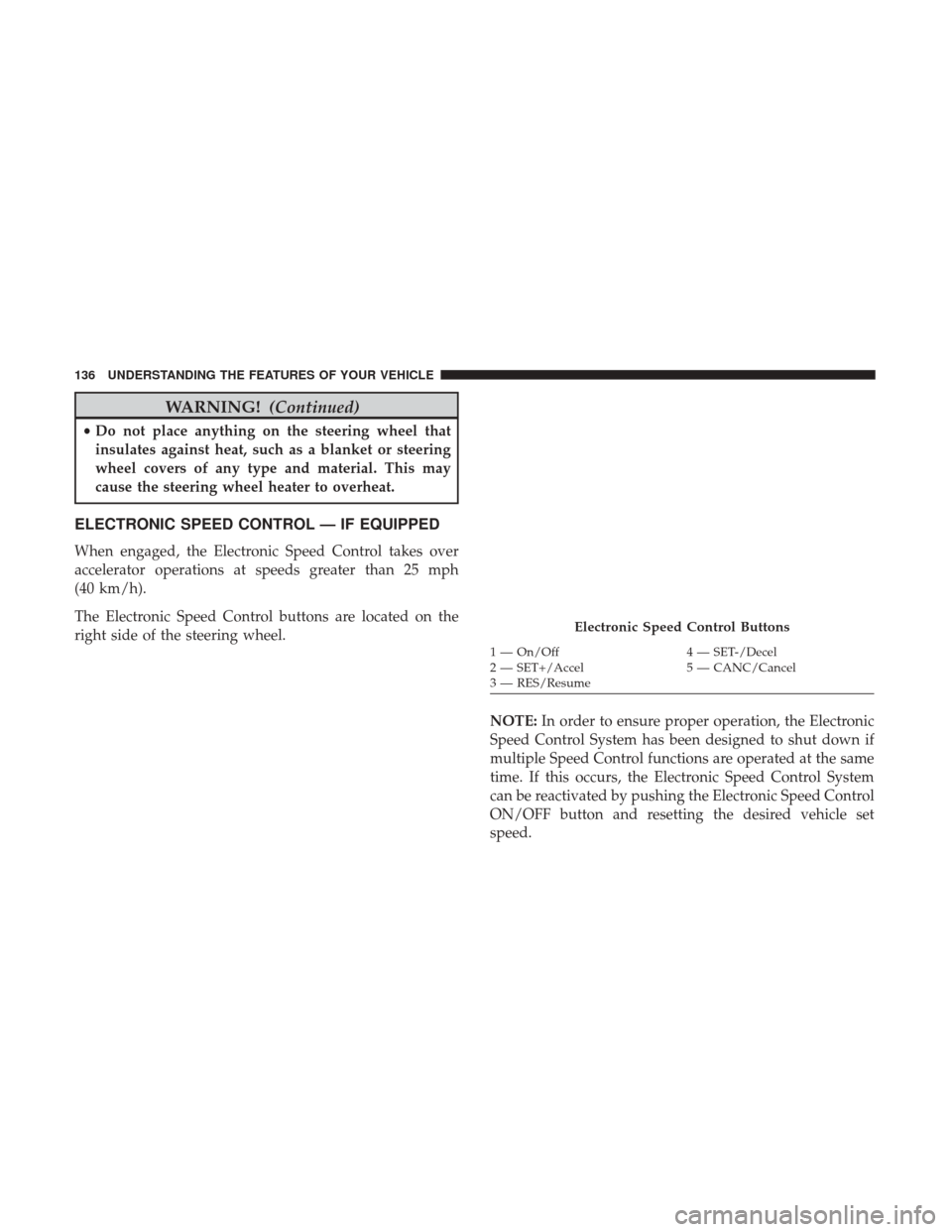
The Electronic Speed Control buttons are located on the
right side of the steering wheel.
NOTE:In order to ensure proper operation, the Electronic
Speed Control System has been designed to shut down if
multiple Speed Control functions are operated at the same
time. If this occurs, the Electronic Speed Control System
can be reactivated by pushing the Electronic Speed Control
ON/OFF button and resetting the desired vehicle set
speed.
Electronic Speed Control Buttons
1 — On/Off 4 — SET-/Decel
2 — SET+/Accel 5 — CANC/Cancel
3 — RES/Resume
136 UNDERSTANDING THE FEATURES OF YOUR VEHICLE
Page 142 of 539
•Normal (fixed speed) electronic speed control mode for
cruising at a constant preset speed. For additional infor-
mation, refer to “Normal (Fixed Speed) Cruise Control
Mode” in this section.
NOTE: Normal (fixed speed) electronic speed control will
not react to preceding vehicles. Always be aware of the
mode selected.
You can change the mode by using the Cruise Control
buttons. The two control modes function differently. Al-
ways confirm which mode is selected.
WARNING!
• Adaptive Cruise Control (ACC) is a convenience
system. It is not a substitute for active driving
involvement. It is always the driver ’s responsibility
to be attentive of road, traffic, and weather condi-
tions, vehicle speed, distance to the vehicle ahead;
and, most importantly, brake operation to ensure safe
operation of the vehicle under all road conditions.
Your complete attention is always required while
driving to maintain safe control of your vehicle.
(Continued)
WARNING! (Continued)
Failure to follow these warnings can result in a
collision and death or serious personal injury.
• The ACC system:
• Does not react to pedestrians, oncoming vehicles,
and stationary objects (e.g., a stopped vehicle in a
traffic jam or a disabled vehicle).
• Cannot take street, traffic, and weather conditions
into account, and may be limited upon adverse
sight distance conditions.
• Does not always fully recognize complex driving
conditions, which can result in wrong or missing
distance warnings.
• Will bring the vehicle to a complete stop while
following a target vehicle and hold the vehicle for
approximately 3 minutes in the stop position. If the
target vehicle does not start moving within 3
minutes the parking brake will be activated, and
the ACC system will be cancelled.
You should switch off the ACC system:
• When driving in fog, heavy rain, heavy snow, sleet,
heavy traffic, and complex driving situations (i.e., in
highway construction zones).
(Continued)
140 UNDERSTANDING THE FEATURES OF YOUR VEHICLE
Page 143 of 539
WARNING!(Continued)
•When entering a turn lane or highway off ramp;
when driving on roads that are winding, icy, snow-
covered, slippery, or have steep uphill or downhill
slopes.
• When towing a trailer up or down steep slopes.
• When circumstances do not allow safe driving at a
constant speed.
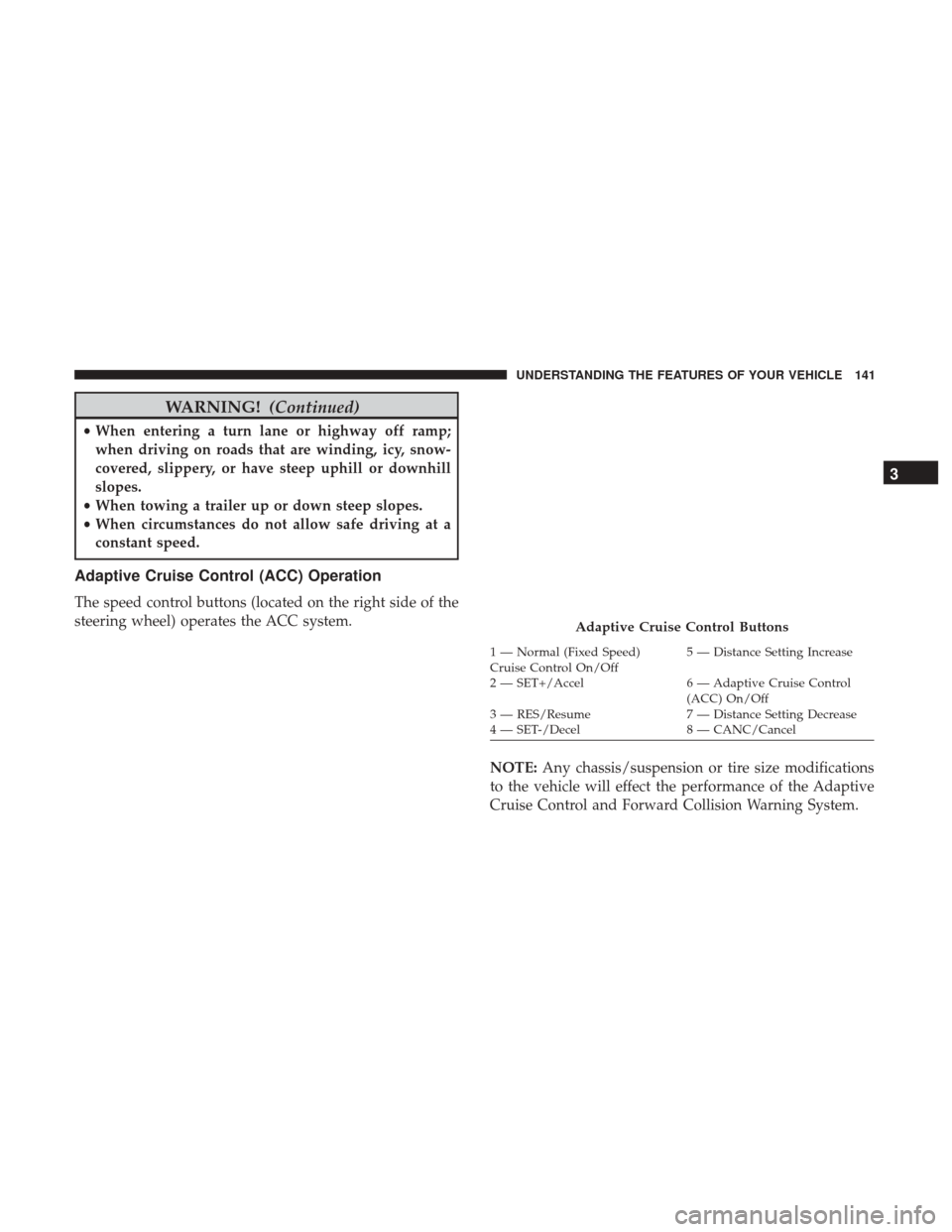
Adaptive Cruise Control (ACC) Operation
The speed control buttons (located on the right side of the
steering wheel) operates the ACC system.
NOTE:Any chassis/suspension or tire size modifications
to the vehicle will effect the performance of the Adaptive
Cruise Control and Forward Collision Warning System.
Adaptive Cruise Control Buttons
1 — Normal (Fixed Speed)
Cruise Control On/Off 5 — Distance Setting Increase
2 — SET+/Accel 6 — Adaptive Cruise Control (ACC) On/Off
3 — RES/Resume 7 — Distance Setting Decrease
4 — SET-/Decel 8 — CANC/Cancel
3
UNDERSTANDING THE FEATURES OF YOUR VEHICLE 141
Page 148 of 539
Metric Speed (km/h)
•Pushing the SET -button once will result in a 1 km/h
decrease in set speed. Each subsequent tap of the button
results in a decrease of 1 km/h.
• If the button is continually pushed, the set speed will
continue to decrease in 10 km/h decrements until the
button is released. The decrease in set speed is reflected
in the Instrument Cluster Display.
NOTE:
• When you override and push the SET +button or SET -
buttons, the new Set Speed will be the current speed of
the vehicle.
• When you use the SET -button to decelerate, if the
engine’s braking power does not slow the vehicle suffi-
ciently to reach the set speed, the brake system will
automatically slow the vehicle.
• The ACC system decelerates the vehicle to a full stop
when following a target vehicle. If an ACC host vehicle
follows a target vehicle to a standstill, after two seconds
the driver will either have to push the RES (resume)
button, or apply the accelerator pedal to reengage the
ACC to the existing Set Speed. •
The ACC will bring the vehicle to a complete stop while
following a target vehicle and hold the vehicle for two
seconds in the stop position. If the target vehicle does
not start moving within two seconds, the ACC system
will display a message that the system will release the
brakes and that the brakes must be applied manually. An
audible chime will sound when the brakes are released.
• The ACC system maintains set speed when driving up
hill and down hill. However, a slight speed change on
moderate hills is normal. In addition, downshifting may
occur while climbing uphill or descending downhill.
This is normal operation and necessary to maintain set
speed. When driving up hill and down hill, the ACC
system will cancel if the braking temperature exceeds
normal range (overheated).
Setting The Following Distance In ACC
The specified following distance for ACC can be set by
varying the distance setting between four bars (longest),
three bars (long), two bars (medium) and one bar (short).
Using this distance setting and the vehicle speed, ACC
calculates and sets the distance to the vehicle ahead. This
distance setting displays in the Instrument Cluster Display.
146 UNDERSTANDING THE FEATURES OF YOUR VEHICLE
Page 213 of 539
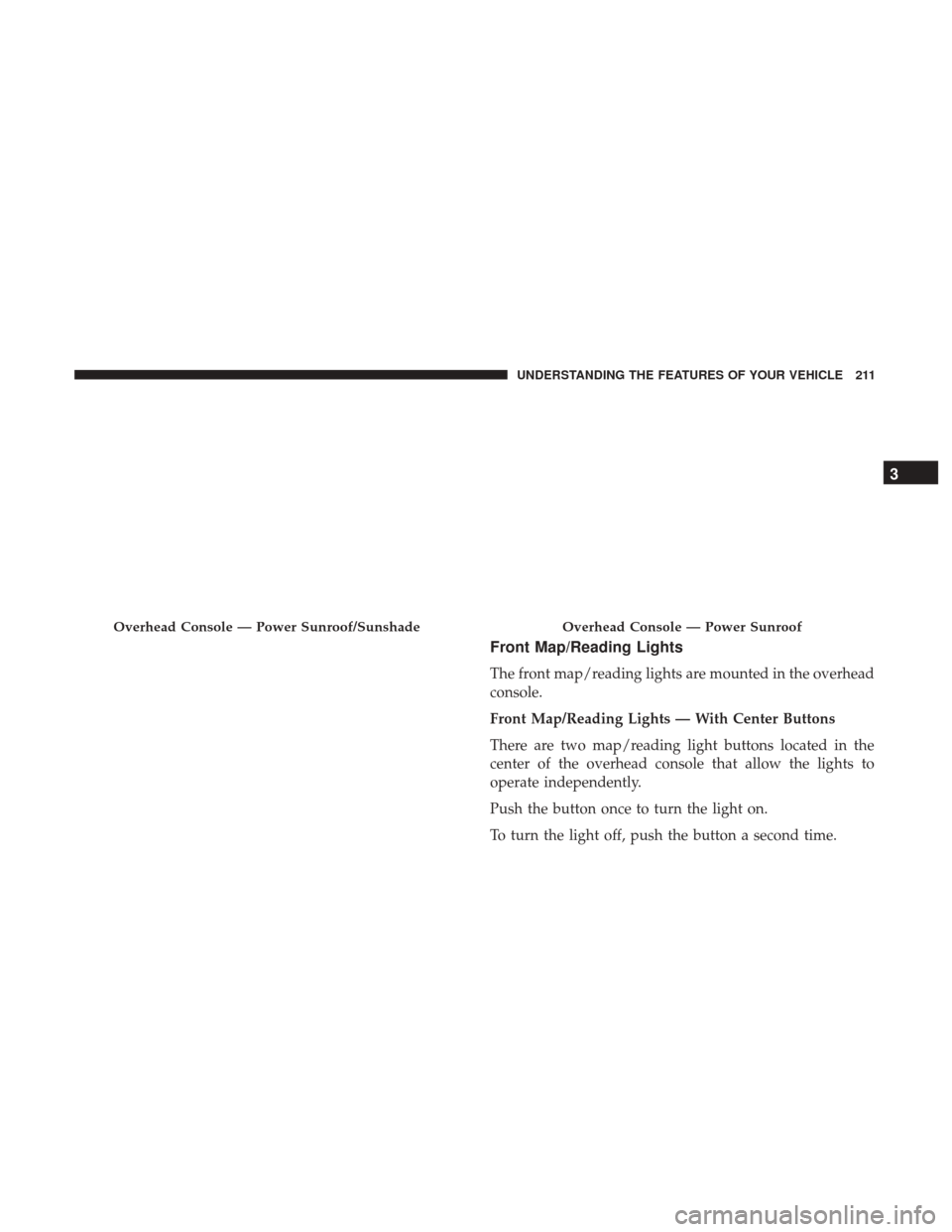
Front Map/Reading Lights
The front map/reading lights are mounted in the overhead
console.
Front Map/Reading Lights — With Center Buttons
There are two map/reading light buttons located in the
center of the overhead console that allow the lights to
operate independently.
Push the button once to turn the light on.
To turn the light off, push the button a second time.
Overhead Console — Power Sunroof/SunshadeOverhead Console — Power Sunroof
3
UNDERSTANDING THE FEATURES OF YOUR VEHICLE 211
Page 214 of 539
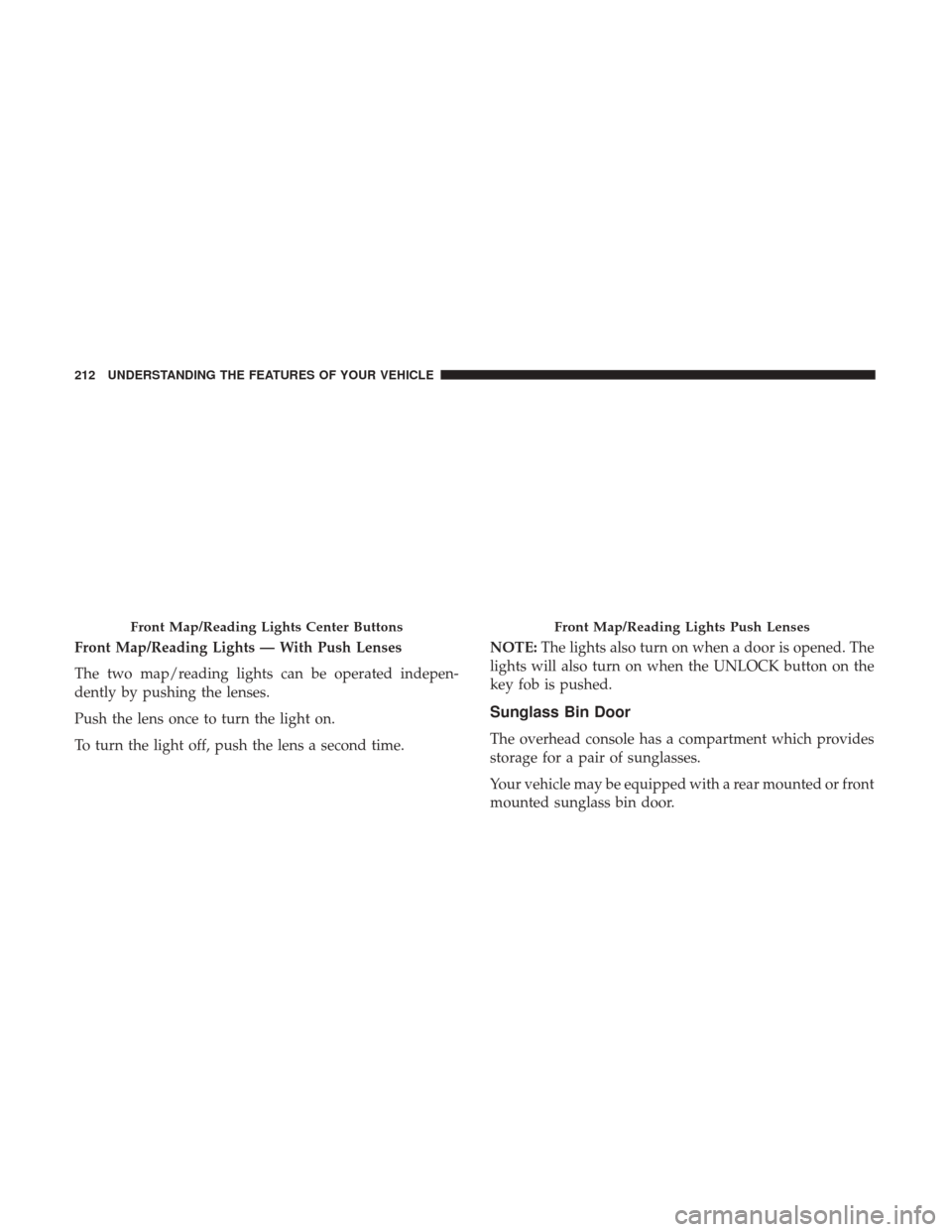
Front Map/Reading Lights — With Push Lenses
The two map/reading lights can be operated indepen-
dently by pushing the lenses.
Push the lens once to turn the light on.
To turn the light off, push the lens a second time.NOTE:
The lights also turn on when a door is opened. The
lights will also turn on when the UNLOCK button on the
key fob is pushed.
Sunglass Bin Door
The overhead console has a compartment which provides
storage for a pair of sunglasses.
Your vehicle may be equipped with a rear mounted or front
mounted sunglass bin door.
Front Map/Reading Lights Center ButtonsFront Map/Reading Lights Push Lenses
212 UNDERSTANDING THE FEATURES OF YOUR VEHICLE
Page 215 of 539
The storage compartment access is a “push/push” design.
Push the chrome pad on the sunglass bin door to open.
Push the chrome pad on the sunglass bin door to close.
GARAGE DOOR OPENER — IF EQUIPPED
HomeLink replaces up to three remote controls (handheld
transmitters) that operate devices such as garage door
openers, motorized gates, lighting or home security sys-
tems. The HomeLink unit operates off your vehicle’s
battery.
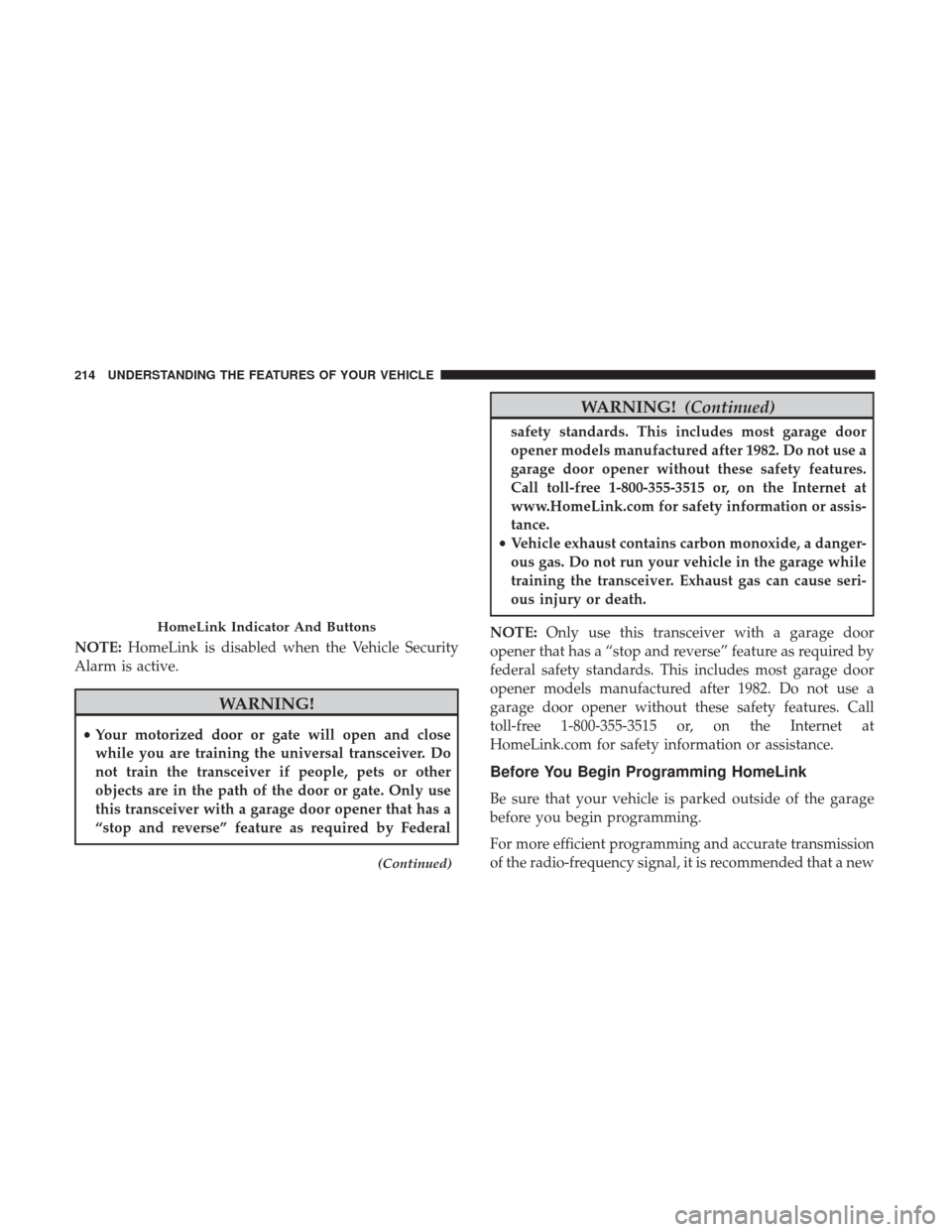
The HomeLink buttons that are located in the sun visor
designate the three different HomeLink channels.
The HomeLink indicator is located above the center button.Sunglass Bin Door — Rear Mounted
Sunglass Bin Door — Front Mounted
3
UNDERSTANDING THE FEATURES OF YOUR VEHICLE 213
Page 216 of 539
NOTE:HomeLink is disabled when the Vehicle Security
Alarm is active.
WARNING!
• Your motorized door or gate will open and close
while you are training the universal transceiver. Do
not train the transceiver if people, pets or other
objects are in the path of the door or gate. Only use
this transceiver with a garage door opener that has a
“stop and reverse” feature as required by Federal
(Continued)
WARNING! (Continued)
safety standards. This includes most garage door
opener models manufactured after 1982. Do not use a
garage door opener without these safety features.
Call toll-free 1-800-355-3515 or, on the Internet at
www.HomeLink.com for safety information or assis-
tance.
• Vehicle exhaust contains carbon monoxide, a danger-
ous gas. Do not run your vehicle in the garage while
training the transceiver. Exhaust gas can cause seri-
ous injury or death.
NOTE: Only use this transceiver with a garage door
opener that has a “stop and reverse” feature as required by
federal safety standards. This includes most garage door
opener models manufactured after 1982. Do not use a
garage door opener without these safety features. Call
toll-free 1-800-355-3515 or, on the Internet at
HomeLink.com for safety information or assistance.
Before You Begin Programming HomeLink
Be sure that your vehicle is parked outside of the garage
before you begin programming.
For more efficient programming and accurate transmission
of the radio-frequency signal, it is recommended that a new
HomeLink Indicator And Buttons
214 UNDERSTANDING THE FEATURES OF YOUR VEHICLE