radio CHRYSLER 200 2017 2.G User Guide
[x] Cancel search | Manufacturer: CHRYSLER, Model Year: 2017, Model line: 200, Model: CHRYSLER 200 2017 2.GPages: 539, PDF Size: 5.18 MB
Page 108 of 539
Rear Cross Path
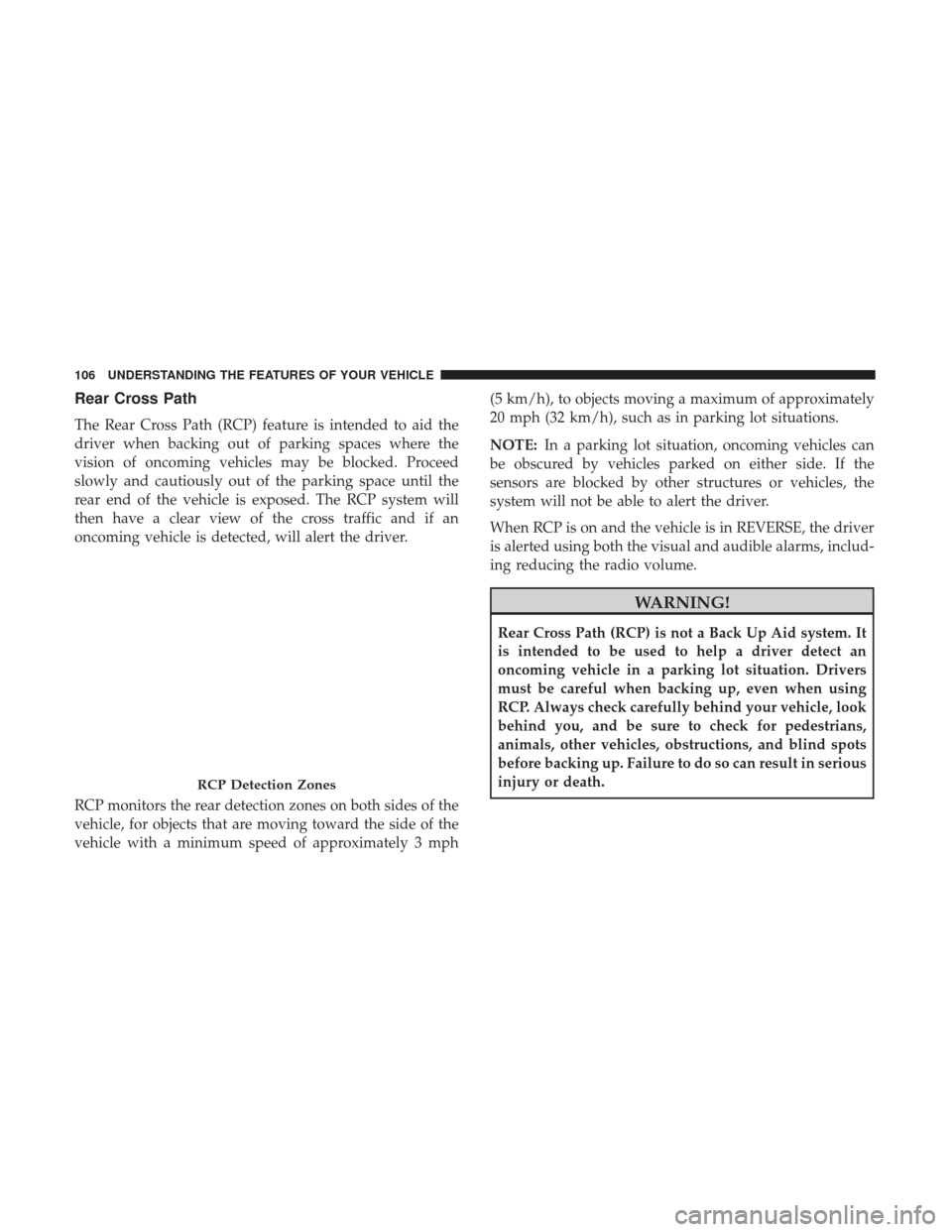
The Rear Cross Path (RCP) feature is intended to aid the
driver when backing out of parking spaces where the
vision of oncoming vehicles may be blocked. Proceed
slowly and cautiously out of the parking space until the
rear end of the vehicle is exposed. The RCP system will
then have a clear view of the cross traffic and if an
oncoming vehicle is detected, will alert the driver.
RCP monitors the rear detection zones on both sides of the
vehicle, for objects that are moving toward the side of the
vehicle with a minimum speed of approximately 3 mph(5 km/h), to objects moving a maximum of approximately
20 mph (32 km/h), such as in parking lot situations.
NOTE:
In a parking lot situation, oncoming vehicles can
be obscured by vehicles parked on either side. If the
sensors are blocked by other structures or vehicles, the
system will not be able to alert the driver.
When RCP is on and the vehicle is in REVERSE, the driver
is alerted using both the visual and audible alarms, includ-
ing reducing the radio volume.
WARNING!
Rear Cross Path (RCP) is not a Back Up Aid system. It
is intended to be used to help a driver detect an
oncoming vehicle in a parking lot situation. Drivers
must be careful when backing up, even when using
RCP. Always check carefully behind your vehicle, look
behind you, and be sure to check for pedestrians,
animals, other vehicles, obstructions, and blind spots
before backing up. Failure to do so can result in serious
injury or death.
RCP Detection Zones
106 UNDERSTANDING THE FEATURES OF YOUR VEHICLE
Page 109 of 539
Modes Of Operation
Three selectable modes of operation are available in the
Uconnect System. Refer to “Uconnect Settings/Customer
Programmable Features” in “Understanding Your Instru-
ment Panel” for further information.
Blind Spot Alert Lights Only
When operating in Blind Spot Alert mode, the BSM system
will provide a visual alert in the appropriate side view
mirror based on a detected object. However, when the
system is operating in Rear Cross Path (RCP) mode, the
system will respond with both visual and audible alerts
when a detected object is present. Whenever an audible
alert is requested, the radio is muted.
Blind Spot Alert Lights/Chime
When operating in Blind Spot Alert Lights/Chime mode,
the BSM system will provide a visual alert in the appro-
priate side view mirror based on a detected object. If the
turn signal is then activated, and it corresponds to an alert
present on that side of the vehicle, an audible chime will
also be sounded. Whenever a turn signal and detected
object are present on the same side at the same time, both
the visual and audible alerts will be issued. In addition to
the audible alert the radio (if on) will also be muted.NOTE:
Whenever an audible alert is requested by the BSM
system, the radio is also muted.
When the system is in RCP, the system shall respond with
both visual and audible alerts when a detected object is
present. Whenever an audible alert is requested, the radio
is also muted. Turn/hazard signal status is ignored; the
RCP state always requests the chime.
Blind Spot Alert Off
When the BSM system is turned off there will be no visual
or audible alerts from either the BSM or RCP systems.
NOTE: The BSM system will store the current operating
mode when the vehicle is shut off. Each time the vehicle is
started the previously stored mode will be recalled and
used.
General Information
This vehicle has systems that operate on radio frequency
that comply with Part 15 of the Federal Communications
Commission (FCC) rules and with Industry Canada Stan-
dards RSS- GEN/210/220/310.
Operation is subject to the following two conditions:
1. The device may not cause harmful interference.
3
UNDERSTANDING THE FEATURES OF YOUR VEHICLE 107
Page 119 of 539
NOTE:You may experience deformation in the seat cush-
ion from the seat belt buckles if the seats are left folded for
an extended period of time. This is normal and by simply
opening the seats to the open position, over time the seat
cushion will return to its normal shape.
When returning the rear seatback to the upright position,
be sure the seatback is latched.
WARNING!
• Be certain that the seatback is securely locked into
position. If the seatback is not securely locked into
position the seat will not provide the proper stability
for child seats and/or passengers. An improperly
latched seat could cause serious injury.
• The rear cargo area of the vehicle (with the rear
seatbacks in the locked-up or folded down position)
should not be used as a play area by children. They
could be seriously injured in a collision. Children
should be seated and using the proper restraint
system.
DRIVER MEMORY SEAT — IF EQUIPPED
This feature allows the driver to store up to two different
memory profiles, for easy recall through a memory switch.
Each memory profile contains desired position settings for
the driver seat and side mirrors and a set of desired radio
station presets.
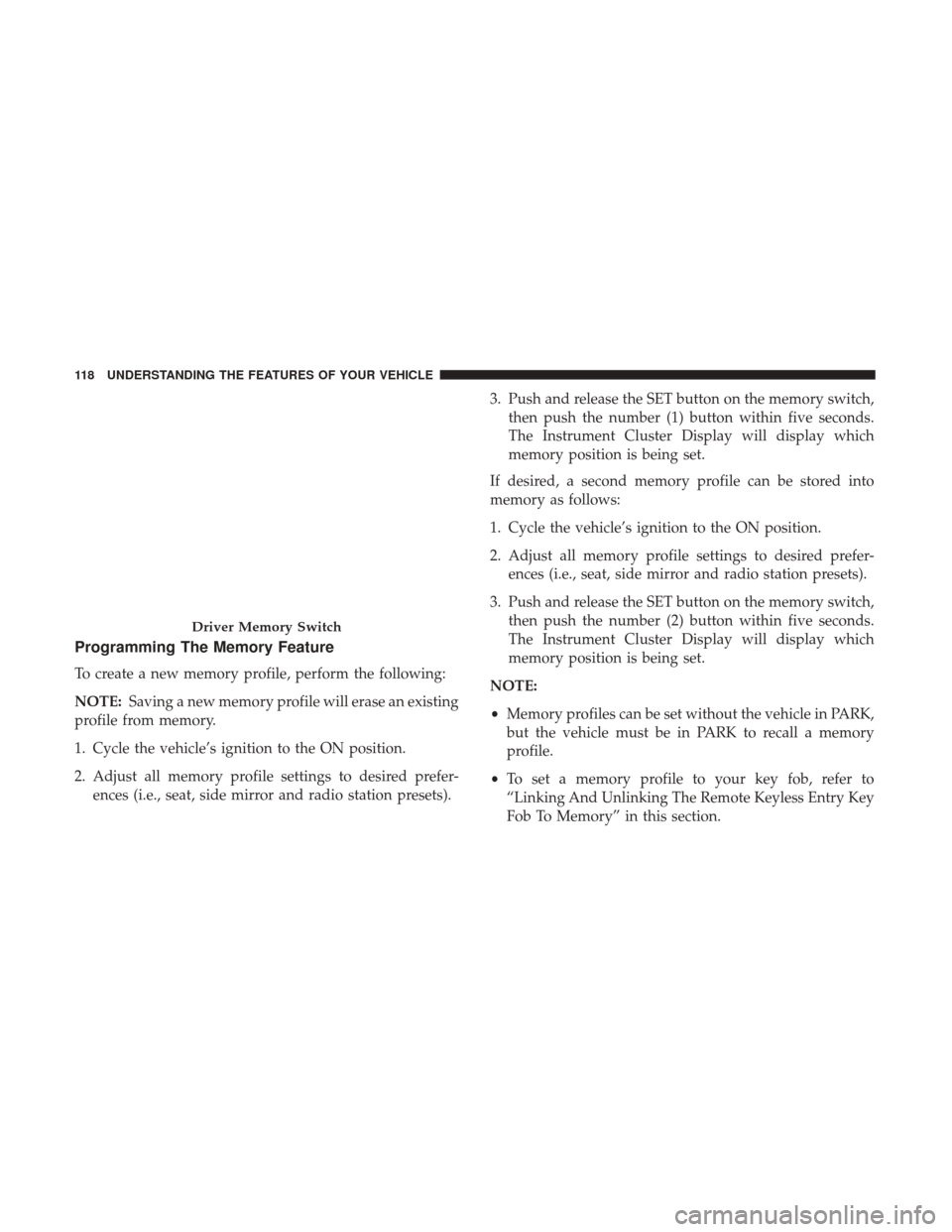
The memory switch is located on the driver’s side door
panel. The switch contains 3 buttons, a S (SET) button to
activate the memory save function, the number (1) memory
button and the number (2) memory button. The memory
switch allows the driver to recall either of the two pre-
programmed memory profiles by pushing the appropriate
number button on the switch.
3
UNDERSTANDING THE FEATURES OF YOUR VEHICLE 117
Page 120 of 539
Programming The Memory Feature
To create a new memory profile, perform the following:
NOTE:Saving a new memory profile will erase an existing
profile from memory.
1. Cycle the vehicle’s ignition to the ON position.
2. Adjust all memory profile settings to desired prefer- ences (i.e., seat, side mirror and radio station presets). 3. Push and release the SET button on the memory switch,
then push the number (1) button within five seconds.
The Instrument Cluster Display will display which
memory position is being set.
If desired, a second memory profile can be stored into
memory as follows:
1. Cycle the vehicle’s ignition to the ON position.
2. Adjust all memory profile settings to desired prefer- ences (i.e., seat, side mirror and radio station presets).
3. Push and release the SET button on the memory switch, then push the number (2) button within five seconds.
The Instrument Cluster Display will display which
memory position is being set.
NOTE:
• Memory profiles can be set without the vehicle in PARK,
but the vehicle must be in PARK to recall a memory
profile.
• To set a memory profile to your key fob, refer to
“Linking And Unlinking The Remote Keyless Entry Key
Fob To Memory” in this section.
Driver Memory Switch
118 UNDERSTANDING THE FEATURES OF YOUR VEHICLE
Page 132 of 539
Interior Light Defeat (OFF)
Rotate the instrument panel dimmer control to the extreme
bottom OFF position. The interior lights will remain off
when the doors are open.
Parade Mode (Daytime Brightness Feature)
Rotate the instrument panel dimmer control upward to the
first detent. This feature brightens all text displays such as
the odometer, Instrument Cluster Display, and radio when
the position lights or headlights are on.
Battery Saver Feature
To protect the battery, the interior lights will turn off
automatically 10 minutes after the ignition switch is moved
to the LOCK position. This will occur if the interior lights
were switched on manually or are on because a door is
open.
WINDSHIELD WIPERS AND WASHERS
The windshield wiper/washer controls are located on the
windshield wiper/washer lever on the right side of the
steering column. The front wipers are operated by rotating
a switch, located on the end of the lever.
Windshield Wiper Operation
Rotate the end of the lever to one of the first four detent
positions for intermittent settings, the fifth detent for low
wiper operation and the sixth detent for high wiper
operation.
Windshield Wiper/Washer Lever
130 UNDERSTANDING THE FEATURES OF YOUR VEHICLE
Page 158 of 539
Narrow Vehicles
Some narrow vehicles traveling near the outer edges of the
lane or edging into the lane are not detected until they have
moved fully into the lane. There may not be sufficient
distance to the vehicle ahead.
Stationary Objects And Vehicles
ACC does not react to stationary objects and stationary
vehicles. For example, ACC will not react in situations
where the vehicle you are following exits your lane and the
vehicle ahead is stopped in your lane. Always be attentive
and ready to apply the brakes if necessary.
General Information
This vehicle has systems that operate on radio frequency
that comply with Part 15 of the Federal Communications
Commission (FCC) rules and with Industry Canada Stan-
dards RSS- GEN/210/220/310.
Operation is subject to the following two conditions:
1. The device may not cause harmful interference.
2. The device must accept any interference received, in-cluding interference that may cause undesired operation
of the device.
Narrow Vehicle Example
Stationary Object And Stationary Vehicle Example
156 UNDERSTANDING THE FEATURES OF YOUR VEHICLE
Page 174 of 539
WARNING ALERTS
Rear Dis- tance
(in/cm) Greater
than
79 in
(200 cm) 79-59 in
(200-150 cm)
59-47 in
(150-120 cm)
47-39 in
(120-100 cm)
39-25 in
(100-65 cm) 25-12 in
(65-30 cm) Less than
12 in (30 cm)
Arcs — Left None None None None None 2nd Flash-
ing1st Flashing
Arcs — Center None 6th Solid 5th Solid 4th Solid 3rd Flash-
ing2nd Flash-
ing 1st Flashing
Arcs — Right None None None None None 2nd Flash-
ing1st Flashing
Audible Alert
Chime None Single 1/2-
SecondTone
(for rear
center only) Slow
(for rear
center only) Slow
(for rear
center only) Fast
(for rear
center only) Fast Continuous
Radio Vol- ume Re- duced No
Yes YesYesYes Yes Yes
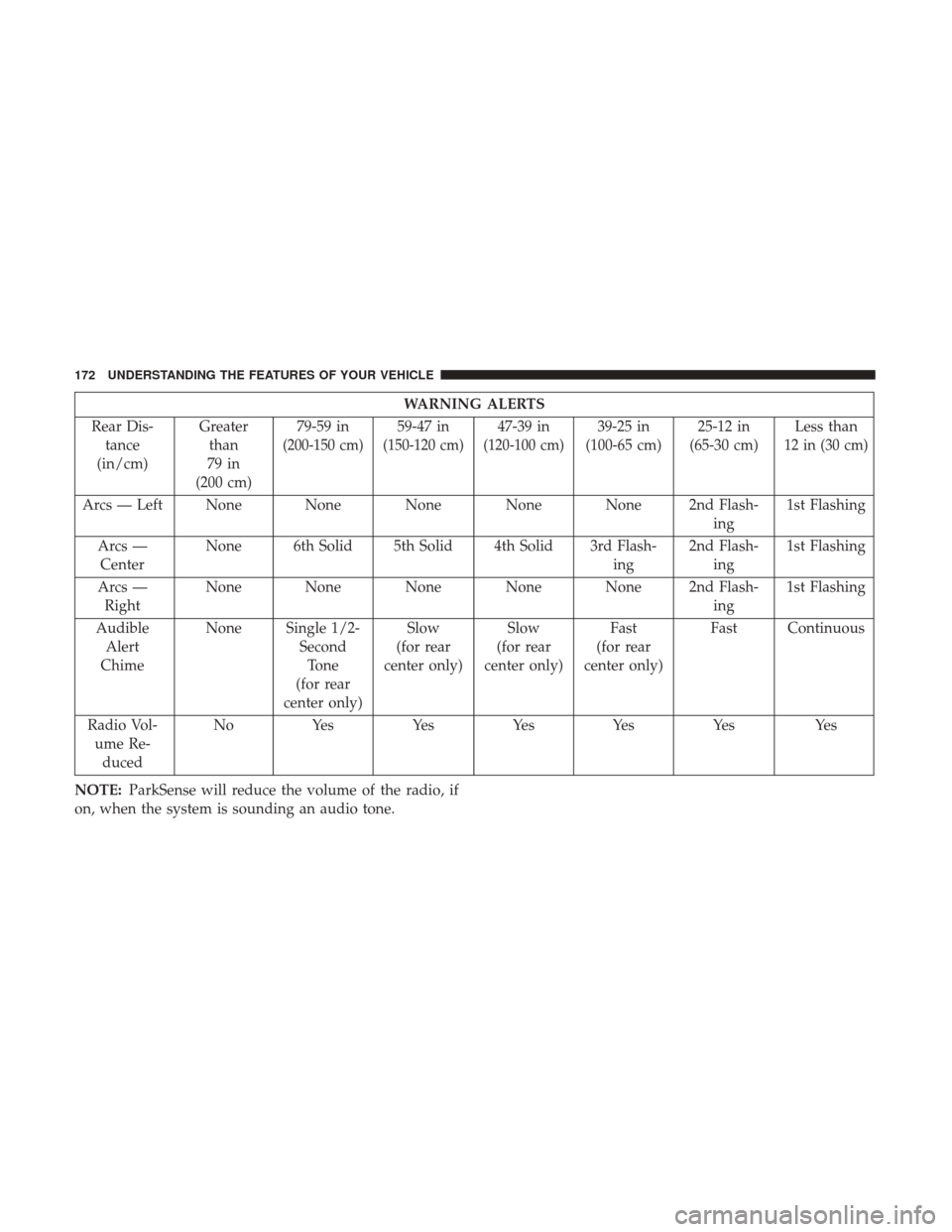
NOTE: ParkSense will reduce the volume of the radio, if
on, when the system is sounding an audio tone.
172 UNDERSTANDING THE FEATURES OF YOUR VEHICLE
Page 176 of 539
is clean and clear of snow, ice, mud, dirt or other obstruc-
tion and then cycle the ignition. If the message continues to
appear, see an authorized dealer.
If “PARKSENSE UNAVAILABLE SERVICE REQUIRED”
appears in the Instrument Cluster Display, see an autho-
rized dealer.
Cleaning The ParkSense System
Clean the ParkSense sensors with water, car wash soap and
a soft cloth. Do not use rough or hard cloths. Do not scratch
or poke the sensors. Otherwise, you could damage the
sensors.
ParkSense System Usage Precautions
NOTE:
•Ensure that the rear bumper is free of snow, ice, mud,
dirt and debris to keep the ParkSense system operating
properly.
• Jackhammers, large trucks, and other vibrations could
affect the performance of ParkSense.
• When you turn ParkSense OFF, the Instrument Cluster
Display will read “PARKSENSE OFF”. Furthermore,
once you turn ParkSense off, it remains off until you turn
it on again, even if you cycle the ignition. •
When you move the gear selector to the REVERSE
position and ParkSense is turned OFF, the Instrument
Cluster Display will show a “PARKSENSE OFF” mes-
sage for as long as the vehicle is in REVERSE.
• ParkSense, when on, will reduce the volume of the radio
when it is sounding a tone.
• Clean the ParkSense sensors regularly, taking care not to
scratch or damage them. The sensors must not be
covered with ice, snow, slush, mud, dirt or debris.
Failure to do so can result in the system not working
properly. The ParkSense system might not detect an
obstacle behind the fascia/bumper, or it could provide a
false indication that an obstacle is behind the fascia/
bumper.
• Use the ParkSense switch to turn the ParkSense system
OFF if objects such as bicycle carriers, trailer hitches, etc.
are placed within 12 in (30 cm) from the rear fascia/
bumper. Failure to do so can result in the system
misinterpreting a close object as a sensor problem,
causing the “PARKSENSE UNAVAILABLE SERVICE
REQUIRED” message to be displayed in the Instrument
Cluster Display.
174 UNDERSTANDING THE FEATURES OF YOUR VEHICLE
Page 183 of 539
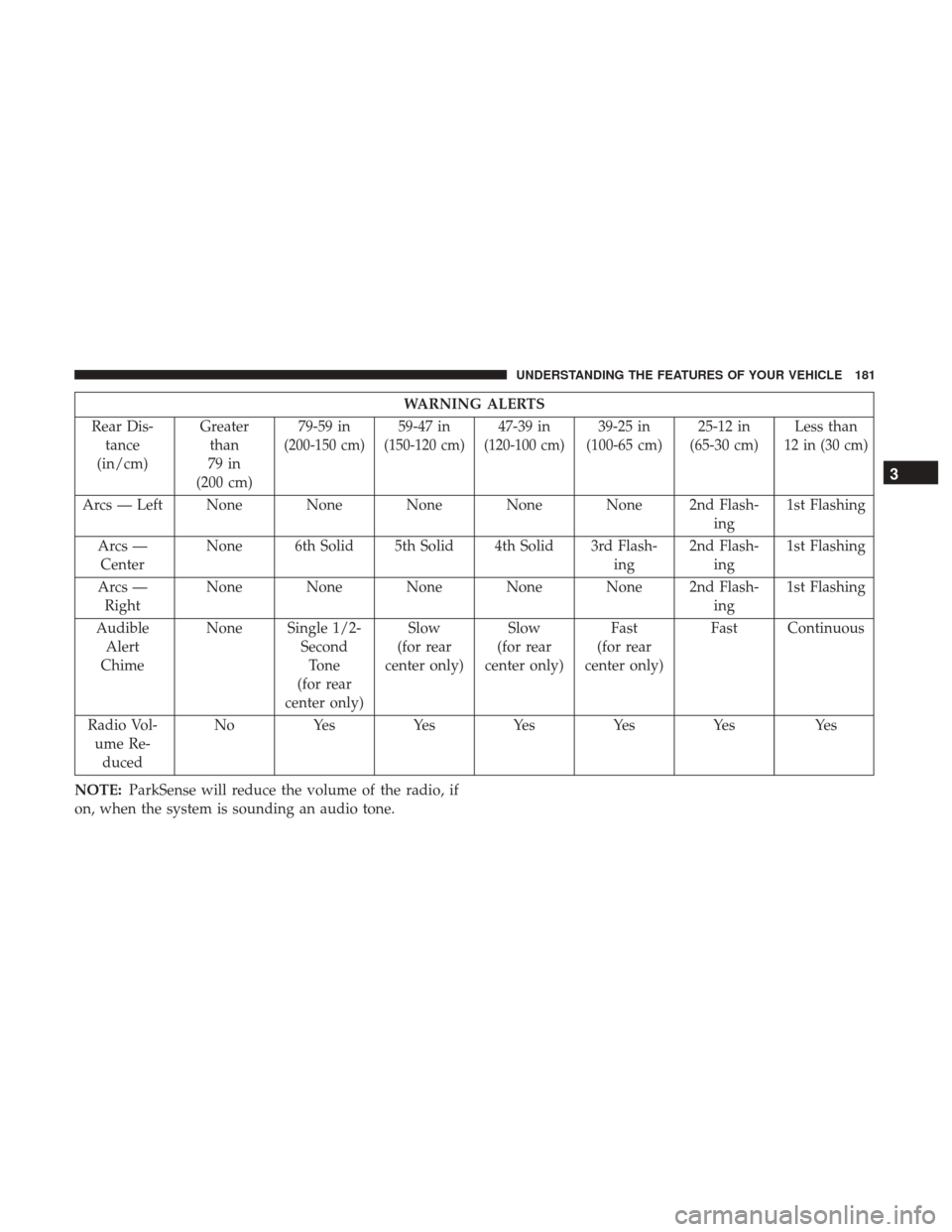
WARNING ALERTS
Rear Dis- tance
(in/cm) Greater
than
79 in
(200 cm) 79-59 in
(200-150 cm)
59-47 in
(150-120 cm)
47-39 in
(120-100 cm)
39-25 in
(100-65 cm) 25-12 in
(65-30 cm) Less than
12 in (30 cm)
Arcs — Left None None None None None 2nd Flash-
ing1st Flashing
Arcs — Center None 6th Solid 5th Solid 4th Solid 3rd Flash-
ing2nd Flash-
ing 1st Flashing
Arcs — Right None None None None None 2nd Flash-
ing1st Flashing
Audible Alert
Chime None Single 1/2-
SecondTone
(for rear
center only) Slow
(for rear
center only) Slow
(for rear
center only) Fast
(for rear
center only) Fast Continuous
Radio Vol- ume Re- duced No Yes Yes Yes Yes Yes Yes
NOTE: ParkSense will reduce the volume of the radio, if
on, when the system is sounding an audio tone.
3
UNDERSTANDING THE FEATURES OF YOUR VEHICLE 181
Page 187 of 539
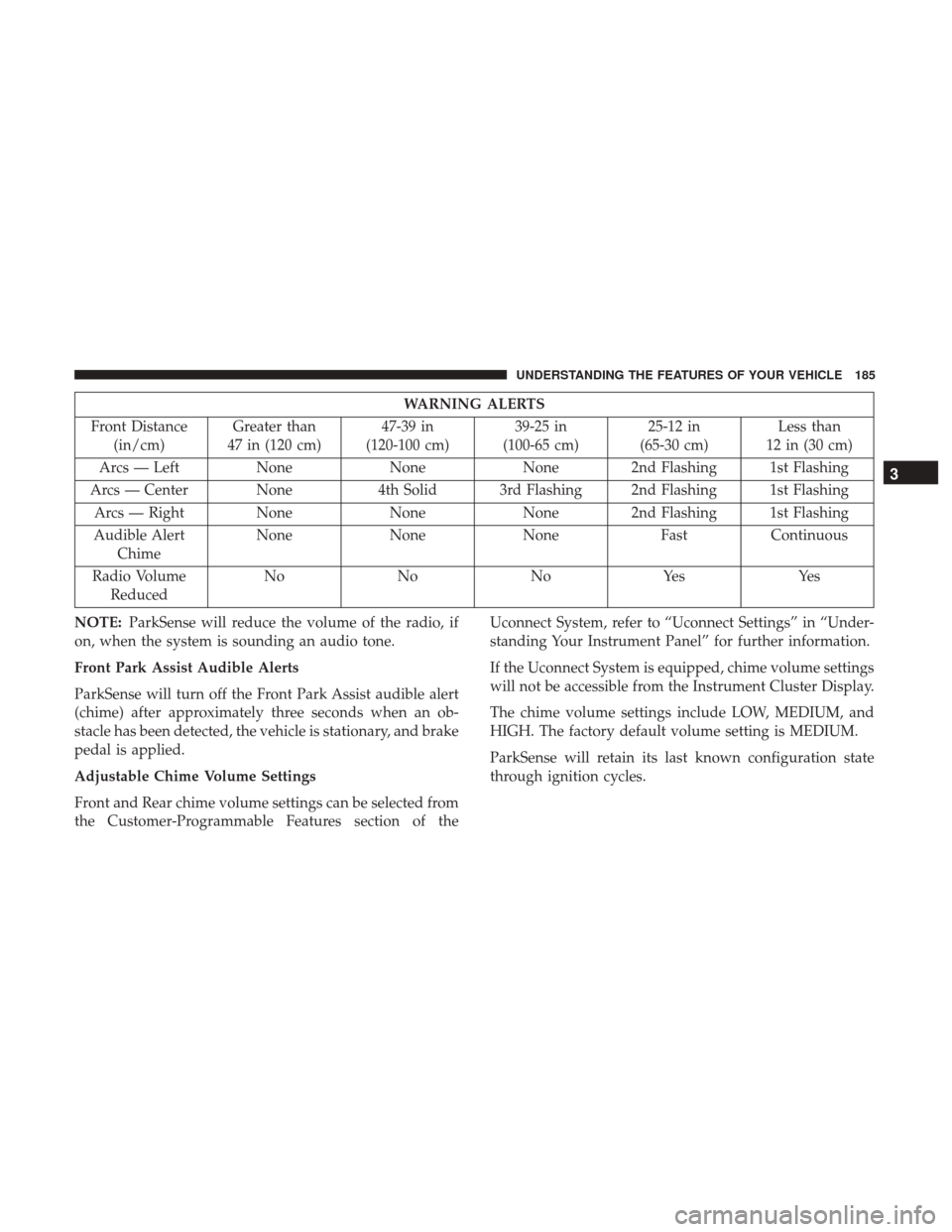
WARNING ALERTS
Front Distance (in/cm) Greater than
47 in (120 cm) 47-39 in
(120-100 cm) 39-25 in
(100-65 cm) 25-12 in
(65-30 cm) Less than
12 in (30 cm)
Arcs — Left NoneNoneNone 2nd Flashing 1st Flashing
Arcs — Center None 4th Solid 3rd Flashing 2nd Flashing 1st Flashing
Arcs — Right None NoneNone 2nd Flashing 1st Flashing
Audible Alert Chime None
NoneNone FastContinuous
Radio Volume Reduced No
NoNoYes Yes
NOTE: ParkSense will reduce the volume of the radio, if
on, when the system is sounding an audio tone.
Front Park Assist Audible Alerts
ParkSense will turn off the Front Park Assist audible alert
(chime) after approximately three seconds when an ob-
stacle has been detected, the vehicle is stationary, and brake
pedal is applied.
Adjustable Chime Volume Settings
Front and Rear chime volume settings can be selected from
the Customer-Programmable Features section of the Uconnect System, refer to “Uconnect Settings” in “Under-
standing Your Instrument Panel” for further information.
If the Uconnect System is equipped, chime volume settings
will not be accessible from the Instrument Cluster Display.
The chime volume settings include LOW, MEDIUM, and
HIGH. The factory default volume setting is MEDIUM.
ParkSense will retain its last known configuration state
through ignition cycles.
3
UNDERSTANDING THE FEATURES OF YOUR VEHICLE 185