mirror CHRYSLER 200 2017 2.G Owner's Manual
[x] Cancel search | Manufacturer: CHRYSLER, Model Year: 2017, Model line: 200, Model: CHRYSLER 200 2017 2.GPages: 539, PDF Size: 5.18 MB
Page 294 of 539
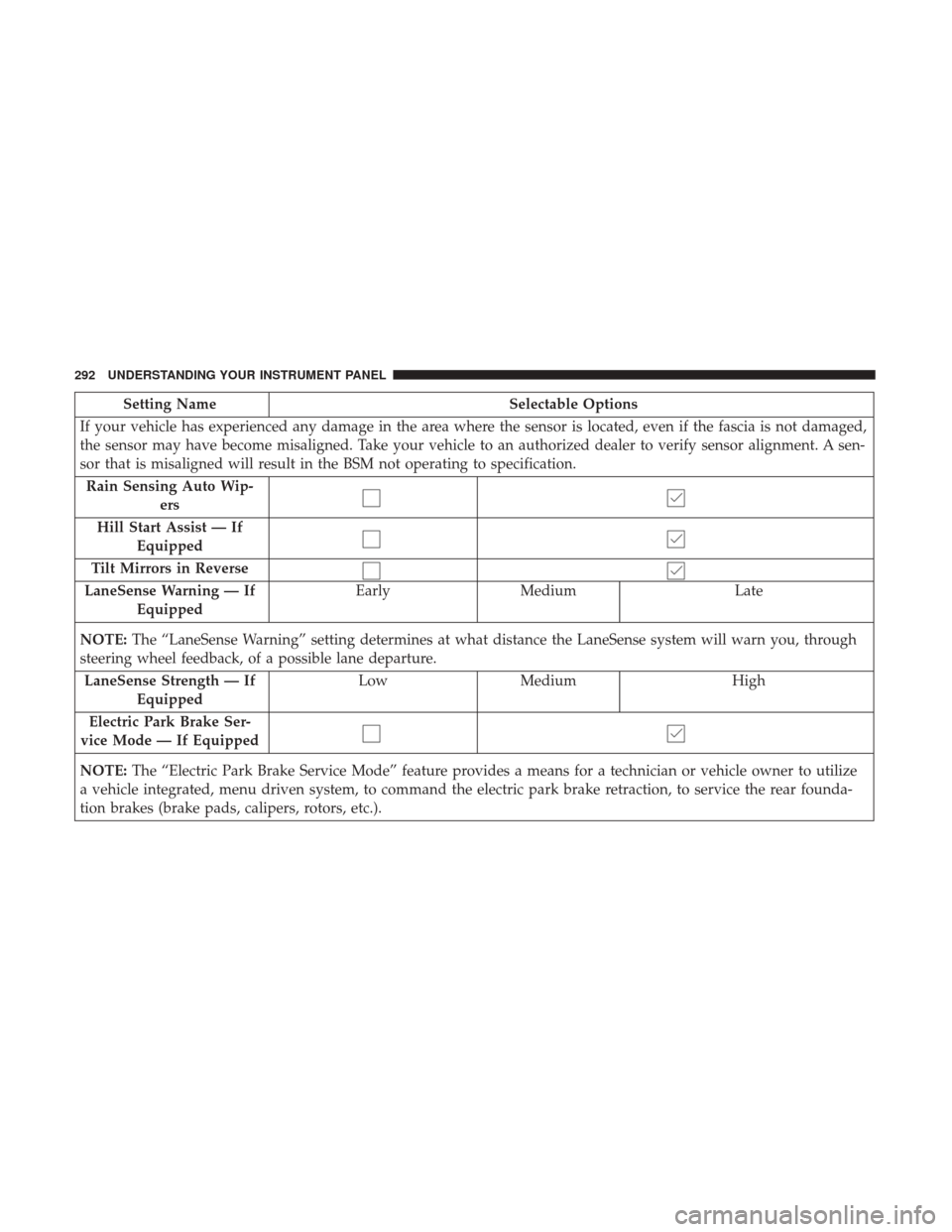
Setting NameSelectable Options
If your vehicle has experienced any damage in the area where the sensor is located, even if the fascia is not damaged,
the sensor may have become misaligned. Take your vehicle to an authorized dealer to verify sensor alignment. A sen-
sor that is misaligned will result in the BSM not operating to specification. Rain Sensing Auto Wip- ers
Hill Start Assist — If Equipped
Tilt Mirrors in Reverse
LaneSense Warning — If Equipped Early
Medium Late
NOTE: The “LaneSense Warning” setting determines at what distance the LaneSense system will warn you, through
steering wheel feedback, of a possible lane departure.
LaneSense Strength — If Equipped Low
Medium High
Electric Park Brake Ser-
vice Mode — If Equipped
NOTE: The “Electric Park Brake Service Mode” feature provides a means for a technician or vehicle owner to utilize
a vehicle integrated, menu driven system, to command the electric park brake retraction, to service the rear founda-
tion brakes (brake pads, calipers, rotors, etc.).
292 UNDERSTANDING YOUR INSTRUMENT PANEL
Page 298 of 539
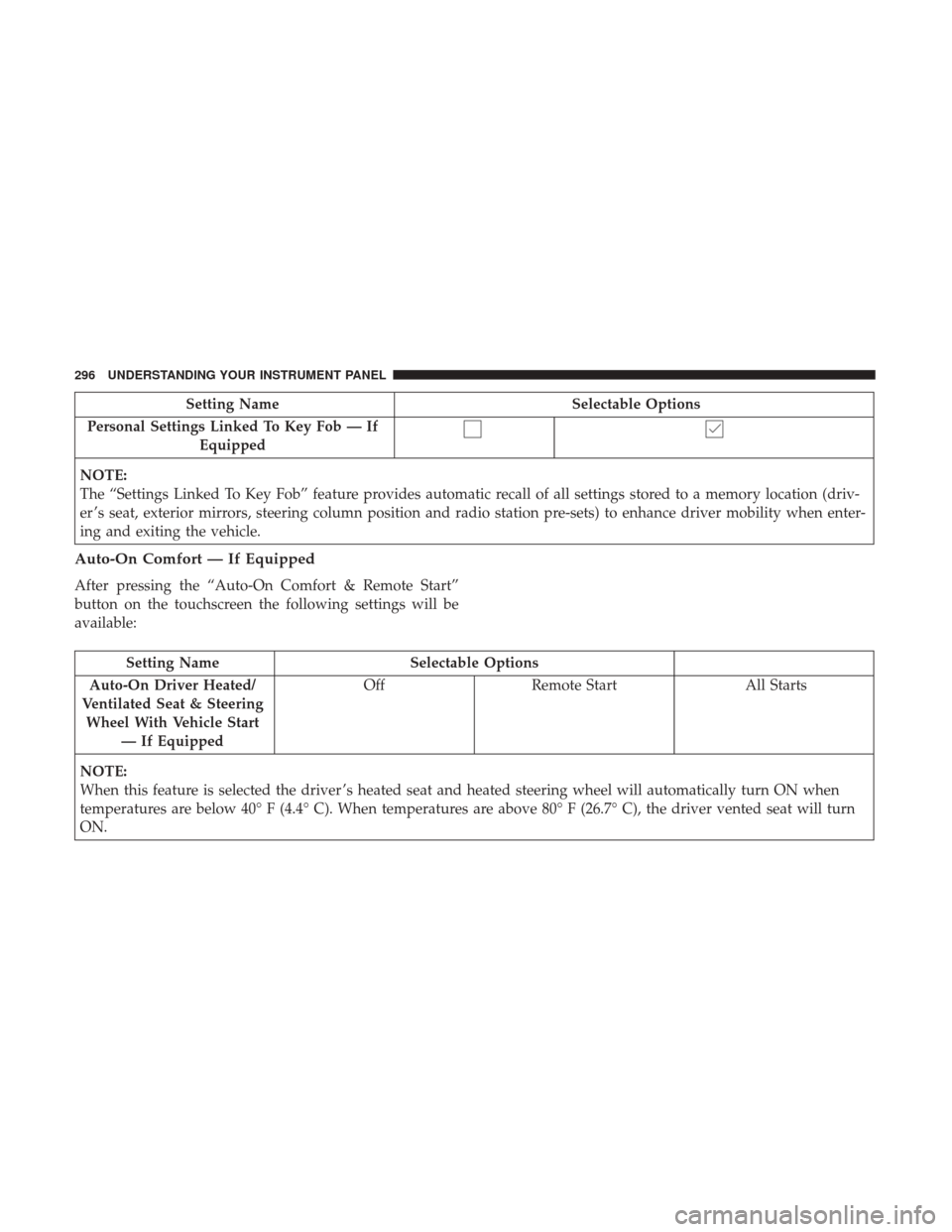
Setting NameSelectable Options
Personal Settings Linked To Key Fob — If Equipped
NOTE:
The “Settings Linked To Key Fob” feature provides automatic recall of all settings stored to a memory location (driv-
er ’s seat, exterior mirrors, steering column position and radio station pre-sets) to enhance driver mobility when enter-
ing and exiting the vehicle.
Auto-On Comfort — If Equipped
After pressing the “Auto-On Comfort & Remote Start”
button on the touchscreen the following settings will be
available:
Setting Name Selectable Options
Auto-On Driver Heated/
Ventilated Seat & Steering Wheel With Vehicle Start — If Equipped Off
Remote Start All Starts
NOTE:
When this feature is selected the driver ’s heated seat and heated steering wheel will automatically turn ON when
temperatures are below 40° F (4.4° C). When temperatures are above 80° F (26.7° C), the driver vented seat will turn
ON.
296 UNDERSTANDING YOUR INSTRUMENT PANEL
Page 309 of 539
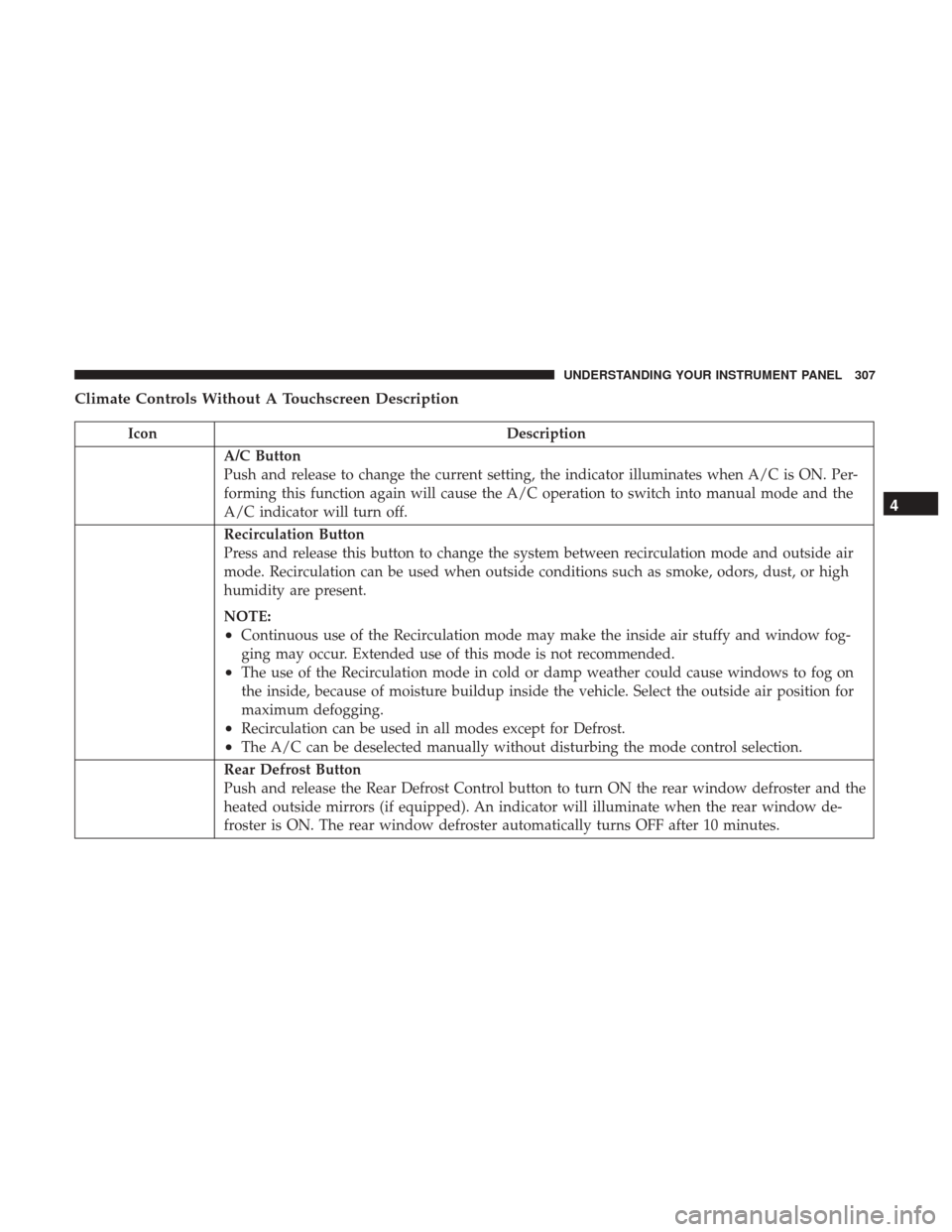
Climate Controls Without A Touchscreen Description
IconDescription
A/C Button
Push and release to change the current setting, the indicator illuminates when A/C is ON. Per-
forming this function again will cause the A/C operation to switch into manual mode and the
A/C indicator will turn off.
Recirculation Button
Press and release this button to change the system between recirculation mode and outside air
mode. Recirculation can be used when outside conditions such as smoke, odors, dust, or high
humidity are present.
NOTE:
•Continuous use of the Recirculation mode may make the inside air stuffy and window fog-
ging may occur. Extended use of this mode is not recommended.
•The use of the Recirculation mode in cold or damp weather could cause windows to fog on
the inside, because of moisture buildup inside the vehicle. Select the outside air position for
maximum defogging.
•Recirculation can be used in all modes except for Defrost.
•The A/C can be deselected manually without disturbing the mode control selection.
Rear Defrost Button
Push and release the Rear Defrost Control button to turn ON the rear window defroster and the
heated outside mirrors (if equipped). An indicator will illuminate when the rear window de-
froster is ON. The rear window defroster automatically turns OFF after 10 minutes.
4
UNDERSTANDING YOUR INSTRUMENT PANEL 307
Page 316 of 539
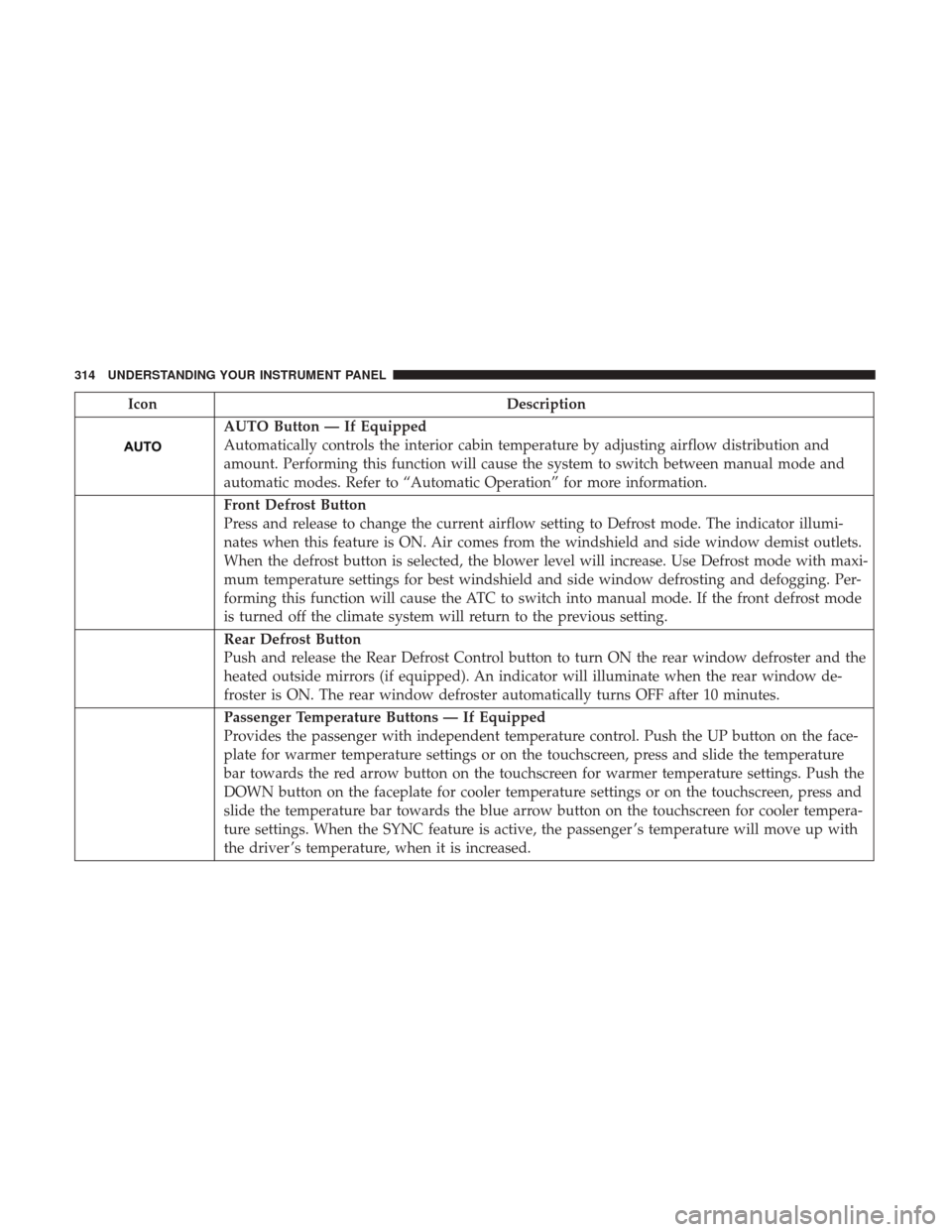
IconDescription
AUTO Button — If Equipped
Automatically controls the interior cabin temperature by adjusting airflow distribution and
amount. Performing this function will cause the system to switch between manual mode and
automatic modes. Refer to “Automatic Operation” for more information.
Front Defrost Button
Press and release to change the current airflow setting to Defrost mode. The indicator illumi-
nates when this feature is ON. Air comes from the windshield and side window demist outlets.
When the defrost button is selected, the blower level will increase. Use Defrost mode with maxi-
mum temperature settings for best windshield and side window defrosting and defogging. Per-
forming this function will cause the ATC to switch into manual mode. If the front defrost mode
is turned off the climate system will return to the previous setting.
Rear Defrost Button
Push and release the Rear Defrost Control button to turn ON the rear window defroster and the
heated outside mirrors (if equipped). An indicator will illuminate when the rear window de-
froster is ON. The rear window defroster automatically turns OFF after 10 minutes.
Passenger Temperature Buttons — If Equipped
Provides the passenger with independent temperature control. Push the UP button on the face-
plate for warmer temperature settings or on the touchscreen, press and slide the temperature
bar towards the red arrow button on the touchscreen for warmer temperature settings. Push the
DOWN button on the faceplate for cooler temperature settings or on the touchscreen, press and
slide the temperature bar towards the blue arrow button on the touchscreen for cooler tempera-
ture settings. When the SYNC feature is active, the passenger ’s temperature will move up with
the driver ’s temperature, when it is increased.
314 UNDERSTANDING YOUR INSTRUMENT PANEL
Page 334 of 539
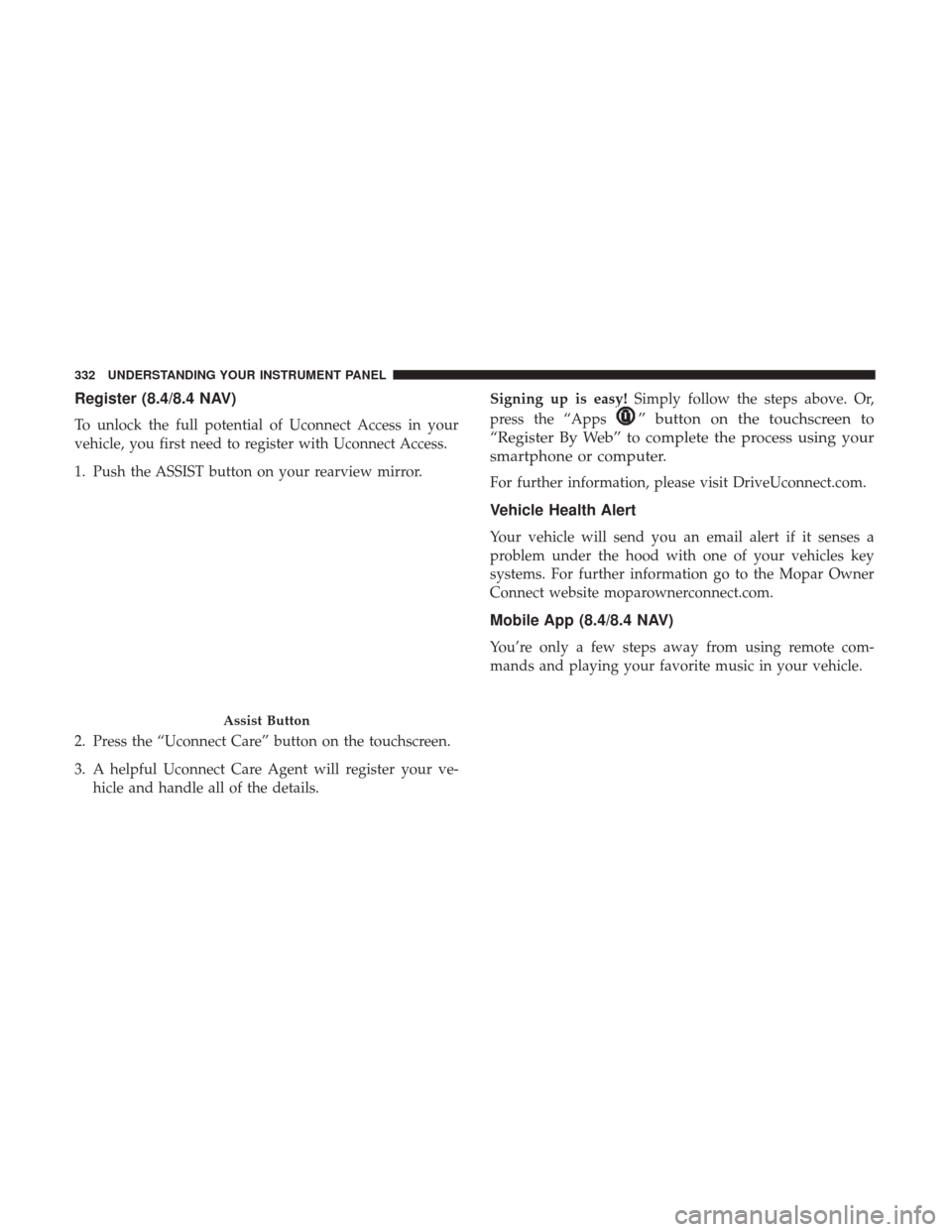
Register (8.4/8.4 NAV)
To unlock the full potential of Uconnect Access in your
vehicle, you first need to register with Uconnect Access.
1. Push the ASSIST button on your rearview mirror.
2. Press the “Uconnect Care” button on the touchscreen.
3. A helpful Uconnect Care Agent will register your ve-hicle and handle all of the details. Signing up is easy!
Simply follow the steps above. Or,
press the “Apps” button on the touchscreen to
“Register By Web” to complete the process using your
smartphone or computer.
For further information, please visit DriveUconnect.com.
Vehicle Health Alert
Your vehicle will send you an email alert if it senses a
problem under the hood with one of your vehicles key
systems. For further information go to the Mopar Owner
Connect website moparownerconnect.com.
Mobile App (8.4/8.4 NAV)
You’re only a few steps away from using remote com-
mands and playing your favorite music in your vehicle.
Assist Button
332 UNDERSTANDING YOUR INSTRUMENT PANEL
Page 346 of 539
STARTING PROCEDURES
Before starting your vehicle, adjust your seat, adjust both
inside and outside mirrors, and fasten your seat belts.
WARNING!
•When leaving the vehicle, always remove the key fob
from the ignition and lock your vehicle.
• Never leave children alone in a vehicle, or with
access to an unlocked vehicle.
• Allowing children to be in a vehicle unattended is
dangerous for a number of reasons. A child or others
could be seriously or fatally injured. Children
should be warned not to touch the parking brake,
brake pedal or the gear selector.
• Do not leave the key fob in or near the vehicle, or in
a location accessible to children, and do not leave the
ignition of a vehicle equipped with Keyless Enter-
N-Go in the ACC or ON/RUN mode. A child could
operate power windows, other controls, or move the
vehicle.
Start the engine with the gear selector in the NEUTRAL or
PARK position. Apply the brake before shifting to any
driving range.
Normal Starting — Gasoline Engine
NOTE: Normal starting of either a cold or a warm engine
is obtained without pumping or pressing the accelerator
pedal.
Cycle the ignition switch to the START position and release
when the engine starts. If the engine fails to start within 10
seconds, cycle the ignition switch to the LOCK/OFF posi-
tion, wait 10 to 15 seconds, then repeat the “Normal
Starting” procedure.
Tip Start Feature
Cycle the ignition switch to START position and release it.
The starter motor will continue to run, and will automati-
cally disengage itself when the engine is running. If the
engine fails to start, the starter will disengage automati-
cally in 10 seconds. If this occurs, cycle the ignition switch
to the OFF position, wait 10 to 15 seconds, then repeat the
“Normal Starting” procedure.
Extreme Cold Weather (Below –22°F Or 30°C)
To ensure reliable starting at these temperatures, use of an
externally powered electric engine block heater (available
from your authorized dealer) is recommended.
344 STARTING AND OPERATING
Page 478 of 539
with electric defrosters or windows equipped with radio
antennas. Do not use scrapers or other sharp instrument
that may scratch the elements.
When cleaning the rear view mirror, spray cleaner on the
towel or cloth that you are using. Do not spray cleaner
directly on the mirror.
Cleaning Plastic Instrument Cluster Lenses
The lenses in front of the instruments in this vehicle are
molded in clear plastic. When cleaning the lenses, care
must be taken to avoid scratching the plastic.
1. Clean with a wet soft cloth. A mild soap solution may beused, but do not use high alcohol content or abrasive
cleaners. If soap is used, wipe clean with a clean damp
cloth.
2. Dry with a soft cloth.
Seat Belt Maintenance
Do not bleach, dye or clean the belts with chemical solvents
or abrasive cleaners. This will weaken the fabric. Sun
damage can also weaken the fabric.
If the belts need cleaning, use a mild soap solution or
lukewarm water. Do not remove the belts from the vehicle
to wash them. Dry with a soft cloth. Replace the belts if they appear frayed or worn or if the
buckles do not work properly.
NOTE:
If the belts retract slowly, inspect the upper turning
loop for soiling. If soiling is present, clean with a wet soft
cloth until all residue is removed.
WARNING!
A frayed or torn belt could rip apart in a collision and
leave you with no protection. Inspect the belt system
periodically, checking for cuts, frays, or loose parts.
Damaged parts must be replaced immediately. Do not
disassemble or modify the system. Seat belt assemblies
must be replaced after a collision if they have been
damaged (i.e., bent retractor, torn webbing, etc.).
FUSES
WARNING!
• When replacing a blown fuse, always use an appro-
priate replacement fuse with the same amp rating as
the original fuse. Never replace a fuse with another
fuse of higher amp rating. Never replace a blown
(Continued)
476 MAINTAINING YOUR VEHICLE
Page 486 of 539
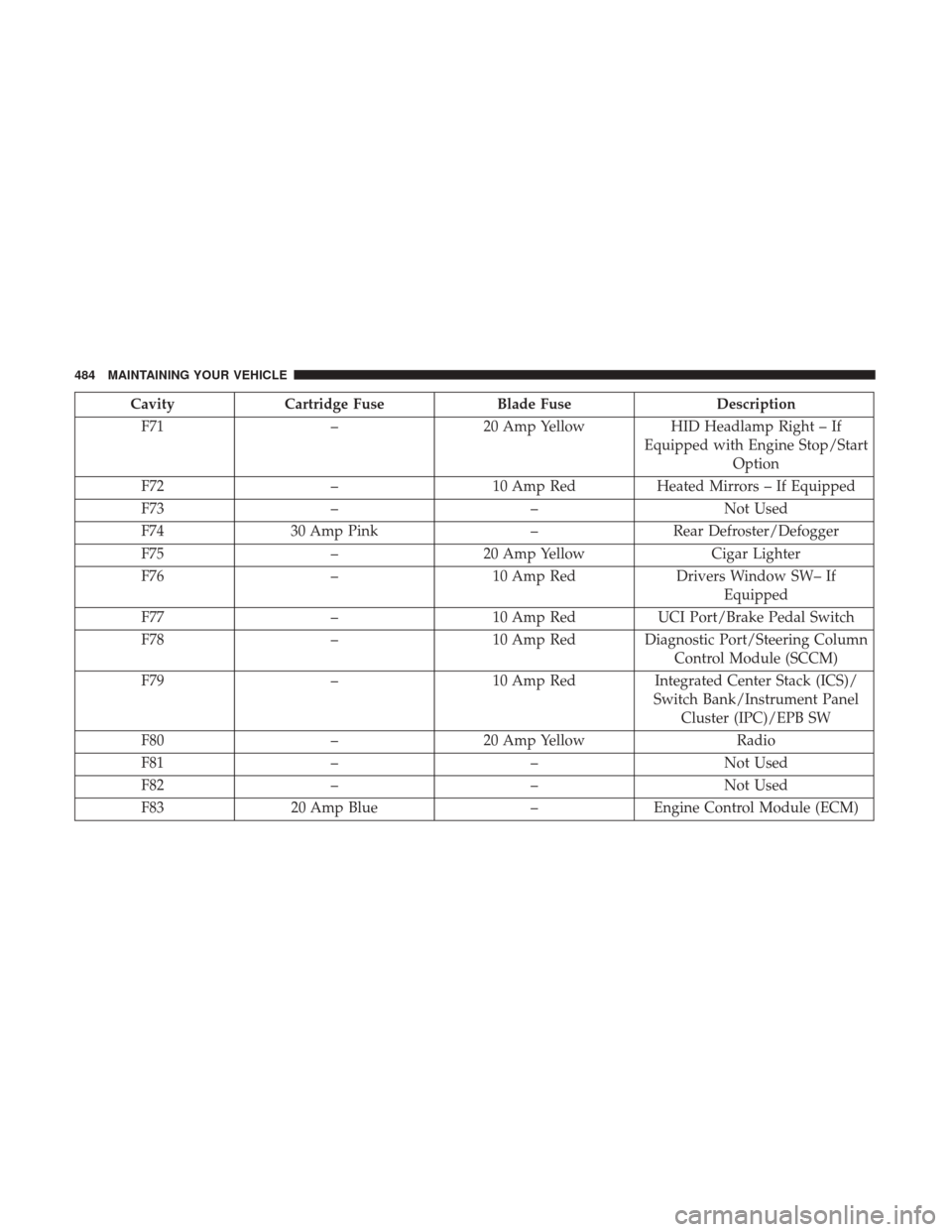
CavityCartridge Fuse Blade Fuse Description
F71 –20 Amp Yellow HID Headlamp Right – If
Equipped with Engine Stop/Start Option
F72 –10 Amp Red Heated Mirrors – If Equipped
F73 – –Not Used
F74 30 Amp Pink –Rear Defroster/Defogger
F75 –20 Amp Yellow Cigar Lighter
F76 –10 Amp Red Drivers Window SW– If
Equipped
F77 –10 Amp Red UCI Port/Brake Pedal Switch
F78 –10 Amp Red Diagnostic Port/Steering Column
Control Module (SCCM)
F79 –10 Amp Red Integrated Center Stack (ICS)/
Switch Bank/Instrument Panel Cluster (IPC)/EPB SW
F80 –20 Amp Yellow Radio
F81 – –Not Used
F82 – –Not Used
F83 20 Amp Blue –Engine Control Module (ECM)
484 MAINTAINING YOUR VEHICLE
Page 487 of 539
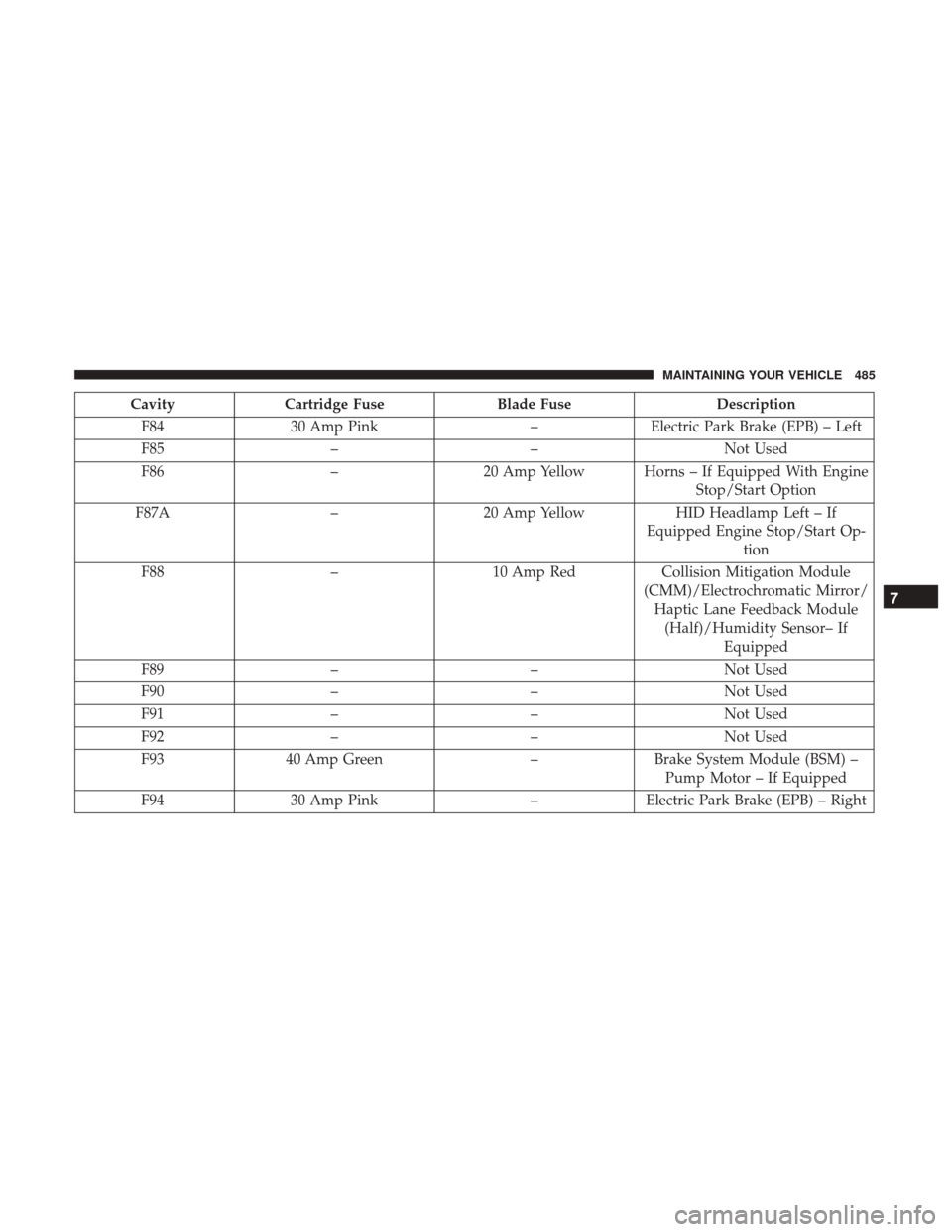
CavityCartridge Fuse Blade Fuse Description
F84 30 Amp Pink –Electric Park Brake (EPB) – Left
F85 – –Not Used
F86 –20 Amp Yellow Horns – If Equipped With Engine
Stop/Start Option
F87A –20 Amp Yellow HID Headlamp Left – If
Equipped Engine Stop/Start Op- tion
F88 –10 Amp Red Collision Mitigation Module
(CMM)/Electrochromatic Mirror/ Haptic Lane Feedback Module (Half)/Humidity Sensor– If Equipped
F89 – –Not Used
F90 – –Not Used
F91 – –Not Used
F92 – –Not Used
F93 40 Amp Green –Brake System Module (BSM) –
Pump Motor – If Equipped
F94 30 Amp Pink –Electric Park Brake (EPB) – Right
7
MAINTAINING YOUR VEHICLE 485
Page 488 of 539
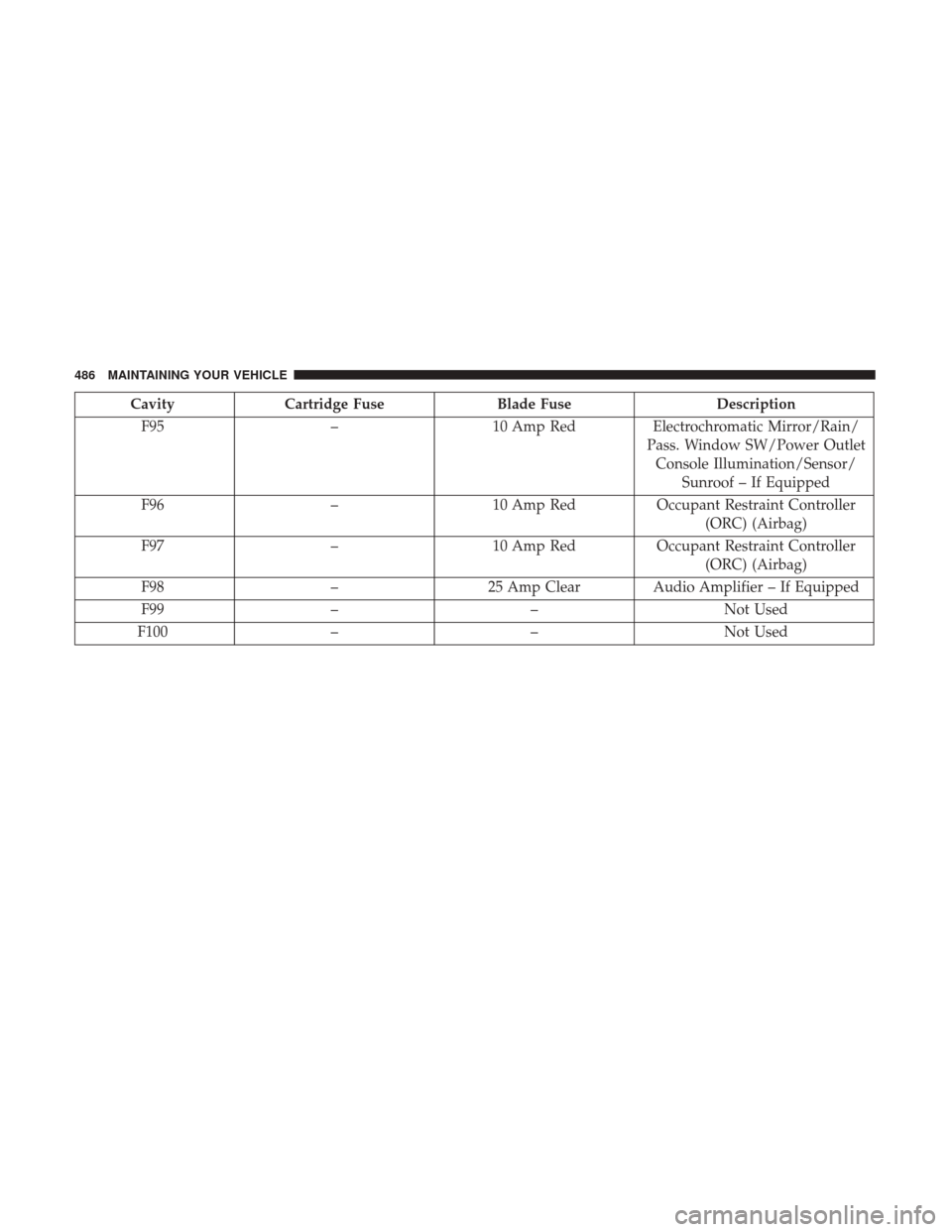
CavityCartridge Fuse Blade Fuse Description
F95 –10 Amp RedElectrochromatic Mirror/Rain/
Pass. Window SW/Power Outlet Console Illumination/Sensor/ Sunroof – If Equipped
F96 –10 Amp Red Occupant Restraint Controller
(ORC) (Airbag)
F97 –10 Amp Red Occupant Restraint Controller
(ORC) (Airbag)
F98 –25 Amp Clear Audio Amplifier – If Equipped
F99 – –Not Used
F100 – –Not Used
486 MAINTAINING YOUR VEHICLE