warning CHRYSLER 200 2017 2.G Manual PDF
[x] Cancel search | Manufacturer: CHRYSLER, Model Year: 2017, Model line: 200, Model: CHRYSLER 200 2017 2.GPages: 539, PDF Size: 5.18 MB
Page 118 of 539
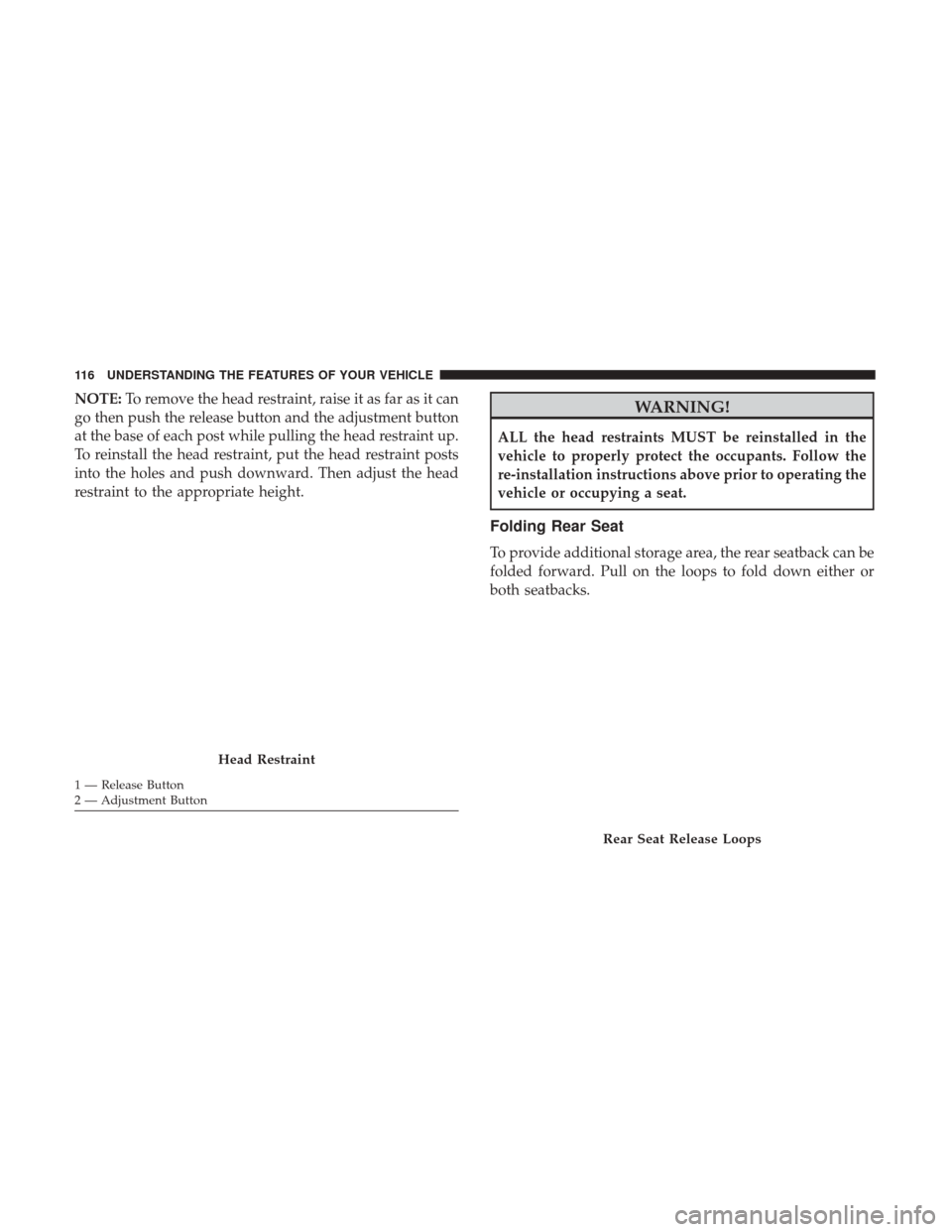
NOTE:To remove the head restraint, raise it as far as it can
go then push the release button and the adjustment button
at the base of each post while pulling the head restraint up.
To reinstall the head restraint, put the head restraint posts
into the holes and push downward. Then adjust the head
restraint to the appropriate height.WARNING!
ALL the head restraints MUST be reinstalled in the
vehicle to properly protect the occupants. Follow the
re-installation instructions above prior to operating the
vehicle or occupying a seat.
Folding Rear Seat
To provide additional storage area, the rear seatback can be
folded forward. Pull on the loops to fold down either or
both seatbacks.
Head Restraint
1 — Release Button
2 — Adjustment Button
Rear Seat Release Loops
116 UNDERSTANDING THE FEATURES OF YOUR VEHICLE
Page 119 of 539
NOTE:You may experience deformation in the seat cush-
ion from the seat belt buckles if the seats are left folded for
an extended period of time. This is normal and by simply
opening the seats to the open position, over time the seat
cushion will return to its normal shape.
When returning the rear seatback to the upright position,
be sure the seatback is latched.
WARNING!
• Be certain that the seatback is securely locked into
position. If the seatback is not securely locked into
position the seat will not provide the proper stability
for child seats and/or passengers. An improperly
latched seat could cause serious injury.
• The rear cargo area of the vehicle (with the rear
seatbacks in the locked-up or folded down position)
should not be used as a play area by children. They
could be seriously injured in a collision. Children
should be seated and using the proper restraint
system.
DRIVER MEMORY SEAT — IF EQUIPPED
This feature allows the driver to store up to two different
memory profiles, for easy recall through a memory switch.
Each memory profile contains desired position settings for
the driver seat and side mirrors and a set of desired radio
station presets.
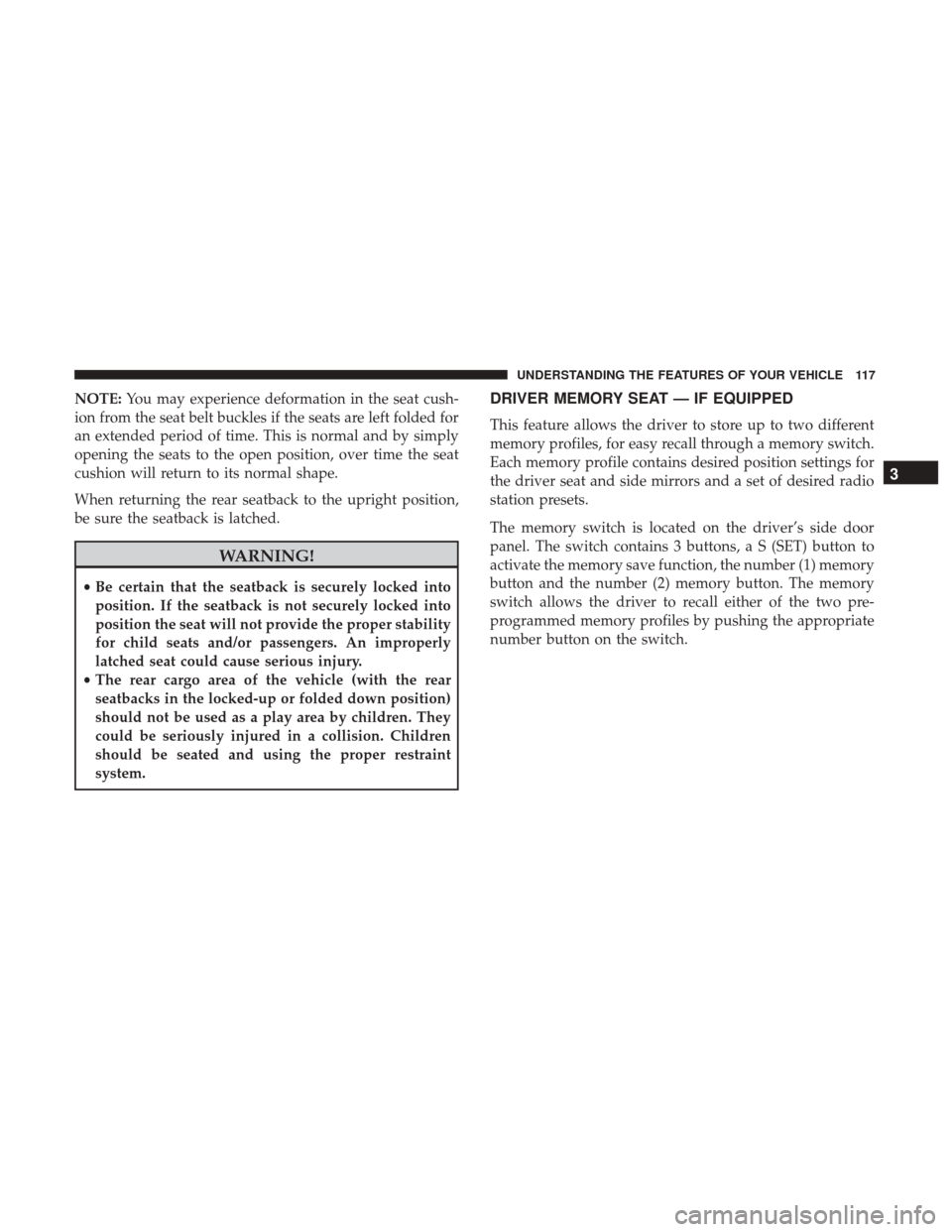
The memory switch is located on the driver’s side door
panel. The switch contains 3 buttons, a S (SET) button to
activate the memory save function, the number (1) memory
button and the number (2) memory button. The memory
switch allows the driver to recall either of the two pre-
programmed memory profiles by pushing the appropriate
number button on the switch.
3
UNDERSTANDING THE FEATURES OF YOUR VEHICLE 117
Page 124 of 539
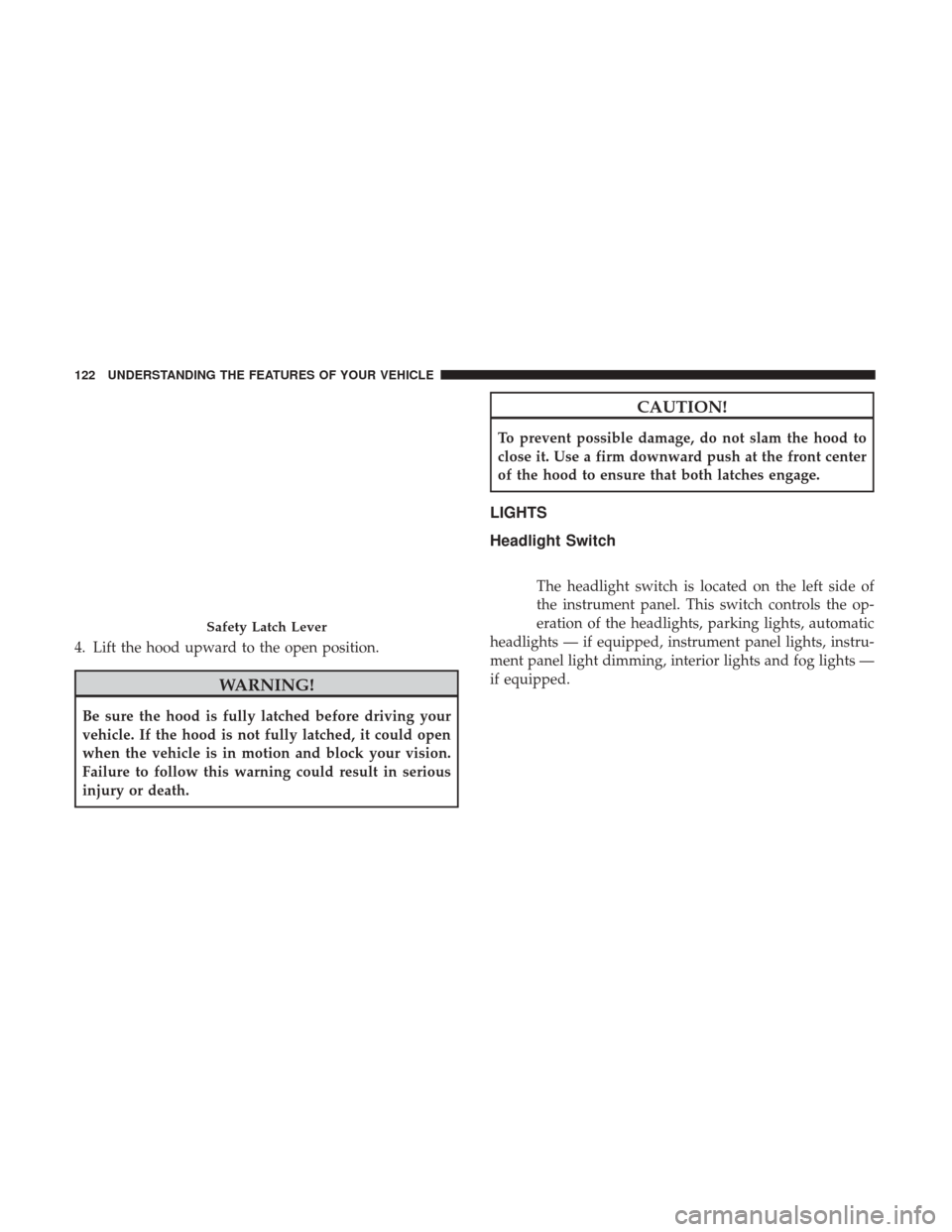
4. Lift the hood upward to the open position.
WARNING!
Be sure the hood is fully latched before driving your
vehicle. If the hood is not fully latched, it could open
when the vehicle is in motion and block your vision.
Failure to follow this warning could result in serious
injury or death.
CAUTION!
To prevent possible damage, do not slam the hood to
close it. Use a firm downward push at the front center
of the hood to ensure that both latches engage.
LIGHTS
Headlight Switch
The headlight switch is located on the left side of
the instrument panel. This switch controls the op-
eration of the headlights, parking lights, automatic
headlights — if equipped, instrument panel lights, instru-
ment panel light dimming, interior lights and fog lights —
if equipped.
Safety Latch Lever
122 UNDERSTANDING THE FEATURES OF YOUR VEHICLE
Page 134 of 539
NOTE:If the vehicle is moving less than 10 mph
(16 km/h), delay times will be doubled.
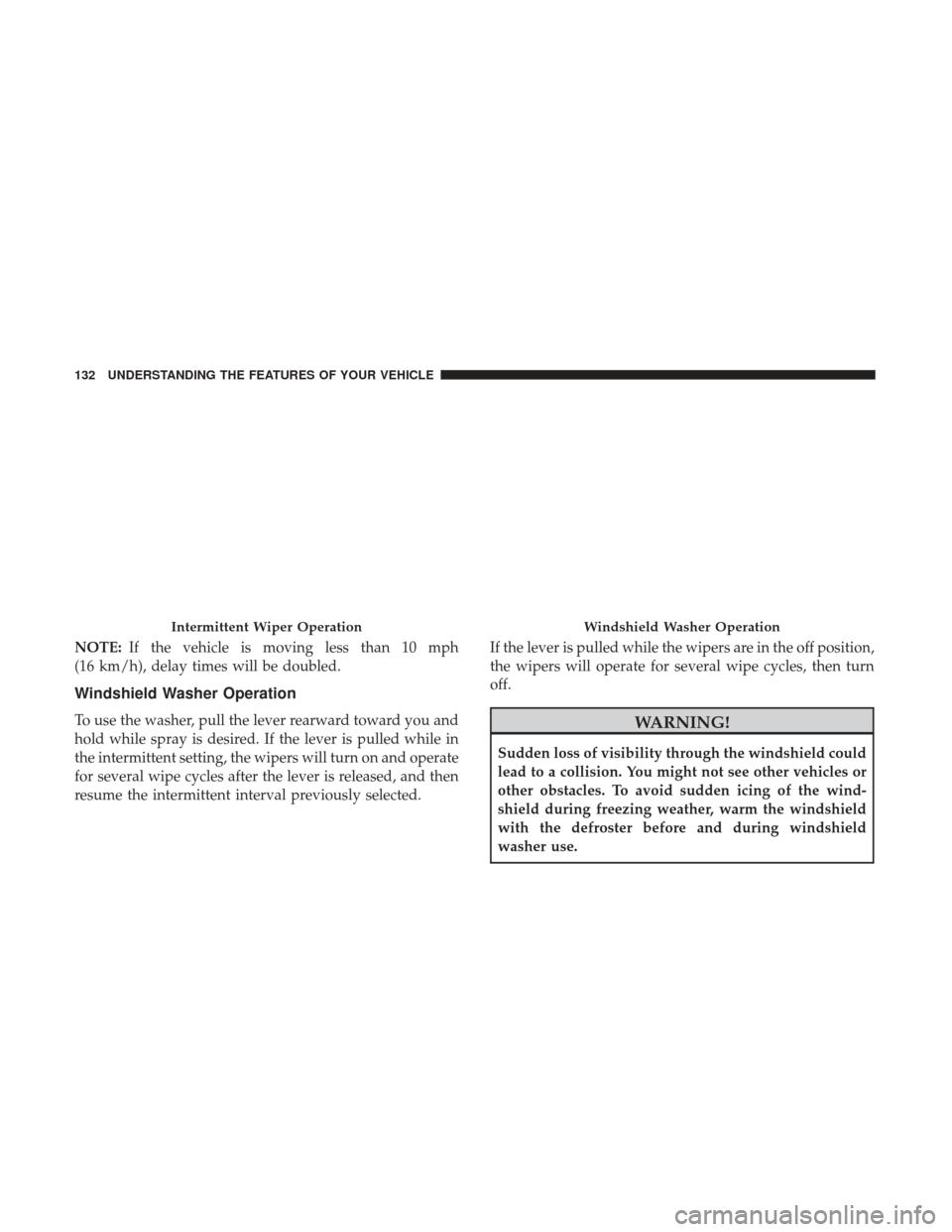
Windshield Washer Operation
To use the washer, pull the lever rearward toward you and
hold while spray is desired. If the lever is pulled while in
the intermittent setting, the wipers will turn on and operate
for several wipe cycles after the lever is released, and then
resume the intermittent interval previously selected. If the lever is pulled while the wipers are in the off position,
the wipers will operate for several wipe cycles, then turn
off.WARNING!
Sudden loss of visibility through the windshield could
lead to a collision. You might not see other vehicles or
other obstacles. To avoid sudden icing of the wind-
shield during freezing weather, warm the windshield
with the defroster before and during windshield
washer use.
Intermittent Wiper OperationWindshield Washer Operation
132 UNDERSTANDING THE FEATURES OF YOUR VEHICLE
Page 137 of 539
upward or downward as desired. To lengthen or shorten
the steering column, pull the steering wheel outward or
push it inward as desired. To lock the steering column in
position, push the control handle up until fully engaged.
WARNING!
Do not adjust the steering column while driving.
Adjusting the steering column while driving or driv-
ing with the steering column unlocked, could cause the
driver to lose control of the vehicle. Failure to follow
this warning may result in serious injury or death.
HEATED STEERING WHEEL — IF EQUIPPED
The steering wheel contains a heating element that helps
warm your hands in cold weather. The heated steering
wheel has only one temperature setting. Once the heated
steering wheel has been turned on it can operate for up to
130 minutes before automatically shutting off. The heated
steering wheel can shut off early or may not turn on when
the steering wheel is already warm.
The heated steering wheel control button is located within
the Uconnect system. You can gain access to the control
button through the climate screen or the controls screen.•
Press the heated steering wheel button
once to turn
the heating element ON.
• Press the heated steering wheel buttona second time
to turn the heating element OFF.
NOTE: The engine must be running for the heated steering
wheel to operate.
Vehicles Equipped With Remote Start
On models that are equipped with remote start, the heated
steering wheel can be programmed to come on during a
remote start through the Uconnect system. Refer to
“Uconnect Settings” in “Understanding Your Instrument
Panel” for further information.
WARNING!
• Persons who are unable to feel pain to the skin
because of advanced age, chronic illness, diabetes,
spinal cord injury, medication, alcohol use, exhaus-
tion, or other physical conditions must exercise care
when using the steering wheel heater. It may cause
burns even at low temperatures, especially if used
for long periods.
(Continued)
3
UNDERSTANDING THE FEATURES OF YOUR VEHICLE 135
Page 138 of 539
WARNING!(Continued)
•Do not place anything on the steering wheel that
insulates against heat, such as a blanket or steering
wheel covers of any type and material. This may
cause the steering wheel heater to overheat.
ELECTRONIC SPEED CONTROL — IF EQUIPPED
When engaged, the Electronic Speed Control takes over
accelerator operations at speeds greater than 25 mph
(40 km/h).
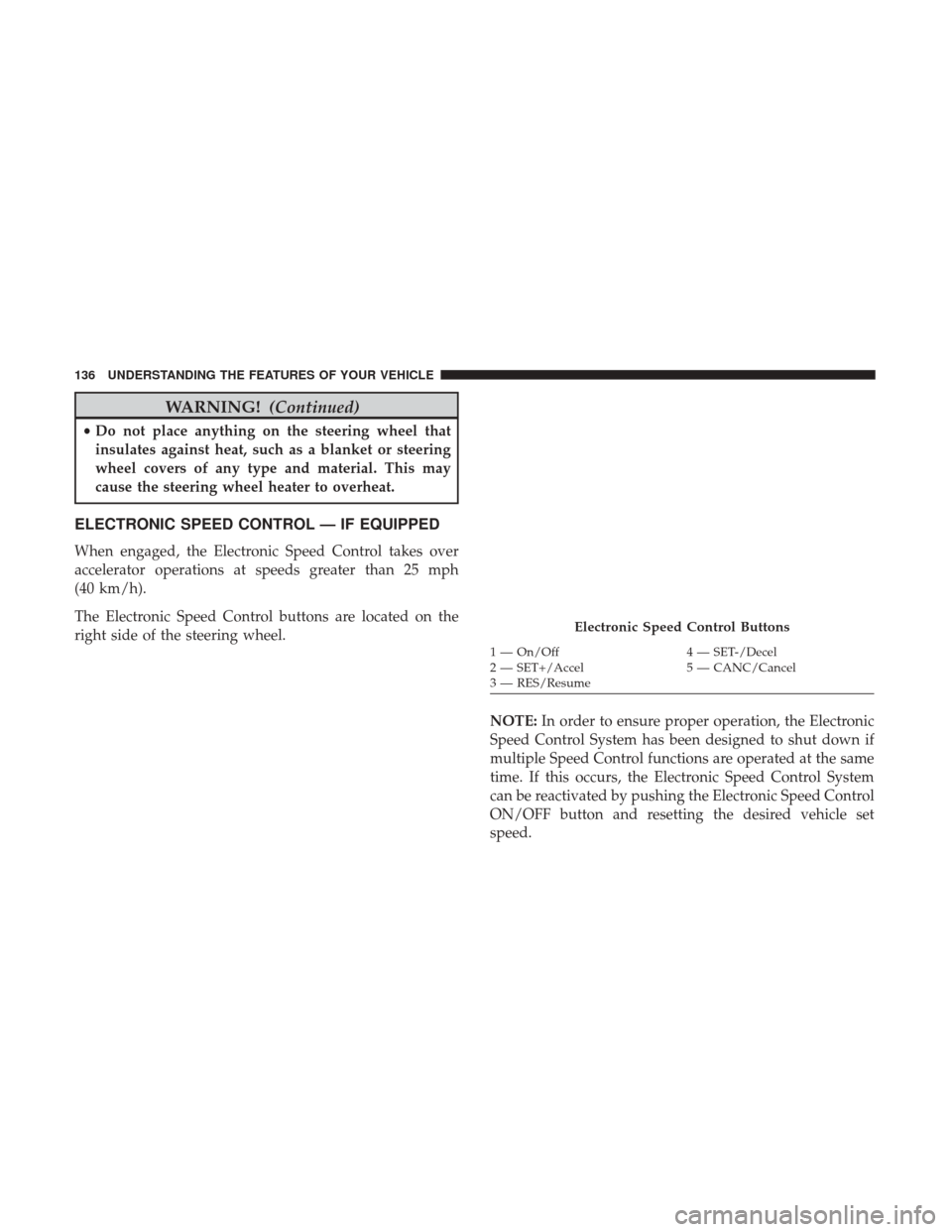
The Electronic Speed Control buttons are located on the
right side of the steering wheel.
NOTE:In order to ensure proper operation, the Electronic
Speed Control System has been designed to shut down if
multiple Speed Control functions are operated at the same
time. If this occurs, the Electronic Speed Control System
can be reactivated by pushing the Electronic Speed Control
ON/OFF button and resetting the desired vehicle set
speed.
Electronic Speed Control Buttons
1 — On/Off 4 — SET-/Decel
2 — SET+/Accel 5 — CANC/Cancel
3 — RES/Resume
136 UNDERSTANDING THE FEATURES OF YOUR VEHICLE
Page 139 of 539
To Activate
Push the ON/OFF button to activate the electronic speed
control. The Cruise Indicator Light in the Instrument
Cluster Display will illuminate. To turn the system off,
push the ON/OFF button a second time. The Cruise
Indicator Light will turn off. The system should be turned
off when not in use.
WARNING!
Leaving the Electronic Speed Control system on when
not in use is dangerous. You could accidentally set the
system or cause it to go faster than you want. You could
lose control and have an accident. Always leave the
system OFF when you are not using it.
To Set A Desired Speed
Turn the Electronic Speed Control ON.
NOTE:The vehicle should be traveling at a steady speed
and on level ground before pushing the SET (+) or SET (-)
button.
When the vehicle has reached the desired speed, push the
SET (+) or SET (-) button and release. Release the accelera-
tor and the vehicle will operate at the selected speed.
To Deactivate
A soft tap on the brake pedal, pushing the CANCEL
button, or normal brake pressure while slowing the vehicle
will deactivate the Electronic Speed Control without eras-
ing the set speed from memory.
Pushing the ON/OFF button or turning the ignition to the
OFF position erases the set speed from memory.
To Resume Speed
To resume a previously set speed, push the RES button and
release. Resume can be used at any speed above 20 mph
(32 km/h).
To Vary The Speed Setting
To Increase Speed
When the Electronic Speed Control is set, you can increase
speed by pushing the SET +button.
The drivers preferred units can be selected through the
instrument panel settings if equipped. Refer to “Under-
standing Your Instrument Panel” for more information.
3
UNDERSTANDING THE FEATURES OF YOUR VEHICLE 137
Page 141 of 539
Using Electronic Speed Control On Hills
The transmission may downshift on hills to maintain the
vehicle set speed.
NOTE:The Electronic Speed Control system maintains
speed up and down hills. A slight speed change on
moderate hills is normal.
On steep hills, a greater speed loss or gain may occur so it
may be preferable to drive without Electronic Speed Control.
WARNING!
Electronic Speed Control can be dangerous where the
system cannot maintain a constant speed. Your vehicle
could go too fast for the conditions, and you could lose
control and have an accident. Do not use Electronic
Speed Control in heavy traffic or on roads that are
winding, icy, snow-covered or slippery.
ADAPTIVE CRUISE CONTROL (ACC) — IF
EQUIPPED
Adaptive Cruise Control (ACC) increases the driving con-
venience provided by cruise control while traveling on
highways and major roadways. However, it is not a safety system and not designed to prevent collisions.
Electronic
Speed Control function performs differently. Please refer
to the proper section within this chapter.
ACC will allow you to keep cruise control engaged in light
to moderate traffic conditions without the constant need to
reset your cruise control. ACC utilizes a radar sensor and a
forward facing camera designed to detect a vehicle directly
ahead of you.
NOTE:
• If the sensor does not detect a vehicle ahead of you, ACC
will maintain a fixed set speed.
• If the ACC sensor detects a vehicle ahead, ACC will
apply limited braking or acceleration (not to exceed the
original set speed) automatically to maintain a preset
following distance, while matching the speed of the
vehicle ahead.
The Cruise Control system has two control modes:
• Adaptive Cruise Control mode for maintaining an ap-
propriate distance between vehicles.
3
UNDERSTANDING THE FEATURES OF YOUR VEHICLE 139
Page 142 of 539
•Normal (fixed speed) electronic speed control mode for
cruising at a constant preset speed. For additional infor-
mation, refer to “Normal (Fixed Speed) Cruise Control
Mode” in this section.
NOTE: Normal (fixed speed) electronic speed control will
not react to preceding vehicles. Always be aware of the
mode selected.
You can change the mode by using the Cruise Control
buttons. The two control modes function differently. Al-
ways confirm which mode is selected.
WARNING!
• Adaptive Cruise Control (ACC) is a convenience
system. It is not a substitute for active driving
involvement. It is always the driver ’s responsibility
to be attentive of road, traffic, and weather condi-
tions, vehicle speed, distance to the vehicle ahead;
and, most importantly, brake operation to ensure safe
operation of the vehicle under all road conditions.
Your complete attention is always required while
driving to maintain safe control of your vehicle.
(Continued)
WARNING! (Continued)
Failure to follow these warnings can result in a
collision and death or serious personal injury.
• The ACC system:
• Does not react to pedestrians, oncoming vehicles,
and stationary objects (e.g., a stopped vehicle in a
traffic jam or a disabled vehicle).
• Cannot take street, traffic, and weather conditions
into account, and may be limited upon adverse
sight distance conditions.
• Does not always fully recognize complex driving
conditions, which can result in wrong or missing
distance warnings.
• Will bring the vehicle to a complete stop while
following a target vehicle and hold the vehicle for
approximately 3 minutes in the stop position. If the
target vehicle does not start moving within 3
minutes the parking brake will be activated, and
the ACC system will be cancelled.
You should switch off the ACC system:
• When driving in fog, heavy rain, heavy snow, sleet,
heavy traffic, and complex driving situations (i.e., in
highway construction zones).
(Continued)
140 UNDERSTANDING THE FEATURES OF YOUR VEHICLE
Page 143 of 539
WARNING!(Continued)
•When entering a turn lane or highway off ramp;
when driving on roads that are winding, icy, snow-
covered, slippery, or have steep uphill or downhill
slopes.
• When towing a trailer up or down steep slopes.
• When circumstances do not allow safe driving at a
constant speed.
Adaptive Cruise Control (ACC) Operation
The speed control buttons (located on the right side of the
steering wheel) operates the ACC system.
NOTE:Any chassis/suspension or tire size modifications
to the vehicle will effect the performance of the Adaptive
Cruise Control and Forward Collision Warning System.
Adaptive Cruise Control Buttons
1 — Normal (Fixed Speed)
Cruise Control On/Off 5 — Distance Setting Increase
2 — SET+/Accel 6 — Adaptive Cruise Control (ACC) On/Off
3 — RES/Resume 7 — Distance Setting Decrease
4 — SET-/Decel 8 — CANC/Cancel
3
UNDERSTANDING THE FEATURES OF YOUR VEHICLE 141