Instrument CHRYSLER 300 2005 1.G User Guide
[x] Cancel search | Manufacturer: CHRYSLER, Model Year: 2005, Model line: 300, Model: CHRYSLER 300 2005 1.GPages: 374, PDF Size: 6.8 MB
Page 59 of 374

turned ON. If the LED is not lit during starting, have it
checked. If the light stays on or comes on while driving,
have the system checked by an authorized dealer.
Defroster
Check operation by selecting the defrost mode and place
the blower control on high speed. You should be able to
feel the air directed against the windshield.
Periodic Safety Checks You Should Make Outside
The Vehicle
Tires
Examine tires for excessive tread wear or uneven wear
patterns. Check for stones, nails, glass, or other objects
lodged in the tread. Inspect tread and sidewall for cuts or
cracks. Check wheel nuts for tightness, and tires (includ-
ing spare) for proper pressure.
Lights
Have someone observe the operation of exterior lights
while you work the controls. Check turn signal and high
beam indicator lights on the instrument panel.
Fluid Leaks
Check area under vehicle after overnight parking for fuel,
engine coolant, oil or other fluid leaks. Also, if gasoline
fumes are detected or fuel, power steering fluid or brake
fluid leaks are suspected, the cause should be located and
corrected immediately.
THINGS TO KNOW BEFORE STARTING YOUR VEHICLE 59
2
Page 62 of 374

mSeats................................89
NPower Seats..........................89
NPower Reclining Seats...................90
NLumbar Support.......................91
NHeated SeatsÐIf Equipped...............92
NMemory FeatureÐIf Equipped.............93
NProgramming The Remote Keyless Transmitter
For The Memory Feature.................94
NDriver's Seat Glide ±To ± Exit Feature Ð
If Equipped..........................95
NHead Restraints.......................96
NFolding Rear Seat......................97
mAdjustable Pedals Ð If Equipped...........98
mTo Open And Close The Hood.............99
mLights..............................101
NOverhead Console Map/Reading Lights.....101NInterior Lights.......................101
NHeadlight Switch.....................102
NMulti-Function Lever...................103
NHeadlights, Parking Lights, Instrument Panel
Lights.............................103
NAutomatic Headlights±If Equipped.........104
NHeadlamps On With Wipers
(Available With Auto Headlights Only)......104
NDaytime Running Lights (Canada Only).....104
NLights-On Reminder...................104
NHeadlight Time Delay..................104
NFog Lights Ð If Equipped...............105
NTurn Signals.........................105
NHighbeam/Lowbeam Select Switch.........106
NFlash To Pass........................106
62 UNDERSTANDING THE FEATURES OF YOUR VEHICLE
Page 92 of 374

Heated SeatsÐIf Equipped
Heated seats, which are available only with leather
upholstery, provide comfort and warmth on cold days
and can help soothe sore muscles and backs. The heaters
provide the same heat level for both cushion and back.
The front driver's and passenger seats are heated. The
controls for each heater are located near the bottom
center of the instrument panel. After turning on the
ignition, you can choose from High, Off, or Low heat
settings. Amber LEDs in the top portion of each switch
indicate the level of heat in use. Two LEDs are illumi-
nated for high, one for low, and none for off. Pressing the
switch once will select high-level heating.
Pressing the switch a second time will select low-level
heating. Pressing the switch a third time will shut the
heating elements off.
Heated Seat Switch
92 UNDERSTANDING THE FEATURES OF YOUR VEHICLE
Page 94 of 374

2. Press and release the Set (S) button on the memory
seat switch, then press button 1 within 5 seconds. The
radio display will show which memory position is being
set.
3. A second memory profile can also be stored in the
vehicle memory. Begin by pressing 2 on the memory
switch for driver 2. Adjust settings to desired positions,
press Set (S) button, then press button 2 within 5 seconds.
Each time the Set and a numbered button are pressed, the
old memory is erased, and a new one is stored.
NOTE:Memory positions can be set without the ve-
hicle in Park, but the vehicle must be in Park to recall a
memory position. The Recall Memory with Remote Key
Unlock feature must be turned on using the Electronic
Vehicle Information Center (EVIC). Refer to Electronic
Vehicle Information Center in this manual for details.
Programming the Remote Keyless Transmitter for
the Memory Feature
Your remote transmitter can be programmed to return to
a memory profile when the Unlock button is pressed and
released.To program your transmitters, perform the following:
1. Insert the key into the ignition and turn the key to the
Run position.
2. Select desired memory profile 1 or 2.
3. Press and release the Set (S) button on the memory
seat switch, then press and release button 1 or 2.
9Memory Profile Setº (1or 2) will be displayed in the
instrument cluster on vehicles equipped with the Elec-
tronic Vehicle Information Center.
4. Press and release the Lock button on the transmitter
within 10 seconds.
NOTE:Your transmitters may be unlinked to your
memory settings by pressing the Unlock button on the
transmitter in step 4 above. On vehicles equipped with an
Electronic Vehicle Information Center (Optional), these
functions can be selected at the EVIC using the Personal
Settings (Customer Programmable Features). Refer to
Electronic Vehicle Information Center Ð ªPersonal Set-
tingsº for details. When newly purchased (or replace-
ment) transmitters are programmed into the vehicle, the
first transmitter trained will be associated with memory
94 UNDERSTANDING THE FEATURES OF YOUR VEHICLE
Page 99 of 374
CAUTION!
Do not place any article under the adjustable pedals
or impede its ability to move as it may cause damage
to the pedal controls. Pedal travel may become
limited if movement is stopped by an obstruction in
the adjustable pedal's path.
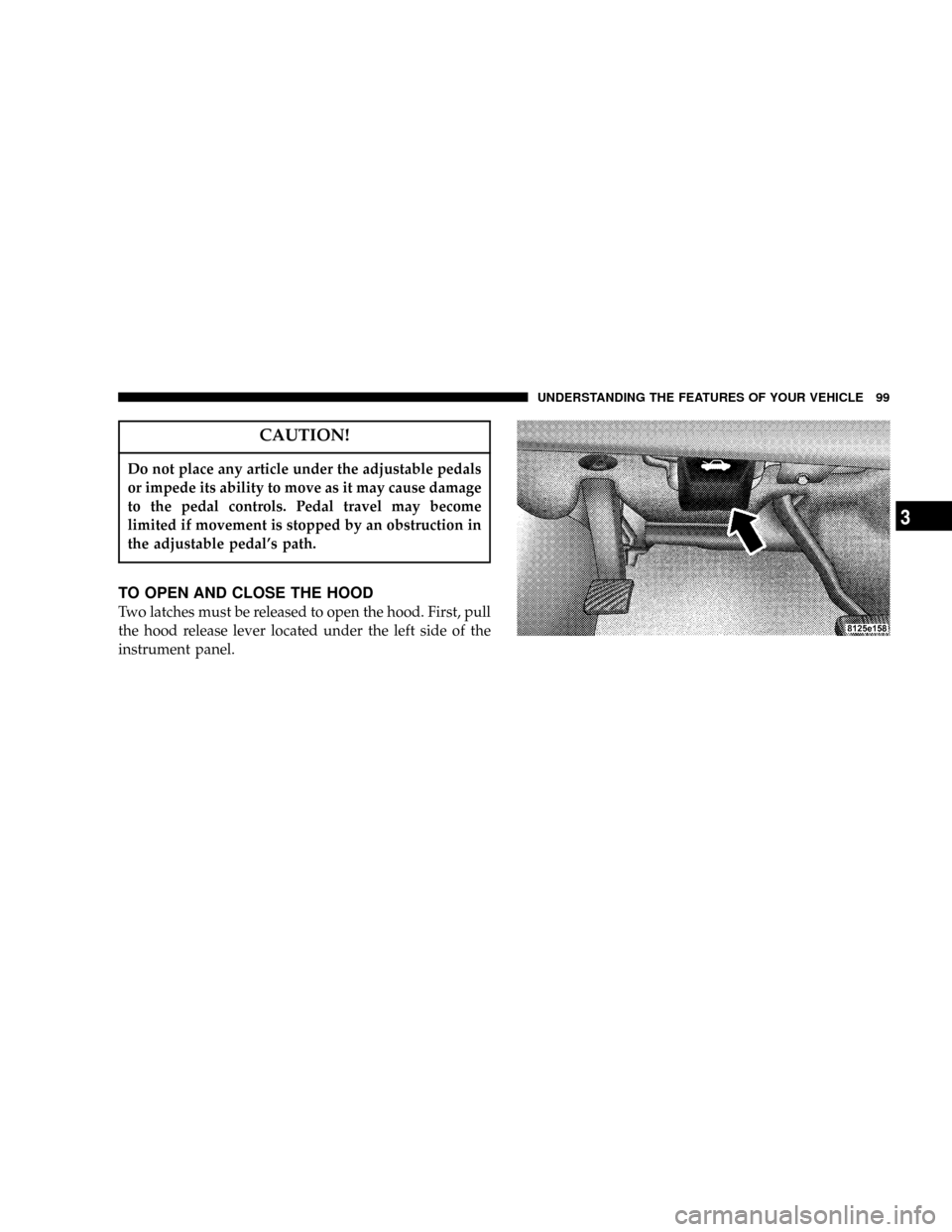
TO OPEN AND CLOSE THE HOOD
Two latches must be released to open the hood. First, pull
the hood release lever located under the left side of the
instrument panel.
UNDERSTANDING THE FEATURES OF YOUR VEHICLE 99
3
Page 101 of 374

LIGHTS
Overhead Console Map/Reading Lights
These lights are mounted between the sun visors on the
overhead console. Each light is turned ON by pressing
the lens. Press the lens a second time to turn the light
OFF. The lights also turn on when a door is opened or the
dimmer control is turned fully upward, past the second
detent.
NOTE:The lights will remain on until the switch is
pressed a second time, so be sure they have been turned
off before leaving the vehicle.
Interior Lights
The interior lights come on when a door is opened.
The interior lights will automatically turn off 10 minutes
after the ignition switch is moved to the LOCK position
if they are switched on manually, or if a door is left open
to protect the battery. This includes the glove box, but not
the trunk. Turn the ignition switch ON, or cycle the
switchable lamp that was left on to restore the interior
light operation.
Dimmer Control
The dimmer control is part of the
headlamp switch, and is located on the
left side of the instrument panel. With
the parking lights or headlights on,
rotating the dimmer control upward
will increase the brightness of the in-
strument panel lights.
Overhead Console
UNDERSTANDING THE FEATURES OF YOUR VEHICLE 101
3
Page 102 of 374

Dome Light Position
Rotate the dimmer control completely upward to the
second detent to turn on the interior lights. The interior
lights will remain on when the dimmer control is in this
position.
Interior light Defeat (OFF)
Rotate the dimmer control to the extreme bottom ªOFFº
position. The interior lights will remain off when the
doors are open.
Parade Mode (Daytime Brightness Feature)
Rotate the dimmer control upward to the first detent.
This feature brightens all text displays such as the
odometer, Electronic Vehicle Information Center Ð if
equipped, and radio when the parking lights or head-
lights are on.
Headlight Switch
The headlight switch is located on the left side of the
instrument panel. This switch controls the operation of
the headlights, parking lights, instrument panel lights,
instrument panel light dimming, interior lights, and fog
lights.
Headlight Switch
102 UNDERSTANDING THE FEATURES OF YOUR VEHICLE
Page 103 of 374

Multi-Function Lever
The multi-function lever controls the operation of the
turn signals, headlight beam selection, and passing
lights. The lever is located on the left side of the steering
column.
Headlights, Parking Lights, Instrument Panel
Lights
Rotate the headlight switch clockwise to the first detent
for parking light and instrument panel light operation.
Turn to the second detent for headlight, park light and
instrument panel light operation.
Multi-Function Lever
Headlight Switch
UNDERSTANDING THE FEATURES OF YOUR VEHICLE 103
3
Page 105 of 374

To activate the delay feature, turn off the ignition switch
while the headlights are still on. Then turn off the
headlights within 45 seconds. The 90 second delay inter-
val begins when headlight switch is turned off. If the
headlights or park lights are turned back on or the
ignition switch is turned on, the delay will be cancelled.
If the headlights are turned off before the ignition, they
will turn off in the normal manner.
NOTE:The lights must be turned off within 45 seconds
of turning the ignition off to activate this feature
The Headlamp delay time is programmable on vehicles
equipped with the Electronic Vehicle Information Center
(EVIC). Refer to ªDelay Turning Headlamps Offº in the
Electronic Vehicle Information Center section for details.
Fog Lights Ð If Equipped
The front fog light switch is on the headlamp
switch below the dimmer control. To activate the
front fog lights, turn on the parking lights or the
low beam headlights and press the fog lamp switch.
NOTE:The fog lights will operate with the low beam
headlights, or parking lights on. However, selecting the
high beam headlights will turn off the fog lights.
Turn Signals
Move the Multi-Function Lever up or down and the
arrows on each side of the instrument cluster flash to
show proper operation of the front and rear turn signal
lights. You can signal a lane change by moving the lever
partially up or down without moving beyond the detent.
Releasing the lever at the detent will provide 3 flashes.
If either light has a very fast flash rate, check for a
defective outside light bulb. If an indicator fails to light
when the lever is moved, it would suggest that the fuse
or indicator bulb is defective or there may be a circuit
failure.
NOTE:The message ªTurn Signal Onº will appear in
the electronic vehicle information center (EVIC) Ð if
equipped, and a continuous chime will be heard when
the vehicle has been driven more than 1 mile (1.6 km)
with either turn signal on.
UNDERSTANDING THE FEATURES OF YOUR VEHICLE 105
3
Page 108 of 374

Windshield Wiper Operation
Rotate the end of the lever to the second detent for Low
speed wiper operation, or to the third detent for High
speed operation.
Intermittent Wiper System
Use the intermittent wiper when weather conditions
make a single wiping cycle, with a variable pause be-
tween cycles, desirable. Rotate the end of the lever to the
first detent position, then turn the end of the lever to
select the desired delay interval. There are 6 possible
delay wiper positions. The delay can be regulated from a
maximum of approximately 23 seconds between cycles,
to a cycle every second.
Adding Washer Fluid
The windshield washer fluid reservoir is located in the
front of the engine compartment on the passenger side
and should be checked for fluid level at regular intervals.
Fill the reservoir with windshield washer solvent (not
radiator antifreeze) and operate the system for a few
seconds to flush out the residual water.The washer fluid reservoir will hold a full gallon of fluid
when ªLow Washer Fluidº (Electronic Vehicle Informa-
tion Center equipped vehicles), or the low washer sym-
bol (non Electronic Vehicle Information Center equipped
vehicles) appears in the instrument cluster.
Windshield Washer Fluid Reservoir
108 UNDERSTANDING THE FEATURES OF YOUR VEHICLE