clock CHRYSLER 300 2007 1.G User Guide
[x] Cancel search | Manufacturer: CHRYSLER, Model Year: 2007, Model line: 300, Model: CHRYSLER 300 2007 1.GPages: 432, PDF Size: 7.53 MB
Page 208 of 432
4. To turn daylight savings on or off, select “Daylight
Savings” and press ENTER. Select “On” or “Off” and
press ENTER.
5. Select DONE to exit from the clock setting mode. Press
ENTER to save your changes. If you press CANCEL or
NAV then your changes will not be saved.
User Defined Clock
If you wish to set the clock to a time different than the
system clock, you can manually adjust the time by
choosing the “User Defined Clock” option.
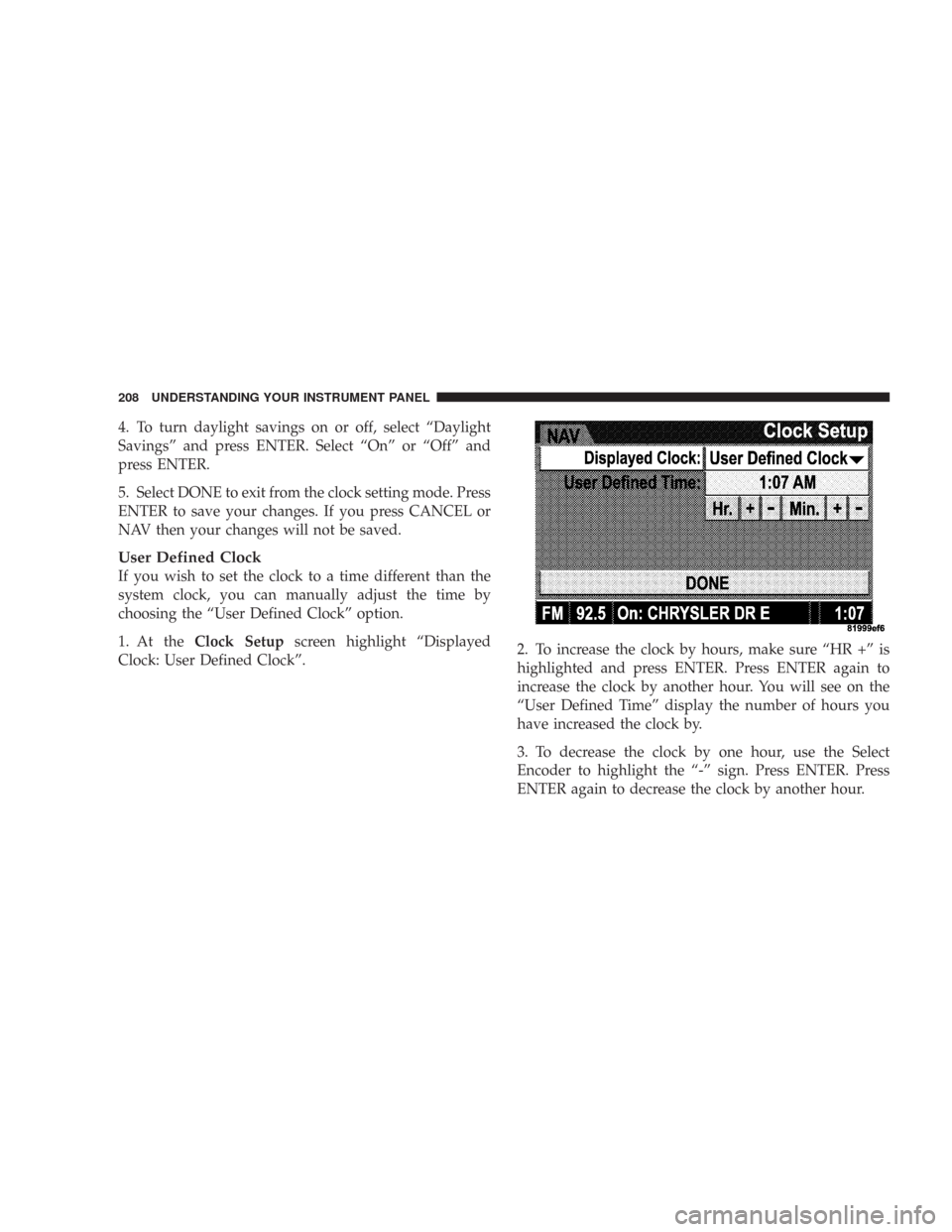
1. At theClock Setupscreen highlight “Displayed
Clock: User Defined Clock”.2. To increase the clock by hours, make sure “HR +” is
highlighted and press ENTER. Press ENTER again to
increase the clock by another hour. You will see on the
“User Defined Time” display the number of hours you
have increased the clock by.
3. To decrease the clock by one hour, use the Select
Encoder to highlight the “-” sign. Press ENTER. Press
ENTER again to decrease the clock by another hour.
208 UNDERSTANDING YOUR INSTRUMENT PANEL
Page 209 of 432
4. To increase the clock by minutes, make sure “MIN +”
is highlighted and press ENTER. Press ENTER again to
increase the clock by another minute.
5. To decrease the clock by minutes, use the Select
Encoder to highlight the “-“ sign. Press ENTER. Press
ENTER again to decrease the clock by another minute.
6. Select “DONE” to exit from the clock setting mode.
Press ENTER to save your changes. If you press CAN-
CEL or NAV then your changes will not be saved.Audio Clock Display
Select this option to change the size of the clock on the
audio screens.
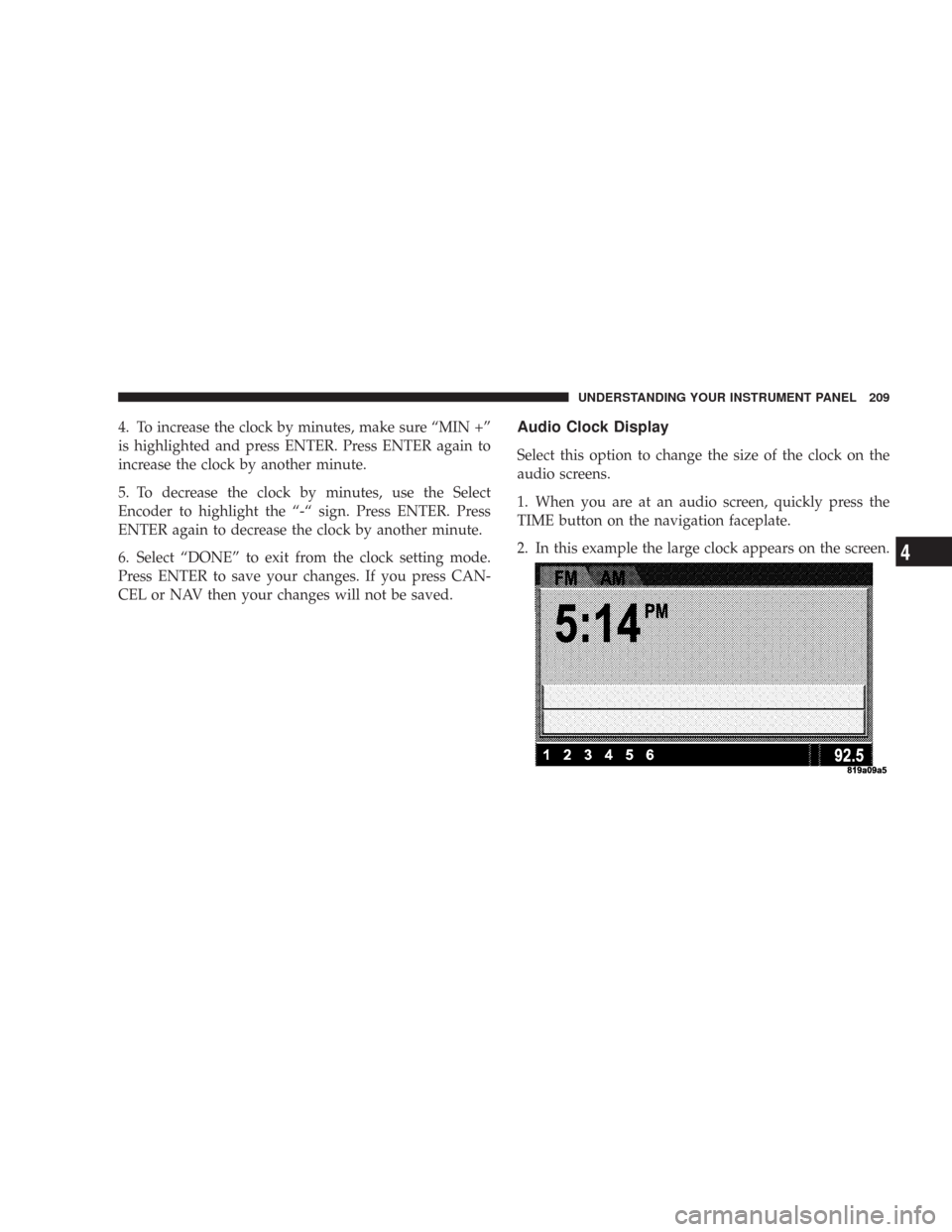
1. When you are at an audio screen, quickly press the
TIME button on the navigation faceplate.
2. In this example the large clock appears on the screen.
UNDERSTANDING YOUR INSTRUMENT PANEL 209
4
Page 210 of 432
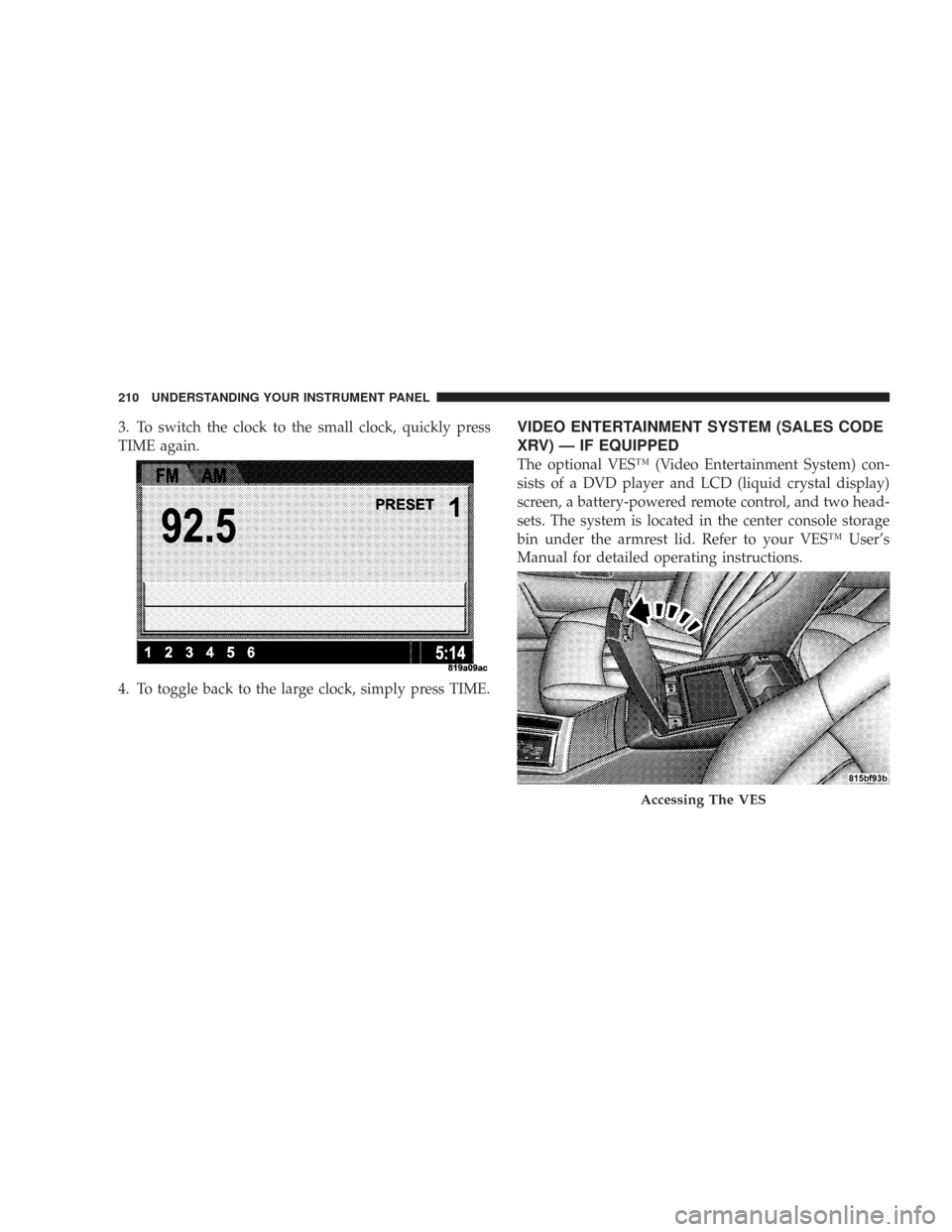
3. To switch the clock to the small clock, quickly press
TIME again.
4. To toggle back to the large clock, simply press TIME.VIDEO ENTERTAINMENT SYSTEM (SALES CODE
XRV) — IF EQUIPPED
The optional VES™ (Video Entertainment System) con-
sists of a DVD player and LCD (liquid crystal display)
screen, a battery-powered remote control, and two head-
sets. The system is located in the center console storage
bin under the armrest lid. Refer to your VES™ User’s
Manual for detailed operating instructions.
Accessing The VES
210 UNDERSTANDING YOUR INSTRUMENT PANEL
Page 215 of 432
Reception Quality
Satellite reception may be interrupted due to one of the
following reasons.
•The vehicle is parked in an underground parking
structure or under a physical obstacle.
•Dense tree coverage may interrupt reception in the
form of short audio mutes.
•Driving under wide bridges or along tall buildings can
cause intermittent reception.
•Placing objects over or too close to the antenna can
cause signal blockage.
REMOTE SOUND SYSTEM CONTROLS — IF
EQUIPPED
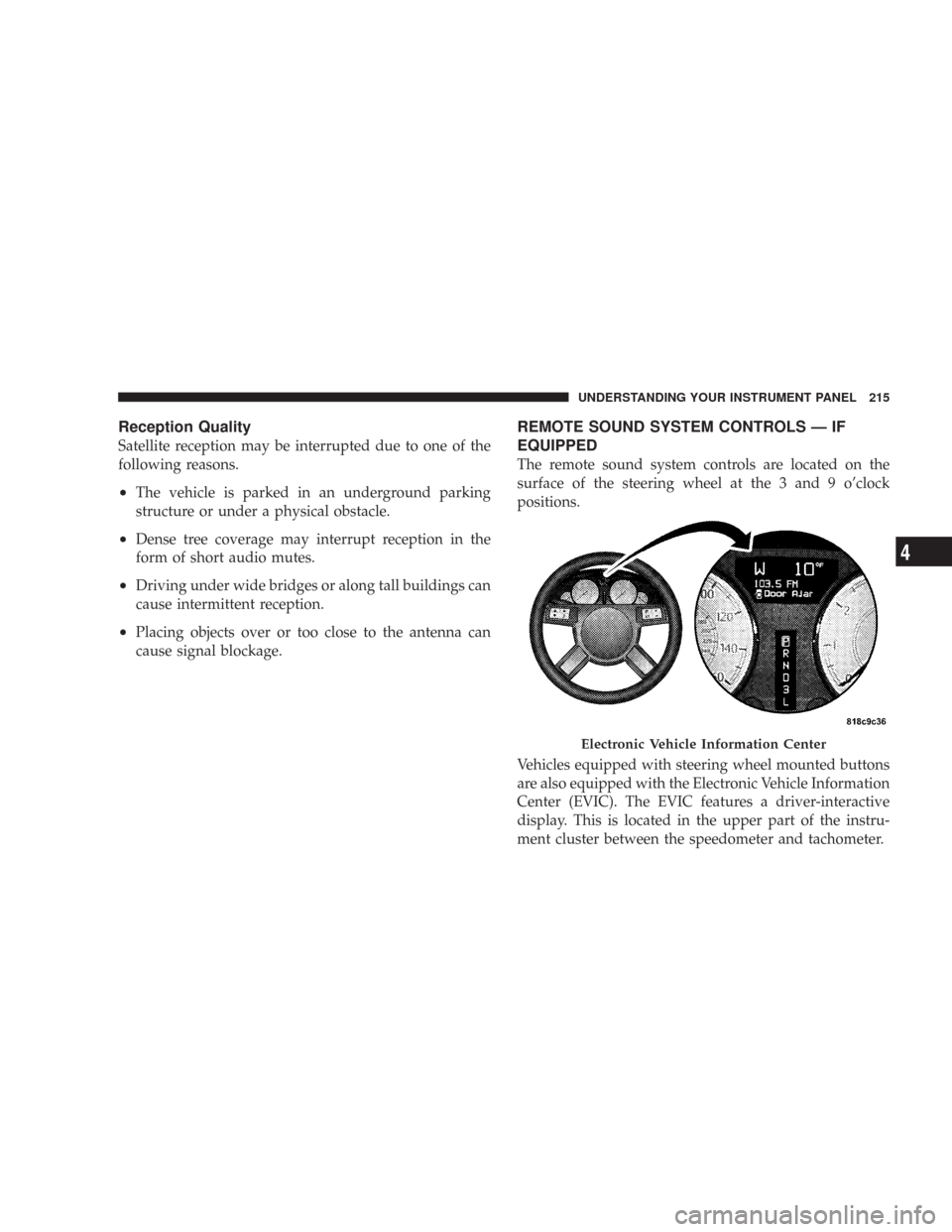
The remote sound system controls are located on the
surface of the steering wheel at the 3 and 9 o’clock
positions.
Vehicles equipped with steering wheel mounted buttons
are also equipped with the Electronic Vehicle Information
Center (EVIC). The EVIC features a driver-interactive
display. This is located in the upper part of the instru-
ment cluster between the speedometer and tachometer.
Electronic Vehicle Information Center
UNDERSTANDING YOUR INSTRUMENT PANEL 215
4
Page 318 of 432

4. Before raising the vehicle, use the lug wrench to
loosen, but not remove, the lug nuts on the wheel with
the flat tire. Turn the lug nuts counter-clockwise one turn
while the wheel is still on the ground.5. Place the jack underneath the lift area that is closest to
the flat tire. Turn the jack screw clockwise to firmly
engage the jack saddle with the lift area of the sill flange.
318 WHAT TO DO IN EMERGENCIES
Page 320 of 432
6. Raise the vehicle just enough to remove the flat tire
and install the spare tire.
WARNING!
Raising the vehicle higher than necessary can make
the vehicle less stable. It could slip off the jack and
hurt someone near it. Raise the vehicle only enough
to remove the tire.
7. Remove the lug nuts, wheel cover (if equipped), and
tire. Remove the cover by hand. Do not pry it off.
8. Mount the spare tire. For vehicles equipped with
wheel covers, refer to “Wheel Cover Installation.” Do not
attempt to install a wheel cover on a compact spare.
9. Tighten all the lug nuts on the mounting studs.
10. Lower the vehicle to the ground by turning the jack
handle counter-clockwise.
11. Fully tighten the lug nuts. Torque the wheel lug nuts
to 100 ft/lb. (135 N. m).12. Store the flat tire, jack, and tools.
WARNING!
A loose tire or jack thrown forward in a collision or
hard stop could endanger the occupants of the ve-
hicle. Always stow the jack parts and the spare tire in
the places provided.
Compact Spare Tire
The compact spare tire is for temporary emergency use
with radial tires. It is engineered to be used on your style
vehicle only. Since this tire has limited tread life, the
original tire should be repaired (or replaced) and rein-
stalled at the first opportunity.
•Keep tire inflated to 60 PSI (414 KPa) Cold Inflation
Pressure.
•Avoid driving more than 50 miles (80 km) before
replacing tire and wheel.
•This tire is designed as an emergency spare only. Do
not exceed 50 MPH (80 km/h) speed.
320 WHAT TO DO IN EMERGENCIES
Page 368 of 432
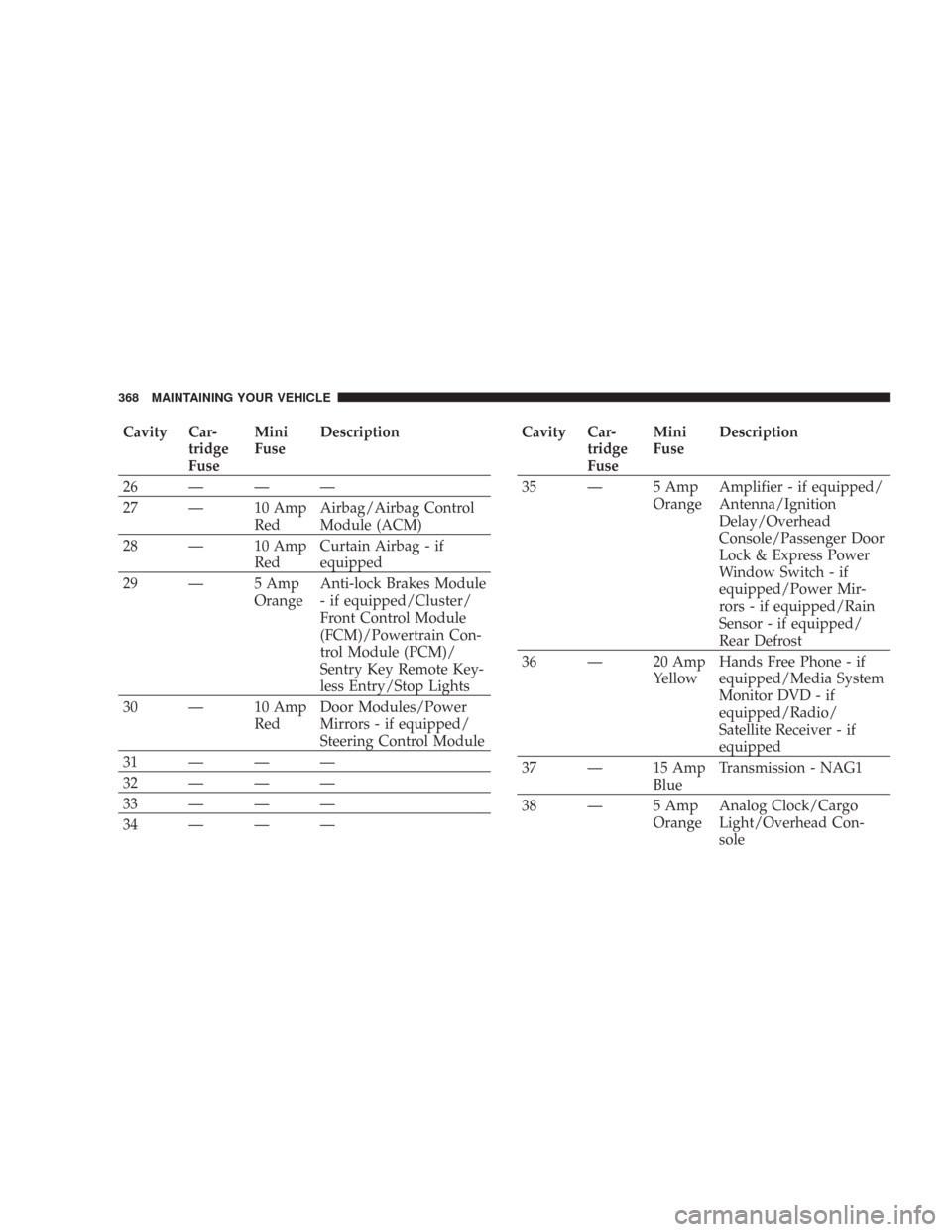
Cavity Car-
tridge
FuseMini
FuseDescription
26———
27 — 10 Amp
RedAirbag/Airbag Control
Module (ACM)
28 — 10 Amp
RedCurtain Airbag - if
equipped
29 — 5 Amp
OrangeAnti-lock Brakes Module
- if equipped/Cluster/
Front Control Module
(FCM)/Powertrain Con-
trol Module (PCM)/
Sentry Key Remote Key-
less Entry/Stop Lights
30 — 10 Amp
RedDoor Modules/Power
Mirrors - if equipped/
Steering Control Module
31———
32———
33———
34———Cavity Car-
tridge
FuseMini
FuseDescription
35 — 5 Amp
OrangeAmplifier - if equipped/
Antenna/Ignition
Delay/Overhead
Console/Passenger Door
Lock & Express Power
Window Switch - if
equipped/Power Mir-
rors - if equipped/Rain
Sensor - if equipped/
Rear Defrost
36 — 20 Amp
YellowHands Free Phone - if
equipped/Media System
Monitor DVD - if
equipped/Radio/
Satellite Receiver - if
equipped
37 — 15 Amp
BlueTransmission - NAG1
38 — 5 Amp
OrangeAnalog Clock/Cargo
Light/Overhead Con-
sole
368 MAINTAINING YOUR VEHICLE
Page 372 of 432
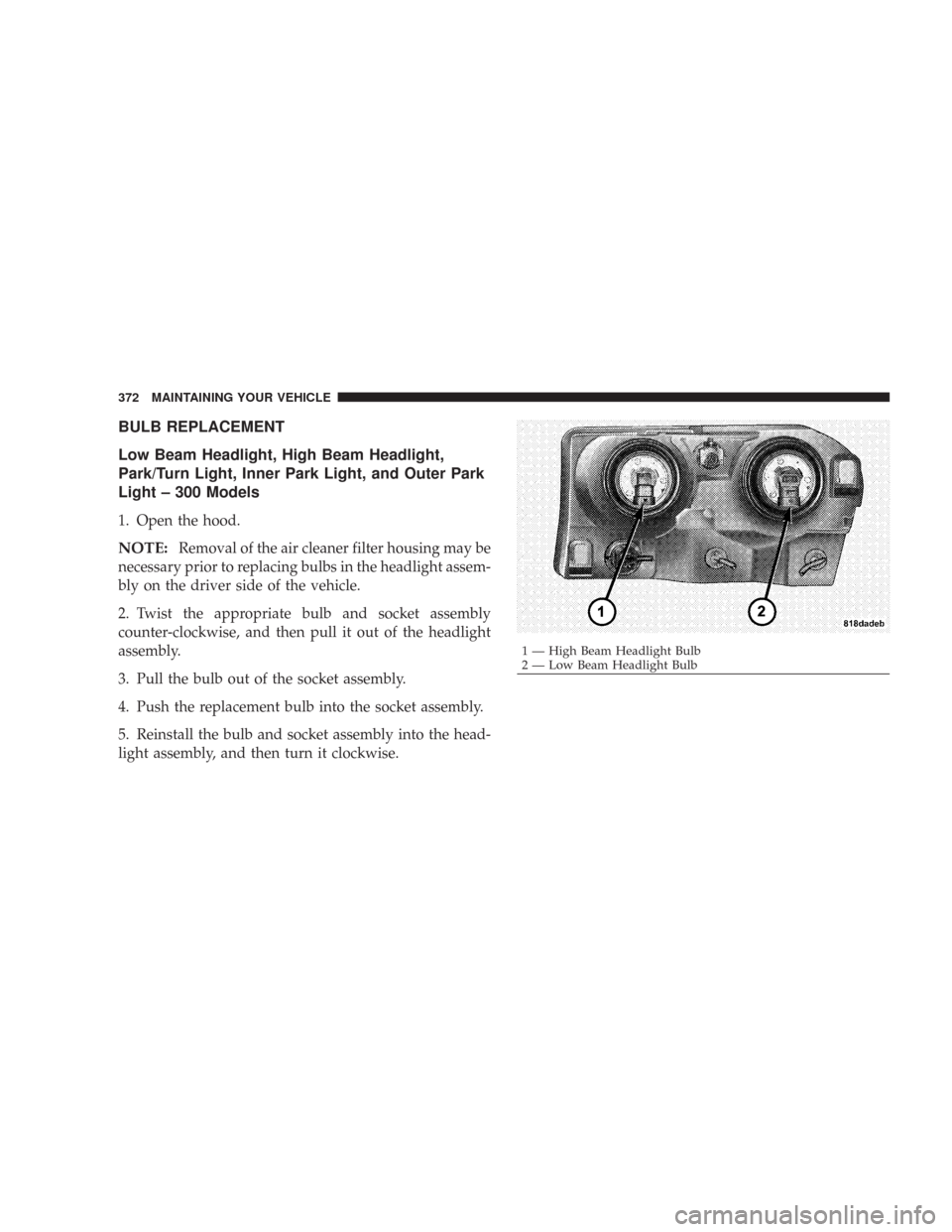
BULB REPLACEMENT
Low Beam Headlight, High Beam Headlight,
Park/Turn Light, Inner Park Light, and Outer Park
Light – 300 Models
1. Open the hood.
NOTE:Removal of the air cleaner filter housing may be
necessary prior to replacing bulbs in the headlight assem-
bly on the driver side of the vehicle.
2. Twist the appropriate bulb and socket assembly
counter-clockwise, and then pull it out of the headlight
assembly.
3. Pull the bulb out of the socket assembly.
4. Push the replacement bulb into the socket assembly.
5. Reinstall the bulb and socket assembly into the head-
light assembly, and then turn it clockwise.
1 — High Beam Headlight Bulb
2 — Low Beam Headlight Bulb 372 MAINTAINING YOUR VEHICLE
Page 374 of 432
CAUTION!
Do not touch the new bulb with your fingers. Oil
contamination will severely shorten bulb life. If the
bulb comes in contact with an oily surface, clean the
bulb with rubbing alcohol.
Low Beam Headlight, High Beam Headlight, and
Park/Turn Light – 300C
High Intensity Discharge Headlights (HID) — If
Equipped
The headlights are a type of high voltage discharge tube.
High voltage can remain in the circuit even with the
headlight switch off and the key removed.Because of
this, you should not attempt to service a headlight bulb
yourself. If a headlight bulb fails, take your vehicle to
an authorized dealer for service.
WARNING!
A transient high tension occurs at the bulb sockets of
High Intensity Discharge (HID) headlights when the
headlight switch is turned ON. It may cause serious
electrical shock or electrocution if not serviced prop-
erly. See your authorized dealer for service.
NOTE:On vehicles equipped with High Intensity Dis-
charge Headlights (HID), when the headlights are turned
on, there is a blue hue to the lights. This diminishes and
becomes more white after approximately 10 seconds, as
the system charges.
1. Open the hood.
NOTE:Removal of the air cleaner filter housing may be
necessary prior to replacing bulbs in the headlight assem-
bly on the driver side of the vehicle.
2. Twist the appropriate bulb and socket assembly
counter-clockwise, and then pull it out of the headlight
assembly.
3. Pull the bulb out of the socket assembly.
374 MAINTAINING YOUR VEHICLE
Page 375 of 432
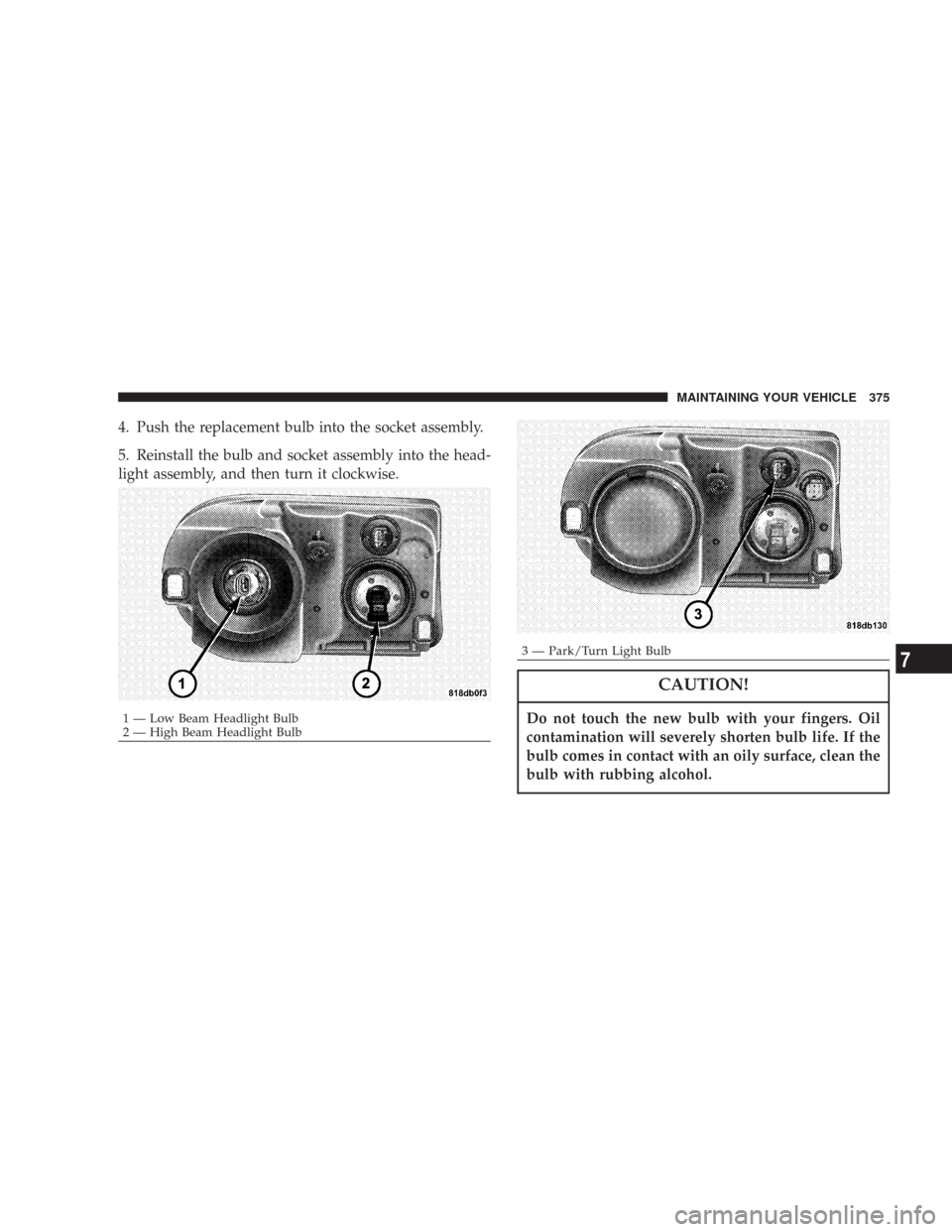
4. Push the replacement bulb into the socket assembly.
5. Reinstall the bulb and socket assembly into the head-
light assembly, and then turn it clockwise.
CAUTION!
Do not touch the new bulb with your fingers. Oil
contamination will severely shorten bulb life. If the
bulb comes in contact with an oily surface, clean the
bulb with rubbing alcohol.1 — Low Beam Headlight Bulb
2 — High Beam Headlight Bulb
3 — Park/Turn Light BulbMAINTAINING YOUR VEHICLE 3757