bulb CHRYSLER 300 2008 1.G User Guide
[x] Cancel search | Manufacturer: CHRYSLER, Model Year: 2008, Model line: 300, Model: CHRYSLER 300 2008 1.GPages: 519, PDF Size: 7.2 MB
Page 418 of 519
odometer reset button to turn off the message. If the
problem continues, the message will appear the next time
the vehicle is started.
A loose, improperly installed, or damaged fuel filler cap
may also turn on the Malfunction Indicator Light (MIL).
EMISSIONS INSPECTION AND MAINTENANCE
PROGRAMS
In some localities, it may be a legal requirement to pass
an inspection of your vehicle’s emissions control system.
Failure to pass could prevent vehicle registration.
For states, which have an I/M (Inspection and
Maintenance) requirement, this check verifies the
following: the MIL (Malfunction Indicator Light)
is functioning and is not on when the engine is running,
and that the OBD (On Board Diagnostic) system is ready
for testing.Normally, the OBD system will be ready. The OBD
system maynotbe ready if your vehicle was recently
serviced, if you recently had a dead battery, or a battery
replacement. If the OBD system should be determined
not ready for the I/M test, your vehicle may fail the test.
Your vehicle has a simple ignition key actuated test,
which you can use prior to going to the test station. To
check if your vehicle’s OBD system is ready, you must do
the following:
1. Insert your ignition key into the ignition switch.
2. Turn the ignition to the ON position, but do not crank
or start the engine.
3. If you crank or start the engine, you will have to start
this test over.
4. As soon as you turn your key to the ON position, you
will see your MIL symbol come on as part of a normal
bulb check.
418 MAINTAINING YOUR VEHICLE
Page 459 of 519
REPLACEMENT BULBS
LIGHT BULBS — Interior Bulb Number
Rear Courtesy/Reading Lights.............. W5W
Rear Compartment (Trunk) Light............. 579
Overhead Console Reading Lights............. 578
Visor Vanity Lights.....................A6220
Glove Box Light......................... 194
Door Courtesy.......................... 562
Shift Indicator Light.................JKLE14140
Optional Door Map Pocket /
Cup Holder Lighting....... LED(Serviced at Dealer)
NOTE:For lighted switches, see your dealer for replace-
ment instructions.
All of the interior bulbs are glass wedge base or glass
cartridge types. Aluminum base bulbs are not approved
and should not be used for replacement.LIGHT BULBS —
Exterior (300, 300 Touring Models) Bulb Number
Low Beam Headlight.....................9006
High Beam Headlight.....................9005
Front Park/Turn Light....................3157
Front Inner Park Light..................194NA
Front Outer Park Light..................194NA
Front Fog Light—If Equipped............9145/H10
(Serviced at Dealer)
Front Sidemarker......... W5W(Serviced at Dealer)
Tail/Stop/Turn Light.....................3057
Rear Sidemarker......................... 194
Backup Light...........................3057
Center High Mount Stop Light (CHMSL)....... LED
(Serviced at Dealer)
License................................ 168
MAINTAINING YOUR VEHICLE 459
7
Page 460 of 519
LIGHT BULBS —
Exterior (300C Models) Bulb Number
Low Beam Headlight (Standard Halogen).....9006XS
Low Beam Headlight – High Intensity Discharge
(HID).................. D1S(Serviced at Dealer)
High Beam Headlight.....................9005
Front Park/Turn Light..................3157AK
Front Fog Light........9145/H10 (Serviced at Dealer)
Front Sidemarker......... W5W(Serviced at Dealer)
Tail/Stop Light.........................3057
Tail Light.............................3057
Turn Signal Light.......................3757A
Backup Light...........................3057
Center High Mount Stop Light (CHMSL)....... LED
(Serviced at Dealer)
Outside Mirror Turn Signal & Approach Lights... LED
(Serviced at Dealer)
License.............................. W5WBULB REPLACEMENT
Low Beam Headlight, High Beam Headlight,
Park/Turn Light, Inner Park Light, and Outer Park
Light – 300 Models
1. Open the hood.
NOTE:Removal of the air cleaner filter housing may be
necessary prior to replacing bulbs in the headlight assem-
bly on the driver side of the vehicle.
2. Twist the appropriate bulb and socket assembly
counter-clockwise, and then pull it out of the headlight
assembly.
3. Disconnect the bulb from the socket assembly and
install the replacement bulb.
4. Reinstall the bulb and socket assembly into the head-
light assembly, and then turn it clockwise.
460 MAINTAINING YOUR VEHICLE
Page 461 of 519
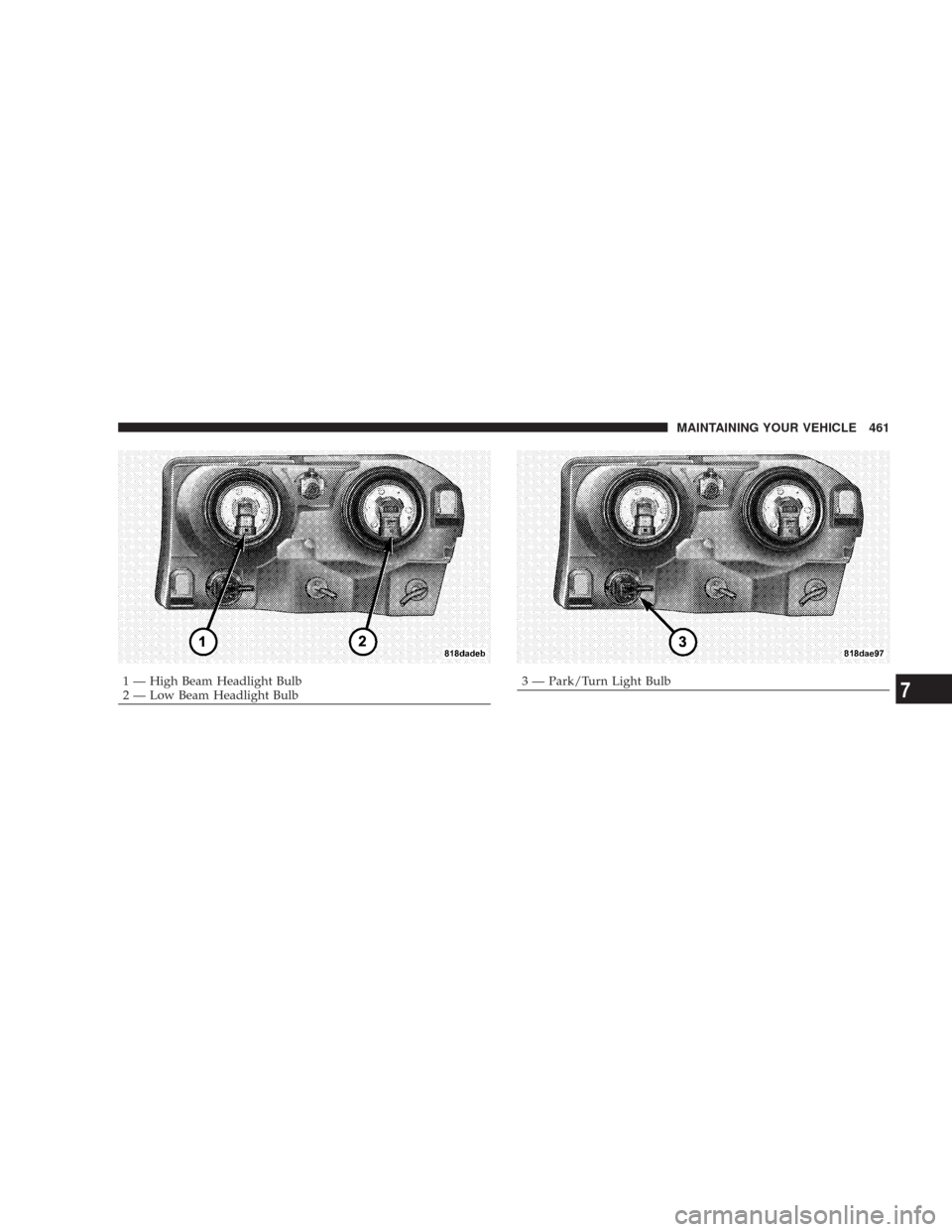
1 — High Beam Headlight Bulb
2 — Low Beam Headlight Bulb3 — Park/Turn Light BulbMAINTAINING YOUR VEHICLE 4617
Page 462 of 519
CAUTION!
Do not touch the new bulb with your fingers. Oil
contamination will severely shorten bulb life. If the
bulb comes in contact with an oily surface, clean the
bulb with rubbing alcohol.
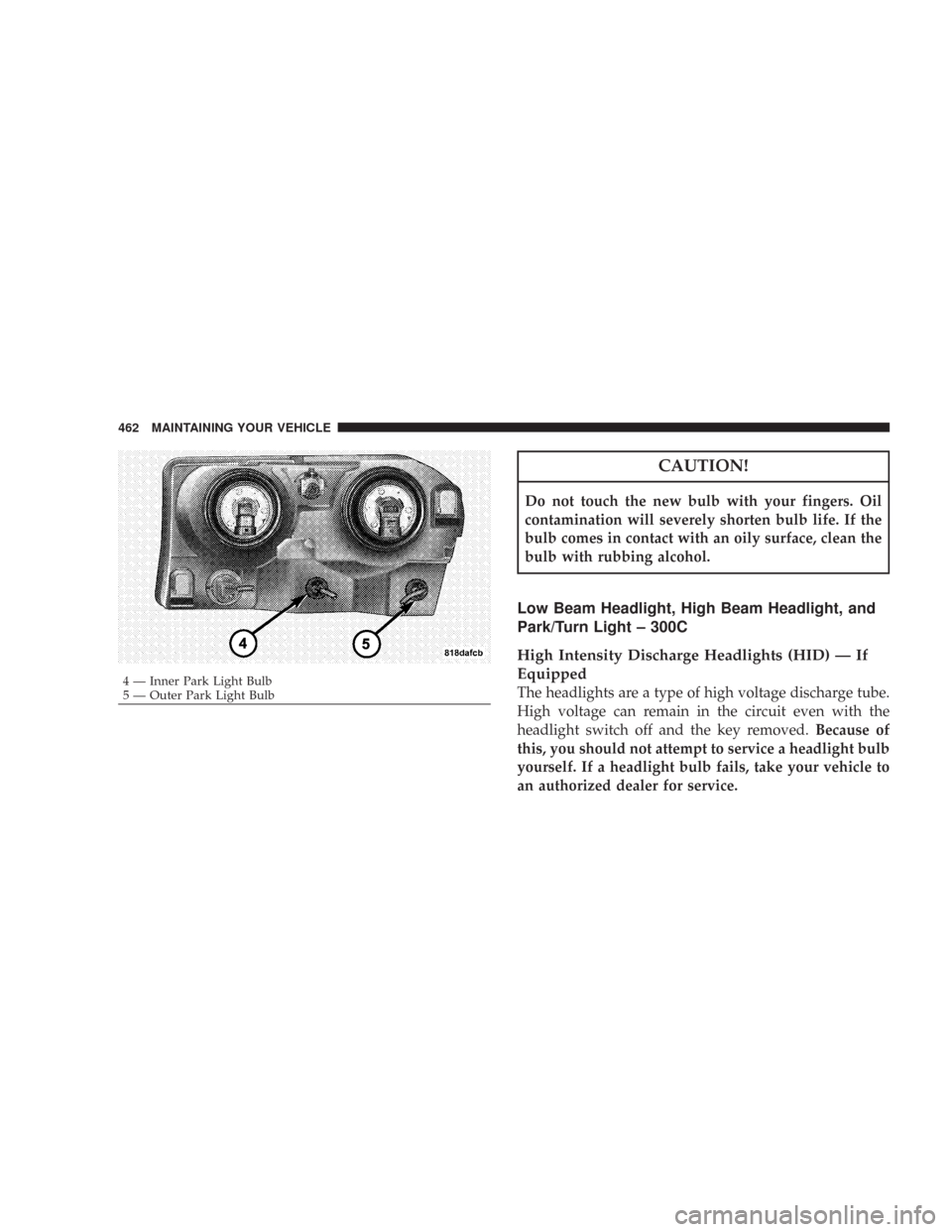
Low Beam Headlight, High Beam Headlight, and
Park/Turn Light – 300C
High Intensity Discharge Headlights (HID) — If
Equipped
The headlights are a type of high voltage discharge tube.
High voltage can remain in the circuit even with the
headlight switch off and the key removed.Because of
this, you should not attempt to service a headlight bulb
yourself. If a headlight bulb fails, take your vehicle to
an authorized dealer for service.4 — Inner Park Light Bulb
5 — Outer Park Light Bulb 462 MAINTAINING YOUR VEHICLE
Page 463 of 519
WARNING!
A transient high tension occurs at the bulb sockets of
High Intensity Discharge (HID) headlights when the
headlight switch is turned ON. It may cause serious
electrical shock or electrocution if not serviced prop-
erly. See your authorized dealer for service.
NOTE:On vehicles equipped with High Intensity Dis-
charge Headlights (HID), when the headlights are turned
on, there is a blue hue to the lights. This diminishes and
becomes more white after approximately 10 seconds, as
the system charges.
1. Open the hood.NOTE:Removal of the air cleaner filter housing may be
necessary prior to replacing bulbs in the headlight assem-
bly on the driver side of the vehicle.
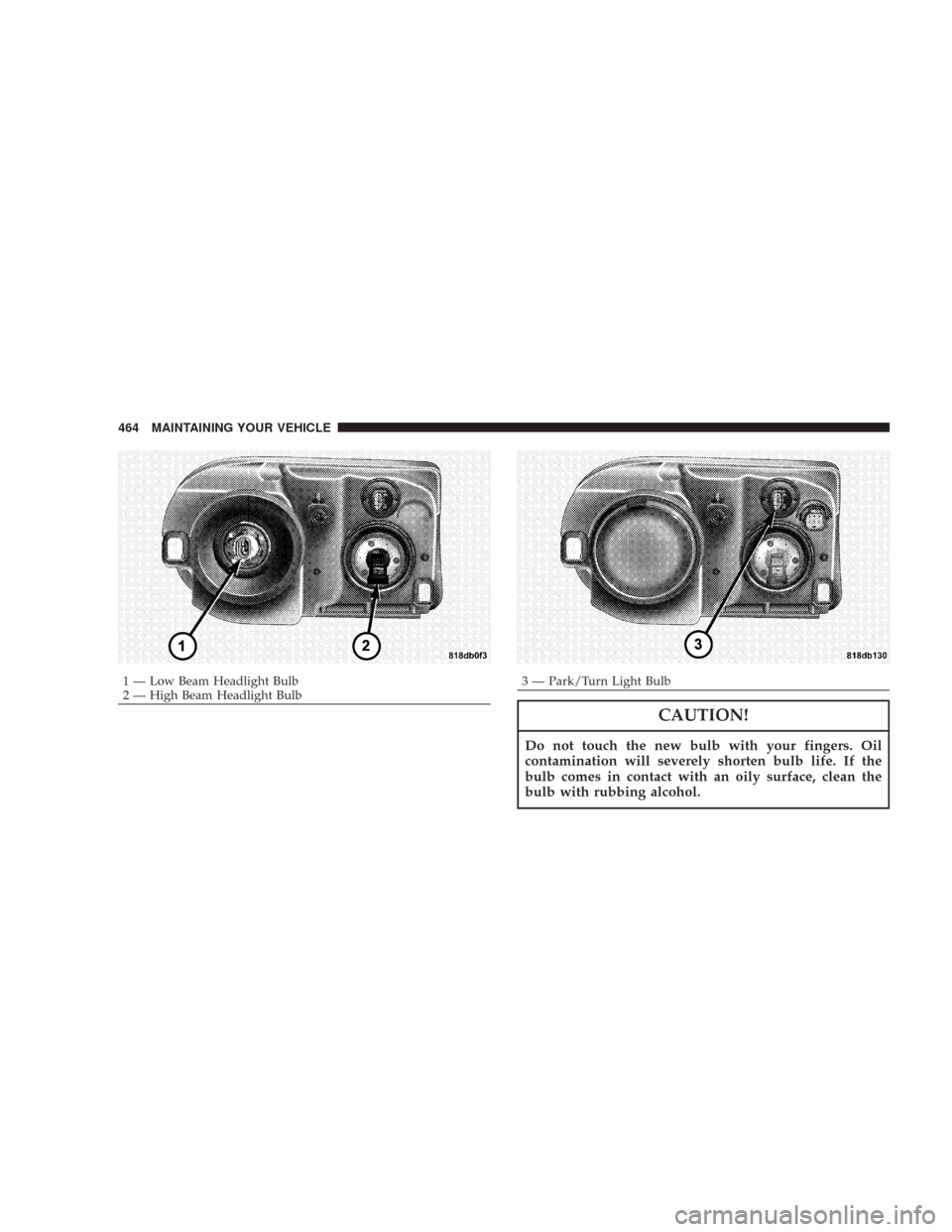
2. Twist the appropriate bulb and socket assembly
counter-clockwise, and then pull it out of the headlight
assembly.
3. Disconnect the bulb from the socket assembly and
install the replacement bulb.
4. Reinstall the bulb and socket assembly into the head-
light assembly, and then turn it clockwise.
MAINTAINING YOUR VEHICLE 463
7
Page 464 of 519
CAUTION!
Do not touch the new bulb with your fingers. Oil
contamination will severely shorten bulb life. If the
bulb comes in contact with an oily surface, clean the
bulb with rubbing alcohol.
1 — Low Beam Headlight Bulb
2 — High Beam Headlight Bulb3 — Park/Turn Light Bulb 464 MAINTAINING YOUR VEHICLE
Page 465 of 519
Backup Light, Side Marker Light, and Tail/Stop
Turn Light — 300 Models
1. Open the Trunk.
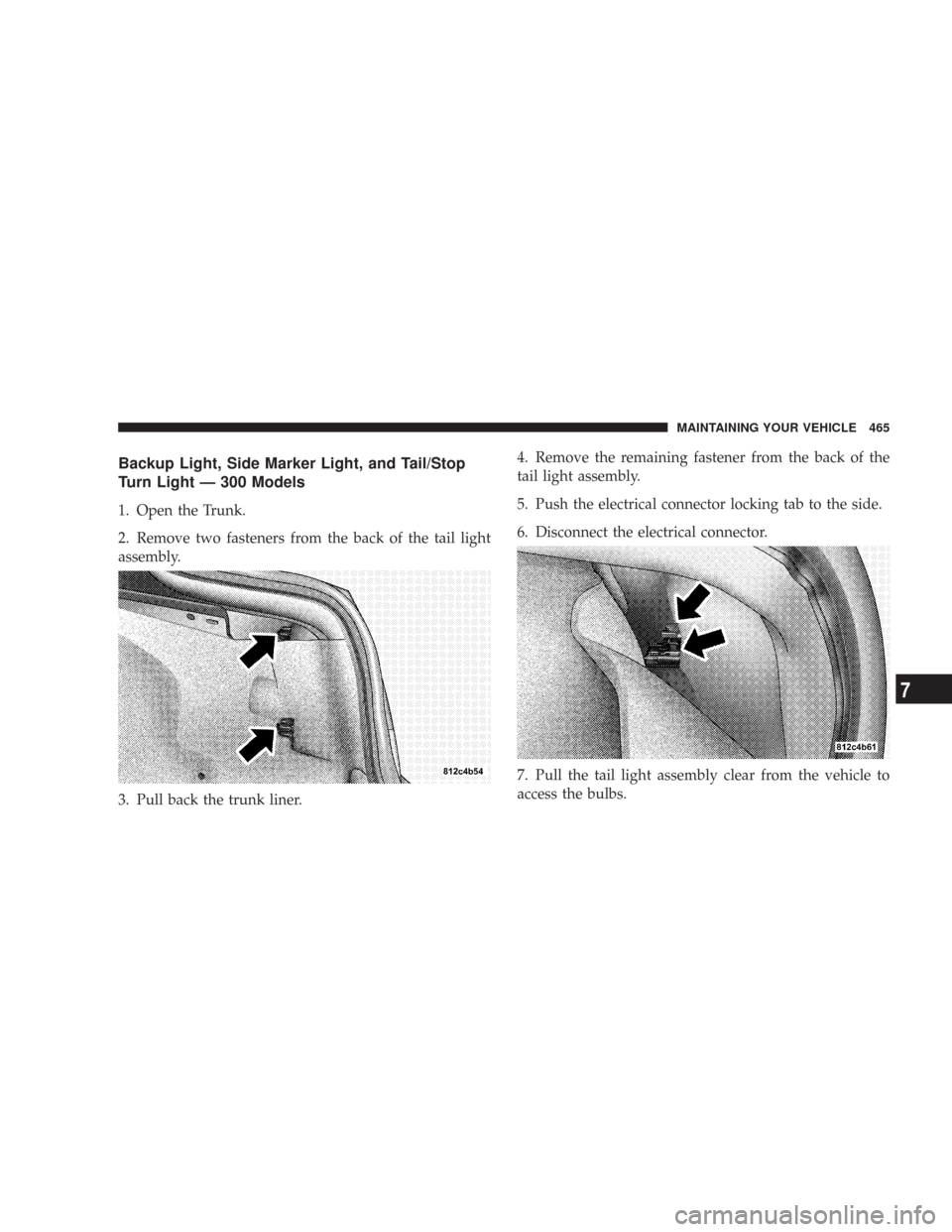
2. Remove two fasteners from the back of the tail light
assembly.
3. Pull back the trunk liner.4. Remove the remaining fastener from the back of the
tail light assembly.
5. Push the electrical connector locking tab to the side.
6. Disconnect the electrical connector.
7. Pull the tail light assembly clear from the vehicle to
access the bulbs.
MAINTAINING YOUR VEHICLE 465
7
Page 466 of 519
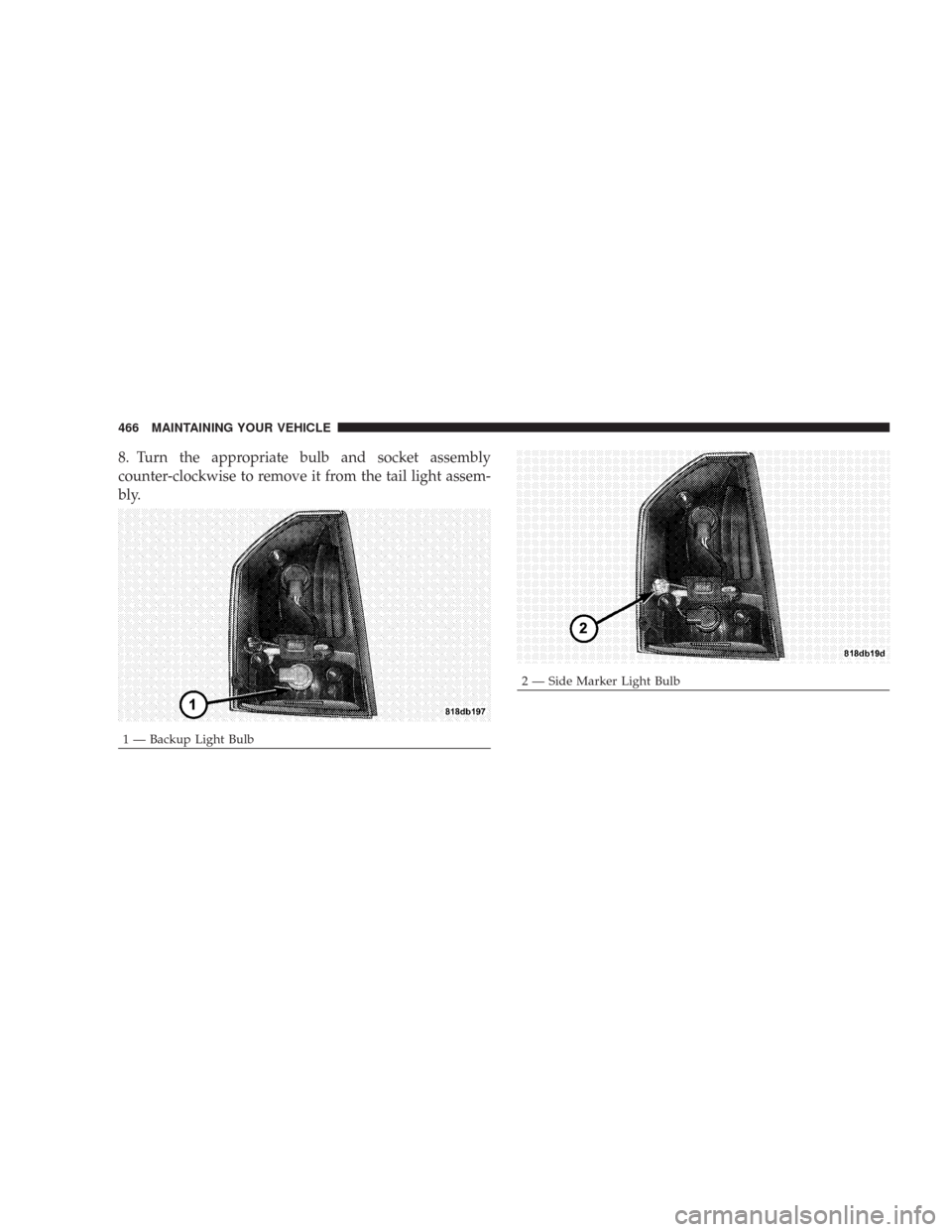
8. Turn the appropriate bulb and socket assembly
counter-clockwise to remove it from the tail light assem-
bly.
1 — Backup Light Bulb
2 — Side Marker Light Bulb 466 MAINTAINING YOUR VEHICLE
Page 467 of 519
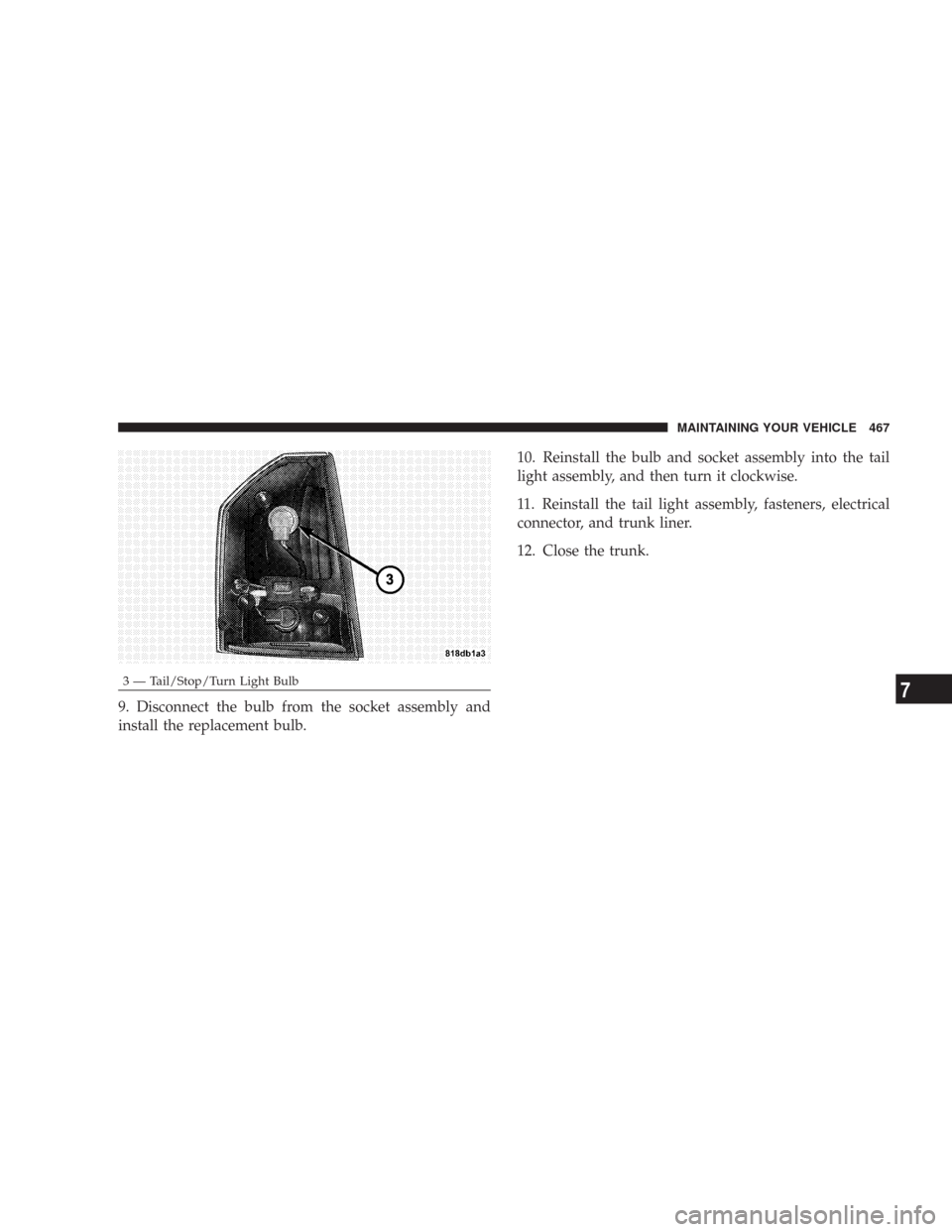
9. Disconnect the bulb from the socket assembly and
install the replacement bulb.10. Reinstall the bulb and socket assembly into the tail
light assembly, and then turn it clockwise.
11. Reinstall the tail light assembly, fasteners, electrical
connector, and trunk liner.
12. Close the trunk.
3 — Tail/Stop/Turn Light BulbMAINTAINING YOUR VEHICLE 4677