clock CHRYSLER 300 2009 1.G Owner's Manual
[x] Cancel search | Manufacturer: CHRYSLER, Model Year: 2009, Model line: 300, Model: CHRYSLER 300 2009 1.GPages: 526, PDF Size: 9.04 MB
Page 293 of 526
REMOTE SOUND SYSTEM CONTROLS — IF
EQUIPPED
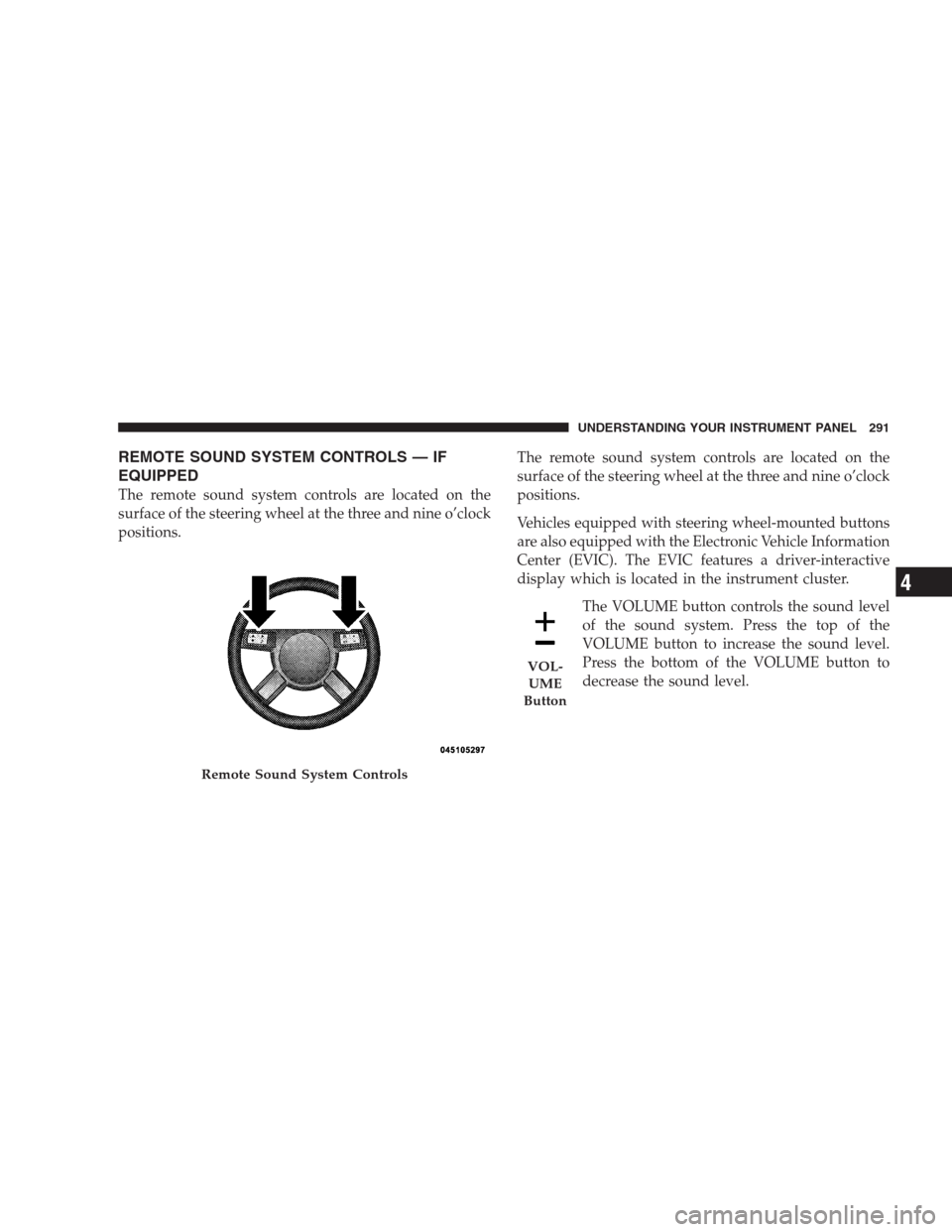
The remote sound system controls are located on the
surface of the steering wheel at the three and nine o’clock
positions.The remote sound system controls are located on the
surface of the steering wheel at the three and nine o’clock
positions.
Vehicles equipped with steering wheel-mounted buttons
are also equipped with the Electronic Vehicle Information
Center (EVIC). The EVIC features a driver-interactive
display which is located in the instrument cluster.
The VOLUME button controls the sound level
of the sound system. Press the top of the
VOLUME button to increase the sound level.
Press the bottom of the VOLUME button to
decrease the sound level.
Remote Sound System Controls
VOL-
UME
Button
UNDERSTANDING YOUR INSTRUMENT PANEL 291
4
Page 404 of 526
WARNING!
To avoid possible personal injury, handle the wheel
covers with care to avoid contact with the metal edges
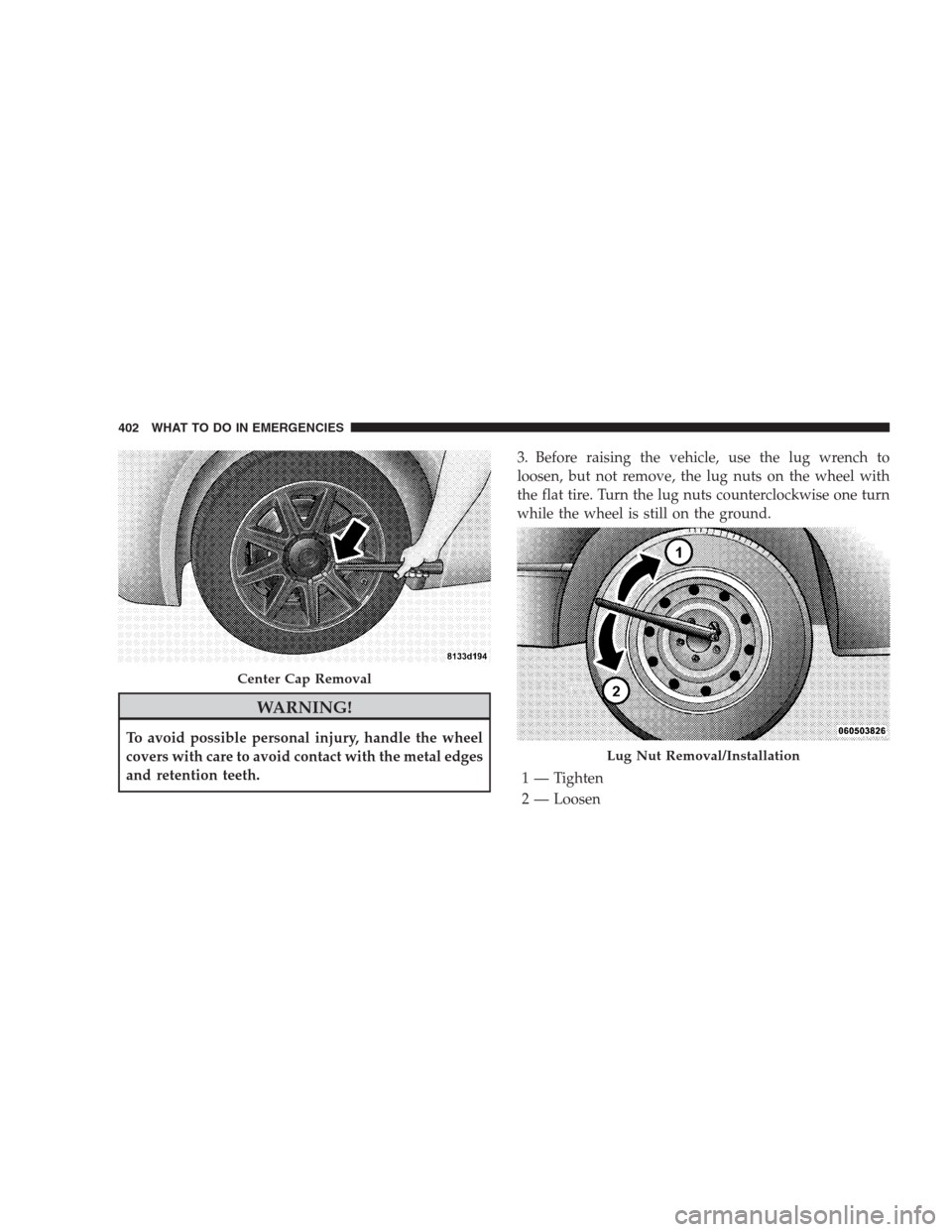
and retention teeth.3. Before raising the vehicle, use the lug wrench to
loosen, but not remove, the lug nuts on the wheel with
the flat tire. Turn the lug nuts counterclockwise one turn
while the wheel is still on the ground.
Center Cap Removal
Lug Nut Removal/Installation
1 — Tighten
2 — Loosen
402 WHAT TO DO IN EMERGENCIES
Page 405 of 526
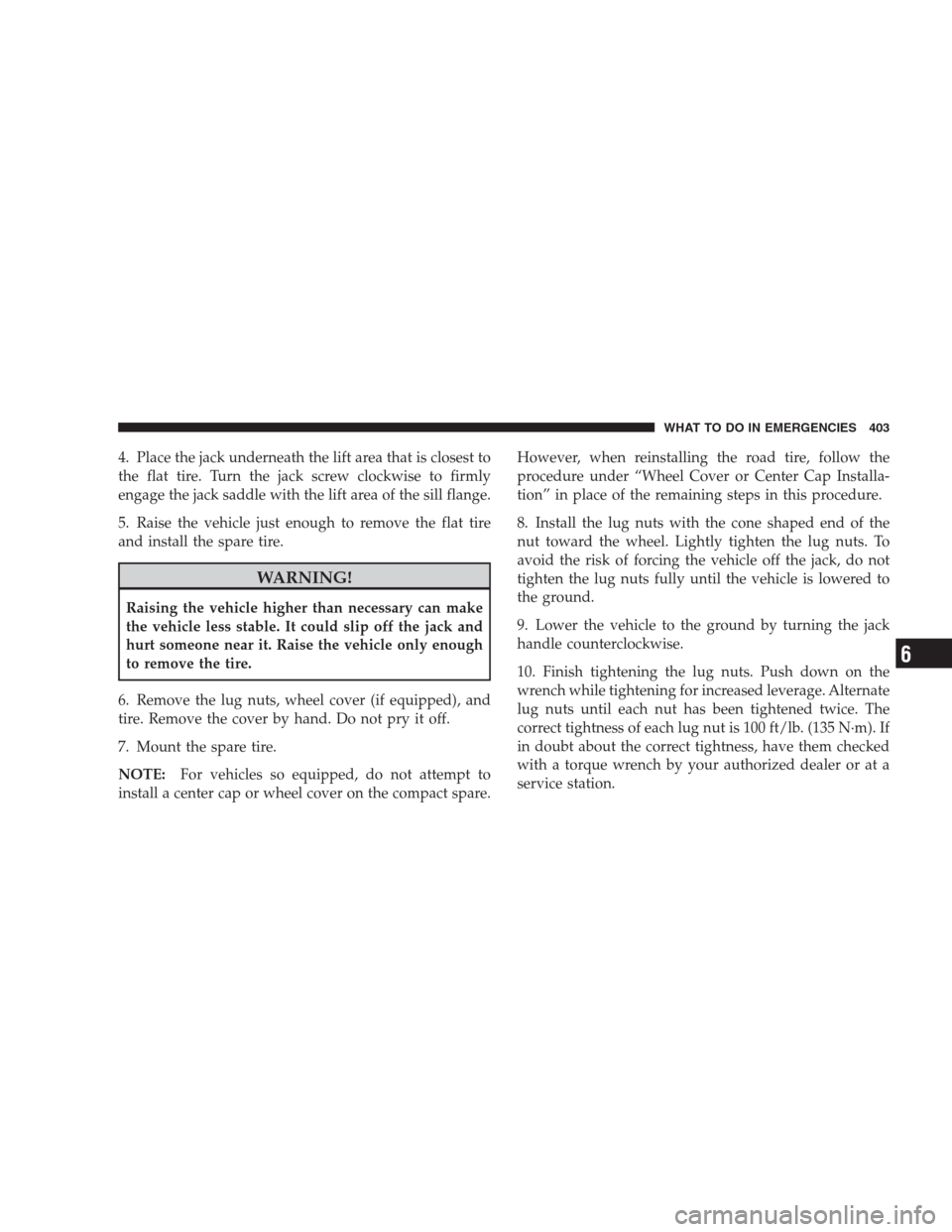
4. Place the jack underneath the lift area that is closest to
the flat tire. Turn the jack screw clockwise to firmly
engage the jack saddle with the lift area of the sill flange.
5. Raise the vehicle just enough to remove the flat tire
and install the spare tire.
WARNING!
Raising the vehicle higher than necessary can make
the vehicle less stable. It could slip off the jack and
hurt someone near it. Raise the vehicle only enough
to remove the tire.
6. Remove the lug nuts, wheel cover (if equipped), and
tire. Remove the cover by hand. Do not pry it off.
7. Mount the spare tire.
NOTE:For vehicles so equipped, do not attempt to
install a center cap or wheel cover on the compact spare.However, when reinstalling the road tire, follow the
procedure under “Wheel Cover or Center Cap Installa-
tion” in place of the remaining steps in this procedure.
8. Install the lug nuts with the cone shaped end of the
nut toward the wheel. Lightly tighten the lug nuts. To
avoid the risk of forcing the vehicle off the jack, do not
tighten the lug nuts fully until the vehicle is lowered to
the ground.
9. Lower the vehicle to the ground by turning the jack
handle counterclockwise.
10. Finish tightening the lug nuts. Push down on the
wrench while tightening for increased leverage. Alternate
lug nuts until each nut has been tightened twice. The
correct tightness of each lug nut is 100 ft/lb. (135 N·m). If
in doubt about the correct tightness, have them checked
with a torque wrench by your authorized dealer or at a
service station.
WHAT TO DO IN EMERGENCIES 403
6
Page 409 of 526
3. Align the valve notch in the wheel cover with the
valve stem on the wheel. Install the cover by hand,
snapping the cover over the two lug nuts. Do not use a
hammer or excessive force to install the cover.
4. Install the remaining lug nuts with the cone shaped
end of the nut toward the wheel. Lightly tighten the lug
nuts. To avoid the risk of forcing the vehicle off the jack,
do not tighten the lug nuts fully until the vehicle is
lowered to the ground.
5. Lower the vehicle to the ground by turning the jack
handle counterclockwise.
6. Finish tightening the lug nuts. Push down on the
wrench while tightening for increased leverage. Alternate
lug nuts until each nut has been tightened twice. The
correct tightness of each lug nut is 100 ft/lb. (135 N·m). If
in doubt about the correct tightness, have them checked
with a torque wrench by your authorized dealer or at a
service station.7. For vehicles equipped with center caps, install the
center cap by hand. Do not use a hammer or excessive
force to install the center cap.
8. Stow the jack, tools, and spare tire. Make sure the base
of the jack faces the rear of the vehicle before tightening
down the fastener.
WARNING!
A loose tire or jack thrown forward in a collision or
hard stop could endanger the occupants of the ve-
hicle. Always stow the jack parts and the spare tire in
the places provided.
WHAT TO DO IN EMERGENCIES 407
6
Page 457 of 526
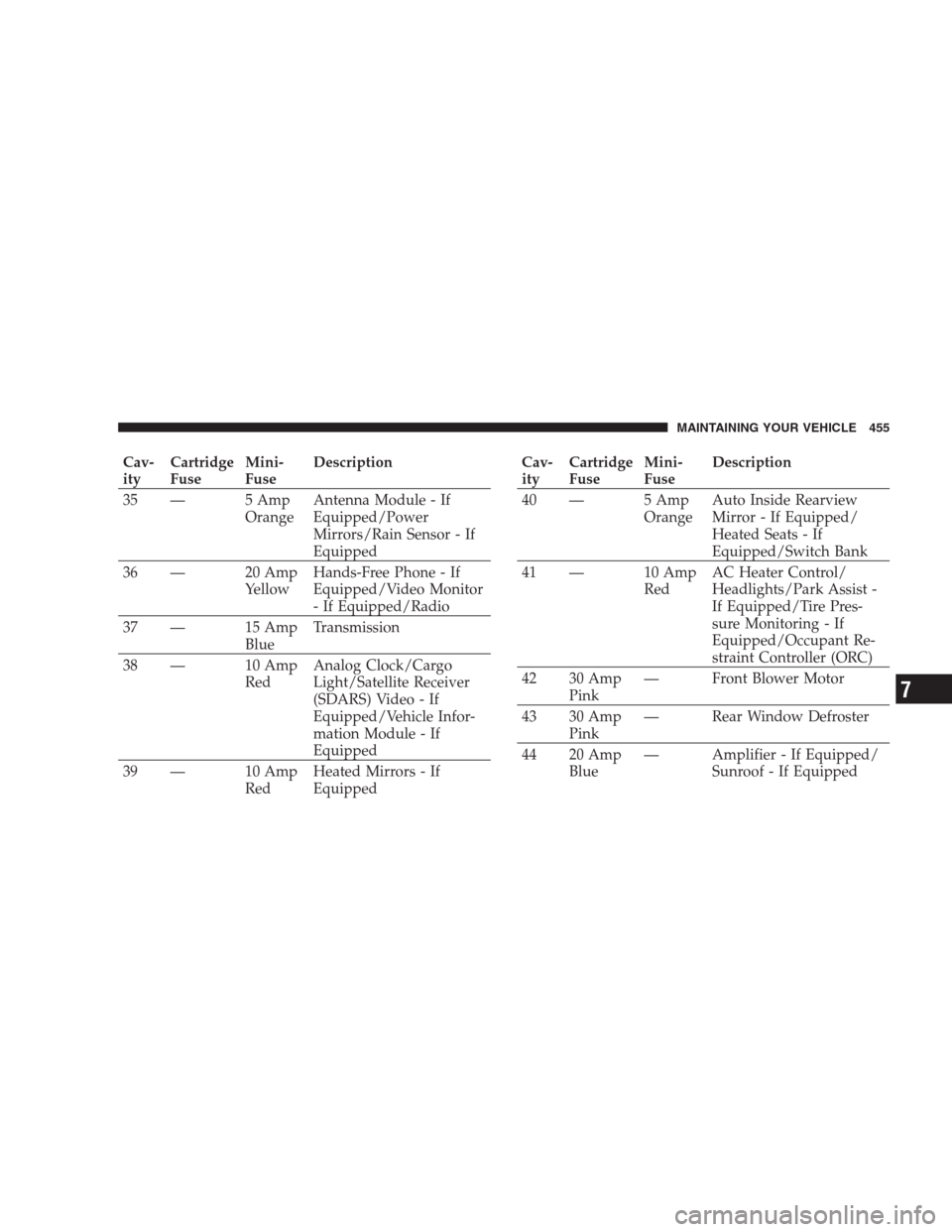
Cav-
ityCartridge
FuseMini-
FuseDescription
35 — 5 Amp
OrangeAntenna Module - If
Equipped/Power
Mirrors/Rain Sensor - If
Equipped
36 — 20 Amp
YellowHands-Free Phone - If
Equipped/Video Monitor
- If Equipped/Radio
37 — 15 Amp
BlueTransmission
38 — 10 Amp
RedAnalog Clock/Cargo
Light/Satellite Receiver
(SDARS) Video - If
Equipped/Vehicle Infor-
mation Module - If
Equipped
39 — 10 Amp
RedHeated Mirrors - If
EquippedCav-
ityCartridge
FuseMini-
FuseDescription
40 — 5 Amp
OrangeAuto Inside Rearview
Mirror - If Equipped/
Heated Seats - If
Equipped/Switch Bank
41 — 10 Amp
RedAC Heater Control/
Headlights/Park Assist -
If Equipped/Tire Pres-
sure Monitoring - If
Equipped/Occupant Re-
straint Controller (ORC)
42 30 Amp
Pink— Front Blower Motor
43 30 Amp
Pink— Rear Window Defroster
44 20 Amp
Blue— Amplifier - If Equipped/
Sunroof - If Equipped
MAINTAINING YOUR VEHICLE 455
7
Page 460 of 526
Center High Mount Stop Light
(CHMSL)....... LED(Serviced at Authorized Dealer)
Outside Mirror Turn Signal & Approach
Lights.......... LED(Serviced at Authorized Dealer)
License.............................. W5W
BULB REPLACEMENT
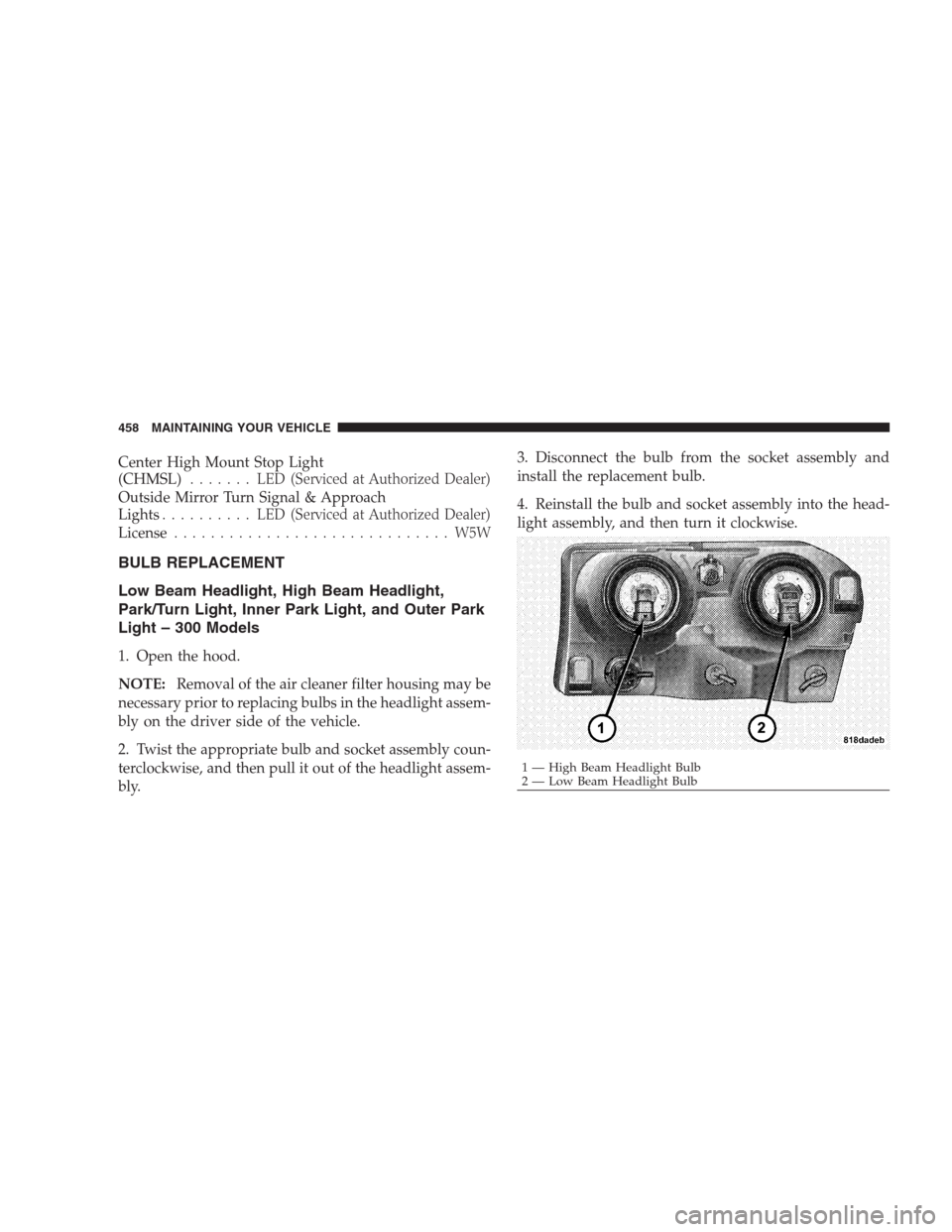
Low Beam Headlight, High Beam Headlight,
Park/Turn Light, Inner Park Light, and Outer Park
Light – 300 Models
1. Open the hood.
NOTE:Removal of the air cleaner filter housing may be
necessary prior to replacing bulbs in the headlight assem-
bly on the driver side of the vehicle.
2. Twist the appropriate bulb and socket assembly coun-
terclockwise, and then pull it out of the headlight assem-
bly.3. Disconnect the bulb from the socket assembly and
install the replacement bulb.
4. Reinstall the bulb and socket assembly into the head-
light assembly, and then turn it clockwise.
1 — High Beam Headlight Bulb
2 — Low Beam Headlight Bulb 458 MAINTAINING YOUR VEHICLE
Page 464 of 526
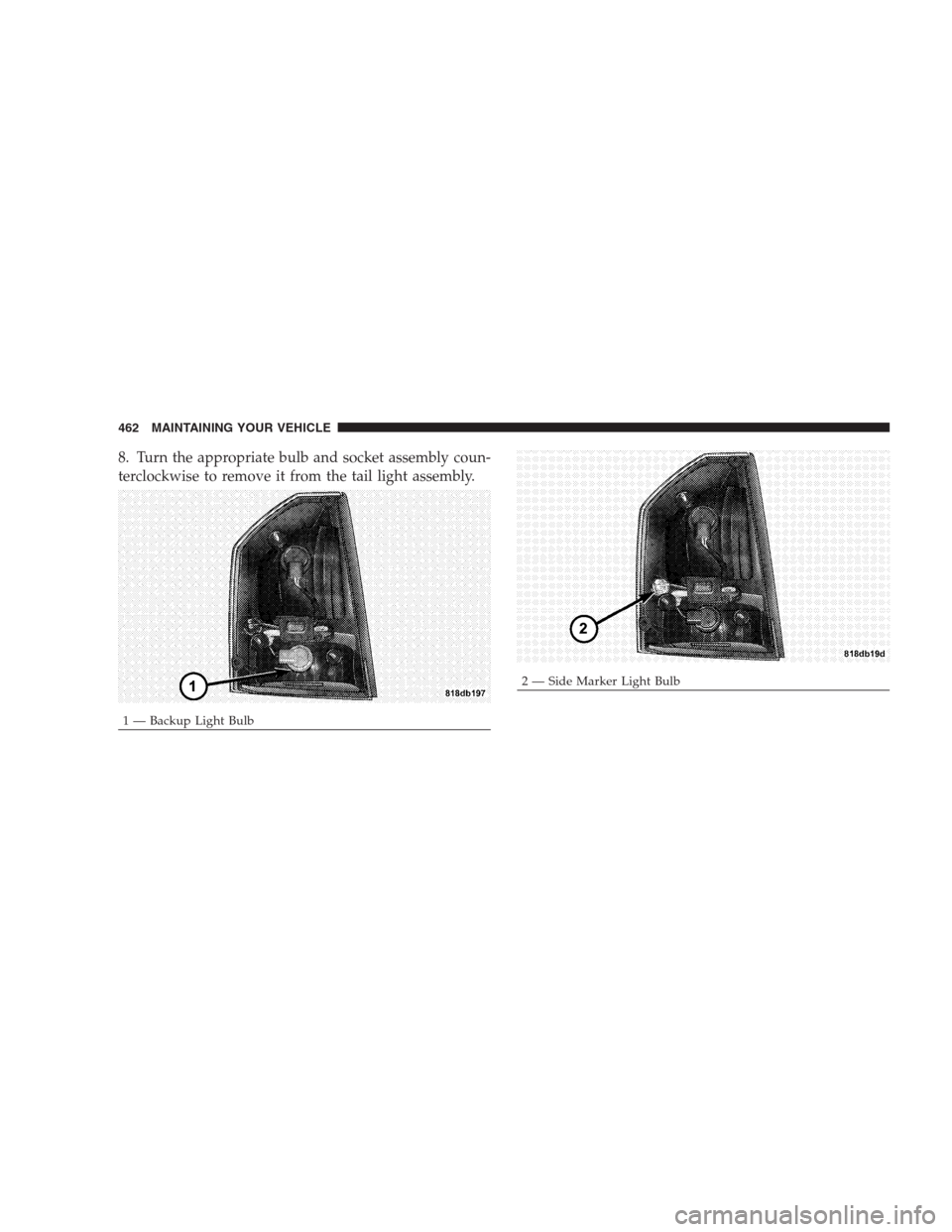
8. Turn the appropriate bulb and socket assembly coun-
terclockwise to remove it from the tail light assembly.
1 — Backup Light Bulb
2 — Side Marker Light Bulb 462 MAINTAINING YOUR VEHICLE
Page 465 of 526
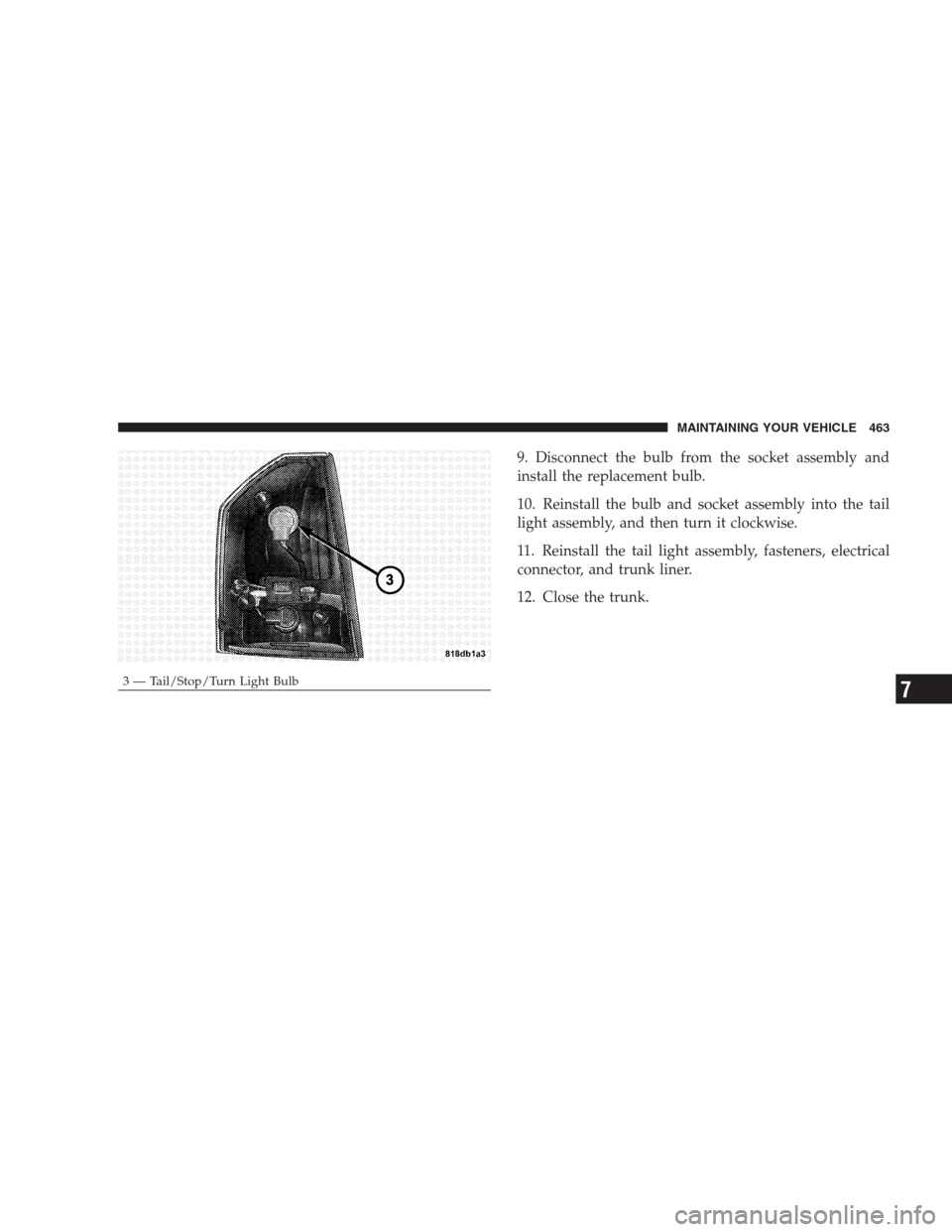
9. Disconnect the bulb from the socket assembly and
install the replacement bulb.
10. Reinstall the bulb and socket assembly into the tail
light assembly, and then turn it clockwise.
11. Reinstall the tail light assembly, fasteners, electrical
connector, and trunk liner.
12. Close the trunk.
3 — Tail/Stop/Turn Light BulbMAINTAINING YOUR VEHICLE 4637
Page 467 of 526
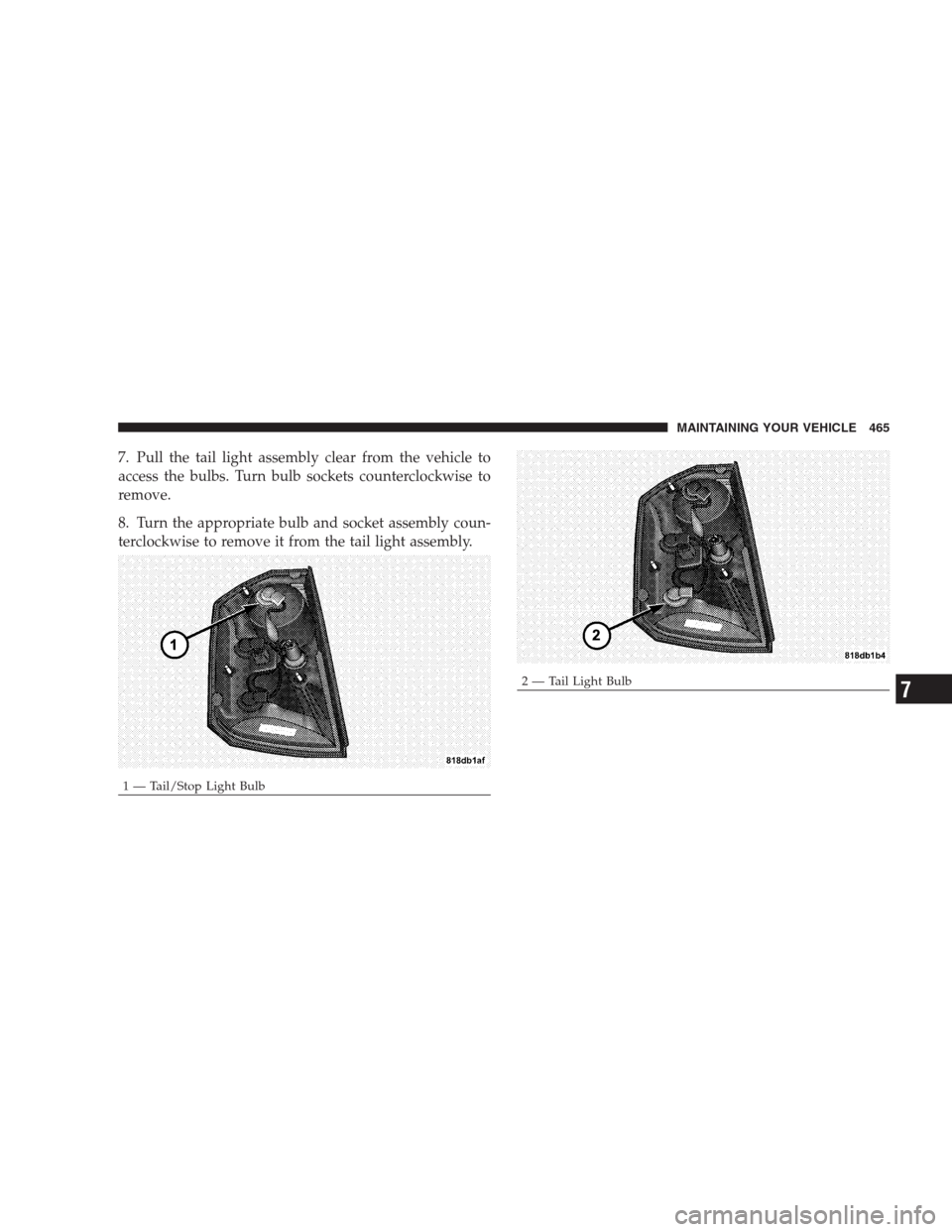
7. Pull the tail light assembly clear from the vehicle to
access the bulbs. Turn bulb sockets counterclockwise to
remove.
8. Turn the appropriate bulb and socket assembly coun-
terclockwise to remove it from the tail light assembly.
1 — Tail/Stop Light Bulb
2 — Tail Light BulbMAINTAINING YOUR VEHICLE 4657
Page 468 of 526
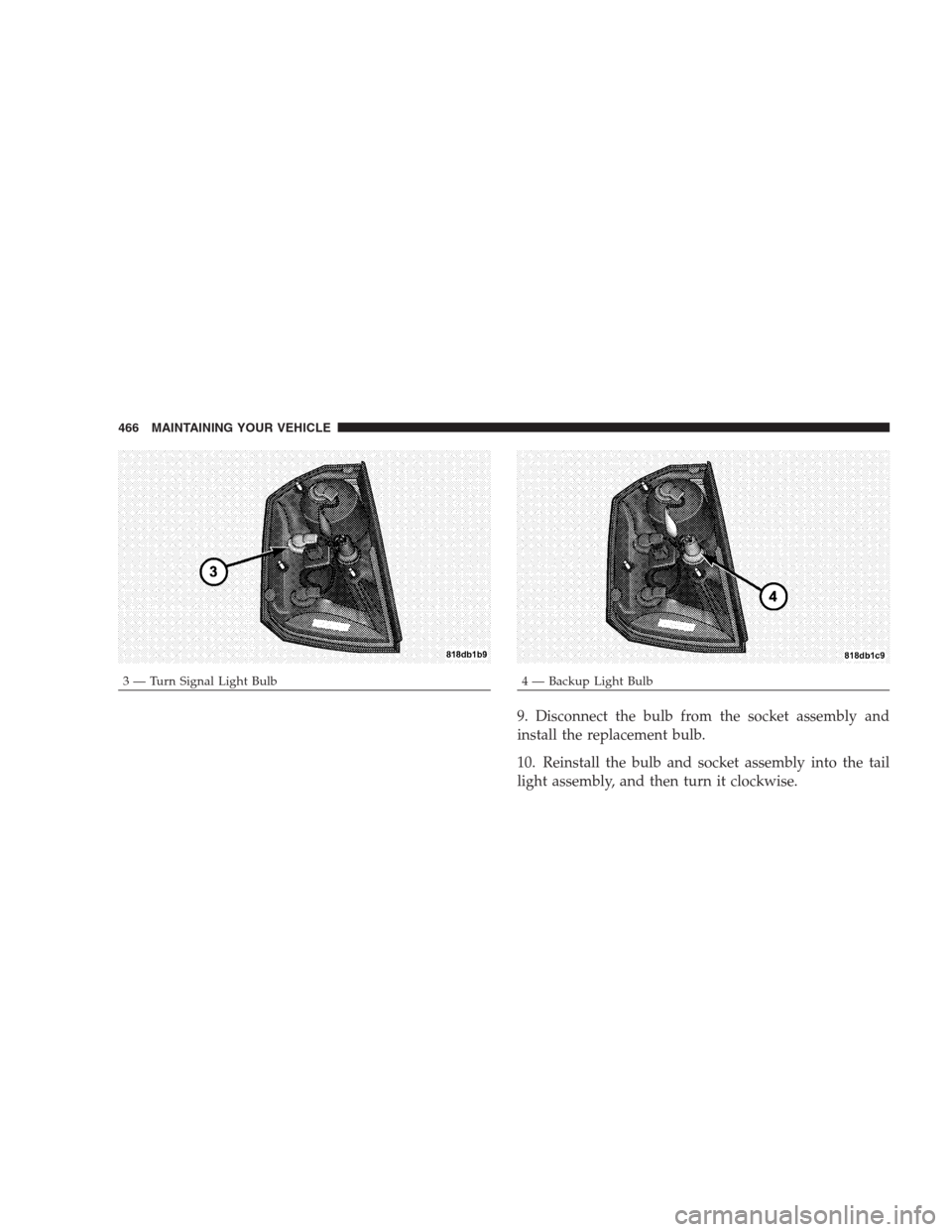
9. Disconnect the bulb from the socket assembly and
install the replacement bulb.
10. Reinstall the bulb and socket assembly into the tail
light assembly, and then turn it clockwise.
3 — Turn Signal Light Bulb4 — Backup Light Bulb 466 MAINTAINING YOUR VEHICLE