instrument panel CHRYSLER 300 2012 2.G Owners Manual
[x] Cancel search | Manufacturer: CHRYSLER, Model Year: 2012, Model line: 300, Model: CHRYSLER 300 2012 2.GPages: 576, PDF Size: 15.25 MB
Page 333 of 576
The button located in the center of the left-hand control
will tune to the next preset station that you have pro-
grammed in the radio preset pushbutton.
CD Player
Pressing the top of the switch once will go to the next
track on the CD. Pressing the bottom of the switch once
will go to the beginning of the current track, or to the
beginning of the previous track if it is within one second
after the current track begins to play.
If you press the switch up or down twice, it plays the
second track; three times, it will play the third, etc.
The center button on the left side rocker switch has no
function for a single-disc CD player. However, when a
multiple-disc CD player is equipped on the vehicle, the
center button will select the next available CD in the
player.
CD/DVD DISC MAINTENANCE
To keep a CD/DVD in good condition, take the following
precautions:
1. Handle the disc by its edge; avoid touching the
surface.
2. If the disc is stained, clean the surface with a soft cloth,
wiping from center to edge.
3. Do not apply paper or tape to the disc; avoid scratch-
ing the disc.
4. Do not use solvents such as benzene, thinner, cleaners,
or anti-static sprays.
5. Store the disc in its case after playing.
6. Do not expose the disc to direct sunlight.
7. Do not store the disc where temperatures may become
too high.
4
UNDERSTANDING YOUR INSTRUMENT PANEL 331
Page 334 of 576
NOTE:If you experience difficulty in playing a particu-
lar disc, it may be damaged (i.e., scratched, reflective
coating removed, a hair, moisture or dew on the disc)
oversized, or have protection encoding. Try a known
good disc before considering disc player service.
RADIO OPERATION AND MOBILE PHONES
Under certain conditions, the mobile phone being on in
your vehicle can cause erratic or noisy performance from
your radio. This condition may be lessened or eliminated
by relocating the mobile phone antenna. This condition is
not harmful to the radio. If your radio performance does
not satisfactorily “clear” by the repositioning of the
antenna, it is recommended that the radio volume be
turned down or off during mobile phone operation when
not using Uconnect™ (if equipped).
CLIMATE CONTROLS
The air conditioning and heating system is designed to
make you comfortable in all types of weather. This
system can be operated through either the Automatic
Climate Controls on the instrument panel or through the
Uconnect Touch™ system display.
When the Uconnect Touch™ system is in different modes
(Radio, Player, Settings, More, etc.) the driver and pas-
senger temperature settings will be indicated at the top of
the display.
332 UNDERSTANDING YOUR INSTRUMENT PANEL
Page 335 of 576
General Overview
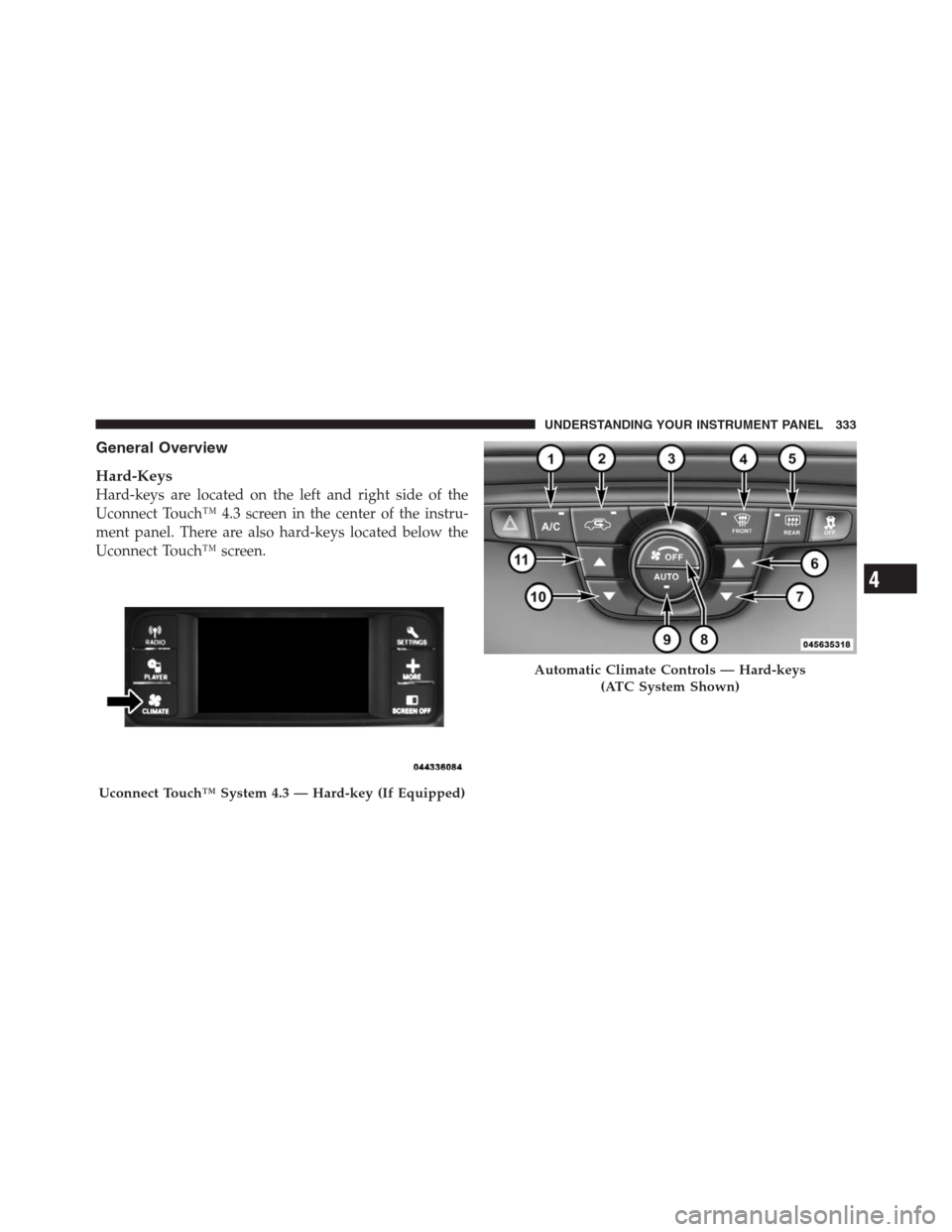
Hard-Keys
Hard-keys are located on the left and right side of the
Uconnect Touch™ 4.3 screen in the center of the instru-
ment panel. There are also hard-keys located below the
Uconnect Touch™ screen.
Uconnect Touch™ System 4.3 — Hard-key (If Equipped)
Automatic Climate Controls — Hard-keys
(ATC System Shown)
4
UNDERSTANDING YOUR INSTRUMENT PANEL 333
Page 336 of 576
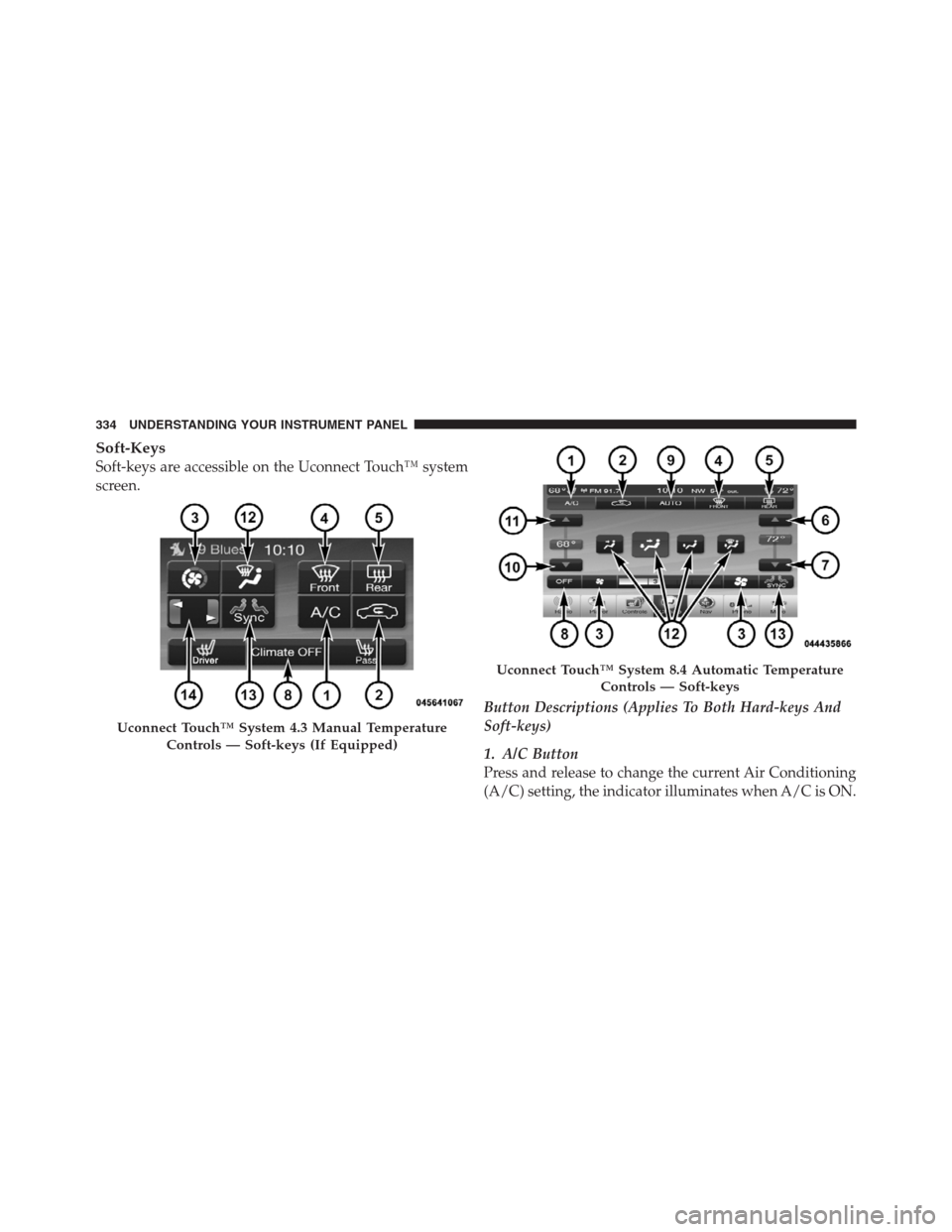
Soft-Keys
Soft-keys are accessible on the Uconnect Touch™ system
screen.
Button Descriptions (Applies To Both Hard-keys And
Soft-keys)
1. A/C Button
Press and release to change the current Air Conditioning
(A/C) setting, the indicator illuminates when A/C is ON.
Uconnect Touch™ System 4.3 Manual Temperature
Controls — Soft-keys (If Equipped)
Uconnect Touch™ System 8.4 Automatic Temperature
Controls — Soft-keys
334 UNDERSTANDING YOUR INSTRUMENT PANEL
Page 337 of 576
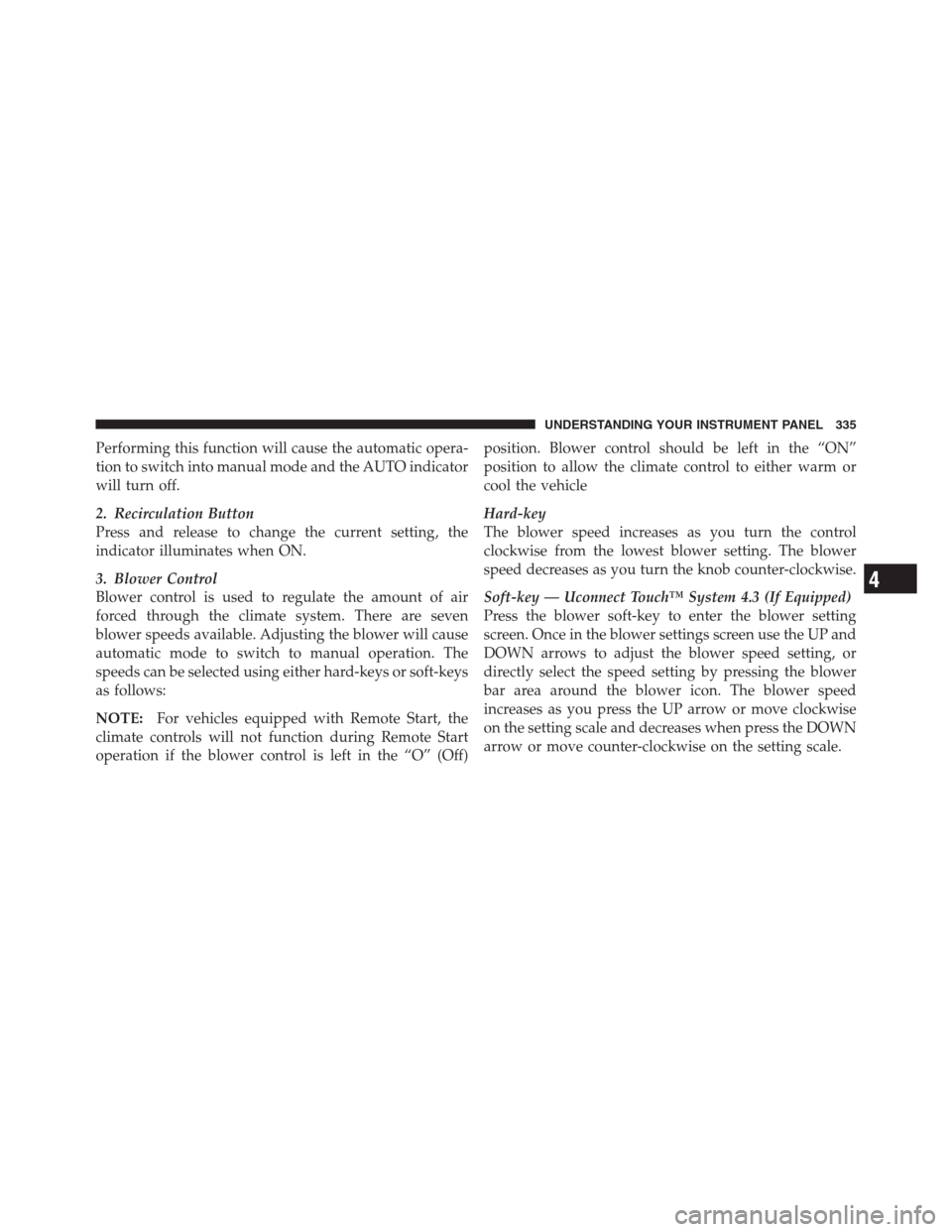
Performing this function will cause the automatic opera-
tion to switch into manual mode and the AUTO indicator
will turn off.
2. Recirculation Button
Press and release to change the current setting, the
indicator illuminates when ON.
3. Blower Control
Blower control is used to regulate the amount of air
forced through the climate system. There are seven
blower speeds available. Adjusting the blower will cause
automatic mode to switch to manual operation. The
speeds can be selected using either hard-keys or soft-keys
as follows:
NOTE:For vehicles equipped with Remote Start, the
climate controls will not function during Remote Start
operation if the blower control is left in the “O” (Off)position. Blower control should be left in the “ON”
position to allow the climate control to either warm or
cool the vehicle
Hard-key
The blower speed increases as you turn the control
clockwise from the lowest blower setting. The blower
speed decreases as you turn the knob counter-clockwise.
Soft-key — Uconnect Touch™ System 4.3 (If Equipped)
Press the blower soft-key to enter the blower setting
screen. Once in the blower settings screen use the UP and
DOWN arrows to adjust the blower speed setting, or
directly select the speed setting by pressing the blower
bar area around the blower icon. The blower speed
increases as you press the UP arrow or move clockwise
on the setting scale and decreases when press the DOWN
arrow or move counter-clockwise on the setting scale.
4
UNDERSTANDING YOUR INSTRUMENT PANEL 335
Page 338 of 576
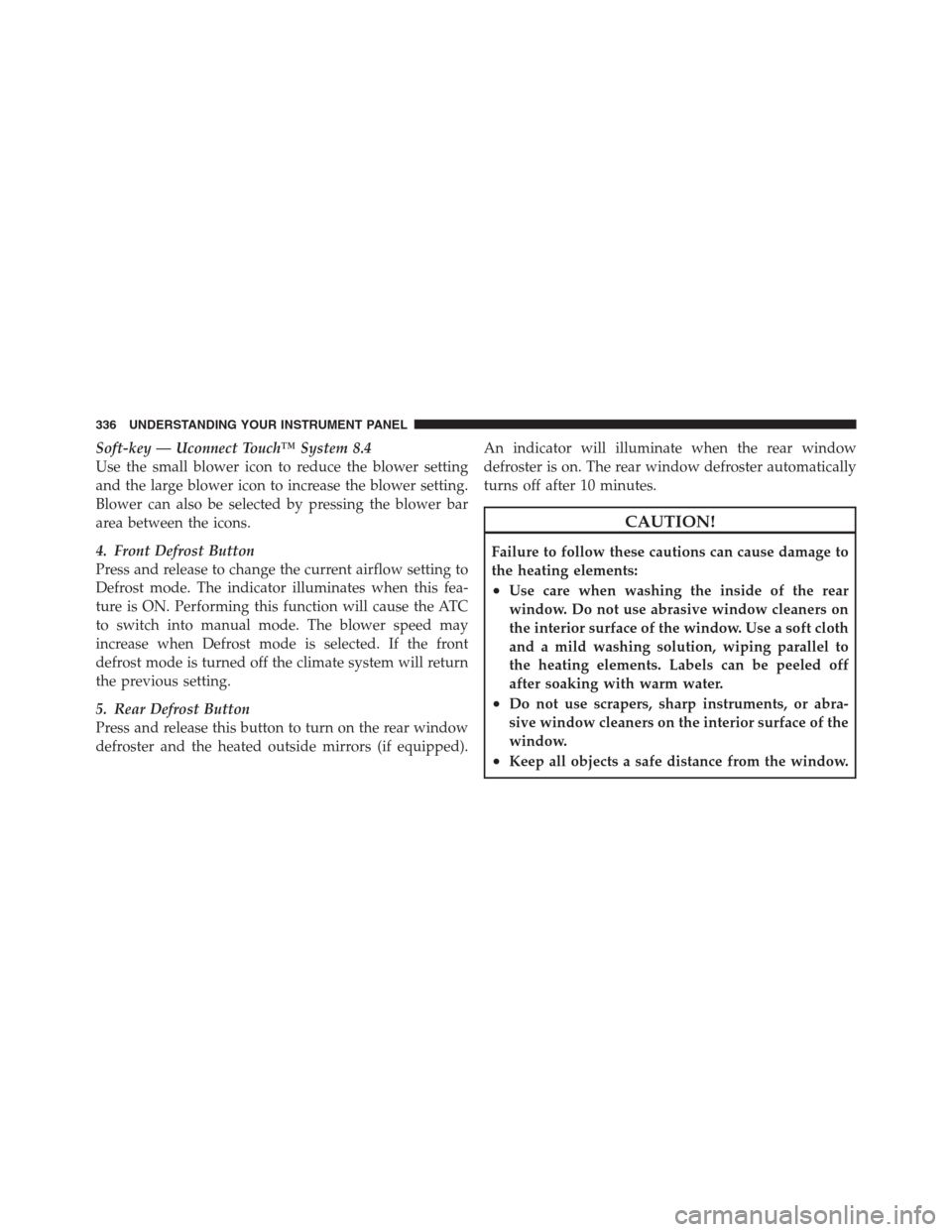
Soft-key — Uconnect Touch™ System 8.4
Use the small blower icon to reduce the blower setting
and the large blower icon to increase the blower setting.
Blower can also be selected by pressing the blower bar
area between the icons.
4. Front Defrost Button
Press and release to change the current airflow setting to
Defrost mode. The indicator illuminates when this fea-
ture is ON. Performing this function will cause the ATC
to switch into manual mode. The blower speed may
increase when Defrost mode is selected. If the front
defrost mode is turned off the climate system will return
the previous setting.
5. Rear Defrost Button
Press and release this button to turn on the rear window
defroster and the heated outside mirrors (if equipped).An indicator will illuminate when the rear window
defroster is on. The rear window defroster automatically
turns off after 10 minutes.
CAUTION!
Failure to follow these cautions can cause damage to
the heating elements:
•Use care when washing the inside of the rear
window. Do not use abrasive window cleaners on
the interior surface of the window. Use a soft cloth
and a mild washing solution, wiping parallel to
the heating elements. Labels can be peeled off
after soaking with warm water.
•Do not use scrapers, sharp instruments, or abra-
sive window cleaners on the interior surface of the
window.
•Keep all objects a safe distance from the window.
336 UNDERSTANDING YOUR INSTRUMENT PANEL
Page 339 of 576
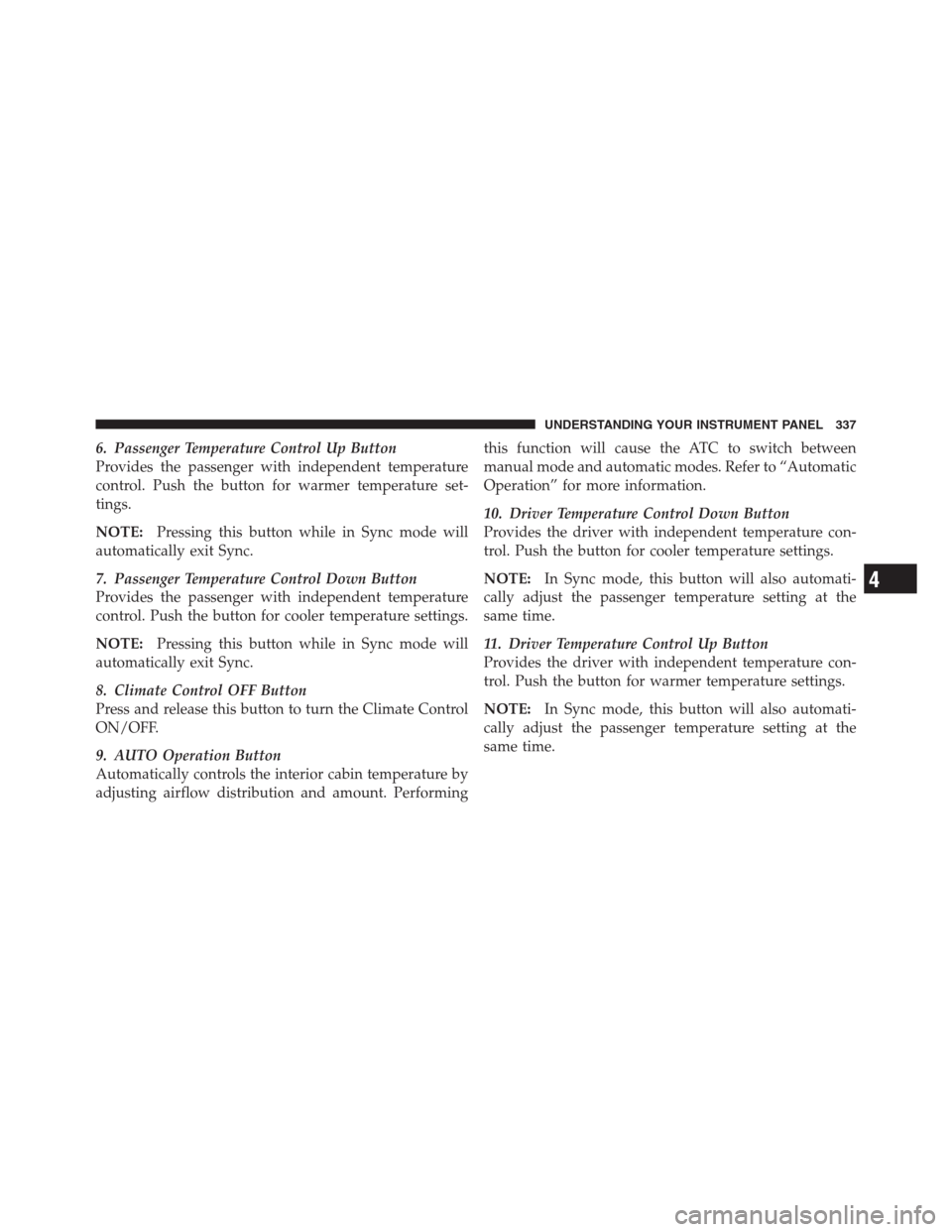
6. Passenger Temperature Control Up Button
Provides the passenger with independent temperature
control. Push the button for warmer temperature set-
tings.
NOTE:Pressing this button while in Sync mode will
automatically exit Sync.
7. Passenger Temperature Control Down Button
Provides the passenger with independent temperature
control. Push the button for cooler temperature settings.
NOTE:Pressing this button while in Sync mode will
automatically exit Sync.
8. Climate Control OFF Button
Press and release this button to turn the Climate Control
ON/OFF.
9. AUTO Operation Button
Automatically controls the interior cabin temperature by
adjusting airflow distribution and amount. Performingthis function will cause the ATC to switch between
manual mode and automatic modes. Refer to “Automatic
Operation” for more information.
10. Driver Temperature Control Down Button
Provides the driver with independent temperature con-
trol. Push the button for cooler temperature settings.
NOTE:In Sync mode, this button will also automati-
cally adjust the passenger temperature setting at the
same time.
11. Driver Temperature Control Up Button
Provides the driver with independent temperature con-
trol. Push the button for warmer temperature settings.
NOTE:In Sync mode, this button will also automati-
cally adjust the passenger temperature setting at the
same time.
4
UNDERSTANDING YOUR INSTRUMENT PANEL 337
Page 340 of 576
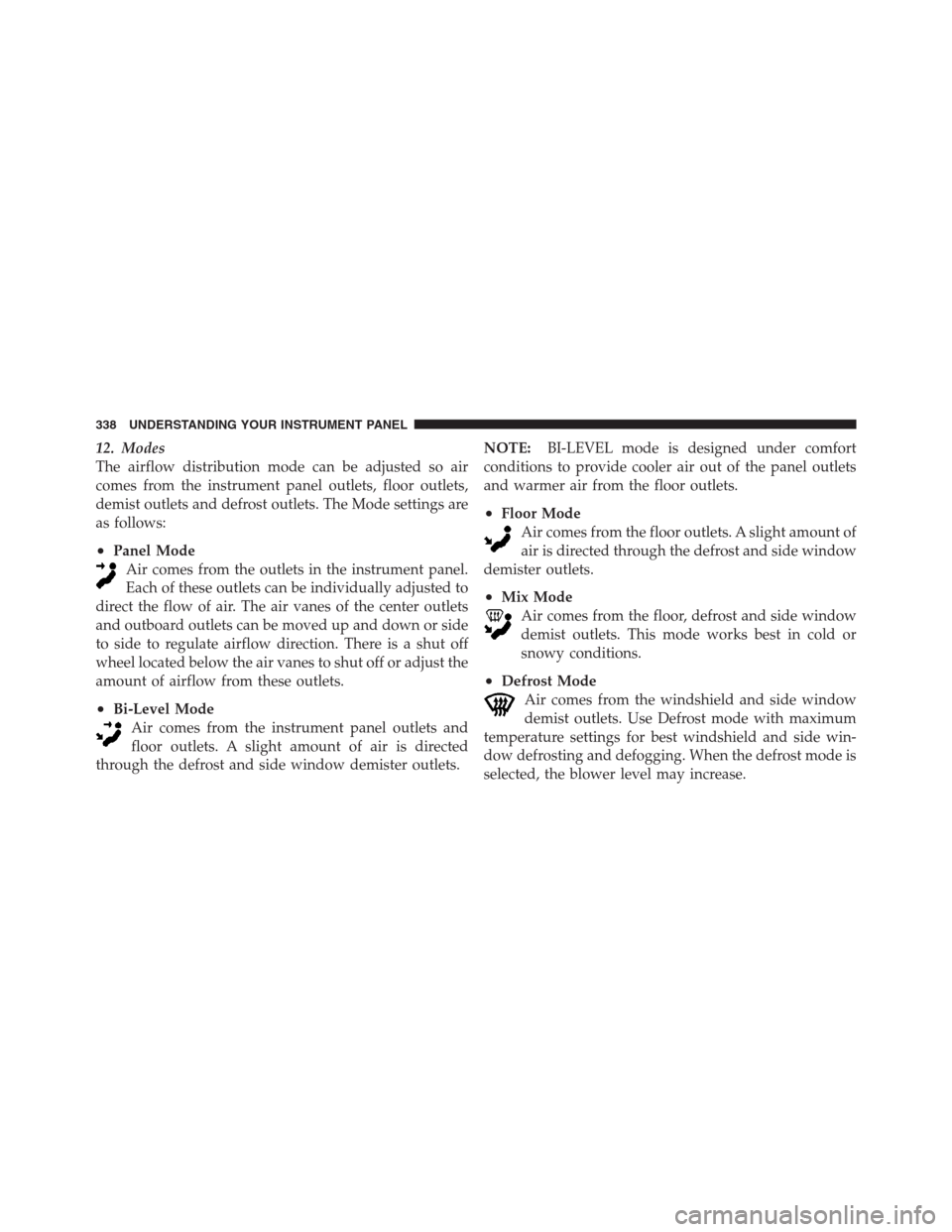
12. Modes
The airflow distribution mode can be adjusted so air
comes from the instrument panel outlets, floor outlets,
demist outlets and defrost outlets. The Mode settings are
as follows:
•Panel Mode
Air comes from the outlets in the instrument panel.
Each of these outlets can be individually adjusted to
direct the flow of air. The air vanes of the center outlets
and outboard outlets can be moved up and down or side
to side to regulate airflow direction. There is a shut off
wheel located below the air vanes to shut off or adjust the
amount of airflow from these outlets.
•Bi-Level Mode
Air comes from the instrument panel outlets and
floor outlets. A slight amount of air is directed
through the defrost and side window demister outlets.NOTE:BI-LEVEL mode is designed under comfort
conditions to provide cooler air out of the panel outlets
and warmer air from the floor outlets.
•Floor Mode
Air comes from the floor outlets. A slight amount of
air is directed through the defrost and side window
demister outlets.
•Mix Mode
Air comes from the floor, defrost and side window
demist outlets. This mode works best in cold or
snowy conditions.
•Defrost Mode
Air comes from the windshield and side window
demist outlets. Use Defrost mode with maximum
temperature settings for best windshield and side win-
dow defrosting and defogging. When the defrost mode is
selected, the blower level may increase.
338 UNDERSTANDING YOUR INSTRUMENT PANEL
Page 341 of 576
13. SYNC
Press the Sync soft-key to toggle the Sync feature On/Off.
The Sync indicator is illuminated when this feature is
enabled. Sync is used to synchronize the passenger
temperature setting with the driver temperature setting.
Changing the passenger temperature setting while in
Sync will automatically exit this feature.
Climate Control Functions
A/C (Air Conditioning)
The Air Conditioning (A/C) button allows the operator
to manually activate or deactivate the air conditioning
system. When the air conditioning system is turned on,
cool dehumidified air will flow through the outlets into
the cabin. For improved fuel economy, press the A/C
button to turn off the air conditioning and manually
adjust the blower and airflow mode settings.NOTE:
•If fog or mist appears on the windshield or side glass,
select Defrost mode and increase blower speed.
•If your air conditioning performance seems lower than
expected, check the front of the A/C condenser (lo-
cated in front of the radiator), for an accumulation of
dirt or insects. Clean with a gentle water spray from
behind the radiator and through the condenser. Fabric
front fascia protectors may reduce airflow to the
condenser, reducing air conditioning performance.
Recirculation
When outside air contains smoke, odors, or
high humidity, or if rapid cooling is desired,
you may wish to recirculate interior air by
pressing the Recirculation control button. The
recirculation indicator will illuminate when this button is
selected. Push the button a second time to turn off the
Recirculation mode and allow outside air into the vehicle.
4
UNDERSTANDING YOUR INSTRUMENT PANEL 339
Page 342 of 576
NOTE:In cold weather, use of Recirculation mode may
lead to excessive window fogging. On systems with
Manual Climate Controls, the Recirculation mode is not
allowed in Defrost mode to improve window clearing
operation. Recirculation will be disabled automatically if
this mode is selected. Attempting to use Recirculation
while in this mode will cause the LED in the control
button to blink and then turn off.
Automatic Temperature Control (ATC)
ATC Hard-keys are located in the center of the instru-
ment panel.
Soft-keys are accessible on the Uconnect Touch™ system
screen.
Automatic Operation
1. Press the AUTO hard-key or soft-key button on the
Automatic Temperature Control (ATC) Panel.2.
Next, adjust the temperature you would like the system
to maintain by adjusting the driver and passenger tempera-
ture hard or soft control buttons (6, 7, 10, 11). Once the
desired temperature is displayed, the system will achieve
and automatically maintain that comfort level.
3. When the system is set up for your comfort level, it is
not necessary to change the settings. You will experience
the greatest efficiency by simply allowing the system to
function automatically.
NOTE:
•It is not necessary to move the temperature settings for
cold or hot vehicles. The system automatically adjusts
the temperature, mode and blower speed to provide
comfort as quickly as possible.
•The temperature can be displayed in U.S. or Metric
units by selecting the US/M customer-programmable
feature. Refer to the “Uconnect Touch™ System Set-
tings” in this section of the manual.
340 UNDERSTANDING YOUR INSTRUMENT PANEL