remote start CHRYSLER 300 2012 2.G Owner's Manual
[x] Cancel search | Manufacturer: CHRYSLER, Model Year: 2012, Model line: 300, Model: CHRYSLER 300 2012 2.GPages: 576, PDF Size: 15.25 MB
Page 307 of 576
•Rain Sensing
Touch the Rain Sensing soft-key to change this display.
When this feature is selected, the system will automati-
cally activate the windshield wipers if it senses moisture
on the windshield. To make your selection, touch the
Rain Sensing soft-key and select ON or OFF. Then touch
the arrow back soft-key.
•Hill Start Assist — If Equipped
Touch the Hill Start Assist soft-key to change this display.
When this feature is selected, the Hill Start Assist (HSA)
system is active. Refer to “Electronic Brake Control
System” in “Starting And Operating” for system function
and operating information. To make your selection, touch
the Hill Start Assist soft-key and select ON or OFF. Then
touch the arrow back soft-key.
Lights
•
Illuminated Approach
Touch the Illuminated Approach soft-key to change this
display. When this feature is selected, the headlights will
activate and remain on for 0, 30, 60, or 90 seconds when
the doors are unlocked with the Remote Keyless Entry
(RKE) transmitter. To change the Illuminated Approach
status, touch the 0, 30, 60 or 90 soft-key. Then touch the
arrow back soft-key.
•Headlights With Wipers
Touch the Headlights With Wipers soft-key to change this
display. When this feature is selected, and the headlight
switch is in the AUTO position, the headlights will turn on
approximately 10 seconds after the wipers are turned on.
The headlights will also turn off when the wipers are
turned off if they were turned on by this feature. To make
your selection, touch the Headlights With Wipers soft-key
and select ON or OFF. Then touch the arrow back soft-key.
4
UNDERSTANDING YOUR INSTRUMENT PANEL 305
Page 309 of 576
Doors & Locks
•
Auto Unlock On Exit
Touch the Auto Unlock On Exit soft-key to change this
display. When this feature is selected, all doors will
unlock when the vehicle is stopped and the transmission
is in the PARK or NEUTRAL position and the driver’s
door is opened. To make your selection, touch the Auto
Unlock On Exit soft-key and select ON or OFF. Then
touch the arrow back soft-key.
•Flash Lights With Lock
Touch the Flash Lights With Lock soft-key to change this
display. When this feature is selected, the front and rear
turn signals will flash when the doors are locked or
unlocked with the Remote Keyless Entry (RKE) transmit-
ter. To make your selection, touch the Flash Lights With
Lock soft-key and select ON or OFF. Then touch the
arrow back soft-key.
•Sound Horn With Remote Start
Touch the Sound Horn With Remote Start soft-key to
change this display. When this feature is selected, the
horn will sound when the remote start is activated. To
make your selection, touch the Sound Horn With Remote
Start soft-key and select ON or OFF. Then touch the
arrow back soft-key.
•Sound Horn With Lock
Touch the Sounds Horn With Lock soft-key to change this
display. When this feature is selected, the horn will chirp
when the doors are locked or unlocked with the Remote
Keyless Entry (RKE) transmitter. To make your selection,
touch the Sound Horn With Lock soft-key and select ON
or OFF. Then touch the arrow back soft-key.4
UNDERSTANDING YOUR INSTRUMENT PANEL 307
Page 315 of 576
SIRIUS Setup
•
Channel Skip
SIRIUS can be programmed to designate a group of
channels that are the most desirable to listen to or to
exclude undesirable channels while scanning. To make
your selection, touch the Channel Skip soft-key, select the
channels you would like to skip. Then touch the arrow
back soft-key.
•Subscription Info
New vehicle purchasers or lessees will receive a free
limited time subscription to SIRIUS Satellite Radio with
your radio. Following the expiration of the free services,
it will be necessary to access the information on the
Subscription Information screen in order to re-subscribe.
Touch the Subscription Info soft-key to access the Sub-
scription Information screen.Write down the SIRIUS ID numbers for your receiver. To
reactivate your service, either call the number listed on
the screen or visit the provider online.
NOTE:SIRIUS Travel Link is a separate subscription.
Customer Programmable Features — Uconnect
Touch™ System 8.4 Settings (If Equipped)
Press the More soft-key, then press the Settings soft-key
to display the menu setting screen. In this mode the
Uconnect Touch™ system allows you to access program-
mable features that may be equipped such as Display,
Clock, Safety/Assistance, Lights, Doors & Locks,
Auto-On Comfort & Remote Start, Engine Off Operation,
Compass Settings, Audio, Phone/Bluetooth and SIRIUS
Setup.4
UNDERSTANDING YOUR INSTRUMENT PANEL 313
Page 322 of 576
and operating information. To make your selection, touch
the Hill Start Assist soft-key, until a check-mark appears
next to setting, showing that setting has been selected.
Touch the back arrow soft-key to return to the previous
menu.
Lights
After pressing the Lights soft-key the following settings
will be available.
•Headlight Illumination On Approach
When this feature is selected, the headlights will activate
and remain on for 0, 30, 60, or 90 seconds when the doors
are unlocked with the Remote Keyless Entry (RKE)
transmitter. To change the Illuminated Approach status,
touch the + or - soft-key to select your desired time
interval. Touch the back arrow soft-key to return to the
previous menu.
•Headlights With Wipers — If Equipped
When this feature is selected, and the headlight switch is
in the AUTO position, the headlights will turn on ap-
proximately 10 seconds after the wipers are turned on.
The headlights will also turn off when the wipers are
turned off if they were turned on by this feature. To make
your selection, touch the Headlights With Wipers soft-
key, until a check-mark appears next to setting, showing
that setting has been selected. Touch the back arrow
soft-key to return to the previous menu.
•Auto Dim High Beams “SmartBeam™” — If Equipped
When this feature is selected, the high beam headlights
will deactivate automatically under certain conditions. To
make your selection, touch the Auto High Beams soft-
key, until a check-mark appears next to setting, showing
that setting has been selected. Touch the back arrow
soft-key to return to the previous menu. Refer to “Lights/
SmartBeam™ — If Equipped” in “Understanding The
Features Of Your Vehicle” for further information.
320 UNDERSTANDING YOUR INSTRUMENT PANEL
Page 324 of 576
•Flash Headlight With Lock
When this feature is selected, the front and headlights
will flash when the doors are locked or unlocked with the
Remote Keyless Entry (RKE) transmitter. To make your
selection, touch the Flash Lights With Lock soft-key, until
a check-mark appears next to setting, showing that
setting has been selected. Touch the back arrow soft-key
to return to the previous menu.
•Sound Horn With Lock
When this feature is selected, the horn will sound when
the remote start is activated. To make your selection,
touch the Sound Horn With Lock soft-key, until a check-
mark appears next to setting, showing that setting has
been selected. Touch the back arrow soft-key to return to
the previous menu.
•Sound Horn With Remote Start
When this feature is selected, the horn will sound when
the remote start is activated. To make your selection,touch the Sound Horn With Remote Start soft-key, until a
check-mark appears next to setting, showing that setting
has been selected. Touch the back arrow soft-key to
return to the previous menu.
•1st Press Of Key Fob Unlocks
When Driver Door is selected, only the driver’s door will
unlock on the first press of the Remote Keyless Entry
(RKE) transmitter UNLOCK button. When Driver Door
is selected, you must press the RKE transmitter UNLOCK
button twice to unlock the passenger’s doors. When All
Doors is selected, all of the doors will unlock on the first
press of the RKE transmitter UNLOCK button.
NOTE:If the vehicle is programmed to All Doors, all
doors will unlock no matter which Passive Entry
equipped door handle is grasped. If Driver Door is
programmed, only the driver ’s door will unlock when
the driver ’s door is grasped. With Passive Entry, if Driver
Door is programmed touching the handle more than once
322 UNDERSTANDING YOUR INSTRUMENT PANEL
Page 325 of 576
will only result in the driver ’s door unlocking. If Driver
Door is selected, once the driver door is opened, the
interior door lock/unlock switch can be used to unlock
all doors (or use RKE transmitter).
•Passive Entry
This feature allows you to lock and unlock the vehicle’s
door(s) without having to press the Remote Keyless
Entry (RKE) transmitter lock or unlock buttons. To make
your selection, touch the Passive Entry soft-key, until a
check-mark appears next to setting, showing that setting
has been selected. Touch the back arrow soft-key to
return to the previous menu. Refer to “Keyless Enter-N-
Go” in “Things To Know Before Starting Your Vehicle”.
•Personal Settings Linked To FOB — If Equipped
This feature provides automatic driver seat positioning to
enhance driver mobility when entering and exiting the
vehicle. To make your selection, touch the Memory
Linked To FOB soft-key, until a check-mark appears nextto setting, showing that setting has been selected. Touch
the back arrow soft-key to return to the previous menu.
NOTE:The seat will return to the memorized seat
location (if Recall Memory with Remote Key Unlock is set
to ON) when the Remote Keyless Entry (RKE) transmitter
is used to unlock the door. Refer to “Driver Memory
Seat” in “Understanding The Features Of Your Vehicle”
for further information.
Auto-On Comfort & Remote Start
After pressing the Auto-On Comfort & Remote Start
soft-key the following settings will be available.
•Horn With Remote Start
When this feature is selected, the horn will sound when
the remote start is activated. To make your selection,
touch the Sound Horn With Remote Start soft-key, until a
check-mark appears next to setting, showing that setting
has been selected. Touch the back arrow soft-key to
return to the previous menu.
4
UNDERSTANDING YOUR INSTRUMENT PANEL 323
Page 337 of 576
Performing this function will cause the automatic opera-
tion to switch into manual mode and the AUTO indicator
will turn off.
2. Recirculation Button
Press and release to change the current setting, the
indicator illuminates when ON.
3. Blower Control
Blower control is used to regulate the amount of air
forced through the climate system. There are seven
blower speeds available. Adjusting the blower will cause
automatic mode to switch to manual operation. The
speeds can be selected using either hard-keys or soft-keys
as follows:
NOTE:For vehicles equipped with Remote Start, the
climate controls will not function during Remote Start
operation if the blower control is left in the “O” (Off)position. Blower control should be left in the “ON”
position to allow the climate control to either warm or
cool the vehicle
Hard-key
The blower speed increases as you turn the control
clockwise from the lowest blower setting. The blower
speed decreases as you turn the knob counter-clockwise.
Soft-key — Uconnect Touch™ System 4.3 (If Equipped)
Press the blower soft-key to enter the blower setting
screen. Once in the blower settings screen use the UP and
DOWN arrows to adjust the blower speed setting, or
directly select the speed setting by pressing the blower
bar area around the blower icon. The blower speed
increases as you press the UP arrow or move clockwise
on the setting scale and decreases when press the DOWN
arrow or move counter-clockwise on the setting scale.
4
UNDERSTANDING YOUR INSTRUMENT PANEL 335
Page 351 of 576
CAUTION! (Continued)
•Shift into or out of REVERSE only after the
vehicle has come to a complete stop and the engine
is at idle speed.
•Do not shift from REVERSE, PARK, or NEUTRAL
into any forward gear when the engine is above
idle speed.
•Before shifting into any gear, make sure your foot
is firmly on the brake pedal.
Keyless Enter-N-Go
This feature allows the driver to oper-
ate the ignition switch with the push
of a button, as long as the Remote
Keyless Entry (RKE) transmitter is in
the passenger compartment.
Normal Starting
Using The ENGINE START/STOP Button
NOTE:Normal starting of either a cold or a warm
engine is obtained without pumping or pressing the
accelerator pedal.
To start the engine, the transmission must be in PARK or
NEUTRAL. Press and hold the brake pedal while press-
ing the ENGINE START/STOP button once. The system
takes over and attempts to start the vehicle. If the vehicle
fails to start, the starter will disengage automatically after
10 seconds. If you wish to stop the cranking of the engine
prior to the engine starting, press the button again.
To Turn Off The Engine Using ENGINE
START/STOP Button
1. Place the shift lever in PARK, then press and release
the ENGINE START/STOP button.
5
STARTING AND OPERATING 349
Page 461 of 576
CAUTION!
Do not use a portable battery booster pack or any
other booster source with a system voltage greater
than 12 Volts or damage to the battery, starter motor,
alternator or electrical system may occur.
WARNING!
Do not attempt jump-starting if the battery is frozen.
It could rupture or explode and cause personal injury.
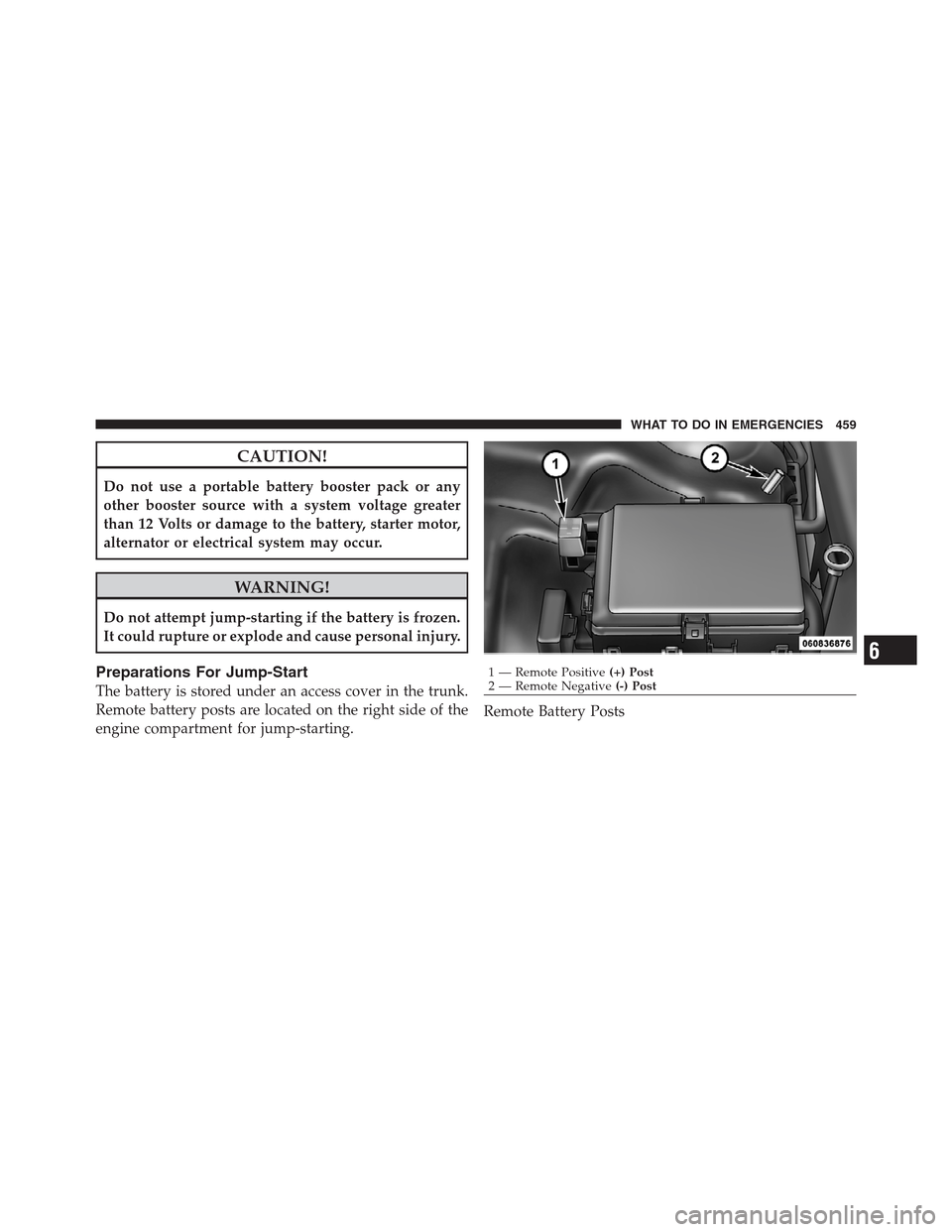
Preparations For Jump-Start
The battery is stored under an access cover in the trunk.
Remote battery posts are located on the right side of the
engine compartment for jump-starting.Remote Battery Posts
1 — Remote Positive(+) Post
2 — Remote Negative(-) Post
6
WHAT TO DO IN EMERGENCIES 459
Page 463 of 576
CAUTION!
Failure to follow these procedures could result in
damage to the charging system of the booster vehicle
or the discharged vehicle.
1. Connect the positive(+)end of the jumper cable to the
remote positive(+)post of the discharged vehicle.
2. Connect the opposite end of the positive(+)jumper
cable to the positive(+)post of the booster battery.
3. Connect the negative end(-)of the jumper cable to the
negative(-)post of the booster battery.
4. Connect the opposite end of the negative(-)jumper
cable to the remote negative(-)post of the vehicle with
the discharged battery.
WARNING!
Do not connect the cable to the negative post (-) of the
discharged battery. The resulting electrical spark
could cause the battery to explode and could result in
personal injury.
5. Start the engine in the vehicle that has the booster
battery, let the engine idle a few minutes, and then start
the engine in the vehicle with the discharged battery.
Once the engine is started, remove the jumper cables in
the reverse sequence:
6. Disconnect the negative(-)jumper cable from the
remote negative(-)post of the vehicle with the dis-
charged battery.
7. Disconnect the negative end(-)of the jumper cable
from the negative(-)post of the booster battery.
6
WHAT TO DO IN EMERGENCIES 461