ECO mode CHRYSLER 300 2013 2.G User Guide
[x] Cancel search | Manufacturer: CHRYSLER, Model Year: 2013, Model line: 300, Model: CHRYSLER 300 2013 2.GPages: 132, PDF Size: 5.2 MB
Page 3 of 132
INTRODUCTION/WELCOMEWELCOME FROM CHRYSLER
GROUPLLC ..................2
CONTROLS AT A GLANCEDRIVER COCKPIT...............4
INSTRUMENT CLUSTER ...........6
GETTING STARTEDKEYFOB ....................8
REMOTE START................9
KEYLESS ENTER-N-GO™ ...........9
THEFT ALARM ................12
SEATBELT ...................13
SUPPLEMENTAL RESTRAINT SYSTEM
(SRS) — AIR BAGS...............13
CHILD RESTRAINTS .............14
FRONTSEATS .................17
REAR SEAT ...................19
HEATEDSEATS ...............20
HEATED AND COOLED CUPHOLDERS..21ADJUSTABLE PEDALS............22TILT/TELESCOPING STEERING COLUMN..23
OPERATING YOUR VEHICLEENGINE BREAK-IN
RECOMMENDATIONS ............24
TURN SIGNAL/WIPER/WASHER/HIGH
BEAM LEVER .................25
HEADLIGHT SWITCH ............26
SPEED CONTROL ..............27
ELECTRONIC SHIFTER – 3.6L ENGINE . . . 31
TRANSMISSION MODES/AUTOSTICK® . . 32
CLIMATE CONTROLS ............34
BLIND SPOT MONITORING .........35
POWER SUNROOF ..............36
WIND BUFFETING ..............37
ELECTRONICSYOUR VEHICLE'S SOUND SYSTEM ....38
IDENTIFYING YOUR RADIO ........40
Uconnect® 8.4 & 8.4N AT A GLANCE ....40
RADIO .....................42
SiriusXM SATELLITE RADIO .........43
STEERING WHEEL AUDIO CONTROLS . 45
SETTING THE ANALOG CLOCK . . . . . 45
iPod®/CD/AUX CONTROLS .........46
GARMIN® NAVIGATION (8.4N ONLY) . . . 46
SiriusXM TRAVEL LINK (8.4N ONLY) ....50
PLAYING iPod/USB/MP3 DEVICES .....51
Uconnect® Phone (Bluetooth® HANDS FREE
CALLING) ...................52
Uconnect® VOICE COMMAND .......56
ELECTRONIC VEHICLE INFORMATION
CENTER (EVIC) ...............59
PROGRAMMABLE FEATURES .......60
UNIVERSAL GARAGE DOOR OPENER
(HomeLink®) ..................61
POWER OUTLETS ..............64
UTILITYTRAILER TOWING WEIGHTS (MAXIMUM
TRAILER WEIGHT RATINGS) ........65
RECREATIONAL TOWING (BEHIND
MOTORHOME, ETC.) ............65
SRT8AUTOSTICK® .................66
ELECTRONIC CONTROL DAMPING
SYSTEM....................66
PERFORMANCE FEATURES ........68
SUMMER/THREE-SEASON TIRES .....70
WHAT TO DO IN EMERGENCIESROADSIDE ASSISTANCE...........71
INSTRUMENT CLUSTER WARNING
LIGHTS .....................71
IF YOUR ENGINE OVERHEATS .......75
JACKING AND TIRE CHANGING .....76
TIREFIT KIT ..................82
BATTERY LOCATION ............88
JUMP-STARTING ...............88
SHIFT LEVER OVERRIDE ..........90
TOWING A DISABLED VEHICLE . . ....92
FREEING A STUCK VEHICLE ........93
EVENT DATA RECORDER (EDR) ......94
MAINTAINING YOUR VEHICLEOPENING THE HOOD . . .........95
FUEL DOOR RELEASE ...........95
ENGINE COMPARTMENT .........97
FLUIDSANDCAPACITIES .........100
MAINTENANCE SCHEDULE . . . . . . . 103
MAINTENANCE RECORD . ........107
SRT8 – MAINTENANCE CHART .....108
SRT8 – MAINTENANCE RECORD ....109
FUSES .....................110
TIRE PRESSURES ...............114
WHEEL AND WHEEL TRIM CARE . . . . . 114
EXTERIOR BULBS ..............115
CONSUMER ASSISTANCECHRYSLER GROUP LLC
CUSTOMER CENTER ............116
CHRYSLER CANADA INC.
CUSTOMER CENTER ............116
PUBLICATIONS ORDERING ........116
ASSISTANCE FOR THE HEARING
IMPAIRED ...................116
REPORTING SAFETY DEFECTS IN THE
UNITED STATES................117
MOPAR ACCESSORIESAUTHENTIC ACCESSORIES BY MOPAR®. . 118
INDEX...................119
FAQ(HowTo?)
FREQUENTLY ASKED QUESTIONS ....122
TABLE OF CONTENTS
Page 9 of 132
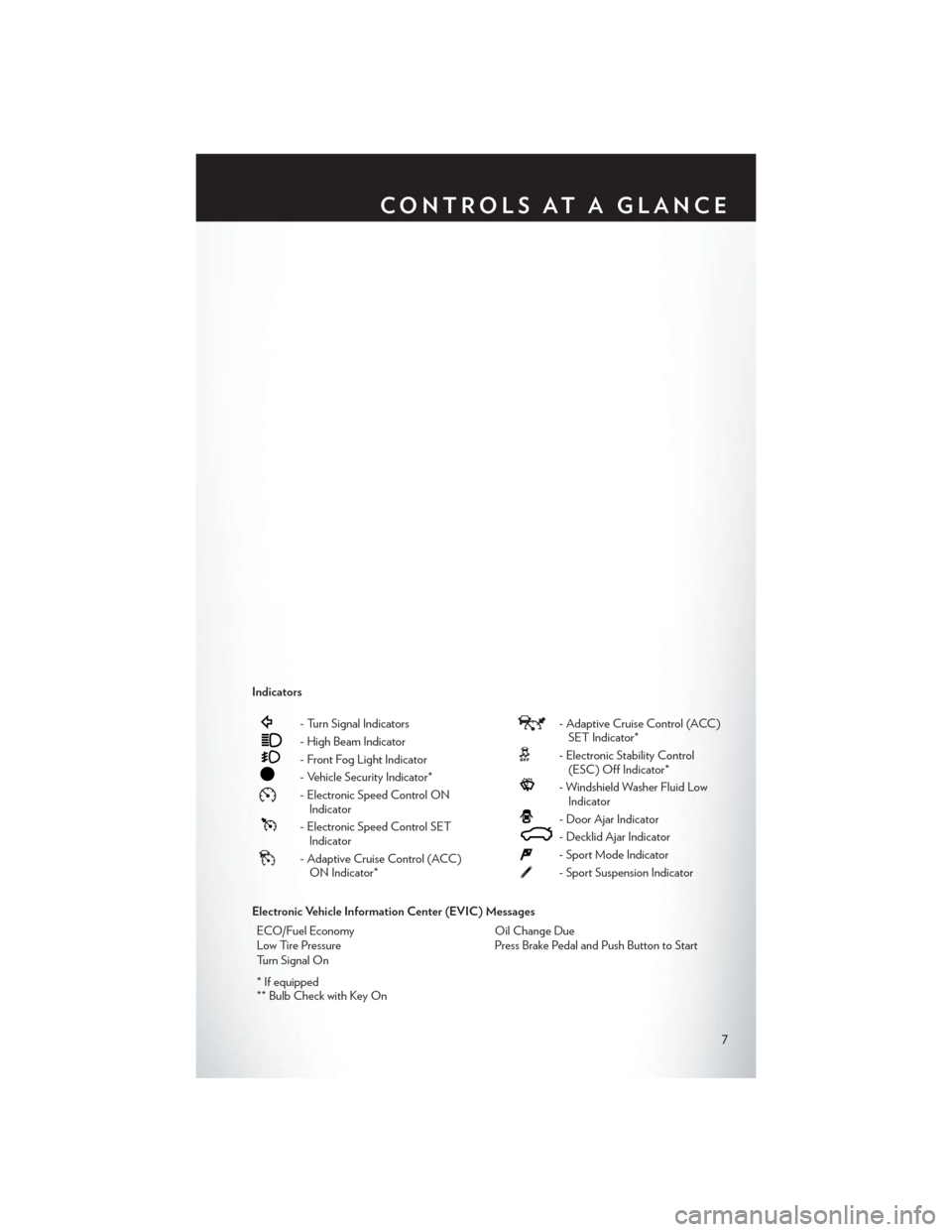
Indicators
- Turn Signal Indicators
- High Beam Indicator
- Front Fog Light Indicator
- Vehicle Security Indicator*
- Electronic Speed Control ONIndicator
- Electronic Speed Control SETIndicator
- Adaptive Cruise Control (ACC)ON Indicator*
- Adaptive Cruise Control (ACC)SET Indicator*
- Electronic Stability Control(ESC) Off Indicator*
- Windshield Washer Fluid LowIndicator
- Door Ajar Indicator
- Decklid Ajar Indicator
- Sport Mode Indicator
- Sport Suspension Indicator
Electronic Vehicle Information Center (EVIC) Messages ECO/Fuel Economy Oil Change Due
Low Tire Pressure Press Brake Pedal and Push Button to Start
Turn Signal On
* If equipped
** Bulb Check with Key On
CONTROLS AT A GLANCE
7
Page 10 of 132
KEY FOB
Locking And Unlocking The Doors
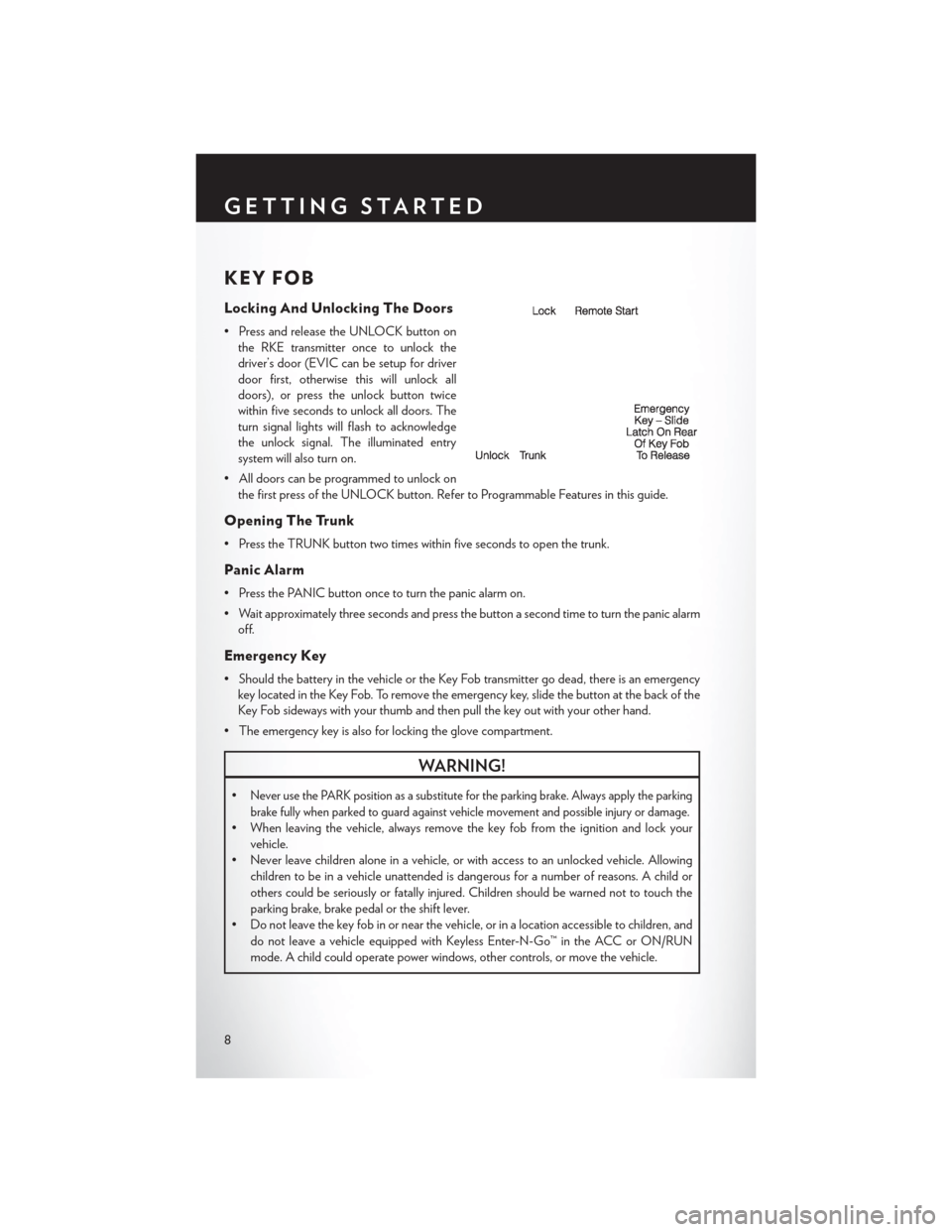
• Press and release the UNLOCK button onthe RKE transmitter once to unlock the
driver’s door (EVIC can be setup for driver
door first, otherwise this will unlock all
doors), or press the unlock button twice
within five seconds to unlock all doors. The
turn signal lights will flash to acknowledge
the unlock signal. The illuminated entry
system will also turn on.
• All doors can be programmed to unlock on the first press of the UNLOCK button. Refer to Programmable Features in this guide.
Opening The Trunk
• Press the TRUNK button two times within five seconds to open the trunk.
Panic Alarm
• Press the PANIC button once to turn the panic alarm on.
• Wait approximately three seconds and press the button a second time to turn the panic alarmoff.
Emergency Key
• Should the battery in the vehicle or the Key Fob transmitter go dead, there is an emergencykey located in the Key Fob. To remove the emergency key, slide the button at the back of the
Key Fob sideways with your thumb and then pull the key out with your other hand.
• The emergency key is also for locking the glove compartment.
WARNING!
•Never use the PARK position as a substitute for the parking brake. Always apply the parking
brake fully when parked to guard against vehicle movement and possible injury or damage.
• When leaving the vehicle, always remove the key fob from the ignition and lock your vehicle.
• Never leave children alone in a vehicle, or with access to an unlocked vehicle. Allowing
children to be in a vehicle unattended is dangerous for a number of reasons. A child or
others could be seriously or fatally injured. Children should be warned not to touch the
parking brake, brake pedal or the shift lever.
• Do not leave the key fob in or near the vehicle, or in a location accessible to children, and
do not leave a vehicle equipped with Keyless Enter-N-Go™ in the ACC or ON/RUN
mode. A child could operate power windows, other controls, or move the vehicle.
GETTING STARTED
8
Page 26 of 132

ENGINE BREAK-IN RECOMMENDATIONS
• A long break-in period is not required for the engine and drivetrain (transmission and axle) inyour vehicle.
• Drive moderately during the first 300 miles (500 km). After the initial 60 miles (100 km), speeds up to 50 or 55 mph (80 or 90 km/h) are desirable.
• While cruising, brief full-throttle acceleration within the limits of local traffic laws contributes to a good break-in. Wide-open throttle acceleration in low gear can be detrimental and should
be avoided.
• The engine oil installed in the engine at the factory is a high-quality energy conserving type lubricant. Oil changes should be consistent with anticipated climate conditions under which
vehicle operations will occur. For the recommended viscosity and quality grades, refer to
“Maintaining Your Vehicle”.
NOTE:
A new engine may consume some oil during its first few thousand miles (kilometers) of opera-
tion. This should be considered a normal part of the break-in and not interpreted as an indica-
tion to an engine problem or malfunction.
CAUTION!
Never use Non-Detergent Oil or Straight Mineral Oil in the engine or damage may result.
Engine Break-In Recommendation — SRT8 Version
• A long break-in period is not required for the drivetrain (engine, transmission, and rear axle) in your new vehicle.
• Drive moderately during the first 500 miles (800 km). After the initial 60 miles (100 km), speeds up to 50 or 55 mph (80 or 90 km/h) are desirable.
• While cruising, brief full-throttle acceleration within the limits of local traffic laws contributes to a good break-in. However, wide-open throttle acceleration in low gear can be detrimental
and should be avoided.
• The engine oil is a high performance synthetic lubricant, the transmission fluid, and axle lubricant installed at the factory is high-quality and energy-conserving. Oil, fluid, and lubricant
changes should be consistent with anticipated climate and conditions under which vehicle
operations will occur. For the recommended viscosity and quality grades, refer to “Maintaining
Your Vehicle”.
NOTE:
A new engine may consume some oil during its first few thousand miles (kilometers) of operation.
This should be considered a normal part of the break-in and not interpreted as an indication of
difficulty.
CAUTION!
Never use Non-Detergent Oil or Straight Mineral Oil in the engine or damage may result.
OPERATING YOUR VEHICLE
24
Page 30 of 132
Distance Setting (ACC Only)
• The specified following distance for ACC can be set by varying the distance setting between3 (long), 2 (medium), and 1 (short). Using this distance setting and the vehicle speed, ACC
calculates and sets the distance to the vehicle ahead. This distance setting displays in the
EVIC.
• To set or change the distance setting, press the Distance button and release. Each time the button is pressed, the distance setting adjusts between long (3), medium (2), and short (1).
The distance setting will default to the last set mode the next time the vehicle is restarted and
the ACC system is turned on.
Mode (ACC Only)
• If desired, the Adaptive Cruise Control mode can be turned off and the system can beoperated as a standard (fixed speed) Cruise Control. When in the standard (fixed speed)
Cruise Control mode the distance setting feature will be disabled and the system will maintain
the speed you set.
• To change modes, press the MODE button when the system is in either the OFF, READY, or SET position. “Cruise Ready” will be displayed if the system was in ACC READY or ACC SET
position. “Cruise Off ” will be displayed if the system was in the ACC OFF position. To switch
back to Adaptive Cruise Control mode, press the MODE button a second time.
• Refer to your Owner's Manual on the DVD for further information.
Forward Collision Warning
• The Forward Collision Warning (FCW) system provides the driver with audible and visual warnings (within the EVIC) when it detects a potential frontal collision. The warnings are
intended to provide the driver with enough time to react and avoid the potential collision.
Changing FCW Status
• The FCW feature has three settings and can be changed within the Uconnect® System: •Far
• Near
•Off
NOTE:
The FCW settings can only be changed when the vehicle is in PARK.
OPERATING YOUR VEHICLE
28
Page 34 of 132

Shifting From REVERSE to DRIVE
• Bring the vehicle to a complete stop, firmly depress the brake pedal, press the lock button onthe shift lever, then pull the shift lever rearward and release when “D” is displayed in the EVIC.
• To shift back into REVERSE from DRIVE, bring the vehicle to a complete stop, firmly depress the brake pedal, press the lock button on the shift lever, then push the shift lever forward and
release when “R” is displayed in the EVIC.
Shifting From DRIVE to SPORT/LOW
Vehicles Equipped with SPORT Mode
• To shift from DRIVE to SPORT, pull the shift lever rearward until “S” is displayed in the EVIC.
• To shift back into DRIVE from SPORT, pull the shift lever rearward until “D” is displayed in the EVIC.
Vehicles Equipped with LOW Mode
• To shift from DRIVE to LOW, pull the shift lever rearward until “L” is displayed in the EVIC.
• To shift back into DRIVE from LOW, pull the shift lever rearward until “D” is displayed in the EVIC.
TRANSMISSION MODES/AUTOSTICK®
• AUTOSTICK® is only available on sport equipped vehicles.
For Vehicles Equipped With Sport Mode
• This mode is driver selectable and will provide more aggressive shifting and is intended forspirited driving.
• Shifting into SPORT mode can be done anytime the vehicle is in the “D” Drive position. Simply pull the shift lever and release when “S” is displayed in the EVIC. Pulling the shift lever
rearward a second time will return the vehicle to the “D” Drive position.
NOTE:
When the vehicle is in SPORT mode, there is a green “SPORT” message attached with a flag
illuminated in the instrument cluster.
For Vehicles Equipped With Low Mode
• This range should be used for engine braking when descending very steep grades. In this range, the transmission will downshift for increased engine braking. To switch between DRIVE
and LOW mode, pull the shift lever rearward and release when “L” is displayed in the EVIC.
• Shifting into LOW can be done anytime the vehicle is in “D” DRIVE position.
OPERATING YOUR VEHICLE
32
Page 35 of 132

AUTOSTICK®
• When the transmission is in DRIVE, it willoperate automatically, shifting between the
eight available gears. While in SPORT
mode, the transmission will only shift be-
tween seven of the eight available gears.
• To engage AutoStick®, simply tap one of the steering wheel-mounted shift paddles (+/-).
• In AutoStick® mode, the transmission will only shift up or down when (+/-) is manually
selected by the driver, except as described
below. It will remain in the selected gear until
another upshift or downshift is chosen.
• When AutoStick® is active, the current transmission gear is displayed in the EVIC.
• If AutoStick® is engaged while in DRIVE mode, lack of accelerator pedal activity will cause the transmission to revert to automatic
operation. The transmission will also upshift automatically once redline, (where the tachom-
eter needle points to the red portion of the gauge) is reached. If the accelerator is pressed to
the floor, the transmission will downshift when possible (based on current vehicle speed and
gear).
• When AutoStick® is used in SPORT mode, the transmission will only shift up or down when commanded by the driver, except as noted below.
• In either DRIVE or SPORT mode, the transmission will automatically downshift as the vehicle slows to a stop (to prevent engine lugging) and will display the current gear. Tapping the (+)
paddle (at a stop) will allow starting in second gear. After a stop, the driver should manually
upshift (+) the transmission as the vehicle accelerates.
NOTE:
To disengage AutoStick® mode, press and hold the (+) shift paddle until “D” or “S” is once again
displayed in the EVIC. You can shift in or out of the AutoStick® mode at any time without taking
your foot off the accelerator pedal.
OPERATING YOUR VEHICLE
33
Page 44 of 132

RADIO
• To access the Radio mode, touch the Radio soft-key at the lower left of the screen.
• Unless otherwise noted, the information provided on the operation and functionality of theradios in this section is common to all Uconnect® 8.4 radios.
Selecting Radio Stations
• Touch the desired radio band (AM, FM or SAT) soft-key.
Seek Up/Seek Down
• Touch the Seek arrow soft-keys for less than two seconds to seek through radio stations.
• Touch and hold either arrow soft-key for more than two seconds to bypass stations without stopping. The radio will stop at the next listenable station once the arrow soft-key is released.
Direct Tune
• Tune directly to a radio station by pressing the “Tune” button on the screen, and entering the desired station number.
Store Radio Presets
• Your radio can store 12 total preset stations. They are shown at the top of your screen. To see all 12 stations, press the arrow soft-key at the top right of the screen to toggle between the six
presets.
• To set a station into memory press and hold the desired numbered soft-key for more than two seconds or until you hear a confirmation beep.
ELECTRONICS
42
Page 45 of 132

SiriusXM SATELLITE RADIO
• SiriusXM Satellite Radio gives you over 130 channels, including 100% commercial-free musicfrom nearly every genre, plus all your favorite sports, news, talk and entertainment channels –
all with crystal clear, coast-to-coast coverage, all in one place and all at your fingertips.
• To access SiriusXM Satellite Radio, touch the SAT soft-key on the main Radio screen.
• The following describes features that are available when in SiriusXM Satellite Radio mode.
Selecting SiriusXM Satellite Channels
Seek Up/Seek Down
• Touch the Seek arrow soft-keys for less than two seconds to seek through channels in SAT mode.
• Touch and hold either arrow soft-key for more than two seconds to bypass channels without stopping. The radio will stop at the next listenable channel once the arrow soft-key is released.
Direct Tune
• Tune directly to a SAT channel by pressing the Tune soft-key on the screen, and entering the desired station number.
Jump
• Automatically tells you when Traffic & Weather for a favorite city is available, and gives you the option to switch to that channel. Touch Jump to activate the feature. After listening to Traffic
and Weather, touch Jump again to return to the previous channel.
Fav
• Activates the favorites menu. You can add up to 50 favorite artists or songs. Just touch Add Fav Artist or Add Fav Song while the song is playing. You will then be alerted any time one of
these songs, or works by these artists, is playing on other SiriusXM channels.
SiriusXM Parental Controls
• You can skip or hide certain channels from view if you do not want access to them. Touch the More soft-key, then the Settings soft-key, next touch the Sirius Setup soft-key, then select
Channel Skip. Touch the box, check-mark, next to the channel you want skipped. They will not
show up in normal usage.
• SiriusXM also offers the option to permanently block selected channels. Call 1-888-539-7474 and request the Family Package.
ELECTRONICS
43
Page 59 of 132
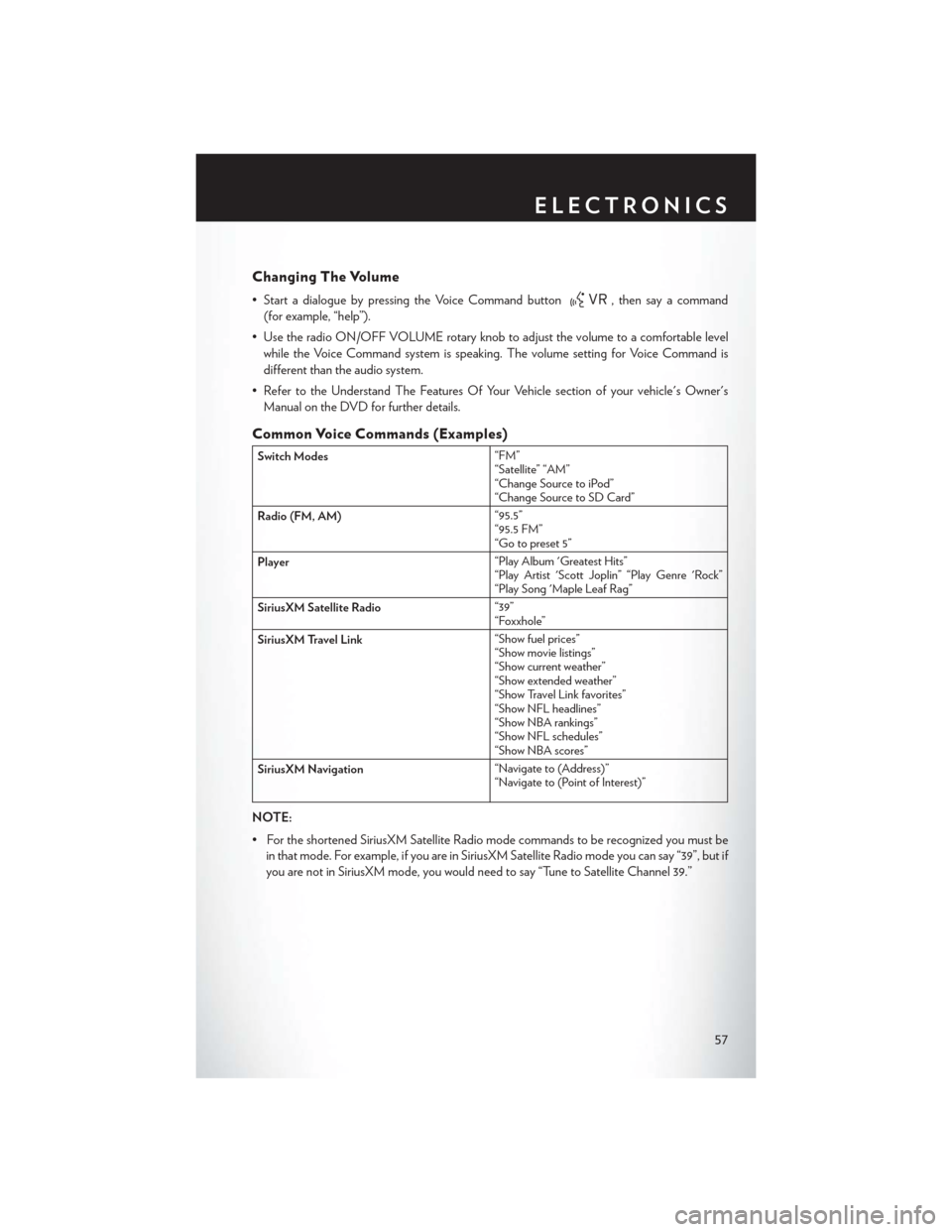
Changing The Volume
• Start a dialogue by pressing the Voice Command button, then say a command
(for example, “help”).
• Use the radio ON/OFF VOLUME rotary knob to adjust the volume to a comfortable level while the Voice Command system is speaking. The volume setting for Voice Command is
different than the audio system.
• Refer to the Understand The Features Of Your Vehicle section of your vehicle's Owner's Manual on the DVD for further details.
Common Voice Commands (Examples)
Switch Modes “FM”
“Satellite” “AM”
“Change Source to iPod”
“Change Source to SD Card”
Radio (FM, AM) “95.5”
“95.5 FM”
“Go to preset 5”
Player “Play Album 'Greatest Hits”
“Play Artist 'Scott Joplin” “Play Genre 'Rock”
“Play Song 'Maple Leaf Rag”
SiriusXM Satellite Radio “39”
“Foxxhole”
SiriusXM Travel Link “Show fuel prices”
“Show movie listings”
“Show current weather”
“Show extended weather”
“Show Travel Link favorites”
“Show NFL headlines”
“Show NBA rankings”
“Show NFL schedules”
“Show NBA scores”
SiriusXM Navigation “Navigate to (Address)”
“Navigate to (Point of Interest)”
NOTE:
• For the shortened SiriusXM Satellite Radio mode commands to be recognized you must be
in that mode. For example, if you are in SiriusXM Satellite Radio mode you can say “39”, but if
you are not in SiriusXM mode, you would need to say “Tune to Satellite Channel 39.”
ELECTRONICS
57