instrument cluster CHRYSLER 300 2013 2.G User Guide
[x] Cancel search | Manufacturer: CHRYSLER, Model Year: 2013, Model line: 300, Model: CHRYSLER 300 2013 2.GPages: 132, PDF Size: 5.2 MB
Page 3 of 132
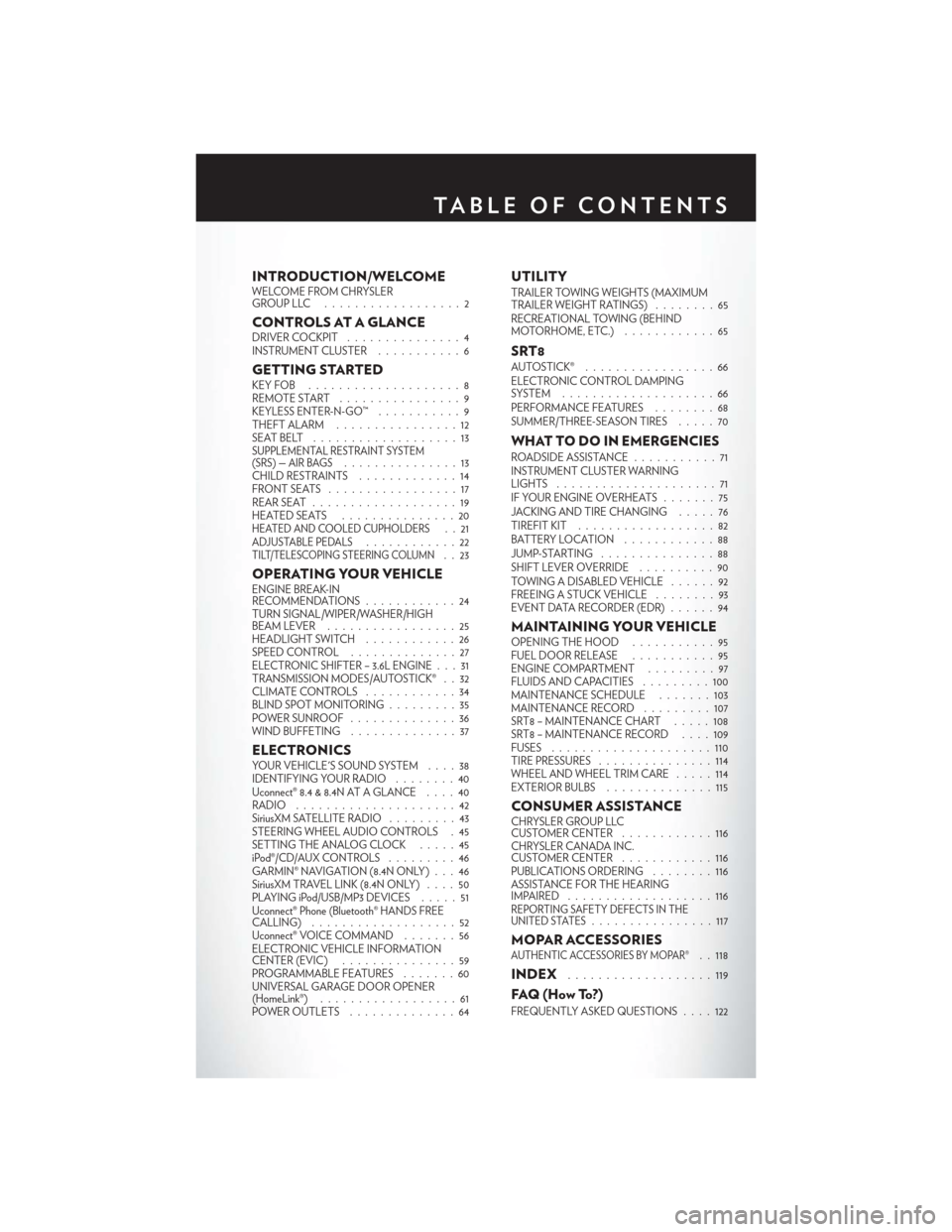
INTRODUCTION/WELCOMEWELCOME FROM CHRYSLER
GROUPLLC ..................2
CONTROLS AT A GLANCEDRIVER COCKPIT...............4
INSTRUMENT CLUSTER ...........6
GETTING STARTEDKEYFOB ....................8
REMOTE START................9
KEYLESS ENTER-N-GO™ ...........9
THEFT ALARM ................12
SEATBELT ...................13
SUPPLEMENTAL RESTRAINT SYSTEM
(SRS) — AIR BAGS...............13
CHILD RESTRAINTS .............14
FRONTSEATS .................17
REAR SEAT ...................19
HEATEDSEATS ...............20
HEATED AND COOLED CUPHOLDERS..21ADJUSTABLE PEDALS............22TILT/TELESCOPING STEERING COLUMN..23
OPERATING YOUR VEHICLEENGINE BREAK-IN
RECOMMENDATIONS ............24
TURN SIGNAL/WIPER/WASHER/HIGH
BEAM LEVER .................25
HEADLIGHT SWITCH ............26
SPEED CONTROL ..............27
ELECTRONIC SHIFTER – 3.6L ENGINE . . . 31
TRANSMISSION MODES/AUTOSTICK® . . 32
CLIMATE CONTROLS ............34
BLIND SPOT MONITORING .........35
POWER SUNROOF ..............36
WIND BUFFETING ..............37
ELECTRONICSYOUR VEHICLE'S SOUND SYSTEM ....38
IDENTIFYING YOUR RADIO ........40
Uconnect® 8.4 & 8.4N AT A GLANCE ....40
RADIO .....................42
SiriusXM SATELLITE RADIO .........43
STEERING WHEEL AUDIO CONTROLS . 45
SETTING THE ANALOG CLOCK . . . . . 45
iPod®/CD/AUX CONTROLS .........46
GARMIN® NAVIGATION (8.4N ONLY) . . . 46
SiriusXM TRAVEL LINK (8.4N ONLY) ....50
PLAYING iPod/USB/MP3 DEVICES .....51
Uconnect® Phone (Bluetooth® HANDS FREE
CALLING) ...................52
Uconnect® VOICE COMMAND .......56
ELECTRONIC VEHICLE INFORMATION
CENTER (EVIC) ...............59
PROGRAMMABLE FEATURES .......60
UNIVERSAL GARAGE DOOR OPENER
(HomeLink®) ..................61
POWER OUTLETS ..............64
UTILITYTRAILER TOWING WEIGHTS (MAXIMUM
TRAILER WEIGHT RATINGS) ........65
RECREATIONAL TOWING (BEHIND
MOTORHOME, ETC.) ............65
SRT8AUTOSTICK® .................66
ELECTRONIC CONTROL DAMPING
SYSTEM....................66
PERFORMANCE FEATURES ........68
SUMMER/THREE-SEASON TIRES .....70
WHAT TO DO IN EMERGENCIESROADSIDE ASSISTANCE...........71
INSTRUMENT CLUSTER WARNING
LIGHTS .....................71
IF YOUR ENGINE OVERHEATS .......75
JACKING AND TIRE CHANGING .....76
TIREFIT KIT ..................82
BATTERY LOCATION ............88
JUMP-STARTING ...............88
SHIFT LEVER OVERRIDE ..........90
TOWING A DISABLED VEHICLE . . ....92
FREEING A STUCK VEHICLE ........93
EVENT DATA RECORDER (EDR) ......94
MAINTAINING YOUR VEHICLEOPENING THE HOOD . . .........95
FUEL DOOR RELEASE ...........95
ENGINE COMPARTMENT .........97
FLUIDSANDCAPACITIES .........100
MAINTENANCE SCHEDULE . . . . . . . 103
MAINTENANCE RECORD . ........107
SRT8 – MAINTENANCE CHART .....108
SRT8 – MAINTENANCE RECORD ....109
FUSES .....................110
TIRE PRESSURES ...............114
WHEEL AND WHEEL TRIM CARE . . . . . 114
EXTERIOR BULBS ..............115
CONSUMER ASSISTANCECHRYSLER GROUP LLC
CUSTOMER CENTER ............116
CHRYSLER CANADA INC.
CUSTOMER CENTER ............116
PUBLICATIONS ORDERING ........116
ASSISTANCE FOR THE HEARING
IMPAIRED ...................116
REPORTING SAFETY DEFECTS IN THE
UNITED STATES................117
MOPAR ACCESSORIESAUTHENTIC ACCESSORIES BY MOPAR®. . 118
INDEX...................119
FAQ(HowTo?)
FREQUENTLY ASKED QUESTIONS ....122
TABLE OF CONTENTS
Page 7 of 132
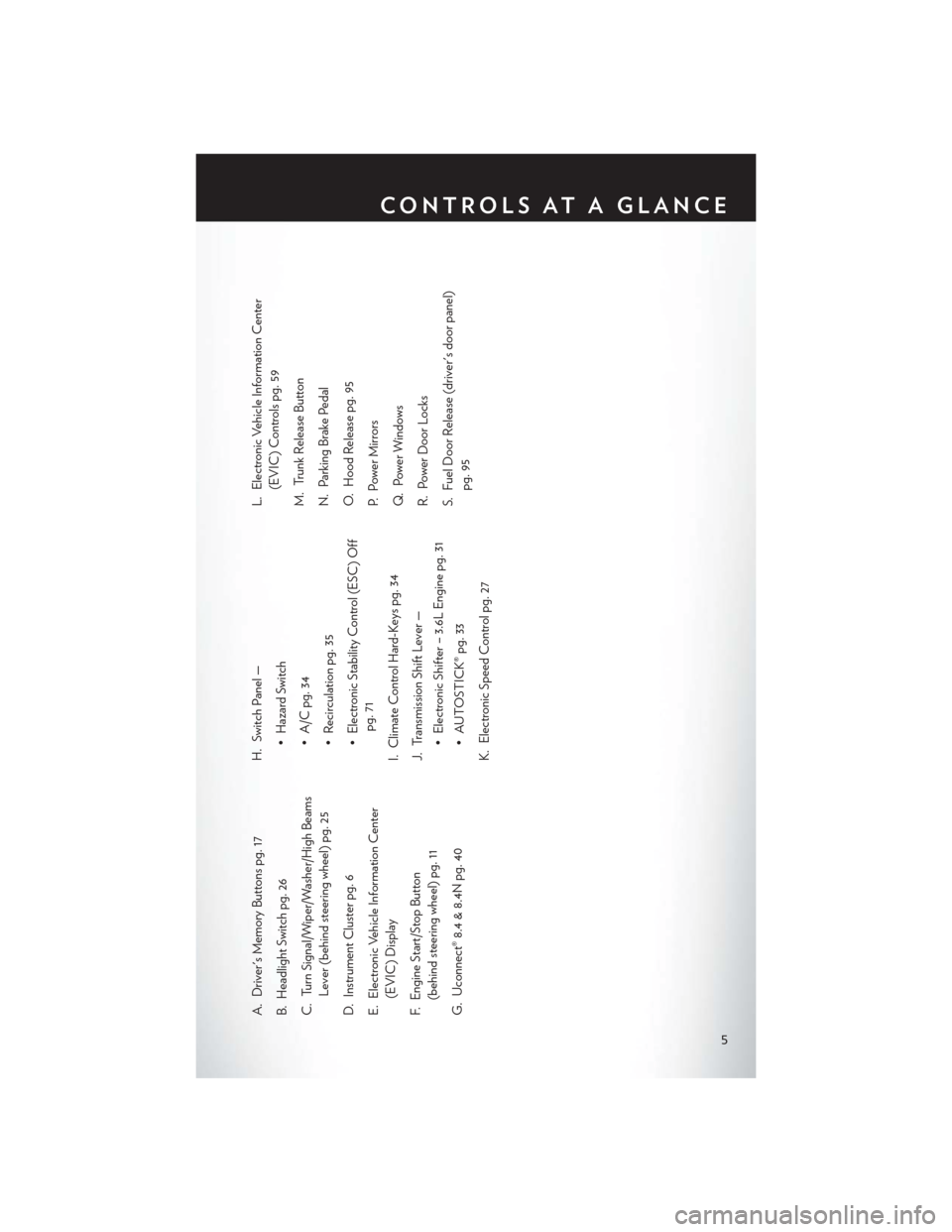
A. Driver's Memory Buttons pg. 17
B. Headlight Switch pg. 26
C. Turn Signal/Wiper/Washer/High BeamsLever (behind steering wheel) pg. 25
D. Instrument Cluster pg. 6
E. Electronic Vehicle Information Center (EVIC) Display
F. Engine Start/Stop Button (behind steering wheel) pg. 11
G. Uconnect® 8.4 & 8.4N pg. 40 H. Switch Panel —
• Hazard Switch
• A/C pg. 34
• Recirculation pg. 35
• Electronic Stability Control (ESC) Offpg. 71
I. Climate Control Hard-Keys pg. 34
J. Transmission Shift Lever — • Electronic Shifter – 3.6L Engine pg. 31
• AUTOSTICK® pg. 33
K. Electronic Speed Control pg. 27 L. Electronic Vehicle Information Center
(EVIC) Controls pg. 59
M. Trunk Release Button
N. Parking Brake Pedal
O. Hood Release pg. 95
P. Power Mirrors
Q. Power Windows
R. Power Door Locks
S. Fuel Door Release (driver's door panel) pg. 95
CONTROLS AT A GLANCE
5
Page 8 of 132
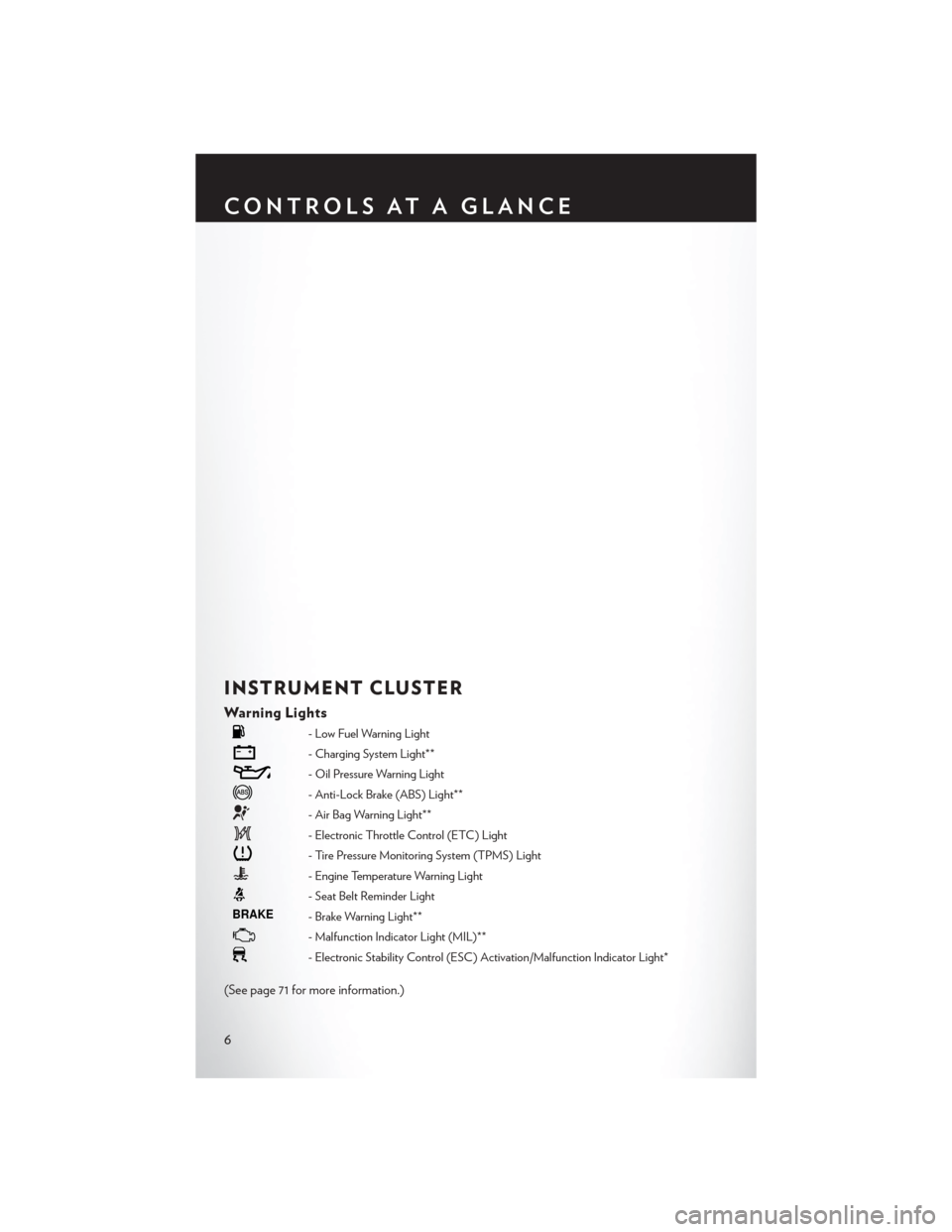
INSTRUMENT CLUSTER
Warning Lights
- Low Fuel Warning Light
- Charging System Light**
- Oil Pressure Warning Light
- Anti-Lock Brake (ABS) Light**
- Air Bag Warning Light**
- Electronic Throttle Control (ETC) Light
- Tire Pressure Monitoring System (TPMS) Light
- Engine Temperature Warning Light
- Seat Belt Reminder Light
BRAKE- Brake Warning Light**
- Malfunction Indicator Light (MIL)**
- Electronic Stability Control (ESC) Activation/Malfunction Indicator Light*
(See page 71 for more information.)
CONTROLS AT A GLANCE
6
Page 20 of 132

To program your Key Fobs, perform the following:
• Change the ignition to OFF.
• Select desired memory profile 1 or 2.
• Once the profile has been recalled, press and release the SET (S) button on the memoryswitch, then press and release the side of the rocker switch labeled 1 or 2 accordingly.
• (1 or 2) will display in the instrument cluster if the vehicle is equipped with the EVIC.
• Press and release the LOCK button on the Key Fob within 10 seconds.
NOTE:
Your Key Fob can be unlinked to your memory settings by pressing the SET (S) button followed
by the UNLOCK button on the Key Fob in the fourth step.
• Press 1 or 2 to recall the saved positions, or press UNLOCK on the programmed Key Fob.
• Refer to the Owner's Manual on the DVD for further details.
Manual Seat
Forward/Rearward
• Lift up on the adjusting bar located at the front of the seat near the floor and release it
when the seat is at the desired position.
Then, using body pressure, move forward
and backward on the seat to be sure that the
seat adjusters have latched.
Recliner
• Lean forward in the seat and lift the reclinerlever, then lean back to the desired position
and release the lever.
• Lift the lever to return the seatback to an upright position.
CAUTION!
Do not place any article under a power seat or impede its ability to move as it may cause
damage to the seat controls. Seat travel may become limited if movement is stopped by an
obstruction in the seat’s path.
GETTING STARTED
18
Page 29 of 132
SPEED CONTROL
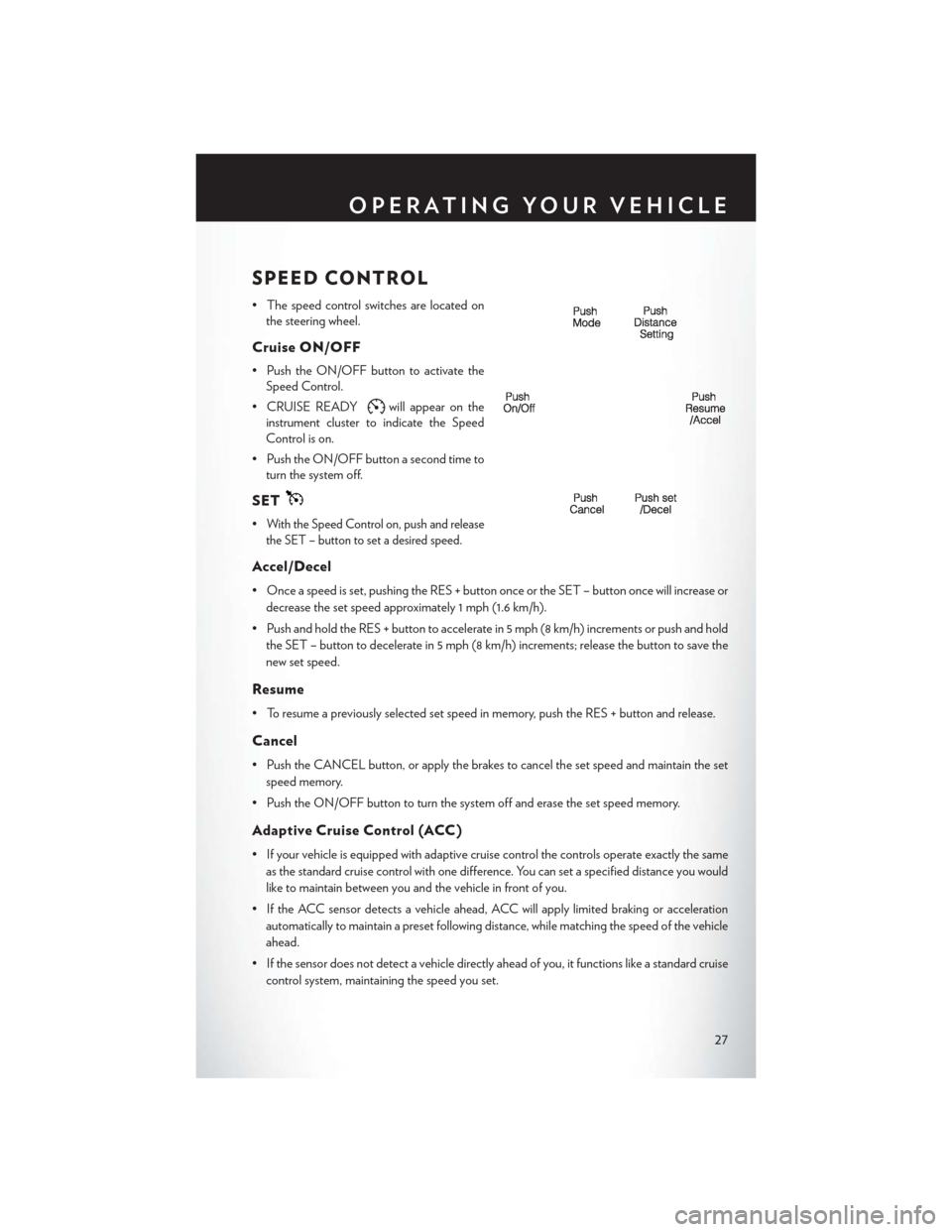
• The speed control switches are located onthe steering wheel.
Cruise ON/OFF
• Push the ON/OFF button to activate theSpeed Control.
• CRUISE READY
will appear on the
instrument cluster to indicate the Speed
Control is on.
• Push the ON/OFF button a second time to turn the system off.
SET
•With the Speed Control on, push and release
the SET – button to set a desired speed.
Accel/Decel
• Once a speed is set, pushing the RES + button once or the SET – button once will increase or
decrease the set speed approximately 1 mph (1.6 km/h).
• Push and hold the RES + button to accelerate in 5 mph (8 km/h) increments or push and hold the SET – button to decelerate in 5 mph (8 km/h) increments; release the button to save the
new set speed.
Resume
• To resume a previously selected set speed in memory, push the RES + button and release.
Cancel
• Push the CANCEL button, or apply the brakes to cancel the set speed and maintain the setspeed memory.
• Push the ON/OFF button to turn the system off and erase the set speed memory.
Adaptive Cruise Control (ACC)
• If your vehicle is equipped with adaptive cruise control the controls operate exactly the same as the standard cruise control with one difference. You can set a specified distance you would
like to maintain between you and the vehicle in front of you.
• If the ACC sensor detects a vehicle ahead, ACC will apply limited braking or acceleration automatically to maintain a preset following distance, while matching the speed of the vehicle
ahead.
• If the sensor does not detect a vehicle directly ahead of you, it functions like a standard cruise control system, maintaining the speed you set.
OPERATING YOUR VEHICLE
27
Page 34 of 132

Shifting From REVERSE to DRIVE
• Bring the vehicle to a complete stop, firmly depress the brake pedal, press the lock button onthe shift lever, then pull the shift lever rearward and release when “D” is displayed in the EVIC.
• To shift back into REVERSE from DRIVE, bring the vehicle to a complete stop, firmly depress the brake pedal, press the lock button on the shift lever, then push the shift lever forward and
release when “R” is displayed in the EVIC.
Shifting From DRIVE to SPORT/LOW
Vehicles Equipped with SPORT Mode
• To shift from DRIVE to SPORT, pull the shift lever rearward until “S” is displayed in the EVIC.
• To shift back into DRIVE from SPORT, pull the shift lever rearward until “D” is displayed in the EVIC.
Vehicles Equipped with LOW Mode
• To shift from DRIVE to LOW, pull the shift lever rearward until “L” is displayed in the EVIC.
• To shift back into DRIVE from LOW, pull the shift lever rearward until “D” is displayed in the EVIC.
TRANSMISSION MODES/AUTOSTICK®
• AUTOSTICK® is only available on sport equipped vehicles.
For Vehicles Equipped With Sport Mode
• This mode is driver selectable and will provide more aggressive shifting and is intended forspirited driving.
• Shifting into SPORT mode can be done anytime the vehicle is in the “D” Drive position. Simply pull the shift lever and release when “S” is displayed in the EVIC. Pulling the shift lever
rearward a second time will return the vehicle to the “D” Drive position.
NOTE:
When the vehicle is in SPORT mode, there is a green “SPORT” message attached with a flag
illuminated in the instrument cluster.
For Vehicles Equipped With Low Mode
• This range should be used for engine braking when descending very steep grades. In this range, the transmission will downshift for increased engine braking. To switch between DRIVE
and LOW mode, pull the shift lever rearward and release when “L” is displayed in the EVIC.
• Shifting into LOW can be done anytime the vehicle is in “D” DRIVE position.
OPERATING YOUR VEHICLE
32
Page 61 of 132
ELECTRONIC VEHICLE INFORMATION
CENTER (EVIC)
• The EVIC features a driver interactive dis-play that is located in the instrument cluster.
Pressing the controls on the left side of the
steering wheel allows the driver to select
vehicle information and Personal Settings.
For additional information, refer to “Pro-
grammable Features” located in this guide.
• Press and release the UP
button to
scroll upward through the main menus (Fuel
Economy, Vehicle Info, Tire PSI, Cruise,
Messages, Trip Info, Vehicle Speed and Turn
Menu Off ) and sub menus.
• Press and release the DOWN
button to scroll downward through the main menus and sub
menus.
• Press and release the SELECT
button for access to main menus, sub menus or to select a
personal setting in the setup menu. Press and hold the SELECT button for two seconds to
reset features.
• Press the BACK button to scroll back to a previous menu or sub menu.
Compass Calibration
• This compass is self-calibrating, which eliminates the need to set the compass manually. When the vehicle is new, the compass may appear erratic and the EVIC will display “CAL” until the
compass is calibrated.
• You may also calibrate the compass by completing one or more 360 degree turns (in an area free from large metal or metallic objects) until the “CAL” message displayed in the EVIC turns
off. The compass will now function normally.
ECO
• The ECO message will appear in your EVIC display whenever you are driving in a fuelefficient manner.
• This feature allows you to monitor when you are driving in a fuel efficient manner, and it can be used to modify driving habits in order to increase fuel economy.
ELECTRONICS
59
Page 68 of 132
AUTOSTICK®
Steering Wheel Mounted Paddle Shifters Or Console Mounted Shifter
• AutoStick® is a driver-interactive transmis-sion feature that offers manual gear shifting
to provide you with more control of the
vehicle. AutoStick® allows you to maximize
engine braking, and improve overall vehicle
performance.
• This system can also provide you with more control during passing, city driving, cold
slippery conditions, mountain driving, trailer
towing, and many other situations.
Operation
• When the shift lever is in the DRIVE posi-tion, the transmission will operate automati-
cally, shifting between the five available
gears. To engage AutoStick®, simply move
the shift lever to the right or left (+/-) while in the DRIVE position, or press one of the steering
wheel mounted shift paddles (+/-). When AutoStick® is active, the current transmission gear is
displayed in the Electronic Vehicle Information Center (EVIC) portion of the instrument
cluster. In AutoStick® mode, the transmission will shift when manually selected by the driver
(using the shift lever, or the shift paddles), unless an engine lugging or overspeed condition
would result. It will remain in the selected gear until another upshift or downshift is chosen,
except as described below:• The transmission will automatically downshift as the vehicle slows (to prevent engine
lugging) and will display the current gear.
• The transmission will automatically downshift to first gear when coming to a stop.
• You can start out in first or second gear. Tapping (+) (at a stop) will allow starting in second gear. Starting out in second gear is helpful in snowy or icy conditions.
• The system will ignore attempts to upshift at too low of a vehicle speed.
• Transmission shifting will be more noticeable when AutoStick® is engaged. To disengage AutoStick® mode, hold the shift lever to the right or press and hold the (+) shift paddle until
“D” is once again displayed in the instrument cluster. You can shift in or out of the AutoStick®
mode at any time without taking your foot off the accelerator pedal.
ELECTRONIC CONTROL DAMPING SYSTEM
• This vehicle may be equipped with an electronic controlled damping system. This system reduces body roll and pitch in many driving situations including cornering, acceleration and
braking. There are three modes of operation:
SRT8
66
Page 69 of 132
Automatic (Auto) Mode
• This is the default position when vehicleignition is first turned on. This mode will
give a sporty, but comfortable ride. Within
this mode, the suspension will adapt to the
vehicle inputs, including vehicle speed,
steering inputs, braking, and acceleration.
•
If AutoStick® is engaged while in “Auto”
mode, the transmission will automatically shift
up if maximum engine speed is reached.
• Heavily pressing the accelerator pedal may generate an automatic downshift for im-
proved acceleration.
• This mode should be used for most driving situations.
SPORTSport Mode
• This mode is driver selectable when the vehicle is placed in SPORT mode (press the
CONTROLS button and then the SPORT
button on the display screen). This mode
will set suspension for maximum perfor-
mance handling and is intended for spirited
driving.
• When SPORT mode is enabled, a flag will light up in the instrument cluster.
NOTE:
The SPORT setting will provide a firmer ride.
TrackMode
•In track mode, the transmission has a sportier,
more aggressive shift pattern.
• This mode includes SPORT Suspension and affects transmission shifting in either
Auto or Manual mode.
•
If AutoStick (console shifter or paddle shift-
ers) is engaged while in “Track” mode, the
transmission will remain in the selected gear
even when maximum engine speed is reached.
• Engine overspeed protection is achieved
through fuel cut off at or near redline.
• This mode will provide aggressive shifting and is intended for spirited driving.
• The system will return to SPORT mode when the ignition switch is cycled from RUN to OFF, and back to RUN again, if this mode is selected.
SRT8
67
Page 73 of 132
ROADSIDE ASSISTANCE
• Dial toll-free 1-800-521-2779 for U.S. Residents or 1-800-363-4869 for Canadian Residents.
• Provide your name, vehicle identification number, license plate number, and your location,including the telephone number from which you are calling.
• Briefly describe the nature of the problem and answer a few simple questions.
• You will be given the name of the service provider and an estimated time of arrival. If you feel you are in an “unsafe situation”, please let us know. With your consent, we will contact local
police or safety authorities.
INSTRUMENT CLUSTER WARNING LIGHTS
- Electronic Stability Control (ESC) Activation/Malfunction
Indicator Light
• The “ESC Activation/Malfunction Indicator Light” in the instrument cluster will come on when the ignition switch is turned to the ON/RUN position. It should go out with the engine
running. If the “ESC Activation/Malfunction Indicator Light” comes on continuously with the
engine running, a malfunction has been detected in the ESC system.
• If this light remains on after several ignition cy cles, and the vehicle has been driven several
miles (kilometers) at speeds greater than 30 mph (48 km/h), we recommend you drive to the
nearest service center and have the vehicle serviced immediately.
- Tire Pressure Monitoring System (TPMS) Light
• Each tire, including the spare (if provided), should be checked monthly, when cold and inflated to the inflation pressure recommended by the vehicle manufacturer on the vehicle placard or
tire inflation pressure label. (If your vehicle has tires of a different size than the size indicated
on the vehicle placard or tire inflation pressure label, you should determine the proper tire
inflation pressure for those tires.)
• As an added safety feature, your vehicle has been equipped with a Tire Pressure Monitoring System (TPMS) that illuminates a low tire pressure telltale when one or more of your tires is
significantly under-inflated. Accordingly, when the low tire pressure telltale illuminates, you
should stop and check your tires as soon as possible, and inflate them to the proper pressure.
Driving on a significantly under-inflated tire causes the tire to overheat and can lead to tire
failure. Under-inflation also reduces fuel efficiency and tire tread life, and may affect the
vehicle’s handling and stopping ability.
• IF THE LIGHT STARTS FLASHING INDICATING A LOW TIRE PRESSURE,
ADJUST THE AIR PRESSURE IN THE LOW TIRE TO THE AIR PRESSURE
SHOWN ON THE VEHICLE PLACARD OR TIRE INFLATION PRESSURE LABEL
LOCATED ON THE DRIVER'S DOOR.
NOTE:
AFTER INFLATION, THE VEHICLE MAY NEED TO BE DRIVEN FOR 20 MINUTES
BEFORE THE FLASHING LIGHT WILL TURN OFF.
WHAT TO DO IN EMERGENCIES
71