key CHRYSLER 300 2014 2.G Owner's Guide
[x] Cancel search | Manufacturer: CHRYSLER, Model Year: 2014, Model line: 300, Model: CHRYSLER 300 2014 2.GPages: 615, PDF Size: 4.44 MB
Page 136 of 615
•Touch the “Add Device” soft-key.
• Search for available devices on your Bluetooth®
enabled mobile phone. When prompted on the
phone, enter the name and PIN shown on the
Uconnect® screen.
• See step 4 to complete the process.
4. Uconnect® Phone will display an in progress screen while the system is connecting.
5. When the pairing process has successfully completed,the system will prompt you to choose whether or not
this is your favorite phone. Selecting “Yes” will make
this phone the highest priority. This phone will take
precedence over other paired phones within range.
Mobile Phone Pairing Progress
134 UNDERSTANDING THE FEATURES OF YOUR VEHICLE
Page 137 of 615
Pair Additional Mobile Phones
1. Touch the “Settings” soft-key from the Phone mainscreen.
2. Touch the “Add Device” soft-key.
3. Search for available devices on your Bluetooth® en- abled mobile phone. When prompted on the phone,
enter the name and PIN shown on the Uconnect®
screen.
4. Uconnect® Phone will display an in process screen while the system is connecting.
5. When the pairing process has successfully completed, the system will prompt you to choose whether or not
this is your favorite phone. Selecting “Yes” will make
this phone the highest priority. This phone will take
precedence over other paired phones within range. NOTE:
For phones which are not made a favorite, the
phone priority is determined by the order in which it was
paired. The latest phone paired will have the higher
priority.
You can also use the following VR commands to bring up
the Paired Phone screen from any screen on the radio:
• “Show Paired Phones”
• “Connect My Phone”
Pair A Bluetooth® Streaming Audio Device
1. Touch the “Player” soft-key to begin.
2. Change the Source to Bluetooth®.
3. Touch the “Bluetooth®” soft-key to display the Paired
Audio Devices screen.
4. Touch the “Add Device” soft-key.
3
UNDERSTANDING THE FEATURES OF YOUR VEHICLE 135
Page 138 of 615
NOTE:If there is no device currently connected with the
system, a pop-up will appear.
5. Search for available devices on your Bluetooth® en- abled audio device. When prompted on the device,
enter the PIN shown on the Uconnect® screen.
6. Uconnect® Phone will display an in process screen while the system is connecting.
7. When the pairing process has successfully completed, the system will prompt you to choose whether or not
this is your favorite device. Selecting “Yes” will make
this device the highest priority. This device will take
precedence over other paired devices within range.
NOTE: For devices which are not made a favorite, the
device priority is determined by the order in which it was
paired. The latest device paired will have the higher
priority. You can also use the following VR command to bring up
a list of paired audio devices:
•
“Show Paired Phones”
• “Connect My Phone”
Connecting To A Particular Mobile Phone Or
Audio Device After Pairing
Uconnect® Phone will automatically connect to the high-
est priority paired phone and/or Audio Device within
range. If you need to choose a particular phone or Audio
Device follow these steps:
1. Touch the “Settings” soft-key.
2. Touch the “Paired Phone” or “Paired Audio Source”
soft-key.
3. Touch to select the particular Phone or the particular Audio Device.
4. Touch the “X” to exit out of the Settings screen.
136 UNDERSTANDING THE FEATURES OF YOUR VEHICLE
Page 139 of 615
Disconnecting A Phone Or Audio Device
1. Touch the “Settings” soft-key.
2. Touch the “Paired Phone” or “Audio Device” soft-key.
3. Touch the “+” soft-key located to the right of thedevice name.
4. The options pop-up will be displayed.
5. Touch the “Disconnect Device” soft-key.
6. Touch the “X” to exit out of the Settings screen.
Deleting A Phone Or Audio Device
1. Touch the “Settings” soft-key.
2. Touch the “Pair Phone” or “Audio Device” soft-key.
3. Touch the “+” soft-key located to the right of the device name for a different Phone or Audio Device
than the currently connected device. 4. The options pop-up will be displayed.
5. Touch the “Delete Device” soft-key.
6. Touch the “X” to exit out of the Settings screen.
Making A Phone Or Audio Device A Favorite
1. Touch the “Settings” soft-key.
2. Touch the “Phone/Bluetooth®” soft-key.
3. Touch the “+” soft-key located to the right of the
device name.
4. The options pop-up will be displayed.
5. Touch the “Make Favorite” soft-key; you will see the chosen device move to the top of the list.
6. Touch the “X” to exit out of the Settings screen.3
UNDERSTANDING THE FEATURES OF YOUR VEHICLE 137
Page 141 of 615
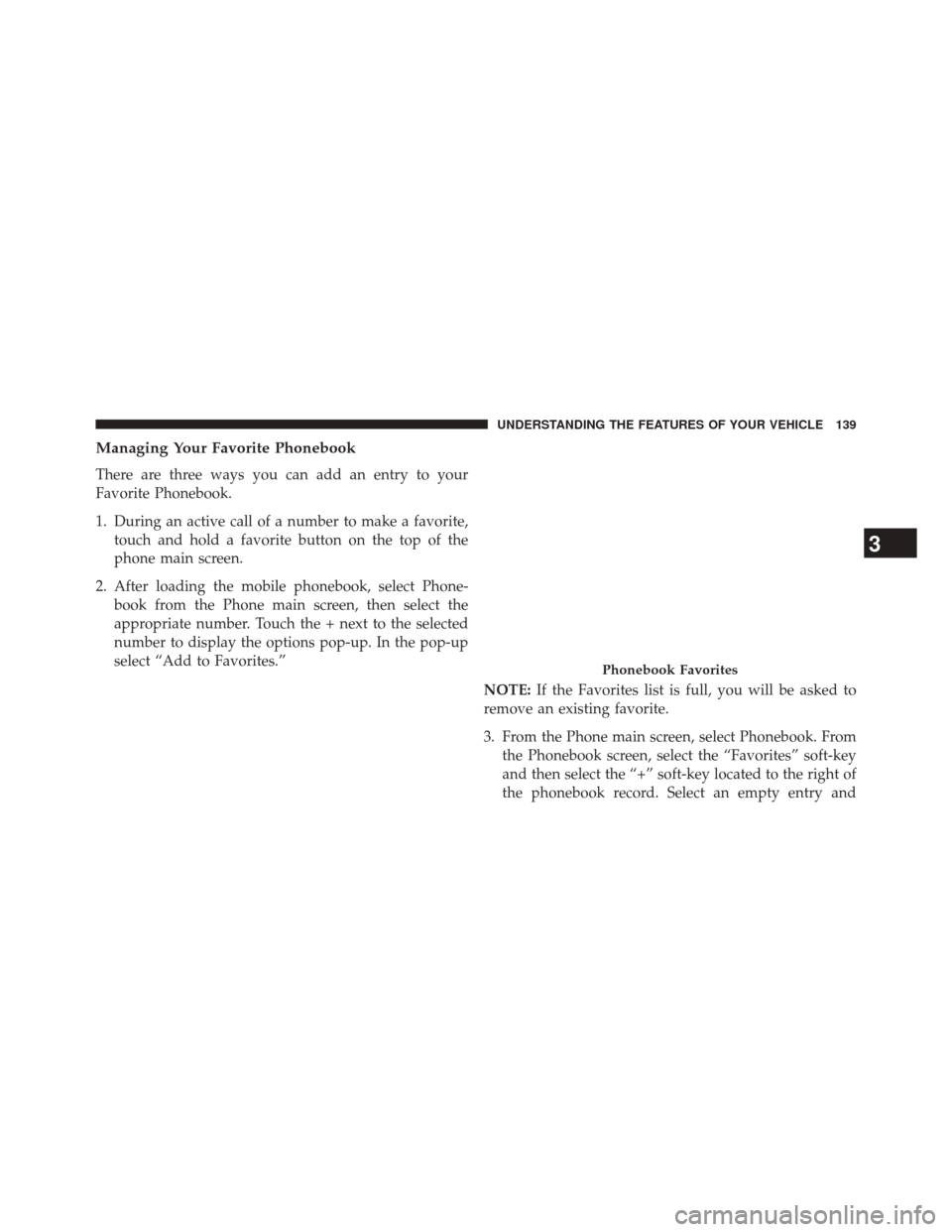
Managing Your Favorite Phonebook
There are three ways you can add an entry to your
Favorite Phonebook.
1. During an active call of a number to make a favorite,touch and hold a favorite button on the top of the
phone main screen.
2. After loading the mobile phonebook, select Phone- book from the Phone main screen, then select the
appropriate number. Touch the + next to the selected
number to display the options pop-up. In the pop-up
select “Add to Favorites.”
NOTE:If the Favorites list is full, you will be asked to
remove an existing favorite.
3. From the Phone main screen, select Phonebook. From the Phonebook screen, select the “Favorites” soft-key
and then select the “+” soft-key located to the right of
the phonebook record. Select an empty entry and
Phonebook Favorites
3
UNDERSTANDING THE FEATURES OF YOUR VEHICLE 139
Page 142 of 615
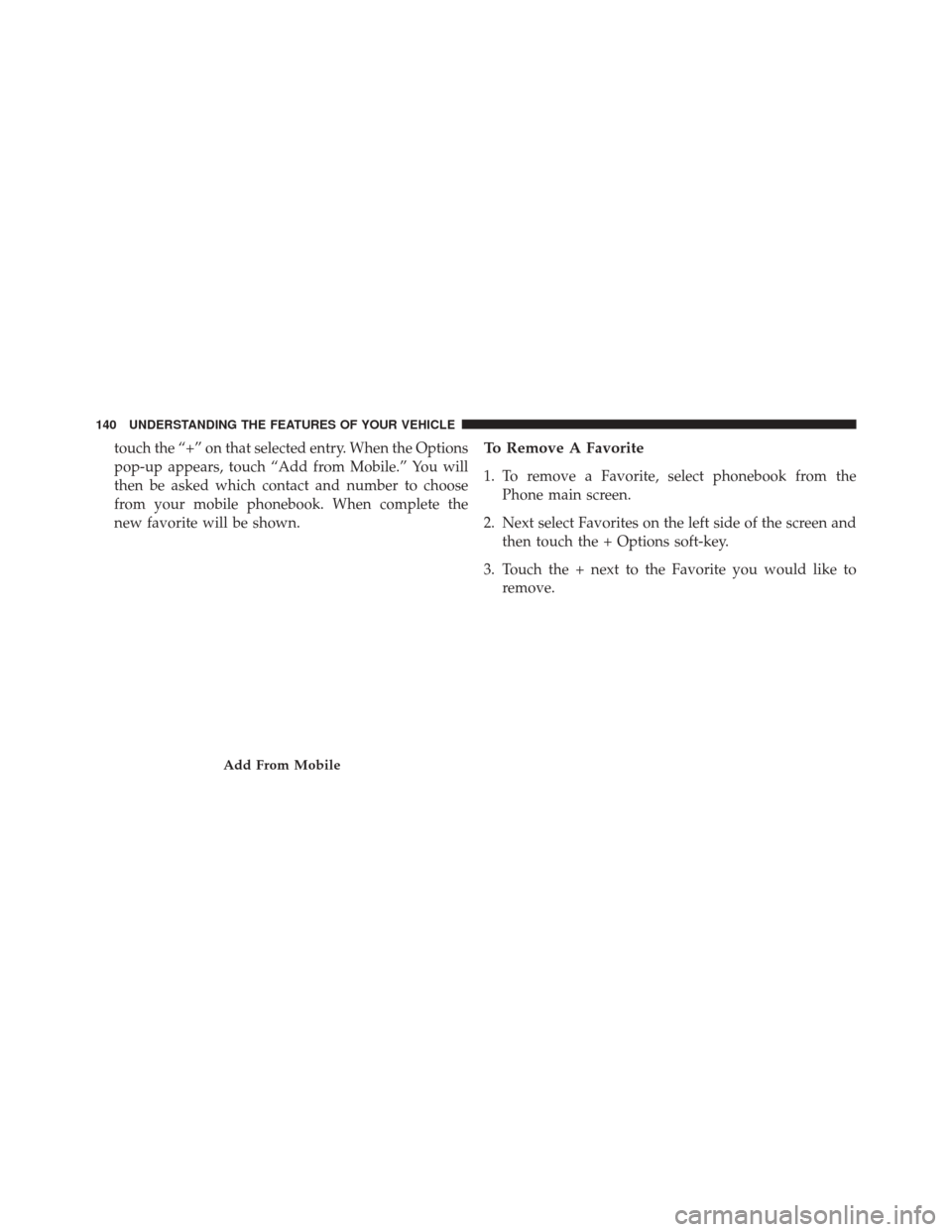
touch the “+” on that selected entry. When the Options
pop-up appears, touch “Add from Mobile.” You will
then be asked which contact and number to choose
from your mobile phonebook. When complete the
new favorite will be shown.To Remove A Favorite
1. To remove a Favorite, select phonebook from thePhone main screen.
2. Next select Favorites on the left side of the screen and then touch the + Options soft-key.
3. Touch the + next to the Favorite you would like to remove.
Add From Mobile
140 UNDERSTANDING THE FEATURES OF YOUR VEHICLE
Page 143 of 615
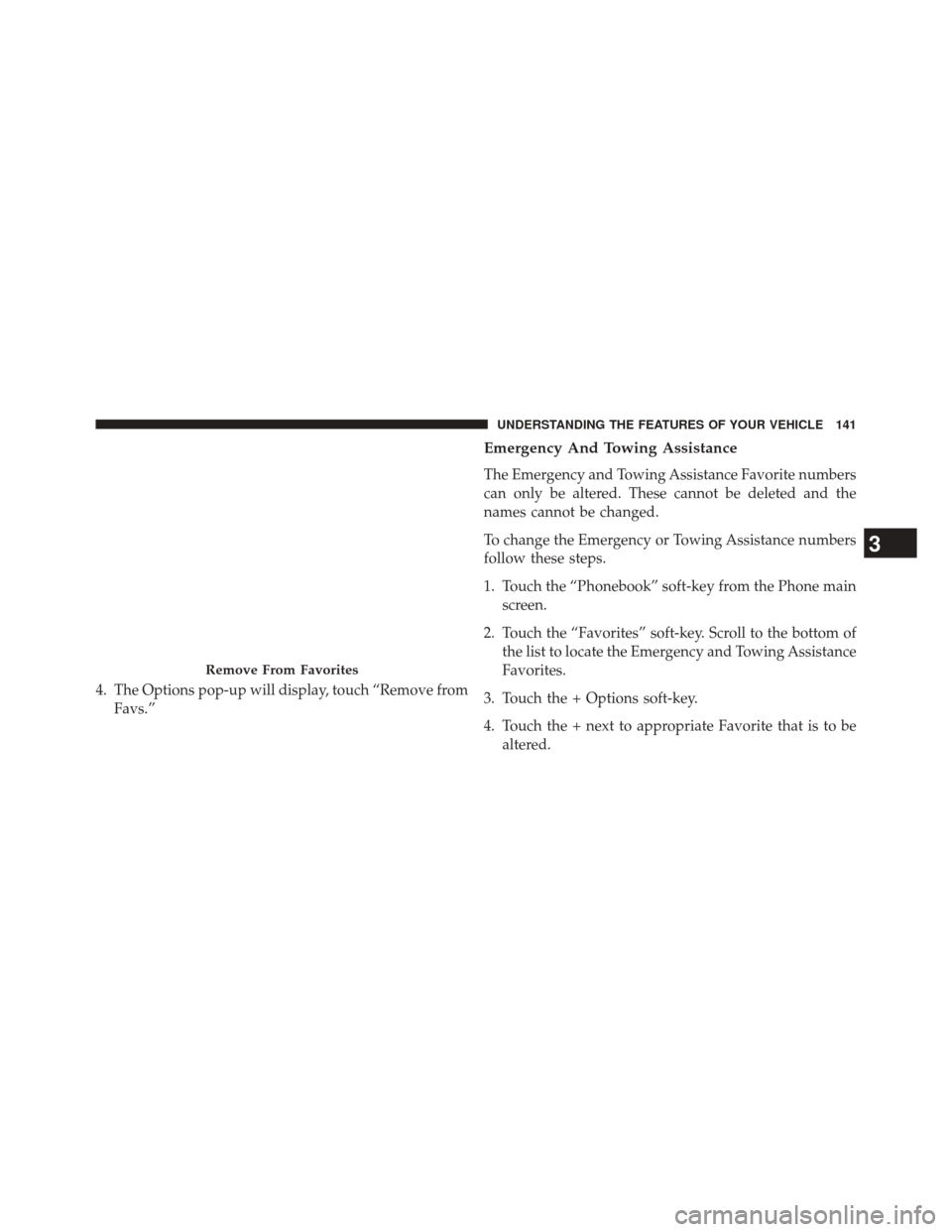
4. The Options pop-up will display, touch “Remove fromFavs.”
Emergency And Towing Assistance
The Emergency and Towing Assistance Favorite numbers
can only be altered. These cannot be deleted and the
names cannot be changed.
To change the Emergency or Towing Assistance numbers
follow these steps.
1. Touch the “Phonebook” soft-key from the Phone mainscreen.
2. Touch the “Favorites” soft-key. Scroll to the bottom of the list to locate the Emergency and Towing Assistance
Favorites.
3. Touch the + Options soft-key.
4. Touch the + next to appropriate Favorite that is to be altered.
Remove From Favorites
3
UNDERSTANDING THE FEATURES OF YOUR VEHICLE 141
Page 146 of 615
Touch-Tone Number Entry
1. Touch the “Phone” soft-key.
2. Touch the “Dial” soft-key.
3. The Touch-Tone screen will be displayed.
4. Use the numbered soft-keys to enter the number andtouch “Call.”
To send a touch tone using Voice Recognition (VR), press
the
button on your steering wheel while in a call
and say “Send 1234#” or you can say “Send Voicemail
Password” if Voicemail password is stored in your
mobile phonebook.
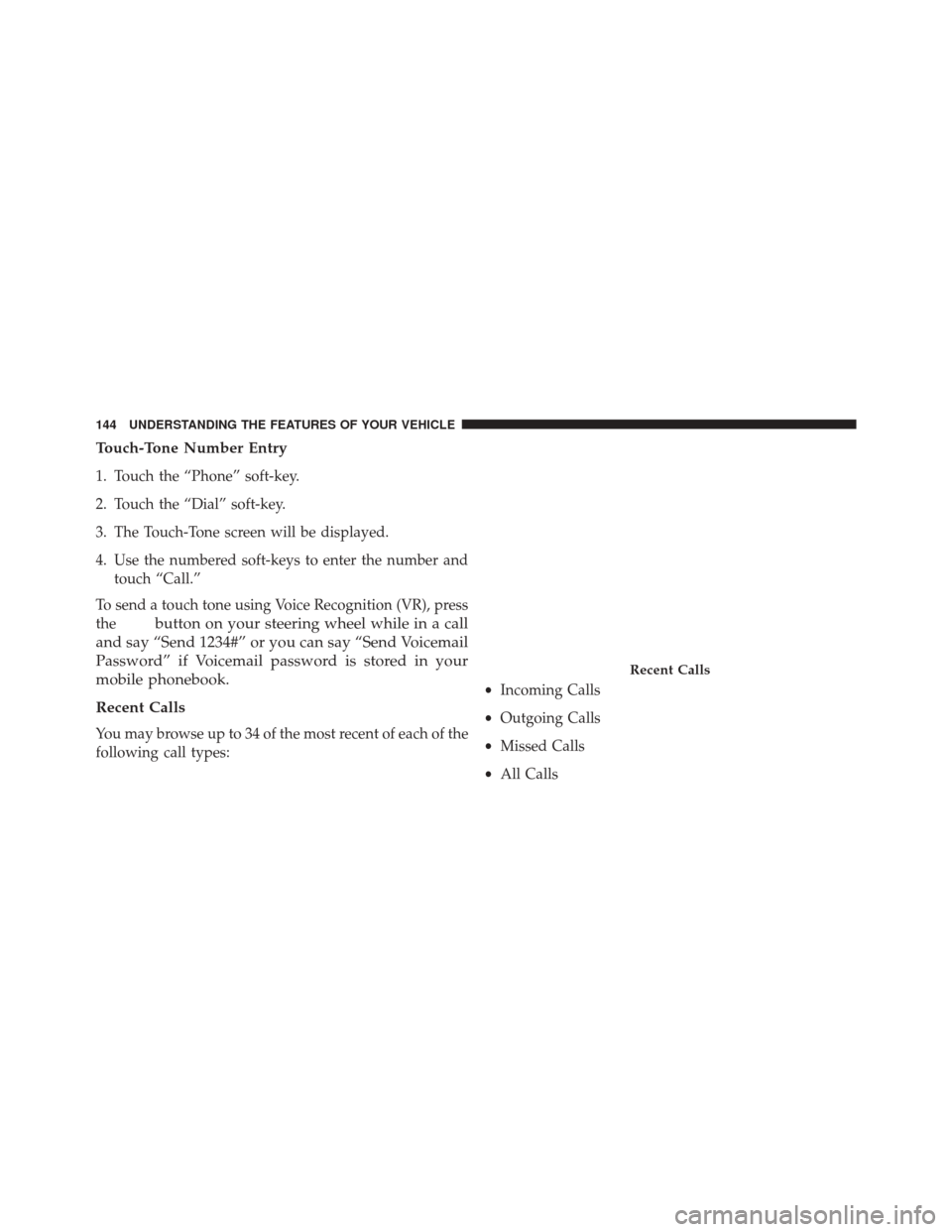
Recent Calls
You may browse up to 34 of the most recent of each of the
following call types: •
Incoming Calls
• Outgoing Calls
• Missed Calls
• All Calls
Recent Calls
144 UNDERSTANDING THE FEATURES OF YOUR VEHICLE
Page 147 of 615
These can be accessed by touching the “recent calls”
soft-key on the Phone main screen.
You can also press the
button and say “Show my
incoming calls” from any screen and the Incoming
calls will be displayed.
You can also press thebutton and say “Show my
recent calls” from any screen and the All calls screen
will be displayed.
NOTE: Incoming can also be replaced with “Outgoing,”
“Recent” or “Missed.”
Answer Or Ignore An Incoming Call — No Call
Currently In Progress
When you receive a call on your mobile phone, the
Uconnect® Phone will interrupt the vehicle audio sys-
tem. Press the
button on your steering wheel to
accept the call. You can also touch the “answer”
soft-key or touch the caller ID box. Answer Or Ignore An Incoming Call — Call
Currently In Progress
If a call is currently in progress and you have another
incoming call, you will hear the same network tones for
call waiting that you normally hear when using your
mobile phone. Press the phone
button on the steer-
ing wheel, “answer” soft-key or caller ID box to place
the current call on hold and answer the incoming call.
NOTE: The Uconnect® Phone compatible phones in the
market today do not support rejecting an incoming call
when another call is in progress. Therefore, the user can
only answer an incoming call or ignore it.
Making A Second Call While Current Call Is In
Progress
You can place a call on hold by touching the “Hold”
soft-key on the Phone main screen, then dial a number
from the dialpad, recent calls, SMS Inbox or from the
3
UNDERSTANDING THE FEATURES OF YOUR VEHICLE 145
Page 148 of 615
phonebooks. To go back to the first call, refer to “Toggling
Between Calls” in this section. To combine two calls, refer
to “Join Calls” in this section.
Place/Retrieve A Call From Hold
During an active call, touch the “Hold” soft-key on the
Phone main screen.
Toggling Between Calls
If two calls are in progress (one active and one on hold),
touch the “Swap” soft-key on the Phone main screen.
Only one call can be placed on hold at a time.
You can also press the
button on the steering wheel
to toggle between the active and held phone call.
Join Calls
When two calls are in progress (one active and one on
hold), touch the “Join Calls” soft-key on the Phone main
screen to combine all calls into a Conference Call.
Call Termination
To end a call in progress, momentarily press thebut-
ton on the steering wheel or the “end” soft-key. Only
the active call(s) will be terminated and if there is a call
on hold, it will become the new active call.
Redial
Touch the “Redial” soft-key, or press theand after the
“Listening” prompt and the following beep, say “Re-
dial.”
The Uconnect® Phone will call the last number that was
dialed from your mobile phone.
Call Continuation
Call continuation is the progression of a phone call on the
Uconnect® Phone after the vehicle ignition key has been
switched to OFF.
146 UNDERSTANDING THE FEATURES OF YOUR VEHICLE