instrument cluster CHRYSLER 300 2015 2.G Owner's Manual
[x] Cancel search | Manufacturer: CHRYSLER, Model Year: 2015, Model line: 300, Model: CHRYSLER 300 2015 2.GPages: 574, PDF Size: 14.59 MB
Page 348 of 574
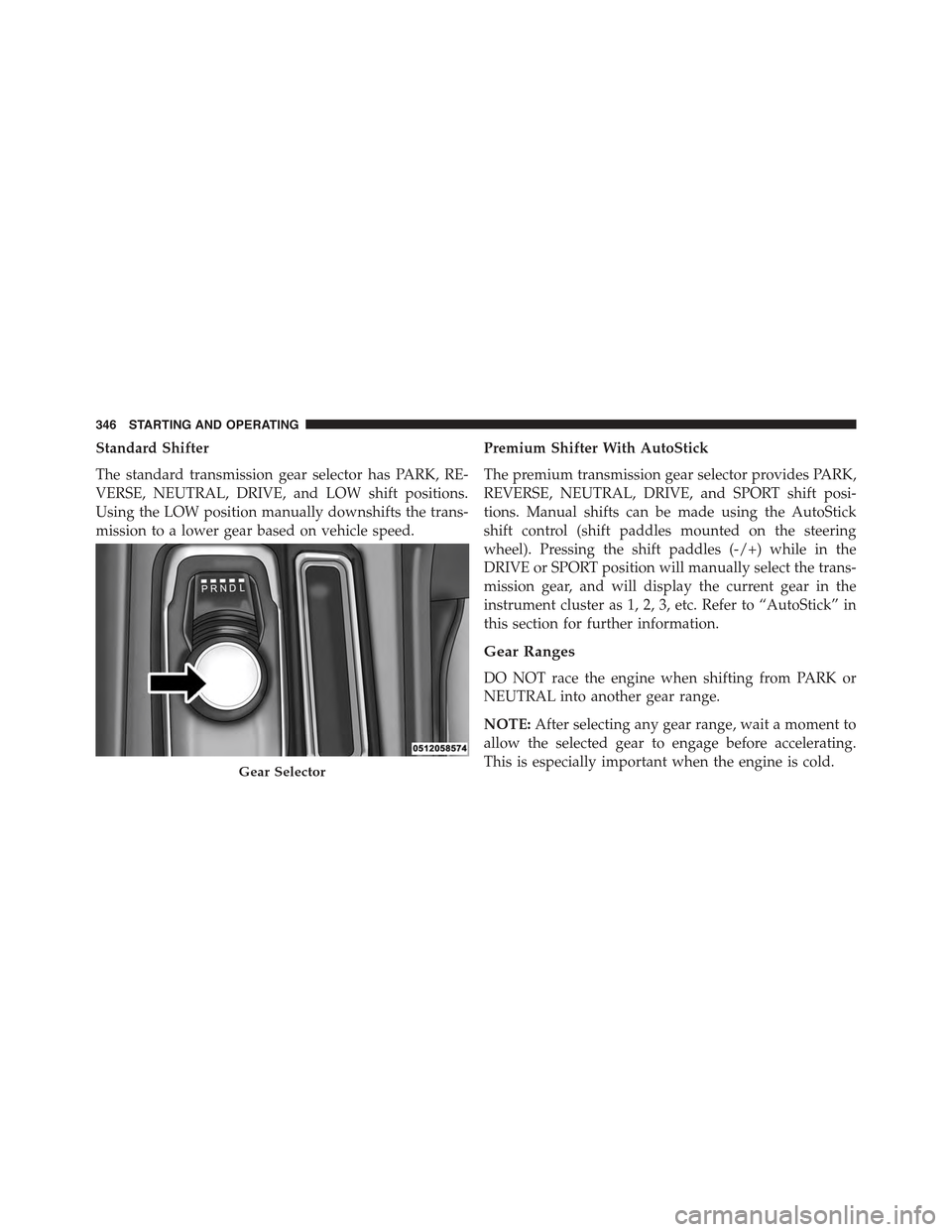
Standard Shifter
The standard transmission gear selector has PARK, RE-
VERSE, NEUTRAL, DRIVE, and LOW shift positions.
Using the LOW position manually downshifts the trans-
mission to a lower gear based on vehicle speed.
Premium Shifter With AutoStick
The premium transmission gear selector provides PARK,
REVERSE, NEUTRAL, DRIVE, and SPORT shift posi-
tions. Manual shifts can be made using the AutoStick
shift control (shift paddles mounted on the steering
wheel). Pressing the shift paddles (-/+) while in the
DRIVE or SPORT position will manually select the trans-
mission gear, and will display the current gear in the
instrument cluster as 1, 2, 3, etc. Refer to “AutoStick” in
this section for further information.
Gear Ranges
DO NOT race the engine when shifting from PARK or
NEUTRAL into another gear range.
NOTE:After selecting any gear range, wait a moment to
allow the selected gear to engage before accelerating.
This is especially important when the engine is cold.Gear Selector
346 STARTING AND OPERATING
Page 353 of 574
access SPORT mode, push down on the gear selector and
rotate it fully clockwise, or press the SPORT button in the
center stack.
LOW (L) — If Equipped
Use this range for engine braking when descending very
steep grades. In this range, the transmission will down-
shift for increased engine braking. To access the LOW
position, push down on the gear selector and rotate it
fully clockwise.
Sport Mode — If Equipped
Your vehicle is equipped with a Sport Mode feature. This
mode is a configuration set up for typical enthusiast
driving. The engine, transmission and steering systems
are all set to their SPORT settings. Sport Mode will
provide improved throttle response and modified shift-
ing for an enhanced driving experience, as well the
greatest amount of steering feel. This mode may be
activated and deactivated by pushing the Sport button on
the instrument panel switch bank.
Transmission Limp Home Mode
Transmission function is monitored electronically for
abnormal conditions. If a condition is detected that could
result in transmission damage, Transmission Limp Home
Mode is activated. In this mode, the transmission may
operate only in certain gears, or may not shift at all.
Vehicle performance may be severely degraded and the
engine may stall. In some situations, the transmission
may not re-engage if the engine is turned off and
restarted. The Malfunction Indicator Light (MIL) may be
illuminated. A message in the instrument cluster will
inform the driver of the more serious conditions, and
indicate what actions may be necessary.
5
STARTING AND OPERATING 351
Page 354 of 574
In the event of a momentary problem, the transmission
can be reset to regain all forward gears by performing the
following steps:
NOTE:In cases where the instrument cluster message
indicates the transmission may not re-engage after en-
gine shutdown, perform this procedure only in a desired
location (preferably, at your authorized dealer).
1. Stop the vehicle.
2. Shift the transmission into PARK, if possible. If not,
shift the transmission to NEUTRAL.
3. Push and hold the ignition switch until the engine
turns OFF.
4. Wait approximately 30 seconds.
5. Restart the engine.
6. Shift into the desired gear range. If the problem is no
longer detected, the transmission will return to normal
operation.
NOTE:Even if the transmission can be reset, we recom-
mend that you visit your authorized dealer at your
earliest possible convenience. Your authorized dealer has
diagnostic equipment to determine if the problem could
recur.
If the transmission cannot be reset, authorized dealer
service is required.
AUTOSTICK — IF EQUIPPED
AutoStick is a driver-interactive transmission feature
providing manual shift control, giving you more control
of the vehicle. AutoStick allows you to maximize engine
braking, eliminate undesirable upshifts and downshifts,
and improve overall vehicle performance. This system
352 STARTING AND OPERATING
Page 355 of 574
can also provide you with more control during passing,
city driving, cold slippery conditions, mountain driving,
trailer towing, and many other situations.
Operation
When the transmission is in DRIVE or SPORT mode, it
will operate automatically, shifting between the eight
available gears. To engage AutoStick, simply tap one of
the steering wheel-mounted shift paddles (+/-) while in
DRIVE or SPORT mode. In DRIVE mode, this will
activate a temporary AutoStick mode. The transmission
will revert back to normal operation after a period of
time, depending on accelerator pedal activity. When the
transmission gear selector is in the SPORT position,
tapping either shift paddle will activate#permanent#
AutoStick mode. The transmission will remain in
AutoStick mode until the driver deliberately disables
AutoStick (as described below). Tapping (-) to enter
AutoStick will downshift the transmission to the next
lower gear, while using (+) to enter AutoStick will retain
the current gear. When AutoStick is active, the current
transmission gear is displayed in the instrument cluster.
In AutoStick mode, the transmission will shift up or
down when (+/-) is manually selected by the driver,
unless an engine lugging or overspeed condition would
result. It will remain in the selected gear until another
upshift or downshift is chosen, except as described
below.
•If AutoStick is engaged while in DRIVE mode, the
transmission will automatically shift up when maxi-
mum engine speed is reached. If the accelerator is fully
depressed, the transmission will downshift when pos-
sible (based on current vehicle speed and gear). Lack
of accelerator pedal activity will cause the transmis-
sion to revert to automatic operation.
5
STARTING AND OPERATING 353
Page 356 of 574
•If AutoStick is engaged while the transmission gear
selector is in the SPORT position, manual gear selec-
tion will be maintained until the gear selector is
returned to DRIVE, or as described below. The trans-
mission will not upshift automatically at redline in this
mode, nor will downshifts be obtained if the accelera-
tor pedal is pressed to the floor.
•In either DRIVE or SPORT mode, the transmission will
automatically downshift as the vehicle slows (to pre-
vent engine lugging) and will display the current gear.
•The transmission will automatically downshift to first
gear when coming to a stop. After a stop, the driver
should manually upshift (+) the transmission as the
vehicle is accelerated.
•You can start out, from a stop, in first or second gear.
Tapping (+) at a stop will allow starting in second gear.
Starting out in second gear can be helpful in snowy or
icy conditions.
•If a requested downshift would cause the engine to
over-speed, that shift will not occur.
•The system will ignore attempts to upshift at too low
of a vehicle speed.
•Holding the (-) paddle depressed will downshift the
transmission to the lowest gear possible at the current
speed.
•Transmission shifting will be more noticeable when
AutoStick is engaged.
•The system may revert to automatic shift mode if a
fault or overheat condition is detected.
To disengage AutoStick mode, press and hold the (+)
shift paddle until#D#or#S#is once again indicated in the
instrument cluster. Shifting out of SPORT mode will also
disable AutoStick. You can shift in or out of AutoStick
mode at any time without taking your foot off the
accelerator pedal.
354 STARTING AND OPERATING
Page 363 of 574
PARKING BRAKE
Before leaving the vehicle, make sure that the parking
brake is fully applied and place the shift lever/gear
selector in the PARK position.
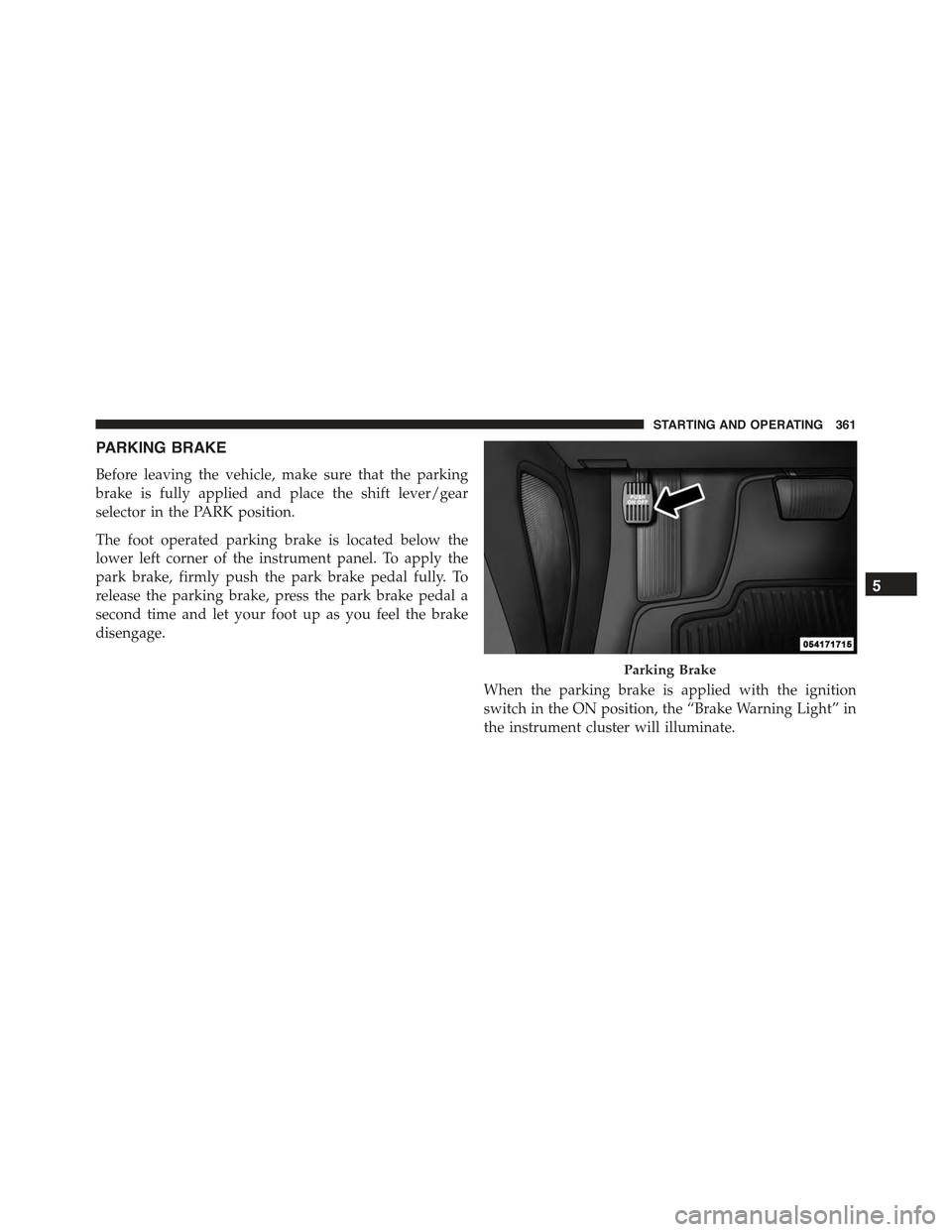
The foot operated parking brake is located below the
lower left corner of the instrument panel. To apply the
park brake, firmly push the park brake pedal fully. To
release the parking brake, press the park brake pedal a
second time and let your foot up as you feel the brake
disengage.
When the parking brake is applied with the ignition
switch in the ON position, the “Brake Warning Light” in
the instrument cluster will illuminate.
Parking Brake
5
STARTING AND OPERATING 361
Page 375 of 574
HSA Off
If you wish to turn off the HSA system, it can be done in
the Uconnect® Settings. Refer to#Uconnect® Settings#in
#Understanding Your Instrument Panel#for further infor-
mation.
Ready Alert Braking
Ready Alert Braking may reduce the time required to
reach full braking during emergency braking situations.
It anticipates when an emergency braking situation may
occur by monitoring how fast the throttle is released by
the driver. When the throttle is released very quickly,
Ready Alert Braking applies a small amount of brake
pressure. This brake pressure will not be noticed by the
driver. The brake system uses this brake pressure to allow
a fast brake response if the driver applies the brakes.
Rain Brake Support
Rain Brake Support may improve braking performance
in wet conditions. It will periodically apply a small
amount of brake pressure to remove any water buildup
on the front brake rotors. It only functions when the
windshield wipers are in the LO or HI mode, it does not
function in the intermittent mode. When Rain Brake
Support is active, there is no notification to the driver and
no driver interaction is required.
ESC Activation/Malfunction Indicator Light And
ESC OFF Indicator Light
The “ESC Activation/Malfunction Indicator
Light” in the instrument cluster will come on
when the ignition switch is cycled to the ON
position. It should go out with the engine
running. If the “ESC Activation/Malfunction Indicator
Light” comes on continuously with the engine running, a
5
STARTING AND OPERATING 373
Page 376 of 574
malfunction has been detected in the ESC system. If this
light remains on after several ignition cycles, and the
vehicle has been driven several miles (kilometers) at
speeds greater than 30 mph (48 km/h), see your autho-
rized dealer as soon as possible to have the problem
diagnosed and corrected.
The “ESC Activation/Malfunction Indicator Light” (lo-
cated in the instrument cluster) starts to flash as soon as
the tires lose traction and the ESC system becomes active.
The “ESC Activation/Malfunction Indicator Light” also
flashes when TCS is active. If the “ESC Activation/
Malfunction Indicator Light” begins to flash during ac-
celeration, ease up on the accelerator and apply as little
throttle as possible. Be sure to adapt your speed and
driving to the prevailing road conditions.
NOTE:
•Each time the ignition is cycled ON, the ESC system
will be ON even if it was cycled off previously.
•The ESC system will make buzzing or clicking sounds
when it is active. This is normal; the sounds will stop
when ESC becomes inactive following the maneuver
that caused the ESC activation.
The “ESC OFF Indicator Light” indicates the
Electronic Stability Control (ESC) is partially
off or full off.
374 STARTING AND OPERATING
Page 407 of 574
•Seasonal temperature changes will affect tire pressure,
and the TPMS will monitor the actual tire pressure in
the tire.
Base System
The Tire Pressure Monitor System (TPMS) uses wireless
technology with wheel rim mounted electronic sensors to
monitor tire pressure levels. Sensors mounted to each
wheel as part of the valve stem transmit tire pressure
readings to the receiver module.
NOTE:It is particularly important for you to check the
tire pressure in all of the tires on your vehicle monthly
and to maintain the proper pressure.
The TPMS consists of the following components:
•Receiver module
•Four TPM sensors
•TPM Telltale Light
The matching full size spare wheel and tire assembly (if
equipped) has a TPM sensor. The matching full size spare
can be used in place of any of the four road tires. The
TPMS will only monitor the pressure in the full size spare
when it is used in place of a road tire. Otherwise, a spare
with a pressure below the low-pressure limit will not
cause the TPM Telltale Light to illuminate or the chime to
sound.
Tire Pressure Monitoring Low Pressure Warnings
The TPM Telltale Light will illuminate in the
instrument cluster, a#LOW TIRE#message will be
displayed and a chime will sound when tire pressure is
low in one or more of the four active road tires. An
#Inflate to XX#message will also be displayed. Should
this occur, you should stop as soon as possible, check the
inflation pressure of each tire on your vehicle, and inflate
each tire to the vehicle’s recommended cold placard
5
STARTING AND OPERATING 405
Page 410 of 574
Premium System — If Equipped
The Tire Pressure Monitor System (TPMS) uses wireless
technology with wheel rim mounted electronic sensors to
monitor tire pressure levels. Sensors mounted to each
wheel as part of the valve stem transmit tire pressure
readings to the receiver module.
NOTE:It is particularly important for you to check the
tire pressure in all of the tires on your vehicle monthly
and to maintain the proper pressure.
The TPMS consists of the following components:
•Receiver module
•Four TPM sensors
•Various TPMS messages, which display in the Driver
Information Display (DID)
•TPM Telltale Light
The matching full size spare wheel and tire assembly (if
equipped) has a TPM sensor. The full size spare can be
used in place of any of the four road tires. The TPMS will
only monitor the pressure in the full size spare tire when
it is used in place of a road tire. Otherwise, a spare with
a pressure below the low-pressure limit will not cause the
TPM Telltale Light to illuminate or the chime to sound.
Tire Pressure Monitoring Low Pressure Warnings
The TPM Telltale Light will illuminate in the
instrument cluster and a chime will sound when
tire pressure is low in one or more of the four active road
tires. In addition, the DID will display a#LOW TIRE#
message and a graphic showing the pressure values of
each tire with the low tire pressure values flashing or
changing color. An#Inflate to XX#message will also be
displayed.
408 STARTING AND OPERATING