display CHRYSLER 300 2015 2.G Repair Manual
[x] Cancel search | Manufacturer: CHRYSLER, Model Year: 2015, Model line: 300, Model: CHRYSLER 300 2015 2.GPages: 574, PDF Size: 14.59 MB
Page 322 of 574
Media
Uconnect® offers connections via USB, SD, Bluetooth®
and auxiliary ports (If Equipped). Voice operation is only
available for connected USB and iPod® devices. (Remote
CD player optional and not available on all vehicles.)
Push the VR button. After the beep, say one of the
following commands and follow the prompts to
switch your media source or choose an artist.
•Change sourceto Bluetooth®
•Change sourceto iPod®
•Change sourceto USB
•Play artistBeethoven;Play albumGreatest Hits;Play
songMoonlight Sonata;Play genreClassical
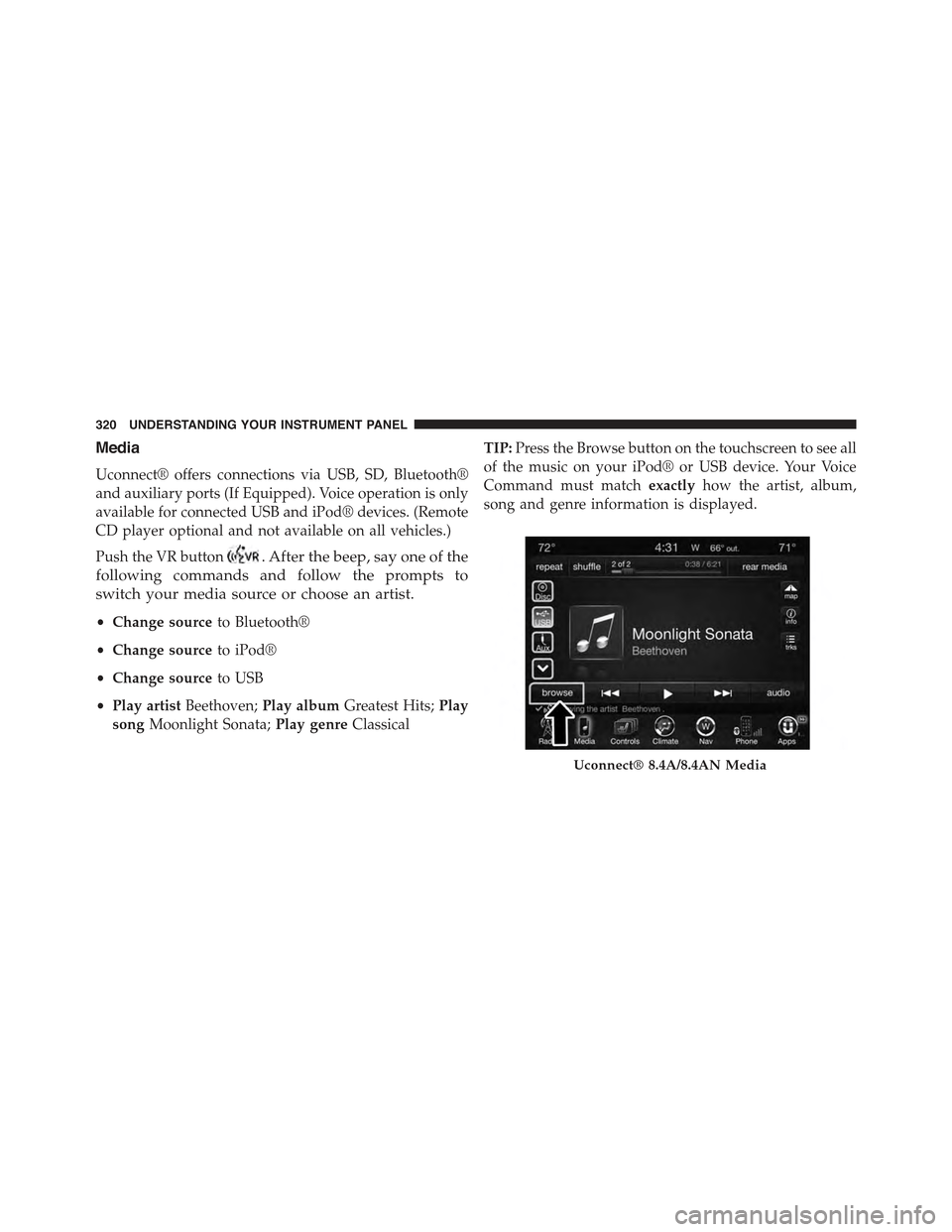
TIP:Press the Browse button on the touchscreen to see all
of the music on your iPod® or USB device. Your Voice
Command must matchexactlyhow the artist, album,
song and genre information is displayed.
Uconnect® 8.4A/8.4AN Media
320 UNDERSTANDING YOUR INSTRUMENT PANEL
Page 330 of 574
Yelp® (8.4A/8.4AN)
Once registered with Uconnect® Access, you can use
your voice to search for the most popular places or things
around you.
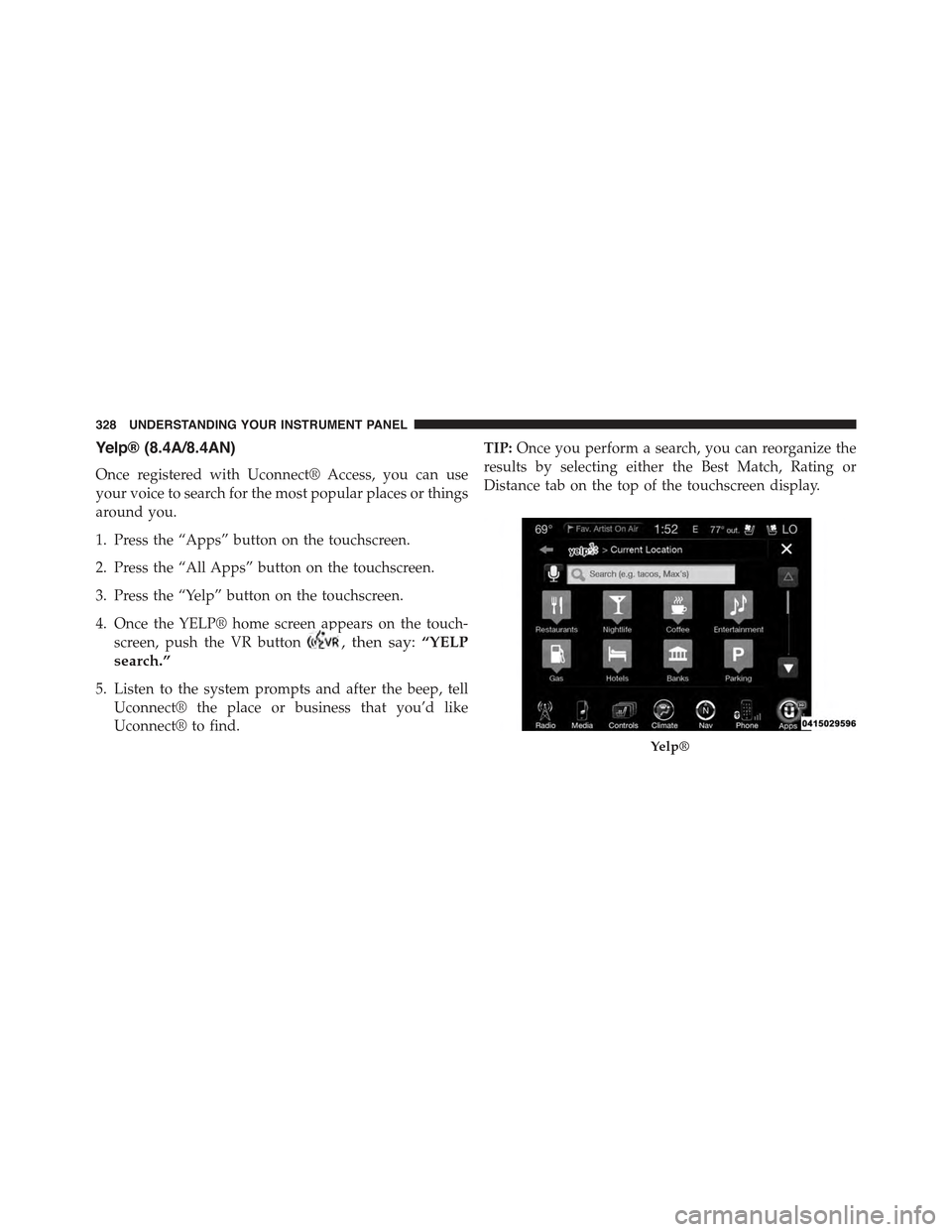
1. Press the “Apps” button on the touchscreen.
2. Press the “All Apps” button on the touchscreen.
3. Press the “Yelp” button on the touchscreen.
4. Once the YELP® home screen appears on the touch-
screen, push the VR button, then say:“YELP
search.”
5. Listen to the system prompts and after the beep, tell
Uconnect® the place or business that you’d like
Uconnect® to find.
TIP:Once you perform a search, you can reorganize the
results by selecting either the Best Match, Rating or
Distance tab on the top of the touchscreen display.
Yelp®
328 UNDERSTANDING YOUR INSTRUMENT PANEL
Page 341 of 574
4. If you wish to stop the cranking of the engine prior to
the engine starting, push the button again.
NOTE:Normal starting of either a cold or a warm engine
is obtained without pumping or pressing the accelerator
pedal.
To Turn Off The Engine Using ENGINE
START/STOP Button
1. Place the shift lever/gear selector in PARK, then push
and release the ENGINE START/STOP button.
2. The ignition switch will return to the OFF position.
3. If the shift lever/gear selector is not in PARK, the
ENGINE START/STOP button must be held for two
seconds or three short pushes in a row with the vehicle
speed above 5 mph (8 km/h) before the engine will
shut off. The ignition switch position will remain in
the ACC position until the shift lever/gear selector is
in PARK and the button is pushed twice to the OFF
position. If the shift lever/gear selector is not in PARK
and the ENGINE START/STOP button is pushed
once, the DID will display a “Vehicle Not In Park”
message and the engine will remain running. Never
leave a vehicle out of the PARK position, or it could
roll.
NOTE:If the ignition switch is left in the ACC or RUN
(engine not running) position and the transmission is in
PARK, the system will automatically time out after 30
minutes of inactivity and the ignition will switch to the
OFF position.
ENGINE START/STOP Button Functions — With
Driver ’s Foot OFF The Brake Pedal (In PARK Or
NEUTRAL Position)
The ENGINE START/STOP button operates similar to an
ignition switch. It has three positions, OFF, ACC, RUN.
5
STARTING AND OPERATING 339
Page 347 of 574
Eight-Speed Automatic Transmission
The transmission is controlled using a rotary electronic
gear selector located on the center console. The transmis-
sion gear range (PRNDL/S) is displayed both above the
gear selector and in the Driver Information Display
(DID). To select a gear range, simply rotate the gear
selector. To access the L or S position, push down on the
gear selector and then rotate it. You must also press the
brake pedal to shift the transmission out of PARK, or to
shift from NEUTRAL into DRIVE or REVERSE when the
vehicle is stopped or moving at low speeds (refer to
“Brake/Transmission Shift Interlock System” in this sec-
tion). To shift past multiple gear ranges at once (such as
PARK to DRIVE), simply rotate the gear selector to the
appropriate detent. Select the DRIVE range for normal
driving.
The electronically-controlled transmission provides a
precise shift schedule. The transmission electronics are
self-calibrating; therefore, the first few shifts on a new
vehicle may be somewhat abrupt. This is a normal
condition, and precision shifts will develop within a few
hundred miles (kilometers).
Only shift from DRIVE to PARK or REVERSE when the
accelerator pedal is released and the vehicle is stopped.
Be sure to keep your foot on the brake pedal when
shifting between these gears.
5
STARTING AND OPERATING 345
Page 348 of 574
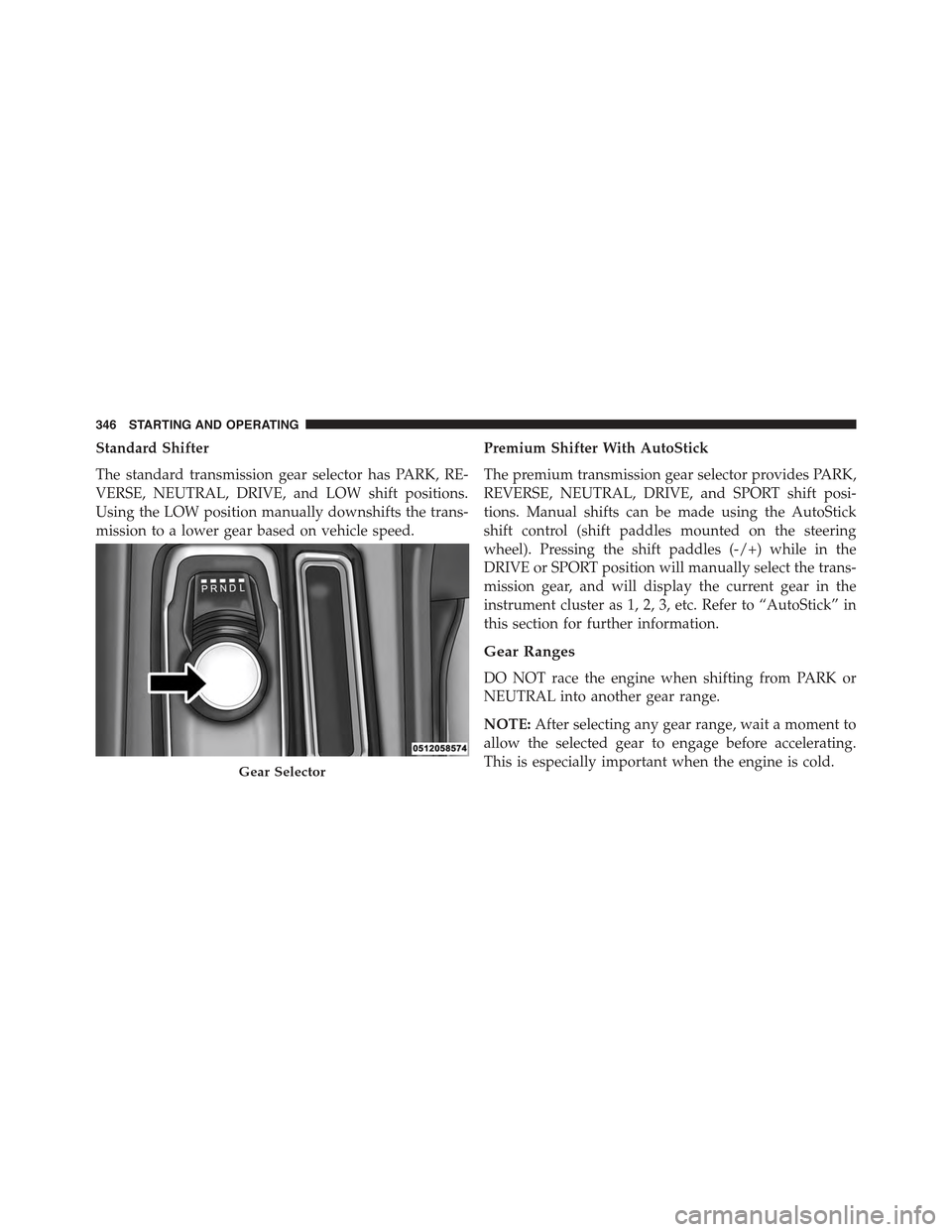
Standard Shifter
The standard transmission gear selector has PARK, RE-
VERSE, NEUTRAL, DRIVE, and LOW shift positions.
Using the LOW position manually downshifts the trans-
mission to a lower gear based on vehicle speed.
Premium Shifter With AutoStick
The premium transmission gear selector provides PARK,
REVERSE, NEUTRAL, DRIVE, and SPORT shift posi-
tions. Manual shifts can be made using the AutoStick
shift control (shift paddles mounted on the steering
wheel). Pressing the shift paddles (-/+) while in the
DRIVE or SPORT position will manually select the trans-
mission gear, and will display the current gear in the
instrument cluster as 1, 2, 3, etc. Refer to “AutoStick” in
this section for further information.
Gear Ranges
DO NOT race the engine when shifting from PARK or
NEUTRAL into another gear range.
NOTE:After selecting any gear range, wait a moment to
allow the selected gear to engage before accelerating.
This is especially important when the engine is cold.Gear Selector
346 STARTING AND OPERATING
Page 351 of 574
NOTE:
•Before moving the transmission gear selector out of
PARK, you must start the engine and also press the
brake pedal. Otherwise, damage to the gear selector
could result.
•DO NOT race the engine when shifting from PARK or
NEUTRAL into another gear range, as this can damage
the drivetrain.
The following indicator should be used to ensure that
you have engaged the transmission into the PARK posi-
tion:
•With brake pedal released, look at the transmission
gear position display and verify that it indicates the
PARK position (P).
REVERSE (R)
This range is for moving the vehicle backward. Shift into
REVERSE only after the vehicle has come to a complete
stop.
NEUTRAL (N)
Use this range when the vehicle is standing for prolonged
periods with the engine running. Apply the parking
brake and shift the transmission into PARK if you must
leave the vehicle.
WARNING!
Do not coast in NEUTRAL and never turn off the
ignition to coast down a hill. These are unsafe
practices that limit your response to changing traffic
or road conditions. You might lose control of the
vehicle and have a collision.
5
STARTING AND OPERATING 349
Page 355 of 574
can also provide you with more control during passing,
city driving, cold slippery conditions, mountain driving,
trailer towing, and many other situations.
Operation
When the transmission is in DRIVE or SPORT mode, it
will operate automatically, shifting between the eight
available gears. To engage AutoStick, simply tap one of
the steering wheel-mounted shift paddles (+/-) while in
DRIVE or SPORT mode. In DRIVE mode, this will
activate a temporary AutoStick mode. The transmission
will revert back to normal operation after a period of
time, depending on accelerator pedal activity. When the
transmission gear selector is in the SPORT position,
tapping either shift paddle will activate#permanent#
AutoStick mode. The transmission will remain in
AutoStick mode until the driver deliberately disables
AutoStick (as described below). Tapping (-) to enter
AutoStick will downshift the transmission to the next
lower gear, while using (+) to enter AutoStick will retain
the current gear. When AutoStick is active, the current
transmission gear is displayed in the instrument cluster.
In AutoStick mode, the transmission will shift up or
down when (+/-) is manually selected by the driver,
unless an engine lugging or overspeed condition would
result. It will remain in the selected gear until another
upshift or downshift is chosen, except as described
below.
•If AutoStick is engaged while in DRIVE mode, the
transmission will automatically shift up when maxi-
mum engine speed is reached. If the accelerator is fully
depressed, the transmission will downshift when pos-
sible (based on current vehicle speed and gear). Lack
of accelerator pedal activity will cause the transmis-
sion to revert to automatic operation.
5
STARTING AND OPERATING 353
Page 356 of 574
•If AutoStick is engaged while the transmission gear
selector is in the SPORT position, manual gear selec-
tion will be maintained until the gear selector is
returned to DRIVE, or as described below. The trans-
mission will not upshift automatically at redline in this
mode, nor will downshifts be obtained if the accelera-
tor pedal is pressed to the floor.
•In either DRIVE or SPORT mode, the transmission will
automatically downshift as the vehicle slows (to pre-
vent engine lugging) and will display the current gear.
•The transmission will automatically downshift to first
gear when coming to a stop. After a stop, the driver
should manually upshift (+) the transmission as the
vehicle is accelerated.
•You can start out, from a stop, in first or second gear.
Tapping (+) at a stop will allow starting in second gear.
Starting out in second gear can be helpful in snowy or
icy conditions.
•If a requested downshift would cause the engine to
over-speed, that shift will not occur.
•The system will ignore attempts to upshift at too low
of a vehicle speed.
•Holding the (-) paddle depressed will downshift the
transmission to the lowest gear possible at the current
speed.
•Transmission shifting will be more noticeable when
AutoStick is engaged.
•The system may revert to automatic shift mode if a
fault or overheat condition is detected.
To disengage AutoStick mode, press and hold the (+)
shift paddle until#D#or#S#is once again indicated in the
instrument cluster. Shifting out of SPORT mode will also
disable AutoStick. You can shift in or out of AutoStick
mode at any time without taking your foot off the
accelerator pedal.
354 STARTING AND OPERATING
Page 357 of 574
WARNING!
Do not downshift for additional engine braking on a
slippery surface. The drive wheels could lose their
grip and the vehicle could skid, causing a collision or
personal injury.
ALL-WHEEL DRIVE (AWD) — IF EQUIPPED
This vehicle is equipped with an active on-demand
All-Wheel Drive (AWD) system which makes available
optimum traction for a wide variety of road surface and
driving conditions. The system minimizes wheel slip by
automatically redirecting torque to the front and rear
wheels as necessary.
To maximize fuel economy, your AWD vehicle automati-
cally defaults to rear-wheel drive (RWD) when road and
environmental conditions are such that wheel slip is
unlikely to occur. When specific road and environmental
conditions require increased levels of road traction, the
vehicle automatically shifts into AWD mode. Automatic
AWD operation could be activated by outside tempera-
ture, wheel slip, or other predetermined conditions (there
may be a slight delay for AWD engagement after a wheel
slip condition occurs). AWD can also be manually se-
lected by activating AutoStick mode (+/-), engaging
Sport Mode or activating the windshield wipers for an
extended period of time. Drive mode, RWD or AWD, can
be found in the Driver Information Display (DID). Refer
to “Driver Information Display (DID)” in “Understand-
ing Your Instrument Panel” for further information.
NOTE:If the “SERVICE AWD SYSTEM” warning mes-
sage appears after engine start up, or during driving, it
means that the AWD system is not functioning properly
and that service is required. Refer to “Driver Information
Display (DID)” in “Understanding Your Instrument
Panel” for further information.
5
STARTING AND OPERATING 355
Page 362 of 574
WARNING!
Continued operation with reduced assist could pose
a safety risk to yourself and others. Service should be
obtained as soon as possible.
If the Steering icon is displayed and the “SER-
VICE POWER STEERING” or the “POWER
STEERING ASSIST OFF – SERVICE SYSTEM”
message is displayed within the Driver Infor-
mation Display (DID), this indicates the vehicle needs to
be taken to the dealer for service. Refer to “Driver
Information Display (DID)” in “Understanding Your
Instrument Panel” for further information.
NOTE:
•Even if the power steering assistance is no longer
operational, it is still possible to steer the vehicle.
Under these conditions there will be a substantial
increase in steering effort, especially at low speeds and
during parking maneuvers.
•If the condition persists, see your authorized dealer for
service.
FUEL SAVER TECHNOLOGY 5.7L ENGINE ONLY
— IF EQUIPPED
This feature offers improved fuel economy by shutting
off four of the engine’s eight cylinders during light load
and cruise conditions. The system is automatic with no
driver inputs or additional driving skills required.
NOTE:This system may take some time to return to full
functionality after a battery disconnect.
360 STARTING AND OPERATING