change time CHRYSLER 300 2016 2.G Owner's Manual
[x] Cancel search | Manufacturer: CHRYSLER, Model Year: 2016, Model line: 300, Model: CHRYSLER 300 2016 2.GPages: 620, PDF Size: 4.26 MB
Page 328 of 620
“Parkview Backup Camera Delay” button on the touch-
screen to turn the ParkView Delay ON or OFF.
•Rain Sensing Auto Wipers
When this feature is selected and the wipers are on, the
system will automatically activate the windshield wipers
if it senses moisture on the windshield. To make your
selection, press the “Rain Sensing Auto Wipers” button
on the touchscreen, until a check-mark appears next to
setting, indicating that the setting had been selected.
• Hill Start Assist — If Equipped
When this feature is selected, the Hill Start Assist (HSA)
system is active. Refer to “Electronic Brake Control
System” in “Starting And Operating” for system function
and operating information. To make your selection, press
the “Hill Start Assist” button on the touchscreen, until a
check-mark appears next to setting, indicating that the
setting had been selected.Lights
After pressing the “Lights” button on the touchscreen the
following settings will be available.
• Headlight Off Delay
When this feature is selected, it allows adjustment of the
amount of time the headlights remain on after the engine
is shut off. To change the Headlights Off Delay setting,
press the “+” or “-” button on the touchscreen to select
your desired time interval, and choose either 0, 30, 60 or
90 seconds.
• Headlight Illumination On Approach
When this feature is selected, the headlights will activate
and remain on for 0, 30, 60 or 90 seconds when the doors
are unlocked with the Remote Keyless Entry (RKE)
transmitter. To change the Illuminated Approach status,
press the “+” or “-” button on the touchscreen to select
your desired time interval.
326 UNDERSTANDING YOUR INSTRUMENT PANEL
Page 333 of 620
•Engine Off Power Delay
When this feature is selected, the power window
switches, radio, Uconnect Phone system (if equipped),
DVD video system (if equipped), power sunroof (if
equipped), and power outlets will remain active for up to
10 minutes after the ignition is cycled to OFF. Opening
either front door will cancel this feature. To change the
Engine Off Power Delay setting, press the “+” or “-”
button on the touchscreen to select your desired time
interval, and choose from “0 seconds,” “45 seconds,” “5
minutes” or “10 minutes.”
• Headlight Off Delay
When this feature is selected, the driver can choose to
have the headlights remain on for 0, 30, 60, or 90 seconds
when exiting the vehicle. To change the Headlight Off
Delay status press the “+” or “–” button on the touch-
screen to select your desired time interval.Audio
After pressing the “Audio” button on the touchscreen the
following settings will be available.
• Balance/Fade
This feature allows you to adjust the Balance and Fade
settings. Press and drag the speaker icon, use the arrows
to adjust, or tap the ‘C’ icon to readjust to the center.
• Equalizer
This feature allows you to adjust the Bass, Mid and Treble
settings. Adjust the settings with the “+” and “–” setting
buttons on the touchscreen or by selecting any point on
the scale between the “+” and “–” buttons on the
touchscreen.
NOTE: Bass/Mid/Treble allow you to simply slide your
finger up or down to change the setting as well as press
directly on the desired setting.
4
UNDERSTANDING YOUR INSTRUMENT PANEL 331
Page 381 of 620
4. If the shift lever/gear selector is in Neutral, push andrelease the ENGINE START/STOP button with the
vehicle speed below 5mph (8 km/h) before the engine
will shut off. The ignition switch position will remain
in the ACC position.
NOTE: If the ignition switch is left in the ACC or RUN
(engine not running) position and the transmission is in
PARK, the system will automatically time out after 30
minutes of inactivity and the ignition will switch to the
OFF position.
ENGINE START/STOP Button Functions — With
Driver ’s Foot OFF The Brake Pedal (In PARK Or
NEUTRAL Position)
The ENGINE START/STOP button operates similar to an
ignition switch. It has three positions, OFF, ACC, RUN.
To change the ignition switch positions without starting
the vehicle and use the accessories follow these steps: 1. Starting with the ignition in the OFF position:
2. Push the ENGINE START/STOP button once to
change the ignition to the ACC position.
3. Push the ENGINE START/STOP button a second time to change the ignition to the RUN position.
4. Push the ENGINE START/STOP button a third time to return the ignition to the OFF position.
Extreme Cold Weather (Below –22°F Or 30°C)
To ensure reliable starting at these temperatures, use of
an externally powered electric engine block heater (avail-
able from your authorized dealer) is recommended.
5
STARTING AND OPERATING 379
Page 411 of 620
Disabling And Enabling HSA
This feature can be turned on or turned off. To change the
current setting, proceed as follows:
•For vehicles equipped with the Driver Information
Display (DID), refer to “Driver Information Display
(DID)” in “Understanding Your Instrument Panel” for
further information.
• If disabling HSA using Uconnect Settings, refer to
“Uconnect Settings” in “Understanding Your Instru-
ment Panel” for further information.
For vehicles not equipped with the DID, perform the
following steps:
1. Center the steering wheel (front wheels pointing straight forward).
2. Shift the transmission into PARK.
3. Apply the parking brake. 4. Start the engine.
5. Rotate the steering wheel slightly more than one-half
turn to the left.
6. Push the “ESC Off” button located in the lower switch bank below the climate control four times within
twenty seconds. The “ESC Off Indicator Light” should
turn on and turn off two times.
7. Rotate the steering wheel back to center and then an additional slighty more than one-half turn to the right.
8. Turn the ignition switch to the OFF position and then back to the ON position. If the sequence was com-
pleted properly, the “ESC Off Indicator Light” will
blink several times to confirm HSA is disabled.
9. Repeat these steps if you want to return this feature to its previous setting.
5
STARTING AND OPERATING 409
Page 417 of 620
•Each time the ignition is turned ON, the ESC system
will be ON even if it was turned off previously.
• The ESC system will make buzzing or clicking sounds
when it is active. This is normal; the sounds will stop
when ESC becomes inactive following the maneuver
that caused the ESC activation.
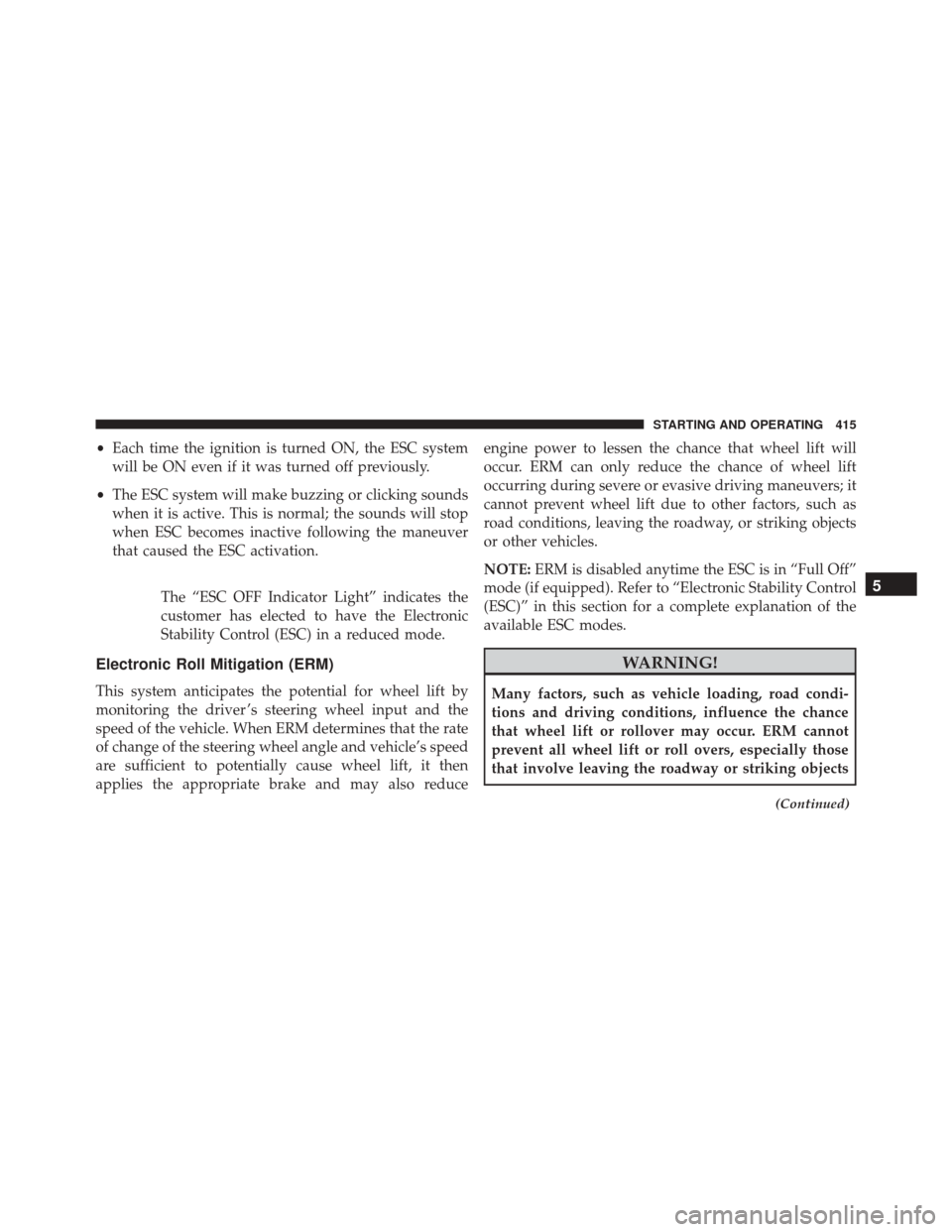
The “ESC OFF Indicator Light” indicates the
customer has elected to have the Electronic
Stability Control (ESC) in a reduced mode.
Electronic Roll Mitigation (ERM)
This system anticipates the potential for wheel lift by
monitoring the driver ’s steering wheel input and the
speed of the vehicle. When ERM determines that the rate
of change of the steering wheel angle and vehicle’s speed
are sufficient to potentially cause wheel lift, it then
applies the appropriate brake and may also reduce engine power to lessen the chance that wheel lift will
occur. ERM can only reduce the chance of wheel lift
occurring during severe or evasive driving maneuvers; it
cannot prevent wheel lift due to other factors, such as
road conditions, leaving the roadway, or striking objects
or other vehicles.
NOTE:
ERM is disabled anytime the ESC is in “Full Off”
mode (if equipped). Refer to “Electronic Stability Control
(ESC)” in this section for a complete explanation of the
available ESC modes.
WARNING!
Many factors, such as vehicle loading, road condi-
tions and driving conditions, influence the chance
that wheel lift or rollover may occur. ERM cannot
prevent all wheel lift or roll overs, especially those
that involve leaving the roadway or striking objects
(Continued)
5
STARTING AND OPERATING 415
Page 518 of 620

Change Engine Oil
The oil change indicator system will remind you that it is
time to take your vehicle in for scheduled maintenance.
Refer to the “Maintenance Schedule” for further informa-
tion.
NOTE:Under no circumstances should oil change inter-
vals exceed 10,000 miles (16,000 km), twelve months or
350 hours of engine run time, whichever comes first. The
350 hours of engine run or idle time is generally only a
concern for fleet customers.
Engine Oil Selection
For best performance and maximum protection under all
types of operating conditions, the manufacturer only
recommends engine oils that are API Certified and meet
the requirements of FCA Material Standard MS-6395.
American Petroleum Institute (API) Engine Oil
Identification Symbol
This symbol means that the oil has
been certified by the American
Petroleum Institute (API). The
manufacturer only recommends
API Certified engine oils.
This symbol certifies 0W-20, 5W-
20, 0W-30, 5W-30 and 10W-30 en-
gine oils.
CAUTION!
Do not use chemical flushes in your engine oil as the
chemicals can damage your engine. Such damage is
not covered by the New Vehicle Limited Warranty.
516 MAINTAINING YOUR VEHICLE
Page 528 of 620
The fluid reservoir will hold nearly 1 gallon (4 liters) of
washer fluid when the message “Low Washer Fluid”
appears in the Driver Information Display (DID).
WARNING!
Commercially available windshield washer solvents
are flammable. They could ignite and burn you. Care
must be exercised when filling or working around
the washer solution.
Exhaust System
The best protection against carbon monoxide entry into
the vehicle body is a properly maintained engine exhaust
system.
If you notice a change in the sound of the exhaust system;
or if the exhaust fumes can be detected inside the vehicle;
or when the underside or rear of the vehicle is damaged;have an authorized technician inspect the complete ex-
haust system and adjacent body areas for broken, dam-
aged, deteriorated, or mispositioned parts. Open seams
or loose connections could permit exhaust fumes to seep
into the passenger compartment. In addition, have the
exhaust system inspected each time the vehicle is raised
for lubrication or oil change. Replace as required.
WARNING!
•
Exhaust gases can injure or kill. They contain
carbon monoxide (CO), which is colorless and
odorless. Breathing it can make you unconscious
and can eventually poison you. To avoid breathing
CO, refer to “Safety Tips/Exhaust Gas” in “Things
To Know Before Starting Your Vehicle” for further
information.
(Continued)
526 MAINTAINING YOUR VEHICLE
Page 576 of 620
MAINTENANCE SCHEDULE
Your vehicle is equipped with an automatic oil change
indicator system. The oil change indicator system will
remind you that it is time to take your vehicle in for
scheduled maintenance.
Based on engine operation conditions, the oil change
indicator message will illuminate. This means that ser-
vice is required for your vehicle. Operating conditions
such as frequent short-trips, trailer tow, extremely hot or
cold ambient temperatures, and E85 fuel usage will
influence when the “Change Oil” or “Oil Change Re-
quired” message is displayed. Severe Operating Condi-
tions can cause the change oil message to illuminate as
early as 3,500 miles (5,600 km) since last reset. Have your
vehicle serviced as soon as possible, within the next 500
miles (805 km).The “Oil Change Required” message will be displayed in
the DID and a single chime will sound, indicating that an
oil change is necessary.
Your authorized dealer will reset the oil change indicator
message after completing the scheduled oil change. If a
scheduled oil change is performed by someone other
than your authorized dealer, the message can be reset by
referring to the steps described under “Driver Informa-
tion Dispay (DID)” in “Understanding Your Instrument
Panel” for further information.
NOTE:
Under no circumstances should oil change inter-
vals exceed 10,000 miles (16,000 km), twelve months or
350 hours of engine run time, whichever comes first. The
350 hours of engine run or idle time is generally only a
concern for fleet customers.
574 MAINTENANCE SCHEDULES
Page 579 of 620
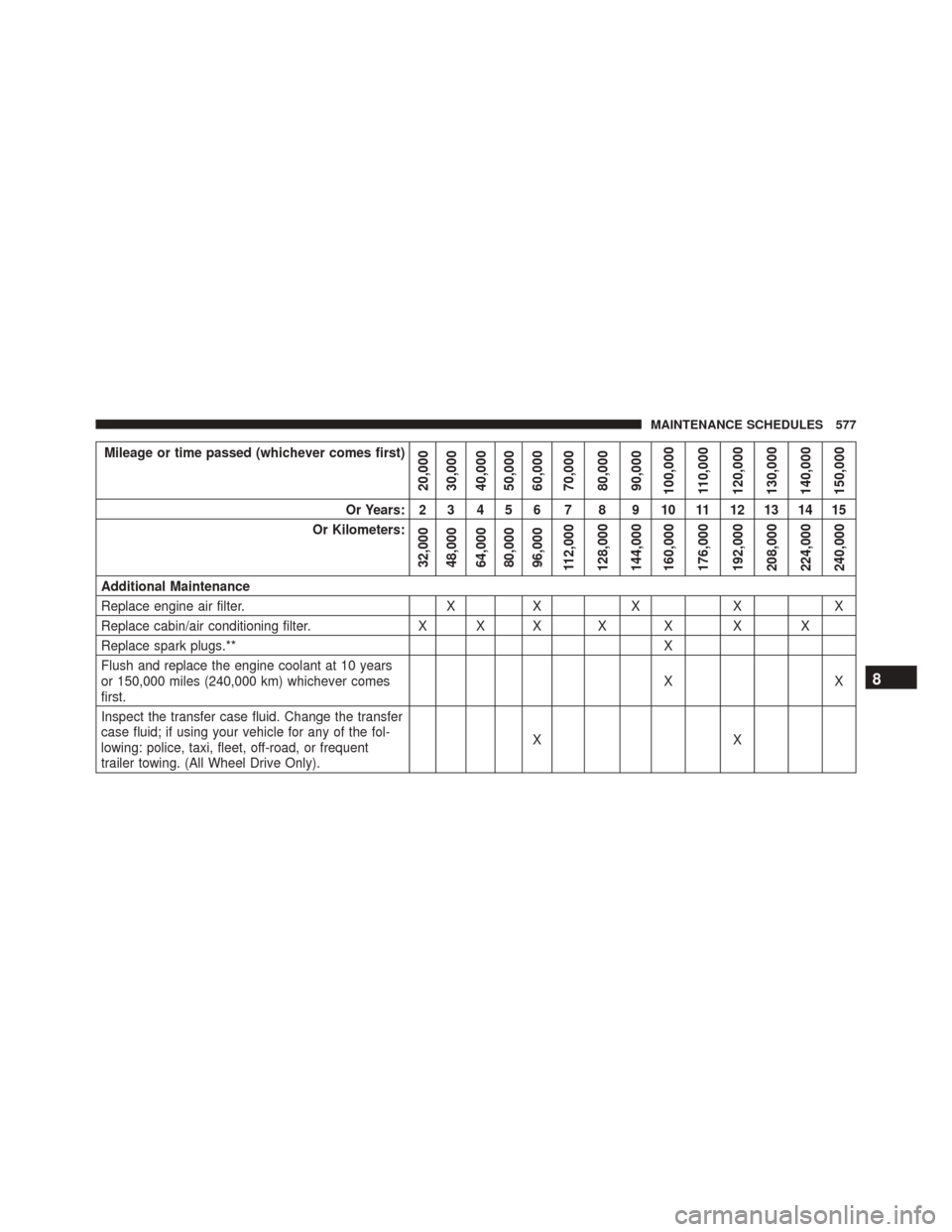
Mileage or time passed (whichever comes first)
20,000
30,000
40,000
50,000
60,000
70,000
80,000
90,000
100,000
110,000
120,000
130,000
140,000
150,000
Or Years: 2 3 4 5 6 7 8 9 10 11 12 13 14 15
Or Kilometers:
32,000
48,000
64,000
80,000
96,000
112,000
128,000
144,000
160,000
176,000
192,000
208,000
224,000
240,000
Additional Maintenance
Replace engine air filter. XX X XX
Replace cabin/air conditioning filter. X X X X X X X
Replace spark plugs.** X
Flush and replace the engine coolant at 10 years
or 150,000 miles (240,000 km) whichever comes
first. XX
Inspect the transfer case fluid. Change the transfer
case fluid; if using your vehicle for any of the fol-
lowing: police, taxi, fleet, off-road, or frequent
trailer towing. (All Wheel Drive Only). XX
8
MAINTENANCE SCHEDULES 577
Page 580 of 620
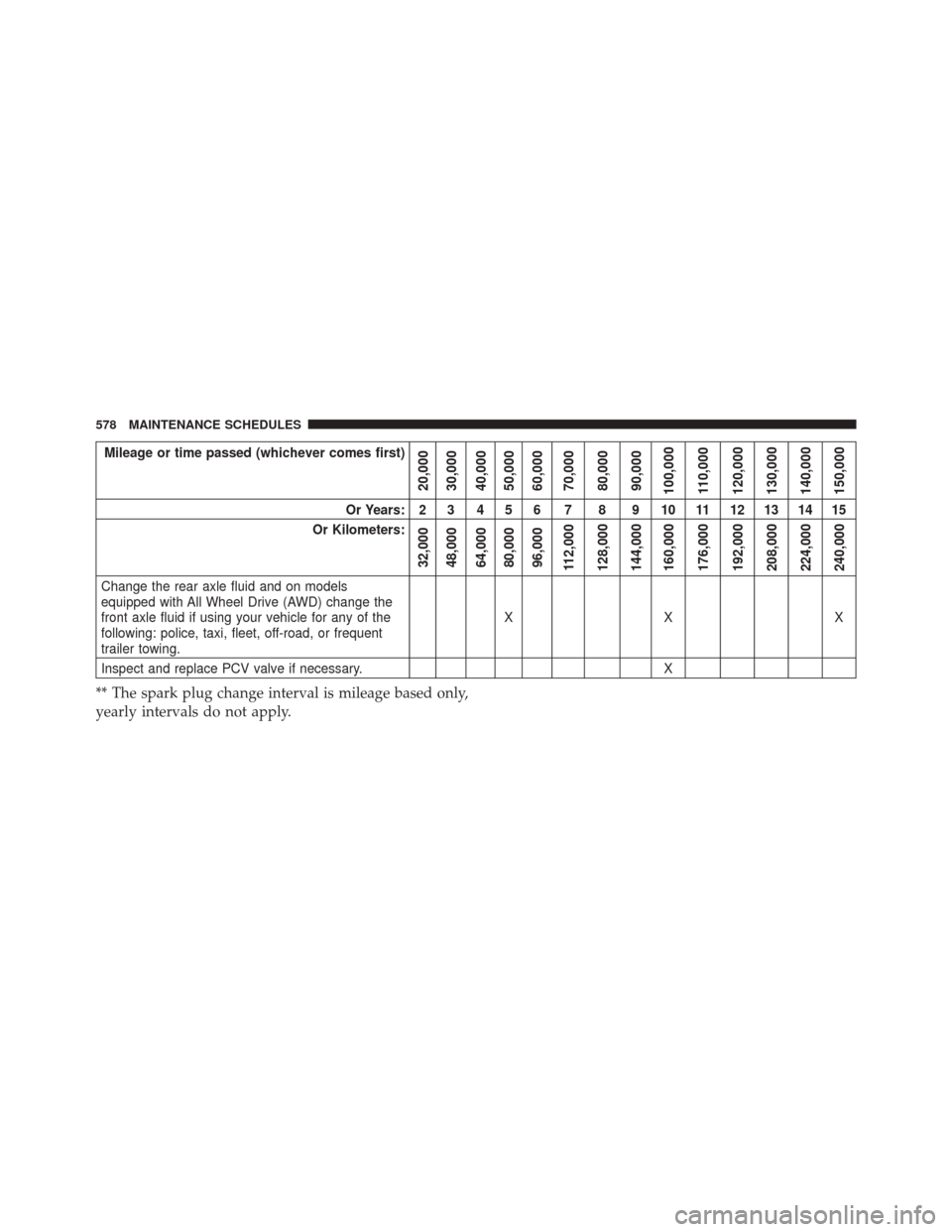
Mileage or time passed (whichever comes first)
20,000
30,000
40,000
50,000
60,000
70,000
80,000
90,000
100,000
110,000
120,000
130,000
140,000
150,000
Or Years: 2 3 4 5 6 7 8 9 10 11 12 13 14 15
Or Kilometers:
32,000
48,000
64,000
80,000
96,000
112,000
128,000
144,000
160,000
176,000
192,000
208,000
224,000
240,000
Change the rear axle fluid and on models
equipped with All Wheel Drive (AWD) change the
front axle fluid if using your vehicle for any of the
following: police, taxi, fleet, off-road, or frequent
trailer towing. XX X
Inspect and replace PCV valve if necessary. X
** The spark plug change interval is mileage based only,
yearly intervals do not apply.
578 MAINTENANCE SCHEDULES