remote start CHRYSLER 300 2019 User Guide
[x] Cancel search | Manufacturer: CHRYSLER, Model Year: 2019, Model line: 300, Model: CHRYSLER 300 2019Pages: 492, PDF Size: 4.85 MB
Page 56 of 492
WARNING!
•Persons who are unable to feel pain to the skin
because of advanced age, chronic illness, diabetes,
spinal cord injury, medication, alcohol use, exhaus-
tion or other physical condition must exercise care
when using the seat heater. It may cause burns even
at low temperatures, especially if used for long
periods of time.
• Do not place anything on the seat or seatback that
insulates against heat, such as a blanket or cushion.
This may cause the seat heater to overheat. Sitting in
a seat that has been overheated could cause serious
burns due to the increased surface temperature of the
seat.
Front Ventilated Seats — If Equipped
Located in the seat cushion and seat back are fans that
draw the air from the passenger compartment and move
air through fine perforations in the seat cover to help keep
the driver and front passenger cooler in higher ambient
temperatures. The fans operate at two speeds, HI and LO. The front ventilated seats control buttons are located
within the Uconnect system. You can gain access to the
control buttons through the climate screen or the controls
screen.
•
Press the ventilated seat button
once to choose HI.
•Press the ventilated seat buttona second time to
choose LO.
• Press the ventilated seat buttona third time to turn
the ventilated seat off.
NOTE: The engine must be running for the ventilated seats
to operate.
Vehicles Equipped With Remote Start
On models that are equipped with remote start, the venti-
lated seats can be programmed to come on during a remote
start.
This feature can be programmed through the Uconnect
system. Refer to “Uconnect Settings” in “Multimedia” for
further information.
54 GETTING TO KNOW YOUR VEHICLE
Page 62 of 492
NOTE:The engine must be running for the heated steering
wheel to operate.
Vehicles Equipped With Remote Start
On models that are equipped with remote start, the heated
steering wheel can be programmed to come on during a
remote start through the Uconnect system. Refer to
“Uconnect Settings” in “Multimedia” for further informa-
tion.
WARNING!
• Persons who are unable to feel pain to the skin
because of advanced age, chronic illness, diabetes,
spinal cord injury, medication, alcohol use, exhaus-
tion, or other physical conditions must exercise care
when using the steering wheel heater. It may cause
burns even at low temperatures, especially if used
for long periods.
• Do not place anything on the steering wheel that
insulates against heat, such as a blanket or steering
wheel covers of any type and material. This may
cause the steering wheel heater to overheat.
MIRRORS
Automatic Dimming Mirror — If Equipped
The mirror head can be adjusted up, down, left, and right
for various drivers. The mirror should be adjusted to center
on the view through the rear window.
This mirror automatically adjusts for headlight glare from
vehicles behind you.
NOTE: The Automatic Dimming feature is disabled when
the vehicle is in REVERSE to improve rear view viewing.
The Automatic Dimming feature can be turned on or off
through the touchscreen.
• Press the mirror dimmer button once to turn the feature
on.
• Press the mirror dimmer button a second time to turn
the feature off.
60 GETTING TO KNOW YOUR VEHICLE
Page 80 of 492
NOTE:
•The Rain Sensing feature will not operate when the
wiper speed is in the low or high position.
• The Rain Sensing feature may not function properly
when ice or dried salt water is present on the wind-
shield.
• Use of Rain-X or products containing wax or silicone
may reduce rain sensor performance.
The Rain Sensing system has protective features for the
wiper blades and arms. It will not operate under the
following conditions:
• Low Temperature Wipe Inhibit — The Rain Sensing
feature will not operate when the ignition is placed in
the RUN position, the vehicle is stationary and the
outside temperature is below 32°F (0°C), unless the
wiper control on the multifunction lever is moved, the
vehicle speed becomes greater than 0 mph (0 km/h) or
the outside temperature rises above freezing. •
Neutral Wipe Inhibit — The Rain Sensing feature will
not operate when the ignition is placed in the RUN
position, the automatic transmission gear selector is in
the NEUTRAL position and the vehicle speed is less
than 3 mph (5 km/h), unless the wiper control on the
multifunction lever is moved or the gear selector is
moved out of the NEUTRAL position.
• Remote Start Mode Inhibit — On vehicles equipped
with Remote Starting system, Rain Sensing wipers are
not operational when the vehicle is in the remote start
mode. Once the operator is in the vehicle and has placed
the ignition switch in the ON/RUN position, rain sens-
ing wiper operation can resume, if it has been selected,
and no other inhibit conditions (mentioned previously)
exist.
CLIMATE CONTROLS
The Climate Control System allows you to regulate the
temperature, air flow, and direction of air circulating
throughout the vehicle. The controls are located on the
touchscreen (if equipped) and on the instrument panel
below the radio.
78 GETTING TO KNOW YOUR VEHICLE
Page 223 of 492
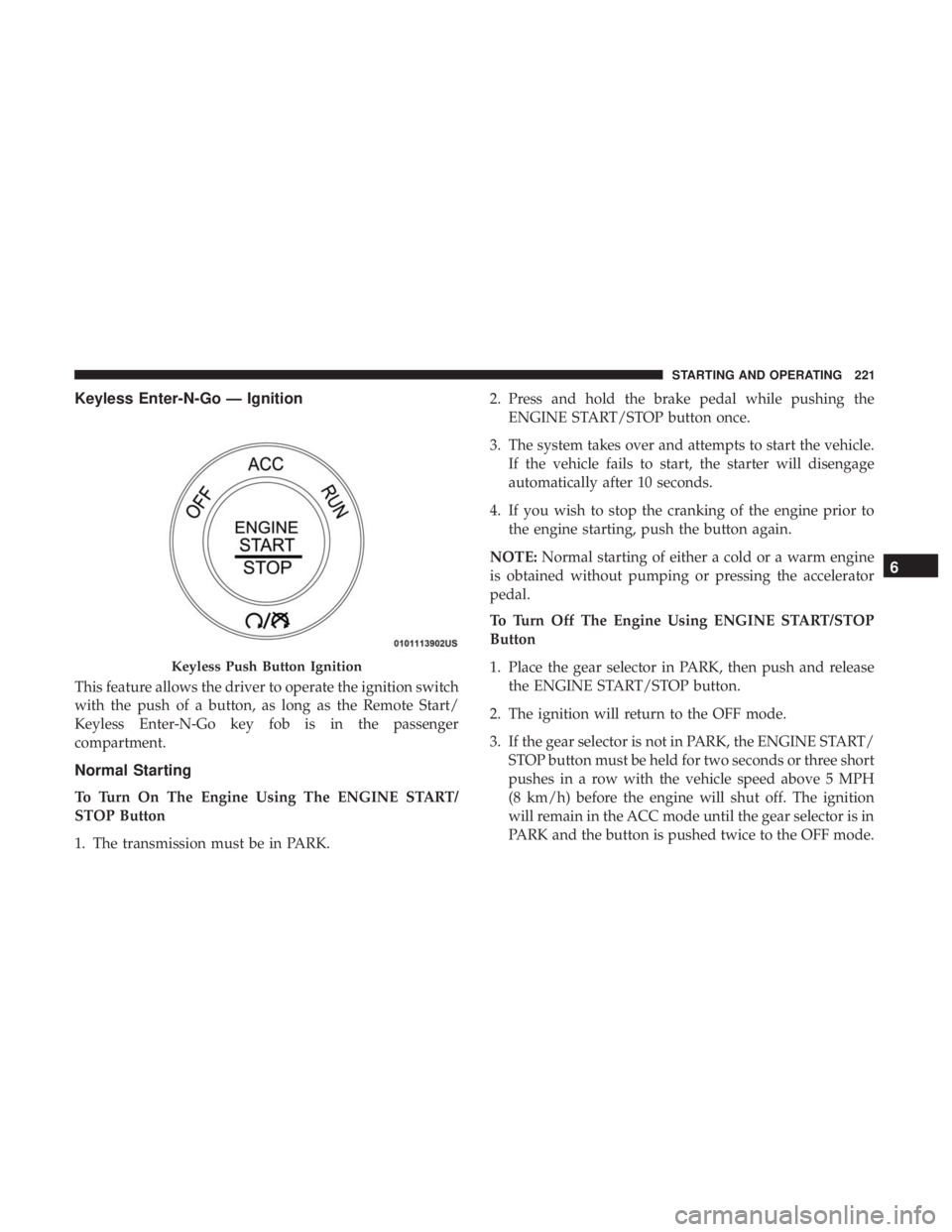
Keyless Enter-N-Go — Ignition
This feature allows the driver to operate the ignition switch
with the push of a button, as long as the Remote Start/
Keyless Enter-N-Go key fob is in the passenger
compartment.
Normal Starting
To Turn On The Engine Using The ENGINE START/
STOP Button
1. The transmission must be in PARK.2. Press and hold the brake pedal while pushing the
ENGINE START/STOP button once.
3. The system takes over and attempts to start the vehicle. If the vehicle fails to start, the starter will disengage
automatically after 10 seconds.
4. If you wish to stop the cranking of the engine prior to the engine starting, push the button again.
NOTE: Normal starting of either a cold or a warm engine
is obtained without pumping or pressing the accelerator
pedal.
To Turn Off The Engine Using ENGINE START/STOP
Button
1. Place the gear selector in PARK, then push and release the ENGINE START/STOP button.
2. The ignition will return to the OFF mode.
3. If the gear selector is not in PARK, the ENGINE START/ STOP button must be held for two seconds or three short
pushes in a row with the vehicle speed above 5 MPH
(8 km/h) before the engine will shut off. The ignition
will remain in the ACC mode until the gear selector is in
PARK and the button is pushed twice to the OFF mode.
Keyless Push Button Ignition
6
STARTING AND OPERATING 221
Page 331 of 492
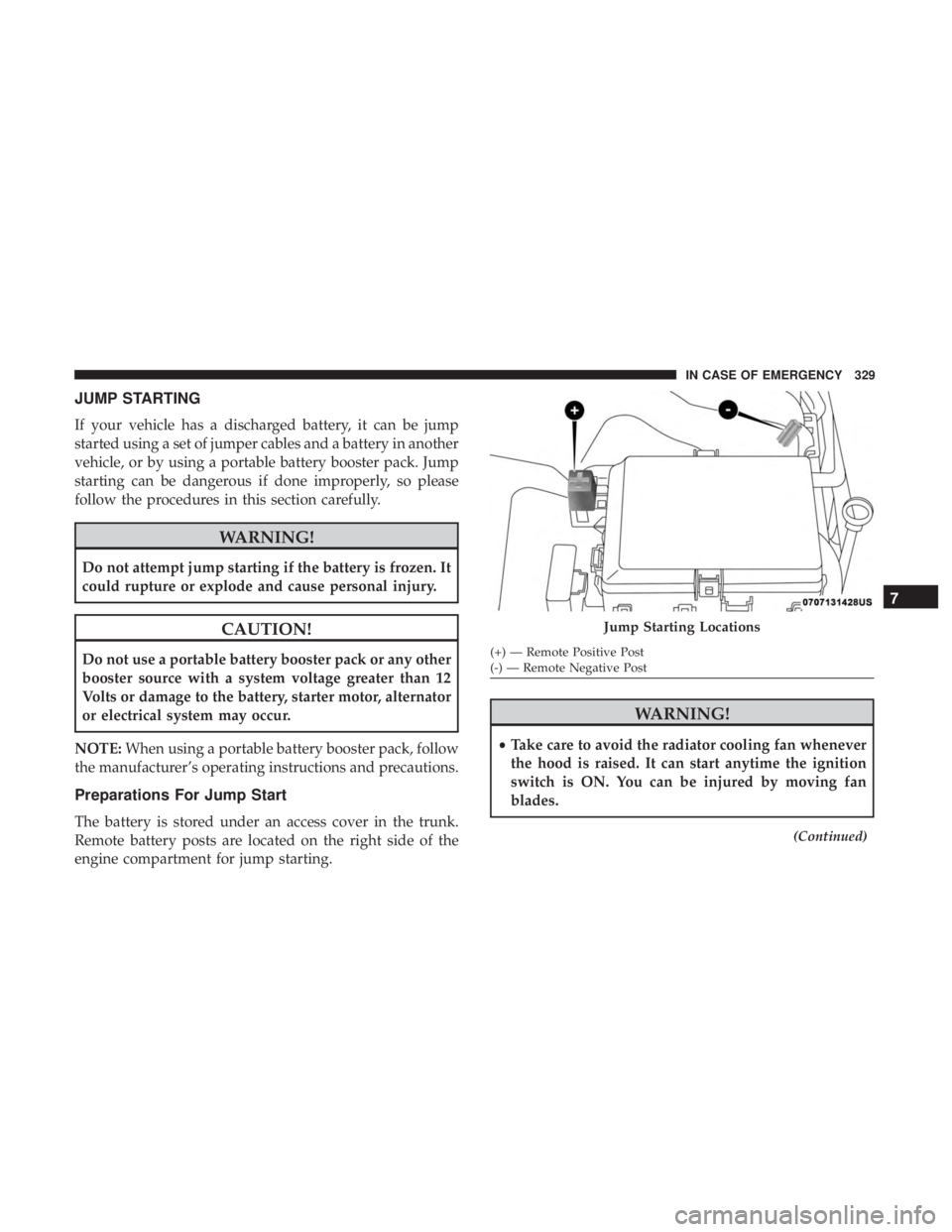
JUMP STARTING
If your vehicle has a discharged battery, it can be jump
started using a set of jumper cables and a battery in another
vehicle, or by using a portable battery booster pack. Jump
starting can be dangerous if done improperly, so please
follow the procedures in this section carefully.
WARNING!
Do not attempt jump starting if the battery is frozen. It
could rupture or explode and cause personal injury.
CAUTION!
Do not use a portable battery booster pack or any other
booster source with a system voltage greater than 12
Volts or damage to the battery, starter motor, alternator
or electrical system may occur.
NOTE: When using a portable battery booster pack, follow
the manufacturer’s operating instructions and precautions.
Preparations For Jump Start
The battery is stored under an access cover in the trunk.
Remote battery posts are located on the right side of the
engine compartment for jump starting.
WARNING!
• Take care to avoid the radiator cooling fan whenever
the hood is raised. It can start anytime the ignition
switch is ON. You can be injured by moving fan
blades.
(Continued)
Jump Starting Locations
(+) — Remote Positive Post
(-) — Remote Negative Post
7
IN CASE OF EMERGENCY 329
Page 332 of 492
WARNING!(Continued)
•Remove any metal jewelry such as rings, watch
bands and bracelets that could make an inadvertent
electrical contact. You could be seriously injured.
• Batteries contain sulfuric acid that can burn your
skin or eyes and generate hydrogen gas which is
flammable and explosive. Keep open flames or
sparks away from the battery.
1. Apply the parking brake, shift the automatic transmis- sion into PARK and cycle the ignition to OFF.
2. Turn off the heater, radio, and all unnecessary electrical accessories.
3. If using another vehicle to jump start the battery, park the vehicle within the jumper cables’ reach, set the
parking brake and make sure the ignition is OFF.
WARNING!
Do not allow vehicles to touch each other as this could
establish a ground connection and personal injury
could result.
Jump Starting Procedure
WARNING!
Failure to follow this jump starting procedure could
result in personal injury or property damage due to
battery explosion.
CAUTION!
Failure to follow these procedures could result in
damage to the charging system of the booster vehicle
or the discharged vehicle.
NOTE: Make sure at all times that unused ends of jumper
cables are not contacting each other or either vehicle while
making connections.
Connecting The Jumper Cables
1. Connect the positive (+)end of the jumper cable to the
remote positive (+)post of the discharged vehicle.
2. Connect the opposite end of the positive (+)jumper
cable to the positive (+)post of the booster battery.
3. Connect the negative end (-)of the jumper cable to the
negative (-)post of the booster battery.
330 IN CASE OF EMERGENCY
Page 333 of 492
4. Connect the opposite end of the negative(-)jumper
cable to the remote negative (-)post of the vehicle with
the discharged battery.
WARNING!
Do not connect the jumper cable to the negative (-) post
of the discharged battery. The resulting electrical spark
could cause the battery to explode and could result in
personal injury. Only use the specific ground point, do
not use any other exposed metal parts.
5. Start the engine in the vehicle that has the booster battery, let the engine idle a few minutes, and then start
the engine in the vehicle with the discharged battery.
CAUTION!
Do not run the booster vehicle engine above 2,000 rpm
since it provides no charging benefit, wastes fuel, and
can damage booster vehicle engine.
6. Once the engine is started, remove the jumper cables in the reverse sequence: Disconnecting The Jumper Cables
1. Disconnect the negative
(-)end of the jumper cable from
the remote negative (-)post of the discharged vehicle.
2. Disconnect the opposite end of the negative (-)jumper
cable from the negative (-)post of the booster battery.
3. Disconnect the positive (+)end of the jumper cable from
the positive (+)post of the booster battery.
4. Disconnect the opposite end of the positive (+)jumper
cable from the remote positive (+)post of the discharged
vehicle.
5. Reinstall the protective cover over the remote positive (+) post of the discharged vehicle.
If frequent jump starting is required to start your vehicle
you should have the battery and charging system tested at
an authorized dealer.
7
IN CASE OF EMERGENCY 331
Page 350 of 492
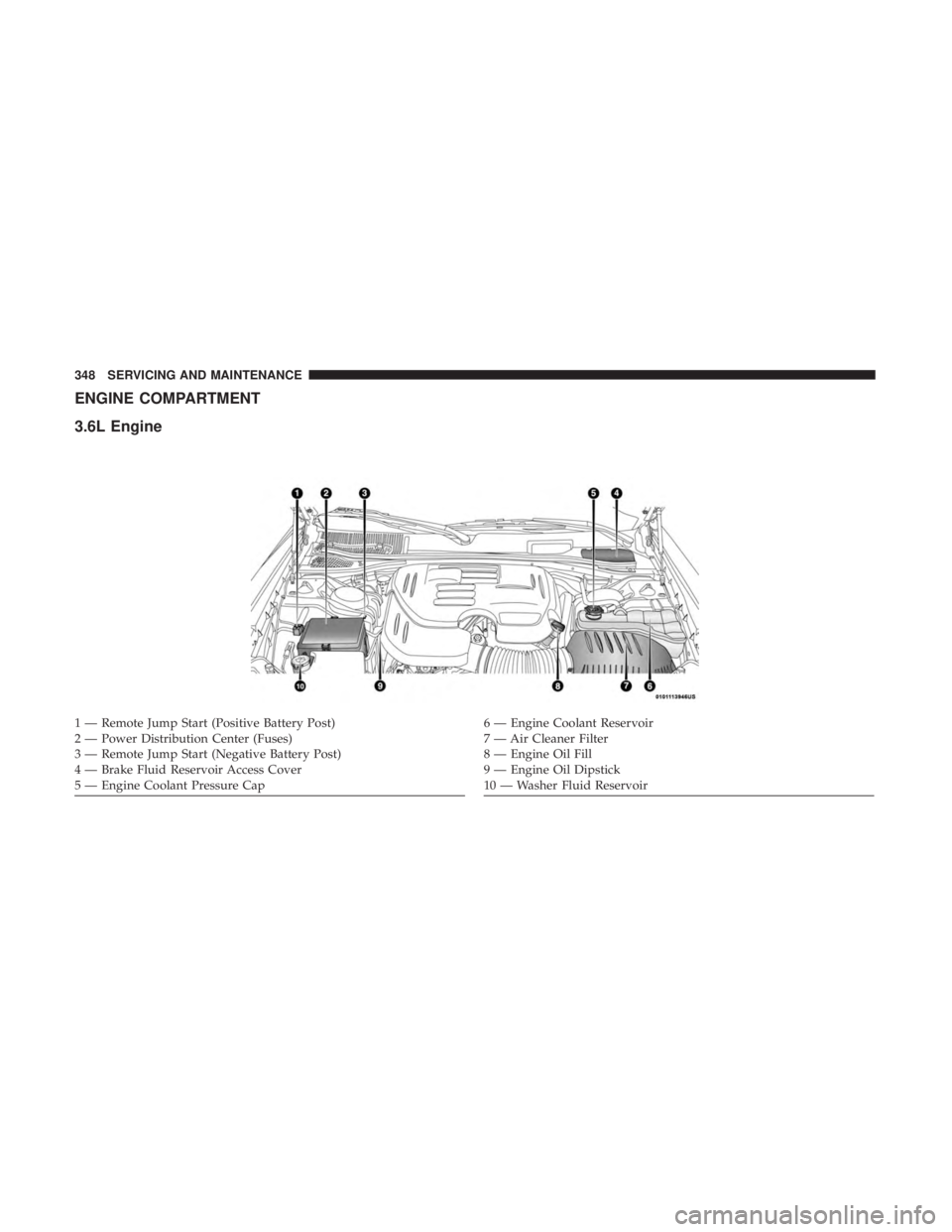
ENGINE COMPARTMENT
3.6L Engine
1 — Remote Jump Start (Positive Battery Post)
2 — Power Distribution Center (Fuses)
3 — Remote Jump Start (Negative Battery Post)
4 — Brake Fluid Reservoir Access Cover
5 — Engine Coolant Pressure Cap6 — Engine Coolant Reservoir
7 — Air Cleaner Filter
8 — Engine Oil Fill
9 — Engine Oil Dipstick
10 — Washer Fluid Reservoir
348 SERVICING AND MAINTENANCE
Page 353 of 492
WARNING!
Commercially available windshield washer solvents
are flammable. They could ignite and burn you. Care
must be exercised when filling or working around the
washer solution.
Maintenance-Free Battery
Your vehicle is equipped with a maintenance-free battery.
You will never have to add water, nor is periodic mainte-
nance required.
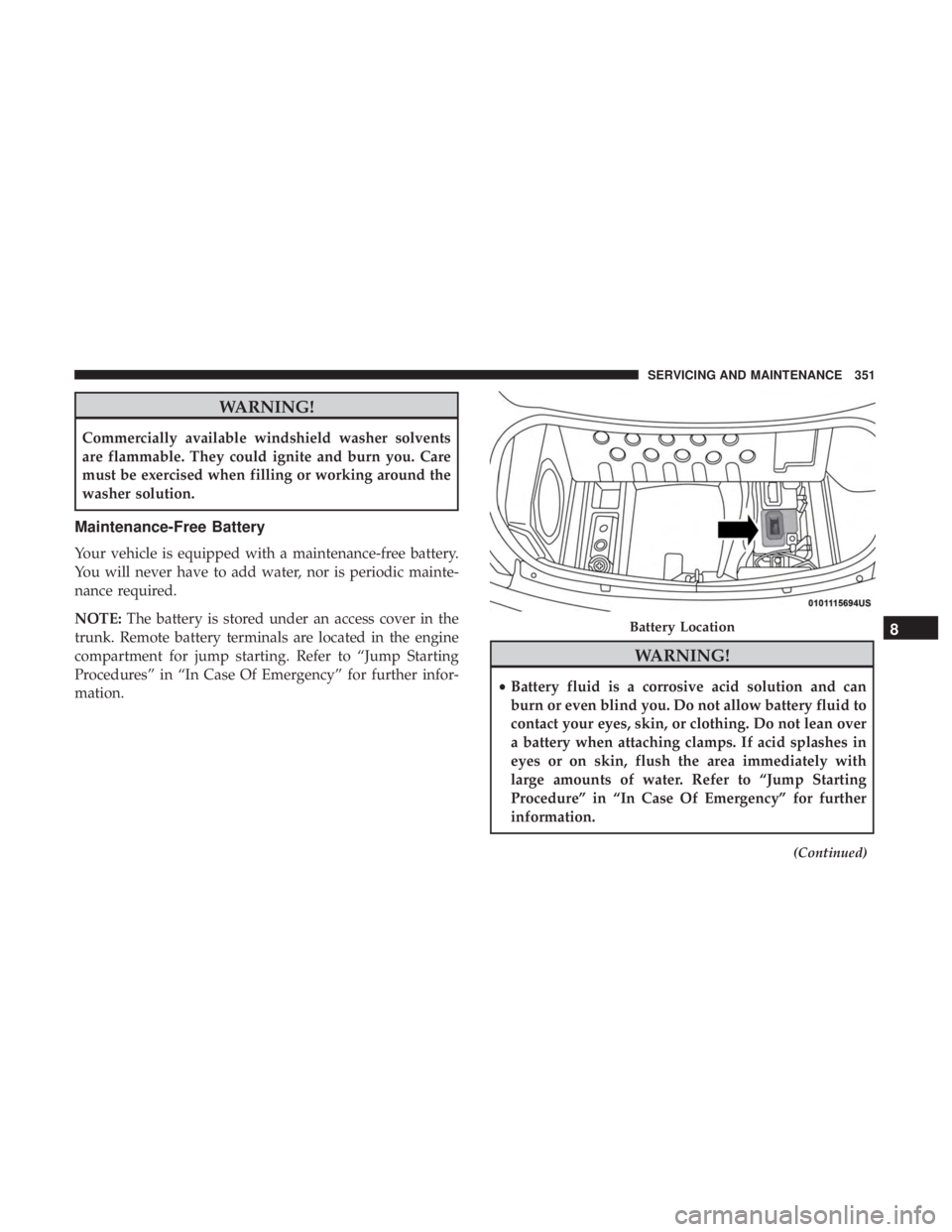
NOTE:The battery is stored under an access cover in the
trunk. Remote battery terminals are located in the engine
compartment for jump starting. Refer to “Jump Starting
Procedures” in “In Case Of Emergency” for further infor-
mation.
WARNING!
• Battery fluid is a corrosive acid solution and can
burn or even blind you. Do not allow battery fluid to
contact your eyes, skin, or clothing. Do not lean over
a battery when attaching clamps. If acid splashes in
eyes or on skin, flush the area immediately with
large amounts of water. Refer to “Jump Starting
Procedure” in “In Case Of Emergency” for further
information.
(Continued)
Battery Location8
SERVICING AND MAINTENANCE 351
Page 438 of 492
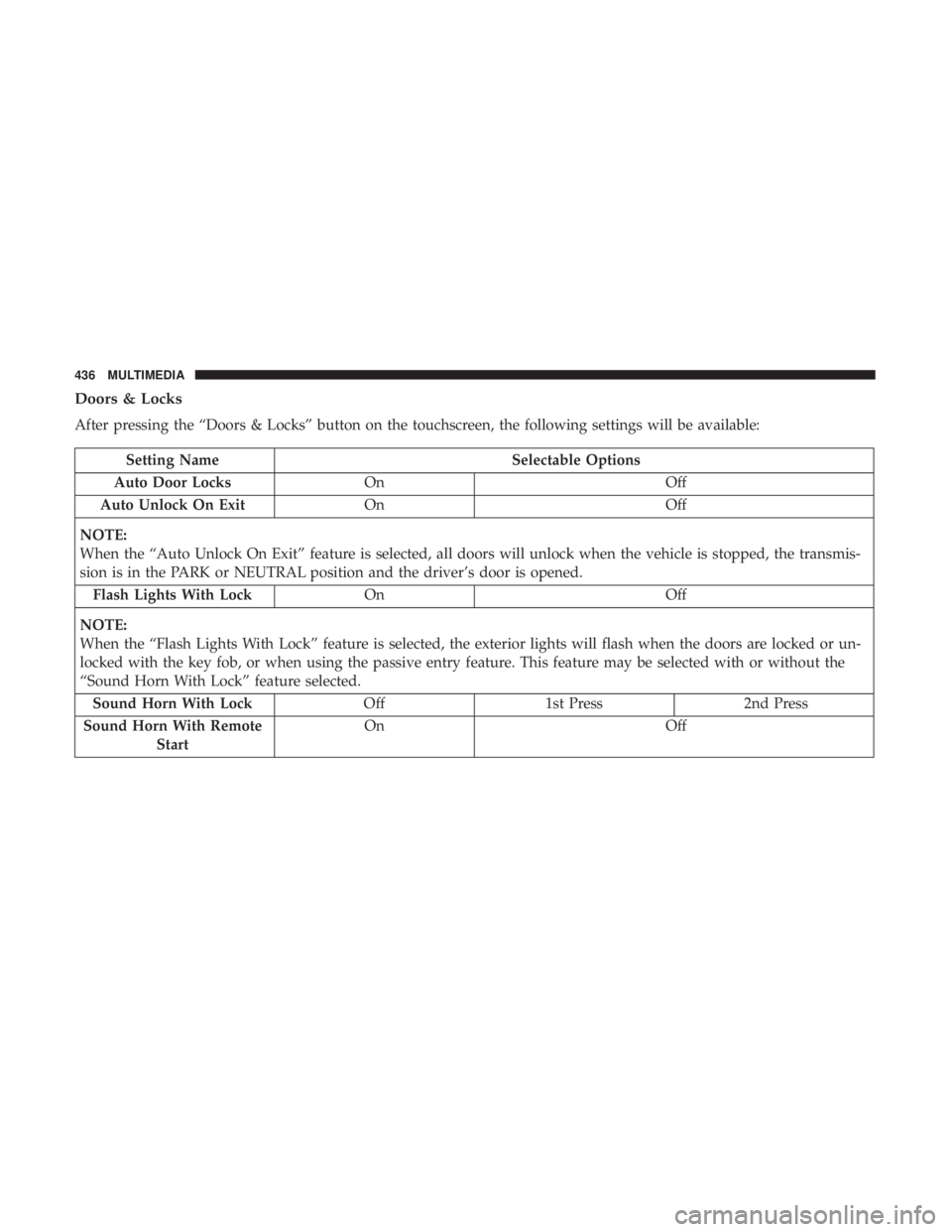
Doors & Locks
After pressing the “Doors & Locks” button on the touchscreen, the following settings will be available:
Setting NameSelectable Options
Auto Door Locks On Off
Auto Unlock On Exit On Off
NOTE:
When the “Auto Unlock On Exit” feature is selected, all doors will unlock when the vehicle is stopped, the transmis-
sion is in the PARK or NEUTRAL position and the driver’s door is opened. Flash Lights With Lock On Off
NOTE:
When the “Flash Lights With Lock” feature is selected, the exterior lights will flash when the doors are locked or un-
locked with the key fob, or when using the passive entry feature. This feature may be selected with or without the
“Sound Horn With Lock” feature selected. Sound Horn With Lock Off1st Press 2nd Press
Sound Horn With Remote Start On
Off
436 MULTIMEDIA