ignition CHRYSLER 300 2020 Owners Manual
[x] Cancel search | Manufacturer: CHRYSLER, Model Year: 2020, Model line: 300, Model: CHRYSLER 300 2020Pages: 328, PDF Size: 14.28 MB
Page 225 of 328

IN CASE OF EMERGENCY223
1. Apply the parking brake, shift the
automatic transmission into PARK and
cycle the ignition to OFF.
2. Turn off the heater, radio, and all electrical accessories.
3. If using another vehicle to jump start the battery, park the vehicle within the jumper
cables’ reach, set the parking brake and
make sure the ignition is OFF.
JUMP STARTING PROCEDURE
NOTE:
Make sure at all times that unused ends of
jumper cables are not contacting each other or
either vehicle while making connections.
Connecting The Jumper Cables
1. Connect the positive
(+) end of the jumper
cable to the remote positive (+)
post of the
discharged vehicle.
2. Connect the opposite end of the positive (+)
jumper cable to the positive (+) post of the
booster battery. 3. Connect the negative end
(-) of the jumper
cable to the negative (-) post of the booster
battery.
4. Connect the opposite end of the negative (-)
jumper cable to a good engine ground. A
“ground” is an exposed metallic/unpainted
part of the engine, frame or chassis, such as
an accessory bracket or large bolt. The
ground must be away from the battery and
the fuel injection system.
5. Start the engine in the vehicle that has the booster battery, let the engine idle a few
minutes, and then start the engine in the
vehicle with the discharged battery.
Remove any metal jewelry such as rings,
watch bands and bracelets that could
make an inadvertent electrical contact. You
could be seriously injured.
Batteries contain sulfuric acid that can
burn your skin or eyes and generate
hydrogen gas which is flammable and
explosive. Keep open flames or sparks
away from the battery.
WARNING!
Do not allow vehicles to touch each other as
this could establish a ground connection and
personal injury could result.
WARNING! (Continued)
WARNING!
Failure to follow this jump starting procedure
could result in personal injury or property
damage due to battery explosion.
CAUTION!
Failure to follow these procedures could
result in damage to the charging system of
the booster vehicle or the discharged vehicle.
WARNING!
Do not connect the jumper cable to the
negative (-) post of the discharged battery.
The resulting electrical spark could cause the
battery to explode and could result in
personal injury.
6
20_LX_OM_EN_USC_t.book Page 223
Page 230 of 328

228IN CASE OF EMERGENCY
(Continued)
TOWING A DISABLED VEHICLE
This section describes procedures for towing a disabled vehicle using a commercial towing service.
Proper towing or lifting equipment is required to
prevent damage to your vehicle. Use only tow
bars and other equipment designed for this
purpose, following equipment manufacturer’s
instructions. Use of safety chains is mandatory.
Attach a tow bar or other towing device to main
structural members of the vehicle, not to
bumpers or associated brackets. State and
local laws regarding vehicles under tow must be
observed.If you must use the accessories (wipers,
defrosters, etc.) while being towed, the ignition
must be in the ON/RUN mode, not the ACC
mode.
If the key fob is unavailable, or the vehicle's
battery is discharged, refer to "Manual Park
Release" in this section for instructions on
shifting the transmission out of PARK for
towing.
Towing Condition
Wheels OFF The Ground RWD MODELS AWD MODELS
Flat Tow NONEIf transmission is operable:
• Transmission in NEUTRAL
• 30 mph (48 km/h) max speed
• 30 miles (48 km) max distance NOT ALLOWED
Wheel Lift Or Dolly Tow Front
NOT RECOMMENDED (but, if used,
same limitations as above) NOT ALLOWED
Rear NOT RECOMMENDED NOT RECOMMENDED, but, if used:
Ignition in ON/RUN mode
Transmission in
NEUTRAL (NOT in PARK)
Flatbed ALLBEST METHOD BEST METHOD
CAUTION!
Do not use sling type equipment when
towing. Vehicle damage may occur.
When securing the vehicle to a flat bed
truck, do not attach to front or rear suspen -
sion components. Damage to your vehicle
may result from improper towing.
20_LX_OM_EN_USC_t.book Page 228
Page 231 of 328

IN CASE OF EMERGENCY229
(Continued)
ALL WHEEL DRIVE (AWD) MODELS
The manufacturer recommends towing your
vehicle with all four wheels OFF the ground
using a flatbed.
If the transmission and driveline are operable,
AWD models can also be towed with the ignition
in the ON/RUN mode, the transmission in
NEUTRAL (N) (not in PARK!), and the rear
wheels OFF the ground with no limitation on
speed or distance. Since the ignition MUST be in
the ON/RUN mode to tow in this manner, AWD
vehicles must be towed with ALL FOUR wheels
OFF the ground (e.g. on a flatbed truck) if the
key fob is unavailable.
REAR-WHEEL DRIVE (RWD) MODELS
The manufacturer recommends towing your
vehicle with all four wheels OFF the ground
using a flatbed.
If flatbed equipment is not available, and the
transmission is operable, this vehicle may be
flat towed (with all four wheels on the ground)
under the following conditions:
The automatic transmission must be in
NEUTRAL (N). Refer to “Manual Park
Release” in this section for instructions on
shifting the transmission to NEUTRAL when
the engine is off.
The towing speed must not exceed 30 mph
(48 km/h).
The towing distance must not exceed
30 miles (48 km). If the transmission is not operable, or the
vehicle must be towed faster than 30 mph
(48 km/h) or farther than 30 miles (48 km),
then the only acceptable method of towing is
with a flatbed truck.
The manufacturer does not recommend
towing this vehicle using a tow dolly.
Vehicle damage may occur.
CAUTION!
Towing this vehicle using any other method
can cause severe transmission and/or
transfer case damage.
CAUTION!
(Continued)
Damage from improper towing is not
covered under the New Vehicle Limited
Warranty.
CAUTION! (Continued)
CAUTION!
Towing this vehicle in violation of the above
requirements can cause severe transmission
damage. Damage from improper towing is not
covered under the New Vehicle Limited
Warranty.
6
20_LX_OM_EN_USC_t.book Page 229
Page 245 of 328
SERVICING AND MAINTENANCE243
NOTE:
Use only manufacturer approved A/C system
PAG compressor oil, and refrigerants.
A/C Air Filter
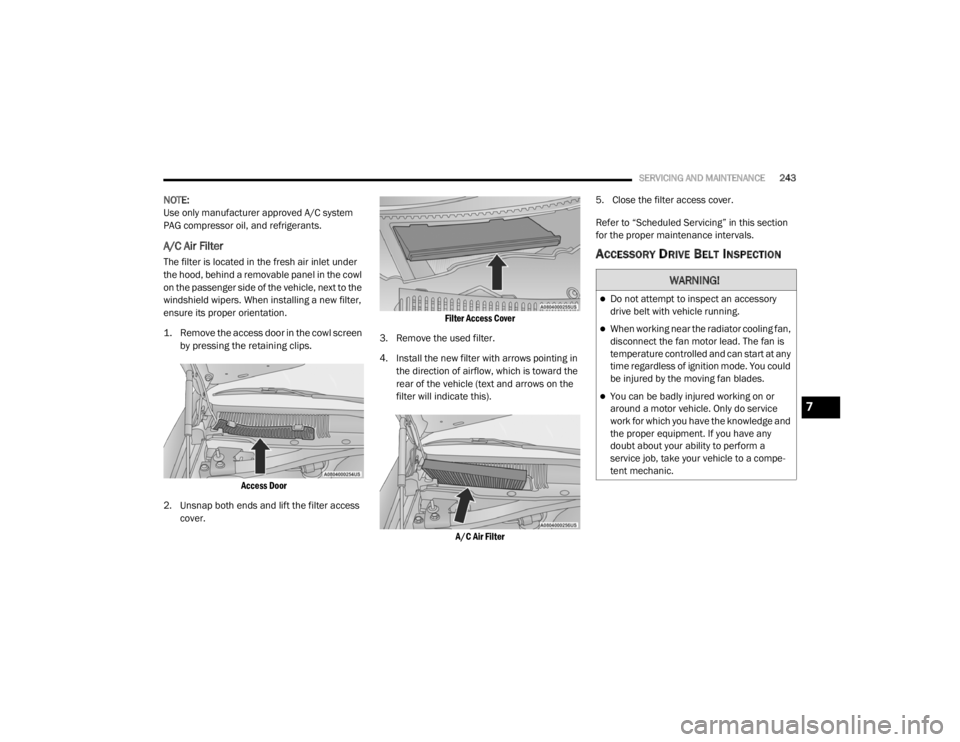
The filter is located in the fresh air inlet under
the hood, behind a removable panel in the cowl
on the passenger side of the vehicle, next to the
windshield wipers. When installing a new filter,
ensure its proper orientation.
1. Remove the access door in the cowl screen
by pressing the retaining clips.
Access Door
2. Unsnap both ends and lift the filter access cover.
Filter Access Cover
3. Remove the used filter.
4. Install the new filter with arrows pointing in the direction of airflow, which is toward the
rear of the vehicle (text and arrows on the
filter will indicate this).
A/C Air Filter
5. Close the filter access cover.
Refer to “Scheduled Servicing” in this section
for the proper maintenance intervals.ACCESSORY DRIVE BELT INSPECTION
WARNING!
Do not attempt to inspect an accessory
drive belt with vehicle running.
When working near the radiator cooling fan,
disconnect the fan motor lead. The fan is
temperature controlled and can start at any
time regardless of ignition mode. You could
be injured by the moving fan blades.
You can be badly injured working on or
around a motor vehicle. Only do service
work for which you have the knowledge and
the proper equipment. If you have any
doubt about your ability to perform a
service job, take your vehicle to a compe
-
tent mechanic.7
20_LX_OM_EN_USC_t.book Page 243
Page 249 of 328

SERVICING AND MAINTENANCE247
Under normal operating conditions, the catalytic
converter will not require maintenance. However,
it is important to keep the engine properly tuned
to ensure proper catalyst operation and prevent
possible catalyst damage.
NOTE:
Intentional tampering with emissions control
systems can result in civil penalties being
assessed against you. In unusual situations involving grossly
malfunctioning engine operation, a scorching
odor may suggest severe and abnormal catalyst
overheating. If this occurs, stop the vehicle, turn
off the engine and allow it to cool. Service,
including a tune-up to manufacturer's
specifications, should be obtained immediately.
To minimize the possibility of catalytic converter
damage:
Do not shut off the engine or interrupt the
ignition when the transmission is in gear and
the vehicle is in motion.
Do not try to start the engine by pushing or
towing the vehicle.
Do not idle the engine with any spark plug
wires disconnected or removed, such as
when diagnostic testing, or for prolonged
periods during very rough idle or malfunc
-
tioning operating conditions.
NOTE:
Your vehicle’s exhaust system may be equipped
with an Electronic Exhaust Valve (EEV) system,
if the exhaust system is replaced with after -
market products a Malfunction Indicator Lamp
(MIL) will illuminate.
COOLING SYSTEM
Coolant Checks
Check engine coolant (antifreeze) protection
every 12 months (before the onset of freezing
weather, where applicable). If the engine
coolant (antifreeze) is dirty, the system should
Damage to the catalytic converter can
result if your vehicle is not kept in proper
operating condition. In the event of engine
malfunction, particularly involving engine
misfire or other apparent loss of perfor -
mance, have your vehicle serviced
promptly. Continued operation of your
vehicle with a severe malfunction could
cause the converter to overheat, resulting
in possible damage to the converter and
vehicle.
CAUTION! (Continued)
WARNING!
You or others can be badly burned by hot
engine coolant (antifreeze) or steam from
your radiator. If you see or hear steam
coming from under the hood, do not open
the hood until the radiator has had time to
cool. Never open a cooling system pressure
cap when the radiator or coolant bottle is
hot.
Keep hands, tools, clothing, and jewelry
away from the radiator cooling fan when
the hood is raised. The fan starts automati -
cally and may start at any time, whether the
engine is running or not.
When working near the radiator cooling fan,
disconnect the fan motor lead or turn the
ignition to the OFF mode. The fan is
temperature controlled and can start at any
time the ignition is in the ON mode.7
20_LX_OM_EN_USC_t.book Page 247
Page 291 of 328

MULTIMEDIA289
Camera
After pressing the Camera button on the touchscreen, the following settings will be available:
Safety & Driving Assistance
After pressing the Safety & Driving Assistance button on the touchscreen, the following settings will be available:
Setting Name Selectable Options
ParkView Backup Camera Delay OnOff
NOTE:
The “ParkView Backup Camera Delay” setting determines whether or not the screen will display the rear view image with dynamic grid lines for up to
10 seconds after the vehicle is shifted out of REVERSE. This delay will be canceled if the vehicle’s speed exceeds 8 mph (13 km/h), the transmission
is shifted into PARK, or the ignition is switched to the OFF position.
Active ParkView Backup Camera Guidelines OnOff
NOTE:
The “Active ParkView Backup Camera Guidelines” feature overlays the Rear Backup Camera image with active, or dynamic, grid lines to help illustrate
the width of the vehicle and its projected backup path, based on the steering wheel position when the option is checked. A dashed center line overlay
indicates the center of the vehicle to assist with parking or aligning to a hitch/receiver.
Setting Name Selectable Options
Forward Collision Warning (FCW) —
If Equipped On
Off
NOTE:
Changing the FCW status to “Off” prevents the system from warning you of a possible collision with the vehicle in front of you.
The FCW system state is kept in memory from one ignition cycle to the next. If the system is turned off, it will remain off when the vehicle is restarted.9
20_LX_OM_EN_USC_t.book Page 289
Page 293 of 328

MULTIMEDIA291
ParkSense — If Equipped Sound Only Sound & Display
NOTE:
The ParkSense system will scan for objects behind the vehicle when the gear selector is in REVERSE and the vehicle speed is less than 11 mph
(18 km/h). It will provide an alert (audible and/or visual) to indicate the proximity to other objects. The system can be enabled with “Sound Only” or
“Sound & Display”. To change the ParkSense status, press and release the Sound Only or Sound & Display option. Front ParkSense Volume LowMedium High
NOTE:
The Front ParkSense Volume settings can be selected from the Uconnect System. The chime volume settings include “Low”, “Medium”, and “High”.
The factory default volume setting is Medium. ParkSense will retain its last known configuration state through ignition cycles. Rear ParkSense Volume LowMedium High
NOTE:
The Rear ParkSense Volume settings can be selected from the Uconnect System. The chime volume settings include “Low”, “Medium”, and “High”.
ParkSense will retain its last known configuration state through ignition cycles. Power Steering Default — If Equipped Normal
SportComfort
NOTE:
When the “Electronic Power Steering Default” is selected, it allows you to change the default setting of your vehicle to “Normal”, “Sport”, or “Comfort”.
Setting Name Selectable Options
9
20_LX_OM_EN_USC_t.book Page 291
Page 294 of 328

292MULTIMEDIA
Mirrors & Wipers
After pressing the Mirrors & Wipers button on the touchscreen, the following settings will be available:Blind Spot Alert — If Equipped
OffLightsLights & Chime
NOTE:
When this feature is selected, the Blind Spot Alert feature provides alerts, visual and/or audible, to indicate objects in your blind spot. The Blind
Spot Alert feature can be activated in “Lights” mode. When this mode is selected, the Blind Spot Monitor (BSM) system is activated and will only
show a visual alert in the exterior mirrors. When “Lights & Chime” mode is activated, the BSM will show a visual alert in the exterior mirrors as well
as sound an audible alert when the turn signal is on.
If your vehicle has experienced any damage in the area where the sensor is located, even if the fascia is not damaged, the sensor may have become
misaligned. Take your vehicle to an authorized dealer to verify sensor alignment. Having a sensor that is misaligned will result in the BSM not oper -
ating to specification.
Hill Start Assist — If Equipped On Off
NOTE:
When this feature is selected, the Hill Start Assist (HSA) system is active. Paddle Shifters — If Equipped On Off
Setting Name Selectable Options
Setting NameSelectable Options
Tilt Side Mirrors in Reverse — If Equipped OnOff
NOTE:
When the “Tilt Side Mirror In Reverse” feature is selected, the exterior sideview mirrors will tilt downward when the ignition is in the ON/RUN position
and the transmission gear selector is in the REVERSE position. The mirrors will move back to their previous position when the transmission is shifted
out of REVERSE.
20_LX_OM_EN_USC_t.book Page 292
Page 298 of 328

296MULTIMEDIA
Seats & Comfort — If Equipped
After pressing the Seats & Comfort button on the touchscreen, the following setting will be available:
Key Off Options
After pressing the Key Off Options button on the touchscreen, the following settings will be available:
Setting Name Selectable Options
Auto-On Dr Heat/Vent Seat &
Steering Wheel With Vehicle Start — If Equipped Off
Remote Start All Starts
NOTE:
When this feature is selected the driver's heated seat and heated steering wheel will automatically turn on when temperatures are below 40°F
(4.4°C). When temperatures are above 80°F (26.7°C), the driver’s vented seat will turn on.
Setting Name Selectable Options
Easy Exit Seat — If EquippedOnOff
NOTE:
When the “Easy Exit Seat” feature is selected, the driver’s seat will automatically move rearward once the engine is shut off.
Key Off Power Delay 0 sec
45 sec
5 mins 10 mins
NOTE:
When the “Key Off Power Delay” feature is selected, the power window switches, radio, Uconnect Phone system (if equipped), dual-pane power
sunroof (if equipped), and power outlets will remain active for up to 10 minutes after the ignition is cycled to OFF. Opening either front door will cancel
this feature. To change the Engine Off Power Delay setting, press the + or - button on the touchscreen to select your desired time interval, and choose
from “0 seconds,” “45 seconds,” “5 minutes” or “10 minutes.”
20_LX_OM_EN_USC_t.book Page 296
Page 320 of 328

318 Floor Console
................................................... 71Fluid Capacities............................................. 280Fluid Leaks.................................................... 145Fluid Level Checks Brake........................................................ 251Cooling System.......................................... 247Engine Oil.................................................. 238Transfer Case............................................ 253Fluid, Brake......................................... 281, 283Fluids And Lubricants.................................... 281Fog Lights........................................................ 45Fold-Flat Seats................................................. 30Folding Rear Seats.......................................... 30Forward Collision Warning............................. 106Four-Way Hazard Flasher............................... 201Freeing A Stuck Vehicle................................. 227Fuel............................................................... 276Additives................................................... 277Clean Air.................................................... 277Ethanol...................................................... 277Gasoline.................................................... 276Gauge.......................................................... 90Materials Added........................................ 277Methanol................................................... 277Octane Rating................................. 276, 281Requirements........................................... 276Specifications............................................ 281Tank Capacity............................................ 280Fuses............................................................. 209
G
Garage Door Opener (HomeLink)..................... 66Gasoline, Clean Air........................................ 277Gasoline, Reformulated................................ 277GaugesFuel............................................................. 90Gear Ranges................................................. 155Glass Cleaning.............................................. 274Gross Axle Weight Rating..................... 190, 191Gross Vehicle Weight Rating................ 190, 191GVWR............................................................ 190
H
HazardDriving Through Flowing, Rising, Or Shallow Standing Water
.................................... 199Hazard Warning Flashers.............................. 201Head Restraints........................................ 35, 36Head Rests............................................... 35, 36Headlights.................................................... 207Automatic.................................................... 44Cleaning................................................... 272High Beam/Low Beam Select Switch.......... 43Lights On Reminder..................................... 45On With Wipers............................................ 44Passing........................................................ 44Switch.......................................................... 42Time Delay................................................... 45Washers................................................... 238
Heated Mirrors.................................................41Heater, Engine Block..................................... 149High Beam/Low Beam Select (Dimmer)
Switch..............................................................43Hill Start Assist.............................................. 100HitchesTrailer Towing........................................... 193Holder, Coin.....................................................71HomeLink (Garage Door Opener).....................66Hood Prop........................................................61Hood Release...................................................61
I
Ignition.............................................................16Switch..........................................................16In Vehicle HelpVehicle User Guide......................................10Inside Rearview Mirror........................... 39, 201Instrument Cluster....................................76, 77Descriptions.................................................92Display.................................................. 78, 80Instrument Panel Lens Cleaning................... 274Interior Appearance Care.............................. 273Interior Lights...................................................46Intermittent Wipers (Delay Wipers)..................49Introduction....................................................... 8
20_LX_OM_EN_USC_t.book Page 318