light CHRYSLER 300 2020 User Guide
[x] Cancel search | Manufacturer: CHRYSLER, Model Year: 2020, Model line: 300, Model: CHRYSLER 300 2020Pages: 328, PDF Size: 14.28 MB
Page 25 of 328
GETTING TO KNOW YOUR VEHICLE23
Security System Manual Override
The vehicle security alarm will not arm if you
lock the doors using the manual door lock.
TO DISARM THE SYSTEM
The vehicle security alarm can be disarmed
using any of the following methods:
Push the unlock button on the key fob.
Grasp the Passive Entry door handle, if
equipped. Refer to “Keyless Enter-N-Go —
Passive Entry” in “Doors” in this chapter for
further information.
Push the Keyless Enter-N-Go ignition button
(requires at least one valid key fob in the
vehicle).
NOTE:
The driver's door key cylinder and the trunk
button on the key fob cannot arm or disarm
the vehicle security alarm.
When the vehicle security alarm is armed,
the interior power door lock switches will not
unlock the doors.
The vehicle security alarm is designed to protect
your vehicle. However, you can create conditions where the system will give you a false
alarm. If one of the previously described arming
sequences has occurred, the vehicle security
alarm will arm regardless of whether you are in
the vehicle or not. If you remain in the vehicle
and open a door, the alarm will sound. If this
occurs, disarm the vehicle security alarm.
If the vehicle security alarm is armed and the
battery becomes disconnected, the vehicle
security alarm will remain armed when the
battery is reconnected; the exterior lights will
flash, the horn will sound. If this occurs, disarm
the vehicle security alarm.
REARMING OF THE SYSTEM
If something triggers the alarm, and no action is
taken to disarm it, the vehicle security alarm will
turn the horn off after 29 seconds, five seconds
between cycles, up to eight cycles if the trigger
remains active and the vehicle security alarm
will rearm itself.
TAMPER ALERT
If something has triggered the vehicle security
alarm in your absence, the horn will sound three
times and the exterior lights will blink three
times when you disarm the vehicle security
alarm. Check the vehicle for tampering.
DOORS
MANUAL DOOR LOCKS
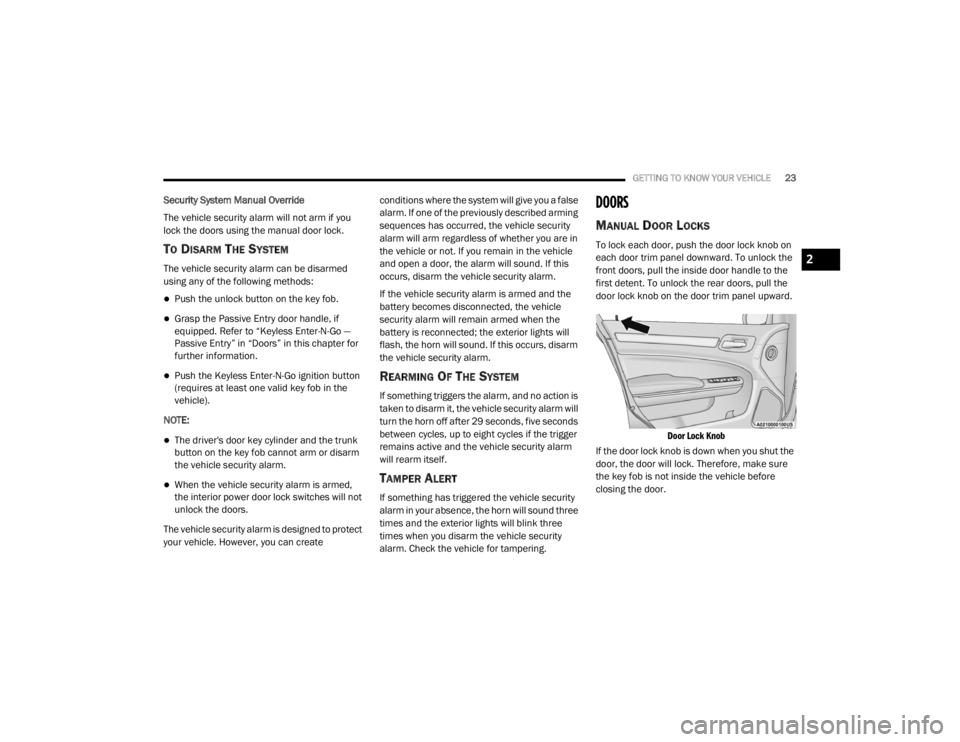
To lock each door, push the door lock knob on
each door trim panel downward. To unlock the
front doors, pull the inside door handle to the
first detent. To unlock the rear doors, pull the
door lock knob on the door trim panel upward.
Door Lock Knob
If the door lock knob is down when you shut the
door, the door will lock. Therefore, make sure
the key fob is not inside the vehicle before
closing the door.
2
20_LX_OM_EN_USC_t.book Page 23
Page 28 of 328
26GETTING TO KNOW YOUR VEHICLE
detected outside the vehicle. The vehicle will
not unlock the doors when any of the following
conditions are true:
The doors are locked manually using the door
lock knobs.
There is a valid Passive Entry key fob outside
the vehicle and within 5 ft (1.5 m) of either
Passive Entry door handle.
Three attempts are made to lock the doors
using the door panel switch and then the
doors are closed.
To Enter The Trunk
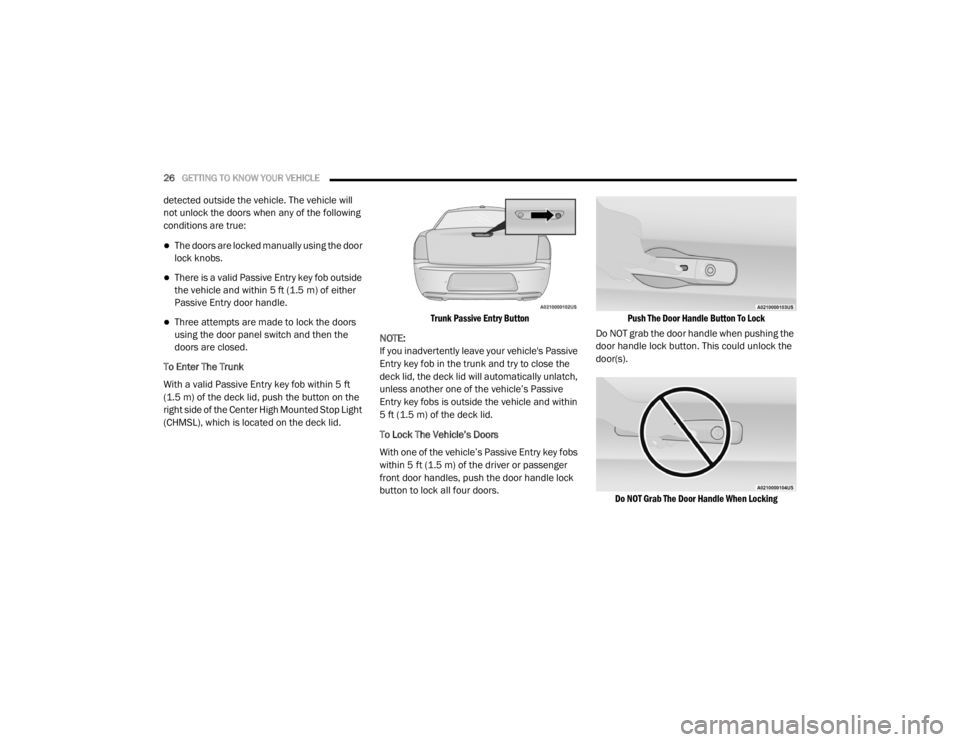
With a valid Passive Entry key fob within 5 ft
(1.5 m) of the deck lid, push the button on the
right side of the Center High Mounted Stop Light
(CHMSL), which is located on the deck lid.
Trunk Passive Entry Button
NOTE:
If you inadvertently leave your vehicle's Passive
Entry key fob in the trunk and try to close the
deck lid, the deck lid will automatically unlatch,
unless another one of the vehicle’s Passive
Entry key fobs is outside the vehicle and within
5 ft (1.5 m) of the deck lid.
To Lock The Vehicle’s Doors
With one of the vehicle’s Passive Entry key fobs
within 5 ft (1.5 m) of the driver or passenger
front door handles, push the door handle lock
button to lock all four doors.
Push The Door Handle Button To Lock
Do NOT grab the door handle when pushing the
door handle lock button. This could unlock the
door(s).
Do NOT Grab The Door Handle When Locking
20_LX_OM_EN_USC_t.book Page 26
Page 36 of 328

34GETTING TO KNOW YOUR VEHICLE
Vehicles Equipped With Remote Start
On models that are equipped with remote start,
the heated seats can be programmed to come
on during a remote start.
This feature can be programmed through the
Uconnect system. Refer to “Uconnect Settings”
in “Multimedia” for further information.Rear Heated Seats — If Equipped
On some models, the two rear outboard seats
may be equipped with heated seats. There are
two heated seat switches that allow the rear
passengers to operate the seats independently.
The heated seat switches for each heater are
located on the rear of the center console.
You can choose from HI, LO, or OFF heat
settings. Amber indicator lights in each switch
indicate the level of heat in use. Two indicator
lights will illuminate for HI, one for LO and none
for OFF.
Push the heated seat button once to turn
the HI setting on.
Push the heated seat button a second
time to turn the LO setting on.
Push the heated seat button a third time
to turn the heating elements off.
When the HI-level setting is selected, the heater
will provide a boosted heat level during the first
four minutes of operation. Then, the heat
output will drop to the normal HI-level. If the
HI-level setting is selected, the system will
automatically switch to LO-level after approximately 60 minutes of continuous
operation. At that time, the number of indicator
lights changes from two to one, indicating the
change. The LO-level setting will turn off
automatically after approximately 45 minutes.
WARNING!
Persons who are unable to feel pain to the
skin because of advanced age, chronic
illness, diabetes, spinal cord injury, medica
-
tion, alcohol use, exhaustion or other phys -
ical condition must exercise care when
using the seat heater. It may cause burns
even at low temperatures, especially if
used for long periods of time.
Do not place anything on the seat or seat -
back that insulates against heat, such as a
blanket or cushion. This may cause the seat
heater to overheat. Sitting in a seat that has
been overheated could cause serious
burns due to the increased surface
temperature of the seat.
WARNING!
Persons who are unable to feel pain to the
skin because of advanced age, chronic
illness, diabetes, spinal cord injury, medica -
tion, alcohol use, exhaustion or other phys -
ical condition must exercise care when
using the seat heater. It may cause burns
even at low temperatures, especially if
used for long periods of time.
Do not place anything on the seat or seat -
back that insulates against heat, such as a
blanket or cushion. This may cause the seat
heater to overheat. Sitting in a seat that has
been overheated could cause serious
burns due to the increased surface
temperature of the seat.
20_LX_OM_EN_USC_t.book Page 34
Page 41 of 328

GETTING TO KNOW YOUR VEHICLE39
MIRRORS
AUTOMATIC DIMMING MIRROR — IF
E
QUIPPED
The mirror head can be adjusted up, down, left,
and right for various drivers. The mirror should
be adjusted to center on the view through the
rear window.
This mirror automatically adjusts for headlight
glare from vehicles behind you.
NOTE:
The Automatic Dimming feature is disabled
when the vehicle is in REVERSE to improve rear
view viewing.
The Automatic Dimming feature can be turned
on or off through the touchscreen.
Automatic Dimming Mirror
Refer to “Uconnect Settings” in “Multimedia”
for further information.
OUTSIDE MIRRORS
To receive maximum benefit, adjust the outside
mirror(s) to center on the adjacent lane of traffic
and a slight overlap of the view obtained from
the inside mirror. NOTE:
The passenger side convex outside mirror will
give a much wider view to the rear, and espe
-
cially of the lane next to your vehicle.
DRIVER'S OUTSIDE AUTOMATIC
D
IMMING MIRROR — IF EQUIPPED
The driver’s outside mirror will automatically
adjust for glare from vehicles behind you. This
feature is controlled by the inside automatic
dimming mirror and will automatically adjust for
headlight glare when the inside mirror adjusts.
Do not place anything on the steering wheel
that insulates against heat, such as a
blanket or steering wheel covers of any type
and material. This may cause the steering
wheel heater to overheat.
WARNING! (Continued)
CAUTION!
To avoid damage to the mirror during
cleaning, never spray any cleaning solution
directly onto the mirror. Apply the solution
onto a clean cloth and wipe the mirror clean.
WARNING!
Vehicles and other objects seen in an outside
convex mirror will look smaller and farther
away than they really are. Relying too much
on side convex mirrors could cause you to
collide with another vehicle or other object.
Use your inside mirror when judging the size
or distance of a vehicle seen in a side convex
mirror.
2
20_LX_OM_EN_USC_t.book Page 39
Page 42 of 328

40GETTING TO KNOW YOUR VEHICLE
OUTSIDE MIRRORS WITH TURN SIGNAL
A
ND APPROACH LIGHTING — IF
E
QUIPPED
Driver and passenger outside mirrors with turn
signal and approach lighting contain four LEDs,
which are located in the upper outer corner of
each mirror.
Three of the LEDs are turn signal indicators,
which flash with the corresponding turn signal
lights in the front and rear of the vehicle.
Turning on the Hazard Warning flashers will also
activate these LEDs.
The fourth LED supplies illuminated entry
lighting, which turns on in both mirrors when
you use the remote keyless entry key fob or
open any door. This LED shines outward to
illuminate the front and rear door handles. It
also shines downward to illuminate the area in
front of the doors.
The illuminated entry lighting fades to off after
about 30 seconds or it will fade to off
immediately once the ignition is placed into the
ON/RUN position. NOTE:
The approach lighting will not function when the
gear selector is moved out of the PARK position.POWER MIRRORS
The power mirror controls are located on the
driver's door trim panel.
Power Mirror Control
The power mirror controls consist of mirror
select buttons and a four-way mirror control
switch. To adjust a mirror, push either the L
(left) or R (right) button to select the mirror that
you want to adjust. NOTE:
A light in the select button will illuminate indi
-
cating the mirror is activated and can be
adjusted.
Using the mirror control switch, push on any of
the four arrows for the direction that you want
the mirror to move.
Power mirror preselected positions can be
controlled by the optional Memory Settings
Feature. Refer to “Driver Memory Settings” in
this chapter for further information.
POWER FOLDING OUTSIDE MIRRORS —
I
F EQUIPPED
If equipped with power folding mirrors, they can
be electrically folded rearward and unfolded
into the drive position.
The switch for the power folding mirrors is
located between the power mirror switches
L (left) and R (right). Push the switch once and
the mirrors will fold in, pushing the switch a
second time will return the mirrors to the
normal driving position.
If the mirror is manually folded after electrically
cycled, a potential extra button push is required
to get the mirrors back to the drive position.
1 — Mirror Direction Control
2 — Right Mirror Selection
3 — Left Mirror Selection
20_LX_OM_EN_USC_t.book Page 40
Page 43 of 328

GETTING TO KNOW YOUR VEHICLE41
If the mirror does not electrically fold, check for
ice or dirt build up at the pivot area which can
cause excessive drag.
Power Folding Mirror Switch
Automatic Folding Mirrors
When the Automatic Folding Mirrors feature is
enabled, the exterior mirrors will fold in when
exiting the vehicle (with the ignition OFF, all
doors closed, and the doors are locked).
If the exterior mirrors were auto-folded, they
will unfold when the ignition is placed in the
ON position.
If the exterior mirrors were manually folded,
they will not automatically unfold. NOTE:
The Automatic Fold/Unfold Mirrors feature is
not turned on when delivered from the factory.
The Automatic Fold/Unfold Mirrors feature can
be turned on and off using the Uconnect
System. Refer to “Uconnect Settings” in "Multi
-
media" for further information.
Resetting The Power Folding Outside Mirrors
You may need to reset the power folding mirrors
if the following occurs:
The mirrors are accidentally blocked while
folding.
The mirrors are accidentally manually
folded/unfolded.
The mirrors come out of the unfolded posi -
tion.
The mirrors shake and vibrate at normal
driving speeds.
To reset the power folding mirrors, fold and
unfold them by pushing the button (this may
require multiple button pushes). This resets
them to their normal position.
HEATED MIRRORS — IF EQUIPPED
These mirrors are heated to melt frost
or ice. This feature will be activated
whenever you turn on the rear window
defroster (if equipped). Refer to “Climate
Controls” in this chapter for further information.
TILT SIDE MIRRORS IN REVERSE — IF
E
QUIPPED
Tilt Side Mirrors In Reverse provides automatic
outside mirror positioning which will aid the
driver’s view of the ground rearward of the front
doors. The outside mirrors will move slightly
downward from the present position when the
vehicle is shifted into REVERSE. The outside
mirrors will then return to the original position
when the vehicle is shifted out of the REVERSE
position. Each stored memory setting will have
an associated Tilt Side Mirrors In Reverse
position.
NOTE:
The Tilt Side Mirrors In Reverse feature is not
turned on when delivered from the factory. The
Tilt Side Mirrors In Reverse feature can be
turned on and off using the Uconnect system.
Refer to “Uconnect Settings” in “Multimedia”
for further information.
2
20_LX_OM_EN_USC_t.book Page 41
Page 44 of 328

42GETTING TO KNOW YOUR VEHICLE
ILLUMINATED VANITY MIRRORS — IF
E
QUIPPED
An illuminated vanity mirror is located on the
sun visor. To use the mirror, rotate the sun visor
downward and swing the mirror cover upward.
The light turns on automatically. Closing the
mirror cover turns off the light.
Illuminated Vanity Mirror
“Slide-On-Rod” And Extender Features Of
Sun Visor
To use the “Slide-On-Rod” feature of the sun
visor, rotate the sun visor downward and swing
the sun visor so it is parallel to the side window,
grab the sun visor and pull rearwards until the
sun visor is in the desired position. To use the
extender feature of the sun visor, grab the
extender which is located at the rear of the visor
and pull rearward.
Slide-On-Rod Feature
EXTERIOR LIGHTS
MULTIFUNCTION LEVER
The multifunction lever controls the operation
of the turn signals, headlight beam selection
and passing lights. The multifunction lever is
located on the left side of the steering column.
Multifunction Lever
HEADLIGHT SWITCH
The headlight switch is located on the
left side of the instrument panel. This
switch controls the operation of the
headlights, parking lights, instrument
panel lights, interior lights and fog lights (if
equipped).
20_LX_OM_EN_USC_t.book Page 42
Page 45 of 328
GETTING TO KNOW YOUR VEHICLE43
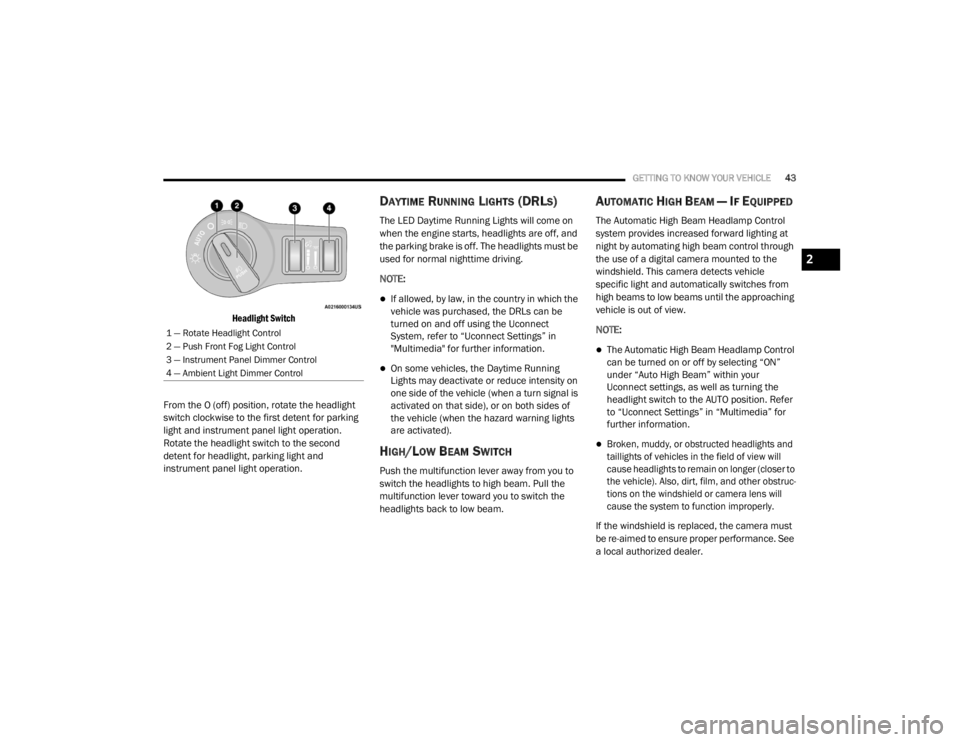
Headlight Switch
From the O (off) position, rotate the headlight
switch clockwise to the first detent for parking
light and instrument panel light operation.
Rotate the headlight switch to the second
detent for headlight, parking light and
instrument panel light operation.
DAYTIME RUNNING LIGHTS (DRLS)
The LED Daytime Running Lights will come on
when the engine starts, headlights are off, and
the parking brake is off. The headlights must be
used for normal nighttime driving.
NOTE:
If allowed, by law, in the country in which the
vehicle was purchased, the DRLs can be
turned on and off using the Uconnect
System, refer to “Uconnect Settings” in
"Multimedia" for further information.
On some vehicles, the Daytime Running
Lights may deactivate or reduce intensity on
one side of the vehicle (when a turn signal is
activated on that side), or on both sides of
the vehicle (when the hazard warning lights
are activated).
HIGH/LOW BEAM SWITCH
Push the multifunction lever away from you to
switch the headlights to high beam. Pull the
multifunction lever toward you to switch the
headlights back to low beam.
AUTOMATIC HIGH BEAM — IF EQUIPPED
The Automatic High Beam Headlamp Control
system provides increased forward lighting at
night by automating high beam control through
the use of a digital camera mounted to the
windshield. This camera detects vehicle
specific light and automatically switches from
high beams to low beams until the approaching
vehicle is out of view.
NOTE:
The Automatic High Beam Headlamp Control
can be turned on or off by selecting “ON”
under “Auto High Beam” within your
Uconnect settings, as well as turning the
headlight switch to the AUTO position. Refer
to “Uconnect Settings” in “Multimedia” for
further information.
Broken, muddy, or obstructed headlights and
taillights of vehicles in the field of view will
cause headlights to remain on longer (closer to
the vehicle). Also, dirt, film, and other obstruc -
tions on the windshield or camera lens will
cause the system to function improperly.
If the windshield is replaced, the camera must
be re-aimed to ensure proper performance. See
a local authorized dealer.
1 — Rotate Headlight Control
2 — Push Front Fog Light Control
3 — Instrument Panel Dimmer Control
4 — Ambient Light Dimmer Control
2
20_LX_OM_EN_USC_t.book Page 43
Page 46 of 328

44GETTING TO KNOW YOUR VEHICLE
To Activate
1. Turn the headlight switch to the AUTO
headlight position.
2. Push the multifunction lever away from you (toward front of vehicle) to engage the high
beam mode.
NOTE:
This system will not activate until the vehicle is
at or above 15 mph (24 km/h).
To Deactivate
1. Pull the multifunction lever toward you (or rearward in vehicle) to manually deactivate
the system (normal operation of low
beams).
2. Push back on the multifunction lever to reactivate the system.
The Automatic High Beams can also be
deactivated through the Uconnect system.
Refer to “Uconnect Settings” in “Multimedia”
for further information.
FLASH-TO-PASS
You can signal another vehicle with your
headlights by lightly pulling the multifunction
lever toward you. This will cause the high beam
headlights to turn on, and remain on, until the
lever is released.
AUTOMATIC HEADLIGHTS
This system automatically turns the headlights
on or off according to ambient light levels. To
turn the system on, rotate the headlight switch
counterclockwise to the AUTO position. When
the system is on, the headlight time delay
feature is also on. This means the headlights
will stay on for up to 90 seconds after you place
the ignition into the OFF position. The headlight
time delay can be programmed 0/30/60/90
seconds.
Refer to “Uconnect Settings” in “Multimedia”
for further information.
To turn the automatic system off, move the
headlight switch out of the AUTO position.
NOTE:
The engine must be running before the head -
lights will come on in the automatic mode.
PARKING LIGHTS
Turn the headlight switch to the
first detent to turn the parking lights
on. This also turns on all instrument
panel lighting.
HEADLIGHTS ON WITH WIPERS
When this feature is active, the headlights will turn
on after the wipers are turned on if the headlight
switch is placed in the AUTO position and the
programmable feature is set to on. In addition, the
headlights will turn off when the wipers are turned
off if they were turned on by this feature.
NOTE:
The “Headlights On With Wipers” feature can be
turned on or off using the Uconnect System.
Refer to “Uconnect Settings” in “Multimedia”
for further information.
ADAPTIVE BI-XENON HIGH INTENSITY
D
ISCHARGE HEADLIGHTS — IF
E
QUIPPED
This system automatically swivels the headlight
beam pattern horizontally to provide increased
illumination in the direction the vehicle is
steering.
20_LX_OM_EN_USC_t.book Page 44
Page 47 of 328

GETTING TO KNOW YOUR VEHICLE45
NOTE:
Each time the Adaptive Headlight system is
turned on, the headlights will initialize by
performing a brief sequence of rotations.
The Adaptive Headlight system is active only
when the vehicle is moving forward.
The Adaptive Headlight system can be turned
on or off using the Uconnect system; refer to
“Uconnect Settings” in “Multimedia” for further
information.
HEADLIGHT TIME DELAY
This feature provides the safety of headlight
illumination for up to 90 seconds
(programmable) when leaving your vehicle in an
unlit area.
To activate the delay feature, place the ignition
in the OFF position while the headlights are still
on. Then, turn off the headlights within 45
seconds. The delay interval begins when the
headlight switch is turned off.
If you turn the headlights or parking lights on, or
place the ignition in the ACC or ON/RUN
position, the system will cancel the delay. If you turn the headlights off before the ignition,
they will turn off in the normal manner.
NOTE:
The lights must be turned off within 45
seconds of placing the ignition in the OFF
position to activate this feature.
The headlight delay time is programmable
using the Uconnect system, refer to
“Uconnect Settings” in “Multimedia” for
further information.
LIGHTS-ON REMINDER
If the headlights or parking lights are on after
the ignition is placed in the OFF position, a
chime will sound to alert the driver when the
driver's door is opened.
FOG LIGHTS — IF EQUIPPED
The front fog light switch is built into the
headlight switch.
Fog Light Switch
To activate the front fog lights, turn on the
parking lights or the low beam headlights and
push the headlight switch. To turn off the front
fog lights, either push the headlight switch a
second time or turn off the headlight switch.
NOTE:
The fog lights will operate with the low beam
headlights or parking lights on. However,
selecting the high beam headlights will turn off
the fog lights.
2
20_LX_OM_EN_USC_t.book Page 45